
Car Rental Booking
A complete car rental booking chatbot template — deploy in minutes to automate conversations, capture leads, and provide 24/7 assistance.
15uses
10likes

Get free, ready-to-use booking and scheduling chatbot templates that help boost conversions and automate customer interactions. Start building in 2 minutes with no coding required.
Browse templates, learn about the category, or find answers to common questions
Choose from our collection of proven booking and scheduling chatbot templates
A complete car rental booking chatbot template — deploy in minutes to automate conversations, capture leads, and provide 24/7 assistance.

A complete conference room scheduler chatbot template — deploy in minutes to automate conversations, capture leads, and provide 24/7 assistance.

A complete fitness class reservation chatbot template — deploy in minutes to automate conversations, capture leads, and provide 24/7 assistance.

A complete home service scheduling chatbot template — deploy in minutes to automate conversations, capture leads, and provide 24/7 assistance.

A complete library book reservation chatbot template — deploy in minutes to automate conversations, capture leads, and provide 24/7 assistance.

Appointment confirmation and rescheduling bot that reduces no-shows by 40%
A complete pet grooming appointment setter chatbot template — deploy in minutes to automate conversations, capture leads, and provide 24/7 assistance.

Creative photography session booking with style matching

A complete restaurant reservation chatbot template — deploy in minutes to automate conversations, capture leads, and provide 24/7 assistance.

A complete salon appointment scheduler chatbot template — deploy in minutes to automate conversations, capture leads, and provide 24/7 assistance.

A complete tour guide booking chatbot template — deploy in minutes to automate conversations, capture leads, and provide 24/7 assistance.

A complete vaccine appointment scheduler chatbot template — deploy in minutes to automate conversations, capture leads, and provide 24/7 assistance.

A complete virtual event registration chatbot template — deploy in minutes to automate conversations, capture leads, and provide 24/7 assistance.
Smart waitlist with priority options and preference-based notifications
Make library book reservations easy with Conferbot's Library Book Reservation Assistant. Offering real-time availability, personalized recommendations, and a seamless reservation process, it enhances the library experience for all users.

Simplify vaccination processes with Conferbot's Vaccine Appointment Scheduler. Enjoy real-time appointment availability, automated reminders, and secure booking to streamline the vaccination experience for healthcare providers and patients alike.

Simplify home service bookings with Conferbot’s Home Service Scheduling Assistant. Offering real-time scheduling, service updates, and 24/7 support, this chatbot enhances customer convenience and boosts your service business.

Streamline your pet grooming appointments with Conferbot's Pet Grooming Appointment Setter. Offering real-time booking, appointment reminders, and personalized grooming suggestions, it enhances customer satisfaction and boosts your business.
Simplify the virtual event registration process with Conferbot’s AI-powered Virtual Event Registration Assistant. Enjoy personalized registration flows, real-time event updates, and 24/7 support to boost event participation and engagement.
Manual scheduling is one of the most persistent time drains in service-based businesses. Staff spend hours fielding calls, checking availability, sending confirmations, and handling reschedules — all for a task that a scheduling bot can execute in seconds. Businesses that deploy automated scheduling chatbots report saving an average of 15 hours per week in administrative labor, translating to $30,000-$45,000 annually in staff cost savings alone. For multi-location businesses, these savings compound — a 5-location salon chain saves over $200,000 per year in scheduling labor alone.
To understand why booking automation delivers such dramatic savings, you need to see exactly where scheduling time is consumed. The table below breaks down the time cost of each scheduling task at a pace of 50 bookings per week — a modest volume for most service businesses.
| Scheduling Task | Manual Time | Chatbot Time | Weekly Savings (50 bookings) |
|---|---|---|---|
| Initial booking | 5-8 min | 45 sec | 4.5 hrs |
| Confirmation call/text | 2-3 min | Automated | 2.0 hrs |
| Rescheduling | 6-10 min | 60 sec | 3.0 hrs |
| Cancellation + waitlist | 8-12 min | Automated | 2.5 hrs |
| Reminder follow-ups | 1-2 min | Automated | 1.5 hrs |
| No-show follow-up | 3-5 min | Automated | 1.5 hrs |
| Total | 15.0 hrs |
📊 Performance Insight
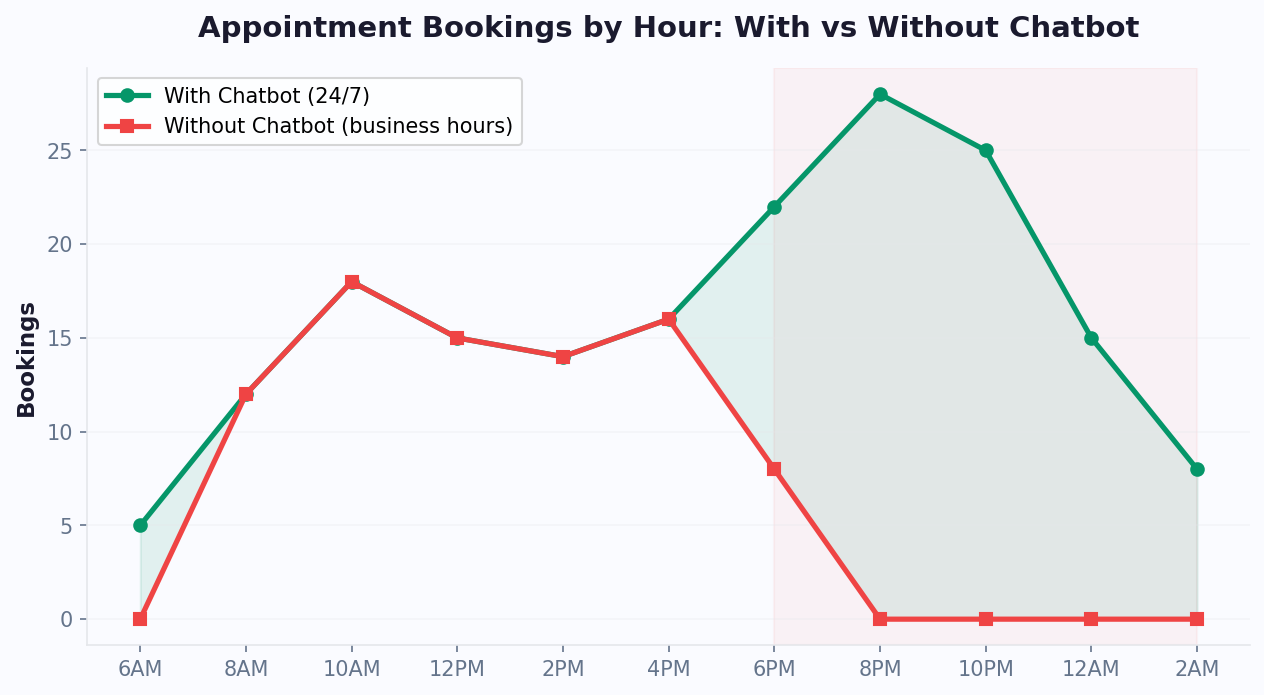
Automated scheduling chatbots generate 35% more appointments by capturing bookings 24/7 — including evenings and weekends when most businesses are unstaffed. Booking completion takes just 10 seconds via chatbot versus an average of 3 days of phone tag with traditional scheduling.
The chart above demonstrates that booking demand does not follow a 9-to-5 schedule. Significant volume occurs in early mornings, evenings, and weekends — times when most businesses are unstaffed. A scheduling bot captures 100% of this demand, while a phone-only system captures less than 40%. Each missed booking is lost revenue: if your average appointment generates $100 and you miss 10 after-hours bookings per week, that is $52,000 in annual revenue left on the table.
The data is even more dramatic in certain industries. Healthcare practices report that 42% of patient appointment requests come in between 7pm and 7am. Salons see 55% of bookings placed on mobile devices during evening hours. Fitness studios receive their highest booking volume on Sunday evenings as clients plan their week ahead. Without an appointment booking chatbot, these businesses forfeit their highest-intent booking windows.
An automated scheduling system does not just save time — it actively increases revenue through intelligent slot management and upselling:
Different industries require different booking logic, and a well-designed scheduling chatbot template adapts to each:
| Industry | Booking Complexity | Key Requirements | Avg. Booking Time (Chatbot) |
|---|---|---|---|
| Hair salon / spa | Medium | Provider selection, service duration, add-ons | 35 seconds |
| Healthcare / dental | High | Insurance verification, intake forms, provider matching | 90 seconds |
| Fitness / personal training | Low | Class type, capacity limits, recurring booking | 20 seconds |
| Legal / consulting | Medium | Case type assessment, conflict check, retainer info | 60 seconds |
| Restaurant / dining | Low-Medium | Party size, dietary needs, seating preference | 25 seconds |
| Auto repair / service | Medium | Vehicle info, service type, loaner car, drop-off window | 50 seconds |
💡 Key Insight
Businesses using automated scheduling chatbots report an average $42,000 annual savings in administrative labor plus $52,000+ in recovered revenue from after-hours bookings — a combined impact of nearly $100,000 per year for a single-location service business.
Set up automated scheduling in minutes with Conferbot's appointment booking templates and connect your calendar via calendar integration. For businesses with complex booking requirements, our no-code chatbot builder lets you customize every step of the flow without writing code. Deploy across your website, WhatsApp, and Messenger with omnichannel support.
No-shows are the silent revenue killer for appointment-based businesses. Across industries, the average no-show rate ranges from 10% to 30%, with some sectors (healthcare, beauty salons, restaurants) hitting even higher. Every empty appointment slot represents not just lost revenue, but also wasted preparation time, idle staff, and opportunity cost — that slot could have been filled by a paying customer. Understanding the precise financial impact is the first step toward solving the problem with a scheduling bot.
| Industry | Avg No-Show Rate | Revenue Per Appointment | Annual Loss (200 bookings/month) |
|---|---|---|---|
| Healthcare (general) | 18% | $250 | $108,000 |
| Dental | 15% | $200 | $72,000 |
| Hair salon / spa | 20% | $85 | $40,800 |
| Fitness / personal training | 22% | $60 | $31,680 |
| Legal consultation | 12% | $350 | $100,800 |
| Restaurant (reservation) | 17% | $65 | $26,520 |
| Auto repair / service | 14% | $180 | $60,480 |
| Veterinary | 16% | $120 | $46,080 |
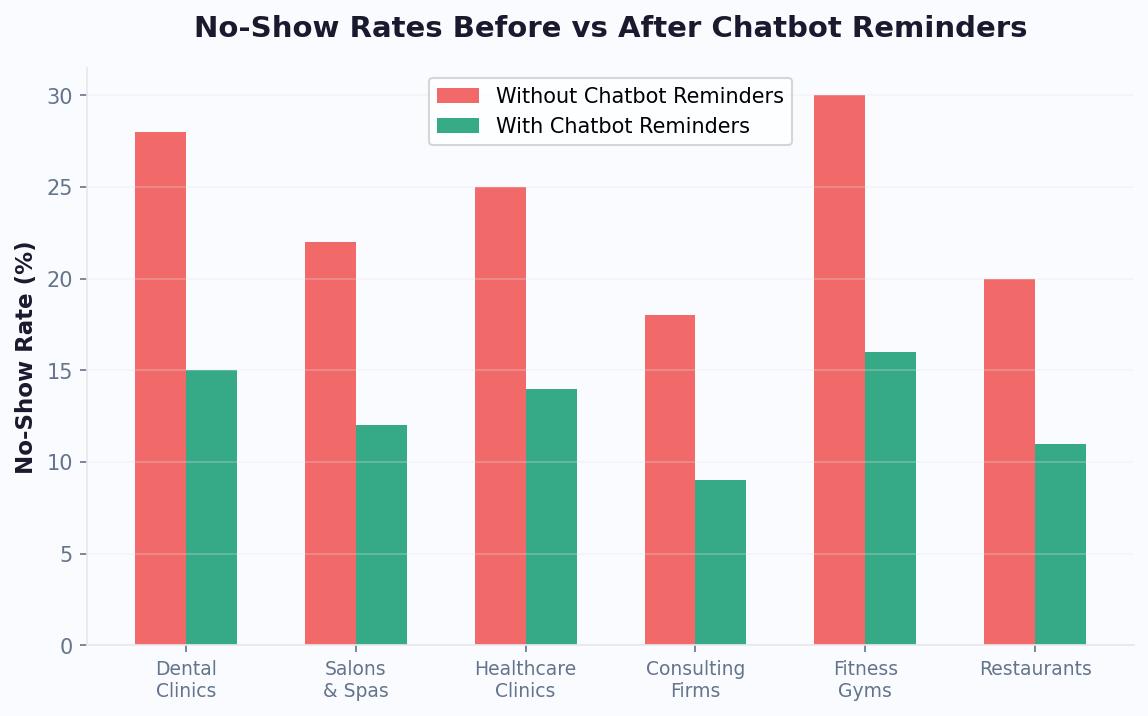
Understanding the root causes is essential for designing effective prevention with your appointment booking chatbot:
The financial impact of no-show reduction is straightforward to calculate, and every business should run this formula to understand the revenue at stake:
📊 Performance Insight
No-Show Revenue Recovery Formula: Monthly Bookings x No-Show Rate x Average Revenue Per Appointment x Chatbot Reduction % = Monthly Revenue Recovered. For a dental practice: 200 x 15% x $200 x 55% = $3,300 recovered per month ($39,600 annually).
The formula works across every industry because the mechanics are universal. The chatbot addresses each root cause simultaneously: it reminds, makes rescheduling easy, reinforces value, provides logistics, and maintains engagement — all automatically. The only variable is the reduction percentage, which ranges from 40% for basic implementations to 70% for optimized multi-stage sequences.
| No-Show Reduction Strategy | Reduction Rate | Implementation Effort | Annual Revenue Impact (200 bookings/mo @ $150) |
|---|---|---|---|
| Single generic reminder (email) | 10-15% | Minimal | $5,400-$8,100 |
| Multi-stage chatbot reminders | 40-55% | Low (template) | $21,600-$29,700 |
| Chatbot + deposit collection | 55-70% | Medium | $29,700-$37,800 |
| Chatbot + deposit + waitlist auto-fill | 65-80% | Medium | $35,100-$43,200 |
💡 Key Insight
Chatbot reminder sequences reduce no-shows by 40% on average, with top performers reaching 60-70% reduction. For a healthcare practice losing $250 per no-show with 200 monthly bookings, that translates to $108,000 in recovered annual revenue.
Businesses using Conferbot's automated reminder system see no-show rates drop by 55-70% on average, recovering tens of thousands of dollars in annual revenue. Configure your reminder sequences through the no-code builder, deploy reminders via WhatsApp for 98% open rates, and track no-show reduction in real time with built-in analytics. Use our cost savings calculator to model the specific impact for your business.
Not all reminders are created equal. A generic "Reminder: You have an appointment tomorrow" message achieves a 15-20% reduction in no-shows. A strategically designed, multi-channel, value-reinforcing reminder sequence achieves 55-70%. The difference lies in timing, content, channel selection, and interactive elements. Understanding what makes a reminder effective is the key to maximizing your booking automation ROI.
| Timing | Channel | Content Strategy | Interactive Element |
|---|---|---|---|
| At booking | Email + Calendar invite | Confirmation with full details | Add to calendar button |
| 7 days before | SMS or WhatsApp | Confirmation request | CONFIRM / RESCHEDULE buttons |
| 24 hours before | WhatsApp (preferred) | Preparation info + value reinforcement | Quick replies for questions |
| 2 hours before | SMS | Logistics + estimated wait | Navigation link |
| 15 min after no-show | WhatsApp + SMS | Rebooking offer | Instant reschedule options |
Each reminder should serve a distinct purpose beyond simply reminding. The psychology behind each touchpoint determines its effectiveness:
Choosing the right channel for each reminder stage dramatically impacts effectiveness. The data across thousands of scheduling bot deployments is clear:
| Channel | Open Rate | Response Rate | No-Show Reduction | Best Use Case |
|---|---|---|---|---|
| 22% | 5-8% | 10-15% | Confirmation + calendar invite | |
| SMS | 95% | 28-35% | 25-35% | Time-sensitive logistics nudges |
| 98% | 45-60% | 35-50% | Value reinforcement + interactive replies | |
| Phone call (automated) | 65% | 18-22% | 20-30% | Older demographics, high-value appointments |
| Multi-channel (combined) | 99%+ | 55-70% | 55-70% | Full lifecycle coverage |
⚡ Efficiency Insight
Value-reinforced 24-hour reminders cut no-shows by 34% more than generic time-and-date notifications. Multi-channel strategies using SMS (95% open rate) + WhatsApp (98% open rate) achieve 55-70% total no-show reduction compared to just 15-20% with a single generic reminder.
The highest-performing reminder sequences go beyond generic templates. They incorporate personalization that makes each message feel hand-crafted:
Configure multi-channel reminders through Conferbot's reminder automation with per-customer channel preferences and smart fallback logic. Deploy via WhatsApp, SMS, and email from a single dashboard using omnichannel messaging.
For more on reducing appointment no-shows, read our comprehensive no-show reduction guide or explore the cost savings calculator to quantify the impact for your specific business.
Businesses with multiple service providers — salons, clinics, law firms, fitness studios, agencies — face an exponentially more complex scheduling challenge. Each provider has unique availability, specializations, break times, and client preferences. Managing this manually is a full-time job. A scheduling bot with multi-provider booking intelligence handles this complexity elegantly, matching customers to the right provider and optimal time slot automatically.
Conferbot's scheduling chatbot template uses a multi-factor matching system to recommend the best provider for each booking:
| Scenario | Manual Handling | Chatbot Handling |
|---|---|---|
| Client wants two services (different providers) | 10+ min coordination | Auto-sequences back-to-back slots |
| Provider calls in sick | Hours of rebooking calls | Auto-reschedules affected clients |
| Client requests earliest available (any provider) | Check each calendar manually | Instant cross-calendar search |
| Group booking (e.g., bridal party of 6) | Complex multi-provider coordination | Parallel slot matching across providers |
| Waitlist management | Manual spreadsheet tracking | Auto-notify when cancellation opens slot |
| Provider schedule change mid-day | Individual calls to affected clients | Automatic rebooking with alternatives |
| New provider added to roster | Manual calendar setup + client notification | Instant availability in system + proactive suggestions |
⚡ Efficiency Insight
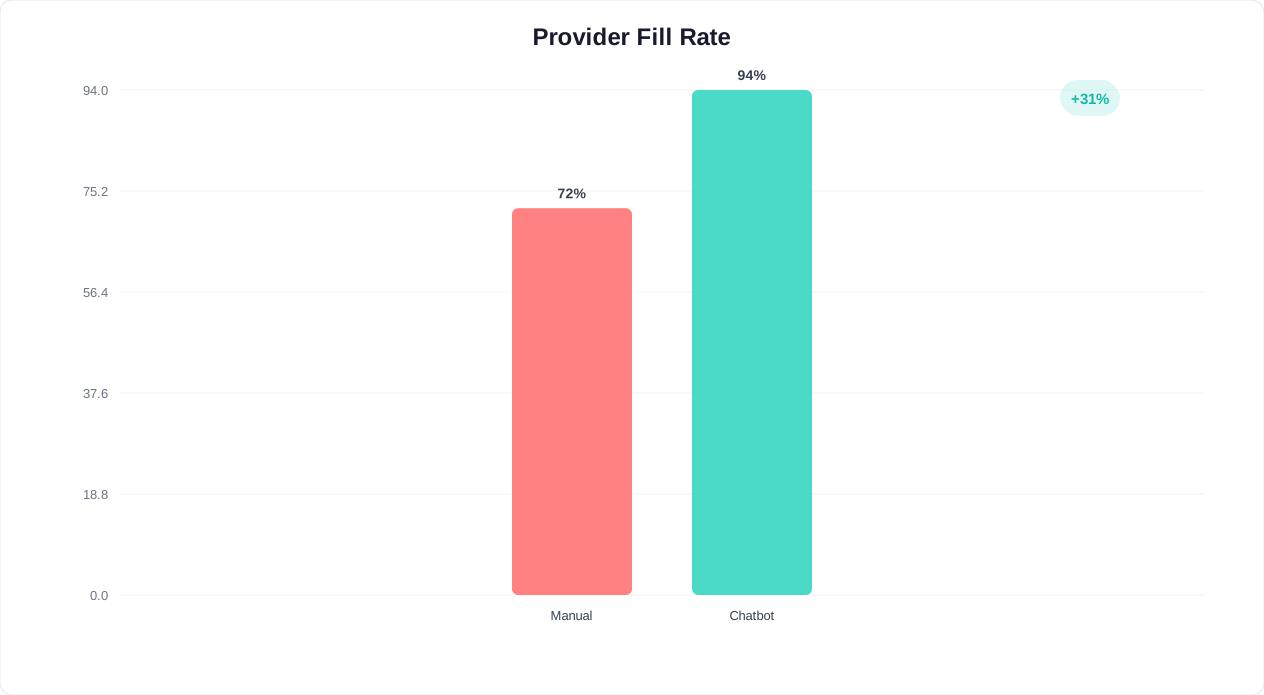
When a provider calls in sick, manual rebooking takes hours of phone calls. A scheduling bot auto-reschedules all affected clients in seconds, filling 60-70% of cancelled slots through automated waitlist notifications — turning potential revenue loss into seamless customer experiences.
A smart waitlist system is one of the most underutilized revenue tools in booking automation. When a cancellation occurs, most businesses simply accept the lost revenue. A chatbot with intelligent waitlisting turns 60-70% of cancellations into filled slots:
Buffer times between appointments are essential for provider wellbeing and service quality, but they are complex to manage manually. The scheduling bot handles buffers transparently:
| Buffer Type | Duration | Purpose | Chatbot Handling |
|---|---|---|---|
| Post-service cleanup | 5-15 min | Room/station preparation | Automatically added, hidden from customer |
| Provider rest break | 10-30 min | Prevent fatigue after long sessions | Configurable per service type and provider |
| Travel buffer | 15-60 min | Between locations (mobile services) | Calculated based on location distance |
| Equipment changeover | 10-20 min | Switch between service types | Applied when consecutive services differ |
Each provider gets a personal view of their schedule, including client names, service details, special notes, and preparation requirements. The chatbot collects this information during booking so providers are always prepared. Beyond scheduling, the multi-provider system generates valuable business intelligence:
| Performance Metric | What It Reveals | Action Triggered |
|---|---|---|
| Utilization rate by provider | Which providers are over/under-booked | Adjust load balancing weights |
| No-show rate by provider | Provider-specific retention issues | Target reminder strategies |
| Rebooking rate | Customer satisfaction with specific providers | Identify top performers for marketing |
| Average revenue per slot | Upsell effectiveness by provider | Train lower performers on upsell techniques |
| Peak demand windows | When to add capacity | Schedule additional providers during peaks |
Sync all provider calendars through Conferbot's calendar integration — it supports Google Calendar, Outlook, Apple Calendar, and custom calendar systems via API. Manage multi-provider routing with conditional logic, monitor team performance through real-time analytics, and connect to your practice management system via the integrations hub.
A scheduling chatbot is only as good as its calendar integration. Without real-time sync, double-bookings occur, availability becomes stale, and customer trust erodes. Conferbot's calendar integration layer connects your chatbot to all major calendar platforms and business systems, ensuring that every booking, cancellation, and reschedule is reflected instantly across your entire tech stack.
| Platform | Sync Type | Features | Setup Time |
|---|---|---|---|
| Google Calendar | Two-way real-time | Availability check, event creation, buffer times | 2 clicks (OAuth) |
| Microsoft Outlook / 365 | Two-way real-time | Room booking, recurring events, shared calendars | 5-10 min (admin consent) |
| Apple Calendar (CalDAV) | Two-way real-time | Multi-device sync, availability blocking | 3-5 min |
| Calendly | One-way (read) | Pull availability, prevent conflicts | 2 min (API key) |
| Acuity Scheduling | Two-way real-time | Service types, intake forms, packages | 5 min |
| Custom API / Webhook | Two-way real-time | Full flexibility for proprietary systems | Varies |
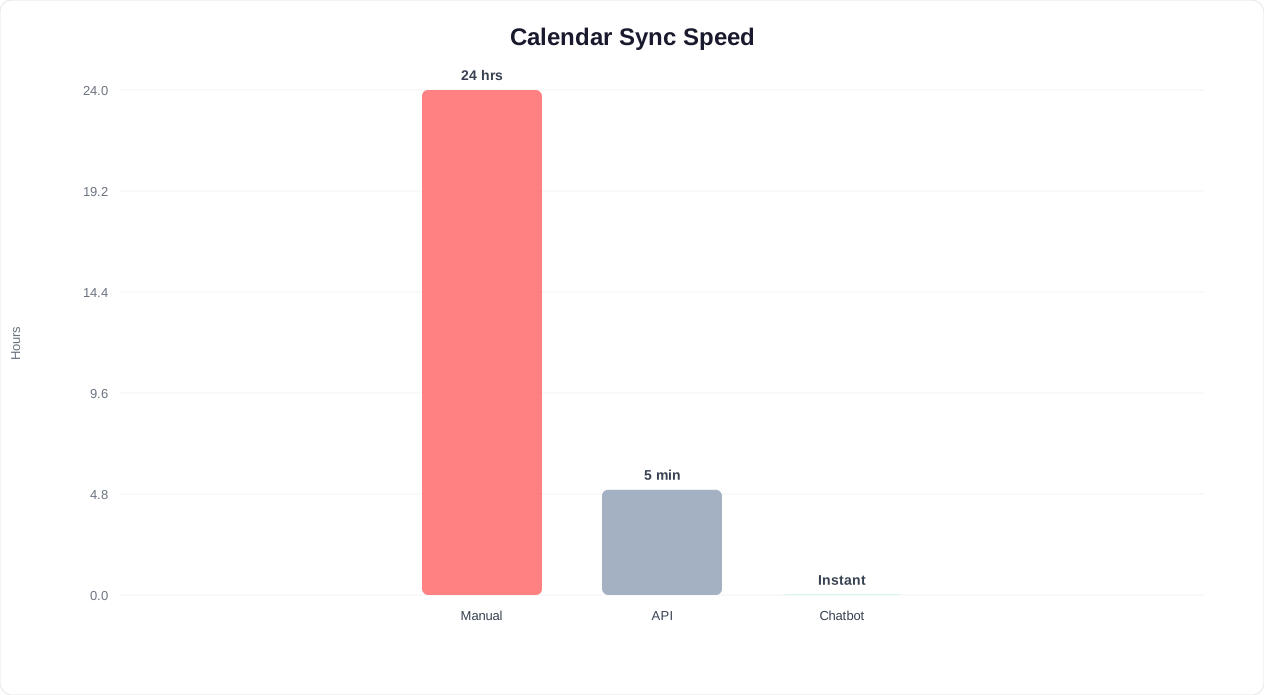
Two-way sync means that changes flow in both directions. When the appointment booking chatbot creates a booking, it appears on the provider's calendar within seconds. When the provider blocks time on their calendar (lunch break, personal appointment), the chatbot immediately removes those slots from availability. This eliminates the double-booking problem that plagues one-way integrations.
The sync latency matters more than most businesses realize. A difference of even 30 seconds can cause a double-booking during peak hours when multiple customers are booking simultaneously. Conferbot's Google Calendar integration operates with sub-2-second sync latency, Outlook with sub-3-second, and Calendly read with 5-15 seconds. For high-volume businesses processing multiple simultaneous bookings, these latency differences are operationally significant.
💡 Key Insight
Two-way calendar sync with sub-2-second latency eliminates the double-booking problem entirely. Businesses report a 99.7% booking accuracy rate with real-time sync versus 92% accuracy with manual calendar management — a 7.7 percentage point improvement that prevents costly scheduling errors.
Set up your calendar integrations in our integration settings. For businesses with complex scheduling needs, our full integration directory covers CRM, payment, and communication platform connections that complement the calendar layer. Build your booking automation workflow using the no-code builder, and check our calendar integration best practices guide for setup tips and optimization strategies.
The backbone of any appointment booking chatbot is its chatbot calendar integration — the real-time connection between the scheduling chatbot template and the calendars your team actually uses. Without a reliable two-way sync, double bookings destroy trust, stale availability frustrates customers, and manual corrections eat into the very time the scheduling bot was supposed to save. This guide compares the three most popular calendar platforms — Google Calendar, Microsoft Outlook, and Calendly — and shows exactly how each integrates with Conferbot's scheduling chatbot template.
| Capability | Google Calendar | Microsoft Outlook / 365 | Calendly |
|---|---|---|---|
| Sync direction | Two-way real-time | Two-way real-time | One-way (read availability) |
| Latency | <2 seconds | <3 seconds | 5-15 seconds |
| Multi-calendar support | Unlimited personal + shared | Unlimited personal + room calendars | Linked calendars only |
| Buffer time configuration | Supported via Conferbot | Supported via Conferbot | Native + Conferbot |
| Recurring events | Full series + exception handling | Full series + exception handling | Not supported in sync |
| Timezone detection | Automatic | Automatic | Automatic |
| Conflict detection | Real-time cross-calendar | Real-time cross-calendar | Per-linked-calendar only |
| Free/busy privacy | Configurable (share free/busy only) | Configurable (share free/busy only) | Always shows available slots only |
| Setup complexity | OAuth in 2 clicks | OAuth + admin consent (enterprise) | API key or OAuth |
| Best for | SMBs, startups, solo providers | Enterprise, corporate teams | Businesses already using Calendly |
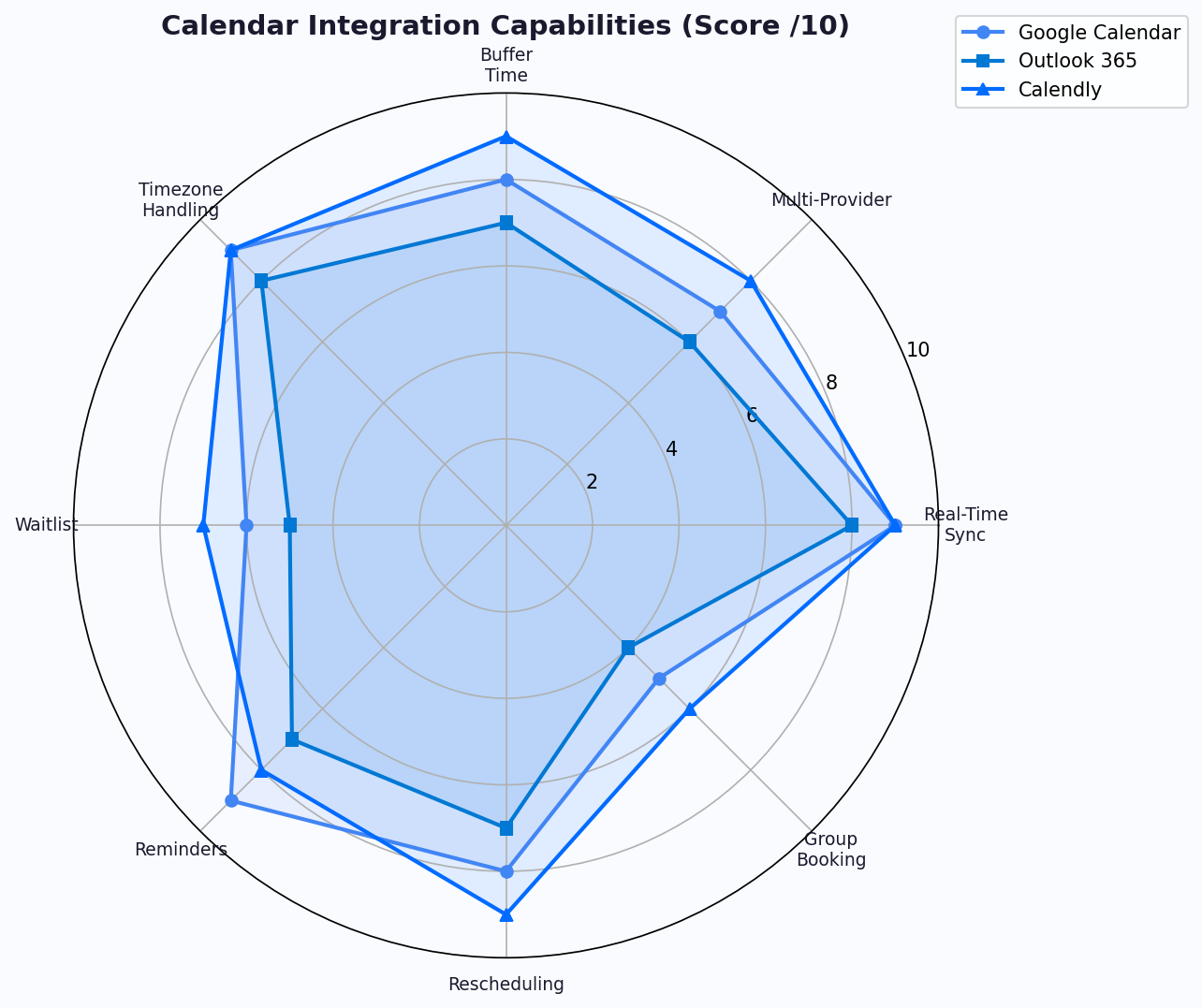
Google Calendar is the most popular choice for small and mid-sized businesses deploying a scheduling bot. The integration is a two-click OAuth flow — authorize Conferbot, select which calendars to sync, and the appointment booking chatbot immediately reads availability and creates events. Key advantages include sub-2-second sync latency, support for multiple calendars per provider (personal + work + shared), and native handling of recurring events. When a provider blocks time on their Google Calendar for lunch or personal errands, the scheduling chatbot template removes those slots from availability within seconds.
📊 Performance Insight
Google Calendar integration achieves sub-2-second sync latency — fast enough to prevent double-bookings even during peak concurrent booking periods. Businesses processing 100+ daily bookings report zero double-booking incidents after switching from manual scheduling.
For enterprise and corporate environments, Outlook is the standard. Conferbot's Outlook integration supports both personal Microsoft accounts and Microsoft 365 organizational accounts with admin consent flows. The chatbot calendar integration handles room bookings (ideal for in-person consultations), shared team calendars, and delegate access. Enterprise IT teams appreciate the granular permission model — Conferbot requests only calendar read/write access, not email or contacts. Setup requires admin consent for organizational accounts, which typically takes 5-10 minutes with IT involvement.
If your team already uses Calendly for scheduling, Conferbot's integration reads Calendly availability to prevent double-bookings across both systems. This is ideal for a transition period — you can run the appointment booking chatbot alongside Calendly and gradually migrate scheduling to the chatbot as your team gains confidence. The one-way sync means Conferbot reads Calendly's availability but creates bookings in your primary calendar (Google or Outlook), ensuring a single source of truth.
In many organizations, different team members use different calendar platforms. A clinic might have doctors on Outlook, administrative staff on Google Calendar, and a receptionist using Calendly. Conferbot's scheduling chatbot template handles this seamlessly — each provider connects their own calendar, and the scheduling bot aggregates availability across all platforms into a unified view for the customer. The customer never knows (or cares) which calendar system their provider uses.
Follow this checklist to ensure a smooth calendar integration setup:
Configure your integrations in the calendar integration settings, or review our step-by-step calendar integration guide for platform-specific setup instructions. Connect additional business tools through the integrations hub.
A scheduling bot that stops working after the appointment is confirmed is leaving money on the table. The period between booking and arrival is where no-shows are born — and where automated reminder sequences deliver their highest ROI. Businesses deploying multi-stage reminder flows through their scheduling chatbot template see no-show rates drop by 40% on average, with top performers reaching 60-70% reduction. The key is not just reminding — it is reminding the right way, at the right time, through the right channel.
Each stage serves a distinct psychological purpose. Skipping any stage weakens the overall sequence.
| Stage | Timing | Channel | Goal | Message Example |
|---|---|---|---|---|
| 1. Confirmation | Immediately after booking | Email + SMS | Anchor the commitment | "Confirmed! Your appointment with Sarah on Thursday at 3pm. Added to your calendar." |
| 2. Early check-in | 7 days before | SMS or WhatsApp | Catch conflicts early | "Quick check — still good for Thursday at 3pm? Reply YES to confirm or CHANGE to reschedule." |
| 3. Value reminder | 24 hours before | WhatsApp (preferred) | Reinforce anticipation | "Tomorrow at 3pm! Sarah has reviewed your preferences and prepared your session. Arrive 5 min early to relax." |
| 4. Logistics nudge | 2 hours before | SMS | Remove last-minute friction | "See you at 3pm! Here's your directions link. Parking available behind the building. Current wait: 0 min." |
| 5. No-show recovery | 15 min after missed time | WhatsApp + SMS | Rebook immediately | "We missed you today! No worries — want to rebook? Here are the next available times this week." |
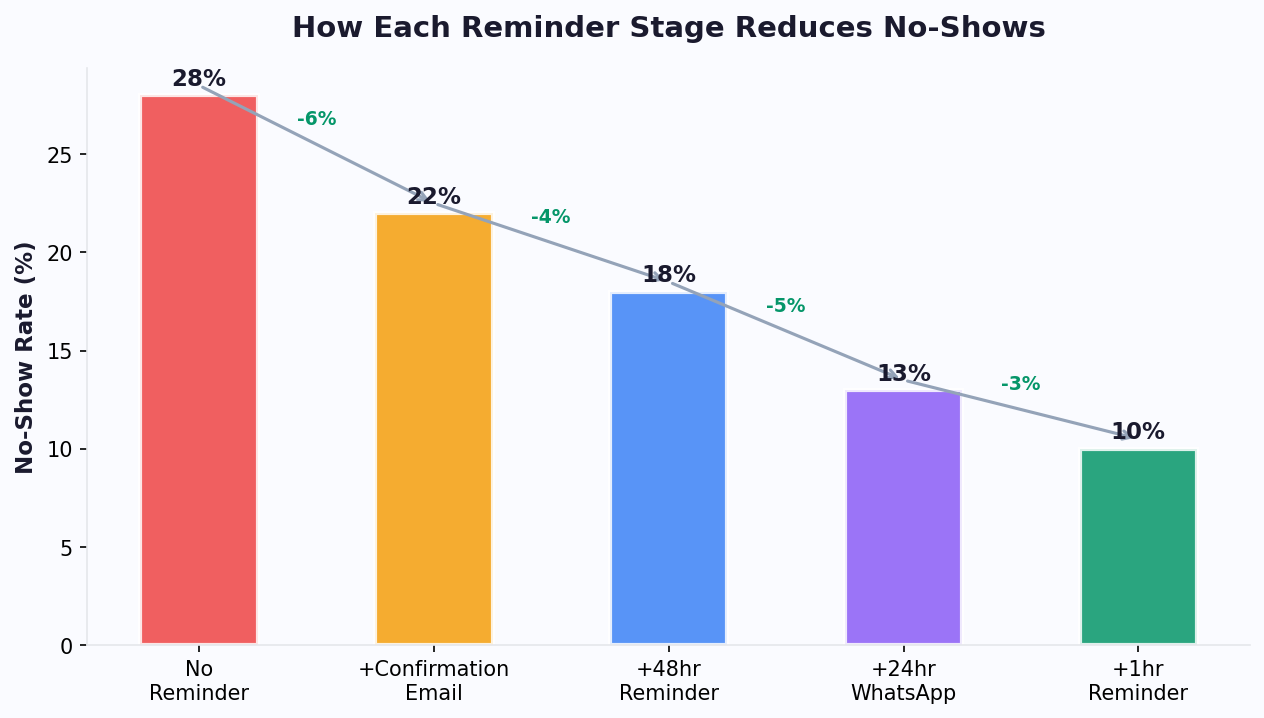
Stage 1 — Confirmation: The immediate confirmation serves as a psychological commitment device. Behavioral research shows that people who receive explicit confirmation of an action are 23% more likely to follow through. The calendar invite attachment is critical — it places the appointment in the customer's daily view, creating passive reminders every time they check their schedule.
Stage 2 — Early Check-In (7 days): This is the most underutilized stage — and one of the most valuable. Seven days out, a significant portion of customers have developed schedule conflicts they have not yet communicated. The early check-in catches these conflicts while there is still ample time to fill the slot with a waitlisted customer. Appointment booking chatbot deployments that include this stage recover 15-20% more cancellation slots compared to those that skip it.
Stage 3 — Value Reminder (24 hours): This is not a reminder — it is a re-sell. By reinforcing the value the customer will receive ("Sarah has prepared a custom session"), the message transforms the appointment from an obligation into an anticipated experience. Customers who receive value-focused 24-hour reminders are 34% less likely to no-show compared to those who receive generic time-and-date reminders.
Stage 4 — Logistics Nudge (2 hours): Last-minute no-shows are often caused by logistical uncertainty — where to park, how to find the office, whether they will wait. The 2-hour logistics message eliminates this friction. Including a real-time wait estimate ("current wait: 0 minutes") is especially effective for healthcare and salon appointments where wait anxiety is common.
Stage 5 — No-Show Recovery (15 minutes after): When a customer does miss their appointment, the worst response is silence. The scheduling bot sends a non-judgmental rebooking message within 15 minutes. This recovers 20-30% of no-shows into rebooked appointments — revenue that would otherwise be permanently lost. The key is offering instant rebooking options rather than asking the customer to call back.
| Stages Active | Cumulative No-Show Reduction | Annual Revenue Recovered (200 bookings/mo @ $150) |
|---|---|---|
| Confirmation only | 10-15% | $5,400-$8,100 |
| + 7-day check-in | 20-25% | $10,800-$13,500 |
| + 24-hour value reminder | 30-35% | $16,200-$18,900 |
| + 2-hour logistics nudge | 40-45% | $21,600-$24,300 |
| + No-show recovery | 45-55% | $24,300-$29,700 |
💡 Key Insight
Each reminder stage reduces no-shows incrementally. The full five-stage sequence consistently achieves a 40-55% total reduction in no-show rates. For a practice with 200 monthly bookings at $150 average, that is $24,000-$30,000 in recovered annual revenue — from a system that costs less than $50/month to operate.
The most aggressive no-show reduction strategies combine reminder sequences with financial commitment mechanisms. A scheduling bot can collect deposits at booking time, enforce cancellation windows, and automatically process late-cancellation fees -- all without awkward conversations between staff and clients.
| Financial Mechanism | Additional No-Show Reduction | Customer Friction | Best For |
|---|---|---|---|
| No deposit (reminders only) | Baseline (40-55%) | None | Low-value appointments, first-time clients |
| Small deposit (10-20% of service) | +15-20% | Low | Medium-value services ($50-$200) |
| Full pre-payment | +25-30% | Medium | High-value services, packages |
| Credit card hold (no charge) | +12-18% | Low-Medium | Medical appointments, consultations |
| Cancellation fee (< 24hr notice) | +10-15% | Medium | Established clients, premium services |
The chatbot handles the entire deposit workflow seamlessly: "To confirm your booking, we collect a $25 deposit that will be applied to your service total. You can cancel free of charge up to 24 hours before your appointment." When framed as standard policy delivered by the bot, deposit collection feels routine rather than confrontational -- a benefit that eliminates one of the most uncomfortable interactions in service businesses.
Every conversation your appointment booking chatbot processes generates actionable business intelligence. Beyond simple booking counts, the analytics reveal patterns that inform strategic decisions:
📊 Performance Insight
Businesses that actively use booking analytics to optimize their operations report 22% higher revenue per provider compared to those that simply deploy a scheduling bot and leave it. The data identifies exactly where revenue is being left on the table -- capacity gaps, underperforming time slots, and abandonment patterns that are invisible without analytics.
Configure your reminder sequence in minutes using Conferbot's appointment booking chatbot template. Deploy reminders across WhatsApp, SMS, and email with omnichannel messaging. Track reminder performance with real-time analytics, or read our complete no-show reduction playbook for advanced strategies including deposit collection and cancellation policies. Use the cost savings calculator to model the financial impact for your specific business.
Everything you need to know about chatbots for booking and scheduling templates.
Our proven templates help businesses like yours achieve better results with automation
Automatically qualify prospects while you sleep
Increase conversions by up to 67% with smart chatbots
Engage visitors within seconds of landing on your site
Lower acquisition costs through automation
Join 50,000+ businesses already using Conferbot templates to automate conversations and boost conversions. Start free in 2 minutes.
다음의 간단한 단계에 따라 booking and scheduling 챗봇을 몇 분 안에 시작하고 실행하세요
Select from high-converting lead generation templates designed for your industry and use case.
Modify questions to match your ideal customer profile and lead scoring criteria.
Configure automatic lead distribution to your sales team based on qualification scores.
Connect to HubSpot, Salesforce, or your preferred CRM for seamless lead management.
Launch your chatbot and track conversion rates, lead quality, and ROI through our analytics dashboard.
전문 템플릿 사용과 처음부터 구축하는 것의 장점 비교
다음을 사용하여 대화를 자동화하고 결과를 향상시키는 수천 개의 비즈니스에 가입하세요 booking and scheduling 템플릿