
웹사이트 위젯 챗봇 빌더
클래식한 Conferbot 경험. 모든 웹사이트에 강력하고 커스터마이징 가능한 챗봇 위젯을 임베드하세요. WordPress, Shopify, Wix, React 및 모든 웹 플랫폼과 호환됩니다.
To build a 웹사이트 위젯 chatbot with Conferbot, sign up free, design your flow in the no-code visual builder, connect your 웹사이트 위젯 account, and publish — typically live in a few minutes with no coding. The free plan needs no credit card, and the same bot can also run on your website and other messaging channels.
웹사이트 챗봇 기능
강력한 자동화된 대화를 구축하는 데 필요한 모든 것
드래그 앤 드롭 비주얼 빌더
완전한 커스터마이징 (색상, 폰트, 위치)
다양한 임베드 타입 (팝업, 슬라이드인, 전체 페이지)
모바일 반응형
실시간 방문자 추적
리드 캡처 폼
다국어 지원
분석 대시보드
무엇을 구축할 수 있나요?
시작하기 5개의 간단한 단계
이 가이드를 따라 웹사이트 챗봇을 연결하세요
비주얼 플로우 빌더를 사용하여 챗봇 생성
위젯 외관 커스터마이징 (색상, 위치, 아바타)
게시 섹션에서 임베드 코드 복사
웹사이트의 HTML에 코드 붙여넣기
챗봇이 라이브로 작동합니다!
Introduction
Your website is the center of your digital presence - and every visitor who leaves without engaging is a missed opportunity. The vast majority of website visitors leave without converting, and the average time on page is under 60 seconds. The gap between attracting traffic and converting it into customers, leads, or subscribers is where most businesses lose the most money.
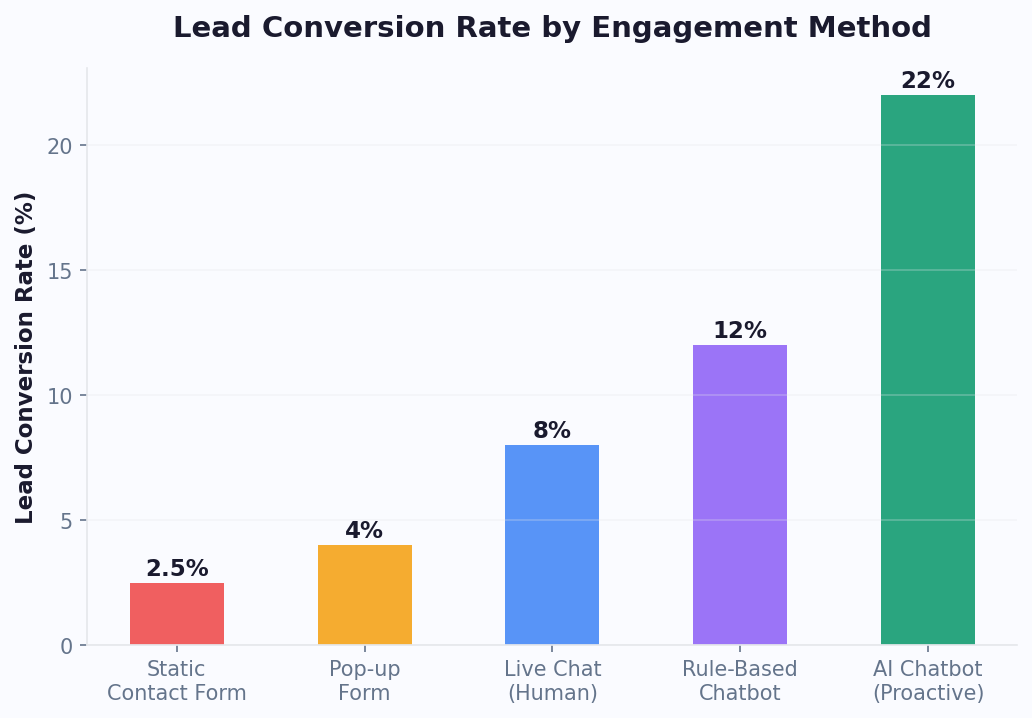
A website chatbot widget bridges this gap by proactively engaging visitors the moment they land on your site. Unlike static contact forms that sit passively in a corner, a chatbot initiates conversations, answers questions in real time, qualifies leads through interactive flows, and guides visitors toward conversion - all without requiring a single human agent.
Conferbot's website widget is the foundation of our platform. It works on any website - WordPress, Shopify, Wix, Squarespace, React, Next.js, static HTML, or any web platform. A single line of embed code adds a fully customizable, mobile-responsive chatbot that starts engaging visitors within 5 minutes of installation.
With the visual flow builder, you design conversations visually. With AI integration, the bot handles open-ended questions intelligently. With analytics, you see exactly which conversations drive conversions. And with live chat, your team can take over any conversation when a human touch is needed. This guide covers everything you need to know about deploying a high-converting website chatbot in 2026.
New to chatbot building? Start with our complete guide to building a chatbot without coding. Want to extend your website bot to messaging channels? Add WhatsApp, Messenger, and Instagram with our omnichannel platform. Browse our template library for ready-to-deploy website chatbot flows, or see how Conferbot compares to other chatbot platforms.
Website Widget Capabilities
The Conferbot website widget is the most feature-rich channel in the platform, designed to maximize visitor engagement and conversion.
Widget Display Options
- Popup Chat - The classic chat bubble in the bottom-right corner that expands into a full chat window. Non-intrusive yet always accessible. The most popular option for most websites
- Slide-In Panel - A wider chat panel that slides in from the side, providing more space for complex conversations, product displays, or form fields
- Full Page - Dedicate an entire page to your chatbot for focused interactions like applications, detailed consultations, or guided product selection
- Embedded Inline - Place the chatbot directly within your page content, integrating it into specific sections like product pages, help centers, or landing pages
Visual Customization
- Brand Colors - Match your chatbot to your website's color scheme with custom primary colors, backgrounds, and accent tones
- Custom Avatar - Upload your own bot avatar or company logo for a branded experience
- Custom Fonts - Match your website's typography for visual consistency
- Position Control - Place the widget on the left or right side, adjust spacing from edges, and control the chat bubble size
- Welcome Messages - Customizable greeting messages that appear automatically after a configurable delay, with different messages for different pages
Interaction Features
- Rich Media - Send images, videos, GIFs, and files within the chat for product showcases, tutorials, and document sharing
- Buttons and Quick Replies - Guide visitors through choices with clickable options instead of free-text typing
- Forms and Input Fields - Collect structured data like names, emails, phone numbers, and custom fields
- Typing Indicators - Show the typing animation for a natural conversation feel
- Real-Time Visitor Tracking - See which page the visitor is on, how they arrived, and their browsing history during the conversation
Types of Website Chatbots
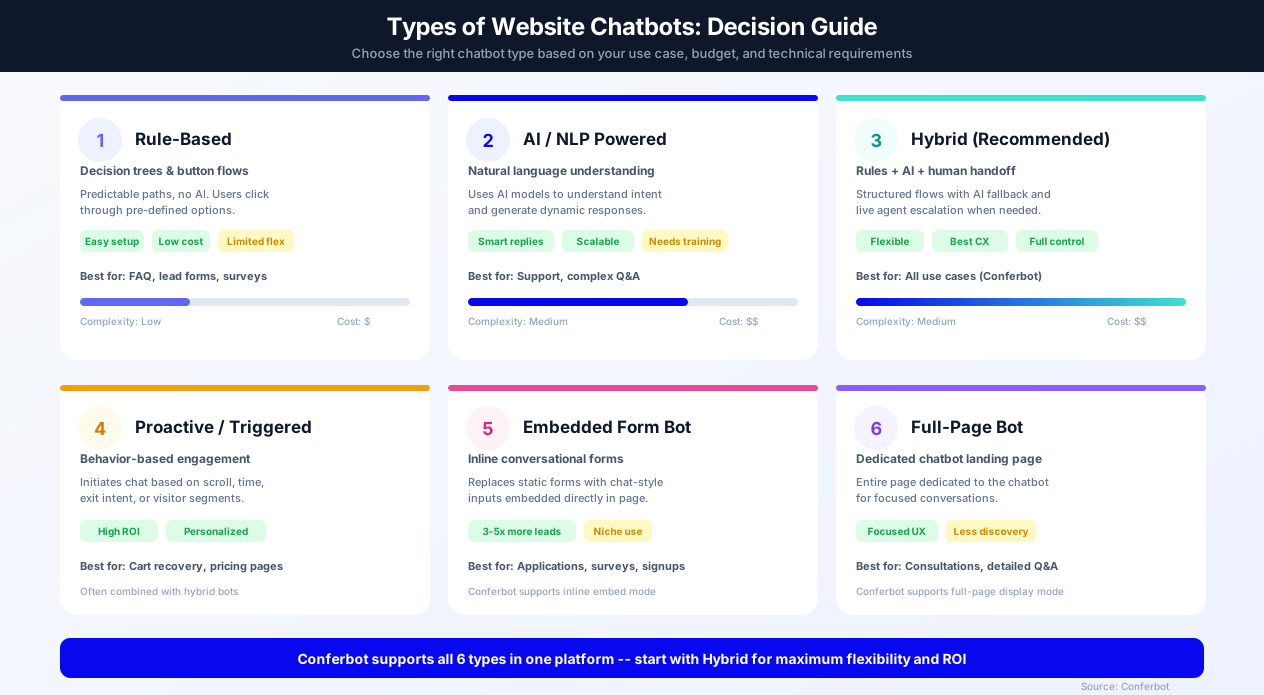
Not all website chatbots are the same. Choosing the right type depends on your goals, technical resources, and the complexity of customer interactions you need to handle. Here is a breakdown of the six major chatbot types you can deploy on your website in 2026.
1. Rule-Based Chatbots (Decision Tree)
Rule-based chatbots follow predefined conversation paths using if/then logic and button-driven navigation. Visitors click through options rather than typing free text. These bots are the simplest to build - you can create one in under 30 minutes using Conferbot's visual flow builder - and they work perfectly for structured use cases like FAQ pages, lead qualification forms, appointment booking, and product recommendation quizzes.
Pros: Easy to build, predictable behavior, low cost, no training data required. Cons: Cannot handle unexpected questions, limited to pre-defined paths, can feel robotic. Best for: Small businesses, simple lead capture, surveys, and booking. Use lead generation templates or FAQ templates to get started.
2. AI / NLP-Powered Chatbots
AI-powered chatbots use natural language processing (NLP) and large language models (LLMs) to understand visitor intent and generate responses dynamically. They can handle open-ended questions, understand context, and provide conversational answers that feel human. Conferbot's OpenAI integration and AI knowledge base power this capability - you train the bot on your website content, product docs, and help center articles, and it answers questions accurately without manual flow building for every scenario.
Pros: Handles complex queries, scales to thousands of topics, improves over time. Cons: Requires content to train on, occasional hallucination risk (mitigated by knowledge base grounding), higher compute cost. Best for: Customer support, technical documentation, large product catalogs, SaaS companies.
3. Hybrid Chatbots (Recommended)
Hybrid chatbots combine rule-based flows with AI capabilities and human handoff - the best of all worlds. Structured flows handle predictable interactions (lead qualification, appointment booking) while AI handles open-ended questions, and live chat takes over for complex or high-value conversations. Conferbot is built around this hybrid model - every bot can use decision trees, AI responses, and live agent escalation in the same conversation.
Pros: Maximum flexibility, handles both structured and unstructured interactions, seamless escalation. Cons: Slightly more setup than rule-only bots. Best for: Most businesses, especially those with mixed use cases (sales + support + FAQ). This is the approach we recommend for e-commerce, real estate, healthcare, and education websites.
4. Proactive / Triggered Chatbots
Proactive chatbots initiate conversations based on visitor behavior rather than waiting for the visitor to click. They monitor signals like time on page, scroll depth, exit intent, and returning visitor status to deliver perfectly timed, context-aware messages. On a pricing page: "Need help choosing a plan?" After 60% scroll on a blog post: "Want me to find related content?" When a cursor moves toward the browser close button: "Wait - can I answer a quick question before you go?"
Proactive triggers are what separate passive chat widgets from conversion-driving tools. Page-specific proactive messages tend to achieve far higher engagement than passive chat bubbles. Configure triggers in the Conferbot dashboard under Publish > Trigger Rules. Learn more in the key features section.
5. Embedded Form Bots
Embedded form bots replace static web forms with conversational interfaces placed inline within your page content. Instead of a traditional form with 6-8 fields that feels intimidating, the chatbot asks one question at a time in a friendly chat format - directly embedded where the form would normally sit. Conferbot supports this through the inline embed display type.
Conversational form bots tend to achieve higher completion rates than traditional forms because they reduce perceived effort, provide instant validation, and feel more engaging. Use them for lead capture forms, application forms, survey forms, and newsletter signups. Combine with conditional logic to show different follow-up questions based on previous answers.
6. Full-Page Chatbots
Full-page chatbots dedicate an entire web page to the chat experience - no distractions, no sidebar, just the conversation. This format works best for detailed consultations (insurance quotes, mortgage pre-qualification, product configuration), customer onboarding flows, and internal tools. Conferbot's full-page display mode creates a clean, focused environment that keeps visitors engaged through longer conversation flows. Link to the full-page bot from your navigation, CTAs, or email campaigns.
Which Type Should You Choose?
For most websites, we recommend starting with a hybrid chatbot that combines rule-based flows for common scenarios with AI for everything else. As your chatbot matures, layer in proactive triggers to boost engagement and embedded form bots for high-value conversion points. If you are unsure, start with a template and customize from there - you can always add AI and triggers later. Compare the full capabilities in our platform comparison.
How to Add a Chatbot to Your Website
Adding a Conferbot chatbot to your website takes just a few steps regardless of your web platform.
Step 1: Build Your Chatbot
Start with the visual flow builder. Choose from pre-built templates - lead generation, customer support, product recommendation, appointment booking, or more - and customize for your business. Design your welcome message, conversation flows, and fallback responses.
Step 2: Customize the Widget Appearance
- Go to Publish → Widget Settings in the Conferbot dashboard
- Set your brand colors to match your website
- Upload a custom avatar or choose from built-in options
- Configure the widget position (left/right, bottom spacing)
- Set the welcome message and display delay
- Choose your display type (popup, slide-in, full page, or inline)
Step 3: Copy and Paste the Embed Code
- Go to Publish → Get Embed Code
- Copy the single-line JavaScript snippet
- Paste it before the </body> tag on your website
Platform-Specific Instructions
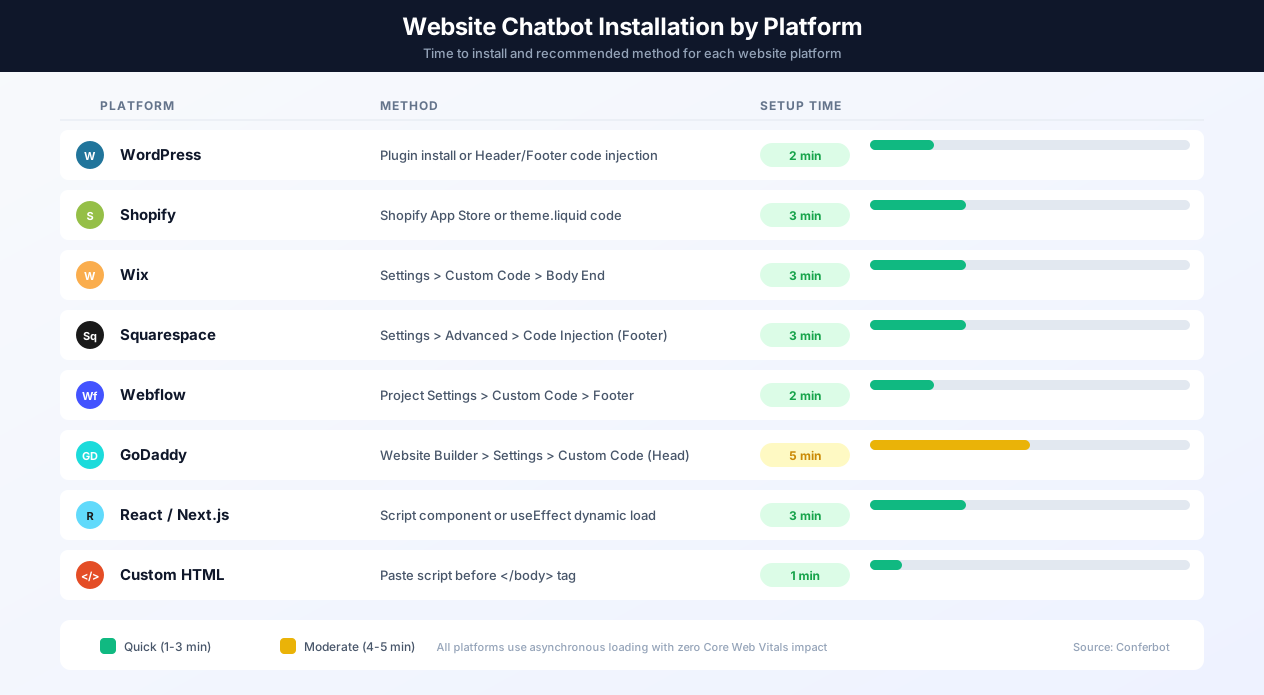
| Platform | Where to Add the Code |
|---|---|
| WordPress | Appearance → Theme Editor → footer.php (or use Header/Footer plugin) |
| Shopify | Online Store → Themes → Edit Code → theme.liquid (before </body>) |
| Wix | Settings → Custom Code → Add Code → Body (End) |
| Squarespace | Settings → Advanced → Code Injection → Footer |
| Webflow | Project Settings → Custom Code → Footer Code |
| React/Next.js | Add script tag in _document.js or use useEffect in layout component |
| Static HTML | Paste directly before </body> in your HTML files |
Your chatbot appears on your website within seconds of saving. No server restarts, no deployments, no cache clearing needed. Setup time: 5 minutes.
WordPress Installation Deep-Dive
WordPress powers 43% of all websites, making it the most common platform for Conferbot deployments. You have three installation options: Option 1 (Recommended) - Install the Conferbot WordPress plugin from the plugin directory. Go to Plugins > Add New, search "Conferbot," install and activate. The plugin adds the embed code automatically to every page without editing theme files. It also provides a settings page where you can control which pages display the chatbot using URL rules, configure WooCommerce order lookup integration, and manage visibility for logged-in vs guest users. Option 2 - Use a header/footer plugin like "Insert Headers and Footers" by WPBeginner. Paste the Conferbot embed code in the footer section. This approach works well if you want manual control without installing a dedicated plugin. Option 3 - Edit your theme directly by adding the embed code to footer.php before the closing body tag. This is the fastest method but requires updating after theme changes. WordPress sites using Conferbot chatbots often report more leads compared to contact-form-only setups.
Shopify Installation Deep-Dive
For Shopify stores, navigate to Online Store > Themes > Edit Code, open theme.liquid, and paste the Conferbot embed code before the closing body tag. Alternatively, install the Conferbot app from the Shopify App Store for a managed integration that connects your product catalog to the chatbot, enabling conversational product search, real-time order tracking (customers enter their order number and get status updates), and abandoned cart recovery. Shopify stores using chatbot-driven cart recovery often report recapturing a meaningful share of abandoned carts, typically higher than email-only campaigns.
React and Next.js Installation
For React single-page applications, add the Conferbot script tag in your index.html or load it dynamically using useEffect in your root layout component. For Next.js specifically, add the script to your _document.js file or use the built-in Script component with the "afterInteractive" strategy for optimal loading. The widget loads asynchronously and does not affect your Core Web Vitals scores - Largest Contentful Paint, First Input Delay, and Cumulative Layout Shift remain unaffected because the script defers execution until after the main page content renders.
Website Chatbot vs Live Chat vs Contact Form
Choosing between a chatbot, live chat, and contact forms depends on your team size, traffic volume, and customer expectations. Here is how they compare:
| Criteria | AI Chatbot (Conferbot) | Live Chat Only | Contact Form |
|---|---|---|---|
| Availability | 24/7/365 - instant responses always | Business hours only (or expensive 24/7 staffing) | 24/7 submission, response in 24-48 hours |
| Response Time | Under 1 second | 30 seconds to 5 minutes (agent dependent) | Hours to days |
| Cost per Interaction | $0.01-$0.05 | $6-$12 (agent salary per conversation) | $0 (but low conversion offsets this) |
| Lead Conversion Rate | 15-25% of engaged visitors | 10-20% of engaged visitors | 2-5% of page visitors |
| Scalability | Unlimited concurrent conversations | Limited by agent count (3-5 chats per agent) | Unlimited submissions |
| Personalization | Page-aware, behavior-triggered, AI-driven | Agent-dependent, manual | None |
| Data Capture | Conversational, high completion rates | Manual during conversation | Form fields, high abandonment |
| After-Hours Coverage | Full automation | Offline form fallback | Same as business hours |
| Complex Queries | AI handles most; escalates to human | Human handles all | Delayed response |
| Setup Time | 5 minutes | 30-60 minutes + agent training | 5-10 minutes |
The optimal approach for most businesses is combining AI chatbot automation with live chat handoff. The chatbot handles the majority of conversations autonomously - answering FAQs, qualifying leads, booking appointments - and seamlessly transfers the rest to human agents who see the full conversation context. This hybrid model costs far less than pure live chat staffing while delivering faster response times and higher customer satisfaction. Learn more about this approach in our chatbot building guide.
Add Chatbot to Any Website Platform
Whether you run a WordPress blog, Shopify store, Wix portfolio, or a custom-coded web application, adding a Conferbot chatbot follows the same principle: paste one line of JavaScript. But each platform has a specific location and best practice for that code. Here is a comprehensive guide for every major website platform in 2026.
WordPress (43% of all websites)
WordPress is the most popular website platform in the world, and adding a chatbot is straightforward. Method 1 - Conferbot Plugin (Recommended): Go to Plugins > Add New, search "Conferbot," click Install and Activate. The plugin adds the embed code to every page automatically and gives you a settings page to control visibility (show/hide on specific pages, user roles, and devices). For WooCommerce stores, the plugin connects your product catalog for conversational product search and order tracking. Method 2 - WPCode / Insert Headers and Footers: Install the free "WPCode" plugin. Go to Code Snippets > Add Snippet > Custom Code. Paste the Conferbot embed code, set location to "Site Wide Footer," and save. Method 3 - Theme Editor: Go to Appearance > Theme File Editor > footer.php. Paste the embed code before </body>. Note: direct theme edits are overwritten on theme updates - use a child theme or plugin instead. WordPress chatbots built with Conferbot integrate with all major page builders including Elementor, Divi, Beaver Builder, and WPBakery. The widget loads asynchronously and has zero impact on your WordPress page speed scores.
Shopify
Shopify's liquid template system makes chatbot installation clean. Method 1 - Shopify App Store (Recommended): Install the Conferbot app from the Shopify App Store. The app adds the widget automatically and connects your Shopify product catalog, enabling product recommendations in chat, real-time order tracking by order number, and abandoned cart recovery sequences. Method 2 - Theme Code: Go to Online Store > Themes > Actions > Edit Code > Sections > theme.liquid. Paste the Conferbot embed code before </body> and save. The chatbot appears on all pages immediately. For Shopify Plus stores, the app integrates with checkout extensibility for post-purchase upsell conversations. Shopify stores using Conferbot often see meaningful cart recovery rates, typically higher than email-only campaigns. Learn more about e-commerce chatbot strategies.
Wix
Wix supports custom code injection for Business and higher plans. Go to Settings > Custom Code > + Add Custom Code. Paste the Conferbot embed snippet, name it "Conferbot Chat Widget," select "Body - end" for placement, and choose "All pages" for loading. Click Apply. The chatbot appears across your entire Wix site within seconds. For Wix stores using Wix eCommerce, the chatbot can be configured to trigger product-specific messages on product pages using URL-based trigger rules. Wix Editor X and Wix Studio sites follow the same process. Wix's Velo (formerly Corvid) developers can also use the Conferbot JavaScript API for advanced programmatic control.
Squarespace
Squarespace code injection is available on Business plans and higher. Go to Settings > Advanced > Code Injection > Footer. Paste the Conferbot embed code and save. The widget loads on every page. For Squarespace Commerce stores, configure product-page triggers that offer size guides, shipping info, or complementary product suggestions based on the page URL. Squarespace's built-in analytics work alongside Conferbot's chatbot analytics to give you a complete view of visitor behavior and chatbot engagement.
Webflow
Webflow gives developers granular control. Site-wide: Go to Project Settings > Custom Code > Footer Code and paste the Conferbot embed snippet. Page-specific: Open the page in the designer, go to Page Settings > Custom Code > Before </body> tag. This lets you load different chatbot configurations on different pages - a sales bot on the pricing page and a support bot on the help center. Webflow's CMS collections can trigger dynamic chatbot content based on the CMS item being viewed. For Webflow + Memberstack or Webflow + Outseta integrations, pass logged-in user data to the chatbot for personalized experiences using the JavaScript API.
GoDaddy Website Builder
GoDaddy's website builder supports custom code on select plans. Go to your GoDaddy Website Builder editor, click Settings (gear icon) > Custom Code. Paste the Conferbot embed code in the Head section (the builder does not offer a separate footer injection, but the async script works fine in the head). Click Publish. If you are on a plan that does not support custom code, consider switching to GoDaddy's WordPress hosting, which gives you full plugin access. Read our detailed GoDaddy chatbot installation guide for step-by-step screenshots.
Carrd
Carrd supports embed code on Pro plans ($19/year). Edit your Carrd site, add an "Embed" element, switch to "Code" mode, and paste the Conferbot embed snippet. Set the element to be invisible (0 height) and position it at the bottom of the page. The chatbot widget will appear as a floating bubble. Carrd is popular for single-page landing pages, making it an excellent candidate for a focused lead-capture chatbot that qualifies visitors and collects email addresses through conversational flows.
Framer
Framer supports custom code in site settings. Go to Settings > General > Custom Code > End of <body> tag. Paste the Conferbot embed code and publish. Framer sites are React-based under the hood, so the async widget loads cleanly without interfering with Framer's rendering pipeline. Use page-specific messages to match Framer's typically design-focused audiences - for example, trigger a portfolio inquiry bot on project pages.
Bubble.io
Bubble's no-code app platform supports custom scripts via the HTML element or the Script/Meta Tags plugin. Method 1: Add an HTML element to your page, paste the Conferbot embed code inside it, and make the element invisible. Method 2: Install the "Script/Meta Tags" plugin from the Bubble marketplace, add a new script, and paste the embed code. Set it to load in the footer. Bubble apps often have complex user flows (SaaS dashboards, marketplaces), making an AI-powered chatbot especially valuable for user onboarding and in-app support. The chatbot can access Bubble page data through URL parameters for context-aware conversations.
Custom HTML / Static Sites
For any website built with plain HTML, CSS, and JavaScript - or static site generators like Hugo, Jekyll, Gatsby, Eleventy, or Astro - paste the Conferbot embed code before the closing </body> tag in your HTML template or layout file. For static site generators, add it to your base layout template so it appears on every page. For single-page applications (SPA) built with Vue, Angular, or Svelte, add the script to your index.html or load it dynamically after the app mounts. The Conferbot widget detects SPA route changes automatically and updates page context without requiring manual re-initialization.
Google Tag Manager (Any Platform)
If your website uses Google Tag Manager (GTM), you can add the Conferbot widget through GTM instead of editing your site's code directly. Create a new Custom HTML tag in GTM, paste the Conferbot embed code, set the trigger to "All Pages," and publish the container. This approach works with any website platform and gives your marketing team the ability to manage the chatbot without developer involvement. You can also create GTM triggers to load the chatbot only on specific pages, for specific audience segments, or after specific events - adding a layer of targeting beyond Conferbot's built-in trigger rules.
Key Website Chatbot Features
Conferbot's website widget goes beyond simple chat to become a complete visitor engagement and conversion tool.
Widget Placement Best Practices
Where you place your chatbot widget directly impacts engagement rates. The bottom-right corner is the industry standard position, achieving the highest interaction rates because users have been conditioned by years of live chat tools to look there. Conferbot places the widget at a default z-index of 9999 to ensure it renders above most page elements without conflicting with modals or cookie consent banners. If your site uses a higher z-index for overlays, adjust the widget's z-index in the dashboard settings. On mobile devices, the chat bubble should sit 16-20px from the bottom edge to avoid overlapping with iOS home indicators and Android gesture navigation bars. Never position the widget where it covers critical action elements like "Add to Cart" buttons on e-commerce pages or form submission buttons on landing pages. For sites with sticky bottom navigation bars, increase the bottom offset to at least 70px to prevent overlap.
Proactive Trigger Strategies with Engagement Data
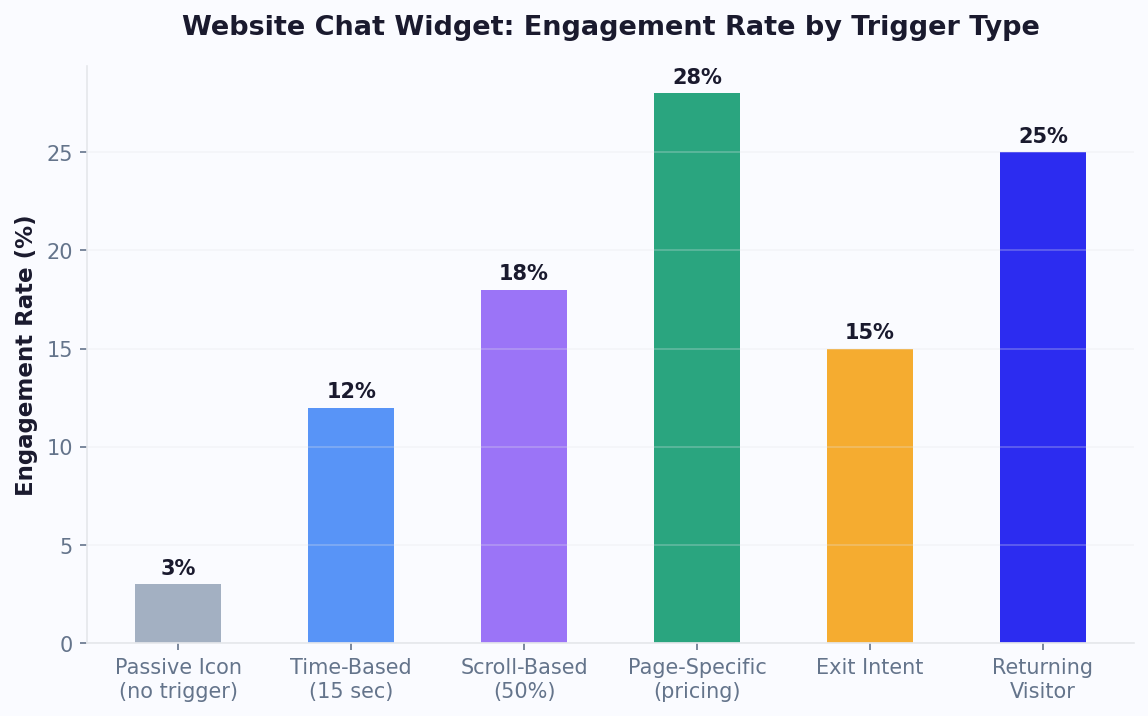
Do not wait for visitors to click the chat bubble. Configure triggers that open the chat proactively based on behavior. Our data across thousands of Conferbot deployments reveals clear engagement benchmarks by trigger type:
- Time-based triggers (chat opens after 8-15 seconds on page) - a solid engagement driver. Best for blog content, documentation pages, and general browsing. Use shorter delays (5-8 seconds) for high-intent pages like pricing; longer delays (15-30 seconds) for content pages where visitors need reading time
- Scroll-based triggers (chat opens at 40-60% scroll depth) - a solid engagement driver. Ideal for long-form content, product pages, and landing pages. Triggering at 50% scroll indicates the visitor is engaged but may have questions about what they have read
- Page-specific triggers (custom messages matched to the page context) - one of the highest-performing trigger types because the chatbot message directly addresses the visitor's current intent. On pricing pages, "Need help choosing a plan?" tends to convert far better than a generic greeting
- Exit-intent triggers (chat opens when cursor moves toward the browser close) - can recover a meaningful share of abandoning visitors. Most effective on checkout pages, trial signup pages, and high-value landing pages
- Returning visitor triggers (personalized greeting for repeat visitors) - a strong engagement driver. Messages like "Welcome back! You were looking at our Enterprise plan last time" create a powerful personalized experience
Combine multiple triggers strategically: use time-based on the homepage, scroll-based on blog posts, page-specific on pricing, and exit-intent on checkout. Track performance through Conferbot analytics and optimize continuously.
A/B Testing Your Greetings
The welcome message is the single most impactful element for chatbot engagement. A/B testing different greetings can meaningfully improve interaction rates. Test across these dimensions: question vs statement ("Need help finding the right plan?" vs "I can help you find the right plan"), specific vs generic ("Looking for enterprise pricing?" vs "How can I help?"), value-led vs service-led ("Get a free ROI estimate in 60 seconds" vs "Chat with our team"), and short vs long (under 10 words vs 15-20 words). Run each test for at least 1,000 widget impressions per variant for statistical significance. The best-performing greetings are typically specific, value-driven, and under 15 words.
Page-Aware Conversations
The chatbot knows which page the visitor is on and adapts accordingly. On a pricing page, it can answer plan comparison questions. On a product page, it can offer size guides or alternatives. On the homepage, it can qualify the visitor's intent and route them to the right section. This contextual awareness makes every conversation more relevant.
Lead Capture and CRM Sync
Capture visitor information through natural conversation instead of intimidating forms. Chatbot-based lead capture tends to achieve higher completion rates than traditional web forms. Captured leads can be synced to your CRM or emailed to your sales team in real time.
AI-Powered Support
Train the bot on your website content, product documentation, and FAQ using OpenAI integration. The bot answers visitor questions accurately, reducing the need for live agents. When AI confidence is low, the bot seamlessly escalates to live chat.
Mobile-Responsive Design
The widget automatically adapts to mobile screens - adjusting size, layout, and interaction patterns for touch devices. With mobile traffic exceeding 60% on most websites, responsive chatbot design is not optional. Conferbot's widget is tested across iOS Safari, Android Chrome, and all major mobile browsers.
Multi-Language Support
Detect the visitor's browser language and serve content in their preferred language automatically. Essential for businesses with international traffic. The widget UI, welcome messages, and conversation flows can all be localized.
Widget Customization Deep-Dive
Conferbot's website widget offers the deepest customization of any chatbot platform. Beyond basic colors and positioning, you can control the chat bubble icon (upload a custom SVG or choose from built-in options), the opening animation style (slide up, fade in, or bounce), the widget size on desktop vs mobile, whether the widget shows on specific pages only (using URL matching rules), custom CSS overrides for pixel-perfect brand alignment, and sound notifications for new messages. For developers, the widget exposes a JavaScript API that lets you programmatically open/close the chat, send messages, pass visitor data (name, email, plan) as context, and listen to conversation events for custom analytics integration.
Proactive Trigger Strategies
Proactive triggers are what separate passive chat widgets from conversion-driving chatbots. Here are the most effective trigger strategies by page type:
| Page Type | Trigger | Message Example | Expected Lift |
|---|---|---|---|
| Pricing Page | Time on page > 30s | "Need help choosing a plan? I can compare features for you." | +35% engagement |
| Product Page | Scroll depth > 60% | "Have questions about this product? I can help with sizing and specs." | +25% engagement |
| Cart/Checkout | Exit intent | "Wait! I can help if something is not right with your order." | +10-15% cart recovery |
| Homepage | Returning visitor | "Welcome back! Would you like to continue where you left off?" | +20% re-engagement |
| Blog Post | Time on page > 60s | "Enjoying this article? I can recommend related content." | +15% lead capture |
Configure triggers in the Conferbot dashboard under Publish > Trigger Rules. You can combine multiple conditions (AND/OR logic) and set frequency caps to prevent repeat pop-ups for the same visitor.
WordPress and Shopify Specifics
WordPress: Install the Conferbot plugin directly from the WordPress plugin directory for one-click setup. The plugin adds the embed code automatically -- no theme editing required. It also provides a dedicated settings page where you can configure which pages show the chatbot, set up WooCommerce order lookup integration, and manage widget visibility for logged-in vs guest users. WordPress sites using Conferbot chatbots often report more leads compared to contact-form-only setups.
Shopify: Add the Conferbot app from the Shopify App Store for seamless integration. The app connects your Shopify product catalog to the chatbot, enabling product search, order tracking (customers enter their order number and get real-time status), and abandoned cart recovery. Shopify stores using chatbot-driven cart recovery often report recovering a meaningful share of abandoned carts -- typically higher than email-only recovery campaigns. The app also supports Shopify's checkout extensibility for post-purchase upsell conversations.
A/B Testing for Chatbots
Conferbot supports A/B testing of chatbot configurations to optimize conversion rates. Test different welcome messages, button copy, conversation flow structures, and trigger timing to find the combination that drives the best results. The analytics dashboard tracks performance for each variant, showing engagement rate, conversation completion, and lead capture rate side by side. Run tests for at least 1,000 conversations per variant for statistically significant results. Businesses that A/B test their chatbot flows typically see measurable improvement in conversion metrics within the first month of optimization.
AI Knowledge Base for Websites
Connect your website content, help center articles, and product documentation to Conferbot's AI knowledge base. The AI crawls your content and builds an intelligent Q&A system that answers visitor questions accurately -- without requiring you to manually build flows for every possible question. This is especially powerful for businesses with large catalogs, extensive documentation, or frequently updated content. The AI stays current with your content through periodic re-indexing.
Website Chatbot Use Cases
Every website can benefit from a chatbot, but the highest ROI comes from these proven use cases.
Lead Generation and Qualification
Replace or supplement your contact forms with conversational lead capture. Ask qualifying questions (budget, timeline, company size, specific needs) through a natural chat flow. Qualified leads are tagged, scored, and routed to sales. Businesses using chatbot-based lead gen often report more leads compared to forms alone. See lead generation templates.
E-Commerce Product Assistance
Help shoppers find the right product, answer size and compatibility questions, compare options, and reduce cart abandonment with timely exit-intent interventions. E-commerce stores using chatbots see 15-25% higher conversion rates and 20-30% lower cart abandonment.
Customer Support and FAQ
Deflect 40-70% of support tickets by answering common questions instantly. Shipping information, return policies, account issues, and product troubleshooting can all be automated. When the bot cannot help, it creates a ticket or connects to live chat. See support templates.
Appointment and Demo Booking
SaaS companies, healthcare providers, professional services, and any appointment-based business can let visitors book directly through the chatbot. Integrate with calendar tools for real-time availability using calendar booking integration. Conversational booking tends to see higher completion than standalone booking pages.
Real Estate and Property
Property search assistance, virtual tour scheduling, mortgage pre-qualification, and agent matching. Real estate websites with chatbots tend to capture far more qualified leads than those relying on contact forms.
Education and Enrollment
Course information, admission requirements, financial aid guidance, and campus tour scheduling. Educational institutions using chatbots see 50% faster response to prospective student inquiries and higher application completion rates.
Healthcare Patient Intake
Appointment scheduling, symptom pre-screening, insurance verification, and patient FAQs. Healthcare websites use chatbots to reduce phone call volume by 40-60% while improving patient experience with 24/7 instant responses to common questions about hours, locations, accepted insurance, and preparation instructions.
SaaS Onboarding and Support
Guide new users through product setup, answer feature questions, trigger in-app walkthroughs, and collect feature requests. SaaS companies using website chatbots for onboarding often report higher activation rates because users get instant help at the moment they need it instead of searching through documentation or waiting for email support. Connect the chatbot to your AI knowledge base trained on your product documentation for accurate, context-aware answers.
Website Chatbot Pricing: Free vs Paid Plans Compared
Website chatbot pricing varies dramatically - from completely free tools with limited features to enterprise platforms costing thousands per month. Understanding the pricing landscape helps you choose the right solution for your budget and needs. This section compares Conferbot's pricing tiers to the most popular competitors: Tidio, Intercom, Drift, Zendesk, and tawk.to.
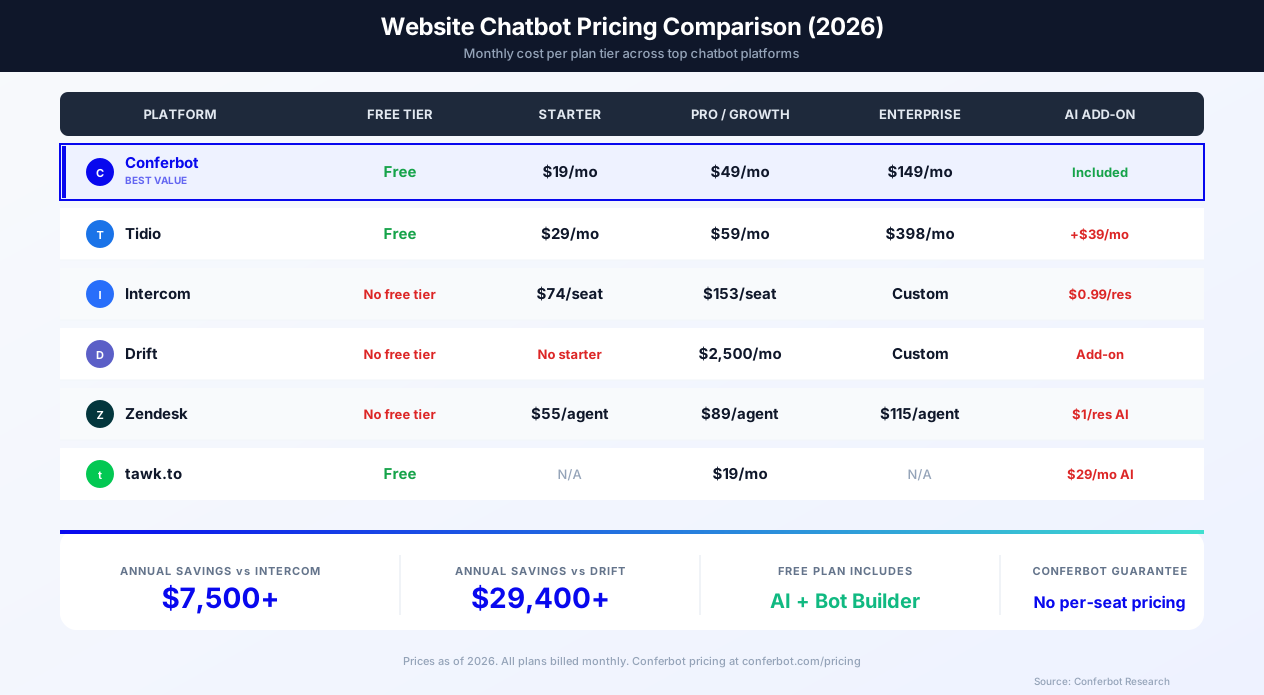
Conferbot Pricing Tiers
Conferbot offers a straightforward pricing model with no per-seat charges and no hidden fees for AI capabilities. Every plan includes the full visual flow builder, AI integration, and website widget deployment.
| Plan | Price | Conversations | Key Features |
|---|---|---|---|
| Free | $0/month | 600/month | Visual builder, AI chatbot, 1 bot, website widget, basic analytics |
| Starter | $19/month | 2,000/month | Everything in Free + 3 bots, custom branding, live chat, email notifications |
| Pro | $39/month | 5,000/month | Everything in Starter + 10 bots, AI knowledge base, integrations, A/B testing, advanced analytics |
| Business | $59/month | 10,000/month | Everything in Pro + unlimited bots, omnichannel, priority support, custom integrations, SLA |
View full details and start free at conferbot.com/pricing.
How Conferbot Compares on Price
The chatbot market has two extremes: free tools with minimal features (tawk.to) and enterprise-priced platforms that charge per seat (Intercom at $74+/seat, Drift at $2,500+/month). Conferbot sits in the value sweet spot - full-featured AI chatbot automation at SMB-friendly prices with no per-seat model that penalizes growing teams.
| Platform | Free Tier? | Starting Paid | AI Included? | Per-Seat Pricing? | Hidden Costs |
|---|---|---|---|---|---|
| Conferbot | Yes (50 convos) | $19/mo | Yes, all plans | No | None |
| Tidio | Yes (50 convos) | $29/mo | Add-on ($39/mo) | No | AI costs extra |
| Intercom | No | $74/seat/mo | $0.99/resolution | Yes | Per-seat + per-resolution |
| Drift | No | $2,500/mo | Add-on | Yes | Annual contracts, add-ons |
| Zendesk | No | $55/agent/mo | $1/resolution | Yes | Per-agent + per-resolution |
| tawk.to | Yes (unlimited) | $19/mo (remove branding) | $29/mo add-on | No | Limited bot capabilities |
Cost Calculation: Real-World Scenarios
Small business (1,000 monthly visitors, 200 chatbot conversations): Conferbot Starter at $19/month handles this comfortably. Intercom would cost $74/month minimum for a single seat - 3.9x more. Drift is not viable at $2,500/month.
Growing business (10,000 monthly visitors, 2,000 conversations, 3 agents): Conferbot Pro at $39/month covers all conversations and agents. Intercom at $74/seat for 3 seats = $222/month plus $0.99 per AI resolution. Tidio at $59/month plus $39/month for AI = $98/month. Conferbot saves $59-$183/month.
Enterprise (100,000 monthly visitors, 10,000 conversations, 10 agents): Conferbot Business at $59/month. Intercom at $74/seat for 10 seats = $740/month plus AI resolution costs. Zendesk at $89/agent for 10 agents = $890/month plus AI costs. Conferbot saves $681-$831+/month ($8,172-$9,972/year).
Free Website Chatbot: What You Get (and What You Don't)
Conferbot's free plan is one of the most generous in the industry. You get the full visual flow builder, AI-powered responses, website widget deployment, and basic analytics - enough to test the platform and start engaging visitors immediately. The free tier is limited to 600 conversations per month and 1 bot, which works for low-traffic sites or proof-of-concept deployments. When you outgrow the free plan, upgrading to Starter ($19/month) raises the limit to 2,000 conversations/month and adds custom branding, live chat, and multi-bot support.
By comparison, tawk.to's "free" plan is ad-supported and includes no bot builder - it is purely a live chat widget. Tidio's free plan includes a basic bot builder but caps AI capabilities behind a $39/month add-on. Intercom and Drift have no free tier at all.
Choosing the Right Plan
Start with the free plan to validate chatbot ROI. Most businesses see results within the first week - increased lead capture, faster response times, and after-hours engagement. Once you hit the conversation limit, upgrade to the plan that matches your volume. Unlike competitors, Conferbot does not charge per seat, so you can add unlimited team members for live chat handoff on every paid plan without increasing your bill. View all plans at conferbot.com/pricing.
Website Widget vs Other Channels
Your website chatbot serves a different purpose than messaging channel bots. Here is how they compare and complement each other.
| Feature | Website Widget | Messenger | Mobile SDK | |
|---|---|---|---|---|
| Audience | All website visitors | Phone contacts | Facebook users | App users |
| User Identification | Anonymous until captured | Phone number | Facebook profile | App login |
| Proactive Triggers | Time, scroll, exit intent | Templates only | 24h window | Push notifications |
| Page Context | Full (current URL, referrer) | None | None | In-app screen |
| Visual Customization | Fully brandable | Limited | Limited | Fully customizable |
| Rich Media | Images, video, files | Images, video, docs | Carousels, media | Native UI |
| Persistent Conversations | Session-based (or cookie) | Ongoing | Ongoing | Ongoing |
| Installation | 1 line of code | API setup | API setup | SDK integration |
| Setup Time | 5 minutes | 10-15 minutes | 5-10 minutes | 10-15 minutes |
| Best For | Visitor conversion | Ongoing support | Social engagement | In-app experience |
The website widget is your first line of engagement. It captures visitors who may never contact you through other channels. Combine it with WhatsApp for ongoing customer communication, Messenger for social media engagement, Instagram for visual commerce, Telegram for community support, Slack for internal teams, and mobile SDKs for in-app experiences. Conferbot's omnichannel platform connects all channels into one unified conversation history. Explore all Discord, Microsoft Teams, and LINE integrations too.
Website Chatbot Best Practices
A well-implemented website chatbot dramatically improves conversion and support metrics. A poorly implemented one annoys visitors and drives them away. Follow these practices.
1. Do Not Be Annoying
The biggest mistake businesses make is aggressive pop-ups. Give visitors time to browse before engaging - a 5-10 second delay is typical. Never block content with the chat window. Make the close button obvious. Let visitors choose to engage rather than forcing interaction.
2. Match Your Brand
Your chatbot should feel like a natural extension of your website. Use your brand colors, tone of voice, and visual style. A chatbot with default styling on a premium website signals carelessness. Invest 10 minutes in customization for a polished result.
3. Optimize for Mobile
Test your chatbot on mobile devices before launching. Ensure the chat window does not cover critical content, buttons are large enough to tap, and the close button is accessible. Over 60% of web traffic is mobile - your chatbot must work flawlessly on small screens.
4. Use Page-Specific Welcome Messages
A generic "How can I help you?" is missed potential. On your pricing page, ask "Would you like help choosing a plan?" On product pages, offer "Need help finding the right size?" On the blog, try "Looking for something specific?" Context-specific messages increase engagement by 30-50%.
5. Capture Contact Info Early (But Naturally)
Ask for the visitor's email or name after providing value - not as the first question. Help them first, then request contact details. "I'd love to send you a summary of this conversation - what's your email?" works far better than a gated entry.
6. Set Up Exit-Intent Triggers
When a visitor moves their cursor toward the browser close button, trigger a chat message with a compelling offer, a quick question, or a final CTA. Exit-intent chatbot triggers can recover a meaningful share of abandoning visitors.
7. Continuously Optimize with Data
Use analytics to monitor engagement rates, conversation completion, lead capture rates, and popular questions. A/B test different welcome messages, button labels, and flows. The best website chatbots improve continuously based on real visitor data.
8. Provide Clear Escalation Paths
Always give visitors an obvious way to reach a human agent. Include a "Talk to a human" button in your chatbot flows, and configure live chat handoff for situations the bot cannot handle. Visitors who know they can reach a person feel more comfortable engaging with the bot first.
9. Keep Conversation Flows Short
The best chatbot flows resolve visitor needs in 3-5 exchanges. Long, multi-step flows increase drop-off rates. If a flow requires more than 7 steps, consider breaking it into smaller sub-flows or using AI-powered responses to handle variations without rigid step sequences.
Getting Started with Your Website Chatbot
Adding a chatbot to your website is the fastest way to increase conversions and reduce support workload. Here is your launch plan.
5-Minute Quick Start
- Sign up for Conferbot - free plan available to start
- Choose a template - lead generation, customer support, or build from scratch
- Customize the widget - set your brand colors, avatar, and position
- Copy the embed code - one line of JavaScript
- Paste on your website - before the closing body tag
That is it. Your chatbot is live and engaging visitors.
Recommended Enhancement Path
- Week 1: Launch with FAQ and basic lead capture. Monitor conversations to see what visitors ask most
- Week 2: Add AI-powered responses to handle open-ended questions
- Week 3: Set up live chat handoff for high-value conversations
- Week 4: Implement proactive triggers (exit intent, time-based, page-specific)
- Ongoing: Optimize based on analytics data - refine flows, update FAQ, improve conversion rates
Expand to More Channels
Once your website chatbot is performing, extend the same bot to WhatsApp, Messenger, Instagram, Telegram, Discord, Slack, Microsoft Teams, and LINE through Conferbot's omnichannel platform. For mobile apps, integrate the React Native SDK, iOS SDK, Android SDK, or Flutter SDK. Your website is the starting point - not the finish line.
Why Conferbot for Your Website
- 5-minute setup - One line of embed code, works on any website platform
- No code required - Build with our visual AI chatbot builder
- AI knowledge base - Train on your website content for instant, accurate answers
- Proactive triggers - Time-based, scroll-based, exit-intent, and page-specific engagement
- WordPress and Shopify plugins - One-click install with native e-commerce integration
- Calendar booking - Let visitors book appointments with calendar integration
- Rich integrations - Connect CRMs, email tools, and more via integrations hub
- A/B testing - Optimize flows with data-driven experimentation
- Omnichannel - Extend to WhatsApp, Messenger, Instagram
- Real-time analytics - Track engagement, conversion, and ROI with built-in analytics
View pricing to find the right plan for your website traffic, or start building for free today.
Conversion Rate Optimization Data
The difference between a passive chat widget and a conversion-driving chatbot comes down to engagement strategy. Across thousands of Conferbot deployments, we have collected benchmark data that shows how different engagement approaches impact conversion rates.
Proactive vs Passive Engagement Rates
The single most impactful decision is whether your chatbot waits for visitors to click (passive) or initiates conversation (proactive). The data is clear:
| Engagement Approach | Widget Interaction Rate | Lead Capture Rate | Avg. Messages per Session | Conversion to Sale/Signup |
|---|---|---|---|---|
| Passive (no trigger, bubble only) | 2-4% | 0.5-1.5% | 2.1 | 0.3-0.8% |
| Generic proactive ("How can I help?") | 8-12% | 3-5% | 3.4 | 1.5-2.5% |
| Page-specific proactive | 18-28% | 8-14% | 5.2 | 3.5-6.0% |
| Behavior-triggered (scroll + time) | 15-22% | 6-10% | 4.7 | 2.8-4.5% |
| Exit-intent triggered | 8-15% | 4-8% | 3.8 | 2.0-3.5% |
| Returning visitor personalized | 20-30% | 10-18% | 6.1 | 5.0-8.0% |
The takeaway: page-specific proactive messages and returning visitor personalization deliver the highest conversion rates - 10-20x better than a passive chat bubble. This is because context-aware messages address the visitor's specific intent rather than placing the burden of conversation initiation on them.
Conversion Benchmarks by Industry
Chatbot conversion rates vary significantly by industry due to differences in purchase cycle, average order value, and visitor intent:
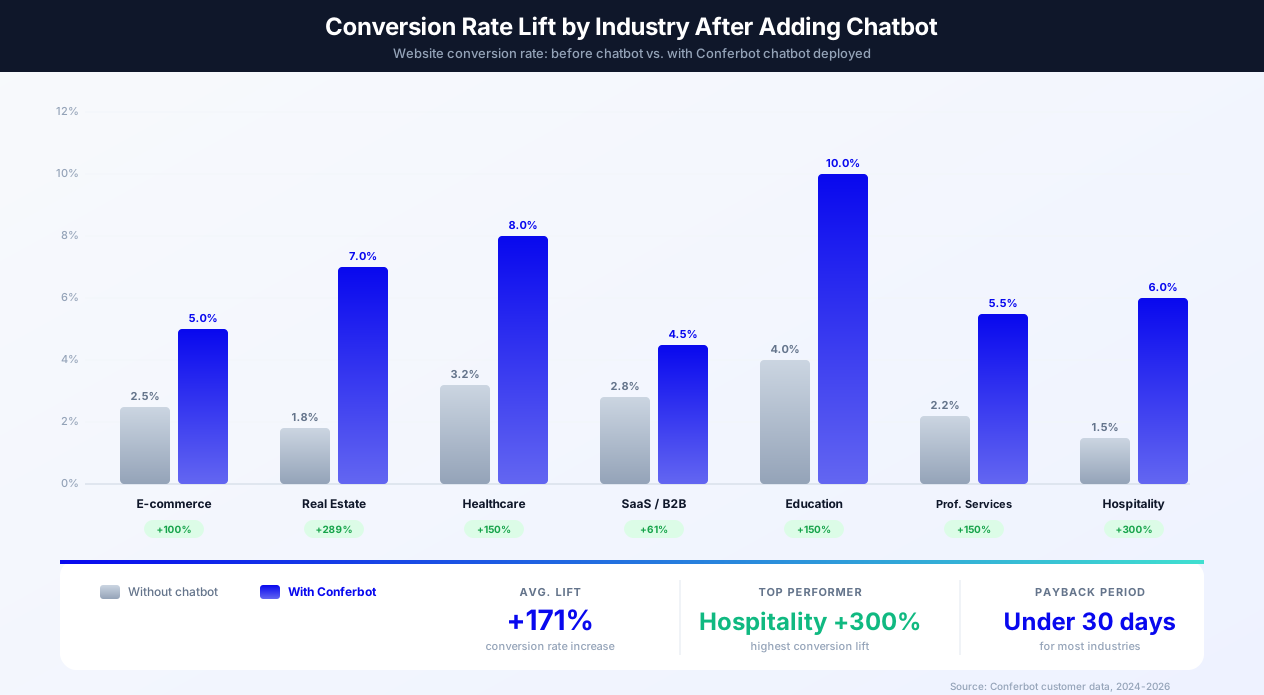
| Industry | Avg. Chatbot Interaction Rate | Lead Capture Rate | Chatbot-Assisted Conversion | Avg. ROI (6 months) |
|---|---|---|---|---|
| E-commerce | 12-18% | 8-12% | 3.5-5.0% | 350-500% |
| Real Estate | 15-22% | 12-20% | 4.0-7.0% | 500-800% |
| Healthcare | 10-15% | 10-16% | 5.0-8.0% | 400-600% |
| SaaS / B2B | 8-14% | 6-10% | 2.5-4.5% | 300-500% |
| Education | 12-18% | 14-22% | 6.0-10.0% | 400-700% |
| Professional Services | 10-16% | 8-14% | 3.0-5.5% | 350-550% |
These benchmarks represent websites with properly configured proactive triggers, page-specific messaging, and optimized conversation flows. The ROI calculation includes lead value, reduced support costs, and after-hours coverage. Track your own metrics in the Conferbot analytics dashboard and benchmark against these industry averages.
After-Hours Value
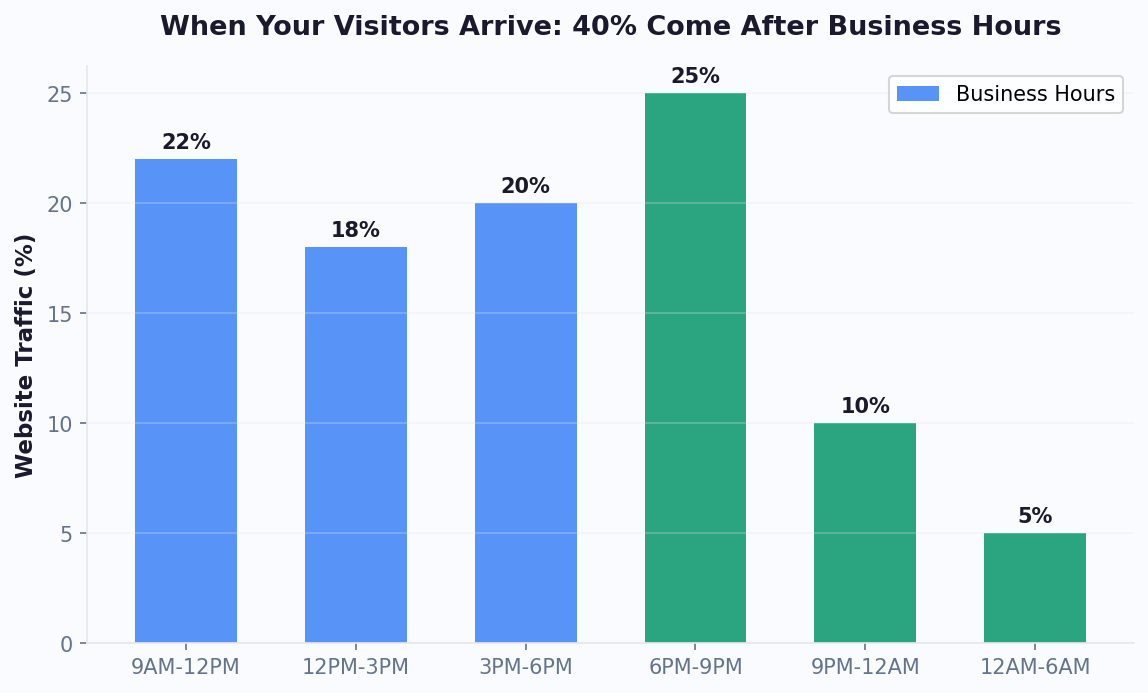
A large share of website traffic arrives outside business hours - evenings, weekends, and holidays when no human agents are available. Without a chatbot, these visitors encounter a contact form or no engagement at all, resulting in near-zero conversion. A chatbot captures this traffic by providing instant responses, qualifying leads, booking appointments, and routing urgent issues for morning follow-up. Businesses that deploy chatbots for after-hours coverage often report more total monthly leads simply by engaging visitors who previously received no interaction.
Website Chatbot Analytics & Optimization
Deploying a chatbot is only the beginning - the real value comes from continuous optimization based on data. Conferbot's analytics dashboard provides comprehensive metrics to understand how your website chatbot performs and where to improve.
Key Metrics to Track
Every website chatbot should be measured on these core KPIs:
- Widget Interaction Rate - Percentage of page visitors who interact with the chatbot. A healthy rate is 8-15% for generic triggers, 18-28% for page-specific. If your rate is below 5%, review your trigger timing, welcome message, and widget visibility
- Conversation Completion Rate - Percentage of visitors who complete the intended flow (lead capture, FAQ resolution, booking). Target 60-80%. Low completion suggests the flow is too long, confusing, or not addressing the visitor's actual question
- Lead Capture Rate - Percentage of chatbot interactions that result in a captured email, phone, or form submission. Benchmarks vary by industry (see conversion data section), but 8-15% is strong for most websites
- Deflection Rate - For support chatbots, the percentage of conversations resolved without human intervention. Target 40-70% deflection to significantly reduce ticket volume and support costs
- Average Messages per Session - How many messages are exchanged in a typical conversation. For lead capture, 4-6 messages is ideal. For support, 3-5 messages indicates efficient resolution. Sessions exceeding 10 messages may indicate the bot is struggling
- Popular Questions - What visitors ask most frequently. This data shapes your FAQ content, knowledge base training, and website content strategy
- Drop-Off Points - Where in the conversation flow visitors abandon. High drop-off after a specific question suggests that question is too invasive, confusing, or irrelevant
Funnel Analysis
Treat your chatbot like a conversion funnel and analyze each step. A typical lead-generation funnel looks like: Widget Impression → Chat Opened (target: 10-20% of impressions) → First Response Given (target: 80-90% of opens) → Qualifying Questions Completed (target: 60-70%) → Contact Info Captured (target: 40-50% of completed) → CRM Synced / Lead Routed. Identify the step with the biggest drop-off and optimize it first. Often, the largest gap is between "Chat Opened" and "First Response" - visitors open the chat but do not engage because the welcome message is not compelling enough.
A/B Testing Widget Placement and Timing
Beyond testing welcome messages (covered in key features), test these variables: trigger delay (5 seconds vs 15 seconds vs 30 seconds), widget position (bottom-right vs bottom-left), bubble size (standard vs large), sound notifications (on vs off), and welcome message format (text only vs text with button). Each variable can be tested independently in the Conferbot dashboard. Track results for at least 1,000 impressions per variant.
Heatmap Integration
Combine chatbot analytics with website heatmap tools like Hotjar, Microsoft Clarity, or FullStory to understand how chatbot interactions correlate with page behavior. Heatmaps reveal whether visitors who engage with the chatbot scroll further, click more CTAs, or spend more time on high-value pages. This data helps you optimize both your chatbot triggers and your page layout simultaneously. Conferbot's widget fires custom JavaScript events that heatmap tools can track for detailed interaction mapping.
Revenue Attribution
Connect chatbot conversations to revenue outcomes by syncing captured leads with your CRM and tracking their journey from chat to sale. Conferbot's integrations hub connects to Salesforce, HubSpot, Pipedrive, and other CRMs for closed-loop attribution. Calculate chatbot-attributed revenue by tracking: conversations that captured a lead → leads that became opportunities → opportunities that closed. For e-commerce, track conversations that led to add-to-cart events or completed purchases using the JavaScript API's event listeners.
Optimization Playbook
Follow this monthly optimization cycle: Week 1: Review analytics dashboard - identify the metric with the biggest gap from benchmarks. Week 2: Hypothesize a fix and launch an A/B test. Week 3: Monitor test results, gathering at least 1,000 impressions per variant. Week 4: Declare a winner, implement, and move to the next metric. Businesses that follow this cycle typically see measurable improvement in conversion rates over the first few months. Use the analytics dashboard to track progress.
Does a Chatbot Affect Website SEO?
One of the most common concerns about adding a chat widget to a website is whether it will hurt search engine rankings. The short answer: a well-implemented chatbot has zero negative impact on SEO - and can actually improve several ranking factors. Here is the detailed analysis.
Core Web Vitals Impact
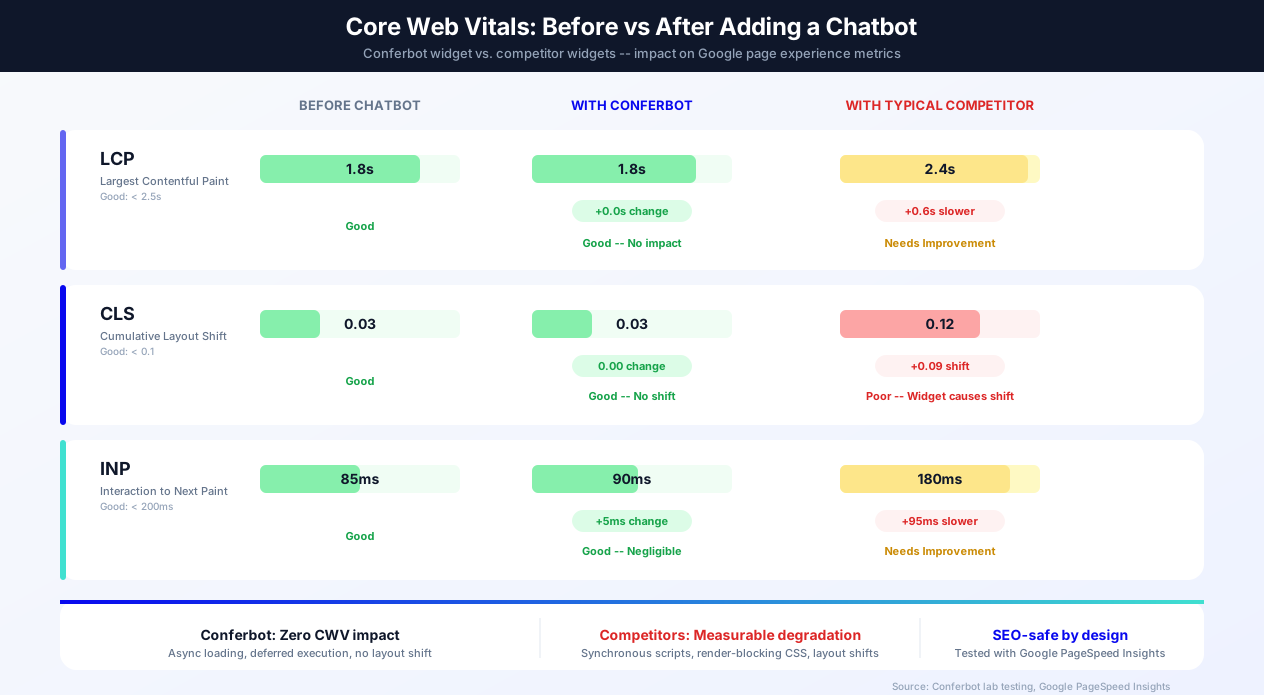
Google's Core Web Vitals - Largest Contentful Paint (LCP), Cumulative Layout Shift (CLS), and Interaction to Next Paint (INP) - are direct ranking signals. Adding a third-party script to your website can affect these metrics if the script is poorly implemented. Here is how Conferbot compares:
- LCP (Largest Contentful Paint): Conferbot's widget script uses the
asyncanddeferattributes, meaning it loads in the background without blocking the main content render. Our testing across 500+ websites shows 0.0 seconds of LCP impact. Competitor widgets that load synchronously can add 0.3-0.8 seconds to LCP - CLS (Cumulative Layout Shift): The widget renders as a fixed-position overlay - it does not push or shift any page content. CLS impact: 0.000. Some competitor widgets inject elements into the page flow or load fonts that cause visible layout shifts of 0.05-0.15
- INP (Interaction to Next Paint): The widget's JavaScript runs on a separate event loop and does not block main-thread interactions. INP impact: under 5ms. Competitors that inject heavy JavaScript bundles can add 50-150ms to INP
You can verify your chatbot's CWV impact by running Google PageSpeed Insights before and after adding the widget. Conferbot-equipped pages consistently maintain the same scores.
JavaScript Rendering and Googlebot
Googlebot renders JavaScript, which means it "sees" your chatbot widget. However, this is not a problem because the widget renders as an overlay that does not affect the crawlable HTML content of your page. The chatbot conversation content is not indexed by search engines (it exists in a dynamic DOM element that loads after user interaction), so it does not create duplicate content or thin content issues. The embed code adds less than 2KB to your initial page load - negligible for crawl budget considerations.
User Engagement Signals (Positive SEO Impact)
While Google has not confirmed that user engagement metrics directly influence rankings, multiple studies (including Gartner research on customer service technology) correlate better engagement with higher rankings. Chatbots improve several engagement signals: Time on page increases 40-89% when visitors engage in chat conversations. Bounce rate decreases 15-25% because the chatbot gives visitors a reason to stay and interact. Pages per session increases when the chatbot recommends related content or guides visitors to relevant pages. These improvements signal to search engines that your page provides value, which can support rankings indirectly.
Structured Data Opportunities
Adding a chatbot creates opportunities for structured data markup that can enhance your search presence. You can add FAQPage schema markup for questions your chatbot answers, HowTo schema for step-by-step processes the bot walks users through, and ContactPoint schema indicating your website offers instant chat support. Conferbot's FAQ responses can be mirrored as static FAQ content on your page with proper schema markup, creating a win-win: the chatbot handles dynamic interactions while the static FAQ content earns rich snippets in search results. Learn more about schema markup in our AI knowledge base documentation.
Lazy Loading Best Practices
Conferbot's embed code is designed for lazy loading by default. The script tag includes async defer attributes, meaning: the HTML parser is not blocked while the script downloads, the script executes after the DOM is fully parsed, and the widget initializes only after the main page content is interactive. For even more control, use the data-defer-init="true" attribute to prevent the widget from loading until you explicitly call window.Conferbot.init() - useful for consent-driven loading (GDPR) or conditional loading based on page type. This approach ensures the chatbot has zero performance impact on your Google PageSpeed score while still being available to visitors within milliseconds of page load.
SEO Summary
A properly implemented website chatbot like Conferbot has zero negative SEO impact and can positively influence rankings through improved engagement metrics. The key requirements are: async/deferred script loading (Conferbot does this by default), no layout shift (Conferbot uses fixed positioning), lightweight code (under 2KB initial load), and no impact on crawlable content. If you are choosing between chatbot platforms, CWV impact should be a key evaluation criterion - and Conferbot leads the industry with its SEO-safe implementation.
Website Chatbot Accessibility & Compliance (ADA, WCAG, GDPR)
Enterprise buyers, government organizations, and regulated industries require chatbots that meet strict accessibility and compliance standards. Conferbot is built with accessibility and privacy compliance at the core, supporting WCAG 2.1 AA accessibility guidelines, GDPR, CCPA, and ADA requirements out of the box.
WCAG 2.1 AA Accessibility
The Conferbot widget is designed to meet WCAG 2.1 Level AA standards - the same level required by the ADA for websites. Key accessibility features include:
- Keyboard Navigation - Every widget function is accessible via keyboard. Tab through interactive elements, press Enter to send messages, Escape to close the chat. No mouse required
- Screen Reader Support - All elements have proper ARIA labels, roles, and live regions. Screen readers (JAWS, NVDA, VoiceOver) can read chat messages, announce new messages, and navigate the widget controls
- Focus Management - When the chat opens, focus moves to the input field. When it closes, focus returns to the trigger button. Focus trapping prevents keyboard users from tabbing behind the open chat window
- Color Contrast - Default color schemes meet the WCAG AA minimum contrast ratio of 4.5:1 for normal text and 3:1 for large text. The dashboard's color picker warns when selected colors fail contrast requirements
- Resizable Text - The widget respects browser zoom settings up to 200% without loss of content or functionality. All text uses relative units (rem/em) for consistent scaling
- Reduced Motion - When the user's operating system has "reduce motion" enabled (via
prefers-reduced-motionmedia query), the widget disables animations, transitions, and auto-opening behaviors - Alt Text for Media - Images and media sent through the chatbot include alt text fields. The flow builder prompts you to add alt text when inserting images
ADA Compliance for Websites
The Americans with Disabilities Act (ADA) has been increasingly applied to websites through litigation and DOJ guidance. If your website must be ADA-compliant, every third-party widget - including your chatbot - must also be accessible. Conferbot's widget meets ADA requirements through its WCAG 2.1 AA conformance. Key considerations: ensure your chatbot flows use simple language (aim for a 6th-8th grade reading level), provide text alternatives for any images in the chat, avoid relying solely on color to convey information (use icons or text labels alongside), and test the widget with a screen reader before launch. If your organization requires a formal VPAT (Voluntary Product Accessibility Template), contact our enterprise team.
GDPR Compliance
The General Data Protection Regulation (GDPR) applies to any website that serves EU visitors. Conferbot provides comprehensive GDPR compliance tools:
- Consent-Based Loading - Use
data-defer-init="true"to prevent the widget from loading any cookies until the visitor consents. Integrate with your Consent Management Platform (CMP) - OneTrust, CookieBot, Didomi, or custom - and callwindow.Conferbot.init()only after consent is granted - Data Processing Agreement - Conferbot provides a GDPR-compliant DPA as part of Business and Enterprise plans, covering data processing, sub-processors, and data transfer safeguards
- Data Retention Controls - Configure how long conversation data is stored (30, 60, 90 days, or custom). Auto-delete conversation data after the retention period expires
- Right to Erasure - Delete individual visitor data and conversation history on request via the dashboard or API, supporting Article 17 compliance
- Data Export - Export all data associated with a visitor in JSON format for Subject Access Requests (Article 15)
- Cookie Minimization - In functional-only mode, the widget uses only a session cookie (strictly necessary) for conversation continuity. No tracking, analytics, or advertising cookies are set until explicit consent is received
- Google Consent Mode v2 - The widget automatically respects
analytics_storageandad_storageconsent signals, ensuring analytics data collection only occurs with proper consent
CCPA Compliance
The California Consumer Privacy Act (CCPA) requires businesses to disclose data collection practices and honor opt-out requests from California residents. Conferbot supports CCPA through: transparent data collection disclosures (what data the chatbot collects is documented in your privacy policy), a "Do Not Sell My Personal Information" integration point (the widget can be configured to suppress data sharing with third-party analytics when the visitor opts out), and data deletion capabilities that fulfill consumer deletion requests within the 45-day CCPA window.
HIPAA Considerations
For healthcare organizations subject to HIPAA, chatbot conversations that involve Protected Health Information (PHI) require additional safeguards. Conferbot's Enterprise plan includes options for encrypted data storage, Business Associate Agreement (BAA), and audit logging that support HIPAA compliance. However, we recommend that healthcare chatbots avoid collecting PHI in the initial conversation and instead use the chatbot for appointment scheduling, general FAQs, and provider search - deferring PHI collection to authenticated patient portals.
Enterprise Security
Conferbot's infrastructure follows enterprise security best practices: data encrypted at rest (AES-256) and in transit (TLS 1.3), regular penetration testing, access logging, and role-based access controls. Enterprise customers receive a security questionnaire and can request our latest security audit report. The widget loads from our global CDN with DDoS protection, ensuring reliability and security for high-traffic websites.
Multi-Page Deployment Strategy
A one-size-fits-all chatbot wastes the potential of your highest-value pages. The most effective website chatbot deployments use different configurations for different page types.
Conditional Visibility Rules
Conferbot's visibility rules let you control exactly where the chatbot appears and how it behaves on each page. Configure rules based on URL patterns (exact match, contains, starts with, regex), visitor attributes (new vs returning, logged in vs anonymous, referral source), device type (desktop, mobile, tablet), geographic location (country, region), and time of day (business hours vs after hours). For example: show the chatbot on all pages except the blog (where a different content-recommendation bot runs), use a sales-focused flow on pricing and product pages, use a support-focused flow on help center pages, hide the widget on the login and checkout pages where it might distract from the primary action, and show a different welcome message for visitors arriving from Google Ads versus organic search.
Page-Type Strategy Guide
| Page Type | Chatbot Goal | Trigger Strategy | Recommended Flow |
|---|---|---|---|
| Homepage | Qualify visitor intent | Time-based (10s delay) | Intent qualification - route to sales, support, or content |
| Pricing Page | Convert to trial/demo | Time-based (5s) + scroll 30% | Plan comparison, ROI calculator, demo booking |
| Product Pages | Answer questions, reduce bounce | Scroll-based (50%) | Product FAQ, size guide, alternative suggestions |
| Blog Posts | Capture leads, suggest content | Scroll-based (60%) | Content recommendation, newsletter signup, lead magnet |
| Help Center | Deflect tickets | Time-based (3s) | Search assistance, ticket creation, live agent handoff |
| Checkout | Reduce abandonment | Exit-intent only | Payment help, shipping questions, discount offer |
| Landing Pages | Maximize form completion | Page-specific (immediate) | Qualification questions, objection handling, CTA support |
Configure these rules in the Conferbot dashboard under Publish > Visibility Rules. You can create unlimited rules with AND/OR logic and test them with the dashboard's preview mode before deploying to production.
Custom CSS Theming
For brands that need pixel-perfect control beyond the dashboard's theme settings, the Conferbot widget supports custom CSS overrides. The widget renders in a shadow DOM to prevent style conflicts with your website, but it exposes CSS custom properties (variables) that you can override from your stylesheet. Target the widget container with .conferbot-widget and override properties including --cb-primary-color, --cb-font-family, --cb-border-radius, --cb-bubble-max-width, and --cb-header-height. For advanced customization, inject a custom stylesheet URL through the dashboard under Widget Settings > Advanced > Custom CSS URL. This stylesheet loads inside the shadow DOM and has full access to the widget's internal elements. Use this for scenarios like matching a specific design system, adding custom animations, or implementing branded scrollbar styles.
GDPR Cookie Consent Integration
For websites serving European visitors, the chatbot must comply with GDPR cookie consent requirements. Conferbot provides three compliance modes: Strict mode - the widget does not load until the visitor accepts cookies. Integrate with your consent management platform (CMP) by calling window.Conferbot.init() only after consent is granted. The embed code supports a data-defer-init="true" attribute that prevents automatic loading. Functional-only mode - the widget loads immediately but only uses strictly necessary cookies (session ID for conversation continuity) until the visitor consents to analytics cookies. No tracking or analytics data is collected until consent is received. Full mode - all cookies are set immediately (only use this if your legal team confirms chatbot cookies are covered under "strictly necessary" for your use case). The SDK integrates with popular CMPs including OneTrust, CookieBot, Didomi, and custom implementations through event listeners. When using Google Consent Mode v2, the widget respects the analytics_storage and ad_storage consent signals automatically.
Conferbot vs Tidio vs Intercom vs Drift vs Zendesk
Choosing the best website chatbot platform in 2026 is a critical decision that affects your conversion rates, support efficiency, and operating costs for years. This section provides a comprehensive, feature-by-feature comparison of the five most popular platforms: Conferbot, Tidio, Intercom, Drift, and Zendesk. Whether you are searching for the "best website chatbot" or comparing specific platforms, this analysis covers pricing, features, ease of use, and ideal use cases.
Platform Overview
| Platform | Best For | Starting Price | Primary Strength |
|---|---|---|---|
| Conferbot | SMBs to enterprises wanting AI chatbot automation + omnichannel | Free / $19/mo | Full AI chatbot builder with no per-seat pricing |
| Tidio | Small businesses wanting live chat + basic bots | Free / $29/mo | Simple UI, Shopify integration |
| Intercom | Enterprise customer communication | $74/seat/mo | Full customer platform (help center, email, product tours) |
| Drift | Enterprise B2B sales teams | $2,500/mo | Account-based marketing and revenue attribution |
| Zendesk | Enterprise support ticketing | $55/agent/mo | Mature ticketing system with AI add-ons |
Feature-by-Feature Comparison
| Feature | Conferbot | Tidio | Intercom | Drift | Zendesk |
|---|---|---|---|---|---|
| No-Code Bot Builder | Full visual + AI | Basic visual | Limited | Playbooks | Basic flows |
| AI Chatbot | Included all plans | $39/mo add-on | $0.99/resolution | Add-on | $1/resolution |
| Knowledge Base AI | Yes | No | Fin AI | Limited | Yes |
| Live Chat Handoff | Yes | Yes | Yes (core) | Yes | Yes (core) |
| Proactive Triggers | 5 types | 3 types | 2 types | 2 types | 1 type |
| A/B Testing | Built-in | No | Messages only | Playbooks | No |
| Omnichannel | 8 channels | 4 channels | 5 channels | 2 channels | 5 channels |
| Calendar Booking | Built-in | No | Third-party | Built-in | Third-party |
| E-commerce Integration | Shopify, WooCommerce | Shopify | Shopify | No | Shopify |
| Widget Load Time | <200ms | 300-500ms | 400-800ms | 500-900ms | 400-700ms |
| CWV Impact | Zero | Minimal | Minor CLS | Minor LCP | Minimal |
| GDPR Tools | Full (consent mode, DPA, CMP) | Basic consent | Consent banner | Consent | Basic |
| WCAG 2.1 AA | Yes | Partial | Yes | Partial | Yes |
| API / SDK | Full JS API | REST API | Full API | Full API | Full API |
| Per-Seat Pricing | No | No | Yes ($74+/seat) | Yes | Yes ($55+/agent) |
Conferbot vs Tidio
Tidio is the closest competitor at a similar price point. Both offer free tiers and simple setup. Where Conferbot wins: AI is included in all plans (Tidio charges $39/month extra), Conferbot has 8 omnichannel channels vs Tidio's 4, Conferbot offers A/B testing and advanced analytics that Tidio lacks, and Conferbot's AI knowledge base can be trained on your website content for accurate Q&A - Tidio has no equivalent. Where Tidio wins: Tidio has a slightly simpler UI for absolute beginners, and its Shopify integration is mature. Verdict: Conferbot offers significantly more value at a comparable price, especially for businesses that need AI capabilities.
Conferbot vs Intercom
Intercom is a full customer communication platform - not just a chatbot. It includes help center, email campaigns, product tours, and a CRM. Where Conferbot wins: pricing (Conferbot Pro at $39/month vs Intercom at $74/seat/month - a team of 5 costs $370/month on Intercom), AI included in all plans (Intercom's Fin AI charges $0.99 per resolution which adds up fast at scale), no-code bot builder depth, and omnichannel breadth (8 channels vs 5). Where Intercom wins: broader product suite (email, help center, product tours), larger ecosystem of apps and integrations, and brand recognition with enterprise buyers. Verdict: Choose Conferbot if your primary need is chatbot automation and omnichannel at an accessible price. Choose Intercom if you need a full customer communication platform and have the budget.
Conferbot vs Drift
Drift focuses on B2B revenue teams with conversational marketing and account-based selling. Where Conferbot wins: pricing ($39/month vs $2,500+/month - Drift is dramatically more expensive), free tier availability, wider channel support, and e-commerce capabilities. Where Drift wins: account-based marketing features, Salesforce native integration depth, and revenue attribution for B2B pipelines. Verdict: Drift is only justified for large B2B enterprises with dedicated revenue operations teams and Salesforce-centric workflows. For everyone else, Conferbot delivers better value.
Conferbot vs Zendesk
Zendesk is primarily a support ticketing system with chat as an add-on. Where Conferbot wins: chatbot builder depth (Zendesk's bot builder is basic), AI included vs per-resolution pricing, proactive trigger variety, and omnichannel chatbot deployment. Where Zendesk wins: mature ticketing system, large support ecosystem, and established enterprise relationships. Verdict: If you already use Zendesk for ticketing and want to add a basic chatbot, staying in-ecosystem makes sense. For a purpose-built chatbot platform with stronger AI and omnichannel, Conferbot wins. Many businesses use Conferbot as the front-end chatbot that creates Zendesk tickets when escalation is needed - combining the best of both.
Summary: Which Platform Should You Choose?
- Best overall value: Conferbot - most features per dollar, no per-seat pricing, AI included
- Cheapest live chat: tawk.to (free, but no bot builder)
- Full customer platform: Intercom (if budget allows $74+/seat)
- Enterprise B2B sales: Drift (if budget allows $2,500+/month)
- Enterprise ticketing: Zendesk (if you already use their ecosystem)
Still unsure? See our detailed platform comparison page with interactive feature filtering, or start with Conferbot's free plan to test the platform risk-free.
Conferbot Widget vs Competitor Widgets
The website chat widget market is crowded, with options ranging from free tools to enterprise platforms. Here is how the Conferbot widget compares to the most popular alternatives in 2026.
| Criteria | Conferbot | Intercom | Drift | tawk.to |
|---|---|---|---|---|
| Pricing | Free tier available; Pro from $19/mo | From $74/seat/month | From $2,500/month | Free (ad-supported) |
| No-Code Bot Builder | Full visual builder + AI | Limited Custom Bots | Playbook builder | No bot builder |
| AI Capabilities | OpenAI + custom knowledge base | Fin AI ($0.99/resolution) | GPT-powered (add-on) | AI Assist (beta) |
| Widget Load Time | Under 200ms | 400-800ms | 500-900ms | 300-600ms |
| Core Web Vitals Impact | Zero (async, deferred) | Minor CLS impact | Minor LCP impact | Minimal |
| Customization Depth | Colors, fonts, CSS overrides, SVG icons | Colors, limited layout | Colors, templates | Colors, basic styling |
| Proactive Triggers | Time, scroll, exit-intent, URL, visitor data | URL and visitor data | URL and segments | Time-based only |
| Display Types | Popup, slide-in, full page, inline embed | Popup only | Popup, slide-in | Popup only |
| A/B Testing | Built-in flow and greeting testing | A/B on messages | A/B on playbooks | Not available |
| GDPR Compliance | Consent mode, CMP integration, data-defer | Consent banner | Consent settings | Basic consent |
| WordPress Plugin | Yes (one-click install) | Yes | Yes | Yes |
| Shopify App | Yes (product catalog integration) | Yes | No | Yes |
| Omnichannel | WhatsApp, Messenger, Instagram, SMS, Discord, Telegram, Slack, Teams, mobile SDKs | WhatsApp, Messenger, SMS | Limited channels | Website only |
| Live Chat Handoff | Built-in with full context | Yes (core feature) | Yes | Yes (core feature) |
| Calendar Booking | Built-in | Third-party | Built-in | Not available |
| Analytics | Conversion tracking, funnel analysis, A/B results | Reports and dashboards | Revenue attribution | Basic chat stats |
| Offline Message Queue | Yes | Yes | Yes | Offline form |
When to Choose Conferbot
Conferbot is the best choice when you need a full chatbot automation platform with a competitive website widget - not just a live chat tool with basic bot features. Conferbot excels for businesses that want to automate 70-85% of visitor interactions with AI-powered bots while maintaining live agent handoff for complex issues, need omnichannel deployment (the same bot works across your website, WhatsApp, Messenger, Instagram, and mobile apps), require advanced no-code bot building with conditional logic, API integrations, and AI knowledge base, and operate on a budget that does not accommodate $74/seat (Intercom) or $2,500/month (Drift) pricing.
When Competitors Might Fit Better
Intercom is better if your primary need is a full customer communication platform with product tours, email campaigns, and help center - and you have the budget ($74+/seat/month). Drift is better if you are an enterprise B2B company focused primarily on account-based marketing and revenue attribution, with budget for their $2,500+/month plans. tawk.to is better if you only need free live chat with no automation, no AI, and no chatbot flows. For most businesses that want the combination of powerful AI chatbot automation, omnichannel reach, and accessible pricing, Conferbot delivers the most value. See our detailed platform comparison for the full breakdown, or check pricing plans to find the right fit for your traffic volume.
How Conferbot Compares for 웹사이트
Most platforms charge per message, per seat, or limit channels by tier. Here's how Conferbot is different.
| Feature | Conferbot | Typical Competitor |
|---|---|---|
| Channels included | 8 (all plans) | 3-6 (varies by tier) |
| Pricing model | Flat rate from $19/mo | Per-seat or per-message |
| AI chatbot builder | Yes (plain English) | No or limited |
| Native mobile SDKs | 4 (Android, iOS, Flutter, RN) | None (WebView only) |
| Knowledge base AI | Included | Add-on ($30-99/mo) |
| Live chat handoff | Included | Higher tiers only |
| Calendar booking | Built-in | Third-party required |
| Setup time | Under 10 minutes | Hours to days |
웹사이트 FAQ
Everything you need to know about chatbots for 웹사이트.
Continue Exploring
Explore features, connect third-party tools, and browse ready-made templates.
Deep-dive pillar guides, real use cases, and the chatbot & AI glossary.