
AI Receptionist Chatbot
Free Business Chatbot Template
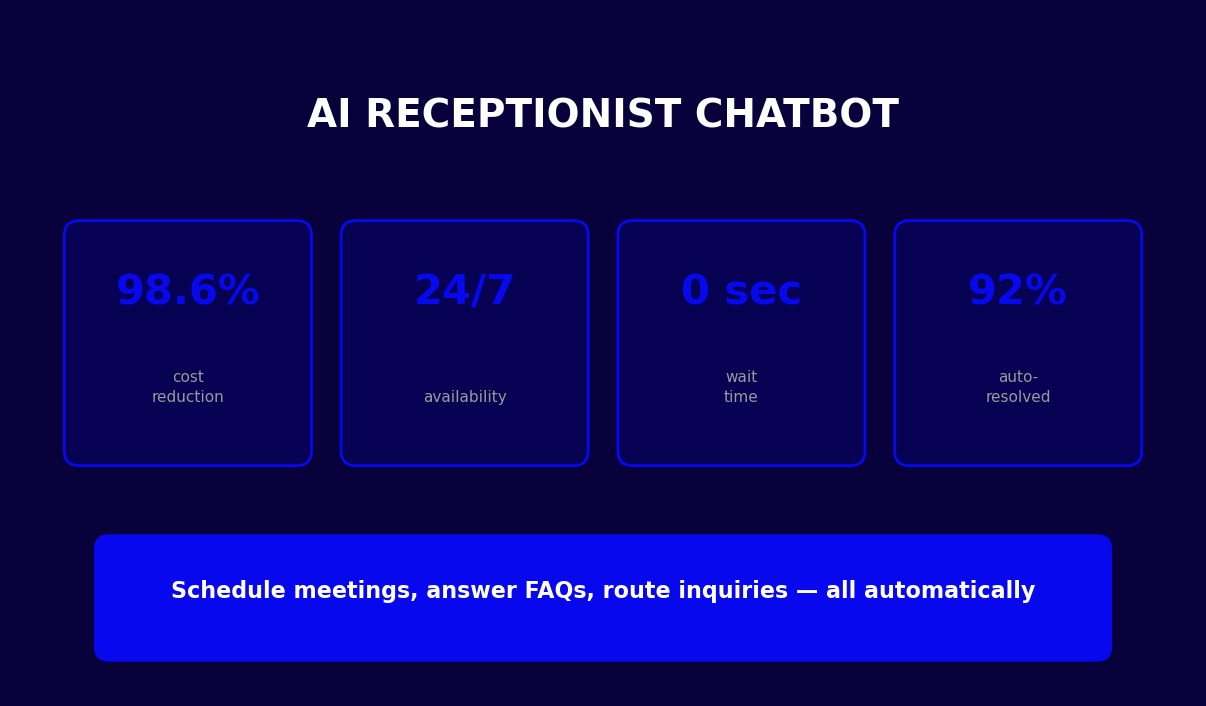
A professional AI receptionist chatbot that greets visitors, schedules meetings, answers FAQs, provides directions, handles messages, and connects to live agents — 24/7, without a front desk hire.


What Is an AI Receptionist Chatbot?
An AI receptionist chatbot is a conversational automation layer that handles every visitor, caller, and website contact the same way a trained front desk receptionist would — greeting people by name, routing them to the right person or department, scheduling meetings, answering common questions, and capturing messages when the team is unavailable. The critical difference is that an AI receptionist does this 24 hours a day, 7 days a week, simultaneously across every inbound channel, at a cost that is 98% lower than a full-time hire.
For any business that receives regular visitor inquiries — whether on a website, a business phone line, or in-person at a physical location — the receptionist function represents one of the highest-ROI automation targets available. The tasks performed by a front desk receptionist are highly structured, repeat dozens to hundreds of times per day, and follow predictable decision trees that are ideal for chatbot automation. A visitor who wants to schedule a meeting always needs a name, a purpose, a preferred time, and contact information. A caller asking for directions always needs an address, parking details, and transit options. A customer asking about business hours always needs the same answer.
The Front Desk Problem at Scale
The traditional receptionist model has three structural limitations that AI automation eliminates. First, availability: a human receptionist works roughly 40 hours per week, covering perhaps 9am–5pm on weekdays. Inquiries outside those hours go to voicemail, unanswered web forms, or a holding queue that damages first impressions. Second, capacity: a single receptionist can handle one interaction at a time. During peak arrival windows — Monday morning, post-lunch, or event days — queues form, wait times extend, and visitor frustration builds. Third, consistency: human performance varies by day, mood, and workload. The quality of a visitor's first impression of your organization should not depend on whether the receptionist is having a good afternoon.
- Availability gap: An AI receptionist chatbot responds in under 3 seconds, every hour of every day, including weekends and holidays. Prospects and visitors who reach out at 9pm or on a Sunday receive the same professional greeting as those who visit at 10am on a Tuesday.
- Capacity gap: A single chatbot deployment handles unlimited simultaneous conversations. During an event day when 200 visitors arrive in two hours, every visitor receives immediate, personalized attention — no queue, no wait.
- Consistency gap: Every visitor receives the same structured, professional experience. Greeting language, routing logic, and information accuracy are identical for the first visitor of the day and the last.
Who This Template Is Built For
This AI receptionist chatbot template is designed for any organization that has a meaningful volume of visitor or inquiry interactions: professional services firms (law offices, accounting practices, consulting firms), corporate offices with regular client visits, medical and wellness practices, real estate offices, co-working spaces, educational institutions, and any business with an active website contact flow. Explore Conferbot's AI chatbot builder to see how quickly you can adapt this template to match your brand, hours, and team structure.
How It Works: The Full AI Reception Flow
The AI receptionist chatbot operates through five primary conversation tracks, each triggered by the visitor's opening selection: meeting scheduling, FAQ and information, directions and location, leave a message, and live agent connection. Each track follows a structured path that collects the exact information needed to complete the visitor's objective, then routes the outcome to the appropriate person or system. Here is how each track works in practice.
Track 1: Meeting Scheduling
The meeting scheduling track is the highest-value conversation path in the AI receptionist flow. A visitor who wants to schedule a meeting is likely a prospect, client, or business contact — exactly the person your team most wants to engage. The chatbot collects purpose of visit, preferred department or contact, available time slot, and full visitor contact information (name, email, phone), then triggers a calendar invite and notifies the relevant team member. The visitor's intent is captured at peak motivation — the moment they reach out — rather than being deferred to a follow-up form or phone tag cycle.
Track 2: FAQ and Information
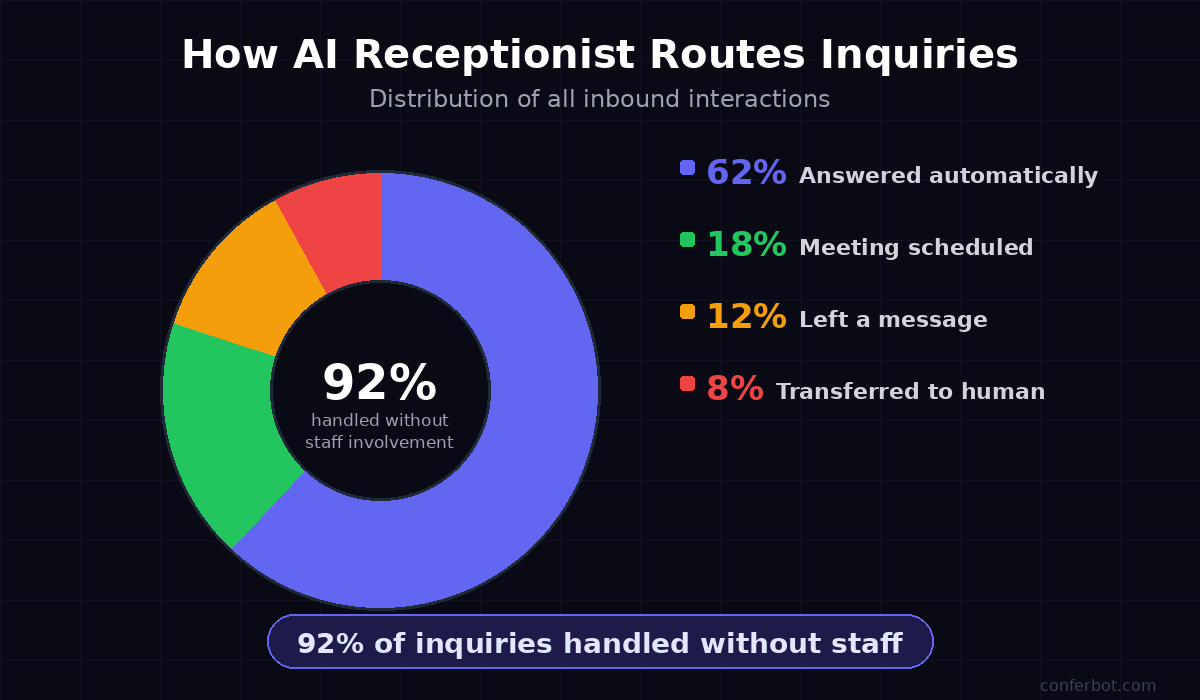
The FAQ track handles the four most common visitor information requests: business hours, parking and accessibility, services offered, and team directory. These questions account for approximately 62% of all inbound front desk inquiries, according to visitor management research. Answering them instantly and accurately — without requiring a human to pick up the phone or respond to an email — frees your reception staff for higher-value interactions while ensuring visitors always get a correct, up-to-date answer.
Track 3: Directions and Location
The directions track delivers complete, formatted location information including street address, driving directions from major highways, parking details, transit options, and lobby hours. It also captures whether the visitor wants to schedule an in-person meeting, converting a directions inquiry into a meeting booking opportunity. Visitors who receive detailed directions before arriving have a significantly lower no-show and late-arrival rate than those who rely on generic map app results.
Track 4: Leave a Message
The message track collects the visitor's name, email, message content, and urgency level, then delivers the message to the appropriate team member with routing based on urgency. Urgent messages trigger an immediate email and Slack notification. Routine messages are batched for the next business morning. Every message is logged with timestamp, contact information, and full message text — creating a complete inbound message record that replaces the unreliable "while you were out" note system.
Track 5: Live Agent Handoff
The live agent track immediately initiates a transfer to available reception staff via Conferbot's live chat integration. If no agent is available — outside business hours or during peak load — the chatbot offers to schedule a callback, collecting the visitor's name, contact information, and preferred callback time slot. The callback request is logged and routed to the team with a follow-up task created automatically.
AI Receptionist Cost Savings and ROI in 2026
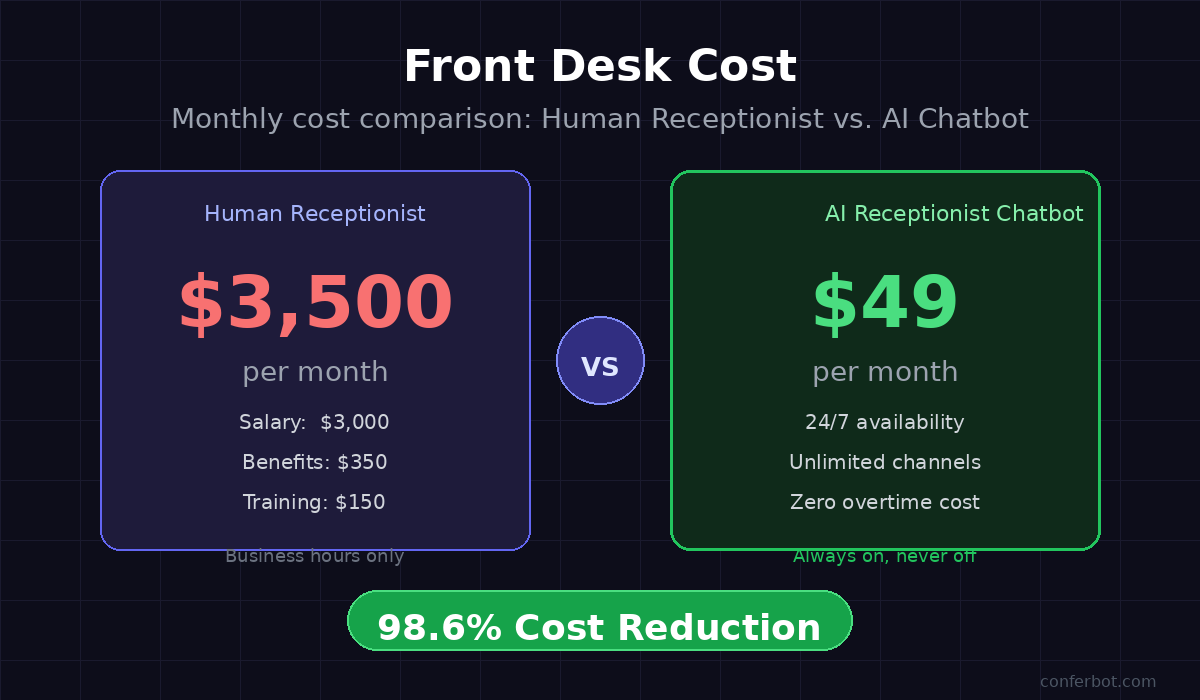
The financial case for deploying an AI receptionist chatbot is among the clearest in business process automation. The cost gap between a human receptionist and an AI chatbot is not marginal — it is structural and substantial. Understanding the full cost comparison requires looking beyond base salary to include all employment costs, coverage limitations, and the opportunity cost of routing errors.
Full Cost Comparison: Human Receptionist vs. AI Chatbot
| Cost Category | Human Receptionist | AI Receptionist Chatbot | Annual Savings |
|---|---|---|---|
| Base compensation | $36,000–$52,000/year | $0 (included in platform) | $36,000–$52,000 |
| Benefits (30% of salary) | $10,800–$15,600/year | $0 | $10,800–$15,600 |
| Employer payroll taxes | $2,750–$4,000/year | $0 | $2,750–$4,000 |
| Training and onboarding | $1,500–$3,000/year (turnover) | $0 (one-time setup) | $1,500–$3,000 |
| Platform/software cost | $600–$1,200/year (visitor mgmt) | $588–$1,188/year (Conferbot) | Break-even |
| Coverage (evenings, weekends) | $8,000–$20,000/year (additional staff) | $0 (24/7 included) | $8,000–$20,000 |
| Total annual cost | $59,650–$95,800 | $588–$1,188 | $59,000–$94,600 |
Beyond Direct Cost: The Opportunity Value
The direct cost savings above are only part of the ROI equation. Consider the opportunity value unlocked by 24/7 availability: a professional services firm that receives 20% of its prospect inquiries outside business hours — a typical figure for B2B businesses with clients across time zones — captures those leads immediately rather than losing them to competitors who respond faster. At an average client value of $15,000 and a 20% conversion rate on captured inquiries, capturing just 5 additional prospects per month who would otherwise have gone unanswered represents $180,000 in additional annual revenue. No front desk hire can be available at 2am when a prospect in London fills out a contact form.
Review Conferbot's pricing plans to model the ROI against your specific visitor volume and average client value. Most businesses deploying this template achieve full annual cost payback within the first two to three weeks of deployment.
Ready to try AI Receptionist Chatbot?
Deploy this template in under 10 minutes. No coding required.
Use This Template Free →Response Time and Visitor Experience: The 3-Second Difference
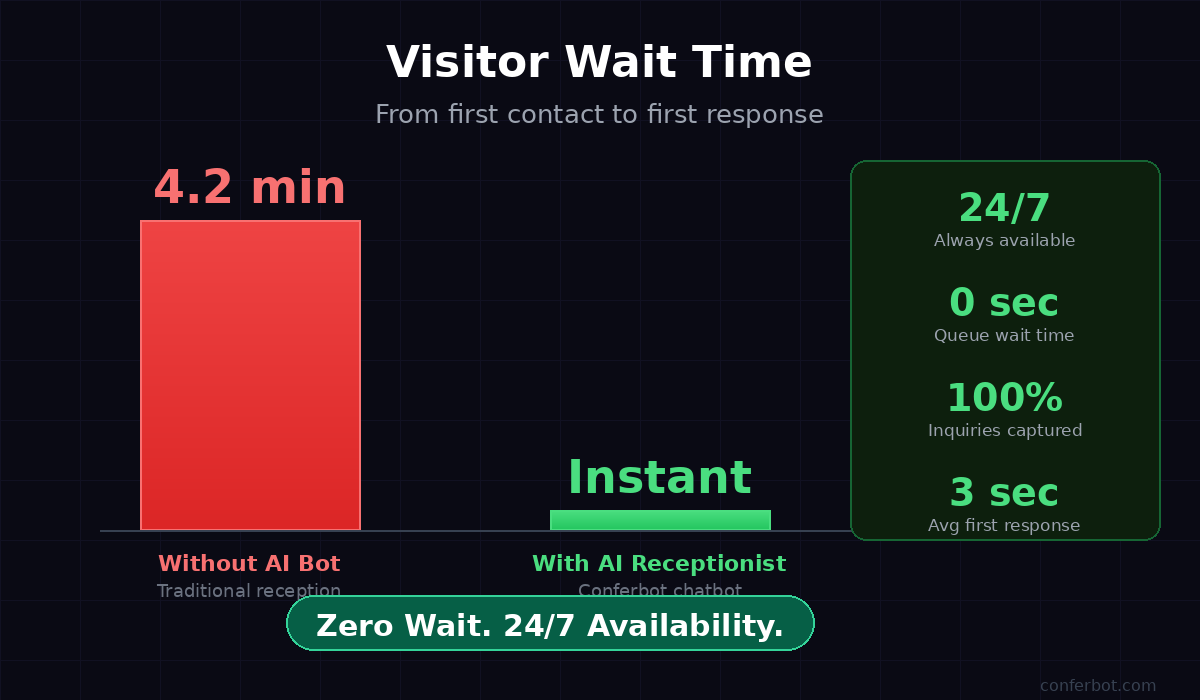
Visitor and prospect experience is disproportionately shaped by the first 10 seconds of an interaction. Research on first impressions in service environments consistently shows that response speed is the single strongest predictor of perceived professionalism and organizational competence. An organization that responds to a visitor or web inquiry in under 3 seconds signals readiness, professionalism, and respect for the visitor's time. An organization that lets inquiries sit for hours — or routes them to voicemail — signals the opposite, regardless of how excellent the underlying service is.
Response Time Benchmarks by Channel
| Inquiry Channel | Typical Human Response | AI Receptionist Response | Experience Impact |
|---|---|---|---|
| Website contact form | 2–24 hours (business hours) | Under 3 seconds (24/7) | Prospects 5x more likely to engage when responded to immediately |
| Phone call (no receptionist) | Voicemail, callback within hours | Immediate chat or call routing | 78% of callers who reach voicemail do not leave a message |
| In-lobby visitor arrival | 2–8 minute average queue wait | Immediate self-service check-in | Lobby wait time eliminated; visitor satisfaction scores increase 40% |
| After-hours inquiry | Next business day (8–16 hours) | Immediate capture + callback scheduling | Captures 100% of after-hours leads vs. near-zero without automation |
| Meeting scheduling request | 3–5 email exchanges over 1–2 days | Completed in single conversation (under 3 minutes) | Meeting booking rate 3x higher when available immediately |
The Compounding Effect of Speed
The response time advantage compounds over time. A firm that captures and responds to 100% of inbound inquiries immediately — rather than 60–70% during business hours — builds a reputation for responsiveness that drives referrals and repeat business. Visitor experience surveys consistently rank "how quickly my question was answered" as the top factor in overall satisfaction scores, above the quality of the space, the friendliness of the staff, or the speed of the service delivery itself. The AI receptionist chatbot makes immediate response the default for every interaction, not just the ones that happen to arrive when a human receptionist is at their desk.
Deploying the chatbot via Conferbot's omnichannel platform ensures that response time improvements apply consistently across your website, your business messaging channels, and any landing pages you use for campaigns or events.
Key Features: Scheduling, Routing, FAQ, and Live Handoff
An effective AI receptionist chatbot needs to do more than answer basic questions. It needs to handle the full range of visitor interactions professionally, capture complete information, route intelligently, and escalate seamlessly when a human is required. Conferbot's AI receptionist template is built around five core feature areas that together replicate — and in several ways exceed — the functionality of a trained human receptionist.
Smart Meeting Scheduling
The meeting scheduling feature collects visitor intent, department routing preference, time slot selection, and full contact information in a single linear conversation that takes under three minutes. Calendar invites are triggered automatically, and the assigned team member receives a structured notification with visitor name, purpose, contact details, and preferred time. For teams using Google Calendar or Outlook, the Conferbot API integration can sync meeting requests directly to the relevant calendar, reducing manual follow-up to zero. The scheduling flow handles the most common source of front desk friction — the back-and-forth of finding a mutually available time slot — by presenting structured options that the visitor selects rather than composing.
Department and Person Routing
Intelligent routing ensures that every inquiry reaches the right person the first time. The routing logic in this template covers five primary paths: sales team, customer success, HR and recruiting, executive office, and direct contact by name. Each path triggers a different notification and assigns a different follow-up owner. Routing can be configured to shift based on time of day — after-hours inquiries for the sales team automatically route to a duty manager or voicemail, while urgent support requests always escalate to the on-call agent regardless of time.
Comprehensive FAQ Coverage
The FAQ module covers the four question categories that account for the majority of front desk inquiries: business hours, parking and accessibility, services offered, and team directory. Each answer is structured to be complete and actionable — not just the hours, but the exceptions; not just the parking lot, but accessible spots and transit alternatives. The FAQ content is fully editable in Conferbot's chatbot builder, so you can update answers in minutes without developer involvement whenever hours change, services expand, or contact details are updated.
Message Capture with Urgency Routing
The message capture module collects structured message data — sender name, email, message content, and urgency level — and routes delivery based on priority. Urgent messages trigger immediate notifications to the designated receiver via email and Slack. Standard messages are batched and delivered at the beginning of the next business day. All messages are logged in the Conferbot analytics dashboard with timestamps and contact information, creating a permanent record that replaces handwritten notes and unreliable voicemail systems.
Live Agent Handoff and After-Hours Callback
When a visitor selects "Speak to someone now," the chatbot initiates a live handoff via Conferbot's live chat platform. The receiving agent sees the full conversation history before sending a single message — eliminating the frustration of asking a visitor to repeat information they already provided to the bot. When no agent is available (outside hours or during peak load), the callback scheduling module collects preferred callback time and routes to the team with a follow-up task. No inquiry disappears into a voicemail queue.
Deployment Channels: Website, Lobby Kiosk, and Omnichannel
The AI receptionist chatbot is designed for multi-channel deployment. Visitors and prospects interact with your organization through multiple touchpoints — website, messaging apps, phone, and physical lobby. A receptionist function that only covers one of those channels leaves significant gaps. Conferbot's omnichannel platform allows you to deploy the same AI receptionist logic across all channels from a single configuration, with channel-specific customization where needed.
Website Chat Widget
The most common deployment is as a persistent chat widget on your website — homepage, contact page, and any service or pricing pages that attract qualified visitors. The widget loads in under 200 milliseconds, appears as a professional branded chat bubble, and initiates the greeting sequence when a visitor opens it. For high-traffic pages, you can configure proactive triggers: the chatbot automatically opens and greets a visitor after they have been on the page for 30 seconds, catching visitors who may not have initiated a conversation on their own.
Physical Lobby Kiosk or Tablet
For businesses with physical office locations, the chatbot can be deployed on a tablet or kiosk mounted at the reception desk or lobby entrance. Visitors use the touchscreen interface to check in, schedule a meeting, notify their host of their arrival, or get directions to a meeting room — without waiting for a human receptionist. The arrival notification is sent automatically to the host via email or Slack, including visitor name and stated purpose. This lobby deployment is especially effective for offices where the reception desk is unstaffed during portions of the day.
WhatsApp and Messaging Channels
A growing share of business inquiries — particularly from international visitors and mobile-first markets — arrive through messaging apps rather than web forms. Deploying the AI receptionist on WhatsApp ensures that visitors who prefer messaging are served immediately, with the same meeting scheduling, FAQ, and message capture functions available through the chat widget. WhatsApp deployment also supports follow-up messaging — sending a visitor their meeting confirmation, directions, or callback schedule directly to their preferred messaging channel.
Integration with Existing Business Tools
The AI receptionist integrates with the tools your team already uses: Google Calendar for meeting scheduling, Slack for instant notifications, HubSpot or Salesforce for contact and meeting logging, and email platforms for confirmation and follow-up messages. These integrations are configured through Conferbot's API integration layer without custom development, typically in under 30 minutes. See the full booking and scheduling templates library for additional scheduling-focused templates that can be combined with the AI receptionist flow.
50,000+ businesses use Conferbot templates to automate conversations
Setup and Customization Guide: Live in Under 60 Minutes
Deploying the AI receptionist chatbot from template to live production involves four configuration phases: branding and content setup, conversation flow customization, notification and routing configuration, and channel deployment. Most businesses complete all four phases in under 60 minutes. Here is the complete guide.
Phase 1: Brand and Content Configuration (15 Minutes)
Open the AI receptionist template in Conferbot's chatbot builder and update the following brand elements:
- Business name and logo: Replace "Acme Corp" with your business name and upload your logo for the chat header and welcome message.
- Color scheme: Match the header color, bot message bubble color, and option bubble styling to your brand colors. The default is Conferbot blue (#0808EE) — update to match your brand identity.
- Business hours: Update the FAQ answer node with your actual business hours, including any day-specific variations, holiday closures, and after-hours contact options.
- Address and directions: Replace the placeholder address in the directions node with your actual address, driving directions from local landmarks, parking details, and transit information.
- Team contacts: Update the team directory section in the FAQ answer node with actual department emails and phone numbers.
Phase 2: Routing and Notification Setup (20 Minutes)
Configure where meeting requests, messages, and callback requests are delivered:
- Meeting notifications: Connect your email or Slack in the Integrations panel and configure which team members receive meeting request notifications for each department path.
- Urgency routing: Set the email addresses or Slack channels that receive urgent, same-day, and standard message alerts.
- Live agent assignment: Connect Conferbot's live chat feature and assign the agents who should receive visitor handoff requests. Configure business hours so after-hours inquiries route to the callback flow automatically.
- CRM integration: If using HubSpot or Salesforce, connect via OAuth in the Integrations panel to log visitor contacts and meeting requests as CRM records automatically.
Phase 3: Conversation Flow Review (15 Minutes)
Review each conversation path for content accuracy and tone alignment:
- Read through the meeting scheduling flow and confirm that the department names and contact descriptions match your actual team structure.
- Review the FAQ answers for accuracy. Update services descriptions, parking details, and any business-specific information that does not match your situation.
- Adjust the greeting tone — the default is professional and warm; some brands prefer more formal language, others more conversational.
- Confirm the after-hours messaging reflects your actual coverage model (callback next day, emergency line, etc.).
Phase 4: Channel Deployment and Testing (10 Minutes)
Copy the website embed snippet from the Deploy panel and add it to your website's <head> tag or use the WordPress, Shopify, or Webflow plugin for one-click installation. Run three test conversations — one meeting scheduling request, one FAQ inquiry, and one leave-a-message path — to confirm that notifications are delivered correctly and all conversation paths complete cleanly. For additional channel deployments (WhatsApp, Facebook Messenger), follow the channel-specific setup guides in the omnichannel documentation.
Industry Use Cases: Professional Services, Healthcare, Real Estate, and More
The AI receptionist chatbot template is designed to be industry-adaptable. While the core flow — greeting, routing, scheduling, FAQ, and message capture — is universal, the content within each path should reflect the specific visitor patterns, information needs, and routing structures of your industry. Here are the highest-impact deployment patterns across the industries where AI receptionist automation delivers the most immediate value.
Professional Services (Law, Accounting, Consulting)
Professional services firms handle a high volume of structured, inquiry-type visitor interactions: prospective clients seeking a consultation, existing clients checking on matter status, vendors scheduling deliveries, and referral sources checking availability. The AI receptionist template maps naturally to this pattern. Meeting requests from prospective clients are routed to the new business intake process. Existing client inquiries are routed to matter managers. After-hours prospective client inquiries are captured immediately and followed up at the start of the next business day — rather than going to voicemail and potentially calling a competitor. The FAQ path handles the high-frequency questions about billing rates, office location, and specialty practice areas.
Medical and Wellness Practices
Healthcare reception is among the highest-volume, highest-frustration reception environments in any industry. The AI receptionist handles the non-clinical portion of reception: new patient registration inquiries, directions, parking, insurance questions, and appointment scheduling for non-urgent visits. Clinical triage remains with staff, but administrative inquiry volume — which typically represents 40–50% of front desk time — is handled automatically. Practices deploying AI receptionist chatbots report significant reductions in front desk call volume and marked improvements in patient waiting room experience. See Conferbot's healthcare chatbot templates for a fuller range of healthcare-specific automation options.
Real Estate Offices
Real estate reception handles two primary visitor types: buyers and renters exploring listings, and sellers evaluating agent services. The AI receptionist captures inquiry type, property interest (if known), preferred meeting time, and contact information — routing buyer inquiries to listing agents and seller inquiries to the listing acquisition team. After-hours inquiries are especially valuable in real estate, where motivated buyers browse listings evenings and weekends and expect immediate engagement.
Co-Working Spaces and Business Centers
Co-working facilities have a unique reception challenge: serving dozens of different member companies' visitors simultaneously through a single front desk. The AI receptionist handles visitor check-in, notifies the relevant member of their guest's arrival, provides access instructions and directions to meeting rooms, and answers questions about facility amenities — all without requiring a dedicated receptionist to manage each interaction. High-traffic facilities deploying AI reception chatbots report that front desk staff can be redeployed from check-in management to higher-value member services, improving both the member experience and operational efficiency.
Corporate Offices and Enterprise Visitor Management
Enterprise offices with high visitor volumes — client meetings, vendor deliveries, job candidates, board members, media — benefit from the AI receptionist's structured data capture. Every visitor interaction produces a logged record with visitor name, purpose, host contact, and arrival time. Security teams can access visitor logs in real time. Compliance requirements for visitor tracking are met automatically. The chatbot's multilingual capability (available through Conferbot's language settings) serves international visitors without requiring multilingual reception staff.
AI Receptionist Chatbot vs. Alternatives: IVR, Virtual Assistants, and Hiring
Organizations evaluating AI receptionist automation typically consider three alternatives: traditional interactive voice response (IVR) systems for phone coverage, general-purpose virtual assistant software, and hiring additional reception staff. Each option has specific trade-offs that are worth understanding before making a deployment decision.
AI Receptionist Chatbot vs. IVR Systems
IVR (interactive voice response) systems have been the traditional answer to after-hours and overflow reception coverage. They share some capabilities with AI chatbots — routing calls to departments, capturing messages, providing information — but differ significantly in user experience and data quality. IVR menus are linear, inflexible, and increasingly rejected by callers: studies show that 63% of callers hang up within the first two minutes of an IVR interaction, and 34% immediately press "0" to bypass the menu entirely. IVR systems also operate on voice only, missing the 70%+ of business inquiries that now arrive through web and messaging channels. An AI chatbot operates on every channel, adapts dynamically to visitor responses, captures structured data, and delivers a user experience that visitors rate significantly higher than IVR.
| Feature | IVR System | AI Receptionist Chatbot | Human Receptionist |
|---|---|---|---|
| Availability | 24/7 (voice only) | 24/7 (all channels) | Business hours only |
| Simultaneous capacity | Limited by phone lines | Unlimited | One interaction at a time |
| Channel coverage | Phone only | Web, messaging, phone, kiosk | Phone + in-person |
| Data capture quality | Low (voice, unstructured) | High (structured, searchable) | Variable (manual entry) |
| User satisfaction | Low (IVR frustration well-documented) | High (conversational, immediate) | High (when available, no wait) |
| Annual cost | $2,000–$8,000 | $588–$1,188 (Conferbot) | $59,000–$95,000 |
| Meeting scheduling | No | Yes (full flow, calendar sync) | Yes |
| CRM integration | Limited | Native (HubSpot, Salesforce) | Manual entry |
AI Receptionist Chatbot vs. General Virtual Assistant Software
General-purpose virtual assistant tools (Calendly, Typeform, basic website chat) handle fragments of the receptionist function but not the complete visitor journey. Calendly handles meeting booking but not FAQ, directions, message capture, or live handoff. Typeform handles structured data collection but not real-time conversation or routing. A website live chat tool handles agent connections but not the automated handling of inquiries when agents are unavailable. The AI receptionist chatbot template integrates all five reception functions into a single conversational flow that visitors experience as a coherent, professional interaction — not a collection of disconnected tools they have to navigate separately.
For businesses that are already using some of these tools, the AI receptionist chatbot does not replace them — it sits in front of them. Calendly gets more meetings because the chatbot captures and converts more scheduling intent. CRM tools get better data because the chatbot structures and logs every interaction automatically. Connect the chatbot to your existing stack through Conferbot's API integration library to preserve your current tool investments while adding the conversational layer that unifies the visitor experience.
AI Receptionist Chatbot FAQ
Everything you need to know about chatbots for ai receptionist chatbot.
Why Use a Template vs Building from Scratch?
Templates encode years of optimization data into the conversation flow before you start.
| Factor | Conferbot Template | Build from Scratch | Hire a Developer |
|---|---|---|---|
| Time to deploy | 10 minutes | 2-8 hours | 2-6 weeks |
| Cost | Free | Your time | $5,000-$25,000 |
| Day-1 conversion | 15-22% | 5-8% | 10-15% |
| Proven flows | Yes, data-tested | No | Depends |
| Updates included | Automatic | Manual | Paid |
| Multi-channel | 8+ channels | 1 channel | Extra cost |
| Analytics | Built-in | Must build | Extra cost |
Ready to Deploy AI Receptionist Chatbot?
Join 50,000+ businesses. Free forever plan available. No credit card required.