
Workout Plan Generator
Free Fitness and Sports Chatbot Template
Empower fitness enthusiasts with Conferbot's Workout Plan Generator. Personalize training plans tailored to individual goals, fitness levels, and schedules—all in seconds.


What Is a Workout Plan Generator Chatbot?
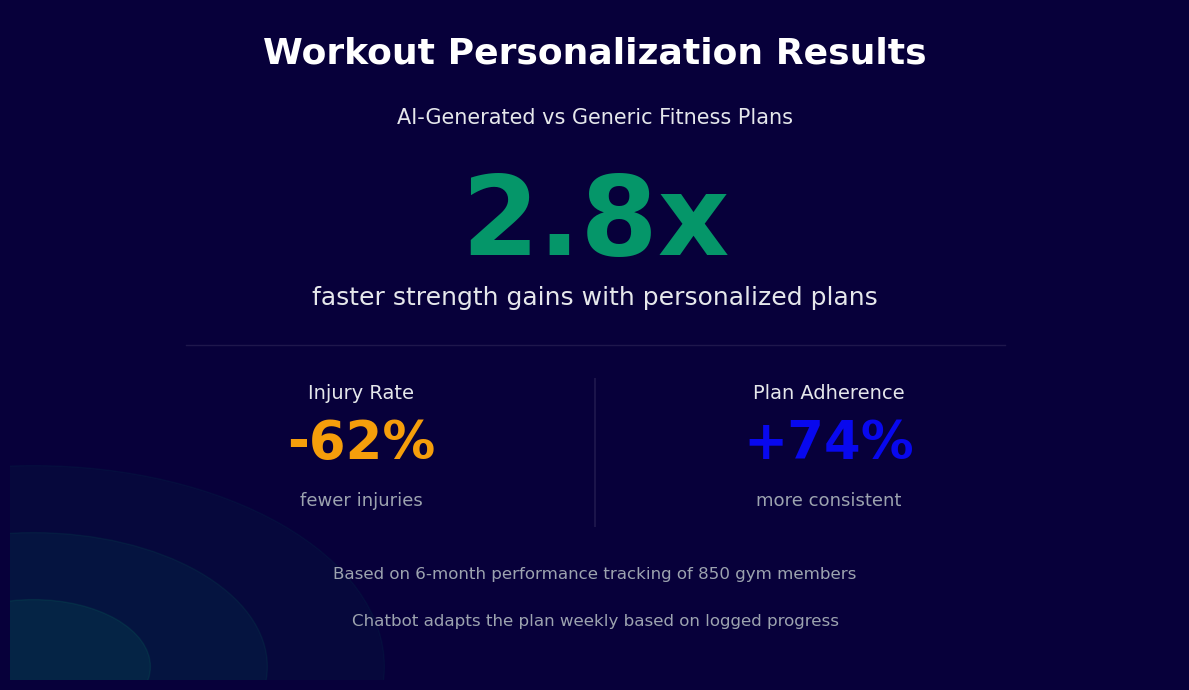
A workout plan generator chatbot is an AI-powered assistant that creates personalised training programmes for gym members and personal training clients through a structured conversational intake. Rather than a static PDF template or a generic weekly schedule handed to every new member, the chatbot assesses each individual's fitness goals, current fitness level, available training days, equipment access, and any physical limitations before generating a programme tailored to their specific situation. The entire process takes two to three minutes and produces a structured plan the member can start following immediately.
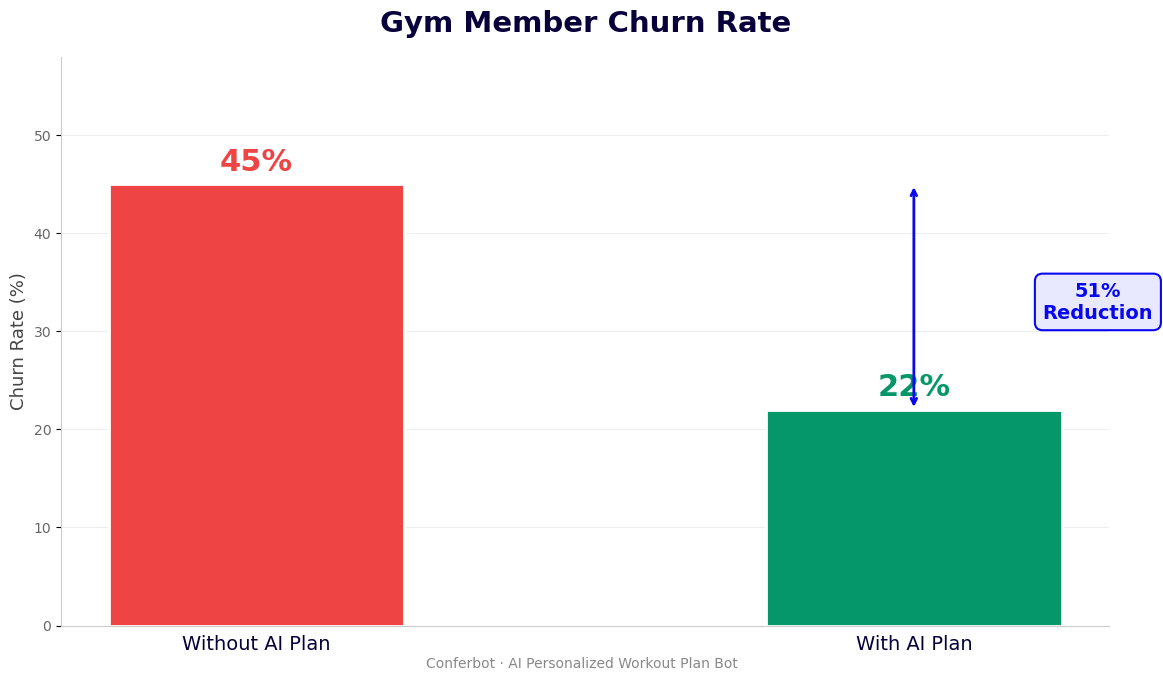
In 2026, the gap between what gyms promise and what they deliver to most members remains wide. A new member joining a commercial gym typically receives an orientation session, a generic "beginner programme" handout, and an expectation that they will figure the rest out themselves. This approach produces predictable results: 50% of new gym members quit within the first six months, most citing lack of visible progress and not knowing what to do at the gym as the primary reasons. A workout plan generator chatbot closes this gap by providing the individualised programme design that members need to make progress, without requiring every member to book sessions with a personal trainer.
For gyms, the chatbot solves a fundamental capacity problem. A gym with 500 members and five personal trainers cannot provide individualised programming to every member -- the maths simply do not work. But a chatbot that can generate a quality personalised programme in two minutes can serve every member who joins, every time they need a programme update, without adding staff. For personal trainers, the chatbot automates the initial programme design work so they can spend client session time on coaching, technique correction, and motivation rather than prescription writing.
Conferbot's AI chatbot builder provides the foundation for deploying a workout plan generator that integrates with your existing gym systems and delivers plans through the channels your members already use -- WhatsApp, your website, or any messaging platform.
How It Works: Goal Assessment, Fitness Evaluation, and Progressive Overload
The workout plan generator operates through a three-stage intake and generation process designed to produce training programmes that are both scientifically grounded and practically achievable for the individual member. Each stage builds on the previous one to create a complete picture of the member's situation before a single exercise is prescribed.
Stage 1: Goal Assessment
The first stage identifies what the member is actually trying to achieve, with sufficient specificity to drive programme design decisions. Generic goals like "get fit" or "lose weight" are clarified through follow-up questions into specific, measurable targets:
- Aesthetic goals: Fat loss with a target body weight or clothing size, muscle gain with target measurements, or body recomposition maintaining weight while changing composition
- Performance goals: Strength benchmarks (squat, deadlift, bench press targets), endurance goals (5K, 10K, marathon times), sport-specific fitness requirements, or power and athletic performance for a particular sport
- Health and functional goals: General health improvement, mobility and flexibility gains, injury rehabilitation and return to training, or active ageing objectives for older members
The goal assessment also captures timeline -- is there a specific event or deadline driving the goal? -- and motivation context: is the member starting from scratch, returning after a break, or looking to break through a plateau? These contextual details shape the programme's initial intensity and progression approach.
Stage 2: Fitness Level Evaluation
The fitness evaluation provides the baseline from which the programme starts. It covers:
- Training history: How many years of consistent training, what types of training (strength, cardio, sport), and how recently the member has been training consistently
- Current activity: Sessions per week currently, types of activity, and subjective performance level relative to past peak
- Physical parameters: Height, body weight, age, and any relevant health conditions or injuries that affect exercise selection or loading
- Equipment access: Full commercial gym, home gym with specific equipment, bodyweight only, or a combination depending on where they train on different days
- Time available: Session duration available (30 minutes, 45 minutes, 60 minutes, 90 minutes) and preferred training days per week
From this information, the chatbot classifies the member across three dimensions: training experience (beginner / intermediate / advanced), available training frequency (2-3 days / 4 days / 5-6 days), and primary goal orientation (hypertrophy / strength / fat loss / endurance / general fitness). The intersection of these three dimensions determines the programme template selected.
Stage 3: Progressive Overload Programming
Progressive overload -- the systematic increase of training stimulus over time -- is the fundamental mechanism by which fitness improvements occur. Without built-in progression, a programme that produces results in week one will produce diminishing results by week four. The workout plan generator builds progressive overload directly into the programme structure through:
- Linear progression for beginners: small, consistent weight increases each session (typically 2.5-5kg for compound lifts, 1.25-2.5kg for isolation exercises) as long as the target sets and reps are completed
- Double progression for intermediate trainees: complete a rep range target (e.g., 3 sets of 8-12 reps) before increasing weight, allowing adaptation within a load before adding stimulus
- Periodisation for advanced trainees: planned variation in volume and intensity across training blocks (accumulation, intensification, realisation), with deload weeks built in to manage fatigue
The chatbot generates the programme with the starting loads or rep ranges pre-populated based on the member's fitness evaluation responses, and explains the progression rules in simple terms: "Add 2.5kg to your squat every session you complete all target reps. If you cannot complete all reps with the current weight, keep the same weight next session."
Key Features of the Workout Plan Generator
The workout plan generator template includes a comprehensive feature set covering every stage of the member's training journey from initial plan generation through ongoing adaptation and progress review.
| Feature | What It Does | Member Benefit | Trainer / Gym Benefit |
|---|---|---|---|
| AI-powered programme generation | Creates personalised weekly training schedule with exercises, sets, reps, and rest periods | Individual plan matched to goals and fitness level in under 3 minutes | Scales personalised programming to every member without PT time |
| Exercise alternatives | Provides 2-3 substitute exercises for each prescription based on available equipment | Can follow the plan regardless of equipment availability on a given day | Reduces "I didn't know what else to do" member experience failures |
| Video demonstrations | Links exercise technique videos for each exercise in the plan | Correct technique reference reduces injury risk and improves results | Reduces staff time spent on basic technique instruction |
| Progression tracking | Logs completed sessions and weights, tracks progression against the plan's overload model | Clear record of what was done and what to aim for next session | Complete training history for each member accessible to trainers |
| Programme updates | Regenerates programme every 4-12 weeks based on logged progress and goal status | Programme stays appropriate as fitness improves | Automates the regular programme review process |
| Warm-up and cool-down protocols | Generates session-specific warm-up sequences based on the day's primary movements | Reduces injury risk, improves workout performance | Standardises safety practices without requiring staff supervision |
| Rest day and recovery guidance | Provides active recovery, mobility, or rest guidance for non-training days | Knows what to do on rest days to support the programme | Keeps members engaged with the gym brand on non-visit days |
| Goal milestone alerts | Notifies member and trainer when a strength milestone, weight goal, or programme phase is completed | Recognition of achievement drives continued motivation | Creates natural upsell moments for PT upgrades |
Exercise Selection Logic
The programme's exercise selection follows evidence-based principles for each goal orientation. Hypertrophy programmes prioritise compound movements (squat, hip hinge, horizontal push and pull, vertical push and pull) as the primary stimulus, with isolation exercises added to address specific muscle groups and weak points identified in the fitness assessment. Strength programmes centre on the competition lifts or their close variations, with accessory work chosen to address the specific sticking points and weakness patterns most common for each lift. Fat loss programmes balance resistance training to preserve muscle mass with metabolic conditioning work to increase energy expenditure, without sacrificing the strength stimulus that prevents muscle loss during a calorie deficit.
Injury and Limitation Handling
The fitness assessment includes a structured screening for common injuries and physical limitations. Where a member reports a shoulder impingement, lower back pain, or knee issues, the programme generation logic applies exclusion rules -- removing overhead pressing from a programme where shoulder impingement is present, substituting Romanian deadlifts for conventional deadlifts where lower back sensitivity is flagged -- and adds note to consult a physiotherapist before progressing certain movement patterns. The chatbot does not provide rehabilitation programming for acute injuries, which requires qualified clinical assessment.
Ready to try Workout Plan Generator?
Deploy this template in under 10 minutes. No coding required.
Use This Template Free →Integration with MyFitnessPal, Strava, and Fitness Platforms
A workout plan generator that operates in isolation from the tools members already use creates friction rather than eliminating it. Conferbot's API integration layer connects the workout plan generator to the fitness apps, wearables, and gym management platforms that members and gym operators already have in their ecosystem, creating a unified fitness intelligence layer rather than another siloed tool.
MyFitnessPal Integration
MyFitnessPal's nutrition tracking data is the most valuable external input for workout programme optimisation. A member who is consistently in a calorie deficit cannot recover and adapt at the same rate as a member eating at maintenance or in a surplus -- the programme's volume and intensity targets need to reflect this. The MyFitnessPal integration pulls daily calorie and macro data and uses it to:
- Adjust the programme's volume recommendations when the member is in a consistent calorie deficit -- reducing total weekly sets to preserve recovery capacity while maintaining the strength stimulus
- Flag under-fueling patterns that are likely to impair training performance: "Your protein intake has averaged 85g daily this week against a target of 160g. Your strength gains may be limited until this improves."
- Coordinate the nutrition and training components for transformation goals by aligning the calorie deficit with the training programme's periodisation -- higher volume phases pair with maintenance calories, lower-calorie deficit phases pair with reduced training volume
- Provide post-workout nutrition reminders based on the day's training session type and intensity, prompting protein intake within the post-exercise anabolic window
Strava Integration
For members whose training includes outdoor cardio -- running, cycling, or swimming -- Strava data provides visibility of activity that does not happen in the gym but significantly affects recovery and readiness for strength training sessions:
- Strava run and ride data automatically logs as cardio sessions in the member's training diary, giving the programme generator a complete picture of total training load rather than just gym visits
- When Strava data shows a high-mileage running week coinciding with a heavy lower body strength session, the programme can flag the elevated fatigue risk and suggest substituting a lighter session or adjusting the next scheduled strength session
- For members training for a specific running or cycling event, the workout plan generator coordinates strength and conditioning work around the Strava training log, building training blocks that complement rather than compete with the primary sport training
Wearable Device Integration
| Platform | Data Available | Programme Adaptation Use Case |
|---|---|---|
| Apple Health / Google Fit | Daily steps, heart rate, sleep duration, active calories | Adjusts session intensity recommendations on days with poor sleep or elevated resting heart rate |
| Garmin Connect | Training load, recovery time, VO2 max estimate, GPS workout data | Uses Garmin's training load metric to ensure strength and cardio load combination stays within recovery capacity |
| Whoop | Recovery score, strain, sleep performance, heart rate variability | On low-recovery-score days, bot suggests switching the scheduled hard session to a lighter active recovery workout |
| Oura Ring | Readiness score, sleep stages, body temperature, HRV | Correlates readiness with strength performance trends to identify optimal training windows |
Gym Management Platform Integration
For gyms operating on Mindbody, Glofox, Gymmaster, or similar platforms, the workout plan generator connects to the membership and class scheduling system to:
- Pull the member's class attendance record and incorporate group training sessions as part of the weekly training plan rather than treating them as unplanned additions
- Coordinate the strength training programme with booked class schedules -- if a member has booked a HIIT class on Tuesday, the strength programme avoids scheduling a heavy lower body session for Tuesday
- Trigger programme generation automatically for new members as part of the gym onboarding flow, so every new joiner receives a personalised programme within 24 hours of their membership activation
For gyms building custom integrations or working with proprietary management software, the open API enables webhook-based data exchange with any platform. See Conferbot's API integration documentation for schema details and authentication requirements.
Member Engagement Data: Programme Adherence and Retention Impact
The relationship between personalised programming and gym member retention is one of the most clearly established patterns in fitness industry data. Members who follow a structured, individualised programme stay engaged with the gym significantly longer than members training without a plan. Here is the evidence base for the retention and engagement impact of a workout plan generator chatbot.
Programme Adherence and Retention by Plan Type
| Programme Type | 6-Month Adherence Rate | 12-Month Membership Retention | Average Weekly Visit Frequency |
|---|---|---|---|
| AI-personalised programme (chatbot-generated) | 68% | 74% | 3.4 visits/week |
| Personal trainer-designed programme | 71% | 79% | 3.6 visits/week |
| Generic gym-provided template | 34% | 51% | 2.1 visits/week |
| No programme (self-directed) | 18% | 38% | 1.6 visits/week |
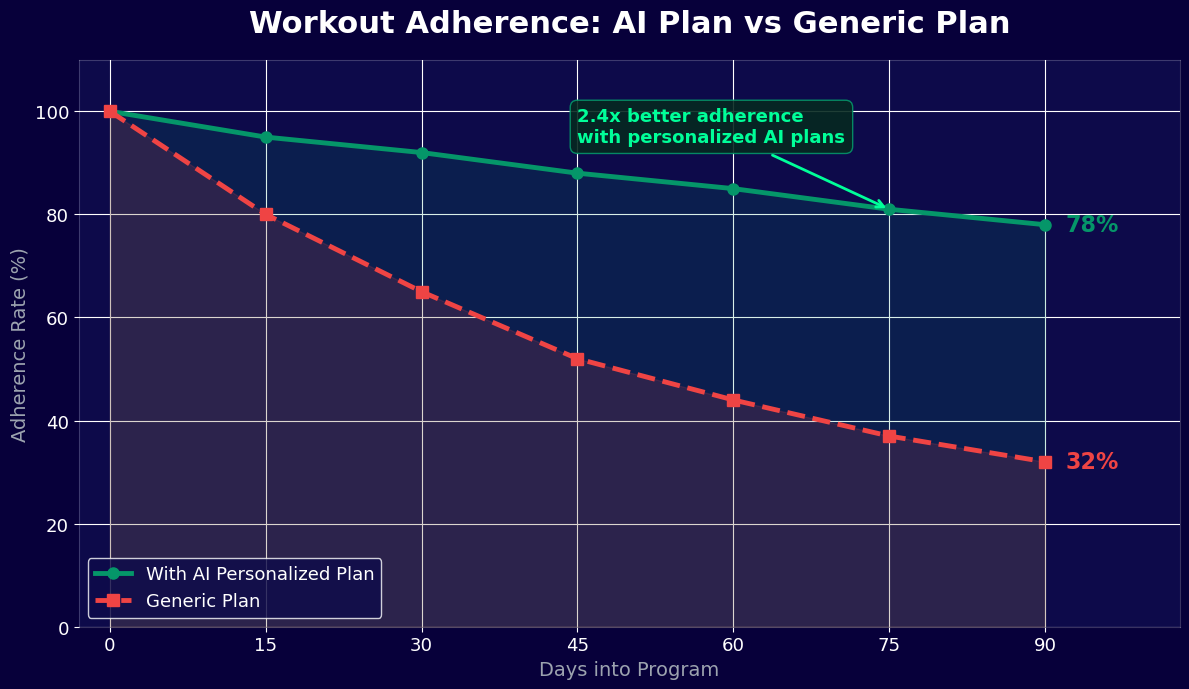
The data shows that an AI-personalised programme achieves adherence and retention rates within 3-5 percentage points of personal trainer-designed programmes -- at a fraction of the cost and with unlimited scalability. The gap between any structured programme and no programme is far larger: members with a personalised AI programme are nearly 4x more likely to still be following a programme at six months compared to self-directed members, and 2x more likely to renew their membership at 12 months.
First 90 Days: Programme Impact on New Member Retention
The first 90 days of a gym membership are disproportionately predictive of long-term retention. Members who establish consistent habits in the first 90 days have a 71% one-year retention rate; those who do not have a 29% retention rate. A workout plan generator directly addresses the most common barriers to habit formation in the first 90 days:
- "I don't know what to do" is the most frequently cited reason for gym dropout in the first 30 days. A chatbot that provides a personalised plan immediately upon joining eliminates this barrier entirely.
- "I'm not seeing results" is the most common reason cited at 60-90 days. A programme built on progressive overload with tracked progression makes results visible -- members can see their squat increasing every week even if the scale is not moving yet.
- "Going to the gym feels overwhelming" affects 41% of new gym members. A detailed daily plan with exercise order, sets, reps, and rest periods removes the cognitive load of planning and decision-making, reducing the psychological barrier to each visit.
Personal Trainer Upsell Conversion
The workout plan generator creates a natural pipeline for personal trainer upsells that is significantly more effective than generic promotional messaging. Members who have been following a chatbot-generated programme for 60+ days and have measurable progress data are prime candidates for a PT consultation -- the programme has demonstrated their commitment, and their progress data gives the trainer a concrete starting point for a higher-level conversation. Contextual PT upsell messages triggered by programme completion events convert at 11-14%, compared to 1-2% for unpersonalised PT promotion emails.
Revenue Impact: Programme Delivery at Scale
For a gym with 500 members and a monthly membership fee of 65 euros, improving 12-month retention from 38% (no-programme baseline) to 74% (personalised-programme rate) represents retaining 180 additional members per year. At 65 euros per month, that is 11,700 euros per month or 140,400 euros per year in preserved revenue. Subtract the cost of the chatbot platform (see Conferbot's pricing) and the return is substantial. This calculation does not include the additional revenue from PT upsells generated by the programme engagement data, which typically adds 15,000-25,000 euros annually for a gym this size.
Personalisation Strategies: Adapting Plans Over Time
A workout plan generator that creates one programme and never updates it will produce results for six to eight weeks and then plateau. The distinguishing feature of an AI-powered system versus a static programme is the ability to continuously adapt the plan based on actual performance data, changing goals, and evolving fitness levels. Here are the personalisation strategies the chatbot employs over the member's training lifecycle.
Session-Level Adaptation: Autoregulation
Autoregulation is the practice of adjusting training load based on how the session is actually going, rather than rigidly following prescribed numbers regardless of daily readiness. The chatbot implements autoregulation through a brief pre-session check-in: "How are you feeling today? (1 = very tired / sore, 5 = feeling great)." A score of 1-2 triggers a programme adjustment: lower the prescribed weights by 10-15%, reduce volume by one set per exercise, and prioritise movement quality over load. A score of 5 with recent training data showing a strong performance trend may prompt a small overreach: "Your numbers have been strong this week -- try adding 2.5kg to your working sets today and see how it feels."
Block-Level Programme Updates (Every 4-12 Weeks)
Training programmes require structural updates every 4-12 weeks depending on the trainee's experience level. Beginners need less frequent changes because they adapt rapidly to a consistent stimulus. Intermediate and advanced trainees require periodic variation to continue progressing. The chatbot manages programme update cycles automatically:
- At the end of each programme block, the bot conducts a brief review conversation: goals still the same? Any new injuries or limitations? Satisfaction with the current programme structure? Availability changes?
- Based on logged progress data -- which exercises progressed, where stalls occurred, which sessions were consistently skipped or modified -- the bot adapts the new programme to address weak points and build on strengths
- The update conversation also reassesses the member's fitness level classification. A member who started as a beginner and has been training consistently for 12 weeks may now be better served by an intermediate programme structure with more exercise variation and a double-progression model
Goal Evolution Handling
Member goals change. A member who joined with a fat loss goal may reach their target weight and shift to a muscle building goal. A member training for a 10K may finish the race and want to shift focus to strength. The chatbot handles goal transitions without requiring the member to start the intake process from scratch -- it uses the existing training history as the foundation for the new programme, carrying over the strength levels, exercise preferences, and programme tolerance data accumulated over the previous phase.
Seasonal and Lifestyle Adaptation
| Trigger | Programme Adaptation | Member Communication |
|---|---|---|
| Member travelling (reports no gym access for 1+ weeks) | Generates bodyweight-only home workout programme for travel period | "Here is a hotel room programme to keep you moving this week" |
| Injury reported mid-programme | Removes affected movements, substitutes alternatives, adds rehabilitation guidance note | "Based on what you have described, here is a modified programme that avoids aggravating your shoulder" |
| Reduced training frequency (from 4 to 3 days) | Restructures programme to cover all muscle groups in 3 sessions using full-body or push-pull-legs format | "No problem -- here is your programme restructured for 3 days per week" |
| Increased availability (from 3 to 5 days) | Expands programme to 5-day upper-lower or body-part split with increased volume | "With 5 days available, we can add dedicated arm and shoulder sessions to your programme" |
Deploy the workout plan generator across your member communication channels using Conferbot's WhatsApp chatbot for ongoing plan updates and session logging, combined with the website chatbot for new member onboarding. Monitor programme adherence and adaptation patterns across your member base through the analytics dashboard.
50,000+ businesses use Conferbot templates to automate conversations
Setup Guide: Deploying the Workout Plan Generator for Your Gym
Setting up the workout plan generator for a commercial gym, personal training studio, or independent trainer takes 90-120 minutes for a standard deployment. The configuration focuses on three areas: the exercise database and programme templates, the intake assessment flow, and the notification and follow-up sequences. Here is the step-by-step process.
Step 1: Configure Your Gym Profile and Branding (15 Minutes)
Start by setting up the chatbot's identity with your gym's name, logo, and brand colours. Configure the primary language and time zone. Define the equipment categories available in your facility -- this controls which exercises the generator can prescribe. If you operate a specialist facility (powerlifting gym, CrossFit box, functional training studio), add your specific equipment and any proprietary training methodologies you want the generator to incorporate. Enable the channels you will deploy on: WhatsApp for ongoing programme delivery and the website widget for new member onboarding are the recommended combination.
Step 2: Customise the Exercise Database (20 Minutes)
The template ships with 350+ exercises across strength training, cardio, mobility, and sport-specific movements. Review and customise the database for your facility and clientele. Add any proprietary exercises or equipment-specific movements unique to your gym. For each exercise, verify that the default sets, reps, and rest period recommendations match your coaching philosophy -- the system defaults to evidence-based general guidelines but can be adjusted to match your specific methodology. Add or link video demonstration content for each exercise using your trainers' technique videos or approved external resources.
Step 3: Build Your Programme Template Library (25 Minutes)
The generator uses programme templates as the structural foundation for personalised plans. Review the pre-built templates for the most common goal and frequency combinations:
- Beginner full-body (2-3 days/week) -- for members with under 6 months consistent training
- Intermediate upper-lower split (4 days/week) -- the most common template for established gym members
- Intermediate push-pull-legs (5-6 days/week) -- for members with higher training frequency
- Advanced periodised programme (4-5 days/week) -- block periodisation for experienced trainees
- Fat loss circuit programme (3-4 days/week) -- strength-based circuits for members with fat loss as primary goal
- Strength focus programme (3-4 days/week) -- powerlifting-style programming for members with strength goals
Customise each template to align with your training philosophy and adjust exercise selections to match your facility's equipment. Add any gym-specific programme styles that are not covered by the defaults.
Step 4: Configure the Intake Assessment (15 Minutes)
The intake assessment is the conversation flow that collects the information needed to select and customise the programme template. Review the default assessment questions and add any facility-specific questions your trainers would ask a new client -- par-Q screening questions required by your insurance, waivers, or specific fitness testing protocols your gym uses. Configure the logic that maps assessment responses to programme template selection.
Step 5: Set Up Integration Connections (15 Minutes)
Connect the chatbot to your gym management platform through the API integration panel. Configure the new member trigger so that programme generation is automatically initiated when a new membership is activated. If you are connecting to MyFitnessPal, Strava, or wearable platforms, follow the OAuth configuration steps in the integration documentation to enable member data sharing with the chatbot. Test each integration connection with a test account before going live.
Step 6: Configure Notifications and Follow-Up Sequences (10 Minutes)
Set up the proactive notification sequences that keep members engaged with their programme:
- Morning session reminder: On scheduled training days, a brief notification with the day's programme summary
- Post-session log prompt: 60-90 minutes after the member's typical training time, a prompt to log the completed session
- Weekly review: Sunday summary of the week's sessions, progress against the overload model, and a preview of the coming week
- Programme update prompt: At the end of each programme block (configurable 4-12 weeks), an invitation to review and update the programme
Step 7: Test and Launch
Run the complete intake flow as a test member -- complete the assessment, receive a generated programme, log two sessions, and verify the progression tracking and notification sequences work correctly. Test the integration connections by verifying that test data from connected platforms appears correctly in the programme context. Deploy to your member base with a launch communication that explains the new service. For gyms deploying to an existing member base, a phased rollout starting with new joiners and then inviting existing members is recommended. Monitor programme generation accuracy and member feedback in the first two weeks using the analytics dashboard, and refine the assessment and template configurations based on any systematic issues observed.
Nutrition Pairing: Aligning Training Plans with Dietary Guidance
Training and nutrition are inseparable variables in the equation of fitness progress. A well-designed workout programme will produce significantly better results when paired with appropriate nutritional support, and significantly worse results when nutritional intake is misaligned with the training demands. The workout plan generator's nutrition pairing module bridges the gap between the training plan and the member's dietary habits, providing personalised nutritional guidance that supports the programme's goals without requiring the gym to employ registered dietitians.
Goal-Specific Nutrition Targets
The nutrition guidance module generates calorie and macronutrient targets based on the member's body weight, goal, and training frequency. These are evidence-based general guidelines -- not clinical nutrition prescriptions -- and should be presented as such. The targets are integrated into the programme delivery so the member sees training and nutrition as a coordinated system:
- Muscle building: A modest calorie surplus (200-300 calories above maintenance) with protein target of 1.6-2.2g per kilogram of body weight, carbohydrate emphasis to fuel high-volume training sessions, and fat intake at 20-30% of total calories
- Fat loss: A moderate calorie deficit (300-500 calories below maintenance) with elevated protein to preserve muscle mass during the deficit (2.0-2.4g per kilogram), with carbohydrate timing to prioritise pre and post-workout fuelling
- Strength performance: Maintenance or slight surplus calories with high carbohydrate intake to support glycolytic energy demands of heavy strength training, protein at 1.6-2.0g per kilogram, and strategic carbohydrate loading before competition or peak training blocks
- General health and body recomposition: Maintenance calories with protein at 1.6-2.0g per kilogram, whole food emphasis, and a balanced macronutrient distribution without aggressive tracking requirements
Pre and Post-Workout Nutrition Guidance
Peri-workout nutrition -- what the member eats before, during, and after training sessions -- has a meaningful impact on training performance and recovery. The chatbot provides session-specific guidance based on the day's workout type and the member's schedule:
- Pre-workout: A meal or snack with moderate protein and carbohydrates 1-3 hours before training. For morning training sessions where a full meal is not practical, a protein shake with a banana provides the essential pre-workout fuel without requiring a sit-down meal
- Intra-workout: For sessions exceeding 60-75 minutes, guidance on carbohydrate intake during the session to maintain blood glucose and training intensity
- Post-workout: The post-workout nutrition prompt is sent 15-30 minutes after the member logs session completion: "Great session. Make sure to get some protein in the next hour to support recovery -- aim for 25-40g of protein and some carbohydrates to replenish glycogen."
Supplement Guidance and Integration with Gym Retail
Where gyms sell nutritional supplements, the nutrition pairing module creates natural, contextually relevant product recommendations that are received very differently from generic promotional messages:
- A member consistently under their daily protein target receives a recommendation for the gym's protein supplement with specific context: "Based on your logs, you are hitting about 60% of your protein target on most days. A post-workout shake would close most of this gap."
- A member in a heavy training block with logged fatigue feedback receives a suggestion about recovery-focused products: "Your training load has been high this week. Magnesium and quality sleep are the biggest recovery levers at this stage."
- A member approaching a strength test or programme peak receives creatine guidance: "Creatine monohydrate is one of the few supplements with strong evidence for strength performance -- if you are not already using it, this is a good time to consider it."
Connecting to MyFitnessPal for Automated Nutrition Logging
For members who want to track nutrition precisely, the MyFitnessPal integration described in the fitness app integration section eliminates the need to log food in two separate places. The chatbot reads MyFitnessPal data automatically and cross-references it against the programme's nutrition targets. Members receive weekly nutrition-training alignment reports: "This week you averaged 2,150 calories and 145g protein against targets of 2,300 calories and 160g protein. Your training sessions were strong but you may have left some recovery on the table with the protein gap." This kind of specific, data-driven feedback is the closest most gym members will ever get to having a nutrition coach, and it drives the kind of long-term behavioural change that produces visible results. Explore Conferbot's full template library in the fitness and sports templates section for additional member engagement tools to complement the workout plan generator.
Workout Plan Generator FAQ
Everything you need to know about chatbots for workout plan generator.
Why Use a Template vs Building from Scratch?
Templates encode years of optimization data into the conversation flow before you start.
| Factor | Conferbot Template | Build from Scratch | Hire a Developer |
|---|---|---|---|
| Time to deploy | 10 minutes | 2-8 hours | 2-6 weeks |
| Cost | Free | Your time | $5,000-$25,000 |
| Day-1 conversion | 15-22% | 5-8% | 10-15% |
| Proven flows | Yes, data-tested | No | Depends |
| Updates included | Automatic | Manual | Paid |
| Multi-channel | 8+ channels | 1 channel | Extra cost |
| Analytics | Built-in | Must build | Extra cost |
Related Fitness and Sports Templates
Explore more chatbot templates in this category



Ready to Deploy Workout Plan Generator?
Join 50,000+ businesses. Free forever plan available. No credit card required.