
Select your industry for pre-filled benchmarks
Your Support Metrics
Your Savings Estimate
Start saving $15,711/month with AI automation
No credit card required. Free 14-day trial.
How This Calculator Works
Three-step methodology grounded in real industry benchmarks to project your potential savings.
Input Your Current Metrics
Enter your monthly support ticket volume, average agent cost per hour, and typical handle time. These data points form the baseline for calculating your total current customer service spend, including overhead costs like training, software, and benefits.
Automation Modeling
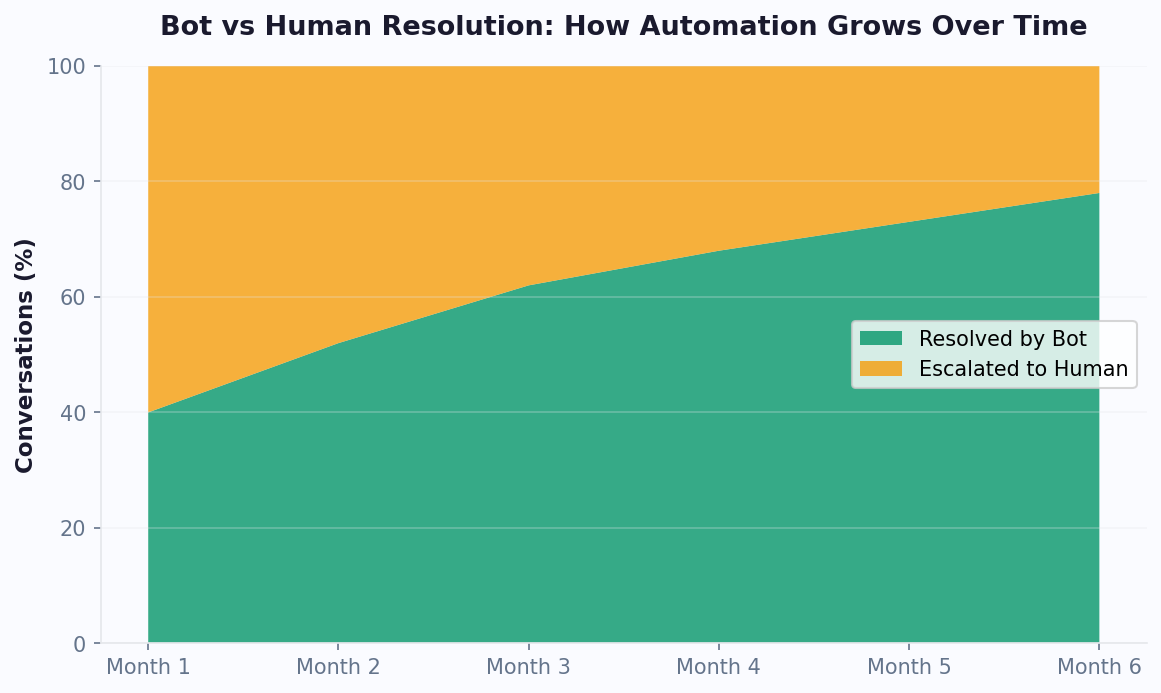
We apply industry-standard deflection rates to determine how many tickets AI can resolve without human intervention. Rates typically range from 60-80%. We model first-contact resolution, escalation paths, and blended costs of automated vs. human interactions.
Savings Projection
Get your projected annual savings, total ROI, and estimated payback period. We compare your current spend against AI chatbot platform costs including subscription, setup, and optimization to show exactly when you break even.
Why Customer Service Costs Matter More Than Ever
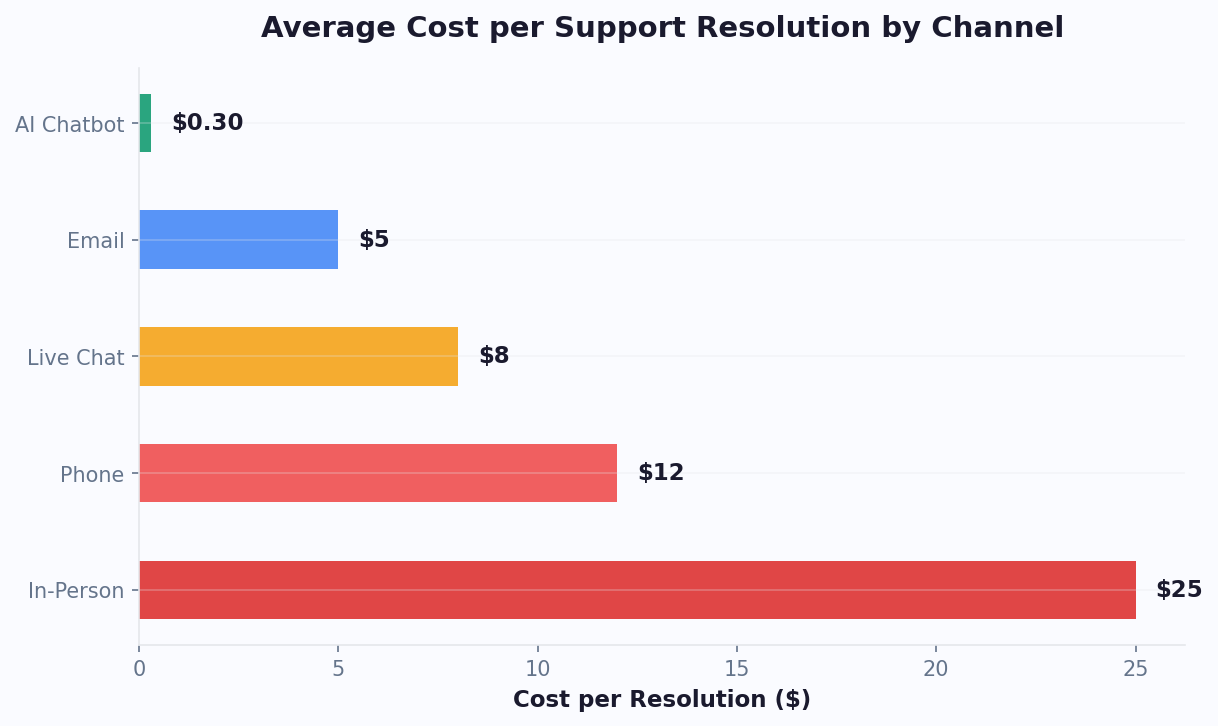
Customer service is one of the largest operational expenses for modern businesses, and it is growing faster than most teams realize. The average cost to resolve a single support ticket through a human agent ranges from $5 to $25, depending on complexity, channel, and agent compensation. For a mid-size company handling 10,000 tickets per month, that translates to $600,000 to $3 million in annual support costs before you account for training, turnover, and technology overhead.
The real problem is that customer service costs scale linearly with ticket volume. Every new customer, product feature, or market expansion generates more tickets — which means more agents, more training, and more management overhead. AI chatbots fundamentally change this equation by handling repetitive queries at near-zero marginal cost. Instead of hiring five new agents to handle a 30% increase in tickets, you can train an AI chatbot to deflect the majority of those new interactions while your existing agents focus on high-value, complex cases.
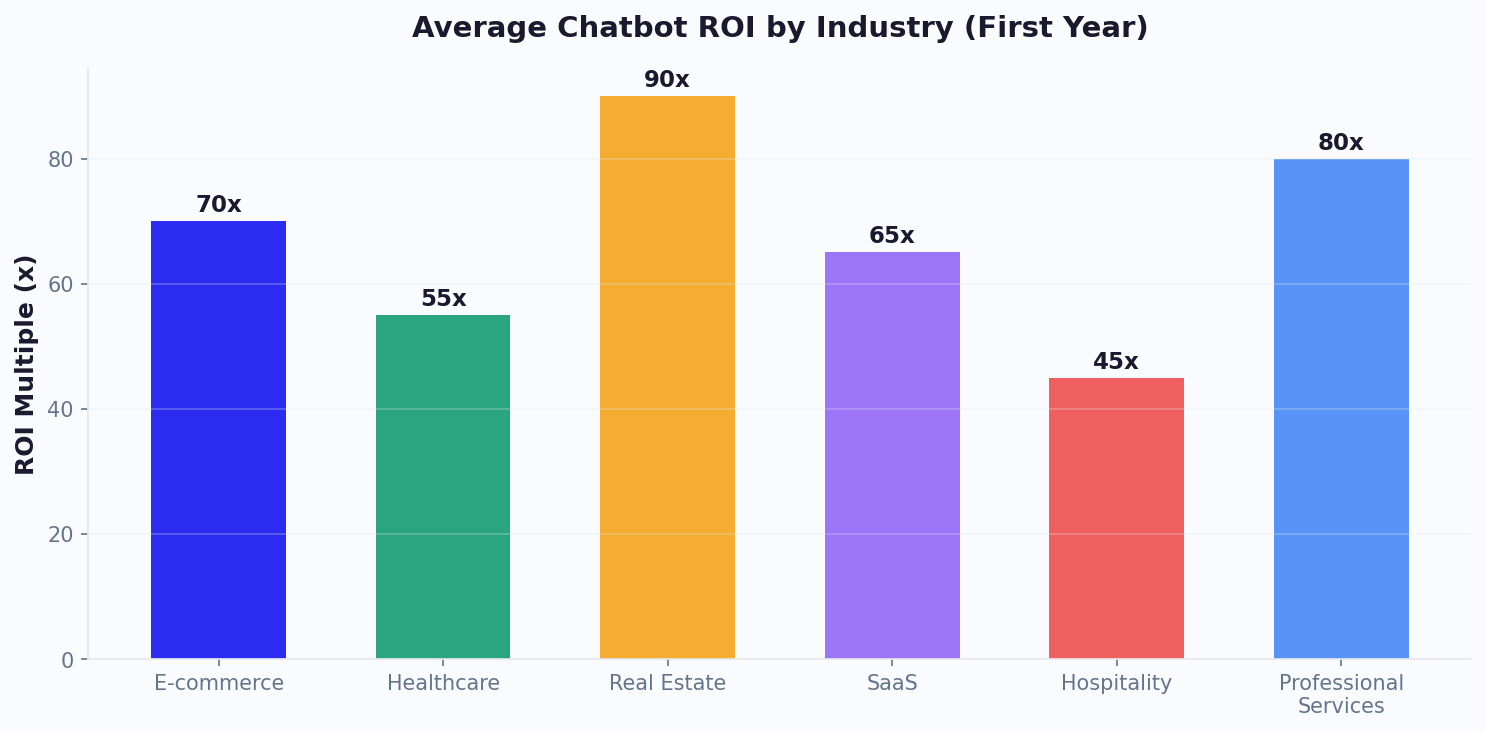
The shift to AI-powered support is not just about cost reduction — it builds a more responsive, consistent customer experience. When a customer gets an instant answer to a shipping question at 2 AM through a live chat widget instead of waiting until business hours, satisfaction scores improve. Companies in e-commerce, SaaS, healthcare, and finance are seeing 40-70% reductions in support costs within the first year of deploying conversational AI.
Businesses spend over $1.3 trillion on 265 billion customer service calls each year. AI chatbots can reduce that cost by up to 30% globally.
Source: IBM Global AI Adoption Index
Automation Rates by Industry
Automation rates vary by industry based on query complexity, regulatory requirements, and customer expectations.
How to Reduce Customer Service Costs
Deploying a chatbot is just the first step. These strategies will maximize your automation ROI.
Identify High-Volume Queries
Audit your ticket data to find the top 20 most frequent queries. These typically account for 60-80% of volume and deliver the fastest ROI when automated.
Train on FAQ Data
Feed your chatbot with real conversations and knowledge base articles. Platforms like Conferbot's AI builder let you import existing FAQ content in minutes.
Set Up Escalation Paths
Design clear escalation workflows so complex issues are seamlessly handed off to human agents via live chat.
Monitor and Optimize
Review chatbot performance weekly. Track deflection rate, CSAT after bot interactions, and topics needing human help. Companies that actively optimize see 15-25% improvement in 90 days.
Customer Service Cost Savings FAQ
Everything you need to know about chatbots for customer service cost savings.
Understanding Customer Service Cost Savings: What the Numbers Mean
Customer service costs represent one of the fastest-growing line items on any company balance sheet. The average cost to resolve a single support ticket through a human agent is $15.56 according to HDI benchmarks, but that number can climb above $25 when you factor in benefits, training, quality assurance, and technology overhead. For a company processing 8,000 tickets per month, that translates to roughly $1.5 million per year spent on resolution alone. The core problem is that these costs scale linearly: every new customer and every new product feature creates more tickets, which demands more agents.
AI chatbot automation changes this equation by introducing near-zero marginal cost per interaction. Once a chatbot is trained on your knowledge base, it can handle thousands of simultaneous conversations for a flat monthly fee. The key metric to watch is your automation rate, which measures the percentage of incoming tickets fully resolved by the chatbot without human intervention. Industry averages range from 40% for complex B2B environments to 80% for consumer-facing businesses with repetitive query patterns.
The ROI calculation is straightforward: multiply your current cost per ticket by the number of tickets the chatbot deflects, then subtract the annual chatbot platform cost. Most businesses find that the chatbot pays for itself within 60 to 90 days. Beyond direct cost savings, automation frees your human agents to focus on high-value interactions that require empathy and creative problem-solving, which reduces burnout and agent turnover. Given that replacing a single support agent costs $10,000 to $15,000 in recruiting and training, the indirect savings can be just as significant as the direct ones. Companies that pair their chatbot with built-in analytics can continuously identify new automation opportunities and push their deflection rates higher quarter over quarter.
How to Use This Calculator
Start by entering your monthly support ticket volume. If you do not know the exact number, check your helpdesk dashboard or multiply your customer count by an industry-typical ticket ratio of 0.5 to 2.0 tickets per customer per month. Next, enter your average cost per ticket. This should include agent hourly wage divided by tickets resolved per hour, plus a 30% overhead multiplier for benefits, software, and management. If you only know your agent salary, a good shortcut is to divide the fully loaded annual cost by 2,080 work hours, then multiply by your average handle time in hours. Finally, set your expected automation rate. Conservative estimates start at 40% for B2B and 60% for B2C; if you have a mature AI knowledge base, aim for 70% or higher. The calculator will produce your projected annual savings, monthly savings, ROI percentage, and estimated payback period in months.
Industry Benchmarks
| Company Size | Avg. Cost per Ticket | Typical Automation Rate | Annual Savings Range |
|---|---|---|---|
| Small (1-50 employees) | $8-$12 | 50-65% | $25K-$75K |
| Mid-Market (51-500 employees) | $12-$18 | 55-72% | $80K-$250K |
| Enterprise (500-5,000 employees) | $15-$25 | 60-78% | $300K-$1.2M |
| Large Enterprise (5,000+) | $18-$35 | 65-80% | $1M-$5M+ |
Cost Savings Formula Explained
The core formula is: Annual Savings = (Monthly Tickets x Automation Rate x Cost per Ticket x 12) - Annual Chatbot Cost. For example, suppose you handle 5,000 tickets per month at an average cost of $15 per ticket, and you deploy a chatbot that achieves a 65% automation rate. The chatbot resolves 3,250 tickets per month, saving $48,750 monthly. Over 12 months that is $585,000. If your chatbot platform costs $6,000 per year, your net annual savings are $579,000 and your ROI is 9,650%. The payback period is calculated by dividing the first month of chatbot cost by the first month of savings: $500 / $48,750, which is less than one day. Even with conservative ramp-up assumptions where the chatbot starts at 30% automation and reaches 65% over three months, most businesses achieve full payback within eight weeks. Track these numbers monthly using your analytics dashboard and adjust your knowledge base to push automation rates higher over time.
 Tips to Improve Your Results
- Audit your top 20 ticket categories first. These typically account for 70-80% of volume and offer the fastest path to high automation rates. Feed these into your chatbot as priority training topics.
- Build a comprehensive AI knowledge base with at least 100 articles covering your most common questions. Every additional article increases deflection by an average of 0.5-1%.
- Implement seamless live chat escalation so customers never feel stuck. A smooth handoff preserves satisfaction while keeping your automation rate high for resolvable queries.
- Review failed bot conversations weekly and update responses. Companies that optimize their chatbot monthly see a 15-25% improvement in deflection rates within 90 days, as detailed in our customer support chatbot guide.
- Calculate and share your cost-per-ticket trend with leadership quarterly. Showing a declining cost curve alongside stable or improving CSAT scores makes the business case for expanding automation to new channels and use cases.
Ready to see these numbers in action? Start your free Conferbot account and deploy a chatbot in under 10 minutes. Track all these metrics automatically with our built-in analytics dashboard.
Related Calculators
Measure how many tickets AI can deflect and the hours your team saves.
Calculate →Calculate the true cost of round-the-clock support and how chatbots make it affordable.
Calculate →See how faster response times translate to higher CSAT and revenue.
Calculate →Continue Exploring
Explore features, connect third-party tools, and browse ready-made templates.
Jeden Chatbot,
Wszystkie Kanały
Twój chatbot działa na WhatsApp, Messenger, Slack i 6 innych platformach. Stwórz raz, wdrażaj wszędzie.
View All Channels