
Why 78% of Support Teams Will Use AI Chatbots by End of 2026
Customer support is in crisis. According to HubSpot's 2026 State of Service report, ticket volumes grow 15-20% year over year while hiring budgets stay flat. Customers expect instant responses but agent burnout is at an all-time high. Something has to give.
AI chatbots are the answer that actually works. Not the clunky menu-driven bots from 2020 that frustrated everyone. Modern AI support chatbots powered by large language models understand natural language, learn from your documentation, and resolve complex queries that used to require human agents.
The 2026 Support Chatbot Reality
| Metric | Without AI Chatbot | With AI Chatbot |
|---|---|---|
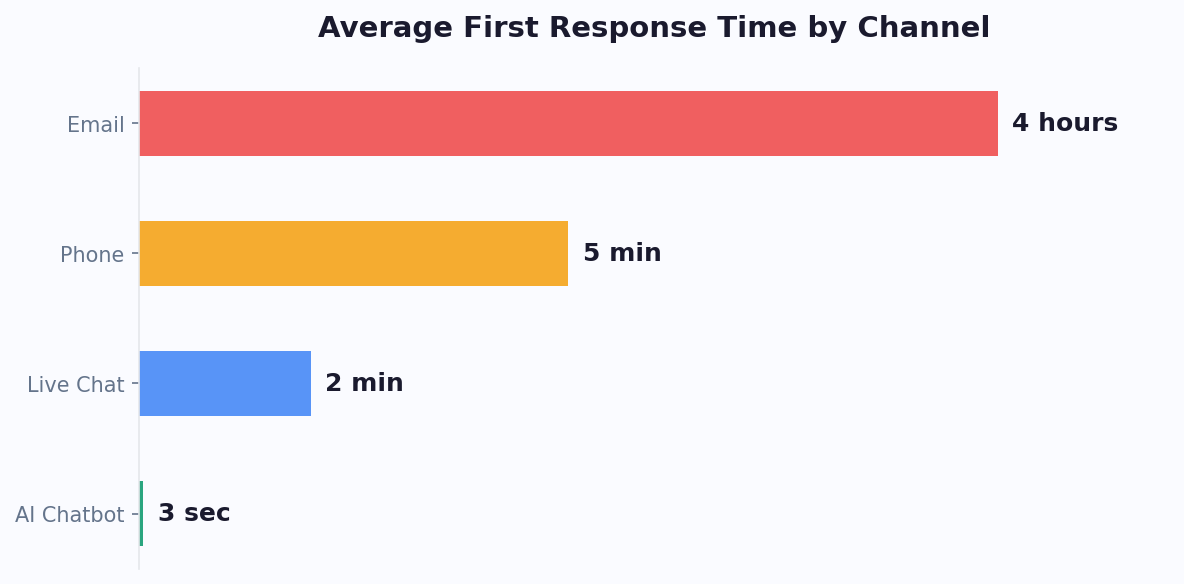
| Average first response time | 4-12 hours | Under 3 seconds |
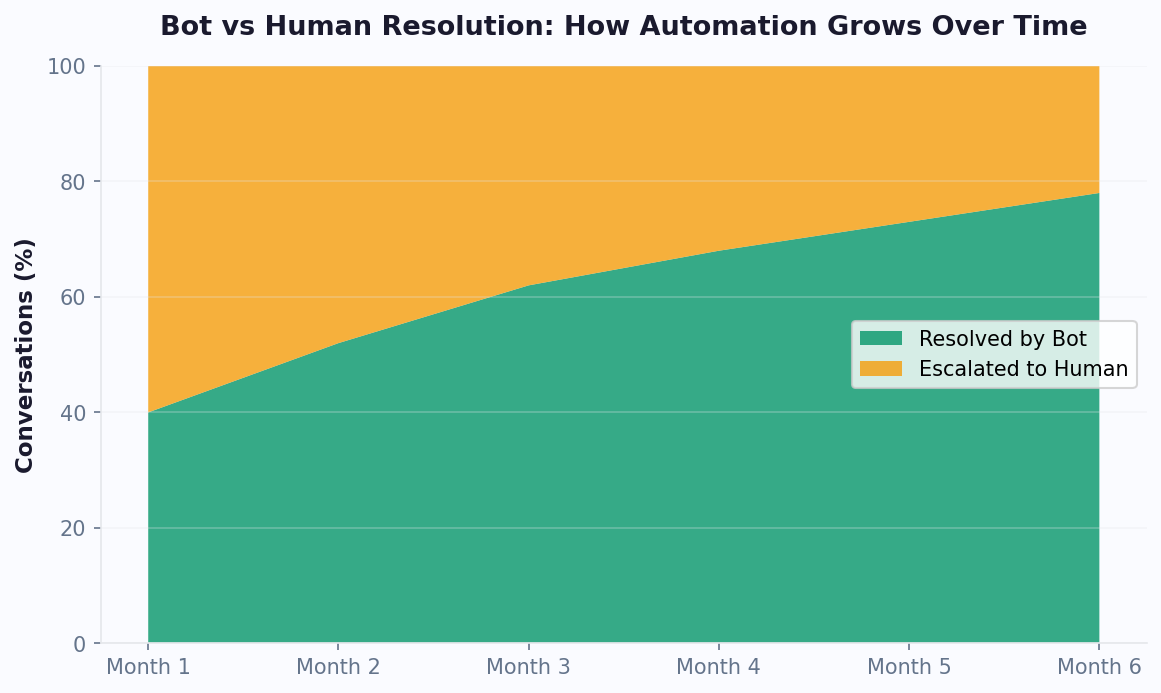
| Ticket resolution rate (automated) | 0% | 60-80% |
| Customer satisfaction (CSAT) | 72-78% | 82-88% |
| Cost per ticket | $5-15 | $0.10-0.50 |
| Agent burnout rate | High (repetitive work) | Low (complex work only) |
| Support hours | Business hours | 24/7/365 |
| Simultaneous conversations | 3-5 per agent | Unlimited |
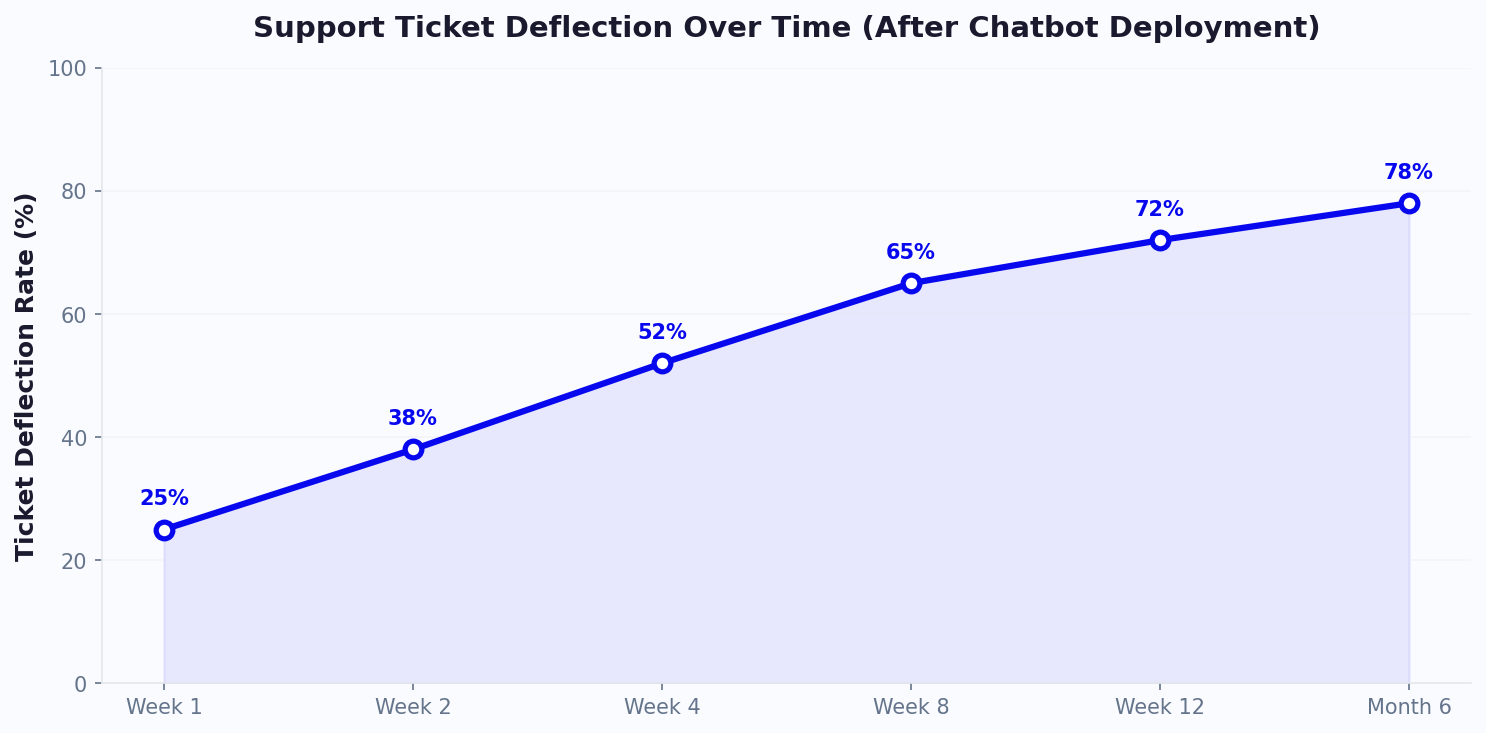
The numbers are not theoretical. Companies deploying AI support chatbots in 2025-2026 consistently report 50-80% ticket deflection within 90 days of deployment, according to Gartner's customer service research. That means your existing team handles far more customers without hiring.
What "Reduces Tickets" Actually Means
Let's be precise. "Reducing tickets" means:
- Of 1,000 incoming support requests, 700 are fully resolved by the chatbot
- The customer gets an accurate, helpful answer without waiting
- No human agent needs to see, touch, or follow up on those 700 conversations
- The remaining 300 escalate to humans with full context already captured
This is not the chatbot saying "I don't understand, let me transfer you." That is a 0% deflection rate with extra steps. True deflection means the customer's issue is resolved - they leave satisfied without ever needing a human.
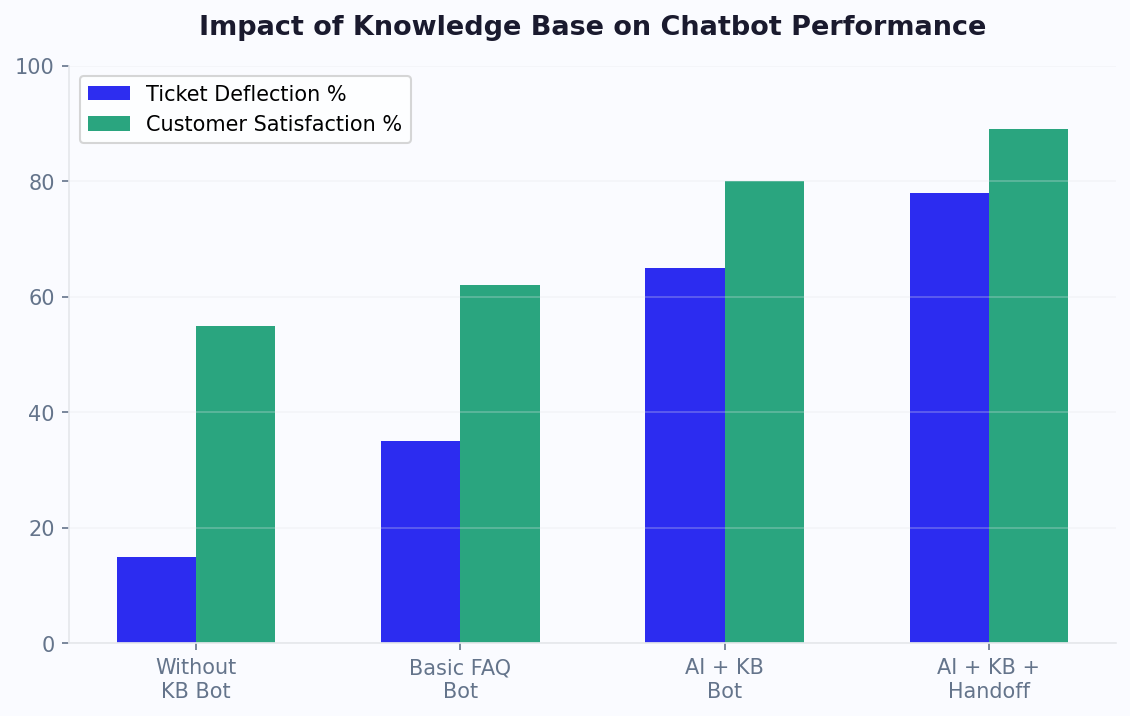
Companies achieving 70%+ deflection share three things: a comprehensive knowledge base, well-configured handoff rules, and continuous improvement based on conversation analytics.
Which Support Queries Can AI Handle? (The 80/20 Breakdown)
Not all support tickets are created equal. Understanding which queries AI can handle versus which need humans is the foundation of a successful deployment.
Tier 1: Fully Automatable (50-60% of tickets)
These are information retrieval and simple action queries:
- FAQ responses: Hours, pricing, policies, features, compatibility
- Account information: Balance checks, plan details, usage stats
- Order/tracking status: Where is my order, delivery estimates
- Password resets: Automated reset flows with verification
- How-to instructions: Step-by-step guides for common tasks
- Billing questions: Invoice details, payment methods, plan comparisons
- Return/refund initiation: Start the process, provide shipping labels
These queries follow predictable patterns with known correct answers. Train your chatbot once and it handles them perfectly forever.
Tier 2: AI-Assisted (20-30% of tickets)
These require some reasoning but follow known troubleshooting patterns:
- Technical troubleshooting: "My integration isn't working" → guided diagnostic steps
- Product recommendations: "Which plan is right for me?" → qualification questions
- Feature explanations: "How does X work?" → contextual documentation
- Configuration help: "How do I set up Y?" → step-by-step with verification
- Comparison questions: "What's the difference between Plan A and Plan B?"
AI handles 60-70% of these successfully. The rest escalate with valuable diagnostic information already collected.
Tier 3: Human Required (15-20% of tickets)
These need judgment, empathy, or authority that AI cannot provide:
- Angry customers: Need de-escalation and genuine empathy
- Account security issues: Compromised accounts, fraud investigations
- Policy exceptions: Refunds outside policy, loyalty gestures
- Complex bugs: Multi-step reproduction requiring back-and-forth investigation
- Legal or compliance: Data deletion requests, dispute resolution
- High-value retention: Cancellation saves, enterprise negotiations
Even for these, the chatbot adds value by collecting context, verifying identity, and routing to the right specialist - saving the agent 2-3 minutes of initial triage per conversation.
The Resolution Quality Ladder
Not all automated resolutions are equal. Understanding the quality ladder helps you set the right expectations and measure your chatbot's true effectiveness:
- Level 1 - Informational resolution: The bot provides a correct answer (policy, hours, pricing). Customer leaves satisfied. This covers 40-50% of all tickets.
- Level 2 - Transactional resolution: The bot completes an action (password reset, order cancellation, appointment reschedule). Customer's issue is fully resolved. This covers 15-25% of tickets.
- Level 3 - Diagnostic resolution: The bot walks the customer through troubleshooting steps and resolves a technical issue. This covers 5-10% of tickets.
- Level 4 - Contextual triage: The bot cannot resolve but collects all relevant information, verifies the customer's identity, and routes to the appropriate specialist with full context. This saves 3-5 minutes per escalated conversation.
A mature support chatbot operates at all four levels simultaneously, automatically choosing the appropriate response depth based on the query complexity and customer history.
Step-by-Step Implementation: From Zero to 70% Deflection
Week 1: Knowledge Base Foundation
Your chatbot is only as good as the knowledge you feed it. Start here:
- Export your existing help docs. Every FAQ page, help article, getting-started guide, and troubleshooting doc you have.
- Upload to your chatbot's AI knowledge base. The AI indexes, understands, and can answer questions from this content.
- Add your website. Point the bot to your website URL and it crawls pricing pages, feature pages, and documentation automatically.
- Include internal-only info. Policies, escalation procedures, common fixes that agents know but customers do not see documented anywhere.
Time investment: 2-4 hours to gather and upload existing content.
Week 2: Conversation Design
- Set up the greeting. Something like: "Hi! I'm the [Company] support assistant. I can help with account questions, billing, troubleshooting, and more. What do you need help with?"
- Define quick-action buttons. Add buttons for your top 5 query categories so users can self-route.
- Configure the live handoff. Set triggers: user says "human" or "agent", two failed answer attempts, detected frustration keywords, billing-related queries above $X.
- Set up the ticket system integration. When the bot cannot resolve and no agents are online, it creates a ticket with full context.
Week 3: Testing and Soft Launch
- Internal testing. Have your team ask the chatbot 50 common questions. Note failures. Add answers to the knowledge base for each failure.
- Shadow mode. Deploy the chatbot alongside your existing support channel. It answers, but agents verify. Catch errors before customers see them.
- Soft launch at 25%. Show the chatbot to 25% of visitors. Monitor deflection rate, CSAT, and escalation quality.
Week 4: Full Launch and Optimization
- Launch to 100%. With 1 week of data and fixes, go full deployment.
- Daily monitoring (15 min/day). Review failed conversations. Add answers for new questions. Adjust handoff triggers if escalating too much or too little.
- Weekly reporting. Track: deflection rate, CSAT, avg resolution time, top unanswered questions.
Ongoing: The Feedback Loop
Every week, your chatbot gets better because:
- New questions get added to the knowledge base
- Failed conversations reveal knowledge gaps
- Agent feedback identifies where the bot escalates unnecessarily
- Customer ratings show which answers need improvement
Within 90 days, expect your deflection rate to go from 40% (week 1) to 70%+ (week 12) through continuous improvement.
Implementation Timeline by Company Size
| Company Size | Typical Setup Time | Time to 50% Deflection | Time to 70% Deflection | Key Success Factor |
|---|---|---|---|---|
| Small (1-20 employees) | 1 week | 2 weeks | 6-8 weeks | Upload existing FAQ content on day one |
| Mid-size (21-200 employees) | 2-3 weeks | 4 weeks | 8-12 weeks | Dedicated chatbot owner reviewing weekly |
| Enterprise (200+ employees) | 4-8 weeks | 6-8 weeks | 12-16 weeks | Cross-team alignment on escalation rules |
The biggest predictor of success is not company size or budget - it is whether someone owns the chatbot's ongoing improvement. Companies that assign a dedicated chatbot manager consistently outperform those that treat it as a set-and-forget deployment, according to Gartner's implementation research.
Training Your Support Bot: What Content to Feed It (And What to Keep from It)
What to Upload
Help center articles: Every public-facing help article. The bot learns to answer the same questions your articles answer, but conversationally.
FAQ pages: Quick answers to common questions. These become the bot's instant-response knowledge.
Product documentation: Feature guides, setup instructions, API docs. The bot can walk users through complex processes step by step.
Pricing information: Plans, features per plan, billing cycles, upgrade/downgrade rules. Pricing questions are 15-20% of support tickets for SaaS companies.
Policy documents: Refund policy, shipping policy, data handling, SLA terms. When customers ask "Can I get a refund?", the bot gives the accurate answer based on your policy.
Internal playbooks: How agents handle common issues. "If the user says X, do Y." These become the bot's decision logic.
Past ticket resolutions: Export resolved tickets and the bot learns from real solutions to real problems.
What NOT to Upload
- Confidential data: Customer lists, internal financials, employee information
- Outdated documentation: Old procedures that no longer apply (these confuse the AI)
- Opinions or speculation: Only facts and official positions. The bot should not speculate about unreleased features or make promises.
- Competitor information: The bot should focus on YOUR product, not discuss competitors
Content Quality Tips
Write for questions, not topics. Instead of a document titled "Billing Overview", structure content as answers: "How do I change my plan?" "When am I billed?" "How do I update my payment method?" This matches how customers ask questions.
Include edge cases. "What happens if I cancel mid-month? You receive a prorated refund within 5-7 business days." The more edge cases your knowledge base covers, the fewer escalations you get.
Keep it current. Outdated information is worse than no information. Set a monthly calendar reminder to review and update your knowledge base content. When product changes ship, update the knowledge base the same day.
Measuring Support Chatbot Success: The 7 Metrics That Matter
1. Deflection Rate (Primary KPI)
Formula: (Conversations resolved by bot without human) / (Total conversations) x 100
Target: 60-80% within 90 days
How to improve: Review non-deflected conversations weekly. Add knowledge for recurring failures.
2. First Contact Resolution Rate
Formula: (Issues resolved in first bot interaction) / (Total bot interactions) x 100
Target: 75%+
Why it matters: If customers have to come back for the same issue, the bot answer was not complete enough.
3. Customer Satisfaction (CSAT)
How to measure: Quick thumbs up/down rating after bot conversations. Optional text feedback.
Target: 85%+ positive ratings
Benchmark: Human agents typically score 80-85%. A well-trained bot should match or exceed this because instant responses outweigh minor imperfections for most queries.
4. Average Resolution Time
What to track: Time from first message to issue resolved
Bot benchmark: Under 2 minutes for most queries
Human benchmark: 4-24 hours depending on complexity and queue
Impact: Customers rank response speed as the #1 factor in support satisfaction.
5. Escalation Quality
What to track: When the bot escalates, does it provide enough context for the agent?
Measure: Agent rating of handoff quality (1-5 scale). Track whether agents ask customers to repeat information.
Target: 90%+ of escalations include sufficient context for agent to begin resolution immediately.
6. Cost Per Resolution
Formula: Monthly chatbot platform cost / Number of bot-resolved conversations
Target: Under $0.50 per resolution
Compare to: Human agent cost per resolution ($5-15 depending on market and complexity)
7. Agent Productivity Impact
What to track: Tickets per agent per day before vs after chatbot deployment
Expected impact: 40-60% increase in agent productivity because they only handle complex tickets (faster to close) and start with full context from bot triage.
Building Your Dashboard
Configure your chatbot analytics to show these 7 metrics on a single dashboard. Review weekly. Share with your team monthly. Set alerts for: CSAT dropping below 80%, deflection rate dropping more than 10% (indicates knowledge gap from a product change), or escalation volume spiking (indicates a new issue the bot needs to learn).
Why Support Chatbots Fail (And How to Avoid Each Trap)
Failure 1: Deploying Without Knowledge Base Content
What happens: The bot launches with default responses only. It cannot answer any product-specific questions. Customers immediately lose trust.
Fix: Never launch without at least uploading your help center and FAQ content. Spend 2-4 hours on knowledge base preparation before any customer sees the bot.
Failure 2: No Escalation Path
What happens: Customer asks something the bot cannot handle. The bot loops "I don't understand" or provides irrelevant answers. Customer gets frustrated, leaves negative review, and never returns.
Fix: Always have a clear path to human agents. After 2 failed attempts, proactively offer: "I'm not sure about this one. Would you like me to connect you with a support agent?" During off-hours: "Our team will get back to you within [timeframe]. Can I take your details?"
Failure 3: Set-and-Forget Mentality
What happens: Bot deployed in January. Nobody reviews conversations. By March, products have changed, but bot answers are stale. Deflection rate drops from 60% to 30%.
Fix: 15 minutes daily for the first month, 30 minutes weekly thereafter. Review failed conversations, add new knowledge, update changed information. This is the single biggest differentiator between chatbots that succeed and those that fail.
Failure 4: Trying to Sound Human
What happens: Bot uses excessive casual language, jokes, and personality. When it inevitably makes a mistake, the contrast between "friendly persona" and "unhelpful answer" feels worse than a straightforward bot that says "I cannot help with that."
Fix: Be helpful and clear. Brief warmth is fine ("Happy to help!"). Extended personality is risky. Customers want answers, not a chat buddy.
Failure 5: No Integration with Support Stack
What happens: Bot resolves a conversation but the resolution is not logged anywhere. Customer calls back, agent has no record. Or: bot collects information but does not pass it to the ticket system, so escalated conversations start from scratch.
Fix: Integrate before launch. Every bot conversation should be logged. Every escalation should create a ticket with full context. Every lead should flow into CRM. Use native integrations or Zapier to connect your stack.
Failure 6: Deflecting When You Should Not
What happens: Bot aggressively tries to resolve everything, even billing disputes and account security issues. Frustrated customers feel the bot is blocking access to help.
Fix: Define clear boundaries. Some queries should escalate immediately (billing disputes over $X, account security, legal requests, explicit "talk to human" requests). The bot should facilitate, not gatekeep.
Multi-Channel Support: Unified Bot Across Web, WhatsApp & Social
Customers do not think in channels. They message on WhatsApp from their phone, switch to the website widget on their laptop, and follow up via Instagram DMs. If your support bot lives on only one channel, you are forcing 40-60% of customers to use a channel they did not choose - and that friction kills satisfaction scores.
The Omnichannel Support Imperative
A 2026 Zendesk CX Trends report found that 73% of customers start a support interaction on one channel and expect to continue it on another without repeating themselves. Businesses that deliver true omnichannel support see 23% higher CSAT and 18% faster resolution times compared to single-channel operations.
Channel-by-Channel Comparison for Support
| Channel | Best For | Avg Response Expectation | Rich Media | Proactive Messaging | Cost Per Conversation |
|---|---|---|---|---|---|
| Website Widget | Pre-purchase questions, onboarding | Instant | Full (images, buttons, carousels) | Exit intent, scroll triggers | $0 (included in platform) |
| Order updates, ongoing support | Under 5 min | Images, docs, buttons, lists | Yes (template-based) | $0.03-0.08 per conversation | |
| Messenger | Social commerce, casual inquiries | Under 15 min | Images, buttons, quick replies | 24-hour window + tags | $0 (Meta platform) |
| Instagram DMs | Brand engagement, product Q&A | Under 30 min | Images, quick replies | Story replies, ad clicks | $0 (Meta platform) |
| Telegram | Tech communities, global support | Under 5 min | Full (files up to 2GB) | Unlimited (no window) | $0 (free API) |
| Slack | B2B support, internal help desk | Under 15 min | Blocks, attachments | Yes | $0 (Slack API) |
| Microsoft Teams | Enterprise internal support | Under 15 min | Adaptive cards | Yes | $0 (Teams API) |
Unified Conversation History
The technical foundation of omnichannel support is a single conversation record that follows the customer across channels. When a customer messages on WhatsApp and later opens the website widget, the bot should recognize them and continue the conversation. This requires a unified customer identity layer - matching customers by email, phone number, or account ID across channels.
Conferbot's integrations hub maintains a single conversation thread per customer regardless of channel. Agents see the full history in one view, and the AI retains context from previous interactions to provide more relevant responses.
Channel Routing Strategy
Not every channel should handle every query. Route based on urgency and complexity:
- Urgent issues (active outage, security): Website widget with priority escalation to live chat
- Transactional updates (orders, appointments): WhatsApp (highest open rate)
- Pre-purchase questions: Whatever channel the prospect is already on
- Follow-ups and feedback: WhatsApp or email, depending on customer preference
Deploy your bot on a minimum of 3 channels to cover 90%+ of customer preferences. Track per-channel metrics with chatbot analytics and invest more in channels that show the highest resolution rate and satisfaction scores.
Training Your Team to Work Alongside AI
Deploying a support chatbot without preparing your team is like hiring a new employee and never introducing them to anyone. The bot handles the volume; your agents handle the exceptions. For this division to work, agents need new skills, new workflows, and a new mindset.
The Shift From Volume Handler to Specialist
Before AI, support agents spent 60-70% of their time on repetitive Tier 1 queries: password resets, order tracking, policy lookups. With a chatbot absorbing that volume, agents now handle exclusively complex, emotionally charged, or high-stakes conversations. This is a fundamentally different job that requires:
- Deeper product knowledge: Agents no longer answer easy questions. They troubleshoot edge cases, negotiate billing disputes, and manage escalations.
- Emotional intelligence: Every human conversation now involves a customer who the bot could not satisfy. These customers may be frustrated, confused, or angry. De-escalation and empathy become core skills.
- AI collaboration: Agents must know how to read bot-provided context, trust the AI's triage, and provide feedback to improve bot accuracy over time.
Agent Training Program: The 2-Week Playbook
| Day | Training Focus | Activity | Outcome |
|---|---|---|---|
| 1-2 | Bot capabilities overview | Agents test the bot as if they were customers | Understand what the bot can and cannot do |
| 3-4 | Reading context cards | Practice reviewing handoff summaries and acting on them | Agents never ask customers to repeat information |
| 5-6 | Escalation handling | Role-play frustrated customer scenarios | De-escalation skills for post-bot conversations |
| 7-8 | Bot feedback loop | Review incorrect bot responses, submit corrections | Agents contribute to bot improvement |
| 9-10 | Complex case mastery | Work through real escalated tickets with coaching | Confidence handling Tier 2-3 issues |
The Bot Feedback Loop
Your agents are the best source of chatbot improvement data. After every escalated conversation, agents should answer two questions: (1) Could the bot have handled this? (2) What information would the bot need to resolve this in the future? Aggregate these responses weekly and feed them into your knowledge base updates. Teams that run this feedback loop consistently see their deflection rate climb 5-8% per month.
New KPIs for the AI-Augmented Team
Traditional metrics like tickets-per-agent-per-day become less meaningful when the bot handles volume. Replace them with quality-focused KPIs:
- Complex resolution rate: Percentage of escalated tickets resolved on first contact
- Customer effort score (CES): How easy was the overall experience, including the bot interaction
- Bot improvement contributions: Number of knowledge base updates submitted per agent per week
- Post-escalation CSAT: Customer satisfaction specifically for conversations that involved a handoff
These metrics reward agents for quality and collaboration with the AI, not just speed and volume. Teams that adopt AI-augmented KPIs report 35% lower agent attrition because agents feel their work is more meaningful and less repetitive. Industry research consistently finds that agent satisfaction directly correlates with customer satisfaction scores. Read our chatbot human handoff guide for detailed escalation design, or explore no-code chatbot builders to get your support bot operational. You may also find our guide to automating customer support helpful for the full implementation picture.
Building the Business Case: Support Chatbot ROI Calculator
Here is how to calculate the exact ROI for your business.
Input Your Numbers
| Variable | How to Find | Example |
|---|---|---|
| Monthly support tickets | Help desk dashboard | 2,000 |
| Average cost per ticket (human) | Support team cost / tickets handled | $8 |
| Expected deflection rate | 60% (conservative first 90 days) | 60% |
| Chatbot platform cost | Platform pricing page | $200/month |
The Calculation
Current monthly support cost: 2,000 tickets x $8 = $16,000/month
Tickets deflected by bot: 2,000 x 60% = 1,200
Human tickets remaining: 800
New monthly human cost: 800 x $8 = $6,400
Total new cost (human + bot): $6,400 + $200 = $6,600
Monthly savings: $16,000 - $6,600 = $9,400/month
Annual savings: $112,800
ROI: $112,800 / ($200 x 12) = 47x annual return
Hidden Savings Not in the Calculation
- Reduced hiring costs: Each support agent you do not need to hire saves $3,000-5,000 in recruiting costs alone
- Lower attrition: Agents handling only complex work (not repetitive FAQ duty) report 40% lower burnout
- Faster onboarding: New agents ramp faster when the bot handles volume while they learn
- 24/7 without shifts: Night and weekend coverage without overtime or additional headcount
- Revenue from faster resolution: Customers who get instant help are 60% more likely to make additional purchases
For a more detailed calculation with your specific numbers, use our Customer Service Savings Calculator. For a broader look at chatbot ROI methodology, see our chatbot ROI calculator guide. If you are comparing options, our chatbot pricing comparison breaks down what different platforms cost at various team sizes.
Presenting ROI to Leadership
When presenting this business case to executives, lead with the conservative scenario and let the expected case build credibility. Frame the investment as risk-free by highlighting the payback period measured in days rather than months. Include a 90-day review checkpoint where you commit to measuring actual deflection rate against projections. This structured approach with built-in accountability consistently wins budget approval even from skeptical finance teams.
Was this article helpful?
Build and deploy in 10 minutes. No coding needed.
AI Customer Support Chatbot FAQ
Everything you need to know about chatbots for ai customer support chatbot.
About the Author
The Conferbot team writes about building, deploying, and improving AI chatbots.
View all articles
