
The Cost Problem: Why Chatbot API Bills Spiral Out of Control
Here is a number that keeps chatbot operators awake at night: the average customer support chatbot answering 10,000 messages per day at $0.025 per LLM call spends $250 per day, $7,500 per month, and $90,000 per year on LLM API costs alone. And that is the average -- spikes from traffic surges, prompt injection attempts, or complex multi-turn conversations can push daily costs 2-3x higher without warning.
The frustrating part is that a huge percentage of those LLM calls are redundant. Research from semantic caching research published on arXiv (Zhu et al., 2023) found that 40-65% of queries to customer service chatbots are semantically similar to a query that has already been answered. "What are your business hours?" and "When are you open?" and "What time do you close?" are three different strings but the same question -- and your LLM generates essentially the same answer each time, at full cost each time.
Traditional caching (exact-match string lookup) catches only a fraction of this redundancy because users rarely phrase questions identically. Semantic caching -- which matches questions by meaning rather than by exact text -- captures 3-5x more cache hits and is the single highest-leverage cost optimization available for production chatbots.
The Cost Savings Math
Let us model the savings for a chatbot handling 10,000 messages per day at $0.025 per LLM call:
| Caching Strategy | Estimated Hit Rate | Daily LLM Calls Saved | Daily Savings | Monthly Savings | Annual Savings |
|---|---|---|---|---|---|
| No caching (baseline) | 0% | 0 | $0 | $0 | $0 |
| Exact-match only | 12-18% | 1,500 | $37.50 | $1,125 | $13,500 |
| Semantic caching | 40-55% | 4,750 | $118.75 | $3,562 | $42,750 |
| Semantic + KB + session caching | 55-70% | 6,250 | $156.25 | $4,687 | $56,250 |

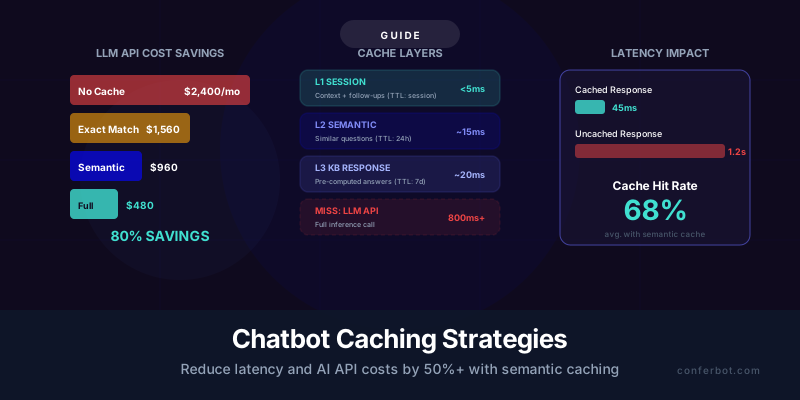
The numbers are striking. A full caching stack can save $4,000-$5,000 per month for a mid-size chatbot deployment. For enterprise deployments handling 100,000+ messages per day, the savings scale to $40,000-$50,000 per month. And the savings compound with other cost optimizations: combine caching with rate limiting and model tiering, and you can reduce your LLM API bill by 70-80% from the unoptimized baseline.
But cost is only half the story. Cached responses are also dramatically faster: a semantic cache hit returns a response in 15-50 milliseconds, compared to 800-2,000 milliseconds for a full LLM inference call. That 10-40x latency improvement translates directly into better user experience and higher CSAT scores.
This guide covers three caching layers -- semantic caching, knowledge base response caching, and session context caching -- with implementation details, TTL strategies, and cache invalidation approaches for each.
Semantic Caching: Match Similar Questions, Not Just Identical Ones
Semantic caching is the most impactful caching strategy for chatbots because it addresses the fundamental problem: users ask the same question in hundreds of different ways. Research published by Redis Labs on AI caching architectures confirms that semantic similarity search is the key enabler for effective LLM response caching. Unlike exact-match caching (which only hits when the query string is byte-for-byte identical), semantic caching converts each query into a vector embedding and checks whether a sufficiently similar embedding already exists in the cache. If it does, the cached response is returned without making an LLM call.
How Semantic Caching Works
- User sends a message: "What's your refund policy?"
- Embed the query: Convert the message to a vector embedding using an embedding model (e.g., OpenAI text-embedding-3-small, Cohere embed-v3, or a local model like sentence-transformers)
- Search the cache: Query the vector cache for the nearest neighbor to the embedding. The cache is a vector database (Pinecone, Weaviate, Chroma, or Redis with vector search module) containing previously cached query-response pairs.
- Check similarity threshold: If the nearest neighbor's similarity score exceeds a configured threshold (e.g., cosine similarity >= 0.92), return the cached response. If below threshold, proceed to the LLM.
- Cache the new response: After the LLM generates a response, store the query embedding and response in the cache for future lookups.
Choosing the Right Similarity Threshold
The similarity threshold is the most critical configuration parameter. Too high and you get very few cache hits (the cache is overly strict about what counts as "similar"). Too low and you return incorrect cached responses for questions that are superficially similar but semantically different.
| Threshold | Cache Hit Rate | Accuracy Risk | Best For |
|---|---|---|---|
| 0.98+ | Very low (15-20%) | Minimal (near-exact matches only) | Highly sensitive domains (medical, financial, legal) |
| 0.94-0.97 | Moderate (30-40%) | Low (close paraphrases match) | General customer support |
| 0.90-0.93 | High (45-55%) | Moderate (some topically similar but different questions may match) | FAQ-heavy bots, informational chatbots |
| Below 0.90 | Very high (55%+) | High (different questions may return wrong cached answers) | Not recommended for production without manual review |
Start with 0.93 and monitor for false positives (cached responses returned for the wrong question). If you see false positives, raise to 0.95. If your cache hit rate is below 30%, lower to 0.91. Data-driven calibration over 2-4 weeks will find your optimal threshold.
Examples of Semantic Cache Hits
With a threshold of 0.93, these query pairs typically match (returning the same cached response):
- "What is your return policy?" matches "How do I return an item?" (similarity: 0.94)
- "Do you ship to Canada?" matches "Can you deliver internationally to Canada?" (similarity: 0.95)
- "How do I cancel my subscription?" matches "I want to cancel my plan" (similarity: 0.96)
- "What payment methods do you accept?" matches "Can I pay with PayPal?" (similarity: 0.88, does NOT match -- correctly, because the second question is more specific)
The last example illustrates why the threshold matters: "What payment methods do you accept?" and "Can I pay with PayPal?" are related but require different answers. A well-calibrated threshold prevents the generic cached response from being returned when the user has a specific question.

Embedding Model Selection
The embedding model determines the quality of your semantic matching. Key factors:
| Model | Dimensions | Cost per 1M Tokens | Quality | Speed |
|---|---|---|---|---|
| OpenAI text-embedding-3-small | 1536 | $0.02 | Good | Fast |
| OpenAI text-embedding-3-large | 3072 | $0.13 | Excellent | Moderate |
| Cohere embed-v3 | 1024 | $0.10 | Excellent | Fast |
| sentence-transformers (local) | 384-768 | Free (compute only) | Good | Varies |
For most chatbot deployments, text-embedding-3-small provides the best cost-quality balance. The embedding cost per query ($0.000002 at ~100 tokens per query) is negligible compared to the LLM inference cost it saves when a cache hit occurs. Use the larger model only if your queries are highly nuanced and the smaller model produces too many false positives.
For self-hosted options, our technology stack guide covers local embedding model deployment in detail.
Knowledge Base Response Caching: Pre-Compute Your Most Common Answers
While semantic caching catches similar questions reactively (building the cache as questions are asked), KB response caching proactively pre-computes and stores answers to questions you know will be asked frequently. This layer ensures your most common questions are always answered from cache, even on the first ask from a new user.
How KB Response Caching Works
- Identify high-frequency topics: Analyze your chatbot logs (or the topics in your knowledge base) to identify the 50-200 questions that account for the majority of your traffic. In most deployments, the top 100 questions account for 40-60% of all queries, following a Pareto distribution.
- Generate canonical questions: For each topic, write 3-5 canonical question variants ("What is your return policy?", "How do returns work?", "Can I return my order?"). These become the cache keys.
- Pre-compute answers: Run each canonical question through your full RAG pipeline (retrieval + LLM generation) and cache the response. This happens offline, not during user conversations.
- Serve from cache: When a user's question matches a canonical question (via semantic similarity with a 0.91+ threshold), serve the pre-computed answer instantly.
KB Cache vs. Semantic Cache: How They Interact
The two caches serve different purposes and should be used together:
| Feature | KB Response Cache | Semantic Cache |
|---|---|---|
| Population method | Proactive (pre-computed offline) | Reactive (built during live conversations) |
| Coverage | Top 50-200 known questions | Any previously asked question |
| Cold start | No cold start (populated before launch) | Cold start problem (empty at launch) |
| Freshness | Updated on schedule (daily/weekly) | Fresh as of last identical query |
| Typical hit rate | 20-35% of all queries | Additional 20-30% on top of KB cache |
The lookup order should be: (1) Check KB response cache first (highest confidence, pre-validated answers), (2) Check semantic cache second (good confidence, previously generated answers), (3) If both miss, proceed to full LLM inference and store the result in the semantic cache for future lookups.
Keeping KB Responses Fresh
Pre-computed responses go stale when the underlying knowledge base changes. A response about your return policy that was cached last week may be wrong if the policy changed yesterday. Two approaches to freshness:
Approach 1: Scheduled refresh. Re-run the pre-computation pipeline on a schedule (daily for frequently changing content, weekly for stable content). Tag each cached response with a generation timestamp and automatically invalidate responses older than their TTL.
Approach 2: Event-driven invalidation. When a knowledge base article is updated, automatically invalidate all cached responses that were generated from that article. This requires tracking which KB articles contributed to each cached response (source attribution in the cache metadata). This approach is more complex but provides real-time freshness.
For Conferbot users, KB response caching is handled automatically -- when you update your knowledge base, affected cached responses are refreshed within the platform's update cycle. For custom implementations, the event-driven approach is preferred if your KB changes frequently (multiple times per week), while scheduled refresh is simpler and sufficient for KBs that change monthly.

Quality Assurance for Pre-Computed Responses
Because KB cache responses are served at high volume (potentially answering 20-35% of all queries), quality errors in these responses have outsized impact. Implement a QA process:
- Human review: Have a team member review all pre-computed responses before they enter the cache. This is feasible because you are reviewing 50-200 responses, not thousands.
- Automated validation: Use the entailment-based checking described in our hallucination prevention guide to verify each pre-computed response is supported by its source KB articles.
- A/B testing: For the first week after introducing KB caching, run an A/B test comparing cached responses vs. live LLM responses for the same questions. If CSAT is equivalent (within 2%), the cache is performing well.
Session Context Caching: Eliminate Redundant Context Reconstruction
Every multi-turn chatbot conversation requires the LLM to receive the conversation history as context with each message. In a 10-message conversation, the 10th message includes all 9 previous messages in the prompt -- and you are paying input token costs for those 9 messages again. Session context caching reduces this cost by intelligently managing how conversation history is stored, compressed, and re-sent to the LLM.
The Context Bloat Problem
Consider a typical 8-turn support conversation:
| Turn | User Message Tokens | Bot Response Tokens | Cumulative Context Tokens | Input Cost (GPT-4o at $2.50/M tokens) |
|---|---|---|---|---|
| 1 | 20 | 150 | 170 + system prompt (500) | $0.0017 |
| 2 | 25 | 120 | 815 | $0.0020 |
| 3 | 30 | 200 | 1,045 | $0.0026 |
| 4 | 15 | 100 | 1,160 | $0.0029 |
| 5 | 40 | 250 | 1,450 | $0.0036 |
| 6 | 20 | 180 | 1,650 | $0.0041 |
| 7 | 35 | 300 | 1,985 | $0.0050 |
| 8 | 25 | 150 | 2,160 | $0.0054 |
The total input cost for this conversation is $0.0273 -- but notice that the cost per turn increases because the context grows. Turn 8 costs 3x more than turn 1 in input tokens. For long conversations (15-20 turns), the cumulative context cost can dominate the total API cost.
Session Caching Strategies
Strategy 1: Context Window Sliding
Only include the last N turns in the context, plus a summary of earlier turns. For example, include the full last 4 turns and a one-paragraph summary of turns 1-4. This keeps input tokens roughly constant regardless of conversation length. The summary can be generated by the LLM itself ("Summarize the conversation so far in 2 sentences") at a one-time cost, then reused for all subsequent turns.
Strategy 2: LLM Provider Prompt Caching
Both OpenAI and Anthropic now offer native prompt caching, as documented in OpenAI's prompt caching documentation, that caches the static portions of your prompt (system instructions, RAG context that does not change between turns) so you only pay for the new tokens in each turn. OpenAI's prompt caching provides a 50% discount on cached input tokens. Anthropic's prompt caching provides a 90% discount on cached tokens after a small write cost. Enable this by structuring your prompts with static content first and dynamic content last.
Strategy 3: Follow-Up Detection
Many multi-turn conversations involve follow-up questions that can be answered from the same cached response. "What is your return policy?" followed by "What about electronics?" is a follow-up that can be handled by the same cached KB response on returns -- just scoped to the electronics category. Detect follow-ups by checking whether the new query's embedding is similar to the previous query and the previous response contains the answer to the follow-up.
Session Cache Architecture
Session context is cached in a fast, session-scoped store:
| Component | Storage | TTL | Purpose |
|---|---|---|---|
| Full conversation history | Redis or in-memory store | Session lifetime (30 min inactivity) | Provides full context for context window sliding |
| Conversation summary | Redis or in-memory store | Session lifetime | Compressed version of early turns for long conversations |
| Last RAG results | Redis or in-memory store | Session lifetime | Avoids re-retrieving the same KB articles for follow-up questions |
| User profile/preferences | Persistent database | Indefinite (updated on each interaction) | Personalizes responses across sessions |
The session cache eliminates two expensive operations: re-running RAG retrieval when the topic has not changed (saving both embedding cost and vector search latency) and re-sending large static context that the LLM provider can cache. Combined, these optimizations reduce per-turn costs by 30-50% in multi-turn conversations.
See our conversation design guide for strategies that minimize turn count while maintaining conversation quality, which further reduces session context costs.
TTL Strategies and Cache Invalidation: Keeping Cached Responses Accurate
A cached response is only valuable if it is still correct. Stale cache entries that serve outdated information are worse than no cache at all because users receive wrong answers faster and with higher confidence (cached responses are typically faster, which paradoxically makes users trust them more). TTL (Time-to-Live) strategies and cache invalidation rules, following principles established in AWS caching best practices, ensure your cache stays fresh.
TTL Recommendations by Cache Layer
| Cache Layer | Recommended TTL | Rationale |
|---|---|---|
| Session context | 30 minutes (session lifetime) | Context is only relevant within the active conversation |
| Semantic cache (general) | 24-72 hours | Most chatbot content does not change daily; 24-72h balances freshness with hit rate |
| Semantic cache (pricing/availability) | 1-4 hours | Pricing, stock levels, and time-sensitive data change frequently |
| KB response cache (stable content) | 7-14 days | Company policies, product descriptions, and FAQs rarely change weekly |
| KB response cache (dynamic content) | 4-24 hours | Operating hours, event schedules, and promotional offers change more often |
Adaptive TTL Based on Content Type
Not all cached responses should have the same TTL. Implement content-aware TTLs by classifying the response topic and applying the appropriate TTL:
- Policy/procedural responses: Long TTL (7-14 days). Return policies, warranty terms, and how-to guides change infrequently.
- Product information: Medium TTL (24-72 hours). Product specs are mostly stable but can be updated with new features or corrections.
- Pricing and promotions: Short TTL (1-4 hours). Prices change with sales, promotions, and inventory.
- Real-time data: No caching or very short TTL (5-15 minutes). Order status, delivery tracking, and live availability should not be cached.
Classify responses by their topic (using intent classification or keyword matching) and apply the corresponding TTL when writing to the cache. This ensures pricing queries are always fresh while stable FAQ responses maximize cache hit rate with longer TTLs.
Cache Invalidation Triggers
In addition to TTL-based expiration, implement event-driven invalidation for immediate freshness when content changes:
- KB article update: When a knowledge base article is edited, invalidate all semantic cache entries whose source metadata references that article. This requires storing source article IDs in the cache metadata alongside each cached response.
- Product update: When product information changes in your e-commerce system, invalidate cached responses that reference that product. Connect your product catalog webhook to the cache invalidation API.
- Manual flush: Provide a dashboard button or API endpoint for the chatbot manager to flush specific cache entries or the entire cache. This is the emergency escape hatch for when you discover a stale response serving incorrect information.
- Scheduled refresh: For KB response cache, run a nightly job that regenerates pre-computed responses for all canonical questions. This ensures all KB cache entries are refreshed daily regardless of whether their source articles changed.

Monitoring Cache Freshness
Add cache freshness metrics to your monitoring dashboard:
- Average cache entry age: How old are the cached responses being served? If the average age exceeds 80% of the TTL, your invalidation may be too slow.
- Stale-serve rate: Percentage of cache hits where the response was generated before the most recent update to its source KB article. This requires comparing cache entry timestamps against KB article update timestamps.
- Post-invalidation hit rate: How does the cache hit rate change after a bulk invalidation event? A sharp drop followed by gradual recovery indicates the cache is working correctly.
Choosing a Vector Database for Your Semantic Cache
The semantic cache needs a storage layer that supports fast vector similarity search. The choice of vector database affects cache lookup latency, scalability, operational complexity, and cost. According to benchmarks from the ANN Benchmarks project, modern vector databases can perform similarity searches over millions of vectors in single-digit milliseconds. Here is a practical comparison of the leading options for chatbot semantic caching.
Vector Database Comparison
| Database | Type | Lookup Latency (p99) | Max Entries (practical) | Cost (10K entries) | Best For |
|---|---|---|---|---|---|
| Redis (with RediSearch) | In-memory | 1-5ms | 1M+ | $15-50/mo (managed) | Low-latency, moderate scale, existing Redis users |
| Pinecone | Managed cloud | 10-30ms | Billions | $70+/mo (starter) | Large-scale, fully managed, no ops team |
| Weaviate | Self-hosted or cloud | 5-20ms | 100M+ | Free (self-hosted) or $25+/mo | Hybrid search (vector + keyword), ML integration |
| Chroma | Embedded / self-hosted | 2-10ms | 10M | Free (open source) | Development, small deployments, Python-native |
| Qdrant | Self-hosted or cloud | 5-15ms | 100M+ | Free (self-hosted) or $25+/mo | Performance-focused, Rust-based, filtering |
| pgvector (PostgreSQL) | Extension | 10-50ms | 10M | Free (existing Postgres) | Teams already using Postgres, simple setup |
Recommendation by Deployment Size
Small (under 5,000 queries/day): Use pgvector if you already have PostgreSQL, or Chroma for a standalone solution. Both are free and sufficient for small-scale semantic caching. Cache entries at this scale fit comfortably in memory on a single server.
Medium (5,000-50,000 queries/day): Use Redis with RediSearch or Qdrant. Both provide excellent latency and can handle the cache size (10K-100K entries) comfortably. Redis is preferred if you already use it for other caching; Qdrant is preferred for a dedicated vector search solution with rich filtering capabilities.
Large (50,000+ queries/day): Use Pinecone or Weaviate Cloud for fully managed operations at scale. The managed overhead justifies the cost when you are handling millions of cache lookups per day and need 99.9% uptime guarantees.
For Conferbot users, the vector database for semantic caching is managed within the platform -- no separate database setup required. For custom implementations, our technology stack guide covers vector database selection in broader context.
Cache Storage Schema
Each cache entry should store:
- query_embedding (vector): The embedding of the original user query
- query_text (string): The original query text (for debugging and review)
- response_text (string): The cached LLM response
- source_article_ids (array): IDs of KB articles used to generate the response (for invalidation)
- created_at (timestamp): When the entry was created
- ttl_seconds (integer): Time-to-live for this entry
- content_type (string): Topic classification for adaptive TTL (e.g., "pricing", "policy", "product")
- hit_count (integer): Number of times this entry has been served (for analytics)
This schema supports all the TTL, invalidation, and monitoring strategies described in this guide. The total storage per entry is small (2-5 KB for the embedding + response text), making even large caches (100K entries) fit in under 500 MB of storage.
Cache Warming: Populating Your Cache Before Launch
The biggest weakness of reactive caching (building the cache as queries arrive) is the cold start problem: on launch day, the cache is empty and every query goes to the LLM. Cache warming solves this by pre-populating the cache before the chatbot goes live, ensuring that common questions are answered from cache from the very first visitor.
The Cache Warming Process
Step 1: Mine your query logs. Analyze the last 90 days of chatbot conversation logs (or support ticket titles, or help center search logs) to identify the most frequently asked questions. Rank by frequency. The top 100-200 questions typically cover 40-60% of all future queries.
Step 2: Generate canonical forms. For each of the top 100 questions, write 3-5 paraphrased variants. This ensures the semantic cache has multiple entry points for each topic, maximizing the chance that a new user's phrasing matches at least one cached variant.
Example for "return policy" topic:
- "What is your return policy?"
- "How do I return an item?"
- "Can I get a refund?"
- "How long do I have to return something?"
- "What are the conditions for returning a product?"
Step 3: Generate embeddings and responses. Run each canonical question through your embedding model and your full RAG pipeline. Store the embedding and the generated response in the semantic cache. Also store a subset (the top 100 original forms) in the KB response cache.
Step 4: QA review. Have a human reviewer check all 100+ pre-computed responses for accuracy, tone, and completeness. Fix any issues before launch. This QA step is critical because pre-warmed cache entries will be served at high volume.
Maintaining the Warm Cache
Cache warming is not a one-time activity. Run a weekly refresh process:
- Pull the top 50 queries from the past week that were NOT served from cache (cache misses)
- For each, generate the response through the full RAG pipeline
- Add to the semantic cache
- If any represent a new FAQ topic, add canonical variants to the KB response cache
This continuous warming process expands the cache to cover emerging topics and gradually increases your cache hit rate over time. Teams that implement weekly warming typically see their cache hit rate improve from 40% at launch to 60-65% within 60 days as the cache adapts to the actual query distribution.
Cache Warming for Seasonal Content
If your chatbot handles seasonal queries (holiday shipping deadlines, back-to-school promotions, tax season questions), pre-warm the cache with seasonal content 1-2 weeks before the season begins. Use last year's seasonal query logs as the source. This prevents a cache miss spike at the start of your busiest period. Our seasonal chatbot strategy guide covers seasonal preparation in broader context.

Measuring Cache Effectiveness: The Metrics That Matter
Caching is only valuable if it is working correctly. A cache with a 5% hit rate is wasting infrastructure resources. Industry guidance from Google Cloud's caching architecture guide recommends targeting 50%+ hit rates for cost-effective caching. A cache with a 70% hit rate but serving stale responses is damaging user experience. Track these metrics to ensure your caching system delivers real value.
Primary Cache Metrics
| Metric | Formula | Target | What Low Values Mean |
|---|---|---|---|
| Cache hit rate (overall) | Cache hits / total queries x 100 | 50-65% | Cache is not covering enough queries; needs warming or lower threshold |
| Semantic cache hit rate | Semantic hits / (total queries - KB cache hits) x 100 | 35-45% | Similarity threshold too high, or cache not retaining enough entries |
| KB cache hit rate | KB cache hits / total queries x 100 | 20-30% | Need more canonical questions or better topic coverage |
| Cache accuracy rate | Correct cached responses / total cached responses x 100 | 95%+ | Similarity threshold too low (false positives) or stale content |
| Average cache response latency | Mean time to serve cached response | < 50ms | Vector database performance issue or network latency |
| Cost savings | (Cache hits x avg LLM cost per call) per month | Track trend | The dollar value of your caching investment |
The Cache Quality Score
To ensure cache quality, sample 50 cache hits per week and have a human reviewer score each as correct, partially correct, or incorrect. Calculate your cache quality score: (correct + 0.5 x partially correct) / total. Target: 0.92+ (92% quality). If quality drops below 90%, investigate:
- Is the similarity threshold too low? (False positives -- different questions matching)
- Are cached responses stale? (Source content changed but cache was not invalidated)
- Are there ambiguous topics where different questions with similar embeddings have different correct answers?
For the ambiguity problem, add metadata filters to your vector search. For example, cache entries for product A's pricing should only match queries that mention product A, not product B -- even if the pricing question embeddings are similar. Most vector databases support metadata filtering alongside similarity search.
Building a Cache Dashboard
Add a caching section to your monitoring dashboard with:
- Real-time cache hit rate gauge (green above 50%, yellow 30-50%, red below 30%)
- Cache hit rate trend over 30 days (should be stable or improving)
- Cost savings graph (LLM cost with caching vs. projected cost without caching)
- Top cache misses: the most frequent queries that are NOT being served from cache (these are your next warming candidates)
- Cache size and growth rate (entries count, storage usage)
- Average cache entry age (are entries being refreshed frequently enough?)
This dashboard makes caching performance visible to stakeholders and provides the data needed for ongoing optimization. Combined with the broader Conferbot analytics dashboard, it creates a comprehensive view of your chatbot's cost efficiency.
Implementation Checklist: From Zero to Fully Cached in 10 Days
This checklist takes you from no caching to a three-layer caching system (semantic + KB + session) in two weeks. The implementation is ordered by impact: highest-value cache layers are implemented first.
Days 1-3: Semantic Cache
- Choose your vector database (Redis recommended for most; pgvector for Postgres users; Pinecone for fully managed)
- Deploy the vector database (Redis cloud, local Docker, or managed service)
- Select embedding model (text-embedding-3-small for most use cases)
- Implement the cache lookup flow: embed query -> search vector DB -> check similarity threshold (start at 0.93) -> return cached response or proceed to LLM
- Implement the cache write flow: after LLM generates a response, store the query embedding and response in the vector DB with TTL metadata
- Test with 50 sample queries: verify cache hits return correct responses, cache misses proceed to LLM correctly
- Deploy to production with monitoring enabled
Days 4-6: KB Response Cache
- Analyze query logs to identify top 100 most frequent questions
- Write 3-5 canonical variants for each question (300-500 total)
- Run all canonical questions through your RAG pipeline to generate responses
- Human review: validate all 100 pre-computed responses for accuracy
- Load into the semantic cache with extended TTL (7-14 days for stable content, 4-24 hours for dynamic content)
- Verify cache hit rate increases after warm-up (expect +15-25% improvement)
Days 7-8: Session Context Cache
- Implement conversation history storage in Redis (key: session_id, value: message array, TTL: 30 min)
- Implement context window sliding: include last 4 turns + summary of earlier turns
- Enable LLM provider prompt caching (OpenAI or Anthropic) by structuring prompts with static content first
- Implement follow-up detection: check if the new query is semantically similar to the previous query (threshold 0.85) and serve from session context cache
Days 9-10: Monitoring and Optimization
- Set up cache metrics dashboard (hit rate, cost savings, latency, quality)
- Configure alerts: cache hit rate below 30% (warning), cache accuracy below 90% (critical)
- Run the first cache quality audit: sample 50 cache hits and score accuracy
- Schedule weekly cache warming (top 50 cache misses added to KB cache each week)
- Document the caching architecture, TTL settings, and maintenance procedures
Ongoing Maintenance
| Frequency | Task | Time |
|---|---|---|
| Weekly | Review top 50 cache misses; add high-frequency misses to KB cache | 1 hour |
| Weekly | Audit 50 cache hits for accuracy (quality score) | 30 min |
| Monthly | Tune similarity threshold based on false positive/negative data | 30 min |
| Monthly | Review TTL settings; adjust based on content change frequency | 15 min |
| Quarterly | Full cache performance review: hit rate trends, cost savings, quality trends | 2 hours |
With this 10-day implementation, your chatbot's LLM API costs drop by 50-70% while response times improve 10x for cached queries. The ongoing maintenance investment (2-3 hours per week) is minimal relative to the thousands of dollars saved monthly.
Ready to deploy a cost-optimized chatbot? Conferbot's AI chatbot builder includes semantic caching, KB response caching, and session management built in -- no vector database setup or caching infrastructure required. Explore the platform or review pricing plans to see how much you can save.
Was this article helpful?
Chatbot Caching Strategies FAQ
Everything you need to know about chatbots for chatbot caching strategies.
About the Author

Conferbot Team specializes in conversational AI, chatbot strategy, and customer engagement automation. With deep expertise in building AI-powered chatbots, they help businesses deliver exceptional customer experiences across every channel.
View all articles