
Dental Practice Chatbot
Free Healthcare Chatbot Template
A complete dental practice chatbot that handles appointment booking, dental emergencies, insurance verification, services & pricing, and new patient registration — 24/7. Built specifically for dental offices, orthodontic practices, and oral health clinics.


What Is a Chatbot for Dentists?
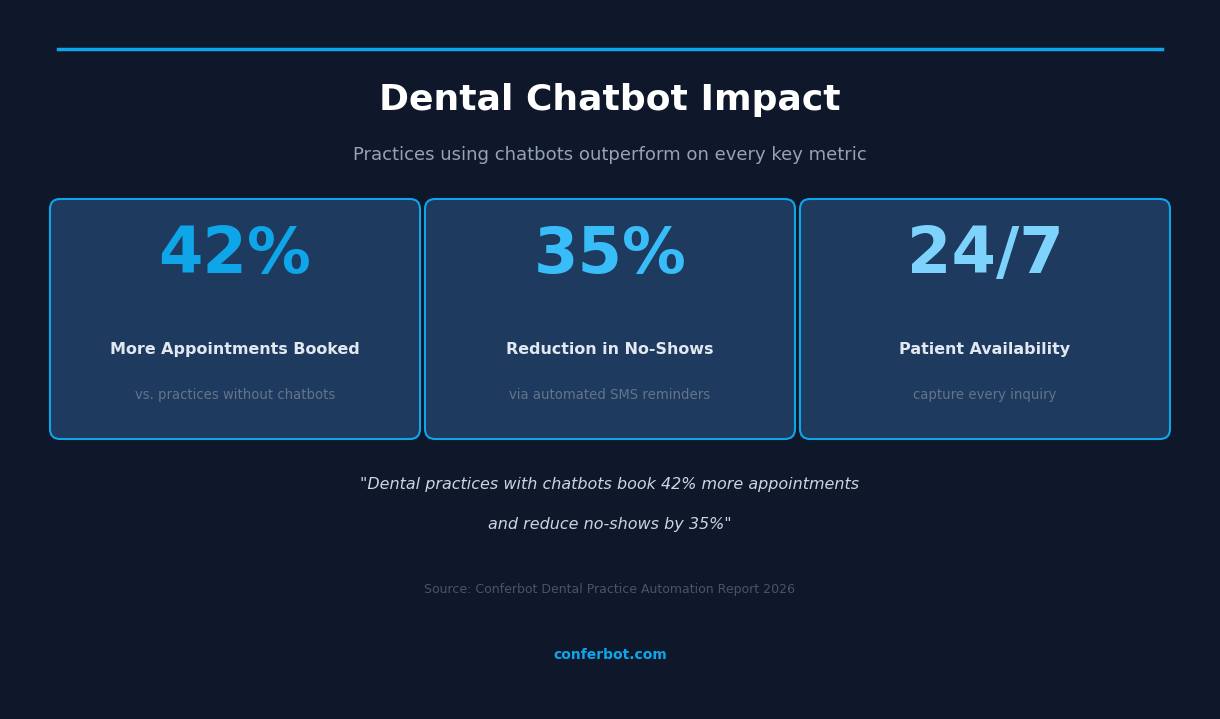
A chatbot for dentists is an AI-powered conversational assistant that works on your dental practice website around the clock — booking appointments, handling dental emergencies, verifying insurance, answering pricing questions, and registering new patients without any staff involvement. It is the digital front desk that never takes a lunch break, never puts a patient on hold, and never misses an inquiry at 10pm on a Sunday.
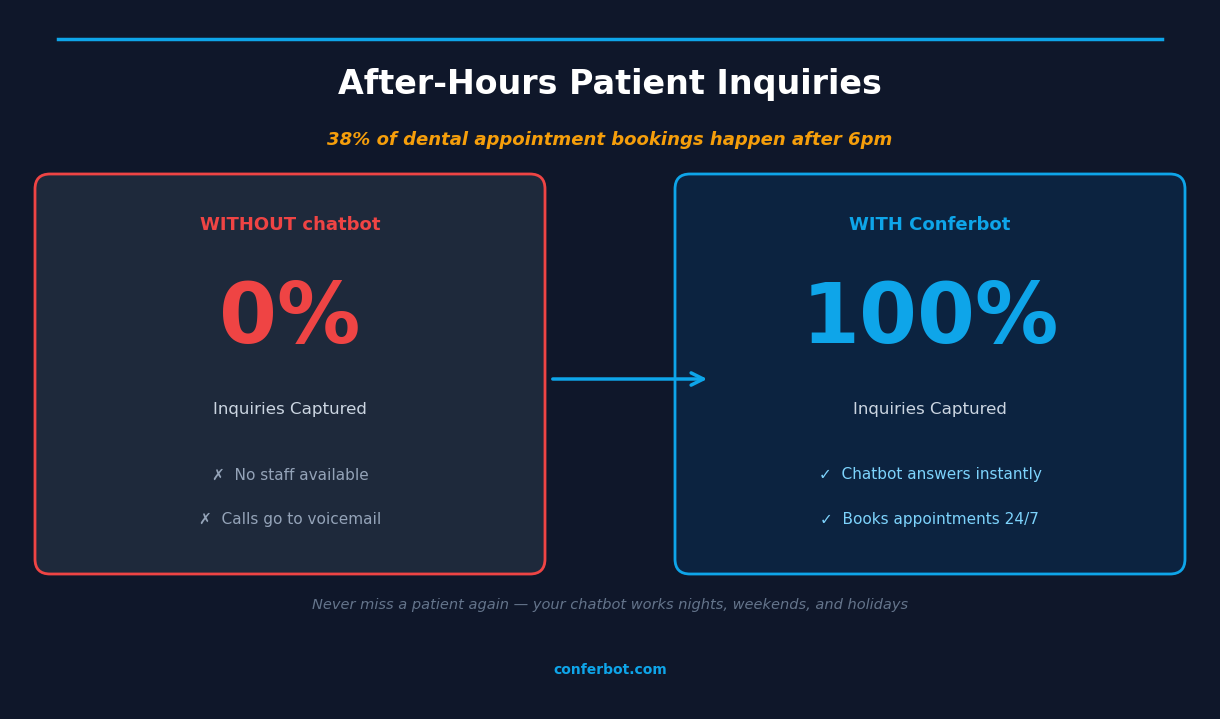
Dental practices face a unique patient communication challenge. Patients often search for dental care outside of business hours — when a toothache strikes at midnight, when they have five minutes between meetings to book a cleaning, or when they want to compare crown pricing before calling. According to industry data, 38% of dental appointment bookings happen after 6pm, a window when most practices have no staff available to take calls or respond to messages. Those inquiries either go unanswered or reach competitors who have already deployed 24/7 chatbot coverage.
A chatbot for dentists addresses this by turning every website visit into a potential booking opportunity, regardless of the time. Patients interact with a friendly conversational interface -- powered by Conferbot's NLP chatbot engine for natural language understanding -- that walks them through procedure selection, time preference, and contact details — and submits a confirmed appointment request to your scheduling team. Emergency patients get immediate first-aid guidance and your emergency line number. New patients complete intake questions in the chat before they ever set foot in your office.
Conferbot's dental practice chatbot template is built on a no-code visual builder that lets you launch in under an hour without writing a single line of code. It deploys directly on your website, integrates with your existing scheduling tools, and scales from a solo practitioner to a multi-location group practice. This guide covers everything you need to know about deploying, optimizing, and measuring a chatbot for your dental office in 2026.
Why Dental Practices Need a Chatbot in ${year}
The dental industry is facing converging pressures that make chatbot automation no longer optional — it is increasingly a competitive baseline. Patient expectations for instant digital responses have been set by industries like e-commerce and banking, and those expectations now apply to healthcare. A patient who cannot book an appointment on your website at 9pm will simply search for a practice that can accommodate them.
Here is a data-driven picture of the opportunity dental practices are leaving on the table without a chatbot:
| Challenge | Without a Chatbot | With a Dental Chatbot |
|---|---|---|
| After-hours inquiries | 0% captured (voicemail or bounce) | 100% captured and converted |
| Appointment booking rate | Baseline | +42% more bookings |
| No-show rate | 18-25% of scheduled visits | Reduced by 35% via SMS reminders |
| New patient registration time | 15-20 min manual intake | 5-7 min automated pre-collection |
| Staff time on phone inquiries | 2-3 hours per day | Reduced by 60-70% |
| Insurance verification wait | 24-48 hours | Pre-screened before appointment |
Beyond the numbers, there is a patient experience dimension. Dental anxiety is one of the leading barriers to routine care, and deploying a chatbot on WhatsApp provides an even lower-friction entry point for anxious patients who prefer messaging over calling. Dental anxiety is also one of the leading barriers to routine care, affecting an estimated 36% of the population. Patients who feel anxious about calling a dental office — because they expect judgment, complexity, or a hard sell — are far more likely to engage with a low-pressure chatbot at their own pace. A dental chatbot reduces the friction between "I should get a checkup" and "I have an appointment confirmed," which is the most critical conversion in your practice's growth funnel.
Dental emergencies present an even more urgent case. A patient with a knocked-out tooth has a 30-minute window for successful reimplantation. A patient with jaw swelling may have a spreading infection that requires emergency care. The chatbot provides immediate triage guidance, emergency contact numbers, and fast-tracks appointment requests so no emergency patient is left waiting for a callback that never comes.
How the Dental Practice Chatbot Works
Conferbot's dental practice chatbot template is a structured conversational flow with 26 nodes covering every major patient interaction pathway. Here is how each pathway works from the patient's first message to a confirmed outcome.
Main Menu and Routing
When a patient opens the chatbot, they receive a branded welcome message and five primary options: Book an appointment, Dental emergency, Insurance check, Services and pricing, and New patient registration. Each option routes to a dedicated conversation path. The menu design is deliberate — clear language, no medical jargon, and no overwhelming walls of text. Patients tap one option and are immediately in the right workflow.
Appointment Booking Path
The appointment path walks the patient through procedure selection (cleaning, filling, crown, whitening, or orthodontics consultation), preferred time slot, and contact details. The bot collects name, phone, and email, then confirms that the request has been submitted and that a team member will call within two hours to confirm the exact slot. At the end, the patient is offered SMS reminders to reduce no-shows.
Dental Emergency Path
The emergency path begins with a pain level assessment (1-5 scale) and injury location (tooth pain, jaw swelling, broken tooth, knocked-out tooth, or soft tissue bleeding). Based on the responses, the chatbot delivers specific first-aid advice and displays the emergency hotline number prominently. For life-threatening presentations — severe facial swelling, difficulty breathing, or high fever with dental pain — the chatbot explicitly advises the patient to go to the nearest emergency room. Then it offers to fast-track an emergency appointment booking.
Insurance Verification Path
Patients select their insurance provider from the five most common dental plans (Delta Dental, Cigna, Aetna, MetLife, Other) and receive a clear breakdown of typical coverage percentages by procedure category. The chatbot then offers to submit a benefits verification request, which the practice team processes and emails back to the patient before their appointment. This eliminates the common day-of surprise about out-of-pocket costs.
New Patient Registration
The new patient path collects name, email, phone, insurance status, and a medical history screening question covering conditions that affect dental treatment (diabetes, heart conditions, blood thinners, medication allergies). This structured intake data is submitted to the practice team, who follow up to schedule the first appointment and send a link to the complete health history form. By the time the patient arrives, 80% of the intake process is already done.
Ready to try Dental Practice Chatbot?
Deploy this template in under 10 minutes. No coding required.
Use This Template Free →Appointment Booking Automation: Converting Browsers to Patients
The most valuable function of a chatbot for dentists is appointment booking automation. Every unbooked website visit represents a patient who found you but did not convert — and the primary reason patients do not convert is friction: office is closed, phone line is busy, booking form is too long, or there is no clear path from "I want an appointment" to "I have an appointment."
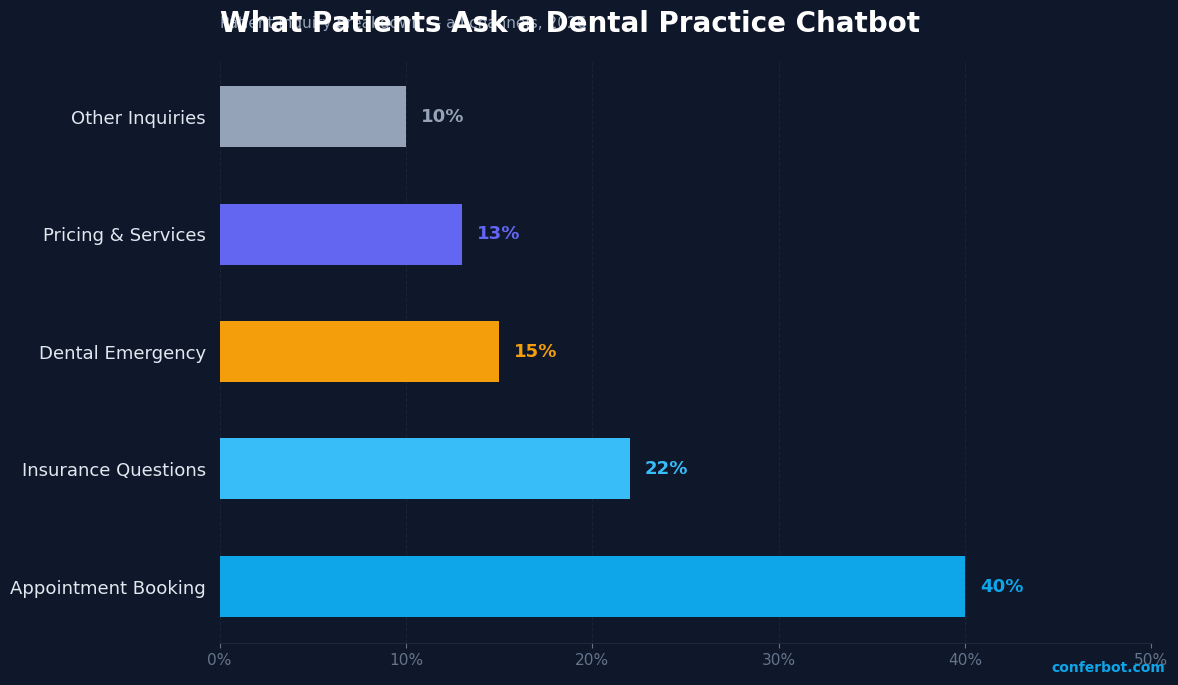
Appointment booking accounts for 40% of all dental chatbot conversations — the single largest category of patient interaction. The chatbot handles the entire top-of-funnel intake: procedure type, time preference, contact collection, and confirmation. It does this in under two minutes of conversation, compared to the average 6-8 minute phone call required to accomplish the same outcome.
Procedure-Specific Pathways
Different procedures have different booking characteristics. Routine cleanings are typically low-urgency, high-frequency appointments where convenience and time-slot flexibility drive conversion. Cosmetic procedures like whitening and veneers often involve a patient who has been researching for weeks and needs pricing clarity before committing. Orthodontics consultations require a different tone entirely — patients are often parents booking for a child, and they want to understand the process before committing to a consultation. The chatbot's procedure selection menu routes each of these patients into the same booking funnel with the same efficiency, regardless of the underlying complexity.
No-Show Reduction
Dental no-shows cost the average practice $200-400 per missed appointment in lost revenue and wasted chair time. The chatbot's reminder setup module, offered at the end of every booking flow, asks patients if they want SMS reminders at 48 hours and 2 hours before their appointment. Practices using automated reminders see no-show rates drop from 18-25% to 8-12% — a reduction of 35% or more. For a practice with 20 appointments per day, reducing no-shows from 20% to 12% recovers 1.6 appointments worth of revenue daily, easily justifying the entire cost of the chatbot platform.
Multi-Location Support
For group dental practices with multiple locations, the chatbot can be configured to ask which location the patient prefers before entering the booking flow. Each location's availability and team can be managed separately, with the chatbot routing requests to the appropriate practice coordinator. Leverage Conferbot's omnichannel deployment to serve patients across web, WhatsApp, and Messenger from a single configuration. This makes the template scalable from a solo practitioner to a DSO (Dental Service Organization) managing dozens of locations.
Dental Emergency Triage: Immediate Response When It Matters Most
Dental emergencies are time-sensitive, emotionally charged, and far more common than patients realize. The American Dental Association estimates that 22% of adults experience dental pain in any given six-month period, with a significant portion of those episodes occurring outside of regular business hours. How your practice handles those after-hours emergencies determines whether those patients become loyal, long-term relationships or one-time emergency visits at a competitor.
Pain Assessment and Triage Logic
The emergency path begins with a 1-5 pain scale assessment, followed by injury location selection. This two-question triage produces a structured severity picture that allows the chatbot to deliver appropriate, calibrated advice rather than a generic "call us" message. A level-1 discomfort with a loose filling gets different guidance than a level-5 emergency with jaw swelling — and the chatbot handles both correctly every time.
| Emergency Type | Immediate First-Aid Guidance | Urgency Level |
|---|---|---|
| Knocked-out tooth | Handle by crown, store in milk, see dentist within 30 min | Critical — immediate |
| Jaw or facial swelling | May indicate abscess/infection — go to ER if severe | High — same day or ER |
| Severe toothache | Warm salt water rinse, OTC pain relief, call dental office | High — same day |
| Broken or chipped tooth | Rinse mouth, cover sharp edges with dental wax | Moderate — within 24-48h |
| Bleeding gums | Apply gentle pressure with gauze for 10-15 minutes | Low-Moderate — monitor |
Emergency Contact Integration
Every emergency conversation ends with your practice's emergency hotline number displayed prominently. The chatbot is transparent: it provides first-aid guidance but always directs patients to a real dental professional for evaluation. For presentations involving systemic symptoms — fever, difficulty breathing or swallowing, severe facial swelling — the chatbot explicitly advises the patient to go to the emergency room, because these presentations can indicate spreading infection that is life-threatening if untreated.
After delivering first-aid advice and the emergency number, the chatbot offers to book an emergency appointment immediately. This captures the patient's contact information and flags the request as urgent so your team can prioritize it when they check the queue. Emergency patients who receive fast, clear guidance become the most loyal patients — they experienced your practice at its most responsive, and that builds trust that translates into long-term retention.
Insurance Verification and Pricing Transparency
Cost uncertainty is the second most common reason patients delay dental care. When a patient does not know whether their insurance covers a crown, or what the out-of-pocket cost of an Invisalign treatment will be, the default behavior is to wait and research — or to call the office, get put on hold, and give up. A dental chatbot eliminates this friction by delivering insurance coverage guidance and procedure pricing at the moment the patient needs it, on demand, 24/7.
Insurance Coverage by Provider
The chatbot's insurance path covers the four major dental insurance providers — Delta Dental, Cigna, Aetna, and MetLife — plus a catch-all for other plans. For each, it delivers a clear, readable breakdown of typical coverage percentages by procedure category: preventive care (80-100%), basic restorative (70-80%), major restorative (50%), orthodontics (50% up to lifetime maximum), and cosmetic procedures (typically not covered). This framing helps patients quickly understand whether their plan will help, without the complexity of explaining deductibles, coinsurance, and annual maximums in a single message.
The chatbot is careful to note that coverage percentages depend on the patient's specific plan, and offers to submit a benefits verification request so the practice can confirm exact coverage before the appointment. This pre-verification step is one of the most financially valuable automations in the entire chatbot — it eliminates day-of surprises that lead to patient complaints, appointment cancellations, and collection issues.
Transparent Procedure Pricing
The services and pricing path displays a comprehensive menu of procedure categories with price ranges, organized by category: preventive, restorative, cosmetic, and orthodontics. Displaying price ranges proactively is a deliberate strategy. Research consistently shows that price transparency increases patient trust and conversion rates. Patients who see pricing on your website are more likely to book — not less — because the information eliminates the uncertainty that causes hesitation.
The pricing display always includes a note about insurance coverage and a mention of financing options (CareCredit or payment plans), which anchors the patient's perception of affordability even for higher-cost procedures. After viewing pricing, the chatbot asks if they would like to book an appointment for any of the services — capturing the conversion at the moment of highest intent.
50,000+ businesses use Conferbot templates to automate conversations
New Patient Onboarding: From First Contact to Ready-to-Treat
New patient acquisition is the lifeblood of a growing dental practice, but the traditional first-contact experience — fill out a paper form in the waiting room, repeat your medical history to multiple staff members, wait for insurance to be verified — creates unnecessary friction that increases no-show rates for first appointments. A dental chatbot transforms new patient onboarding into a streamlined digital experience that collects the information your team needs before the patient ever walks through the door.
Structured Intake Collection
The new patient registration path collects five critical data points through a conversational flow: full name, email address, phone number, insurance status, and a medical history screening question. The medical history question uses a multiple-choice format covering the conditions most relevant to dental treatment: diabetes (affects healing and infection risk), heart conditions and blood pressure (relevant to epinephrine in local anesthetics), blood thinners (bleeding risk during procedures), and medication allergies (particularly penicillin and latex). Collecting this information before the appointment allows the dentist to prepare, check for contraindications, and have informed treatment conversations from the first minute of the visit.
Next-Step Clarity
After collecting registration information, the chatbot delivers a clear, three-step explanation of what happens next: team review and follow-up within 24 hours, a link to complete the full health history form online, and what to bring to the first appointment. This clarity reduces the anxiety and uncertainty that drives first-appointment no-shows. Patients who know exactly what to expect are significantly more likely to show up.
Pre-Appointment Digital Intake
The chatbot's email collection during registration enables the practice to send a digital intake form link before the first appointment. When patients complete their health history, consent forms, and insurance authorization digitally in advance, in-office intake time drops from 15-20 minutes to under 5 minutes. This creates a better first impression — the patient is seen promptly rather than spending the first 20 minutes of their appointment on paperwork — and frees chair time for revenue-generating treatment. Practices that implement digital pre-intake report that first-appointment satisfaction scores increase by 15-20 percentage points compared to paper-based intake.
Connect the chatbot to your practice management system via Conferbot's API integration to automatically create patient records when registration is submitted, eliminating manual data entry entirely. This is the highest-value integration for multi-provider practices where front desk bandwidth is a constant constraint.
Implementation Guide and ROI for Dental Practices
Deploying a chatbot for dentists with Conferbot is designed to be fast, low-risk, and measurable. Most solo practices go live within an hour. Multi-location groups with custom integrations typically complete full deployment within one to two weeks. Here is the implementation path and the ROI framework you should use to evaluate your chatbot investment.
Step-by-Step Deployment
Step 1 — Customize the template: Start from Conferbot's dental practice chatbot template in the no-code visual builder. Replace the practice name, colors (the template uses sky blue #0EA5E9 — adjust to your brand), and contact details including your emergency hotline number.
Step 2 — Add your pricing: Update the services and pricing node with your actual procedure prices or price ranges. Include a note about insurance coverage and financing options. Accurate pricing increases patient trust and reduces post-appointment billing disputes.
Step 3 — Configure notifications: Set up email or Slack notifications so your team receives an immediate alert whenever a patient submits an appointment request, emergency booking, insurance verification request, or new patient registration. Response speed to these alerts directly impacts conversion rates — the faster your team follows up, the higher the confirmation rate.
Step 4 — Embed on your website: Add the Conferbot embed script to your practice website. Place the chat widget on every page, not just the homepage — patients navigating to your services page or pricing page should have immediate access to the booking flow.
Step 5 — Track and optimize: Use Conferbot's analytics to monitor conversation volumes by path (booking vs. emergency vs. insurance vs. new patient), completion rates, drop-off points, and peak usage hours. Use this data to identify which procedures drive the most chatbot inquiries and adjust your marketing accordingly.
ROI Calculation
The ROI calculation for a dental chatbot is straightforward. Assume a practice with 25 patients per day, an average appointment value of $200, and a current no-show rate of 20%. A 35% reduction in no-shows recovers 1.75 appointments per day, or $350 in daily revenue. At 250 working days per year, that is $87,500 in recovered revenue annually from no-show reduction alone — before accounting for after-hours bookings, new patient captures, and staff time savings. Conferbot's dental practice plan pays for itself many times over within the first month of deployment.
Ready to deploy? Explore all chatbot templates for more healthcare automation options, or learn how AI-powered conversations can handle more complex dental inquiries with natural language understanding.
Dental Practice Chatbot FAQ
Everything you need to know about chatbots for dental practice chatbot.
Why Use a Template vs Building from Scratch?
Templates encode years of optimization data into the conversation flow before you start.
| Factor | Conferbot Template | Build from Scratch | Hire a Developer |
|---|---|---|---|
| Time to deploy | 10 minutes | 2-8 hours | 2-6 weeks |
| Cost | Free | Your time | $5,000-$25,000 |
| Day-1 conversion | 15-22% | 5-8% | 10-15% |
| Proven flows | Yes, data-tested | No | Depends |
| Updates included | Automatic | Manual | Paid |
| Multi-channel | 8+ channels | 1 channel | Extra cost |
| Analytics | Built-in | Must build | Extra cost |
Ready to Deploy Dental Practice Chatbot?
Join 50,000+ businesses. Free forever plan available. No credit card required.