
Food Truck Ordering Chatbot
Free Food And Beverage Chatbot Template
A food truck ordering chatbot that lets customers browse the menu, place orders ahead of time, and get notified when their food is ready. Reduces wait times and increases order volume during peak hours.


What Is a Food Truck Ordering Chatbot?
A food truck ordering chatbot is an AI-powered conversational assistant that lets customers browse your menu, customize their orders, pay ahead, find your current location, and skip the line -- all through a simple chat conversation on their phone. It transforms the food truck experience from standing in a long line squinting at a chalkboard menu to a seamless digital ordering flow that starts before the customer even arrives at the truck.
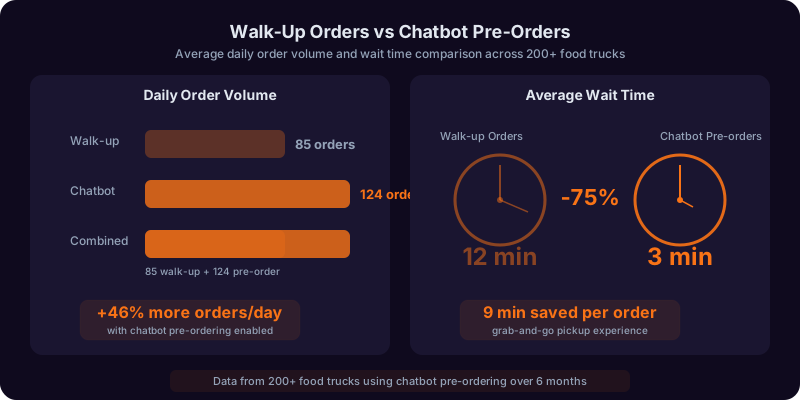
Food trucks in 2026 face a unique operational challenge: extremely high demand compressed into short service windows. A lunch rush lasts 90 minutes, and every minute a customer spends deciding at the window is a minute another customer might walk away. The National Restaurant Association reports that mobile ordering has increased 300% across food service since 2020, and food trucks that offer pre-ordering serve 30-50% more customers per service window than those relying entirely on walk-up orders. The ordering chatbot is how food trucks capture this demand without building a custom app.
Built on Conferbot's AI chatbot builder with natural language processing, the food truck ordering chatbot deploys on WhatsApp, Instagram, your website, and Facebook Messenger -- the platforms your customers already use to follow your truck. No app download required, no login friction, no abandoned carts. Just a conversation that ends with food ready when the customer walks up.
This guide covers how the ordering flow works, menu management, order customization, real-time location tracking, pre-ordering and scheduling, payment processing, loyalty programs, and a complete setup guide for food truck operators.
How the Ordering Flow Works: Menu to Pickup in Minutes
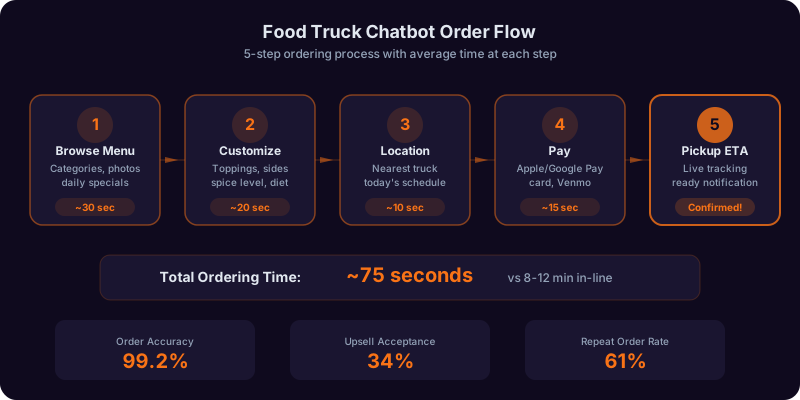
The food truck ordering chatbot guides customers through a frictionless ordering process designed for the speed and simplicity that mobile food customers expect. Every step is optimized to minimize taps and decision fatigue while maximizing order accuracy and average ticket size.
Step 1: Location Check and Availability
When a customer starts a conversation, the chatbot first confirms the truck's current status and location. "Hey! We are parked at 5th and Main today, serving from 11:00 AM to 2:00 PM. Want to see the menu?" If the truck is not currently serving, the chatbot shares the next scheduled location and offers to send a reminder when the truck opens: "We are closed right now, but we will be at Riverside Park tomorrow at 11:30 AM. Want me to ping you when we open?" This location-first approach prevents customers from building orders they cannot pick up and creates a notification opt-in that builds your audience for future service windows.
Step 2: Menu Browsing
The chatbot presents the menu in a conversational format optimized for mobile screens. Rather than dumping the entire menu at once, it presents categories first -- "Tacos, Burritos, Bowls, Sides, Drinks" -- and lets the customer tap or type their interest. Within each category, items are presented with name, brief description, price, and any relevant tags (spicy, vegetarian, gluten-free, popular). The chatbot highlights the day's specials and any items that are selling fast: "Heads up -- our Korean BBQ tacos are the #1 seller today and we are running low. Grab them while they last." This combination of organized browsing and urgency messaging increases both order speed and average ticket size.
Step 3: Order Customization
Food truck customers want their food their way, and the chatbot handles customization through a guided conversation rather than a complex form with checkboxes. "Great choice on the Baja Fish Taco! How would you like it -- Regular, Extra Spicy, or Mild? Any add-ons: extra guac ($1.50), extra salsa ($0.75), or double protein ($3.00)?" The chatbot knows which items have customization options, what the default preparation is, and which modifications carry an upcharge. It also handles allergy-related modifications: "I see you have a dairy allergy noted in your profile -- I will make sure your order is prepared without cheese or sour cream. Want to confirm that?" This allergy awareness feature, powered by customer profile data stored from previous orders, is both a safety measure and a loyalty driver.
Step 4: Cart Review and Upsell
Before checkout, the chatbot presents the complete order for review with itemized prices and a total. This is also the natural moment for smart upselling: "Your order comes to $14.50. Want to add a drink? Our house-made horchata pairs perfectly with tacos and it is only $3.00." The chatbot's upsell suggestions are configured by the operator to match logical pairings and high-margin items. Strategic upselling at the cart review step increases average ticket size by $2-4 per order without feeling pushy, because the suggestions are relevant and well-timed.
Step 5: Payment and Pickup Time
The customer completes payment within the chat conversation through integrated payment processing -- credit card, debit card, Apple Pay, Google Pay, or cash on pickup. For pre-orders, the chatbot provides an estimated pickup time based on current order queue depth: "Your order will be ready in about 12 minutes. I will send you a message when it is ready for pickup -- just show this chat to grab your food." For customers paying cash, the chatbot reserves their spot in the queue and provides the same pickup time estimate. The digital receipt is delivered in the chat with an order number that the customer shows at the pickup window.
Ready to try Food Truck Ordering Chatbot?
Deploy this template in under 10 minutes. No coding required.
Use This Template Free →Real-Time Location Tracking: Helping Customers Find Your Truck
The number one question food truck customers ask is "Where are you today?" The chatbot answers this question instantly and proactively, eliminating the most common source of customer friction in the food truck experience.
Live Location Sharing
The chatbot shares the truck's current location through an embedded map link that opens in the customer's preferred navigation app (Google Maps, Apple Maps, or Waze). "We are at the corner of 5th and Main, right across from City Hall. Here is the map -- tap to get directions." The location is updated by the operator at the start of each service window, or it can be automatically pulled from a GPS tracker installed in the truck for real-time positioning. Customers see both the location and the service hours for that stop, so they know exactly when to arrive.
Schedule and Route Publishing
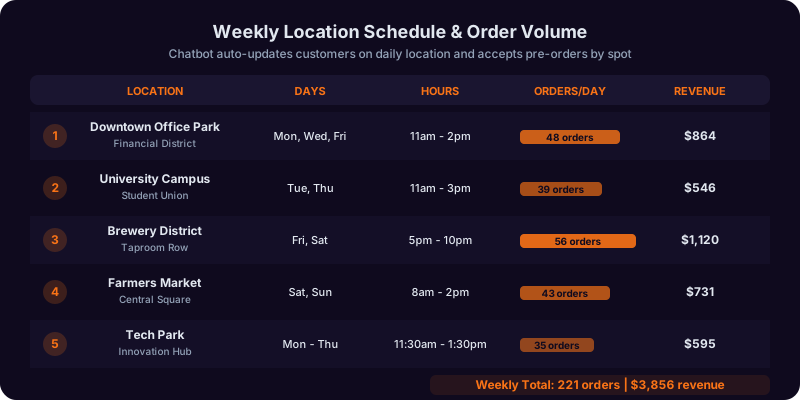
Most food trucks follow a weekly rotation of locations. The chatbot publishes the full weekly schedule so customers can plan ahead: "Here is where you can find us this week: Monday -- Downtown Financial District (11-2), Tuesday -- University Campus (11-2), Wednesday -- Riverside Park (11:30-2:30), Thursday -- Tech Park (11-2), Friday -- Brewery Row (5-10)." Customers can tap any day to pre-order for that location, and they can set location alerts for specific stops: "Notify me every time you are at Riverside Park." These location alerts build a hyper-local audience that drives consistent traffic at each stop.
Event and Pop-Up Notifications
When the truck is booked for a special event, festival, or pop-up location outside the regular rotation, the chatbot notifies followers who have opted into location alerts. "Special pop-up this Saturday! We will be at the Waterfront Music Festival from 4 PM to midnight with a limited festival menu. Pre-order now to skip the line." Event notifications sent through the chatbot see 40-60% open rates on WhatsApp and Messenger -- dramatically higher than email or social media posts -- because they arrive in the same conversation thread where the customer has previously ordered and engaged.
Weather and Cancellation Alerts
Weather is the food truck operator's nemesis. When rain or extreme heat forces a schedule change, the chatbot sends immediate notifications to customers who had pre-orders or location alerts set for the affected service window. "Heads up -- we are moving indoors today due to rain. Find us at the Central Market food hall from 11 to 2. Your pre-order is still confirmed!" This proactive communication prevents customers from showing up to an empty parking lot and preserves pre-orders that would otherwise be lost to confusion.
Pre-Ordering and Scheduled Pickup: Serve More Customers, Faster
Pre-ordering is the single most impactful operational improvement a food truck can make. It shifts order processing from the service window to the customer's idle time, reduces wait times for walk-up customers, and increases total throughput per service window by 30-50%. The chatbot makes pre-ordering effortless for customers and manageable for operators.
How Pre-Ordering Works
Customers can place orders up to 24 hours before the truck's next service window. The chatbot presents the menu for the upcoming service, guides the customer through ordering and payment, and assigns a pickup time window based on the order queue. "Your order is confirmed for pickup between 11:45 and 12:00 at our Downtown location. I will send you a reminder 15 minutes before your window." Pre-orders are paid in advance, so pickup is instant: the customer shows their order confirmation, grabs their food, and goes. No waiting, no fumbling with payment at the window.
Queue Management and Pickup Windows
The chatbot manages the pre-order queue to prevent overloading the kitchen during peak times. Operators configure the maximum number of pre-orders per 15-minute window based on their kitchen's capacity. When a time window fills up, the chatbot offers the next available slot: "The 12:00 window is full -- want 12:15 or 12:30 instead?" This queue management ensures that pre-orders are ready on time and that the kitchen is never overwhelmed. The operator sees the pre-order queue on their phone or tablet in real time, with order details and pickup times displayed in the order they need to be prepared.
Walk-Up and Pre-Order Balance
Smart food truck operators reserve a portion of their capacity for walk-up customers to maintain the spontaneous, discoverable quality that makes food trucks special. The chatbot's queue management system allocates the operator-configured split: for example, 60% capacity for pre-orders and 40% for walk-ups. If walk-up traffic is lighter than expected, the chatbot can open additional pre-order slots in real time. If walk-up traffic is heavier (a surprise crowd from a nearby event), the operator can adjust the split from their phone. This dynamic balancing maximizes total throughput without sacrificing either customer segment's experience.
Group and Catering Pre-Orders
The chatbot handles large group orders for office lunches, events, and catering requests through the same conversational interface. A customer can place an order for 15 people, specifying individual customizations for each item, and pay with a single transaction. For recurring catering clients -- an office that orders every Tuesday, for example -- the chatbot remembers the previous order and offers to repeat or modify it: "Same order as last week for the marketing team? That was 8 tacos, 4 burritos, 3 bowls, and 15 drinks. Want to make any changes?" This convenience drives repeat catering orders, which are typically the highest-margin transactions for food truck operators. Manage group orders and catering through Conferbot's API integration with your POS system.
Payment Processing: Fast, Secure, and Flexible
Food truck transactions need to be fast. Every second spent processing payment at the window is a second the line is not moving. The chatbot processes payments before the customer arrives, but also supports multiple payment methods for maximum flexibility.
In-Chat Payment
The primary payment method is in-chat processing through integrated payment gateways. Customers enter their card information through a secure, PCI-compliant embedded form within the chat conversation, or use saved payment methods from previous orders. Apple Pay and Google Pay are supported for one-tap payment on mobile devices, which reduces checkout time to under five seconds. All payment processing is handled by Stripe, Square, or the operator's preferred processor through Conferbot's API integration framework.
Saved Payment Methods and One-Tap Reorder
Returning customers can save their payment method (securely tokenized, never stored as raw card data) for future orders. Combined with saved order history, this enables one-tap reordering: "Want your usual? 2 Al Pastor Tacos, extra spicy, with a horchata -- $13.50. Tap to confirm and pay." One-tap reorder reduces the ordering process from two to three minutes to under 15 seconds for repeat customers, which dramatically increases order frequency. Regular customers who use one-tap reorder place 40-60% more orders per month than those who go through the full ordering flow each time.
Split Payment and Group Orders
For group orders, the chatbot supports split payment so each person can pay for their own items. The group organizer places the full order, then shares a payment link with each participant. Each person pays for their items through their own chat conversation, and the operator sees a single consolidated order with payment status for each item. This eliminates the awkward "who owes what" conversation and the operational complexity of processing multiple payments at the window for a single order.
Cash Payment Support
Not every customer wants to pay digitally, and the chatbot accommodates cash-paying customers by reserving their spot in the pre-order queue without requiring advance payment. "I have your order for 2 tacos and a drink queued for pickup at 12:15. You will pay $11.50 in cash at the window." The operator sees these orders flagged as cash-on-pickup in the queue. Cash orders are held for 10 minutes past the pickup window before being released, and the chatbot sends a reminder as the window approaches to reduce no-shows.
Tipping
After order completion, the chatbot presents tipping options with suggested percentages: 15%, 20%, 25%, or a custom amount. Tipping is optional but prominently offered, and the chatbot uses light social proof: "Most customers add a 20% tip for our crew." Food trucks using chatbot-integrated tipping see average tip rates of 18-22%, compared to 12-15% for cash tip jars, because the digital format normalizes tipping at restaurant-comparable levels and makes it frictionless.
50,000+ businesses use Conferbot templates to automate conversations
Loyalty Program: Turn First-Time Customers into Regulars
Food trucks thrive on repeat customers, and the chatbot includes a built-in loyalty program that rewards regulars automatically -- no punch cards to lose, no apps to download, no accounts to create. The loyalty program runs entirely within the chat conversation, tracked by the customer's phone number or messaging account.
Points-Based Rewards
The default loyalty structure awards one point per dollar spent, with rewards redeemable at configurable thresholds. A typical configuration: 50 points earns a free side item, 100 points earns a free entree, 200 points earns a free meal for two. The chatbot displays the customer's points balance after every order: "You earned 14 points on this order. Your balance is 87 points -- just 13 away from a free entree!" This visibility and proximity messaging keeps customers motivated to reach the next reward and increases visit frequency.
Visit Streak Bonuses
Beyond points, the chatbot tracks visit streaks and rewards consistency. "This is your 5th visit in a row -- you have earned double points on today's order!" Visit streak bonuses encourage weekly or bi-weekly visit patterns that turn occasional customers into committed regulars. Operators can configure streak thresholds (3 visits, 5 visits, 10 visits) and the bonus type (double points, free upgrade, exclusive menu item access).
VIP Customer Tiers
High-frequency customers automatically advance through loyalty tiers that unlock additional benefits. A three-tier system might include Regular (all customers), VIP (50+ orders or $500+ lifetime spend), and Super VIP (100+ orders or $1,000+ lifetime spend). VIP benefits can include priority pre-order windows (access to tomorrow's pre-order queue 30 minutes before general availability), exclusive menu items or early access to new items, birthday rewards, and personal messages from the operator. These tiers create an aspirational progression that high-value customers actively pursue.
Referral Rewards
The chatbot powers a referral program where existing customers earn rewards for bringing friends. Each customer has a unique referral code that they can share through a "Share" button in the chat. When a new customer places their first order using a referral code, both the referrer and the new customer receive a reward -- typically a free item or bonus points. Referral programs drive 15-25% of new customer acquisition for food trucks using the chatbot, and referred customers have a 30% higher retention rate than customers acquired through social media or walk-up discovery because they arrive with a personal recommendation.
Track loyalty program performance, customer lifetime value, and referral metrics through Conferbot's analytics dashboard.
Multi-Truck Operations: Scaling Beyond a Single Truck
As food truck businesses grow, operators often expand to multiple trucks, each with its own location, menu variations, and staff. The chatbot scales seamlessly from a single truck to a multi-truck fleet, providing a unified customer experience while maintaining operational separation for each unit.
Fleet-Wide Ordering
Customers interact with a single chatbot that knows the location, menu, and availability of every truck in the fleet. "We have two trucks out today: Truck 1 is at Downtown with the full menu, and Truck 2 is at the Tech Park with a limited lunch menu. Which one is closest to you?" The chatbot routes orders to the correct truck based on the customer's selection, and each truck's operator sees only their own order queue. Loyalty points accumulate across all trucks -- a customer who visits different locations throughout the week builds their rewards seamlessly.
Centralized Menu and Pricing Management
Multi-truck operators manage menus centrally through the chatbot's admin interface. A base menu can be shared across all trucks, with per-truck overrides for items that are location-specific, sold out, or priced differently. Pricing changes propagate instantly to the customer-facing chatbot across all trucks. This centralized management prevents the inconsistencies that frustrate customers -- seeing a price on one truck's social media and being charged differently at another.
Consolidated Reporting
The chatbot provides both per-truck and fleet-wide reporting: total orders, revenue, average ticket size, top-selling items, customer counts, and loyalty program metrics. Operators can compare performance across trucks, identify which locations generate the highest revenue per service hour, and optimize their fleet deployment strategy based on data. This reporting is accessible through Conferbot's analytics dashboard and can be exported for accounting and business planning.
Staff Management
Each truck can have its own operator account with permissions to manage their truck's menu (mark items as sold out, add daily specials), view their order queue, and communicate with customers about order status. The fleet owner retains admin access to all trucks for menu management, pricing, and reporting. This permission structure keeps each truck's operations independent while maintaining centralized business oversight.
Setup Guide: Launch Your Food Truck Ordering Chatbot Today
Food truck operators can deploy a fully functional ordering chatbot in two to four hours using Conferbot's no-code platform. Here is the complete setup process.
Step 1: Create Your Menu (1-2 Hours)
Enter your menu items organized by category. For each item, provide: name, description (one to two sentences), price, available customizations (size, spice level, protein choice, add-ons with prices), allergen information, and an optional photo. If you have a rotating menu, create multiple menu configurations and label them (Weekday Lunch, Weekend Brunch, Late Night, Festival). The chatbot provides menu templates for common food truck cuisines -- tacos, burgers, Asian fusion, BBQ, Mediterranean -- that you can customize rather than building from scratch.
Step 2: Set Up Payment Processing (30 Minutes)
Connect your Stripe or Square account through the Conferbot integration settings. If you do not have a payment processor, you can create a Stripe account in minutes. Configure accepted payment methods (cards, Apple Pay, Google Pay, cash on pickup), and test with a small transaction. Set your tipping options and configure any tax rate that applies to your jurisdiction.
Step 3: Configure Location and Schedule (30 Minutes)
Enter your weekly location schedule with addresses, service hours, and any recurring notes (parking lot, indoor market, etc.). Enable GPS tracking if you want real-time location updates, or plan to update your location manually at the start of each service window. Set up your pre-order windows: how far in advance customers can order, maximum orders per time slot, and the pickup window duration.
Step 4: Set Up Loyalty Program (15 Minutes)
Configure your loyalty structure: points per dollar, reward thresholds, streak bonuses, and VIP tiers. Conferbot provides recommended configurations based on your average ticket size and service frequency, so you can start with a proven structure and adjust based on your customer behavior data over time.
Step 5: Deploy to Your Channels (30 Minutes)
Add the chatbot to your website (if you have one), connect your WhatsApp Business account, link your Facebook page, and connect your Instagram business account. Add a "Order Now" link in your Instagram bio and Facebook page that opens the chatbot conversation. Print a QR code that opens the chatbot on WhatsApp and display it on your truck for walk-up customers to scan.
Step 6: Train Your Team and Go Live (30 Minutes)
Show your staff how to view the pre-order queue on their phone or tablet, how to mark items as sold out, how to update the truck's location, and how to handle customer messages that the chatbot escalates. Run through three to five test orders to confirm the full flow works on every channel. Then post on social media, text your regulars, and start taking orders. Most operators see measurable impact on their first day -- higher average tickets from upselling, pre-orders that start rolling in before the truck even opens, and happier customers who skip the line.
ROI and Business Impact: Why Food Trucks Need an Ordering Chatbot
The food truck ordering chatbot is not just a convenience tool -- it is a revenue multiplier. By extending the ordering window beyond the physical service period, increasing average ticket size, and building repeat customer relationships, the chatbot delivers measurable business impact from day one.
Revenue Impact Metrics
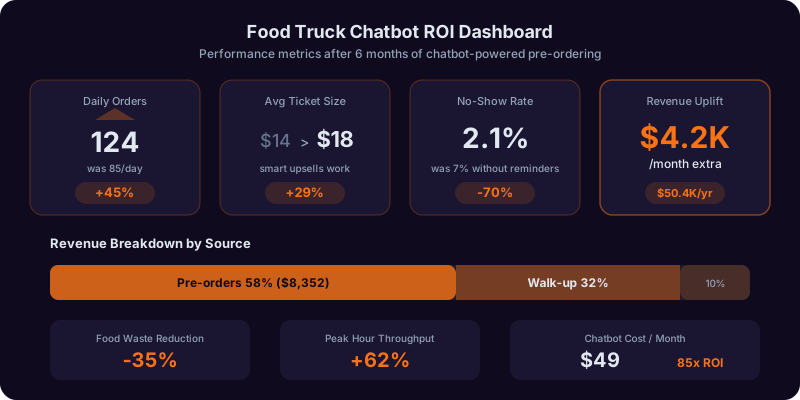
| Metric | Without Chatbot | With Chatbot | Impact |
|---|---|---|---|
| Orders per service window | 80-120 | 110-170 | 30-50% increase |
| Average ticket size | $11-14 | $14-18 | 25-35% increase |
| Pre-order percentage | 0% | 30-45% | New revenue channel |
| Customer return rate (30-day) | 15-22% | 35-50% | 2x repeat visits |
| Average tip percentage | 12-15% | 18-22% | 50% higher tips |
| Catering orders per month | 2-4 | 6-12 | 3x catering revenue |
| No-show rate (pre-orders) | N/A | 3-5% | Minimal waste |
Operational Efficiency
Pre-orders allow the kitchen to batch-prepare orders during slower periods, smoothing the demand curve and reducing the frantic pace of peak service. When 30-40% of orders are pre-paid and queued before the service window opens, the crew can begin preparation early, reducing average wait times for walk-up customers by 40-60%. This faster service means fewer customers walk away during peak times, capturing revenue that would otherwise be lost to long lines. Operators report that pre-ordering adds the equivalent of 30-45 minutes of productive service time per window by shifting preparation to pre-peak periods.
Customer Lifetime Value
The chatbot's loyalty program, reorder convenience, and location notifications transform the customer relationship from transactional to habitual. A typical food truck customer without digital engagement visits two to three times per month. A customer engaged through the chatbot with loyalty tracking and pre-order convenience visits four to six times per month. Over a year, this doubles or triples the customer's lifetime value. For a food truck with 500 active chatbot customers spending an average of $15 per visit, a shift from three to five monthly visits generates an additional $180,000 in annual revenue from existing customers alone.
Get started with Conferbot's AI chatbot builder today -- the food truck ordering chatbot template is free, deploys in hours, and starts generating revenue from your first service window.
Food Truck Ordering Chatbot FAQ
Everything you need to know about chatbots for food truck ordering chatbot.
Why Use a Template vs Building from Scratch?
Templates encode years of optimization data into the conversation flow before you start.
| Factor | Conferbot Template | Build from Scratch | Hire a Developer |
|---|---|---|---|
| Time to deploy | 10 minutes | 2-8 hours | 2-6 weeks |
| Cost | Free | Your time | $5,000-$25,000 |
| Day-1 conversion | 15-22% | 5-8% | 10-15% |
| Proven flows | Yes, data-tested | No | Depends |
| Updates included | Automatic | Manual | Paid |
| Multi-channel | 8+ channels | 1 channel | Extra cost |
| Analytics | Built-in | Must build | Extra cost |
Ready to Deploy Food Truck Ordering Chatbot?
Join 50,000+ businesses. Free forever plan available. No credit card required.
Social Media Integration: From Follow to Order
Food trucks live on social media. Instagram posts of beautifully plated tacos, TikTok videos of food being prepared, Facebook event pages for festival appearances -- social content drives awareness, but the chatbot converts that awareness into orders.
Instagram Integration
When a customer sees your food photo on Instagram and wants to order, they tap "Message" and the chatbot takes over. "Saw our birria tacos on the feed? They are available today at our Downtown location until 2 PM. Want to order?" This instant conversion from content consumption to ordering captures impulse demand that would otherwise dissipate. The chatbot also responds to Instagram Story replies and comments with order prompts, turning every piece of social content into a potential sales channel.
Facebook Messenger Ordering
The chatbot deploys on Facebook Messenger, enabling customers to order directly from your Facebook page. When a customer visits your page to check today's location or menu, the Messenger chatbot engages them with the current day's offering. Facebook Events integration allows the chatbot to promote pre-ordering for upcoming festival and event appearances: "We will be at the Waterfront Festival this Saturday. Pre-order now and skip the festival line."
WhatsApp for Regulars
WhatsApp is the most effective channel for regular customer engagement because messages have near-100% open rates and the conversation thread persists. Regular customers who order through WhatsApp have 2-3x the order frequency of those who order through other channels because the reorder friction is lowest -- their previous orders, saved payments, and loyalty balance are all in the same conversation thread. WhatsApp Broadcast lists allow operators to send daily menu updates and location announcements to opted-in customers.
User-Generated Content and Reviews
After a pickup is completed, the chatbot asks the customer for a quick rating and an optional photo. "How was your meal? Rate 1-5 stars, and snap a pic if you want to share!" Customer photos collected through the chatbot can be reposted (with permission) to the truck's social media accounts, creating a steady stream of authentic user-generated content. Positive reviews are compiled in the chatbot's responses as social proof: "Rated 4.8 stars by 2,300+ customers." Negative reviews trigger an immediate escalation to the operator for personal follow-up and service recovery.