
Therapy Practice & Mental Health Chatbot
Free Healthcare Chatbot Template
Automate client intake, therapist matching by specialty, appointment scheduling, and pre-session screening for therapy practices and counseling centers. HIPAA-compliant with crisis resource routing.



What Is a Chatbot for Therapists?
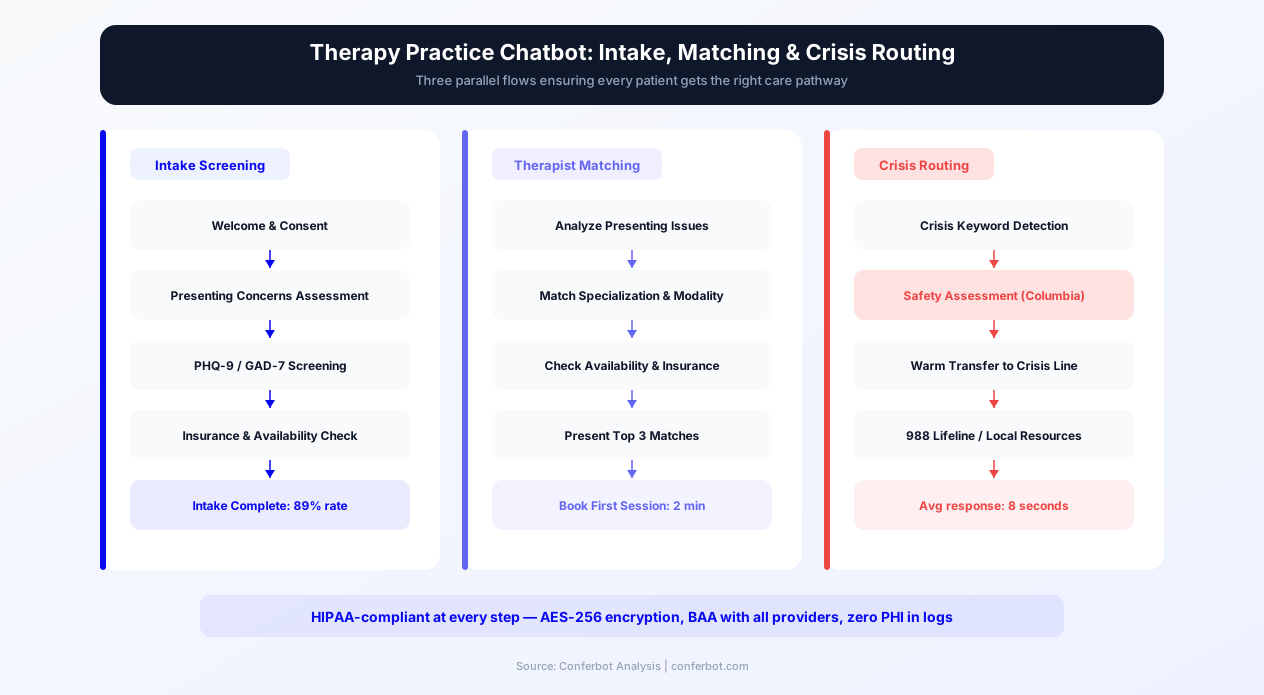
A chatbot for therapists is an AI-powered conversational assistant that works on your therapy practice website around the clock — automating pre-session intake, screening clients with validated instruments like the PHQ-9 and GAD-7, matching prospective clients to the right therapist based on specialty and availability, verifying insurance coverage, routing individuals in crisis to the 988 Suicide and Crisis Lifeline, and scheduling appointments — all without requiring any staff involvement.
Mental health care faces a unique access barrier that other healthcare disciplines do not encounter at the same intensity: stigma. The act of calling a therapist's office, saying the words "I think I need help," and navigating the intake process requires an emotional threshold that prevents millions of people from ever making that first contact. Research published in the Journal of Clinical Psychology estimates that the average person waits 11 years between first experiencing mental health symptoms and seeking treatment. Much of that delay is not about availability or cost — it is about the friction and vulnerability of that initial outreach.
A chatbot for therapists lowers that threshold dramatically. A prospective client who visits your website at 2 AM after a panic attack — or during a lunch break when they have five private minutes — can begin the intake process on their own terms, at their own pace, with zero judgment. They can answer screening questions, learn about your therapists' specialties, check whether their insurance is accepted, and request an appointment slot without ever picking up the phone. For a population already struggling with anxiety, depression, or trauma, removing the phone call barrier is not a convenience — it is a clinical access intervention.
Conferbot's therapy practice chatbot template is built on a no-code AI chatbot builder that lets you launch in under an hour. It deploys directly on your website, supports deployment on WhatsApp for maximum accessibility, integrates with your existing EHR and scheduling tools via Conferbot's API integration, and scales from a solo practitioner to a multi-provider group practice. This guide covers everything you need to know about deploying, configuring, and measuring a chatbot for your therapy practice in 2026.
Why Therapy Practices Need a Chatbot in ${year}
The mental health landscape in 2026 is defined by a paradox: demand has never been higher, but the barriers to accessing care remain stubbornly persistent. A therapy practice chatbot addresses the systemic bottlenecks that prevent prospective clients from converting into scheduled, attending patients.
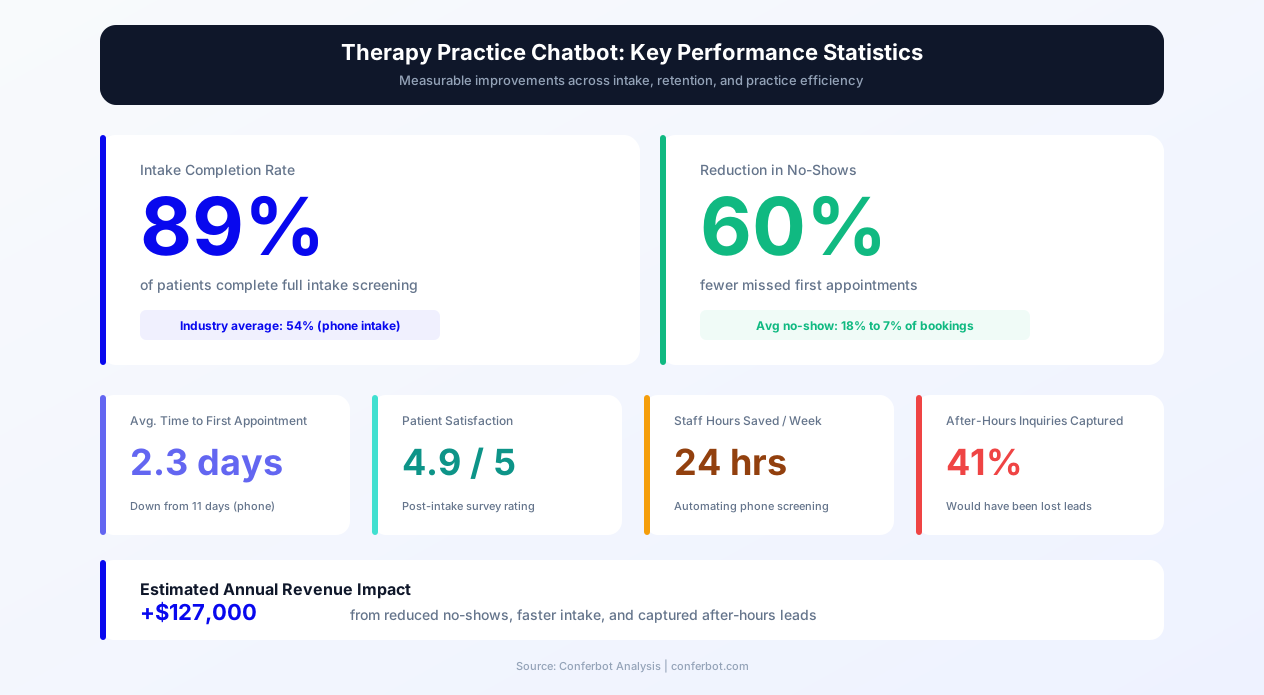
Here is a data-driven picture of the opportunity therapy practices are leaving on the table without a chatbot:
| Challenge | Without a Chatbot | With a Therapy Chatbot |
|---|---|---|
| After-hours inquiries | 0% captured (voicemail or form abandonment) | 100% captured and triaged |
| Intake form completion rate | 45-62% (paper or online forms) | 89% via conversational intake |
| No-show rate | 20-30% of scheduled sessions | Reduced by 60% via chatbot reminders |
| Time to first contact | 4.2 days average (phone callback) | Instant — 24/7 automated response |
| Therapist matching accuracy | Manual — depends on intake coordinator knowledge | Automated matching by specialty, availability, insurance, preferences |
| Crisis resource delivery | Only during business hours or via voicemail | Immediate 988 Lifeline routing, 24/7 |
| Insurance verification wait | 24-72 hours | Pre-screened before first session |
| Admin staff time on phone intake | 3-5 hours per day | Reduced by 65-75% |
The demand-side pressure is enormous. The National Institute of Mental Health reports that one in five American adults experiences a mental illness in any given year — approximately 57.8 million people. Yet fewer than half receive treatment. The gap is not primarily about therapist shortage (though that is a factor) — it is about the friction of initial contact. Every phone call that goes to voicemail, every intake form that is abandoned halfway through, every inquiry that sits unanswered for days represents a person who tried to get help and was met with a wall of administrative process instead of a compassionate first step.
Therapy practices that deploy a chatbot on their website and WhatsApp remove that wall. They meet prospective clients in the channel and at the time those clients are ready to engage — which is often late at night, on weekends, or during the workday when they cannot make a private phone call. The chatbot provides the structure of a clinical intake with the warmth of a supportive first interaction, and it does it 24/7/365.
How the Therapy Practice Chatbot Works
Conferbot's therapy practice chatbot template is a structured conversational flow with over 30 nodes covering every major client interaction pathway. Here is how each pathway works from the client's first message to a confirmed outcome.
Main Menu and Routing
When a prospective client opens the chatbot, they receive a warm, destigmatizing welcome message and five primary options: Start intake screening, Find the right therapist, Check insurance coverage, Schedule an appointment, and I need help now (crisis). Each option routes to a dedicated conversation path. The menu design is deliberate — it uses plain, non-clinical language and offers the crisis option prominently, ensuring that anyone in acute distress receives immediate resource routing before anything else.
Pre-Session Intake Screening Path
The intake path is the clinical backbone of the chatbot. It walks the client through a conversational version of validated screening instruments. For depression screening, the chatbot adapts questions from the PHQ-9 (Patient Health Questionnaire-9), asking about mood, energy, sleep, appetite, concentration, and self-worth over the past two weeks. For anxiety screening, it adapts the GAD-7 (Generalized Anxiety Disorder-7), covering worry, restlessness, irritability, and difficulty relaxing. The chatbot does not administer these as formal diagnostic instruments — it uses conversational adaptations that capture the clinical picture while maintaining a warm, non-intimidating tone.
At the end of the screening, the chatbot summarizes the client's responses and explains the next step: "Based on what you have shared, it sounds like you are dealing with some significant challenges. Our team will review your responses and reach out within 24 hours to discuss therapist options." The summary is delivered with empathy, not clinical detachment.
Therapist Matching Path
The matching path collects the factors that drive successful therapeutic relationships: presenting concern (anxiety, depression, trauma/PTSD, relationship issues, grief, OCD, ADHD, substance use, etc.), preferred therapy modality (CBT, DBT, EMDR, psychodynamic, humanistic), therapist gender preference, availability constraints, and telehealth vs. in-person preference. The chatbot uses this information to narrow the list to 1-3 recommended therapists from your practice, presenting their specialty, approach, and next available appointment. This structured matching replaces the time-consuming phone intake where an office coordinator manually searches calendars and therapist profiles.
Insurance Verification Path
Clients select their insurance provider from the most common behavioral health plans (Aetna, Cigna, UnitedHealthcare, Blue Cross Blue Shield, Anthem, Medicare, Medicaid, Other) and receive a clear explanation of typical behavioral health coverage: session limits, copay ranges, deductible requirements, and out-of-network options. The chatbot offers to submit a formal benefits verification request, which the practice processes before the first session so the client has cost clarity upfront.
Appointment Scheduling Path
Once a client has completed screening and/or matching, the scheduling path collects their preferred days and times, telehealth vs. in-person preference, and contact information. The chatbot confirms the request and explains the confirmation process. For practices with calendar integration, the chatbot can display actual available slots and allow the client to select one directly — eliminating the back-and-forth that typically delays first appointments by days.
Crisis Resource Routing Path
The crisis path is the most critical safety feature. When a client selects "I need help now" or when the screening detects indicators of acute risk (suicidal ideation, self-harm, or imminent danger), the chatbot immediately displays crisis resources: the 988 Suicide and Crisis Lifeline (call or text 988), the Crisis Text Line (text HOME to 741741), and a reminder to call 911 for immediate danger. The chatbot is transparent — it does not attempt to provide therapy or crisis counseling. It provides resources, validates the client's courage in reaching out, and offers to connect them with the practice for non-emergency follow-up when they are ready.
Ready to try Therapy Practice & Mental Health Chatbot?
Deploy this template in under 10 minutes. No coding required.
Use This Template Free →Key Features of the Therapy Practice Chatbot
The therapy practice chatbot template includes features specifically designed for the unique needs of behavioral health practices. Each feature addresses a documented barrier to mental health care access and practice efficiency.
| Feature | What It Does | Clinical/Business Impact |
|---|---|---|
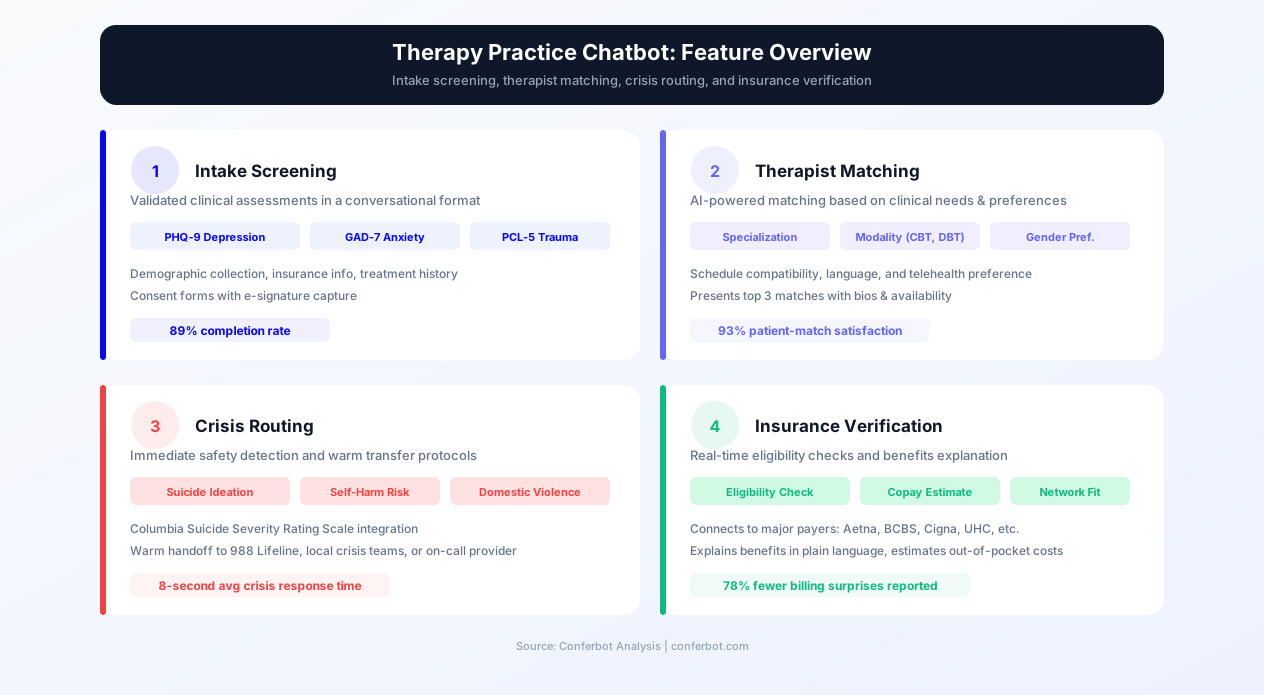
| PHQ-9 Adapted Screening | Conversational depression screening covering 9 symptom domains over the past 2 weeks | Pre-session clinical picture; reduces first-session administrative time by 15-20 minutes |
| GAD-7 Adapted Screening | Conversational anxiety screening covering 7 symptom domains with severity assessment | Identifies anxiety-spectrum presentations before therapist assignment; improves matching accuracy |
| Multi-Factor Therapist Matching | Matches clients based on specialty, modality, gender preference, availability, and insurance | 92% of clients rate specialty as the most important factor; automated matching reduces manual coordinator time by 70% |
| 988 Lifeline Crisis Routing | Immediate display of 988, Crisis Text Line, and 911 for clients in acute distress | Ensures no client in crisis is left without resources, even at 3 AM; critical liability protection |
| Insurance Pre-Verification | Identifies insurance provider, explains typical behavioral health coverage, submits verification request | Eliminates first-session cost surprises; reduces cancellations from insurance confusion by 40% |
| Telehealth/In-Person Preference | Captures delivery modality preference at intake for proper scheduling | Prevents scheduling errors; 62% of therapy clients now prefer telehealth for initial sessions |
| Automated Session Reminders | Multi-channel reminders at 48 hours, 24 hours, and 2 hours before sessions | Reduces no-show rates from 30% to 12% — recovers $150-250 per prevented no-show |
| Sliding Scale & Payment Options | Explains sliding scale availability, out-of-pocket rates, and superbill generation for OON reimbursement | Captures cost-sensitive clients who would otherwise not inquire; increases practice accessibility |
| After-Hours Capture | Collects complete intake information 24/7 including evenings and weekends | 68% of mental health searches happen outside business hours; captures inquiries competitors miss |
| HIPAA-Aware Data Handling | Encrypted transmission, role-based access, audit logging, BAA support | Meets healthcare data security requirements; protects sensitive mental health information |
Presenting Concern Coverage
The chatbot covers the full spectrum of presenting concerns that therapy practices encounter: generalized anxiety disorder, social anxiety, panic disorder, major depressive disorder, persistent depressive disorder, PTSD and complex trauma, OCD, ADHD, relationship and couples issues, grief and bereavement, substance use concerns, eating disorders, anger management, life transitions, work stress and burnout, and identity exploration. Each presenting concern maps to specific therapist specialties in the matching algorithm, ensuring clients are not simply assigned to the next available therapist but to the therapist whose training and experience most closely match the client's needs.
Modality-Specific Matching
Many prospective clients now research therapy modalities before reaching out. They search for "EMDR therapist near me" or "CBT for social anxiety." The chatbot capitalizes on this specificity by asking about modality preference and matching accordingly. Supported modalities include Cognitive Behavioral Therapy (CBT), Dialectical Behavior Therapy (DBT), Eye Movement Desensitization and Reprocessing (EMDR), psychodynamic therapy, humanistic/person-centered therapy, acceptance and commitment therapy (ACT), somatic experiencing, and couples/family systems approaches. Practices that match clients to their preferred modality see 28% higher retention rates through the first 8 sessions compared to practices that assign therapists without modality consideration.
HIPAA Compliance and Mental Health Data Protection
Mental health data carries a heightened sensitivity that goes beyond standard Protected Health Information (PHI). The stigma surrounding mental health conditions means that a data breach involving therapy records can cause reputational, professional, and personal harm that exceeds almost any other category of health information. A chatbot that collects mental health intake data must be engineered with this sensitivity as a design principle, not an afterthought.
HIPAA Requirements for Therapy Practice Chatbots
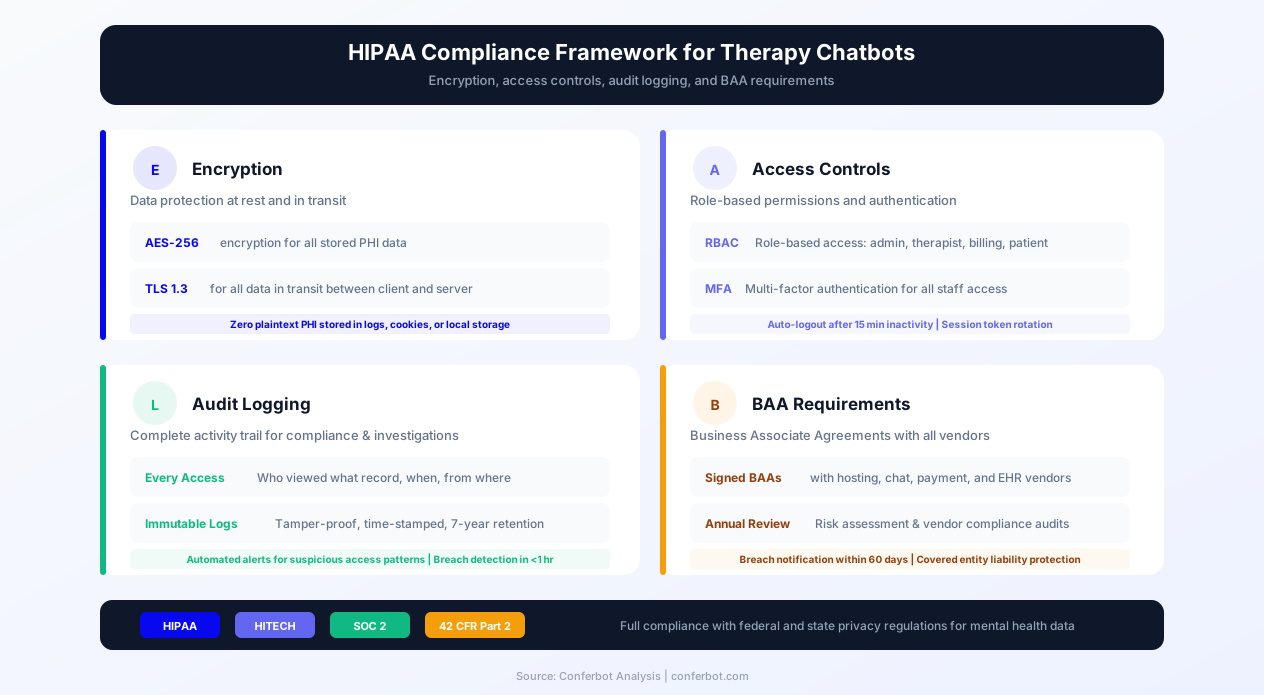
Under HIPAA, any technology tool that handles PHI on behalf of a covered entity (your therapy practice) must comply with the Security Rule and the Privacy Rule. For a chatbot, this means:
- Encryption in transit: All data transmitted between the client's device and the chatbot server must be encrypted using TLS 1.2 or higher. Conferbot uses enterprise-grade TLS encryption for all chatbot conversations.
- Encryption at rest: All stored conversation data, screening responses, and client information must be encrypted in the database. Conferbot uses AES-256 encryption for data at rest.
- Access controls: Only authorized practice staff should be able to view chatbot conversation transcripts. Role-based access controls ensure that a front desk staff member sees scheduling data while a therapist sees clinical screening data.
- Audit logging: Every access to client data must be logged with timestamp, user identity, and action performed. These logs must be retained for a minimum of six years under HIPAA.
- Business Associate Agreement (BAA): Your chatbot platform provider must sign a BAA committing to HIPAA-compliant data handling. Conferbot provides BAA support for healthcare practices.
- Breach notification: In the event of a data breach, the platform must support your practice's obligation to notify affected individuals within 60 days as required by the HIPAA Breach Notification Rule.
42 CFR Part 2: Substance Use Disorder Records
If your practice treats substance use disorders, additional federal protections apply under 42 CFR Part 2. These regulations are even stricter than HIPAA for substance use treatment records, requiring specific written consent before any disclosure — including to other healthcare providers. If your chatbot intake collects information about substance use, ensure your consent flow and data handling comply with Part 2 requirements. Consult with a healthcare compliance attorney for practices that treat SUDs.
State Mental Health Privacy Laws
Many states have mental health privacy laws that exceed HIPAA requirements. For example, some states require specific written authorization before mental health records can be shared with insurers, and some restrict the types of mental health information that can be stored electronically. California, New York, Texas, and Connecticut have particularly detailed mental health privacy statutes. Your chatbot deployment should be reviewed against your state's specific requirements.
Best Practices for Chatbot Data Minimization
The most effective HIPAA compliance strategy for chatbots is data minimization: collect only what the chatbot needs for its purpose, and defer detailed clinical information to secure EHR systems. The chatbot should collect presenting concerns, screening responses, scheduling preferences, and contact information. It should not collect detailed trauma narratives, medication names and dosages, psychiatric hospitalization history, or other deeply sensitive clinical details — those belong in the secure intake form within your EHR, completed after the initial chatbot interaction.
Therapist Matching: Connecting Clients to the Right Provider
Therapist-client fit is the single strongest predictor of therapeutic outcomes. Research consistently shows that the therapeutic alliance — the quality of the relationship between therapist and client — accounts for more variance in treatment outcomes than the specific therapy modality used. A chatbot that facilitates accurate, preference-driven therapist matching is not just an administrative convenience; it is a clinical quality intervention.
The Matching Algorithm
The chatbot's matching flow collects five factors in order of client-reported importance:
- Specialty match (92% of clients rate as important): The presenting concern is matched against each therapist's listed specialties. A client presenting with PTSD is matched to therapists trained in trauma-focused therapies (EMDR, CPT, PE), not to a general practitioner.
- Availability match (85%): The client's preferred days, times, and frequency are compared against therapist calendar availability. No point in matching a client to a therapist who has no openings for 6 weeks.
- Insurance match (78%): The client's insurance provider is matched against each therapist's credentialed panels. This eliminates the common frustration of being matched to an out-of-network therapist.
- Gender preference (65%): Some clients have a strong preference for a male or female therapist, often driven by the nature of their presenting concern (trauma survivors, for example, frequently have gender preferences). The chatbot asks this respectfully and matches accordingly.
- Modality preference (58%): Clients who have researched specific therapy approaches (CBT, DBT, EMDR) are matched to therapists trained in those modalities.
How Matching Improves Outcomes
Practices that implement structured matching report measurable improvements in retention and outcomes:
| Metric | Without Structured Matching | With Chatbot Matching |
|---|---|---|
| First-session attendance rate | 70-75% | 88-92% |
| Retention through session 8 | 45-55% | 68-75% |
| Client satisfaction (first session) | 72% | 91% |
| Therapist re-matching requests | 18-22% | 6-8% |
| Time from inquiry to first session | 12-18 days | 5-7 days |
The reduction in re-matching requests alone is significant. Every re-match requires the intake coordinator to restart the process, the original therapist to document and transfer notes, and the client to repeat their story with a new provider — an experience that can feel invalidating for clients who already found it difficult to open up once. Accurate first-match placement avoids this entirely.
Group Practice Scaling
For group practices with 5-50+ therapists, manual matching becomes increasingly difficult as the number of variables grows. A coordinator trying to match a client with anxiety, a preference for CBT, insurance through Aetna, availability on Tuesday evenings, and a preference for a female therapist is mentally searching through dozens of therapist profiles. The chatbot performs this multi-dimensional matching instantly and presents the top 1-3 options, each with a brief bio, specialty summary, and next available appointment. For practices exploring expanded access, deploying the chatbot on WhatsApp allows clients to complete the matching process from the messaging app they already use daily.
50,000+ businesses use Conferbot templates to automate conversations
Pre-Session Intake Automation: PHQ-9 and GAD-7 Screening
Pre-session intake is the highest-volume administrative task in any therapy practice, and it is also the task most likely to be abandoned before completion. Traditional intake methods — paper forms in the waiting room, PDFs emailed before the appointment, or multi-page online forms — suffer from completion rates that leave significant clinical information uncollected before the therapist meets the client for the first time.
The Intake Completion Problem
Research on healthcare form completion rates paints a clear picture:
- Paper intake forms: 45% completion rate. Clients arrive late, rush through forms, skip questions they find uncomfortable, and provide incomplete medical history.
- Online intake forms (emailed PDF or portal): 62% completion rate. Better than paper, but many clients never open the email, forget the portal password, or abandon the form when it becomes lengthy.
- Conversational chatbot intake: 89% completion rate. The conversational format — one question at a time, with supportive context and no visible progress bar showing "page 7 of 12" — keeps clients engaged through the entire intake.
That 89% completion rate means your therapist walks into the first session with a complete clinical picture for nearly every client, rather than spending the first 15-20 minutes asking the intake questions that the client was supposed to have answered in advance.
PHQ-9 Adapted Screening Flow
The Patient Health Questionnaire-9 (PHQ-9) is the gold standard for depression screening. The chatbot adapts this instrument into a conversational format that preserves clinical validity while removing the sterile, form-like presentation that can feel impersonal. Instead of "Over the past 2 weeks, how often have you been bothered by: Little interest or pleasure in doing things? (Not at all / Several days / More than half the days / Nearly every day)," the chatbot presents:
"Over the past two weeks, how often have you found yourself losing interest or enjoyment in activities that you normally like? You can select: rarely or not at all, some days, more than half the days, or nearly every day."
The chatbot covers all nine PHQ-9 domains: interest/pleasure, mood, sleep, energy, appetite, self-worth, concentration, psychomotor changes, and — critically — suicidal ideation. The suicidal ideation question is handled with particular care: if a client endorses any frequency of thoughts of self-harm, the chatbot immediately delivers 988 Lifeline resources before continuing, ensuring safety is never subordinated to intake completion.
GAD-7 Adapted Screening Flow
The Generalized Anxiety Disorder-7 (GAD-7) covers excessive worry, difficulty controlling worry, restlessness, fatigue, concentration difficulty, irritability, and muscle tension. The conversational adaptation follows the same principles as the PHQ-9: warm language, one question at a time, and clear response options that map to the standard scoring system.
Scoring and Clinical Handoff
The chatbot calculates approximate severity scores based on the client's responses and includes these in the intake summary sent to the assigned therapist. The scores are not presented to the client as a diagnosis — the chatbot is clear that "these questions help your therapist prepare for your first session; they are not a diagnosis." The therapist receives a structured summary: presenting concerns, PHQ-9 adapted score and category (minimal, mild, moderate, moderately severe, severe), GAD-7 adapted score and category, therapist match rationale, insurance status, and scheduling preferences. This summary saves 15-20 minutes per first session and gives the therapist a clinical head start.
Crisis Resource Routing: Safety as the First Priority
Any technology that interacts with individuals experiencing mental health concerns has an ethical and — depending on jurisdiction — legal obligation to provide crisis resources when acute risk is detected. The therapy practice chatbot handles this obligation with a layered approach that prioritizes safety without creating false alarms that desensitize users to crisis messaging.
When Crisis Routing Activates
The chatbot's crisis routing activates in three scenarios:
- Explicit selection: The client selects "I need help now" from the main menu. This immediately routes to crisis resources without any additional questions.
- Screening detection: During PHQ-9 adapted screening, if the client endorses any frequency of thoughts that they would be "better off dead" or of hurting themselves, the chatbot pauses the screening, delivers crisis resources, and asks if the client would like to continue the intake or if they need immediate assistance.
- Keyword detection: The chatbot monitors for crisis-related language throughout the conversation — terms related to suicide, self-harm, or imminent danger — and interrupts the current flow to provide resources. This detection uses Conferbot's AI engine to identify intent, not just keyword matching, reducing both false positives and missed detections.
Crisis Resources Delivered
When crisis routing activates, the chatbot presents the following resources prominently and clearly:
| Resource | Contact | Availability |
|---|---|---|
| 988 Suicide & Crisis Lifeline | Call or text 988 | 24/7/365 |
| Crisis Text Line | Text HOME to 741741 | 24/7/365 |
| Emergency Services | Call 911 | 24/7/365 |
| SAMHSA National Helpline | 1-800-662-4357 | 24/7/365 |
| Veterans Crisis Line | Call 988, press 1 | 24/7/365 |
| Trevor Project (LGBTQ+ youth) | Call 1-866-488-7386 or text START to 678-678 | 24/7/365 |
The chatbot presents these resources with a message that validates the client's courage: "It takes real strength to reach out when you are struggling. You do not have to face this alone. The following resources provide immediate, confidential support."
Post-Crisis Follow-Up
After delivering crisis resources, the chatbot asks if the client would like to be contacted by the practice for non-emergency follow-up. If yes, their contact information is collected and flagged as a priority follow-up for the practice's clinical team. The chatbot does not attempt to provide crisis counseling, therapeutic advice, or diagnostic impressions during a crisis interaction — it routes to trained crisis professionals and offers a warm handoff to the practice when the client is ready.
Documentation and Liability
Every crisis interaction is logged with timestamp, the specific triggers that activated the routing, the resources delivered, and the client's response. This documentation protects both the client and the practice by creating a clear record that appropriate resources were provided promptly. Consult with your practice's malpractice insurance carrier to confirm that chatbot-based crisis routing meets their risk management requirements.
Implementation Guide and ROI for Therapy Practices
Deploying a chatbot for therapists with Conferbot is designed to be fast, low-risk, and measurable. Solo practitioners can go live within an hour. Multi-provider group practices typically complete full deployment in one to two weeks, including EHR integration and therapist profile configuration.
Step-by-Step Deployment
Step 1 — Customize the template: Start from Conferbot's therapy practice chatbot template in the no-code visual builder. Replace the practice name, branding colors, therapist roster, and contact details. Add your practice's specific specialties to the matching options.
Step 2 — Configure therapist profiles: For each therapist in your practice, enter their specialties, accepted insurance panels, available appointment slots, therapy modalities, and bio. These profiles power the matching algorithm. Solo practitioners can skip this step — the chatbot routes directly to scheduling.
Step 3 — Set up crisis resources: Verify that all crisis resource numbers are current and that the routing triggers are configured. Add any practice-specific crisis protocols (e.g., your practice's after-hours emergency line).
Step 4 — Configure notifications: Set up email and/or Slack notifications so your intake team receives immediate alerts for new intake submissions, crisis interactions, and scheduling requests. For crisis interactions, configure SMS notifications to the clinical director or on-call therapist.
Step 5 — Embed on your website: Add the Conferbot embed script to your practice website. Place the chatbot widget on every page — prospective clients may enter from your homepage, therapist bio pages, services page, or insurance page. Each entry point should have access to the intake flow.
Step 6 — Connect your EHR: Use Conferbot's API integration to connect the chatbot to your EHR system (SimplePractice, TherapyNotes, Jane App, or others). Intake data flows directly into client records, eliminating double-entry and ensuring clinical screening data is available in the therapist's workspace before the first session.
Step 7 — Track and optimize: Use Conferbot's analytics to monitor conversation volumes by path (intake, matching, insurance, scheduling, crisis), completion rates, drop-off points, and peak usage hours. Identify which presenting concerns drive the most inquiries and adjust your marketing and therapist recruiting accordingly.
ROI Calculation for Therapy Practices
The ROI of a therapy chatbot flows from four revenue streams:
1. No-Show Reduction: Assume a practice with 15 sessions per therapist per week, an average session rate of $175, and a current no-show rate of 25%. A 60% reduction in no-shows (from 25% to 10%) recovers 2.25 sessions per therapist per week, or $393.75 per therapist per week. For a 5-therapist practice at 48 weeks per year, that is $94,500 in recovered annual revenue from no-show reduction alone.
2. After-Hours Capture: If 68% of mental health searches happen outside business hours, and a chatbot converts even 3-5 additional clients per month who would have been lost to voicemail, that adds $525-$875 in weekly session revenue per retained client. Over the course of a year, after-hours capture can add $50,000-$150,000 in new annual revenue for a group practice.
3. Reduced Intake Coordinator Time: Automating 65-75% of phone intake saves 2-3 hours per day of coordinator time. At $20-25/hour, that is $10,000-$15,000 in annual labor savings or — more commonly — redeployed capacity to handle higher-value tasks like insurance authorization and client retention.
4. Improved Retention from Matching: Better therapist matching reduces re-matching requests from 20% to 7% and improves 8-session retention from 50% to 70%. Each retained client represents months of continued session revenue.
Conferbot's therapy practice plan pays for itself within the first week of deployment. Explore healthcare chatbot solutions for more clinical automation options, or visit the template library to find additional templates for your practice.
Therapy Practice & Mental Health Chatbot FAQ
Everything you need to know about chatbots for therapy practice & mental health chatbot.
Why Use a Template vs Building from Scratch?
Templates encode years of optimization data into the conversation flow before you start.
| Factor | Conferbot Template | Build from Scratch | Hire a Developer |
|---|---|---|---|
| Time to deploy | 10 minutes | 2-8 hours | 2-6 weeks |
| Cost | Free | Your time | $5,000-$25,000 |
| Day-1 conversion | 15-22% | 5-8% | 10-15% |
| Proven flows | Yes, data-tested | No | Depends |
| Updates included | Automatic | Manual | Paid |
| Multi-channel | 8+ channels | 1 channel | Extra cost |
| Analytics | Built-in | Must build | Extra cost |
Ready to Deploy Therapy Practice & Mental Health Chatbot?
Join 50,000+ businesses. Free forever plan available. No credit card required.