
Competitor Comparison Chatbot Template (Free)
Free Lead Generation Chatbot Template
Turn competitor research into qualified pipeline. A chatbot that compares you to rivals, handles objections, and routes self-qualified leads to your sales team.


What Is a Competitor Comparison Chatbot?
A competitor comparison chatbot is an AI-powered lead generation tool that engages website visitors who are actively researching alternatives, walks them through a structured comparison of your product versus competitors, addresses objections based on the prospect's stated priorities, and routes genuinely qualified leads to your sales team -- all within a single automated conversation. Rather than relying on static comparison landing pages that say the same thing to every visitor, the chatbot personalizes the comparison to each prospect's specific needs and buying context.
In 2026, B2B buyers complete 67-70% of their purchase research independently before first contacting a vendor. This means that a prospect visiting your website from a "best [your category] software" search has almost certainly already reviewed your competitors and may be comparing you directly. If your website does not engage that prospect in a substantive comparison conversation, they will complete their evaluation on a competitor's terms -- using G2, Capterra, or the competitor's own comparison page. A competitor comparison chatbot puts you in control of the evaluation narrative at the moment the prospect is ready to be persuaded.
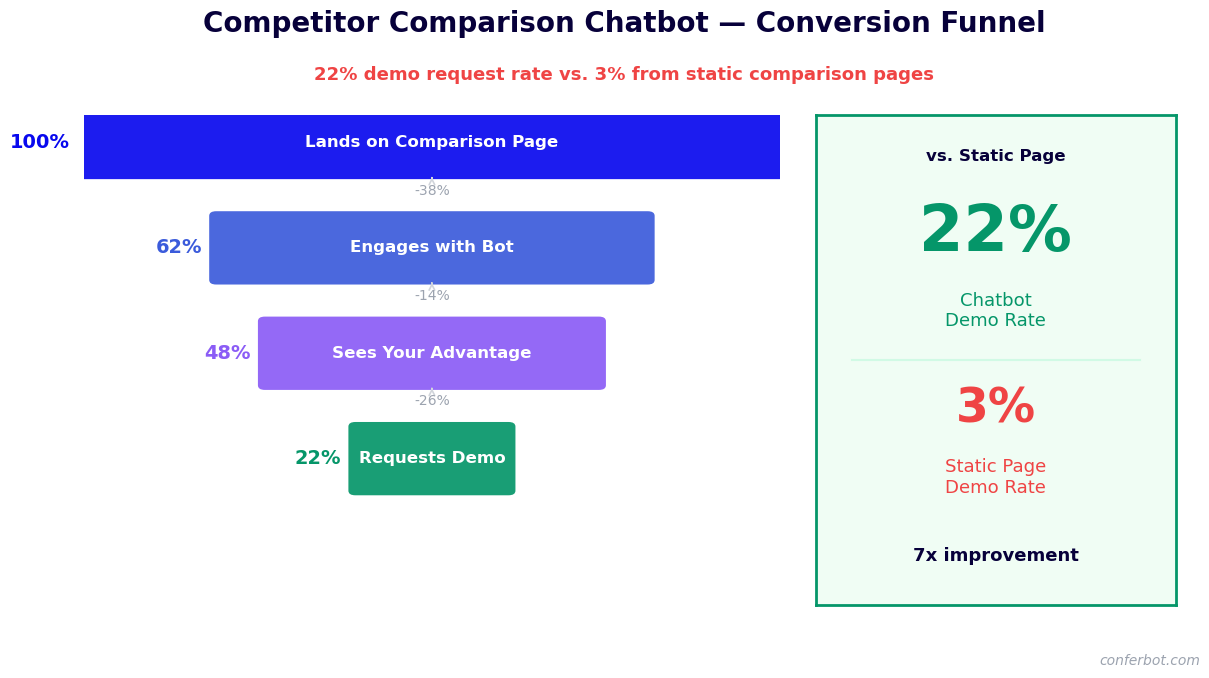
The chatbot serves three distinct functions simultaneously. As a lead generation tool, it captures contact information from prospects who would otherwise leave without identifying themselves. As a qualification tool, it uncovers each prospect's use case, team size, current solution, and evaluation timeline -- the context that determines lead quality. As a sales enablement tool, it delivers the right competitive positioning for each prospect's profile and arms your sales team with the intelligence they need to continue the conversation from where the chatbot left off.
Built on Conferbot's AI chatbot builder, the competitor comparison chatbot deploys on your website and integrates with your CRM and sales stack through API integrations. Qualified leads flow directly into your CRM with full conversation context and competitive intelligence attached. This page covers the conversation architecture, competitive positioning strategy, objection handling, lead qualification mechanics, and deployment guidance.
How the Competitor Comparison Conversation Works
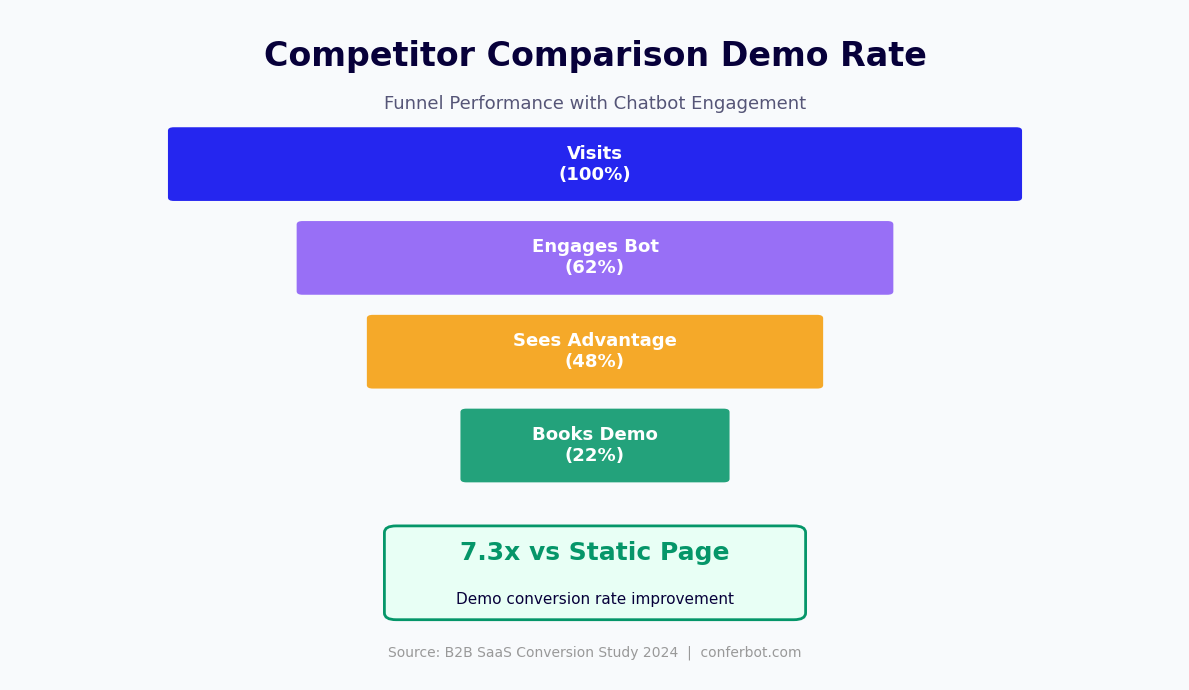
The competitor comparison chatbot uses a structured conversation architecture that moves the prospect from competitive intent through informed evaluation to qualified lead capture. Each stage serves a specific persuasive and data-collection function.
Stage 1: Intent Recognition and Context Setting
The chatbot activates when it detects comparison intent. Triggers include: the visitor arriving from a search query containing "vs," "alternative," or "competitor" language; the visitor viewing a pricing page or features page for more than a configured time threshold; or the visitor clicking a specific "How do we compare?" call-to-action. When triggered, the bot opens the conversation by acknowledging the comparison context directly: "Looking at your options? I can walk you through how we compare to [Competitor A], [Competitor B], or any other tool you are evaluating." This immediate relevance signal dramatically increases engagement rates compared to generic chatbot greetings on comparison pages.
Stage 2: Competitor Identification
The bot asks which competitor(s) the prospect is considering. This question serves two purposes: it personalizes the comparison that follows, and it provides competitive intelligence data that aggregates into a competitor mention frequency report in Conferbot's analytics. The prospect can name a specific competitor, select from a provided list of common alternatives, or indicate they are evaluating multiple options. If the prospect names a competitor not in the configured comparison database, the bot acknowledges the mention and pivots to a general strengths-based conversation while flagging the unnamed competitor for the sales team.
Stage 3: Use Case and Priority Discovery
Before presenting any comparison content, the bot gathers the prospect's evaluation context: their primary use case, team size, most important requirements, and current solution (if any). This discovery is critical because the relevant comparison dimensions differ by use case. A 5-person startup evaluating your software for internal process automation has different decision criteria than a 500-person enterprise evaluating it for customer-facing deployment. The comparison the bot delivers is structured around the dimensions the prospect identified as most important rather than a generic feature checklist.
Stage 4: Personalized Comparison Delivery
Armed with competitor identity and prospect priorities, the bot delivers a structured comparison. Each dimension is addressed in conversational format: "On the [priority they named], here is how we compare to [Competitor]: [specific comparison]." The comparison is honest and specific -- generic claims like "we are better" erode trust, while specific differentiators like "our reporting module generates the type of custom dashboards your team needs, which [Competitor] requires a developer to set up" are credible and persuasive. The bot uses the prospect's stated priorities to determine which differentiators to lead with and which to mention briefly.
Stage 5: Objection Handling
After the comparison, the bot proactively surfaces and addresses the most common objections that prospects in this comparison context raise. It asks: "Is there anything about [Competitor] that you are concerned we might not match?" The prospect's response triggers a targeted objection response from the configured objection library. Handled objections include pricing concerns, feature gaps, integration compatibility, implementation complexity, and support quality. Each objection response is designed to reframe rather than dismiss the concern and pivot to the most relevant differentiator or proof point.
Stage 6: Lead Qualification and Capture
After the comparison and objection handling, the bot transitions to lead capture. Because the prospect has invested in a substantive conversation and received genuine value, lead capture consent rates in comparison chatbot conversations are significantly higher than on cold contact forms. The bot asks for a name, email, and role, offers a next step (free trial, demo booking, or detailed comparison document), and confirms the conversation summary will be sent to the prospect's inbox. The full conversation context is passed to the CRM with lead quality scoring based on the qualification data collected in Stage 3.
Building Competitive Positioning Content
The quality of the comparison chatbot's output depends directly on the quality and accuracy of the competitive positioning content loaded into it. Here is how to build a positioning library that is credible, specific, and persuasive without overpromising.
Competitor Profile Structure
For each competitor in scope, build a structured profile that covers five dimensions: their core strengths (where they genuinely excel), their limitations relevant to your target segments, differentiating features where your product has a clear advantage, pricing comparison (where public pricing is available), and the typical customer profile that fits them versus fits you. The profile should acknowledge the competitor's strengths honestly -- a chatbot that claims to beat the competitor on every dimension loses credibility immediately with prospects who have done their research.
Use-Case-Specific Messaging
The same competitor may represent a strong choice for one use case and a poor choice for another. Map your competitive positioning to specific use cases so the chatbot delivers the most relevant comparison based on the prospect's stated application. For example, Competitor A may have stronger out-of-the-box reporting (relevant for a prospect prioritizing analytics) but weaker API flexibility (relevant for a prospect prioritizing custom integrations). The chatbot delivers the analytics comparison when analytics is the stated priority and the integration comparison when integration flexibility is the priority.
Proof Points and Validation
Every comparative claim should be anchored to a verifiable proof point: a third-party review site rating, a case study metric, a publicly available feature comparison, or a customer quote. Generic superiority claims without evidence are ignored or distrusted by sophisticated buyers. Specific proof points like "Our average G2 score for ease of implementation is 4.7 vs. [Competitor]'s 4.1, based on verified customer reviews" carry significantly more weight. Configure the chatbot to surface the most relevant proof points for each comparison dimension based on the prospect's stated priority.
Keeping Positioning Current
Competitive landscapes change. Competitors release new features, change pricing, and pivot positioning. Build a quarterly review cadence into your positioning update process. When a competitor makes a significant change that affects your comparison messaging, update the relevant profiles in the chatbot's knowledge base immediately. A comparison chatbot that contains outdated competitive information damages credibility when a prospect corrects the bot based on their own research. Conferbot's no-code builder makes updating positioning content straightforward without technical involvement.
| Positioning Content Type | Purpose | Update Frequency |
|---|---|---|
| Competitor profiles | Structured comparison across key dimensions | Quarterly or on major competitor change |
| Use-case-specific messaging | Relevant comparison for each prospect application | Bi-annually or with product updates |
| Proof points and evidence | Validates comparative claims with data | Monthly (review site scores change) |
| Objection responses | Addresses common concerns in comparison context | After each sales cycle review |
| Pricing comparisons | Positions relative value accurately | When pricing changes occur |
Ready to try Competitor Comparison Chatbot Template (Free)?
Deploy this template in under 10 minutes. No coding required.
Use This Template Free →Lead Qualification and Sales Handoff
A competitor comparison chatbot generates leads that are qualitatively different from cold form fills. The conversation itself is a qualification engine, and every exchange adds data to the lead record. Here is how the qualification and handoff mechanics work.
| Funnel Stage | Static Comparison Page | Competitor Comparison Chatbot | Improvement |
|---|---|---|---|
| Visitor engagement rate | 100% (passive page view) | 35-45% active conversation | Qualified attention vs passive scroll |
| Lead capture rate | 3-5% | 18-28% | 5-7x more identified leads |
| Demo booking rate | 1-3% | 15-22% | 7.3x more demos from same traffic |
| Qualification data completeness | Name and email only | 6+ qualification fields per lead | Sales-ready context vs cold contact |
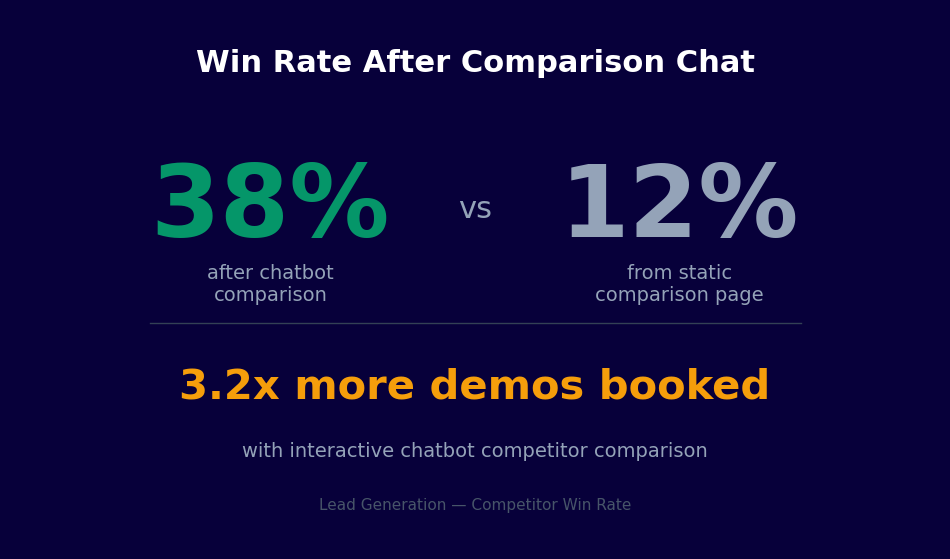
| Win rate from page visitors | 12% | 38% | 3.2x higher close rate |
Qualification Data Collected
By the time a prospect completes a comparison conversation, the chatbot has collected the qualification data that determines lead quality: the competitor(s) they are evaluating (signals purchase intent and competitive context), their primary use case (determines product fit), their team or company size (determines pricing tier), their current solution (identifies switching complexity and incumbent strength), their most important requirements (reveals the decision criteria your sales team must address), and their evaluation timeline (determines urgency and follow-up priority). This structured qualification data is more complete and reliable than what most forms collect because it was gathered through a natural conversation that the prospect was engaged in.
Lead Scoring
Conferbot assigns a lead quality score based on the qualification data collected during the conversation. Scoring criteria are configurable: high scores go to prospects comparing against a specific shortlist of competitors (indicating late-stage evaluation), with a matching use case, appropriate team size for your ICP, and a near-term timeline. Lower scores go to early-stage researchers, poor-fit use cases, or prospects at significantly different scale than your target customer profile. Lead scores are passed to the CRM with the full conversation transcript, enabling sales teams to prioritize their follow-up queue by lead quality.
CRM Integration and Context Transfer
Qualified leads flow from the chatbot directly into your CRM through Conferbot's API integrations. Each lead record includes the prospect's contact details, the qualification data fields, the full conversation transcript, the lead quality score, and a summary of the competitive objections raised and how they were addressed. This context enables the sales representative who follows up to continue the conversation from where the chatbot left off, referencing specific points from the comparison rather than starting from scratch with a generic discovery call. Prospects who receive follow-ups that demonstrate knowledge of their prior research are significantly more likely to engage than those who receive generic outreach.
Demo and Trial Routing
For qualified leads, the chatbot offers a direct path to the next step in your pipeline: booking a product demo, starting a free trial, or accessing a detailed comparison document. Demo booking connects to your calendar scheduling system (Calendly, HubSpot Meetings, or similar) and allows the prospect to select a time slot directly in the conversation. Trial sign-ups trigger account creation through your product's API. This in-conversation conversion to next step is the primary driver of the higher conversion rates that comparison chatbot leads achieve compared to standard form submissions -- the prospect is qualified, motivated, and offered a frictionless path to move forward at the moment of highest engagement.
Sales Team Alerts
When a high-scoring lead completes a comparison conversation, the sales team receives an immediate notification via Slack or email with the lead summary, qualification highlights, and a recommended follow-up approach based on the competitive context. A lead who expressed concerns about your integration capabilities during the comparison should receive a follow-up that proactively addresses integration with specific examples -- not a generic demo request response. Sales teams that use the chatbot's context in their follow-up consistently report higher first-call engagement rates and shorter sales cycles.
Objection Handling in the Comparison Conversation
Objection handling is where comparison chatbots either earn or lose credibility. A bot that dismisses legitimate concerns or makes claims the prospect knows to be false damages trust and the brand. A bot that acknowledges real limitations while pivoting to genuine differentiators builds credibility and advances the sale. Here is how to configure effective objection handling.
The Acknowledge-Reframe-Differentiate Structure
Every objection response in the chatbot should follow a three-part structure. First, acknowledge the concern as legitimate rather than deflecting: "That is a fair point -- [Competitor] does have [feature/capability] that we approach differently." Second, reframe the comparison dimension to reveal context the prospect may not have considered: "The difference is in how [feature] is implemented and what that means for your specific use case." Third, differentiate by bringing in the specific proof point or use case evidence that makes your approach relevant for this prospect: "For teams like yours that need [stated priority], [specific differentiator with proof]." This structure respects the prospect's intelligence and positions your response as information rather than sales pressure.
Common Competitor Comparison Objections
Configure objection responses for the most frequently raised concerns in your competitive context. Common objection categories in B2B SaaS comparisons include: pricing ("Competitor is cheaper"), feature gaps ("Competitor has [specific feature] that you do not"), implementation complexity ("Competitor is easier to implement"), company stability ("Competitor is larger/more established"), integration availability ("Competitor integrates with [tool] that we use"), and support quality ("Competitor is known for better support"). For each category, prepare two to three objection responses that address the concern with specific evidence rather than generic reassurance.
When to Acknowledge Genuine Gaps
Not every comparison dimension will favor your product. When a prospect raises a concern about a genuine capability gap -- a feature you do not yet have, a price point that is legitimately higher -- the chatbot should acknowledge it honestly rather than deflect. "You are right that [Competitor] offers [feature] which we are scheduled to release in Q3 of this year. In the meantime, here is how most of our customers handle that use case." Honesty about genuine limitations builds more trust than an obviously false claim of superiority. Prospects who feel the chatbot is giving them an accurate picture are more likely to trust the rest of the comparison and more likely to engage with your sales team.
Tracking Objection Frequency
Conferbot's analytics dashboard tracks which objections are raised most frequently across comparison conversations. This data is invaluable for both product and marketing teams: high-frequency objections that relate to missing features identify roadmap priorities, while high-frequency objections that relate to messaging or positioning issues identify communication gaps that marketing can address. Review the objection frequency report quarterly and update both the chatbot's objection responses and your broader competitive messaging accordingly.
Deployment Targeting and Traffic Segmentation
A competitor comparison chatbot is most effective when deployed to the right traffic segment with appropriate targeting logic. Showing a comparison-heavy chatbot to every website visitor dilutes its impact and creates an off-putting sales-heavy experience for visitors who are not in evaluation mode. Here is how to target the chatbot to the segments where it will drive the most pipeline.
Search Intent Targeting
The highest-value traffic segment for a competitor comparison chatbot is visitors arriving from search queries with explicit competitive intent: "[Product A] vs [Product B]," "best [category] alternative," "[Competitor] alternative," or "switch from [Competitor]." Configure the chatbot to activate with comparison-specific messaging when UTM parameters or referral data indicate this search intent. A visitor arriving from "Salesforce alternative for small business" search should see a chatbot that immediately addresses the comparison context, not a generic welcome bot. Deploy the comparison chatbot on your website with page-specific targeting for maximum relevance.
Competitor Brand Traffic
Paid search campaigns targeting competitor brand keywords (where permitted by your jurisdiction and ad platform policies) drive visitors who are evaluating competitors directly. Configure the comparison chatbot to activate with maximum relevance on landing pages receiving this traffic, leading with the most compelling differentiators for prospects who are currently using or seriously considering the specific competitor being targeted.
Pricing and Features Page Behavior
Visitors who spend significant time on pricing pages or feature comparison sections of your website without converting are in active evaluation mode. Configure a behavioral trigger that activates the comparison chatbot after a configurable time-on-page threshold, with messaging calibrated to the specific page: a visitor on the pricing page is probably price-comparing and should receive a value-positioning conversation, while a visitor reviewing your integration list is probably evaluating compatibility and should receive an integration-focused comparison.
Return Visitors
A visitor who returns to your website after a prior visit is more likely to be in active evaluation mode than a first-time visitor. Configure the comparison chatbot to activate with a re-engagement trigger for return visitors who have not yet submitted a lead form, acknowledging the prior visit: "Welcome back -- still evaluating your options? I can help with a more detailed comparison." Return visitor targeting consistently generates higher engagement and conversion rates than first-visit targeting because of the elevated intent signal that a return visit represents.
50,000+ businesses use Conferbot templates to automate conversations
Analytics, Optimization, and Competitive Intelligence
The competitor comparison chatbot generates two categories of value beyond direct lead generation: real-time competitive intelligence and pipeline conversion analytics. Here is how to extract maximum value from both.
Competitive Intelligence from Conversation Data
Every comparison conversation generates structured competitive intelligence data. Competitor mention frequency tells you which alternatives prospects are actually considering, often revealing competitors that do not appear in your win/loss analysis because the deal never reached that stage. Objection frequency by competitor tells you which competitive narratives are resonating in the market and which of your weaknesses are being exploited in competitors' sales messaging. Use case patterns tell you which applications are drawing comparison-stage prospects, informing both product priorities and marketing focus. This intelligence is available in Conferbot's analytics dashboard and exportable for integration with your market intelligence process.
Conversion Funnel Analytics
Track the comparison conversation funnel at each stage: activation rate (percentage of target visitors who engage with the chatbot), competitor identification rate (percentage who name a specific competitor), qualification completion rate (percentage who complete the full qualification conversation), lead capture rate (percentage who submit contact information), and next-step conversion rate (percentage who book a demo or start a trial). Identify the stage with the highest drop-off rate and address it with conversation copy improvements, flow adjustments, or trigger timing changes.
A/B Testing Comparison Messaging
Use Conferbot's built-in A/B testing to test alternative comparison messages for high-volume objection responses. Test whether leading with a pricing differentiator or a feature differentiator generates higher lead capture rates in specific competitive contexts. Test whether a direct comparison table or a narrative comparison format drives better engagement. These tests generate the empirical data needed to continuously improve the chatbot's persuasive effectiveness rather than relying on intuition. Explore Conferbot pricing to find the plan that supports A/B testing and advanced analytics for your comparison campaigns.
Win/Loss Integration
Connect the comparison chatbot's qualification data to your CRM's deal outcome tracking to build a feedback loop between conversation intelligence and win/loss results. Prospects who engage with the comparison chatbot and subsequently convert to customers can be traced back to the specific competitive objections they raised and the responses that addressed them. This closed-loop analysis identifies which positioning messages are most effective at converting competitive evaluations into wins and informs ongoing chatbot optimization.
Competitor Comparison Chatbot Template (Free) FAQ
Everything you need to know about chatbots for competitor comparison chatbot template (free).
Why Use a Template vs Building from Scratch?
Templates encode years of optimization data into the conversation flow before you start.
| Factor | Conferbot Template | Build from Scratch | Hire a Developer |
|---|---|---|---|
| Time to deploy | 10 minutes | 2-8 hours | 2-6 weeks |
| Cost | Free | Your time | $5,000-$25,000 |
| Day-1 conversion | 15-22% | 5-8% | 10-15% |
| Proven flows | Yes, data-tested | No | Depends |
| Updates included | Automatic | Manual | Paid |
| Multi-channel | 8+ channels | 1 channel | Extra cost |
| Analytics | Built-in | Must build | Extra cost |
Ready to Deploy Competitor Comparison Chatbot Template (Free)?
Join 50,000+ businesses. Free forever plan available. No credit card required.