
Feedback Collection and Analysis Chatbot
Free Support And FAQ Chatbot Template
An AI feedback chatbot that collects customer reviews, NPS scores, and detailed feedback through engaging conversations. Analyzes sentiment, categorizes feedback themes, and generates actionable insights. Achieves 3x higher response rates than email surveys. Perfect for businesses looking to improve products and customer experience.


What Is a Feedback Collection and Analysis Chatbot?
A feedback collection and analysis chatbot is an AI-powered conversational tool that gathers customer opinions, satisfaction scores, and qualitative feedback through natural dialogue -- then automatically analyzes sentiment, categorizes themes, and surfaces actionable insights to the teams who need them. Rather than sending a static survey form that sits in a customer's inbox until they delete it, the chatbot engages customers in a brief, personalized conversation at the moments when their experience is freshest and their willingness to respond is highest.
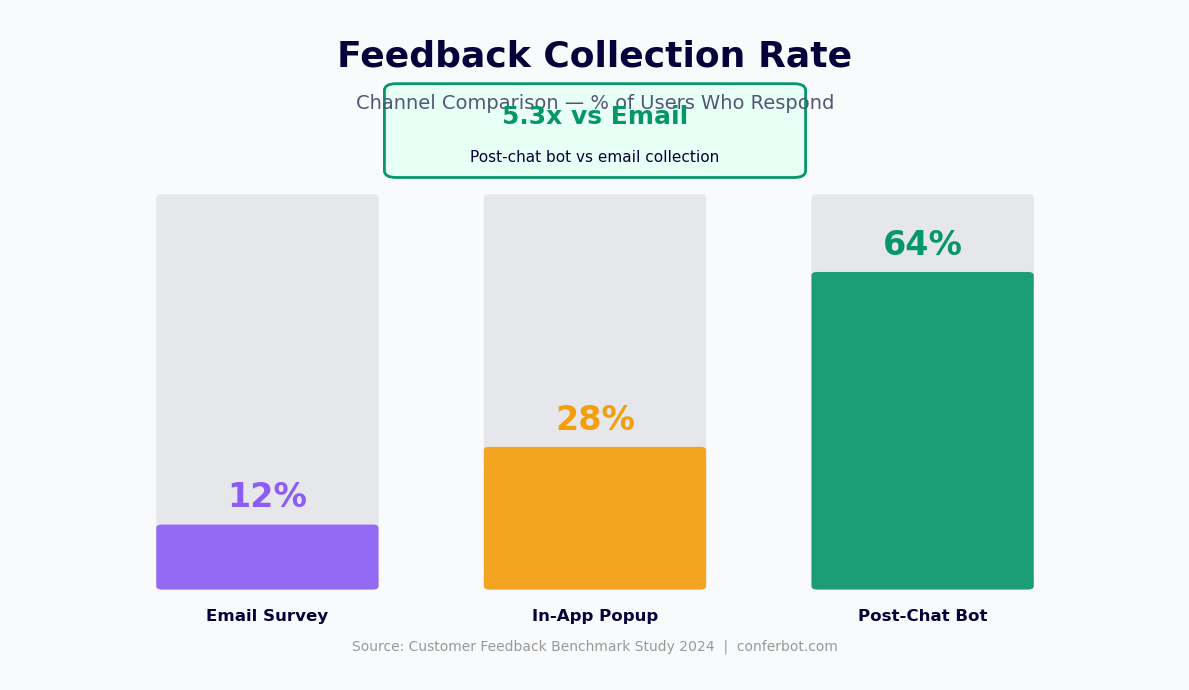
In 2026, the average email survey response rate across industries sits at 8-14%. The low response rate means that the feedback businesses collect is systematically biased toward customers with strong opinions -- the delighted and the furious -- leaving a silent majority unheard. Decisions made on biased feedback lead to investments in the wrong improvements and missed signals about emerging problems. A chatbot-based feedback approach consistently achieves response rates of 28-45%, dramatically broadening the sample of customers represented in the data.
The analysis layer is what distinguishes this tool from a simple survey replacement. Every feedback conversation is processed by Conferbot's NLP engine to extract sentiment scores, identify recurring themes, and flag specific feedback items that require immediate action. A customer who rates their experience 3 out of 5 and mentions a slow checkout process contributes two distinct data points: a satisfaction signal and a specific product issue. The chatbot captures both and routes them to the appropriate destination -- the satisfaction score to the CSAT dashboard, the checkout complaint to the product team's issue tracker.
Built on Conferbot's AI chatbot builder, the feedback bot deploys across your website, WhatsApp, Facebook Messenger, and post-interaction emails. Integration with your CRM, help desk, and analytics stack ensures feedback data flows into the systems where it can drive decisions. This page covers survey methodology, sentiment analysis mechanics, real-time alerting, integration architecture, and the setup process.
Feedback Conversation Types and When to Deploy Them
Effective feedback collection requires matching the conversation type to the customer lifecycle moment and the business question being answered. The feedback chatbot supports five distinct conversation types, each designed for a specific context.
Post-Purchase CSAT Survey
The post-purchase CSAT conversation fires after order delivery confirmation, typically 1-3 days after the customer receives their package. The bot opens with a brief satisfaction question and follows up with a category-specific probe based on the initial score. A high-scoring customer is asked what they liked most (identifying retention drivers). A mid-scoring customer is asked what could have been better (identifying improvement opportunities). A low-scoring customer is asked what went wrong and offered immediate service recovery options (connecting them to a support agent or issuing a goodwill credit). This branching approach collects richer data from every response than a single-question survey while keeping total conversation length under 90 seconds.
NPS (Net Promoter Score) Survey
NPS conversations measure loyalty and advocacy likelihood on a 0-10 scale. The standard NPS question ("How likely are you to recommend us to a friend or colleague?") is followed by an open-ended "Why did you give that score?" question that the chatbot then analyzes for theme and sentiment. Conferbot's analytics dashboard calculates your NPS in real time as responses arrive, segments it by customer cohort (tenure, product type, acquisition channel), and tracks the trend over time. NPS surveys are typically deployed quarterly to the full customer base or triggered by specific lifecycle events such as subscription anniversary or plan upgrade.
Post-Support CSAT
After a support ticket or live chat conversation closes, the chatbot automatically sends a brief satisfaction survey: "Was your issue resolved?" and "How would you rate the support experience?" The post-support CSAT is the fastest indicator of support quality problems. A sudden drop in post-support scores on a specific day can be traced to an agent, a product issue, or a process failure that standard support metrics might take days to surface. Configure alert thresholds that notify team leads immediately when post-support CSAT drops below a defined level on any day.
In-Session Experience Feedback
For websites and applications, the feedback bot can be triggered mid-session when behavioral signals suggest friction: time spent on a checkout page exceeds a threshold, a user visits the same help article three times without converting, or a user abandons a form partway through. The bot proactively asks "Having trouble with anything?" and records the response as contextual feedback tied to the specific page and user journey stage. This in-the-moment feedback captures friction that customers would never bother to report after the fact.
Product Feature Feedback
After a customer uses a specific feature for the first time, the chatbot opens a brief targeted feedback conversation: "You just used our new reporting feature -- what did you think?" The bot asks one or two specific questions about the feature rather than a generic satisfaction question, generating feedback that product teams can act on directly. This feature-specific feedback collection is particularly valuable in the 30-60 days after a new feature launch, when rapid iteration based on real user experience has the highest impact.
Sentiment Analysis and Theme Extraction
The analysis layer transforms raw customer responses into structured intelligence. Here is how Conferbot's NLP engine processes feedback conversations to produce actionable insights.
Sentiment Scoring
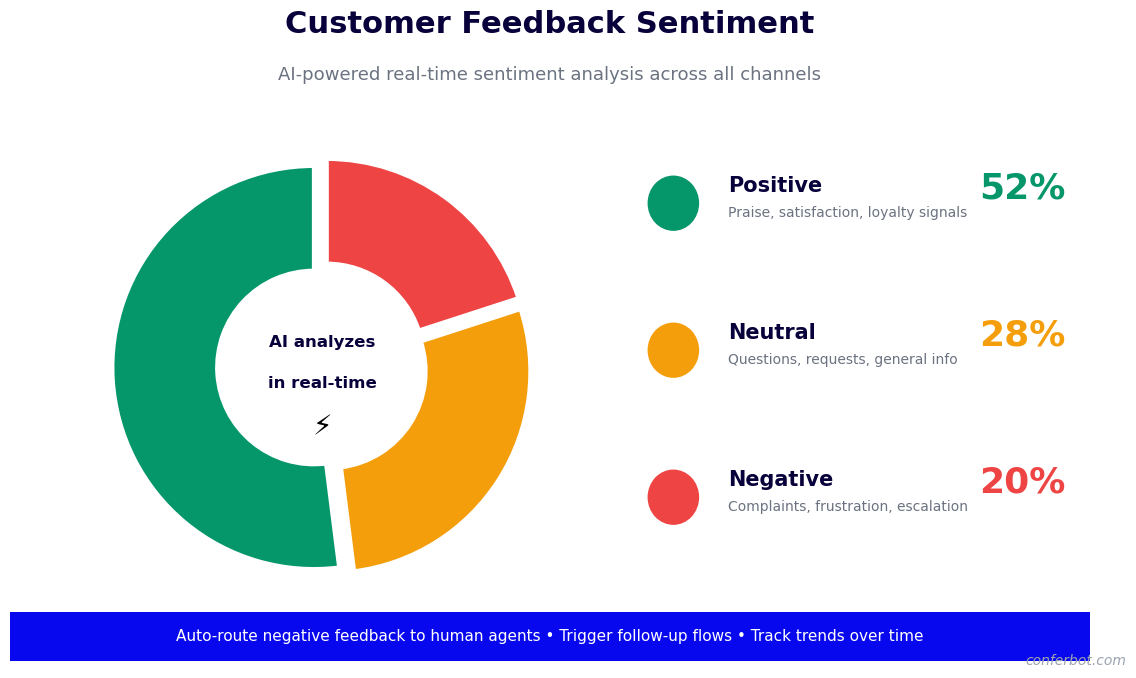
Every feedback message is scored for sentiment on a positive-neutral-negative scale and, for text-rich responses, on a finer granularity that identifies the specific aspects of the experience being evaluated positively or negatively. A response like "The product is great but the delivery took forever" generates two sentiment signals: positive sentiment toward the product and negative sentiment toward delivery. This aspect-level sentiment analysis prevents the two signals from cancelling each other out in an overall average, giving product and logistics teams independent visibility into their respective performance.
Theme and Topic Extraction
The NLP engine identifies recurring themes across feedback conversations automatically, grouping similar comments into named categories: shipping speed, product quality, website usability, customer service responsiveness, pricing, packaging. These themes emerge from the language customers use rather than from predefined categories you specify, which means unexpected issues surface organically. When 15% of feedback responses in a given week mention a new theme that was not present in prior weeks, the analytics dashboard flags it as an emerging issue requiring investigation.
Entity and Root-Cause Extraction
Beyond theme identification, the engine extracts specific named entities from feedback text: product names, feature names, agent names, delivery carrier names, and channel names. This extraction enables attribution: which products generate the most negative feedback? Which support agents have the highest satisfaction scores? Which shipping carrier is mentioned most often in complaint context? Entity-level analysis provides the specificity that aggregate sentiment scores cannot.
Real-Time Sentiment Dashboard
Conferbot's analytics dashboard displays a live sentiment feed showing incoming feedback responses, their sentiment scores, extracted themes, and routing status. The dashboard includes trend charts showing sentiment movement over time, theme distribution charts showing the proportion of feedback in each category, and cohort comparisons showing sentiment differences between customer segments. All data is exportable via CSV or API for analysis in your BI tools.
| Sentiment Analysis Capability | What It Measures | Business Application |
|---|---|---|
| Document-level sentiment | Overall positive/negative tone of a response | CSAT and NPS calculation, trend tracking |
| Aspect-level sentiment | Sentiment toward specific product/service dimensions | Department-specific performance reporting |
| Theme extraction | Recurring topics across feedback corpus | Roadmap prioritization, process improvement |
| Entity extraction | Specific named products, agents, channels mentioned | Attribution and root cause analysis |
| Intent classification | Churn risk, escalation need, advocacy potential | At-risk customer intervention, referral program triggers |
Churn Risk Scoring
Feedback responses that combine low satisfaction scores with specific language patterns (mentions of alternatives, expressions of frustration over repeated issues, or statements about reconsidering the relationship) are classified as churn risk signals. The bot routes these responses to a priority alert queue and can automatically trigger a proactive retention conversation or a CS team notification for manual outreach. Early churn signal detection through feedback analysis is one of the highest-ROI applications of AI feedback analysis, as intervening with an at-risk customer before they cancel costs a fraction of re-acquiring a churned customer.
Ready to try Feedback Collection and Analysis Chatbot?
Deploy this template in under 10 minutes. No coding required.
Use This Template Free →Real-Time Alerts and Closed-Loop Response
Collecting feedback without acting on it is a common failure mode that actively damages customer relationships. Customers who take time to submit feedback and receive no response lose trust faster than customers who never submitted feedback at all. The feedback chatbot's closed-loop system ensures that every feedback submission triggers the appropriate follow-up action.
Negative Feedback Alerts
When a feedback conversation produces a score below the configured threshold (e.g., CSAT below 3, NPS below 7, or negative sentiment classification on a qualitative response), the system immediately generates an alert. Alert destinations are configurable: Slack notifications for support team leads, email alerts for customer success managers, Zendesk ticket creation for CX teams, or Salesforce task creation for account managers. The alert includes the customer's name, the feedback they submitted, the associated order or interaction reference, and a link to the full conversation. This real-time negative feedback alert is the primary mechanism for service recovery -- the faster the response to a negative experience, the higher the probability of retaining the customer.
Automatic Service Recovery Triggers
For low-scoring post-purchase feedback, the system can automatically initiate a service recovery conversation without waiting for a human agent. When a customer rates their experience 1 or 2 out of 5, the bot immediately acknowledges the issue, apologizes, and offers a concrete resolution option: a replacement, a refund, a discount on their next order, or a direct connection to a support agent. Businesses using automatic service recovery flows report that 40-55% of customers who receive an immediate recovery response after a negative experience become loyal customers, versus approximately 5-10% who receive no follow-up.
Positive Feedback Routing for Advocacy
High-scoring feedback and NPS Promoters (9-10 scores) represent advocacy opportunities that most businesses underutilize. When a customer submits a highly positive feedback response, the bot can follow up with a specific advocacy ask: "We're so glad to hear that! Would you mind leaving a quick review on Google?" or "Would you be willing to refer a friend and earn a discount?" This in-context advocacy prompt, delivered immediately after a positive feedback expression, achieves far higher follow-through rates than standalone review request emails sent weeks later.
Team and Management Reporting
Beyond real-time individual alerts, the system generates scheduled summary reports for team and management distribution. Daily summaries show feedback volume, average scores, and top negative themes for the previous 24 hours. Weekly reports show trend movement versus the prior week and flag any themes showing significant week-over-week change. Monthly reports include full NPS calculation, cohort breakdown, and theme analysis with recommended priority areas. Reports are distributed via email, Slack, or BI platform API based on your configured preferences.
CRM, Help Desk, and Analytics Integration
Feedback data is most valuable when it flows automatically into the systems where decisions are made. Here is how the feedback chatbot integrates with the platforms that power customer-facing operations.
CRM Integration
Feedback responses are appended to the corresponding customer record in your CRM as interaction records, with sentiment score, CSAT score, NPS score (where applicable), extracted themes, and a link to the full conversation transcript. In Salesforce, feedback data populates custom Activity fields and can trigger workflow rules (e.g., create a follow-up task for the account manager when NPS falls below 7 for a high-value account). In HubSpot, feedback data updates contact properties and can trigger enrollment in a re-engagement sequence for low-scoring customers. The feedback-enriched CRM record gives every customer-facing team member full visibility into the customer's expressed experience before any interaction.
Help Desk Integration
Negative feedback responses that involve specific product or service complaints are automatically converted to support tickets in your help desk platform (Zendesk, Freshdesk, or Intercom). The ticket body includes the customer's feedback verbatim, the extracted issue category, the associated order reference, and the sentiment classification. Tickets are tagged by feedback source (post-purchase, post-support, NPS) to enable feedback-driven ticket volume tracking separate from inbound support volume. This integration ensures that service failures surfaced through feedback are tracked and resolved with the same rigor as direct support contacts.
Product Management Tools
Product feedback themes extracted from the analysis engine can be routed to product management platforms via webhook or API. When a specific product feature or workflow is mentioned negatively in more than a configurable number of feedback responses within a week, the system creates a tagged issue in your product management tool (Jira, Linear, or similar) with a summary of the feedback and the count of affected customers. This automated feedback-to-product-backlog pipeline ensures that recurring customer pain points are captured in the roadmap process without requiring manual triage of feedback transcripts.
Data Warehouse and BI Integration
All feedback data -- conversation transcripts, sentiment scores, theme labels, entity extractions, CSAT and NPS scores, and customer identifiers -- is available for export to your data warehouse via Conferbot's API or nightly data export. Structured feedback data integrates with BigQuery, Snowflake, and Redshift for analysis alongside product usage, support, and revenue data. This cross-functional analysis enables questions like: "Do customers who give a low NPS score in month three have higher churn rates in month six?" or "Which product categories generate the lowest post-purchase CSAT scores?" that require joining feedback data with other data sources.
| Integration Platform | Data Synced | Trigger Actions |
|---|---|---|
| Salesforce | CSAT, NPS, themes, transcripts | Follow-up tasks, workflow rules, account health updates |
| HubSpot | Contact properties, satisfaction scores | Re-engagement sequence enrollment, deal stage updates |
| Zendesk / Freshdesk | Feedback-driven tickets, sentiment tags | Auto-ticket creation, priority escalation for low scores |
| Jira / Linear | Product theme summaries, customer count | Issue creation when theme exceeds threshold |
| BigQuery / Snowflake | Full feedback corpus, scores, entities | Nightly export, real-time streaming via webhook |
Feedback Collection Use Cases by Industry
Feedback collection and analysis priorities vary significantly by industry. Here is how the feedback chatbot is configured for the highest-impact use cases across key verticals.
E-Commerce and Retail
E-commerce feedback programs focus on three moments: post-purchase (product quality, packaging, and fulfillment experience), post-return (understanding the root cause of returns to reduce future return rates), and post-browsing (understanding why visitors left without purchasing, which surfaces UX and pricing friction). For e-commerce, the most valuable analysis output is product-level and category-level CSAT, which feeds directly into merchandising and supplier management decisions. SKUs with consistently low post-purchase satisfaction are candidates for removal or supplier review; categories with high return-driven negative feedback are candidates for improved product descriptions and size guides.
SaaS and Technology
SaaS feedback programs prioritize feature satisfaction, onboarding experience, and churn risk detection. The chatbot deploys at key activation milestones: after the first meaningful use of the product (day 3-7), after completing onboarding (day 14-30), and at the quarterly renewal window. Feature-specific feedback conversations tied to product releases provide rapid signal for iteration. Churn risk scoring based on usage signals combined with feedback sentiment enables proactive customer success outreach to at-risk accounts before they reach the renewal decision.
Hospitality and Travel
Post-stay and post-trip feedback collection is a high-stakes use case in hospitality where public reviews directly affect booking volume. The feedback chatbot collects structured satisfaction data through WhatsApp or email within 24 hours of checkout, when the experience is fresh and the customer is still reachable. For properties using online review platforms, the chatbot routes satisfied guests (4-5 star equivalent responses) to a review request, while routing dissatisfied guests to a private service recovery conversation before they post publicly. This approach systematically improves public review scores while ensuring service failures are captured and addressed.
Healthcare
Patient experience feedback in healthcare requires careful handling of sensitive health information. The feedback chatbot collects HCAHPS-aligned satisfaction data for healthcare providers, covering communication clarity, wait times, facility quality, and care team responsiveness. Configuration ensures that no clinical information is captured in the feedback conversation and that all data is processed in compliance with applicable privacy regulations. Aggregate patient experience scores and theme analysis support the quality improvement programs required for accreditation and value-based care contracts.
50,000+ businesses use Conferbot templates to automate conversations
How to Deploy a Feedback Collection and Analysis Chatbot
Setting up a feedback collection chatbot involves configuring survey flows, connecting trigger events, setting up analysis and alerting, and integrating with your CRM and analytics stack. Most businesses complete the full deployment within two business days.
Step 1: Define Your Feedback Program
Before building the chatbot, define the feedback questions you need answered and the business decisions those answers will inform. Start with two or three feedback conversation types (e.g., post-purchase CSAT, quarterly NPS, and post-support CSAT) rather than attempting to deploy everything at once. For each conversation type, define the primary metric (CSAT score, NPS score, or qualitative theme), the trigger event, the delivery channel, and the target response rate that would constitute a successful deployment.
Step 2: Build Feedback Conversation Flows
Using Conferbot's no-code builder, create the conversation flows for each feedback type. Configure the branching logic that adjusts follow-up questions based on initial score responses. Set the conversation length target (4-6 messages for post-purchase CSAT, 2-3 messages for post-support CSAT, 3-5 for NPS). Ensure the language is conversational and appropriately brief -- feedback conversations that exceed 90 seconds see sharply lower completion rates.
Step 3: Configure Trigger Events
Set up the event triggers that launch each feedback conversation. Post-purchase triggers connect to your order management system's delivery confirmation webhook. Post-support triggers connect to your help desk's ticket close event. NPS triggers connect to a scheduled send or a customer anniversary date. In-session triggers use behavioral event tracking on your website. Test each trigger with a sample event to verify that the conversation launches correctly and at the right time.
Step 4: Set Up Sentiment Analysis and Alerts
Configure the sentiment analysis thresholds for your business. Set the CSAT score below which a negative feedback alert is triggered. Define the alert routing for each scenario: Slack channel for support leads, email for CX managers, ticket creation for help desk. Configure the positive feedback routing rules for Promoter advocacy ask flows. Test the alert system by submitting a test response that meets each alert condition and verifying delivery to the correct destination.
Step 5: Connect CRM and Analytics
Establish the data connections between the feedback system and your CRM, help desk, and analytics platforms using Conferbot's integrations hub. Verify that feedback responses appear correctly in the corresponding customer records with all relevant fields populated. Set up the scheduled summary reports for team and management distribution. After launch, review the first week's data to verify that response rates are within expected ranges, sentiment analysis is classifying themes accurately, and alerts are triggering correctly for edge case responses. Explore API integration options for custom data flows to your BI platform.
Feedback Collection and Analysis Chatbot FAQ
Everything you need to know about chatbots for feedback collection and analysis chatbot.
Why Use a Template vs Building from Scratch?
Templates encode years of optimization data into the conversation flow before you start.
| Factor | Conferbot Template | Build from Scratch | Hire a Developer |
|---|---|---|---|
| Time to deploy | 10 minutes | 2-8 hours | 2-6 weeks |
| Cost | Free | Your time | $5,000-$25,000 |
| Day-1 conversion | 15-22% | 5-8% | 10-15% |
| Proven flows | Yes, data-tested | No | Depends |
| Updates included | Automatic | Manual | Paid |
| Multi-channel | 8+ channels | 1 channel | Extra cost |
| Analytics | Built-in | Must build | Extra cost |
Ready to Deploy Feedback Collection and Analysis Chatbot?
Join 50,000+ businesses. Free forever plan available. No credit card required.