
SaaS Demo Booking Chatbot
Free B2B Services Chatbot Template
An intelligent SaaS demo booking chatbot that qualifies prospects, captures company details, and schedules product demonstrations automatically. Visitors can share their company size, use case, and current solution before selecting their preferred demo format — live walkthrough, recorded overview, or self-serve sandbox. Perfect for B2B SaaS companies looking to streamline their sales pipeline, reduce time-to-demo, and increase qualified meeting rates.


What Is a SaaS Demo Booking Chatbot?
A SaaS demo booking chatbot is a conversational automation layer that sits between your website visitor and your sales calendar, handling every step of the demo request process: identifying the visitor's use case, qualifying their fit, routing them to the right sales rep or demo track, presenting available time slots, and booking the meeting — all within a single chat conversation that takes under three minutes. The result is a demo pipeline that runs 24/7, captures every qualified prospect at peak buying intent, and delivers a structured briefing to your sales team before the call even starts.
For SaaS companies, the demo request is the single highest-intent conversion event on the website. A visitor who clicks "Book a Demo" has already evaluated your positioning, reviewed your features, and decided they want to see the product. Every minute of delay between that intent signal and a confirmed meeting is a minute where the prospect can lose momentum, visit a competitor, or get pulled into another priority. Research on B2B buying behavior consistently shows that the vendor who responds first wins the deal 35-50% of the time — regardless of product superiority. A demo booking chatbot eliminates response delay entirely.
The Demo Scheduling Problem in SaaS
Most SaaS companies handle demo requests through one of three mechanisms, all of which have significant conversion leakage. The first is a static form: the visitor fills out name, email, company, and a free-text "tell us about your needs" field, then waits hours or days for a sales rep to respond with available times. Conversion rates on form-to-booked-meeting typically run 25-40%, meaning 60-75% of qualified prospects who filled out the form never actually get on a call. The second is a raw calendar link (Calendly, HubSpot Meetings): the visitor picks a time, but there is no qualification, no routing, and no pre-demo intelligence — the sales rep walks into the call blind. The third is a "Contact Us" page that routes to a general inbox, where demo requests compete with support tickets and partnership inquiries for attention.
- Response delay: A demo booking chatbot responds in under 3 seconds, 24 hours a day. Prospects who visit your pricing page at 10pm or on a weekend get the same immediate engagement as those who arrive at 2pm on a Tuesday.
- Qualification gap: The chatbot collects use case, team size, current tools, and timeline before presenting calendar slots — ensuring that your sales team only spends time on prospects who match your ICP (ideal customer profile).
- Routing accuracy: Enterprise prospects route to senior AEs. SMB prospects route to the appropriate territory rep. Product-specific inquiries route to the specialist who can demo that module. No manual triage required.
Who This Template Is Built For
This template is designed for B2B SaaS companies at every stage — from early-stage startups with a single AE handling all demos to enterprise software companies with segmented sales teams across regions and product lines. It is equally effective for product-led growth companies that want to offer guided demos alongside self-serve trials, and for sales-led organizations where the demo is the primary conversion mechanism. Explore Conferbot's AI chatbot builder to see how quickly you can adapt this template to your sales motion and team structure.
Intent-Based Routing: Matching Prospects to the Right Demo Track
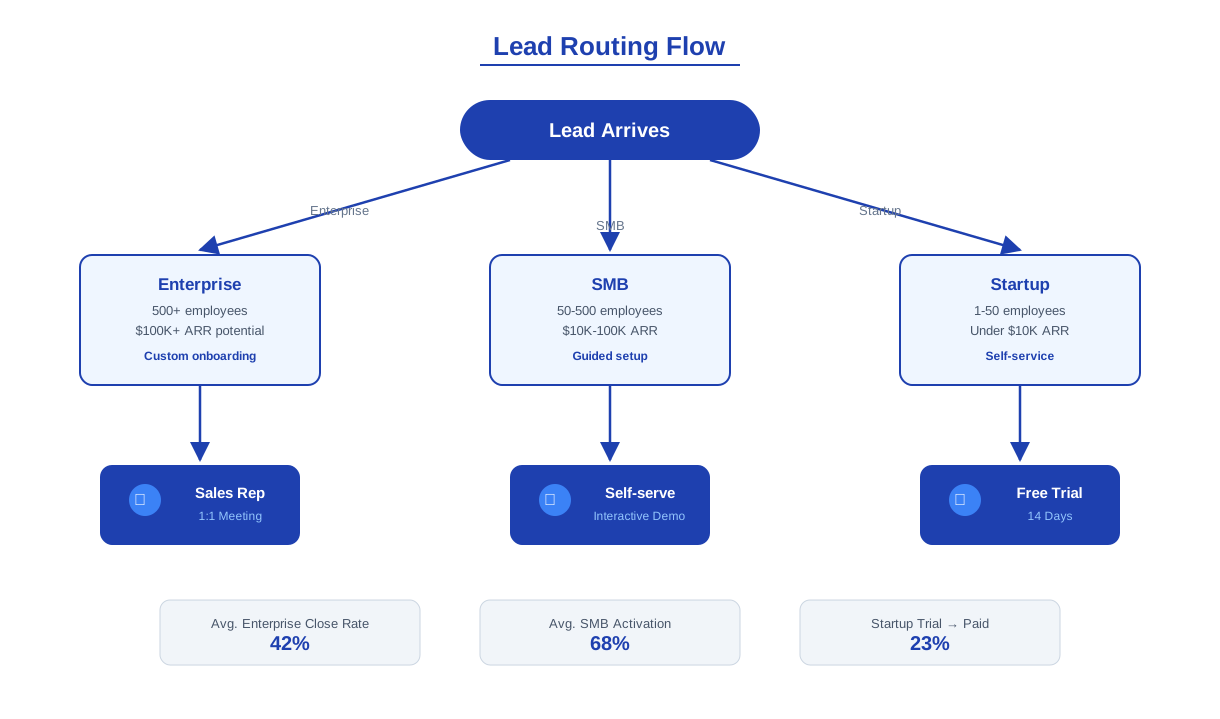
Not every demo request is the same. A VP of Engineering evaluating your platform for a 500-person team has fundamentally different needs than a solo founder exploring tools for a 3-person startup. A prospect interested in your analytics module needs a different demo than one focused on your integrations layer. Intent-based routing ensures that every prospect is matched to the demo experience most likely to convert them — the right rep, the right product focus, and the right depth of conversation.
How the Routing Logic Works
The chatbot collects three data points that drive routing: company size (solo/small team, mid-market, enterprise), primary use case (which product area or problem they want to solve), and urgency (actively evaluating, planning for next quarter, or just researching). These three dimensions create a routing matrix that maps to your sales team structure. Enterprise + high urgency routes to a senior AE with a priority notification. SMB + specific product interest routes to the product specialist for that module. Research-stage prospects receive an automated product tour link and are enrolled in a nurture sequence, freeing your reps to focus on high-intent opportunities.
Routing Configuration by Team Size
| Prospect Segment | Routing Destination | Demo Format | Follow-Up Cadence |
|---|---|---|---|
| Enterprise (500+ employees) | Senior AE / Enterprise team | 60-min custom demo | Same-day follow-up, multi-thread |
| Mid-market (50-499 employees) | Territory AE | 30-min standard demo | Next business day follow-up |
| SMB (1-49 employees) | SMB rep or self-serve track | 15-min quick demo or recorded walkthrough | Automated email sequence |
| Product-specific inquiry | Product specialist | Module-focused demo | Rep follow-up with relevant case study |
| Research stage / not ready | Marketing nurture | Self-serve product tour link | Drip campaign enrollment |
Why Routing Matters for Conversion
SaaS companies that implement intent-based demo routing consistently see 20-35% higher demo-to-opportunity conversion rates compared to generic round-robin assignment. The reason is straightforward: a prospect who is matched to a rep with relevant expertise and given a demo calibrated to their specific needs is far more likely to see immediate value. A 500-person enterprise evaluating a platform migration does not want a 15-minute SMB overview. A solo founder does not want to sit through a 60-minute enterprise architecture walkthrough. Matching format to intent respects the prospect's time and demonstrates that your sales team understands their context before the call even begins.
Configure routing rules directly in Conferbot's chatbot builder using conditional logic nodes — no code required. Routing rules can be updated in minutes as your sales team structure evolves.
Calendar Sync and Real-Time Scheduling
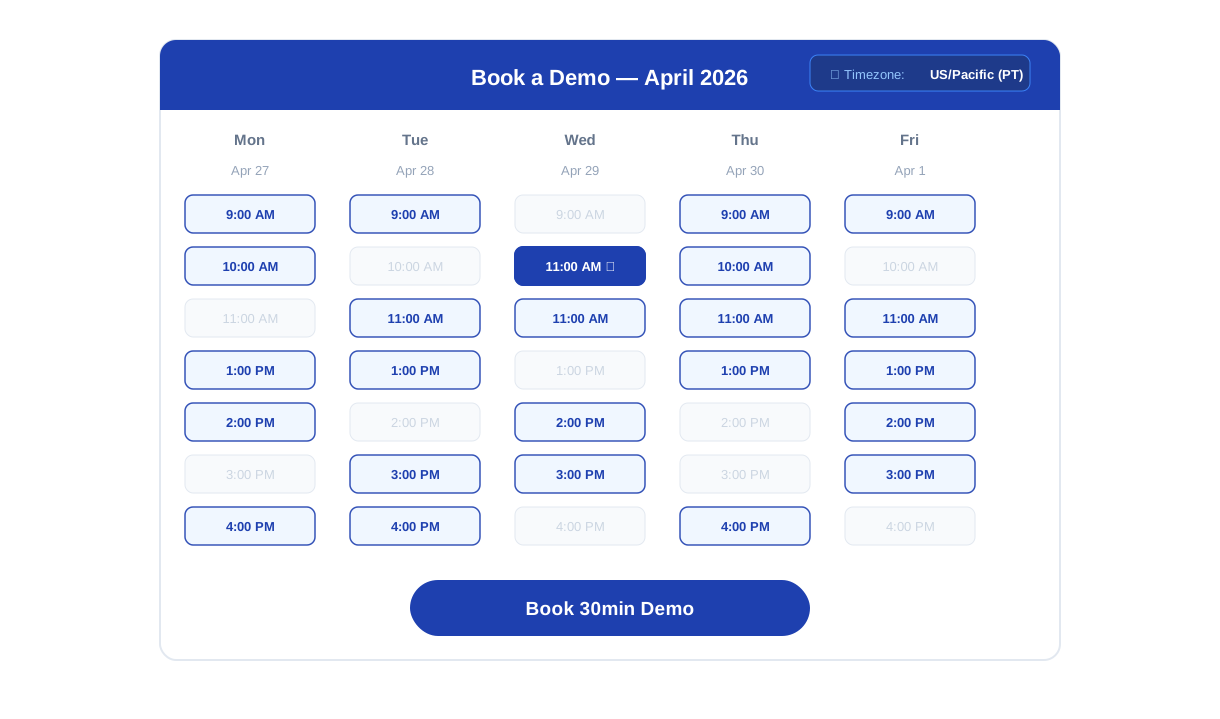
The calendar sync capability transforms the demo booking chatbot from a lead capture form into a complete scheduling system. Once the prospect has been qualified and routed, the chatbot presents available time slots pulled from the assigned rep's actual calendar — not a static list of options, but real-time availability that reflects existing meetings, blocked focus time, and timezone adjustments. The prospect selects a slot, confirms their details, and receives an immediate calendar invite. The entire process completes in under 90 seconds from slot selection to confirmed booking.
Supported Calendar Integrations
The demo booking chatbot integrates with Google Calendar and Microsoft Outlook through Conferbot's API integration layer. Calendar connections are configured via OAuth in under five minutes. Once connected, the chatbot reads real-time availability from the assigned rep's calendar, creates meeting events with video conferencing links (Zoom, Google Meet, or Microsoft Teams), and sends confirmation emails to both the prospect and the rep. For teams using round-robin assignment within a segment, the chatbot checks availability across all eligible reps and presents the earliest available slot — minimizing time-to-demo.
Timezone Intelligence
SaaS companies sell across time zones. A prospect in London requesting a demo from a US-based sales team needs to see slots in their local time, not Pacific Time. The chatbot detects the prospect's timezone from browser metadata and presents all available slots in the prospect's local time. Confirmation emails include timezone-aware calendar events that display correctly regardless of the recipient's location. This eliminates the single most common source of demo no-shows: timezone confusion.
No-Show Prevention
Demo no-show rates in B2B SaaS typically run 20-30%. The chatbot reduces this through three mechanisms. First, immediate confirmation: the prospect receives a calendar invite within seconds of booking, anchoring the commitment. Second, automated reminders: configurable reminder messages are sent 24 hours and 1 hour before the scheduled demo. Third, easy rescheduling: reminder messages include a one-click reschedule link that returns the prospect to the chatbot's scheduling flow rather than requiring an email exchange. Companies deploying these three mechanisms together typically see no-show rates drop to 8-12%.
| Scheduling Feature | Static Form + Email | Calendar Link Only | Demo Booking Chatbot |
|---|---|---|---|
| Time to confirmed meeting | 1-3 days | Under 5 minutes | Under 3 minutes |
| Qualification before booking | None (post-booking) | None | Full ICP qualification |
| Timezone handling | Manual coordination | Automatic | Automatic + detected |
| No-show rate | 25-35% | 20-30% | 8-12% (with reminders) |
| Rep preparation | Minimal context | Zero context | Full pre-demo brief |
Ready to try SaaS Demo Booking Chatbot?
Deploy this template in under 10 minutes. No coding required.
Use This Template Free →Pre-Demo Intelligence: Arming Your Sales Team in 2026
The most undervalued capability of a demo booking chatbot is not the booking itself — it is the intelligence gathered during the conversation. By the time the chatbot confirms a meeting, it has collected a structured profile of the prospect that would normally take a sales rep 10-15 minutes of discovery questioning at the start of the demo call. Delivering this intelligence to the rep before the call starts transforms the demo from a discovery session into a value demonstration — and that shift is directly correlated with higher close rates.
What the Chatbot Captures
The pre-demo intelligence brief includes every data point collected during the conversation, structured into a format that a sales rep can review in under 60 seconds:
- Company profile: Company name, size, industry, and website — giving the rep immediate context on the prospect's business.
- Use case and pain points: The specific problem or goal the prospect described during qualification — "we need to automate our onboarding workflow" or "our current tool doesn't integrate with Salesforce."
- Current tooling: What the prospect is currently using (competitor product, manual process, or nothing) — enabling the rep to tailor the demo to migration or replacement scenarios.
- Team size and decision timeline: How many users and when they plan to make a decision — critical for sizing the opportunity and calibrating urgency.
- Engagement signals: Which pages the prospect visited before opening the chatbot, how long they spent on the pricing page, and whether they downloaded any content — layering behavioral context on top of stated intent.
Delivery to Sales Team
The pre-demo brief is delivered through three channels simultaneously: an email to the assigned rep with the full structured profile, a Slack notification in the sales channel with a summary and calendar link, and a CRM record update in HubSpot or Salesforce with all captured fields mapped to the appropriate contact and deal properties. The rep receives this brief immediately upon booking — not the morning of the demo — giving them time to research the prospect's company, review relevant case studies, and prepare a tailored demo flow.
Impact on Demo Conversion Rates
Sales teams that receive structured pre-demo intelligence consistently report two measurable improvements. First, demo-to-opportunity conversion increases by 25-40% because reps skip generic discovery and immediately demonstrate value against the prospect's stated needs. Second, average deal cycle compresses by 15-20% because the first call is productive rather than exploratory — the prospect sees relevant value immediately and moves faster through the evaluation process. For a SaaS company running 50 demos per month with a $15,000 average contract value, a 30% improvement in demo-to-opportunity conversion represents an additional $225,000 in annual pipeline — from a chatbot that costs less than $100/month to operate.
Review Conferbot's pricing plans to model the ROI against your demo volume and average deal size.
Post-Demo Follow-Up Automation
The demo booking chatbot's value does not end when the meeting is confirmed. Post-demo follow-up is where many SaaS sales processes leak — reps get busy, follow-up emails are delayed or generic, and prospects who were engaged during the demo lose momentum in the days after. Automated post-demo follow-up ensures that every prospect receives timely, relevant follow-up regardless of rep workload.
Automated Follow-Up Sequence
After the scheduled demo completes, the chatbot triggers a configurable follow-up sequence. The default sequence includes three touchpoints:
- Same-day recap (2 hours post-demo): An automated email with a summary of what was covered, links to relevant documentation or case studies based on the prospect's stated use case, and a direct link to start a free trial or schedule a follow-up call.
- Day 3 check-in: A brief message asking if the prospect has questions or wants to involve additional stakeholders. Includes a one-click link to book a follow-up meeting with the same rep.
- Day 7 value reminder: A message highlighting the specific ROI metrics relevant to the prospect's company size and use case, with a clear CTA to move forward.
Re-Engagement for Stalled Prospects
Prospects who attended a demo but did not convert within 14 days are automatically enrolled in a re-engagement flow. The chatbot can initiate a new conversation — via the website widget or messaging channel — asking if the prospect's evaluation timeline has changed, whether they need a technical deep-dive on a specific area, or if they would like to see a comparison with their current solution. This re-engagement is conversational, not a static email blast, which drives significantly higher response rates.
CRM Pipeline Updates
Every post-demo interaction is logged in your CRM. The demo completion event moves the deal to the appropriate pipeline stage. Prospect responses to follow-up messages update the deal activity log. If a prospect clicks the trial link, the CRM record is updated with the trial start date. This end-to-end tracking ensures that your sales pipeline reflects actual prospect engagement rather than relying on reps to manually update deal stages — a task that research shows is completed accurately less than 50% of the time. Connect your CRM through Conferbot's API integration to enable this automation.
Follow-Up Performance Metrics
| Metric | Manual Follow-Up | Chatbot-Automated Follow-Up | Improvement |
|---|---|---|---|
| Follow-up sent within 2 hours | 23% of demos | 100% of demos | +77 percentage points |
| Prospect reply rate | 18% | 34% | +89% |
| Second meeting booked | 22% of demos | 38% of demos | +73% |
| Pipeline updated accurately | 48% | 100% | +108% |
Deploy the full demo booking flow via Conferbot's omnichannel platform to ensure consistent scheduling and follow-up across your website, landing pages, and messaging channels.
50,000+ businesses use Conferbot templates to automate conversations
Setup Guide: Live Demo Booking in Under 45 Minutes
Deploying the SaaS demo booking chatbot from template to production involves three configuration phases: sales team and routing setup, calendar integration, and conversation flow customization. Most SaaS companies complete the full deployment in under 45 minutes.
Phase 1: Sales Team and Routing Configuration (15 Minutes)
Open the template in Conferbot's chatbot builder and configure your routing rules:
- Define segments: Set the company size thresholds that match your sales team structure (e.g., 1-49 = SMB, 50-499 = Mid-Market, 500+ = Enterprise).
- Assign reps: Map each segment to the sales rep or team that should receive demo requests for that segment.
- Product routing: If you have product specialists, configure which product interest selections route to which specialist.
- Notification channels: Connect email and Slack to deliver pre-demo briefs to reps immediately upon booking.
Phase 2: Calendar Integration (10 Minutes)
- Connect calendars: Link each rep's Google Calendar or Outlook calendar via OAuth in the Integrations panel.
- Set availability windows: Define the hours during which demos can be booked (e.g., 9am-5pm in each rep's timezone).
- Configure meeting duration: Set default demo lengths by segment — 60 minutes for enterprise, 30 minutes for mid-market, 15 minutes for SMB.
- Video conferencing: Connect Zoom, Google Meet, or Microsoft Teams to auto-generate meeting links in calendar invites.
Phase 3: Conversation Flow Customization (15 Minutes)
- Update the welcome message to match your brand voice and value proposition.
- Customize qualification questions to reflect your ICP criteria — adjust company size ranges, add industry selection if relevant, and tailor use case options to your product.
- Review the disqualification path: prospects who do not meet your ICP criteria should receive a polished off-ramp (self-serve trial link, documentation, or community resources) rather than a dead end.
- Configure the post-demo follow-up sequence content: update email templates with your case studies, documentation links, and trial URLs.
Phase 4: Deployment and Testing (5 Minutes)
Copy the embed snippet from the Deploy panel and add it to your demo request page, pricing page, and any high-intent landing pages. Run a test booking through each routing path to confirm that calendar invites are created correctly, notifications reach the right reps, and CRM records are updated. For additional deployment channels, configure omnichannel settings to extend the demo booking flow to WhatsApp, LinkedIn, and other B2B communication channels your prospects use.
SaaS Demo Booking Chatbot FAQ
Everything you need to know about chatbots for saas demo booking chatbot.
Why Use a Template vs Building from Scratch?
Templates encode years of optimization data into the conversation flow before you start.
| Factor | Conferbot Template | Build from Scratch | Hire a Developer |
|---|---|---|---|
| Time to deploy | 10 minutes | 2-8 hours | 2-6 weeks |
| Cost | Free | Your time | $5,000-$25,000 |
| Day-1 conversion | 15-22% | 5-8% | 10-15% |
| Proven flows | Yes, data-tested | No | Depends |
| Updates included | Automatic | Manual | Paid |
| Multi-channel | 8+ channels | 1 channel | Extra cost |
| Analytics | Built-in | Must build | Extra cost |
Ready to Deploy SaaS Demo Booking Chatbot?
Join 50,000+ businesses. Free forever plan available. No credit card required.