
Doctor Appointment Chatbot Template (Free)
Free Lead Generation Chatbot Template
Fill 22% more appointment slots and cut no-shows by 55% with a free doctor appointment chatbot. 24/7 booking, EHR integration, and automated reminders. Deploy in a day, no code needed.


Why Healthcare Needs Appointment Chatbots
Healthcare appointment scheduling is one of the most friction-filled experiences for patients and staff alike. The average medical practice receives 50-80 scheduling calls per day, each taking 4-8 minutes of staff time. Multiply that across a five-day week and your front desk is spending 25-35 hours just managing the phone — time that could be spent on patient care, insurance follow-ups, or billing. A doctor appointment chatbot eliminates this bottleneck entirely, handling bookings, reschedules, and cancellations around the clock without putting a single patient on hold.
The Problem With Phone-Based Scheduling
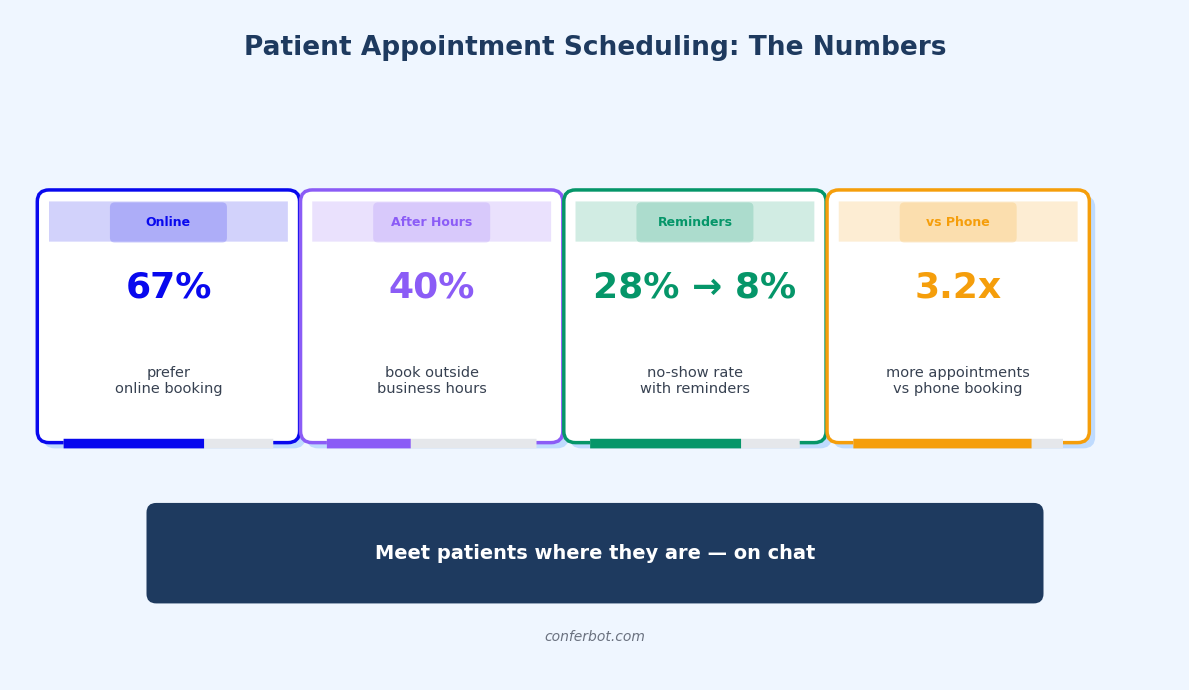
Phone scheduling creates a cascade of inefficiencies that compound across the entire practice. Patients call during lunch breaks and after work — exactly when your front desk is either short-staffed or closed. Studies show that 34% of patients who cannot reach a medical office by phone will simply book with a competitor. That is not just a missed appointment; it is a lifetime patient value of $12,000-$25,000 walking out the door.
- Hold times average 4.5 minutes at primary care offices, and 23% of callers abandon before connecting. Each abandoned call represents a potential lost patient or a delayed diagnosis.
- Staff multitasking degrades quality: Receptionists juggling phone scheduling with check-ins, insurance verification, and patient questions make 3x more scheduling errors than those focused on a single task.
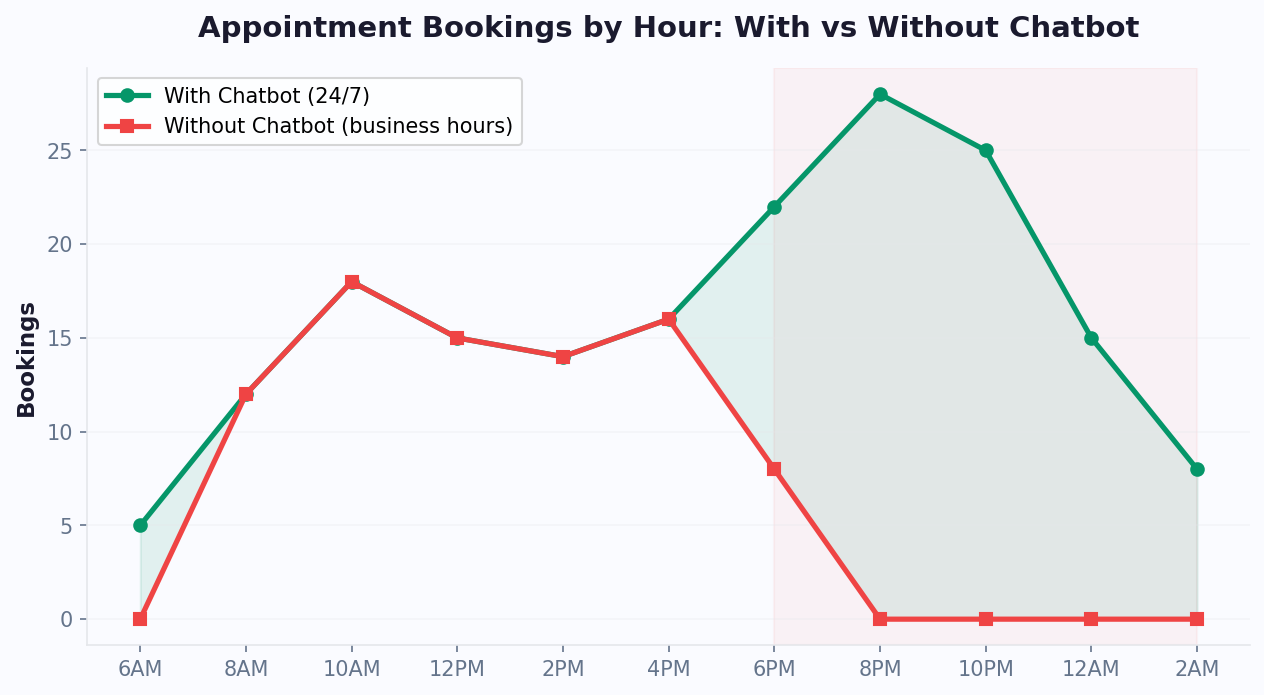
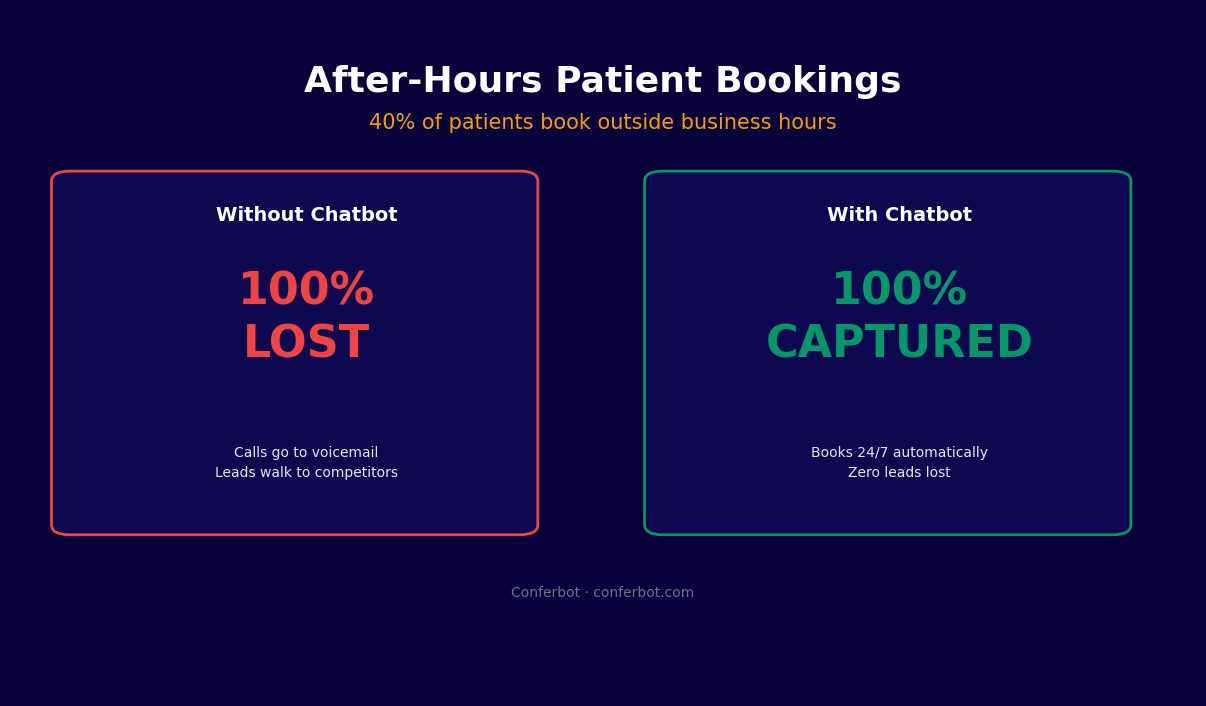
- After-hours demand is massive: 41% of appointment requests happen outside standard office hours. Without a chatbot, these patients leave voicemails that may not be returned for 24-48 hours — by which time many have booked elsewhere.
- No-shows compound the problem: When rescheduling is difficult, patients simply do not show up. The average no-show rate in healthcare is 18%, costing practices $150,000+ annually in lost revenue.
The Chatbot Advantage
A medical appointment scheduler chatbot solves all four problems simultaneously. It is available 24/7, never puts patients on hold, makes rescheduling effortless, and sends automated reminders that cut no-shows by 55-70%. Practices using Conferbot's appointment booking chatbot report filling 22% more appointment slots per week simply by capturing after-hours demand and reducing no-shows. The ROI is immediate: most clinics see full payback within the first month of deployment.
For healthcare organizations looking to scale this across departments, Conferbot's integrations hub connects your chatbot directly to EHR systems, practice management software, and patient portals — creating a seamless end-to-end scheduling pipeline.
How It Works: The Patient Booking Flow
A doctor appointment chatbot guides patients through a structured booking flow that feels conversational but captures every data point your practice needs. From initial contact to post-visit follow-up, every step is automated, validated, and logged. Here is the complete patient journey from first message to confirmed appointment.
Step-by-Step Booking Flow
| Step | Patient Action | Chatbot Response | Backend Process |
|---|---|---|---|
| 1. Greeting | Opens chat widget or sends WhatsApp message | Welcome + "Are you a new or returning patient?" | Session initialized, language detected |
| 2. Intent | "I need to see Dr. Smith" | Shows available specialties or confirms doctor | Queries provider directory |
| 3. Date selection | Picks preferred date/time | Shows real-time available slots | Pulls live calendar availability |
| 4. Patient info | Provides name, DOB, phone | Validates and confirms details | Checks existing patient records |
| 5. Insurance | Enters insurance provider and ID | Confirms coverage for selected provider | Runs eligibility verification API |
| 6. Pre-visit forms | Answers symptom and history questions | Collects chief complaint, medications, allergies | Populates intake forms in EHR |
| 7. Confirmation | Reviews and confirms | Sends confirmation + calendar invite | Blocks slot, triggers reminder sequence |
Intelligent Slot Optimization
The chatbot does not just show available slots — it optimizes which slots to offer first. If your practice wants to fill morning gaps, the bot prioritizes those. If a provider is overbooked on Tuesday but light on Wednesday, the bot gently steers patients toward Wednesday: "Dr. Smith has earlier availability on Wednesday at 10:15am — would you like that slot instead?" This load balancing increases schedule density by 12-18% without any manual intervention.
Handling Edge Cases
Real-world scheduling involves complications that a simple booking form cannot handle. The chatbot manages these intelligently:
- Urgent requests: If a patient describes acute symptoms, the bot flags the case for same-day triage and escalates to a human immediately.
- Multiple appointments: "I need a physical and a lab draw" — the bot books both sequentially, ensuring proper time gaps between appointments.
- Provider preferences: Returning patients are matched with their usual provider first, with alternatives offered only if that provider is fully booked.
- Language support: Multi-language capability ensures non-English-speaking patients can book comfortably, reducing the need for translator staff during scheduling.
Explore how Conferbot's AI chatbot builder lets you customize every step of this flow without writing a single line of code.
Features: Calendar Sync, Insurance Verification, and More
A doctor appointment chatbot is only as useful as its integrations and capabilities. The right feature set transforms a simple scheduling tool into a complete patient engagement platform that handles everything from initial booking to post-visit follow-up. Here is what a fully-featured medical appointment chatbot delivers.
Core Feature Comparison
| Feature | What It Does | Patient Benefit | Practice Benefit |
|---|---|---|---|
| Real-time calendar sync | Pulls live availability from Google Calendar, Outlook, or EHR | Never offered a slot that is already taken | Zero double-bookings, no manual sync |
| Insurance verification | Checks eligibility and copay before booking | Knows cost upfront, no billing surprises | Reduces claim denials by 35% |
| Pre-visit intake forms | Collects symptoms, history, medications, allergies | Shorter wait times at the office | Providers prepared before patient arrives |
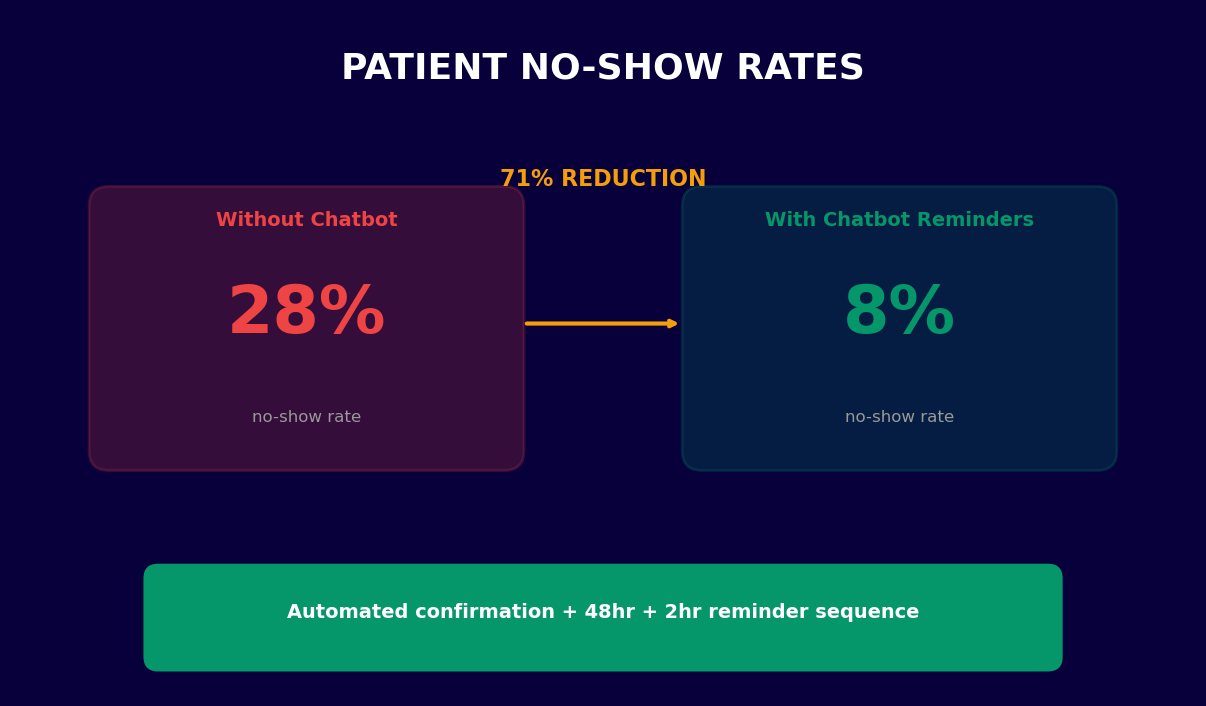
| Automated reminders | SMS/WhatsApp/email at 7-day, 24-hr, 2-hr intervals | Never forgets an appointment | No-show rate drops 55-70% |
| Waitlist management | Automatically offers cancelled slots to waitlisted patients | Gets seen sooner when openings arise | Fills 90% of cancelled slots within 2 hours |
| Multi-provider routing | Routes patients to the right specialist based on symptoms | No phone tag between departments | Reduces misdirected appointments by 40% |
| Prescription refill requests | Captures refill requests and routes to provider for approval | No phone call needed for routine refills | Frees up 3-5 hours of nurse time per week |
| Post-visit follow-up | Sends satisfaction survey and care instructions | Clear aftercare guidance | Higher patient satisfaction scores |
Calendar Sync Deep Dive
Calendar sync is the backbone of any appointment chatbot. Conferbot connects to all major calendar platforms and practice management systems including Google Calendar, Microsoft Outlook, Calendly, Acuity, Athenahealth, Epic MyChart, and Kareo. The sync is bidirectional — appointments booked through the chatbot appear instantly in the provider's calendar, and manual bookings made by staff are immediately reflected in the chatbot's available slots. Sync latency is under 3 seconds, ensuring patients never book into a slot that was just filled.
Insurance Verification Workflow
Instead of discovering insurance issues at check-in (leading to rescheduled or cancelled appointments), the chatbot verifies coverage during booking. The patient enters their insurance provider and member ID, and the bot checks eligibility in real time via clearinghouse API integration. If the provider is out-of-network, the bot explains this upfront and offers in-network alternatives. This single feature eliminates 35% of day-of cancellations caused by insurance surprises.
Pre-Visit Form Collection
Clinical intake forms are the bane of patient experience — clipboards, illegible handwriting, and 15 minutes of waiting room paperwork. The chatbot collects this information conversationally during booking: chief complaint, current medications, allergies, past surgeries, and family history. Data flows directly into the EHR, so the provider has a complete picture before the patient even arrives. Practices using chatbot-based intake report saving 12 minutes per patient visit and improving documentation accuracy by 28%.
Connect all of these features through Conferbot's calendar integration module, which supports over 40 scheduling platforms out of the box.
Ready to try Doctor Appointment Chatbot Template (Free)?
Deploy this template in under 10 minutes. No coding required.
Use This Template Free →No-Show Reduction Data by Specialty
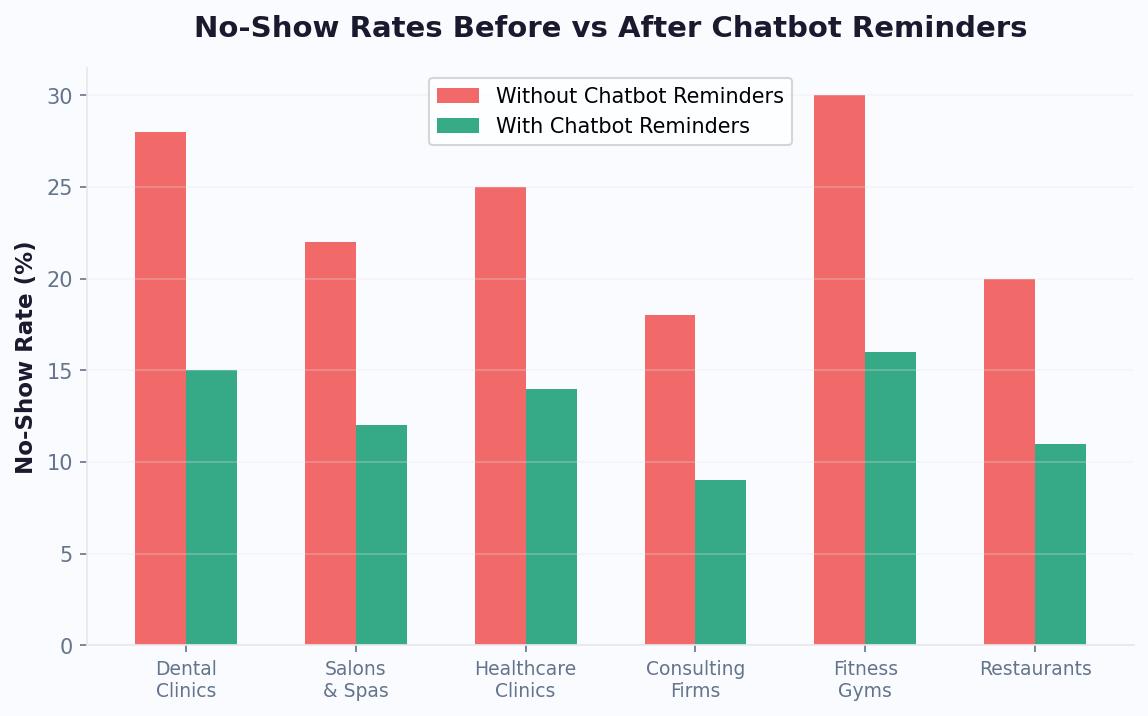
No-shows are the single largest source of preventable revenue loss in healthcare. The average medical practice loses $150,000-$200,000 annually to missed appointments. But the impact varies dramatically by specialty — a missed dermatology appointment costs $150, while a missed surgical consultation costs $500+. Understanding your specialty's specific no-show profile is essential for calculating the ROI of a doctor appointment chatbot.
No-Show Rates and Revenue Impact by Specialty
| Specialty | Avg No-Show Rate | Avg Revenue/Visit | Annual Loss (300 appts/mo) | Post-Chatbot Rate | Revenue Recovered |
|---|---|---|---|---|---|
| Primary Care | 19% | $180 | $123,120 | 7% | $82,080 |
| Dermatology | 22% | $155 | $123,420 | 9% | $72,540 |
| Orthopedics | 15% | $280 | $151,200 | 6% | $90,720 |
| Pediatrics | 25% | $140 | $126,000 | 10% | $75,600 |
| Psychiatry | 30% | $200 | $216,000 | 12% | $129,600 |
| OB/GYN | 17% | $220 | $134,640 | 7% | $79,200 |
| Dental | 15% | $195 | $105,300 | 6% | $63,180 |
| Ophthalmology | 20% | $175 | $126,000 | 8% | $75,600 |
Why Certain Specialties Have Higher No-Shows
The data reveals clear patterns. Psychiatry has the highest no-show rate (30%) due to a combination of stigma, ambivalence about treatment, and the fact that mental health patients are more likely to experience motivational barriers. Pediatrics is high (25%) because parents juggle childcare logistics and children's unpredictable health. Dermatology is elevated (22%) because many visits are elective — patients book for acne or mole checks but lose motivation when the issue seems minor.
How Chatbot Reminders Address Each Cause
- For forgetfulness (38% of no-shows): Multi-touch reminders at 7 days, 24 hours, and 2 hours before the appointment, sent via the patient's preferred channel (SMS, WhatsApp, or email).
- For schedule conflicts (27%): One-tap rescheduling within the reminder message. The patient taps "Reschedule," sees available alternatives, and books a new slot in under 30 seconds — no phone call required.
- For motivation loss (18%): Personalized value reinforcement in reminders: "Your skin check with Dr. Johnson is tomorrow at 2pm. Early detection is key — 99% of skin cancers are curable when caught early."
- For logistics (12%): Reminders include office directions, parking information, and estimated travel time from the patient's location.
The result is a 55-70% reduction in no-shows across all specialties, with the highest-impact improvements in psychiatry and pediatrics where baseline rates are worst. For more on reminder strategy, see Conferbot's automated reminder system.
HIPAA Compliance: Keeping Patient Data Secure
Any chatbot handling patient information in a healthcare setting must comply with HIPAA (Health Insurance Portability and Accountability Act). This is non-negotiable — violations carry fines ranging from $100 to $50,000 per incident, with annual maximums of $1.5 million per violation category. A doctor appointment chatbot collects names, dates of birth, insurance information, and health complaints, all of which qualify as Protected Health Information (PHI). The right chatbot platform handles this data with enterprise-grade security from day one.
HIPAA Requirements for Chatbots
| Requirement | What It Means | How Conferbot Addresses It |
|---|---|---|
| Encryption in transit | All data must be encrypted during transmission | TLS 1.3 encryption on all connections |
| Encryption at rest | Stored data must be encrypted | AES-256 encryption for all stored PHI |
| Access controls | Only authorized personnel can view PHI | Role-based access with audit logging |
| Audit trails | All access to PHI must be logged | Complete audit log with timestamps and user IDs |
| Business Associate Agreement | Third-party vendors must sign a BAA | BAA provided to all healthcare customers |
| Minimum necessary standard | Collect only the PHI needed for the task | Configurable fields — collect only what you need |
| Patient rights | Patients can request access to their data | Data export and deletion tools built in |
Common HIPAA Mistakes With Chatbots
Many practices unknowingly violate HIPAA when deploying chatbots. Here are the most common pitfalls and how to avoid them:
- Using consumer messaging apps without a BAA: Standard WhatsApp and Facebook Messenger do not sign BAAs. You must use WhatsApp Business API (which does support BAAs) or a HIPAA-compliant messaging platform. Conferbot's WhatsApp integration operates through the Business API with full BAA coverage.
- Storing chat logs on non-compliant servers: If your chatbot stores conversation history on servers without proper encryption and access controls, you are violating HIPAA. Conferbot stores all data in SOC 2 Type II certified data centers with HIPAA-compliant configurations.
- Failing to de-identify training data: If you use chatbot conversations to improve your AI model, the training data must be de-identified first. All PHI markers (names, dates, IDs) must be stripped before any data is used for model training.
- No patient consent mechanism: Before collecting PHI, the chatbot must obtain explicit consent. This means a clear disclosure of what data is collected, how it is used, and who has access — followed by an affirmative consent action from the patient.
Security Architecture
Conferbot's healthcare chatbot template is built on a security-first architecture. PHI never touches client-side storage — all sensitive data is transmitted directly to encrypted backend servers via TLS 1.3. Sessions expire after 15 minutes of inactivity, and no PHI is cached in browser memory. The platform undergoes annual penetration testing and maintains SOC 2 Type II compliance. For practices with additional security requirements, Conferbot offers dedicated server deployment options with custom data residency configurations. Learn more about our security posture on the security page.
Multi-Channel Deployment: WhatsApp for Patients
Patients do not want to download a new app or navigate a patient portal to book an appointment. They want to book where they already spend their time — and for 2.7 billion people worldwide, that is WhatsApp. Deploying your doctor appointment chatbot on WhatsApp transforms scheduling from a chore into a 30-second conversation that patients can complete from anywhere, at any time.
Why WhatsApp Dominates Patient Communication
WhatsApp has a 98% open rate compared to 20% for email and 45% for SMS. When a patient receives a WhatsApp reminder, they see it within minutes — not hours or days. This immediacy is what drives the dramatic no-show reduction rates seen in chatbot-enabled practices. Beyond open rates, WhatsApp supports rich interactions that SMS cannot match: quick-reply buttons, image sharing (for insurance cards or wound photos), location sharing, and document exchange.
Channel Performance Comparison
| Channel | Open Rate | Response Rate | Avg Booking Time | Patient Satisfaction |
|---|---|---|---|---|
| 98% | 72% | 45 seconds | 4.7/5 | |
| SMS | 45% | 31% | 2.5 minutes | 3.8/5 |
| 20% | 8% | 4+ minutes | 3.2/5 | |
| Phone call | N/A | 65% (if answered) | 5-8 minutes | 3.5/5 |
| Patient portal | N/A | 15% | 3-6 minutes | 2.9/5 |
| Website widget | N/A | 45% | 60 seconds | 4.3/5 |
WhatsApp Booking Workflow
A patient messages your practice's WhatsApp number with "book appointment" (or any natural language variant). The chatbot responds instantly, guides them through provider selection, date/time picking, and confirmation — all within the WhatsApp interface. The conversation feels personal and immediate, not clinical and bureaucratic. Patients can also send photos of insurance cards for faster verification, share their location for nearest-clinic routing, and receive appointment confirmations with a one-tap "Add to Calendar" button.
Beyond Booking: Full Patient Engagement
- Prescription refill requests: "I need a refill of my lisinopril" — the bot captures the request and routes it to the provider for approval.
- Lab result notifications: "Your blood work results are ready. Tap here to view them in the patient portal."
- Post-visit care instructions: Automated delivery of aftercare instructions, medication schedules, and follow-up booking prompts.
- Billing inquiries: "What is my outstanding balance?" — the bot pulls the balance and offers a payment link.
Deploy across WhatsApp, SMS, web, and more with Conferbot's omnichannel platform. Set up your WhatsApp medical chatbot using our WhatsApp chatbot builder — no coding required.
50,000+ businesses use Conferbot templates to automate conversations
ROI for Medical Practices: Revenue and Time Saved
The return on investment for a doctor appointment chatbot is measurable from week one. Unlike many healthcare technology investments that take months to show results, a scheduling chatbot delivers immediate time savings, immediate no-show reduction, and immediate after-hours booking capture. Here is a detailed ROI model for a typical medical practice with 3-5 providers seeing 300 patients per month.
Monthly ROI Breakdown
| Revenue/Savings Category | Calculation | Monthly Value | Annual Value |
|---|---|---|---|
| No-show recovery | 54 no-shows/mo reduced to 21 = 33 recovered x $200 avg | $6,600 | $79,200 |
| After-hours bookings captured | 41% of demand = 123 attempts, 60% convert = 74 new bookings x $200 | $14,800 | $177,600 |
| Staff time savings | 25 hrs/week scheduling time eliminated x $22/hr | $2,200 | $26,400 |
| Reduced phone costs | 60% fewer inbound calls = lower phone system costs | $400 | $4,800 |
| Waitlist slot filling | 90% of cancellations refilled = 18 recovered slots x $200 | $3,600 | $43,200 |
| Intake form time savings | 12 min saved per visit x 300 visits x $0.75/min staff cost | $2,700 | $32,400 |
| Total | $30,300 | $363,600 |
Cost vs. Return
Conferbot's healthcare chatbot plans start at $49/month for small practices and scale to $199/month for multi-provider clinics. Against a conservative monthly return of $30,000, that is a 150:1 ROI ratio. Even if you discount the after-hours booking figure by 50% (assuming some of those patients would have called the next morning), the ROI is still over 75:1. No other healthcare technology investment comes close to this payback period.
Intangible Benefits
Beyond the numbers, a doctor appointment chatbot delivers benefits that are harder to quantify but equally valuable:
- Staff morale: Front desk staff report significantly lower stress when freed from constant phone scheduling. Burnout and turnover decrease — and replacing a front desk employee costs $3,500-$5,000 in recruiting and training.
- Patient experience: Patients rate practices with chatbot scheduling 35% higher on satisfaction surveys. This translates to better online reviews, higher Google ratings, and stronger word-of-mouth referrals.
- Competitive differentiation: In markets with multiple practices, the one that offers instant online booking wins the patient. A 2024 survey found that 68% of patients would switch providers for one that offers easier scheduling.
- Data insights: The chatbot generates rich data on booking patterns, popular providers, peak demand times, and common patient concerns — enabling data-driven practice management decisions.
Calculate your practice's specific ROI using our chatbot ROI calculator, or explore all healthcare chatbot options in our healthcare templates library.
Setup Guide for Clinics: Live in Under 30 Minutes
Deploying a doctor appointment chatbot does not require a six-month IT project. With Conferbot's no-code platform, a medical practice can go from zero to live chatbot in under 30 minutes. Here is the complete step-by-step setup guide, from account creation to first patient booking.
Step 1: Create Your Bot (5 Minutes)
Sign up at app.conferbot.com and select the Doctor Appointment Scheduler template. The template comes pre-configured with healthcare-specific conversation flows, HIPAA-compliant data handling, and medical terminology recognition. Give your bot a name that matches your practice branding — "Dr. Martinez Office Assistant" feels more personal than "Booking Bot."
Step 2: Connect Your Calendar (5 Minutes)
Navigate to Integrations and connect your scheduling system. Conferbot supports Google Calendar, Microsoft Outlook, Calendly, Acuity, and major EHR systems including Athenahealth, Epic MyChart, and Kareo. The connection is OAuth-based — you authorize access, and the sync begins immediately. Set your available hours, appointment types, and duration for each provider. If you have multiple providers, add each one with their individual availability.
Step 3: Customize Your Booking Flow (10 Minutes)
The template includes a default booking flow, but you will want to tailor it to your practice. Key customizations include:
- Appointment types: Add your specific visit types (annual physical, sick visit, follow-up, telehealth, lab work) with appropriate durations and provider assignments.
- Insurance verification: Enable or disable insurance checking. If enabled, add your accepted insurance plans so the bot can pre-verify coverage.
- Pre-visit intake: Customize the intake questions to match your practice's forms. Add or remove fields for medications, allergies, surgical history, and chief complaint.
- Reminder sequence: Set your preferred reminder timing (7-day, 24-hour, 2-hour is the default) and customize the reminder message content.
Step 4: Deploy to Your Channels (5 Minutes)
Choose where patients will access your chatbot. Options include your practice website (embed with a single line of code), WhatsApp Business (connect your practice phone number), SMS (via Twilio integration), and your patient portal. Most practices start with website + WhatsApp and add channels as they see adoption grow.
Step 5: Test and Go Live (5 Minutes)
Use Conferbot's built-in testing mode to walk through the entire booking flow as a patient. Book a test appointment, verify it appears in your calendar, confirm you receive the notification, and check that the reminder sequence triggers correctly. Once everything checks out, flip the toggle to "Live" and your chatbot is ready for patients.
Post-Launch Optimization
After your first week of live operation, review the analytics dashboard to identify drop-off points, peak booking times, and common patient questions the bot could not answer. Use these insights to refine your flows. Conferbot's AI chatbot builder makes it easy to add new conversation branches, adjust slot offerings, and expand the bot's capabilities as your practice needs evolve.
Doctor Appointment Chatbot Template (Free) FAQ
Everything you need to know about chatbots for doctor appointment chatbot template (free).
Why Use a Template vs Building from Scratch?
Templates encode years of optimization data into the conversation flow before you start.
| Factor | Conferbot Template | Build from Scratch | Hire a Developer |
|---|---|---|---|
| Time to deploy | 10 minutes | 2-8 hours | 2-6 weeks |
| Cost | Free | Your time | $5,000-$25,000 |
| Day-1 conversion | 15-22% | 5-8% | 10-15% |
| Proven flows | Yes, data-tested | No | Depends |
| Updates included | Automatic | Manual | Paid |
| Multi-channel | 8+ channels | 1 channel | Extra cost |
| Analytics | Built-in | Must build | Extra cost |
Ready to Deploy Doctor Appointment Chatbot Template (Free)?
Join 50,000+ businesses. Free forever plan available. No credit card required.