
E-commerce Product Recommendation Assistant
Free E-commerce And Retail Chatbot Template
A smart product recommendation chatbot that delivers hyper-personalized picks based on skin type, style, needs, budget, and brand preferences. It turns casual browsers into confident buyers with tailored suggestions and easy add-to-cart functionality.


What Is a Product Recommendation Assistant Chatbot?
A product recommendation assistant chatbot is a conversational AI tool embedded in your online store that guides shoppers through a structured discovery dialogue -- asking about their needs, preferences, budget, and use case -- and returns a curated shortlist of products that match their specific criteria. Rather than presenting every visitor with the same static product grid and hoping they find what they need, the chatbot acts as a knowledgeable sales assistant who asks the right questions and leads each shopper to the product most likely to convert and satisfy.
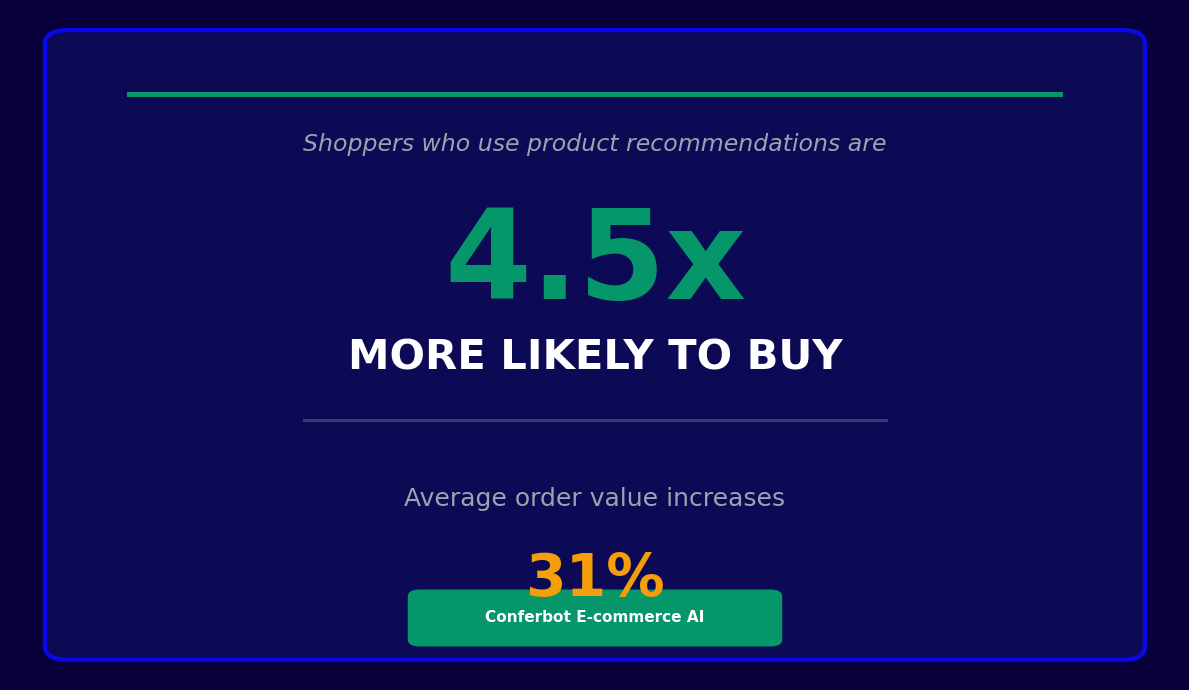
The gap between what shoppers want and what they find is the largest untapped conversion opportunity in e-commerce. In 2026, the average e-commerce conversion rate sits at 2.5-3.5% -- meaning 96-97% of store visitors leave without buying. A significant share of that lost traffic is not price-sensitive or unconvinced; they simply could not find the right product in a catalog of hundreds or thousands of SKUs. Product recommendation chatbots address this discovery problem directly by replacing passive browsing with active guidance.
The chatbot differs from a standard search bar or filter system in three important ways. First, it is proactive -- it initiates the discovery conversation rather than waiting for the shopper to know the right search term. Second, it is adaptive -- each question is informed by the previous answer, narrowing the recommendation set progressively rather than presenting an overwhelming filter tree. Third, it handles ambiguity -- a shopper who says "something for my dad who likes the outdoors and has a budget of around $80" receives a relevant shortlist even though no search query would produce that result.
Conferbot's AI chatbot builder provides a pre-built product recommendation assistant template that connects to your Shopify or WooCommerce product catalog, applies your configured recommendation logic, and surfaces the right products within a conversational flow -- all without writing code. This page covers the recommendation engine mechanics, key features, platform integrations, conversion data, personalization strategies, setup steps, and A/B testing guidance.
How the Recommendation Engine Works
Behind every product recommendation assistant is a recommendation engine that determines which products to surface for each shopper and in what order. Understanding the three dominant approaches -- collaborative filtering, content-based filtering, and hybrid models -- helps you choose the right configuration for your store's catalog size, traffic volume, and data maturity.
Collaborative Filtering
Collaborative filtering recommends products based on the behavior of shoppers with similar profiles. The logic is: "customers who browsed and purchased the same items as you also bought these." This approach is highly effective for stores with large transaction histories because it surfaces non-obvious product connections that a human merchandiser would never anticipate. A shopper browsing running shoes might be recommended an electrolyte drink that running shoe buyers frequently co-purchase, even though the two products share no category or attribute overlap.
The limitation of collaborative filtering is its cold-start problem: it produces poor recommendations for new products (no purchase history) and new shoppers (no browsing history). Stores with fewer than 10,000 transactions also lack the data density required for reliable collaborative signals.
Content-Based Filtering
Content-based filtering recommends products based on the attributes of items the shopper has engaged with -- category, material, price range, brand, size, color, and any other properties in your product catalog. If a shopper clicks on a wool sweater in navy blue at $120, content-based filtering surfaces other wool sweaters in similar colors at similar price points. This approach works from the first product view and does not require transaction history, making it suitable for new stores and new product launches.
| Approach | Data Required | Best For | Limitation |
|---|---|---|---|
| Collaborative filtering | Purchase and browsing history at scale | Large catalogs with 10,000+ transactions | Cold-start problem for new products and users |
| Content-based filtering | Product attribute metadata | New stores, new products, niche catalogs | Limited serendipity -- tends toward obvious matches |
| Hybrid model | Both attribute data and behavioral signals | Mid-to-large stores with 1,000+ transactions | More complex to configure and tune |
Hybrid Models
Hybrid recommendation engines combine collaborative and content-based signals, using content-based filtering as the primary source for new shoppers and low-history products, then blending in collaborative signals as behavioral data accumulates. In 2026, hybrid models are the industry standard for mid-to-large e-commerce stores because they address the cold-start limitation of pure collaborative filtering while producing more serendipitous and commercially relevant recommendations than pure content-based systems.
Conferbot's product recommendation assistant uses a rule-augmented hybrid model: the engine generates a candidate set using collaborative and content-based signals, then applies your configured business rules (prioritize in-stock items, exclude clearance products from cold-traffic recommendations, boost high-margin SKUs) to produce the final ranked shortlist presented to the shopper.
Conversational Filtering
The chatbot layer adds a conversational filtering step that no passive recommendation widget can replicate. By asking 3-5 structured questions -- "What is the occasion?", "What is your budget range?", "Do you have a size preference?" -- the chatbot collects explicit preference signals that dramatically narrow the candidate set before the recommendation engine applies its collaborative or content-based ranking. This explicit preference collection is particularly valuable for stores with large catalogs where implicit behavioral signals alone produce a noisy recommendation set.
Key Features of the Product Recommendation Assistant Template
Conferbot's product recommendation assistant template includes the following features out of the box, all configurable through the no-code builder without developer involvement.
| Feature | What It Does | Conversion Impact |
|---|---|---|
| Guided preference questionnaire | Asks 3-7 structured questions to collect explicit preference signals before generating recommendations | Narrows recommendation set to highest-relevance items |
| Dynamic product card display | Shows product images, names, prices, and ratings within the chat interface | Enables browsing without leaving the conversation |
| Add-to-cart within chat | Lets shoppers add recommended products to their cart directly from the chatbot response | Eliminates navigation friction between discovery and purchase |
| Real-time inventory check | Excludes out-of-stock items and surfaces alternatives if a preferred variant is unavailable | Prevents recommendation dead-ends that increase bounce rate |
| Cross-sell and upsell logic | Suggests complementary products and premium alternatives after the initial recommendation | Increases average order value by 15-25% |
| Comparison mode | Presents a side-by-side attribute comparison of 2-3 recommended products on request | Reduces decision paralysis for high-consideration purchases |
| Wishlist and save-for-later | Allows shoppers to save recommendations for a future session | Captures intent from shoppers not ready to buy now |
| Session memory | Remembers preferences from a returning visitor's previous chatbot session | Reduces re-qualification friction for returning shoppers |
In-Chat Product Card Display
One of the most impactful UX decisions in a recommendation chatbot is whether to keep the shopper inside the conversation or redirect them to a product page for every recommendation. Conferbot's template renders rich product cards -- with image, name, price, star rating, and key attributes -- directly in the chat window. The shopper can review multiple recommendations without any page navigation, reducing the drop-off that occurs when users must navigate away from a discovery context to evaluate a product.
Comparison Mode
For higher-consideration product categories -- electronics, furniture, outdoor gear, beauty devices -- shoppers frequently want to compare two or three options before deciding. The chatbot's comparison mode responds to phrases like "can you compare these two?" or "what is the difference between the first and second option?" by rendering a structured attribute comparison table within the conversation. This keeps the shopper in the chatbot flow rather than bouncing between product pages for manual comparison, which is a common cause of session abandonment in high-consideration categories.
Ready to try E-commerce Product Recommendation Assistant?
Deploy this template in under 10 minutes. No coding required.
Use This Template Free →Shopify and WooCommerce Integration
The product recommendation assistant's value is directly tied to the depth of its integration with your e-commerce platform. A deep integration means the chatbot always recommends in-stock items, reflects real-time pricing and promotional discounts, and writes shopper interactions back to customer profiles for future personalization. Here is how Conferbot integrates with the two dominant platforms.
Shopify Integration
Conferbot's Shopify integration connects via the Shopify Admin API and Storefront API with a single OAuth authorization from the Shopify App Store. The integration provides:
- Full product catalog sync including titles, descriptions, images, variants, tags, collections, and metafields -- updated in real time when products are changed in Shopify admin
- Real-time inventory data from Shopify's Inventory API, ensuring out-of-stock variants are excluded from recommendations automatically
- Storefront cart API integration so "add to cart" actions within the chatbot write directly to the shopper's Shopify cart, maintaining session continuity
- Customer account data for logged-in shoppers, enabling purchase history-based personalization and loyalty tier-aware recommendations
- Discount and price rule access so promotional pricing is reflected accurately in product cards shown within the chatbot
For Shopify Plus merchants, Conferbot also supports checkout extension integration, allowing the recommendation chatbot to appear within the Shopify checkout flow itself to suggest add-ons and accessories at the point of highest purchase intent.
WooCommerce Integration
WooCommerce stores connect through Conferbot's WordPress plugin and the WooCommerce REST API. The integration covers:
- Product catalog sync including custom product attributes, product variations, and ACF fields used by many WooCommerce-powered stores
- Category and tag taxonomy access for content-based filtering using WooCommerce's native product organization structure
- WooCommerce cart integration via REST API for in-chat add-to-cart functionality
- Customer order history access for returning logged-in shoppers, enabling purchase-history-aware recommendations
Headless and Custom Platforms
Stores on headless architectures, Magento, BigCommerce, or proprietary platforms connect via Conferbot's open API. You implement a product catalog endpoint that the chatbot queries at recommendation time, a cart mutation endpoint for add-to-cart actions, and an optional customer profile endpoint for personalization. The chatbot handles the conversation flow, recommendation logic, and display; your platform handles fulfillment and order management.
CRM and Analytics Sync
Every chatbot recommendation session is a rich source of zero-party preference data -- the shopper told you their budget, their use case, and their style preferences. Conferbot's integrations hub writes session preference data and recommendation outcomes to HubSpot, Salesforce, Klaviyo, and your analytics stack. This data enables follow-up personalization: a shopper who expressed interest in hiking gear but did not purchase can be targeted with a hiking-specific email campaign using the preferences they shared in the chatbot conversation.
Conversion Lift Data: What the Numbers Show
The commercial case for a product recommendation chatbot rests on measurable conversion and revenue metrics. Here is a summary of the performance data from Conferbot's merchant base and third-party e-commerce research in 2026.
Conversion Rate Impact
| Metric | Without Recommendation Chatbot | With Recommendation Chatbot | Lift |
|---|---|---|---|
| Store-wide conversion rate | 2.5-3.5% | 3.5-5.0% | 35-50% relative improvement |
| Chatbot-assisted session conversion rate | -- | 8-14% | 3-5x vs. unassisted browsing |
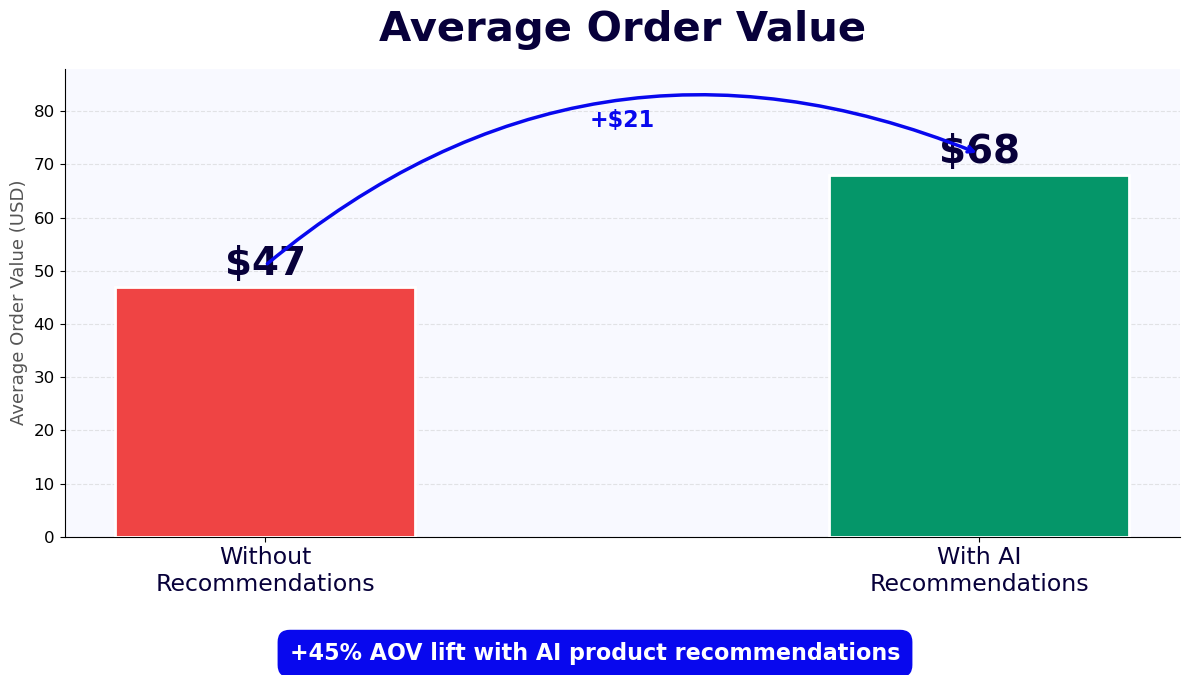
| Average order value (chatbot sessions) | Baseline AOV | Baseline AOV + 18-28% | Cross-sell and upsell logic |
| Bounce rate (chatbot-engaged visitors) | 55-65% | 35-45% | 20-25 percentage point reduction |
| Return visitor conversion rate | 4-6% | 9-13% | Session memory and preference recall |
Why Recommendation Chatbots Outperform Passive Widgets
Passive recommendation widgets -- "customers also bought" carousels, "you may also like" rails -- improve conversion modestly (typically 5-12% relative) because they display without context. The shopper has not told the widget their budget, use case, or preferences, so the recommendations are driven entirely by aggregate purchase patterns that may not match the individual's intent.
A chatbot recommendation session collects explicit preference signals before making any suggestions, which produces a much tighter recommendation set. A shopper who says "I need a gift for a 10-year-old who likes science, budget around $40" gets a three-product recommendation shortlist that is precisely targeted -- not a twenty-item carousel of algorithmically related products that includes a $200 telescope and a $12 toy.
Average Order Value Impact
The AOV lift from recommendation chatbots comes from two sources: upsell prompts that occur naturally within the recommendation dialogue ("the mid-range version is $20 more and includes waterproofing -- would that be useful for outdoor use?") and cross-sell suggestions made after the primary recommendation is accepted ("customers who bought this backpack also added this hydration pack -- would you like to see it?"). These in-conversation prompts convert at 15-22% because they are contextually relevant and delivered at the peak of the shopper's engagement with the product category.
Revenue Per Visitor Comparison
Using Conferbot's ROI calculator, a store with 50,000 monthly visitors, a $75 AOV, and a 2.8% baseline conversion rate generates $105,000 per month. Adding a recommendation chatbot that engages 15% of visitors and converts at 10% within the chatbot session generates an additional 750 chatbot-assisted conversions per month. At $75 AOV with a 20% AOV lift for chatbot sessions, that is $67,500 in incremental monthly revenue -- a figure that typically represents a 10-20x return on the chatbot investment within the first year.
Personalization Strategies for Higher Recommendation Relevance
Personalization is the mechanism that separates a recommendation chatbot that converts at 10% from one that converts at 5%. The following strategies are available in Conferbot's recommendation assistant template and can be implemented progressively -- starting with the simplest approaches and adding sophistication as your data and team capacity grow.
Zero-Party Data Collection
Zero-party data is preference information that the shopper explicitly provides -- as opposed to behavioral data inferred from clicks and purchases. The recommendation chatbot is the most effective zero-party data collection tool in e-commerce because shoppers willingly share their preferences in exchange for relevant recommendations. Budget range, intended recipient, use case, style preference, and size information collected in the chatbot conversation are stored to the customer profile via CRM integration and used to personalize all subsequent interactions -- email campaigns, on-site product grid sorting, and future chatbot sessions.
Returning Visitor Recognition
For returning visitors who completed a chatbot session in a previous visit, Conferbot's session memory feature pre-populates the recommendation engine with stored preferences rather than re-asking the same qualification questions. A shopper who told the chatbot in their last visit that they prefer minimalist design in the $100-150 range receives recommendations filtered by those preferences from the first response, reducing the time-to-recommendation and improving the experience for repeat visitors.
Customer Tier and Lifecycle Stage Personalization
For stores with loyalty programs or subscription tiers, the recommendation chatbot can vary its behavior based on the logged-in customer's tier. VIP customers see recommendations that prioritize premium and exclusive items. New customers see bestsellers and introductory products with lower price points. Customers approaching their annual loyalty tier threshold see recommendations that bring their spend to the next tier. These tier-aware recommendation rules are configured through the chatbot's conditional logic layer and the customer data available via your platform integration.
Seasonal and Contextual Personalization
In 2026, shoppers expect recommendations that reflect real-world context -- the time of year, current promotions, and local weather or events where relevant. Conferbot's recommendation assistant can apply seasonal rule overlays that boost gift-appropriate products in Q4, outdoor gear in spring and summer, and comfort-focused categories in winter. Promotional context can also be injected: if your store is running a "buy two, get one free" offer on a specific category, the recommendation chatbot can prioritize that category for shoppers whose preferences overlap with it.
A/B Testing Personalization Variants
Personalization strategies should be tested rather than assumed. Use Conferbot's built-in A/B testing to run controlled experiments on personalization variables: does showing the customer's first name in the recommendation message improve conversion? Does a price-first vs. feature-first product card layout perform better for your audience? Does a three-question vs. five-question preference questionnaire produce better recommendation accuracy vs. higher completion rates? Track results in the analytics dashboard and implement winning variants progressively.
50,000+ businesses use Conferbot templates to automate conversations
Step-by-Step Setup Guide for the Recommendation Assistant
Most Shopify and WooCommerce stores can configure and launch Conferbot's product recommendation assistant in under a day. The following steps cover the complete setup from installation through first-sale attribution.
Step 1: Connect Your Product Catalog
Install the Conferbot integration for your platform via the integrations hub. For Shopify, authorize the Conferbot app from the Shopify App Store -- the catalog sync begins immediately after OAuth authorization. For WooCommerce, install the WordPress plugin and enter your WooCommerce API credentials. Verify the sync by checking that your products appear in the Conferbot product catalog view with correct titles, images, prices, and stock status. For catalogs with custom attributes used in recommendation logic, confirm that those attributes are imported correctly before proceeding.
Step 2: Configure the Preference Questionnaire
In the no-code builder, open the product recommendation assistant template and customize the preference questionnaire for your specific catalog. For a fashion store, questions might include: "Who are you shopping for?", "What is the occasion?", "What is your style preference?", "What is your budget?", and "What size do you need?" For an electronics store: "What will you use this for?", "What is your budget?", "Do you prefer any specific brand?", and "Is portability important?" Tailor the questions to collect the signals that most meaningfully narrow your catalog to a relevant shortlist.
Step 3: Set Up Recommendation Logic Rules
Configure the business rules that govern which products appear in recommendations. Typical rules include: exclude out-of-stock variants, exclude products with a margin below a threshold from paid traffic recommendations, boost products tagged as "bestseller" for first-time visitors, and apply seasonal overlays for relevant product categories. These rules are configured in the Recommendation Logic panel without code, using the attribute and tag data synced from your platform.
Step 4: Configure Cross-Sell and Upsell Prompts
After the primary recommendation is made, the chatbot can offer cross-sell and upsell suggestions. Configure cross-sell rules: products from complementary categories that are frequently co-purchased with the primary recommendation. Configure upsell prompts: the premium version of the recommended product, triggered by a brief comparison message that highlights the premium differentiators. Set a maximum of one cross-sell and one upsell prompt per session to avoid overwhelming the shopper.
Step 5: Enable Channels and Placement
Configure where the recommendation assistant appears. For most stores, the primary placement is a proactive chat widget that appears on category and search pages after a configurable dwell time (typically 15-30 seconds). For WhatsApp commerce stores, configure the recommendation assistant as the response to product inquiry messages. For Messenger and Instagram DM, set up the assistant as the response to product-related keywords and "shop" button taps.
Step 6: Set Up Analytics and Attribution
Before launching, configure conversion attribution so chatbot-assisted sales are tracked separately from unassisted conversions. In Conferbot's analytics dashboard, enable the revenue attribution model that credits the chatbot session when a purchase occurs within a configurable window (24 or 48 hours recommended) after a recommendation session. Connect the analytics integration to Google Analytics 4 or your analytics platform of choice for unified reporting across all acquisition channels.
Step 7: Launch and Iterate
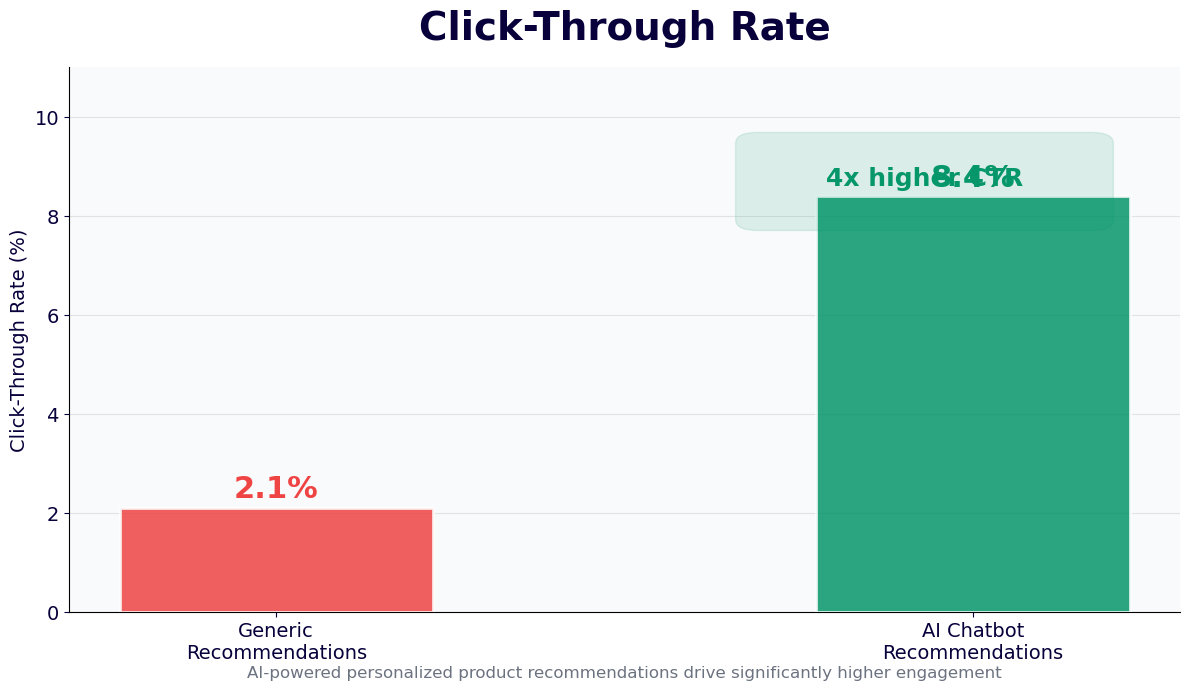
Go live and review performance daily for the first two weeks. Key metrics to track: chatbot session start rate, preference questionnaire completion rate, recommendation click-through rate, add-to-cart rate from chatbot recommendations, and chatbot-attributed conversion rate. Use Conferbot's ROI calculator to quantify revenue impact and identify the optimization levers with the highest potential return.
A/B Testing Your Product Recommendation Chatbot
A/B testing is the discipline that separates stores that plateau at their initial recommendation chatbot performance from those that continuously improve conversion rate over months and years. Conferbot's built-in experimentation framework makes it straightforward to run controlled tests on any element of the recommendation experience. Here are the highest-leverage test variables and how to run each one rigorously.
What to Test First
With limited testing bandwidth, prioritize experiments in this order: (1) the chatbot trigger -- when and how the recommendation assistant is offered to visitors; (2) the preference questionnaire -- number of questions and question framing; (3) the product card format -- what information is displayed and in what order; (4) the cross-sell and upsell message copy; (5) the conversation opening message. The trigger test has the highest leverage because it determines the size of your experimental pool. A trigger change that increases chatbot session starts by 20% multiplies the impact of every downstream optimization.
Trigger Timing Tests
Test different dwell-time thresholds for the proactive trigger: 10 seconds vs. 20 seconds vs. scroll-depth-based triggering (fires when visitor scrolls past 40% of the category page). Test proactive vs. passive placement: a proactive pop-up widget vs. a persistent "Need help finding the right product?" button in the page corner. Track both the session start rate and the bounce rate impact -- an aggressive trigger that starts more sessions but increases bounce rate may not be net positive for conversion.
Questionnaire Length Tests
More questions produce more accurate recommendations but also produce higher questionnaire abandonment rates. A three-question questionnaire will have a higher completion rate than a seven-question one, but may produce less precisely targeted recommendations. Run an A/B test comparing a three-question and a five-question version and measure both questionnaire completion rate and recommendation-to-purchase conversion rate. The optimal questionnaire length is the one that maximizes recommendation-to-purchase conversions, not the one that maximizes completion rate alone.
Recommendation Count Tests
Test showing two product recommendations vs. three vs. four in the initial response. Research on choice architecture consistently shows that offering too many options increases decision paralysis, but too few can make the recommendation feel arbitrary. For most product categories, three recommendations is the empirically supported optimum, but your specific category and customer base may differ. Track click-through rate and add-to-cart rate per position to understand how recommendation count affects shopper behavior in your store in 2026.
Running Statistically Valid Tests
A common mistake in A/B testing chatbot experiences is calling a winner too early. For recommendation chatbot tests, aim for at least 200 completed chatbot sessions per variant before drawing conclusions, and run tests for a minimum of two weeks to control for day-of-week effects. Use Conferbot's built-in A/B testing framework -- which randomly assigns visitors to variants, tracks conversion attribution per variant, and calculates statistical significance -- rather than manual segment splitting, which introduces selection bias. Review all active test results in the analytics dashboard and document each test outcome to build an institutional knowledge base of what works for your specific store and audience.
E-commerce Product Recommendation Assistant FAQ
Everything you need to know about chatbots for e-commerce product recommendation assistant.
Why Use a Template vs Building from Scratch?
Templates encode years of optimization data into the conversation flow before you start.
| Factor | Conferbot Template | Build from Scratch | Hire a Developer |
|---|---|---|---|
| Time to deploy | 10 minutes | 2-8 hours | 2-6 weeks |
| Cost | Free | Your time | $5,000-$25,000 |
| Day-1 conversion | 15-22% | 5-8% | 10-15% |
| Proven flows | Yes, data-tested | No | Depends |
| Updates included | Automatic | Manual | Paid |
| Multi-channel | 8+ channels | 1 channel | Extra cost |
| Analytics | Built-in | Must build | Extra cost |
Ready to Deploy E-commerce Product Recommendation Assistant?
Join 50,000+ businesses. Free forever plan available. No credit card required.