
Why Pre-Built Chatbot Flows Beat Starting from Scratch
Building a chatbot conversation from a blank canvas is the number one reason chatbot projects stall. You stare at the flow builder, type "Hi, how can I help you?" and then wonder what comes next. Meanwhile, the best-performing chatbots in production all follow proven conversation patterns — patterns that have been refined across thousands of deployments and millions of interactions.
The Cost of Getting Flows Wrong
A poorly designed chatbot flow does not just fail — it actively damages your brand. Research from Forrester shows that 73% of customers say they will not return to a chatbot after one bad experience. The most common flow mistakes include:
- Dead ends: Conversations that reach a point where the bot has nothing useful to say and no clear next step
- Infinite loops: "I didn't understand that" repeated three times before offering human help
- Too many questions: Asking 10 qualifying questions before providing any value
- No escape hatch: No way to reach a human when the bot cannot help
- Generic responses: "Thanks for reaching out!" without actually solving anything
📋 7 Ready-to-Use Flows
Each flow below has been tested across hundreds of deployments. Copy the scripts exactly or customize for your brand — no need to start from scratch.
What Makes a Great Flow
Every high-converting chatbot flow follows these principles:
- Value first: Give the user something useful within the first 2 messages
- Progressive disclosure: Ask one question at a time, not five
- Clear exit points: Every branch has a resolution or a handoff to a human
- Personality without friction: Be friendly but do not waste time with unnecessary banter
- Data capture is invisible: Collect lead information as a natural part of the conversation, not as a form
The 7 flows below follow all of these principles. Each has been tested across hundreds of Conferbot deployments. Copy the scripts exactly or customize them for your brand voice.
Flow 1: Support FAQ Bot — Deflect 60% of Support Tickets
This is the most common chatbot flow and the fastest to deploy. It handles repetitive questions that eat up your support team's time.
When to Use
Any business that receives more than 20 support inquiries per day, with 50%+ being repeat questions (shipping, returns, pricing, hours, passwords).
The Complete Conversation Script
Bot: "Hey there! 👋 I'm here to help. What can I assist you with?"
[Show quick-reply buttons:]
- 📦 Order & Shipping
- ↩️ Returns & Refunds
- 💳 Billing & Payments
- 🔑 Account & Login
- 💬 Talk to a Human
If user selects "Order & Shipping":
Bot: "Sure! What do you need help with?"
- Where is my order?
- How long does shipping take?
- Do you ship internationally?
- Change my shipping address
If "Where is my order?":
Bot: "I can look that up for you. What's your order number? (You'll find it in your confirmation email — it starts with #ORD-)"
User: #ORD-29481
Bot: "Found it! Here's the status of order #ORD-29481:
- Status: In transit
- Carrier: FedEx
- Tracking: 7921038471
- Estimated delivery: April 28, 2026
Want me to send you tracking updates on WhatsApp? [Yes, please / No thanks]"
If issue is not resolved:
Bot: "I wasn't able to help with that. Let me connect you with our support team. A human agent will be with you in about 2 minutes. While you wait, could you briefly describe your issue so they can jump right in?"
📊 Performance
Support FAQ bots deflect up to 70% of repetitive tickets. Button-first navigation reduces resolution time by 40% compared to free-text input.
Key Design Choices
- Button-first navigation: Quick-reply buttons reduce friction vs typing. Users resolve issues 40% faster with guided buttons.
- Order lookup integration: Connect to your order system via Conferbot integrations so the bot can pull real data, not just link to a tracking page.
- Escalation at every level: "Talk to a Human" is always visible — never hide the exit.
Get this flow pre-built: Customer Support Template
Flow 2: Lead Qualification Bot — Convert Visitors to Sales-Ready Leads
This flow replaces your contact form with a conversational experience that qualifies leads using BANT criteria (Budget, Authority, Need, Timeline) without feeling like an interrogation.
When to Use
B2B businesses, agencies, SaaS companies, and any business where lead quality matters as much as quantity.
The Complete Conversation Script
Bot: "Hi! Looking to learn more about [Your Product]? I can point you in the right direction. What best describes you?"
- 🏢 I'm evaluating solutions for my company
- 💡 I'm just exploring options
- 📞 I'd like to talk to sales
If "evaluating solutions":
Bot: "Great — happy to help you evaluate. Quick question: roughly how large is your team?"
- 1–10 people
- 11–50 people
- 51–200 people
- 200+ people
User selects "11–50 people"
Bot: "Got it. And what's the main challenge you're looking to solve?"
- Reduce support ticket volume
- Capture more leads from our website
- Automate appointment booking
- Something else
User selects "Capture more leads"
Bot: "Lead capture is one of our most popular use cases — our customers see 3x more leads on average. When are you looking to get started?"
- This week
- This month
- Next quarter
- Just researching
User selects "This month"
Bot: "Perfect timing. I'd love to set you up with a personalized demo. Just need a couple details:
What's your name?"
User: Sarah Chen
Bot: "Thanks, Sarah! And your work email?"
User: [email protected]
Bot: "Last one — what's the best number to reach you?"
User: 555-0142
Bot: "All set, Sarah! Here's what happens next:
- A product specialist will reach out within 2 hours
- They'll prepare a custom demo based on your lead capture needs
- The demo takes about 25 minutes
In the meantime, here's a quick case study from a company your size that increased leads by 340%: [link]
Anything else I can help with?"
🎯 Conversion Data
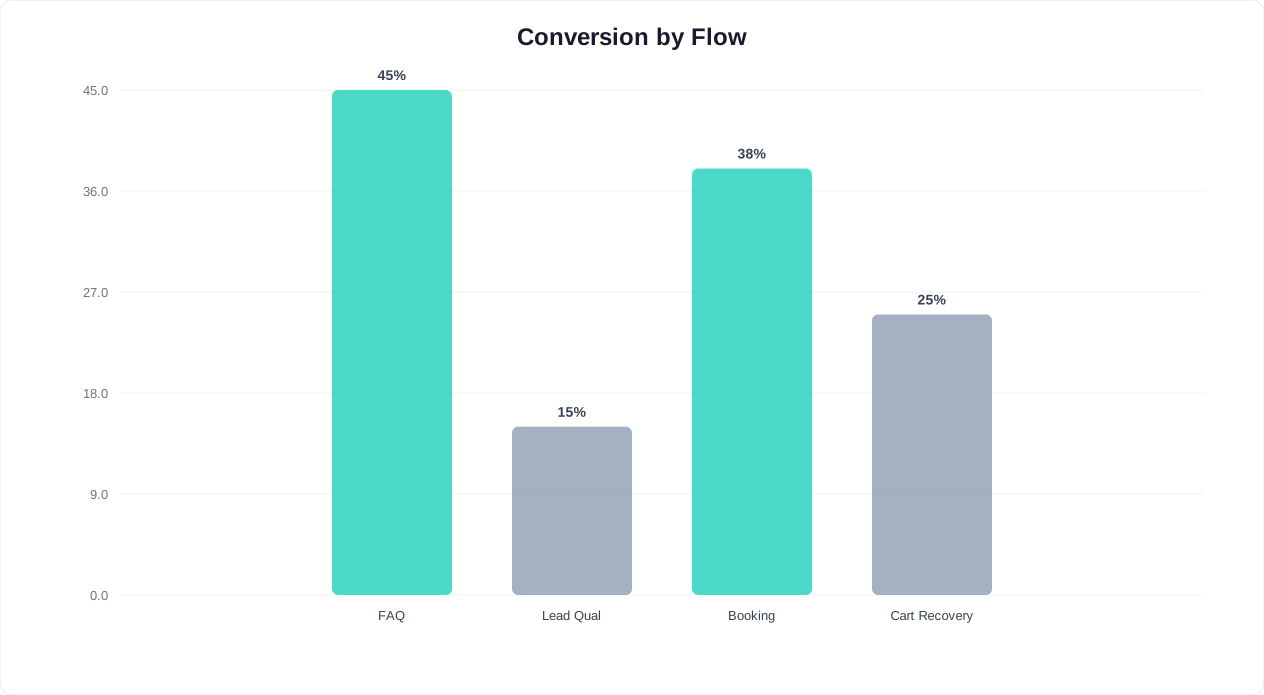
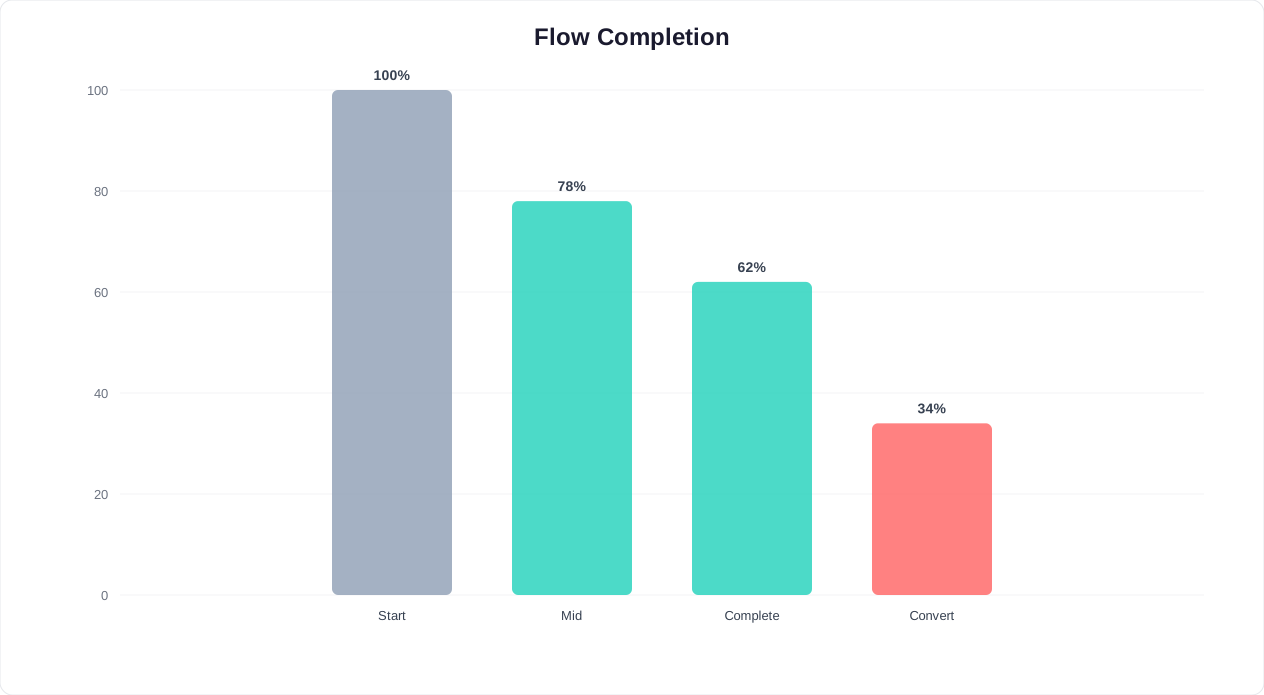
Lead qualification bots achieve a 15% visitor-to-lead conversion rate — 5x higher than static contact forms. Starting with Need instead of Budget increases completion by 34%.
Key Design Choices
- Self-segmentation first: Let the user tell you who they are. This determines the entire flow path.
- Value before asks: Share the 3x stat before requesting personal info. Give them a reason to engage.
- Minimal fields: Name, email, phone. That is it. Every additional field drops conversion 10%.
- Immediate next step: Tell them exactly what will happen and when. Ambiguity kills conversion.
Get this flow pre-built: Lead Generation Template
Flow 3: Appointment Booking Bot — Fill Your Calendar 24/7
This flow lets visitors book appointments directly through the chatbot, syncing with your calendar in real time. It works for clinics, salons, consultants, agencies, and any appointment-based business.
When to Use
Any service business where booking an appointment is the primary conversion action.
The Complete Conversation Script
Bot: "Welcome to [Business Name]! Would you like to book an appointment?"
- 📅 Book an appointment
- ❓ I have a question first
- 📋 Check my existing booking
If "Book an appointment":
Bot: "Great! What type of appointment are you looking for?"
- Initial consultation (30 min, free)
- Follow-up session (30 min, $75)
- Extended session (60 min, $140)
User selects "Initial consultation"
Bot: "Perfect — the initial consultation is free and takes about 30 minutes. Do you have a preferred consultant?"
- Dr. Sarah Mitchell
- Dr. James Park
- No preference
User selects "No preference"
Bot: "Here are the next available slots:
This week:
- Wed, Apr 28 — 10:00 AM, 2:30 PM
- Thu, Apr 29 — 9:00 AM, 11:30 AM, 3:00 PM
- Fri, Apr 30 — 10:00 AM, 1:00 PM
Which time works best?"
User selects "Thu, Apr 29 — 11:30 AM"
Bot: "Great choice. I just need a few details to confirm your booking.
What's your full name?"
User: Alex Rivera
Bot: "And your email address? (I'll send a calendar invite here)"
User: [email protected]
Bot: "Phone number? (For appointment reminders)"
User: 555-0198
Bot: "You're all set, Alex! Here's your booking:
- 📅 Thursday, April 29 at 11:30 AM
- 👤 Initial Consultation (30 min)
- 📍 123 Main Street, Suite 400
- 💰 Free
A calendar invite is on its way to [email protected]. I'll also send you a reminder 24 hours before.
Is there anything specific you'd like to discuss during the consultation? (This helps your consultant prepare.)"
Key Design Choices
- Show real availability: Connect to calendar booking for live slot data. Fake slots that require rescheduling destroy trust.
- Include pricing upfront: No surprises. Show duration and cost at the service selection step.
- Pre-visit prep: Asking what they want to discuss improves the actual appointment quality.
Get this flow pre-built: Appointment Booking Template
Flow 4: Cart Recovery Bot — Rescue Abandoned Checkouts
According to Baymard Institute research, 69.8% of online shopping carts are abandoned. This flow re-engages abandoners via website chat or WhatsApp within minutes of leaving, recovering 10–15% of lost revenue.
When to Use
E-commerce stores with average cart values above $30 and at least 100 abandoned carts per month.
The Complete Conversation Script
[Triggered 5 minutes after cart abandonment via WhatsApp or on next website visit]
Bot: "Hey [First Name]! I noticed you left some great items in your cart. Still thinking it over, or did something go wrong at checkout?"
- 🛒 Take me to my cart
- 💰 Is there a discount available?
- ❓ I had a question about a product
- 🚫 I changed my mind
If "Is there a discount available?":
Bot: "I can help with that! Here's what's in your cart:
- Running Shoes (Size 10) — $89.99
- Performance Socks (3-pack) — $24.99
- Subtotal: $114.98
I can offer you 10% off your entire order if you complete checkout in the next 30 minutes. That brings your total to $103.48. Want me to apply the code?"
- ✅ Yes, apply discount!
- 🤔 I'm still not sure
If "Yes, apply discount!":
Bot: "Done! Discount code SAVE10 has been applied to your cart. Here's your direct checkout link: [personalized cart URL]
This code expires in 30 minutes. Free shipping is included on orders over $75, so you're covered! 🎉"
If "I had a question about a product":
Bot: "Of course! What would you like to know about your items?"
- Sizing / fit questions
- Material / quality
- Shipping timeline
- Return policy
[Bot answers from product knowledge base, then redirects to checkout]
If "I changed my mind":
Bot: "No problem at all! Just curious — was it the price, shipping, or something else? Your feedback helps us improve."
- Price was too high
- Shipping costs/time
- Found a better alternative
- Just browsing
[Logs reason for analytics. If price: offers discount. If shipping: mentions free shipping threshold.]
Key Design Choices
- Timing matters: 5 minutes is the sweet spot — long enough that they are not still mid-checkout, short enough that they remember their cart.
- Show cart contents: Remind them what they wanted. Visual recall drives action.
- Tiered incentives: Offer help first, discount second. Many carts are abandoned due to questions, not price.
- Exit survey: Even non-recoverable abandons provide valuable data for optimization.
Get this flow pre-built: E-commerce Template
Flow 5: Feedback Collection Bot — 3x More Responses Than Email Surveys
Email surveys get 5–10% response rates. A chatbot asking the same questions conversationally gets 25–35%. This flow collects NPS, CSAT, and qualitative feedback without survey fatigue.
When to Use
Post-purchase, post-support-interaction, post-appointment, or on a regular cadence for ongoing customer health monitoring.
The Complete Conversation Script
[Triggered 24 hours after purchase/interaction via WhatsApp or website]
Bot: "Hi [First Name]! Thanks for your recent [purchase / appointment / support interaction]. Quick question — it takes about 30 seconds."
"On a scale of 0 to 10, how likely are you to recommend us to a friend?"
[Show number scale 0–10 as buttons]
User selects: 8
Bot: "Thanks for the 8! That's great to hear. What's the one thing we could do to make it a 10?"
[Free text input]
User: "Faster shipping would be nice"
Bot: "That's really helpful feedback — I'll pass it to our team. One last question: how would you rate the overall quality of [product/service]?"
- ⭐ Excellent
- 👍 Good
- 😐 Average
- 👎 Poor
User selects: 👍 Good
Bot: "Thanks, [First Name]! Your feedback makes a real difference. As a thank-you, here's a 5% discount on your next order: THANKS5
Have a great day! 😊"
If NPS score is 0–6 (Detractor):
Bot: "I'm sorry to hear that. We take this seriously. Would you be open to a quick call with our customer success manager to make things right?"
- Yes, please call me
- No, but here's my feedback: [text]
- No thanks
[If yes: creates urgent support ticket with all context. Agent calls within 2 hours.]
Key Design Choices
- NPS first: One number gives you the macro picture. Follow up for detail.
- Conditional follow-up: Promoters (9–10) get asked for a review. Passives (7–8) get asked what would make it a 10. Detractors (0–6) get immediate escalation.
- Incentive for completion: A small discount or credit increases response rates by 20%.
- Channel choice: WhatsApp gets 3x higher response rates than email for feedback collection.
Get this flow pre-built: Feedback Collection Template
Flow 6: Employee Onboarding Bot — Automate Day 1 Through Week 4
New hires have 150+ questions in their first month. HR answers the same ones every time: "Where's the WiFi password?", "How do I set up my email?", "When do benefits kick in?" This flow handles it all, freeing HR for strategic work.
When to Use
Companies hiring 5+ people per month, or any organization where HR is spending more than 10 hours/month on repetitive onboarding questions.
The Complete Conversation Script
[Triggered on Day 1 via Slack or Microsoft Teams]
Bot: "Welcome to [Company Name], [First Name]! 🎉 I'm your onboarding buddy. I'll help you get set up and answer any questions during your first 4 weeks.
Let's start with the essentials. Which of these do you need help with?"
- 💻 IT setup (email, WiFi, tools)
- 📋 HR paperwork & benefits
- 🏢 Office info (parking, kitchen, etc.)
- 👥 Meet the team
- 📚 Training & resources
If "IT setup":
Bot: "Here's your IT checklist:
- ✅ Email: Your login is [first.last]@company.com. Temporary password was sent to your personal email. Change it at first login.
- ✅ WiFi: Network is 'CompanyNet', password is 'Welcome2026!'
- ✅ Slack: You've been added to #general, #your-team, and #new-hires channels
- ⬜ VPN: Download FortiClient from [link]. Setup guide here: [link]
- ⬜ Dev tools: Your manager will grant repo access. Ping them in #your-team if not done by EOD.
Need help with any of these steps?"
If "HR paperwork & benefits":
Bot: "Here's your HR checklist:
- ⬜ Tax forms (W-4, I-9): Complete by end of Day 1 → [link]
- ⬜ Direct deposit: Set up in Workday → [link]
- ⬜ Benefits enrollment: You have 30 days. Open enrollment portal → [link]
- ✅ Emergency contact: Already on file from your offer letter
Benefits highlights:
- Health insurance starts Day 1 (medical, dental, vision)
- 401(k) match: 4% after 90 days
- PTO: 20 days/year + company holidays
- Remote work: 2 days/week after onboarding period
Any specific benefit questions?"
[Bot continues answering from HR knowledge base. Escalates to HR for edge cases.]
Week 1 check-in (automated):
Bot: "Hey [First Name], you're one week in! 🎉 Quick check — how's everything going?"
- Great, all set up!
- I have some questions
- Something's not working
Key Design Choices
- Proactive, not reactive: The bot reaches out on Day 1, Week 1, Week 2, and Week 4 — it does not wait for questions.
- Checklists over paragraphs: New hires need to-do lists, not essays. Check/uncheck format tracks progress.
- Channel-native: Deploy in Slack or Teams, where new hires already work — not a separate tool.
- Escalation to specific people: "For benefits questions I can't answer, I'll connect you with [HR Manager Name]" — not a generic ticket.
Get this flow pre-built: Employee Onboarding Template
Flow 7: Product Recommendation Bot — Guided Selling That Converts 35% Higher
When shoppers face too many options, they leave. HubSpot research shows that guided selling experiences increase purchase confidence by 35%. A product recommendation bot acts as a personal shopping assistant — asking a few questions and suggesting the best match. It increases average order value by 20–35% and reduces returns by 15%.
When to Use
E-commerce stores with 50+ products, especially in categories where customers need guidance (skincare, electronics, supplements, fashion, furniture).
The Complete Conversation Script
[Triggered when visitor browses product category page for 30+ seconds]
Bot: "Looking for the perfect [product category]? I can help you find the right one in about 60 seconds. Want me to make a recommendation?"
- Yes, help me choose!
- No thanks, I'm browsing
If "Yes, help me choose!":
Bot: "Awesome! First question: Who is this for?"
- For myself
- It's a gift
User selects "For myself"
Bot: "What's most important to you?"
- 💰 Best value for money
- ⭐ Premium / top quality
- 🌱 Eco-friendly / sustainable
- 🏃 Performance / durability
User selects "Best value for money"
Bot: "What's your budget range?"
- Under $50
- $50 – $100
- $100 – $200
- $200+
User selects "$50 – $100"
Bot: "One more — any specific features you need?"
- Wireless / Bluetooth
- Water resistant
- Compact / travel-friendly
- No preference
User selects "Water resistant"
Bot: "Based on your answers, here are my top 3 picks:
🥇 Best Match: AquaPro X200
$79.99 | ⭐ 4.7 (2,341 reviews) | Water resistant IP67
"Best value water-resistant option in your budget"
[View Product] [Add to Cart]
🥈 Runner Up: SoundWave Flex
$64.99 | ⭐ 4.5 (1,872 reviews) | Water resistant IP55
"Budget-friendly with great sound quality"
[View Product] [Add to Cart]
🥉 Premium Pick: AudioMax Pro
$94.99 | ⭐ 4.8 (3,104 reviews) | Water resistant IP68
"Slightly over budget but our highest-rated option"
[View Product] [Add to Cart]
Want more details on any of these?"
If user adds to cart:
Bot: "Great choice! Customers who bought the AquaPro X200 also loved the Silicone Carrying Case ($14.99). Add it for just $12.99 as a bundle?"
- Add the bundle
- No thanks, just the [product]
Key Design Choices
- 3–4 questions max: More than 4 questions feels like an interrogation. Use the minimum needed to narrow results to 2–3 options.
- Show 3 options, not 10: Three choices with clear differentiation (best match, budget, premium) converts better than overwhelming selection.
- Star ratings and review counts: Social proof at the point of recommendation eliminates the "let me check reviews first" bounce.
- Bundle upsell: Post-recommendation upsell increases AOV by 15–25% because the customer is already in buying mode.
Get this flow pre-built: Product Recommendation Template
How to Customize These Flows for Your Business
These 7 flows are starting points, not finished products. Here is how to adapt them for maximum impact at your business:
Step 1: Match Flow to Goal
| Your Primary Goal | Start With | Add Next |
|---|---|---|
| Reduce support tickets | Flow 1 (Support FAQ) | Flow 5 (Feedback) |
| Generate more leads | Flow 2 (Lead Qualification) | Flow 7 (Product Recommendation) |
| Fill your calendar | Flow 3 (Appointment Booking) | Flow 5 (Feedback) |
| Recover lost revenue | Flow 4 (Cart Recovery) | Flow 7 (Product Recommendation) |
| Improve employee experience | Flow 6 (Onboarding) | Flow 1 (Internal FAQ) |
Step 2: Customize the Script
For each flow:
- Replace placeholder text with your actual product names, prices, and policies
- Match your brand voice — if you are formal, remove the emojis. If you are playful, add more.
- Localize — adjust currency, date formats, and language for your market. Conferbot supports 100+ languages.
- Add your integrations — connect to your CRM, calendar, or e-commerce platform via integrations hub
Step 3: Test Before Launching
Run each flow through these test scenarios before going live:
- Happy path: User follows the intended flow perfectly. Does it complete smoothly?
- Wrong input: User types something unexpected. Does the bot recover gracefully?
- Abandon mid-flow: User stops responding after question 2. Does the bot follow up appropriately?
- Edge case: What if inventory is out of stock? What if no calendar slots are available? What if the user's question is not in your knowledge base?
Step 4: Measure and Iterate
Track these metrics for every flow using your analytics dashboard:
| Metric | What It Tells You | Target |
|---|---|---|
| Completion rate | Are users finishing the flow? | >65% |
| Drop-off point | Where are users abandoning? | No single step >20% drop |
| Goal conversion rate | Are leads/bookings/sales happening? | Varies by flow |
| Escalation rate | How often does the bot need human help? | <25% |
| User satisfaction | Are users happy with the experience? | >4.0/5.0 |
Review drop-off data weekly for the first month. The most common fix is simplifying a step that asks too much — split one complex question into two simple ones and watch completion rates jump. For guidance on designing escalation paths when flows cannot resolve an issue, see our chatbot human handoff guide. And for a comprehensive look at choosing the right platform for building these flows, read our no-code chatbot builders comparison.
Flow Performance Benchmarks: What Good Looks Like
How do you know if your chatbot flows are performing well? Without benchmarks, you are guessing. Here are the performance standards drawn from thousands of production chatbot deployments, giving you concrete targets for each flow type.
Conversion Rate Benchmarks by Flow Type
| Flow Type | Industry Avg Conversion | Top 10% Performance | Key Optimization Lever |
|---|---|---|---|
| Support FAQ | 65% resolution rate | 82% resolution rate | Expand knowledge base coverage, reduce fallback rate |
| Lead Qualification | 12% visitor-to-lead | 22% visitor-to-lead | Reduce questions, add value before asking for info |
| Appointment Booking | 35% engagement-to-booking | 55% engagement-to-booking | Show real-time availability, reduce form fields |
| Cart Recovery | 8% recovery rate | 18% recovery rate | Personalize message, time trigger correctly, offer incentive |
| Feedback Collection | 40% completion rate | 65% completion rate | Keep under 5 questions, trigger in-context |
| Employee Onboarding | 75% task completion | 92% task completion | Use checklists, proactive check-ins |
| Product Recommendation | 18% recommendation-to-cart | 32% recommendation-to-cart | Limit to 3 options, include social proof |
Time-Based Performance Patterns
Chatbot flow performance is not static. Expect these patterns as your flows mature:
- Week 1-2: Performance starts below benchmarks as you identify edge cases and missing responses. This is normal — every new deployment has gaps.
- Week 3-4: After initial optimizations (adding missing responses, fixing broken paths), performance reaches industry average.
- Month 2-3: With weekly A/B testing and data-driven refinements, top performers reach the 75th percentile.
- Month 4-6: Sustained optimization produces top-10% performance. Flows are now well-tested across thousands of real interactions.
Common Drop-Off Points and Fixes
Based on analysis from G2's chatbot platform reviews and production deployment data, these are the most common flow failure points:
| Drop-Off Point | Typical Drop Rate | Root Cause | Fix |
|---|---|---|---|
| First message (no engagement) | 60-80% of visitors ignore | Generic greeting, bad timing | Personalize by page context, delay trigger to 15-30 seconds |
| Question 3-4 in qualification | 25-35% abandon here | Too many questions without value | Provide a stat or insight between questions 2 and 3 |
| Email/phone collection | 30-40% refuse | No value exchange established | Explain what they get (demo, quote, guide) before asking |
| Calendar booking step | 20-30% abandon | No immediate slots, friction in calendar UI | Show next 3 available slots as buttons, not a full calendar |
| Post-resolution feedback | 40-50% skip | User already got what they needed | Make it one tap (thumbs up/down), not a multi-step survey |
A/B Testing Your Flows
The fastest path from average to top-10% is systematic A/B testing. Here are the elements worth testing first, in order of typical impact:
- Welcome message copy: Test question-based ("What brings you here today?") vs. value-based ("I can help you find the perfect plan in 60 seconds"). Value-based typically wins by 15-25%.
- Number of buttons: Test 3 vs. 4 vs. 5 options in your main menu. Three options usually converts highest because of reduced decision fatigue.
- Trigger timing: Test immediate vs. 15-second vs. 30-second delays. The winner varies by page type.
- Tone of voice: Test casual ("Hey!") vs. professional ("Hello, welcome to") — the right choice depends entirely on your audience.
- Incentive placement: Test showing the incentive upfront ("Answer 3 questions for 10% off") vs. at the end (surprise reward after completion). Upfront works better for lead gen; surprise works better for feedback.
Use Conferbot's analytics to run these tests with statistical significance (minimum 100 conversations per variant). Document your test results and build a playbook specific to your audience. For more on tracking performance, see our chatbot analytics metrics guide.
Was this article helpful?
Build and deploy in 10 minutes. No coding needed.
7 Chatbot Flows You Can Copy-Paste Today (Support, Sales, Booking, Lead Gen) FAQ
Everything you need to know about chatbots for 7 chatbot flows you can copy-paste today (support, sales, booking, lead gen).
About the Author
Deepak is the founder of Conferbot and writes about building, deploying, and improving AI chatbots.
View all articles

