
How We Tested: Our Evaluation Methodology
We did not just read feature pages. We signed up for every platform, built the same chatbot on each (a lead qualification bot for a SaaS company), and evaluated the real experience. Each builder was scored across six criteria:
| Criteria | Weight | What We Tested |
|---|---|---|
| AI Quality | 25% | Natural language understanding, response accuracy, ability to handle unexpected inputs |
| Ease of Use | 20% | Time from signup to first working bot, learning curve, documentation quality |
| Channel Coverage | 20% | Number of deployment channels, ease of connecting each channel |
| Integrations | 15% | CRM, calendar, analytics, and Zapier connectivity |
| Pricing Value | 10% | Cost at 1K, 10K, and 50K conversations/month |
| Analytics | 10% | Conversation insights, funnel tracking, export capabilities |
All testing was done in April 2026. Pricing and features reflect current plans. We update this comparison quarterly.
Quick Comparison Table: All 10 Builders at a Glance
| Platform | Best For | AI Quality | Channels | Starting Price | Free Plan | Overall Score |
|---|---|---|---|---|---|---|
| Conferbot | All-in-one omnichannel | 9.2/10 | 13+ | $49/mo | Yes | 9.1/10 |
| Tidio | E-commerce + live chat | 7.5/10 | 4 | $29/mo | Yes (limited) | 7.8/10 |
| Chatfuel | Facebook/Instagram bots | 7.0/10 | 3 | $14.99/mo | Yes (limited) | 7.2/10 |
| ManyChat | Marketing automation | 6.5/10 | 4 | $15/mo | Yes (limited) | 7.0/10 |
| Botpress | Developer-oriented | 8.5/10 | 6 | $0 (self-host) | Yes (open source) | 7.5/10 |
| Voiceflow | Voice + conversation design | 8.0/10 | 5 | $50/mo | Yes (limited) | 7.6/10 |
| Landbot | Conversational landing pages | 7.0/10 | 3 | $45/mo | Yes (limited) | 7.1/10 |
| Drift | Enterprise sales | 8.0/10 | 3 | $2,500/mo | No | 7.4/10 |
| Intercom | Customer support | 8.5/10 | 5 | $39/seat/mo | No | 7.9/10 |
| Zendesk Bots | Existing Zendesk users | 7.5/10 | 4 | $55/agent/mo | No | 7.0/10 |
Now let's break down each platform in detail.
1. Conferbot - Best All-in-One No-Code Chatbot Builder
Overall Score: 9.1/10
Conferbot stands out as the most complete no-code chatbot platform for businesses that need omnichannel deployment without enterprise pricing. It combines an AI-powered builder that generates conversation flows from plain English descriptions with the widest channel coverage of any platform tested.
What Sets It Apart
The headline feature is the AI builder: describe what you want in natural language and the platform generates a complete chatbot with messages, logic, validation, and branching. No other platform tested matched this capability. We described a SaaS lead qualification flow in two sentences and had a working bot in under 3 minutes.
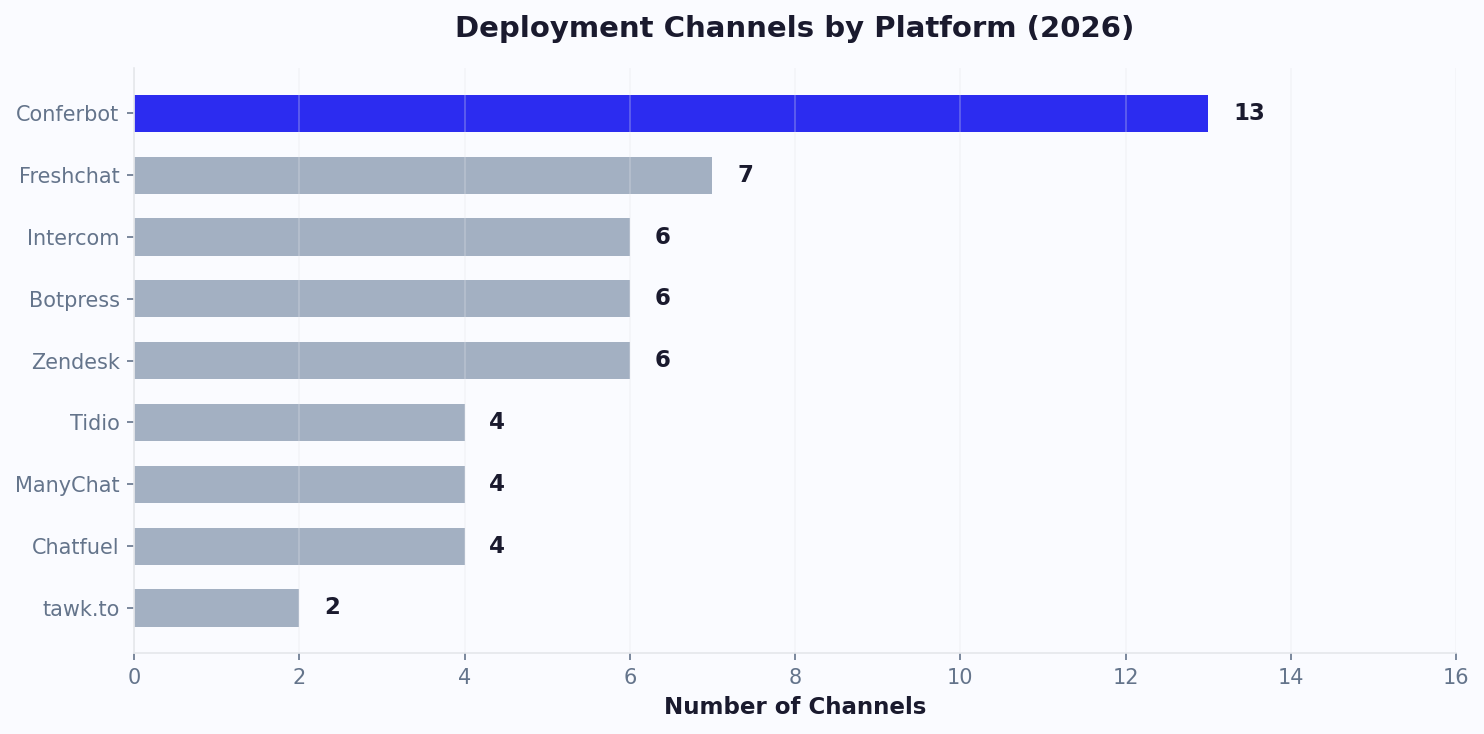
Channel coverage is unmatched: website, WhatsApp, Messenger, Instagram, Telegram, Discord, Slack, Teams, LINE, plus native SDKs for Android, iOS, React Native, and Flutter. Deploy once, serve everywhere. No other platform covers 13+ channels.
Key Strengths
- AI builder: Generate bots from English descriptions (unique feature)
- 13+ channels: More deployment options than any competitor
- Knowledge base AI: Upload docs and the bot learns your business
- Deep analytics: Conversation flows, drop-offs, conversions, satisfaction
- Live chat handoff: Seamless bot-to-human transitions
- Calendar booking: Built-in scheduling (no third-party tool needed)
- Version control: Roll back changes instantly
- Flat-rate pricing: No per-message or per-conversation fees
Limitations
- Newer platform with a smaller community than Intercom or Drift
- Template marketplace is still growing
Pricing
Free tier available. Paid plans start at $49/month with all channels included. No per-seat, per-message, or per-conversation charges. At scale (50K+ conversations/month), this is 94% cheaper than Drift and 80% cheaper than Intercom.
Best for: Businesses wanting the most features per dollar with true omnichannel deployment. Especially strong for SMBs and mid-market companies that need enterprise capabilities without enterprise budgets.
2. Tidio - Best for E-commerce Live Chat + Chatbot Combo
Overall Score: 7.8/10
Tidio shines as a combined live chat and chatbot platform with deep Shopify integration. If your primary need is an e-commerce support chatbot with live agent fallback, Tidio delivers a polished experience.
Key Strengths
- Excellent Shopify and WooCommerce plugins
- Clean live chat interface with real-time visitor monitoring
- Lyro AI assistant handles common support queries
- Visual chatbot builder with pre-built e-commerce templates
- Good multi-language support
Limitations
- Limited to 4 channels (website, Messenger, Instagram, email)
- No WhatsApp, Telegram, Slack, or Teams support
- AI capabilities (Lyro) are a separate add-on with conversation limits
- Per-seat pricing gets expensive for growing teams
- Chatbot and live chat are somewhat separate experiences
Pricing
Free plan with 50 live conversations/month. Paid plans from $29/month. Lyro AI add-on costs extra ($39/month for 50 conversations). Per-operator pricing: additional seats cost $25/month each.
Best for: Small to mid-size e-commerce stores on Shopify who want combined live chat and chatbot support. Not ideal if you need omnichannel (WhatsApp, Telegram) or AI-first capabilities.
3-4. Chatfuel & ManyChat - Best for Social Media Marketing Bots
Chatfuel (Score: 7.2/10)
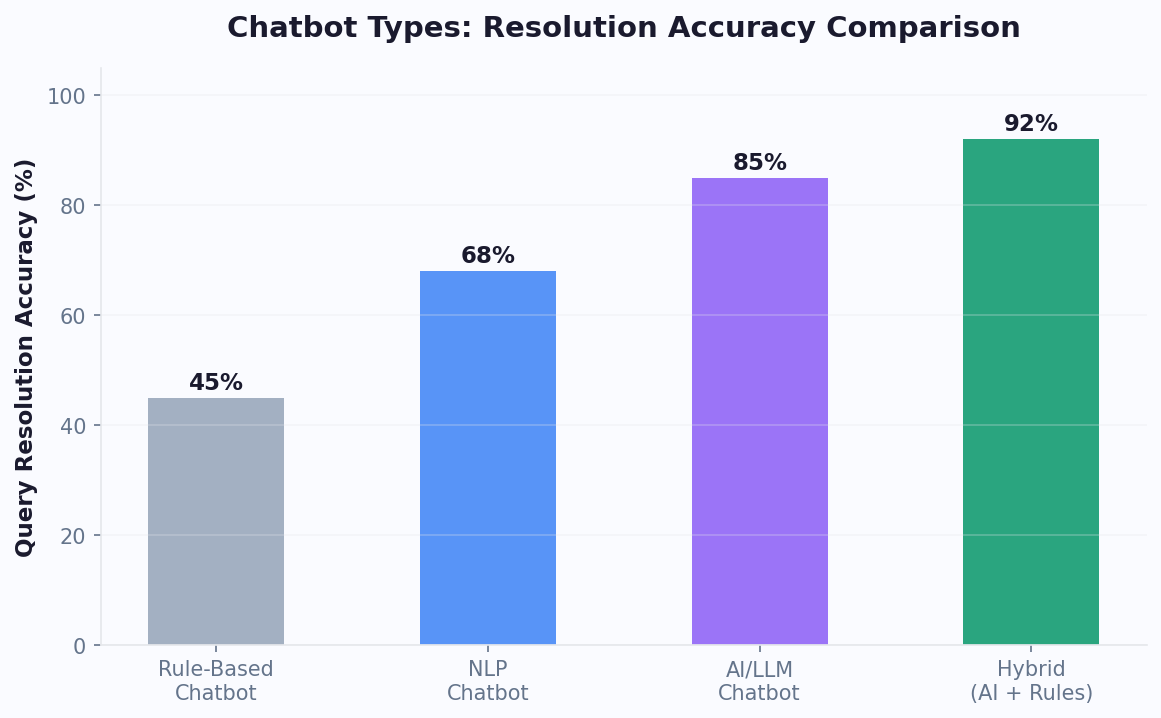
Chatfuel was one of the original Messenger bot platforms and still excels at Facebook and Instagram automation. Their Fuely AI feature adds GPT-powered responses to otherwise rule-based flows.
Strengths: Simple builder, strong Messenger/Instagram support, affordable starting price ($14.99/mo), good template library for social media marketing
Limitations: Weak outside Facebook ecosystem, no website widget until recently (and it is basic), AI features are add-on only, limited CRM integrations, analytics are surface-level
Best for: Businesses whose primary customer channel is Facebook Messenger or Instagram DM
ManyChat (Score: 7.0/10)
ManyChat dominates the marketing automation chatbot space. It excels at building sequences, drip campaigns, and promotional broadcasts across Messenger, Instagram, WhatsApp, and SMS.
Strengths: Best-in-class marketing automation (sequences, tags, segments), strong SMS + email integration, large community and course ecosystem, good for influencer and creator businesses
Limitations: Not designed for customer support (no ticket system, no knowledge base), AI capabilities are basic compared to dedicated AI platforms, WhatsApp support is recent and limited, no website chatbot (Messenger only on web), pricing scales with contacts not conversations
Best for: Instagram influencers, course creators, and businesses focused on promotional chatbot campaigns rather than support or lead qualification
Head-to-Head: Chatfuel vs ManyChat
| Feature | Chatfuel | ManyChat |
|---|---|---|
| Primary strength | Messenger bots | Marketing automation |
| AI quality | Better (Fuely AI) | Basic |
| SMS support | No | Yes |
| Website widget | Basic | No (Messenger widget) |
| Community | Smaller | Larger |
| Pricing model | Per conversation | Per contact |
5-6. Botpress & Voiceflow - Best for Technical Teams and Conversation Designers
Botpress (Score: 7.5/10)
Botpress is the open-source option. Self-host for free or use their cloud platform. It bridges the gap between no-code and code - visual builder for most work, with full code access when you need it.
Strengths: Open source (free self-hosting), most customizable platform tested, excellent NLU engine, strong developer community, good documentation, no vendor lock-in
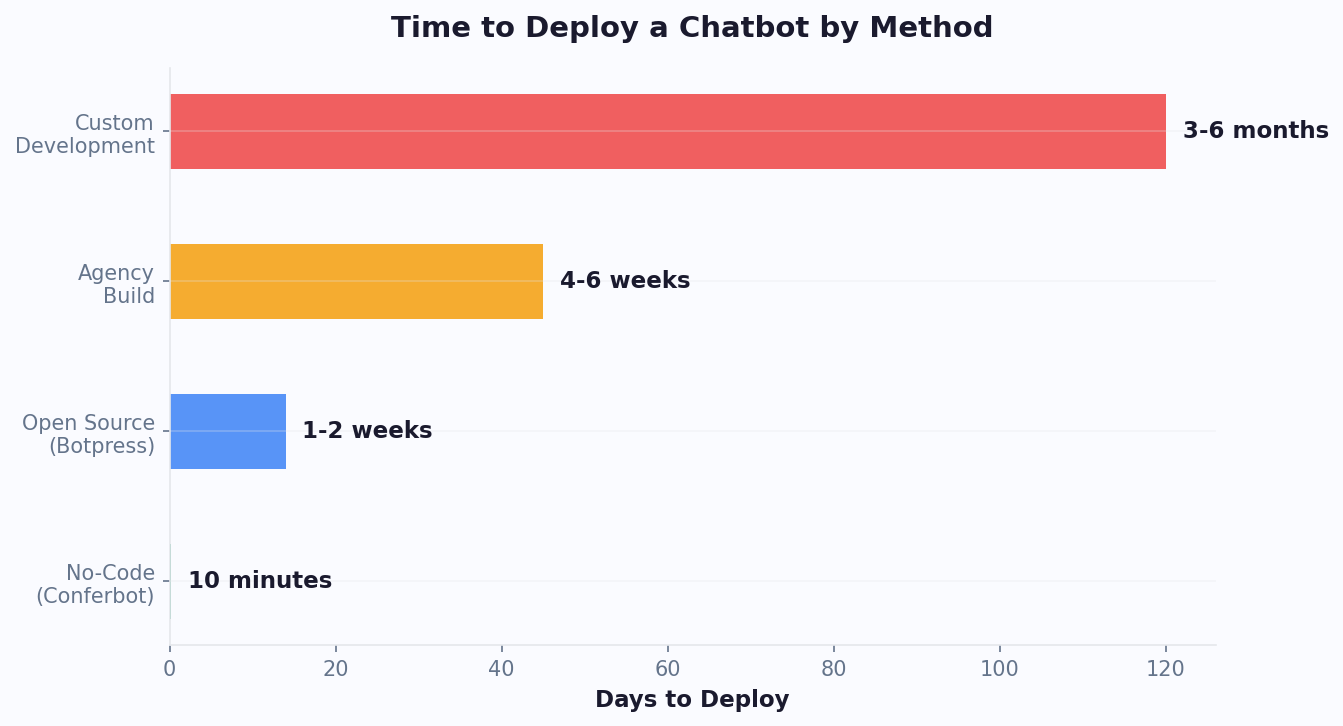
Limitations: Steeper learning curve than pure no-code tools (expect 2-4 hours to build your first bot vs 10 minutes on simpler platforms), self-hosting requires DevOps knowledge, cloud pricing is usage-based and can spike, fewer pre-built integrations than commercial platforms, UI is functional but not polished
Best for: Teams with some technical capability who want maximum flexibility and control. Excellent for companies with compliance requirements that mandate self-hosting.
Voiceflow (Score: 7.6/10)
Voiceflow started as a voice assistant builder (Alexa, Google Assistant) and evolved into a general conversation design platform. Its visual canvas is the most sophisticated of any platform tested - think Figma for chatbots.
Strengths: Best visual conversation designer (the canvas is beautiful), strong collaboration features for teams, excellent for complex multi-turn conversations, good API and custom function support, voice + chat unified design
Limitations: Focused on design over deployment (getting bots live requires more steps), limited native channel integrations (no WhatsApp, Instagram, or Telegram out of the box), pricing jumps significantly from free to paid, smaller template and integration ecosystem, better for building than operating
Best for: Conversation design teams at agencies or larger companies who prioritize sophisticated dialog design and team collaboration over quick deployment.
7-10. Enterprise Options: Drift, Intercom, Landbot, Zendesk
Drift (Score: 7.4/10)
Drift pioneered conversational marketing and remains the platform large B2B sales teams know best. Its AI is strong and its Salesforce integration is the deepest of any platform tested.
Strengths: Excellent Salesforce integration, strong ABM (account-based marketing) features, proven ROI for enterprise sales teams, good conversation AI
Limitations: Starting at $2,500/month makes it inaccessible for most businesses. Limited to 3 channels (website, email, Salesforce). No WhatsApp, Messenger, or social channels. Complex setup requiring dedicated admin. Long contract terms (annual minimum).
Best for: Enterprise B2B sales teams with $500K+ annual marketing budgets and heavy Salesforce usage. For everyone else, there are better alternatives at 1/50th the cost.
Intercom (Score: 7.9/10)
Intercom is the customer communication platform that also does chatbots. Its Fin AI agent is impressive for support automation, drawing from your help center to resolve tickets autonomously.
Strengths: Fin AI is genuinely good at support resolution, unified inbox for all channels, strong knowledge base integration, excellent for scaling customer support teams
Limitations: Per-seat pricing ($39/seat/month minimum) gets expensive fast. Fin AI charges $0.99 per resolution on top of seat costs. Limited customization for chatbot flows (opinionated about how conversations should work). Not ideal for lead generation or marketing use cases.
Best for: SaaS companies with dedicated support teams who need an AI layer on top of their help desk. Budget requirement: realistically $500+/month for meaningful usage.
Landbot (Score: 7.1/10)
Landbot focuses on conversational landing pages - full-screen chatbot experiences that replace traditional forms and landing pages. Visually distinctive and good for specific marketing campaigns.
Strengths: Beautiful visual builder, unique full-page conversational forms, good for lead generation campaigns, WhatsApp integration
Limitations: Limited to 3 channels (web, WhatsApp, API), no Messenger/Instagram/Telegram, AI capabilities are basic (primarily rule-based flows), analytics are limited, not suitable for customer support use cases
Best for: Marketing teams running specific campaign landing pages who want a conversational alternative to traditional forms.
Zendesk Bots (Score: 7.0/10)
If you already use Zendesk for support, their built-in bot is the path of least resistance. It leverages your existing help center content and integrates natively with Zendesk tickets.
Strengths: Seamless Zendesk integration, leverages existing help center, familiar interface for Zendesk users, decent AI for deflecting common tickets
Limitations: Requires Zendesk subscription ($55+/agent/month), bot capabilities tied to your Zendesk tier, limited outside of support (no lead gen, no marketing), no standalone deployment, AI quality dependent on your help center quality
Best for: Existing Zendesk customers who want to add AI deflection without switching platforms.
Pricing at Scale: What Each Platform Costs at 10K and 50K Conversations
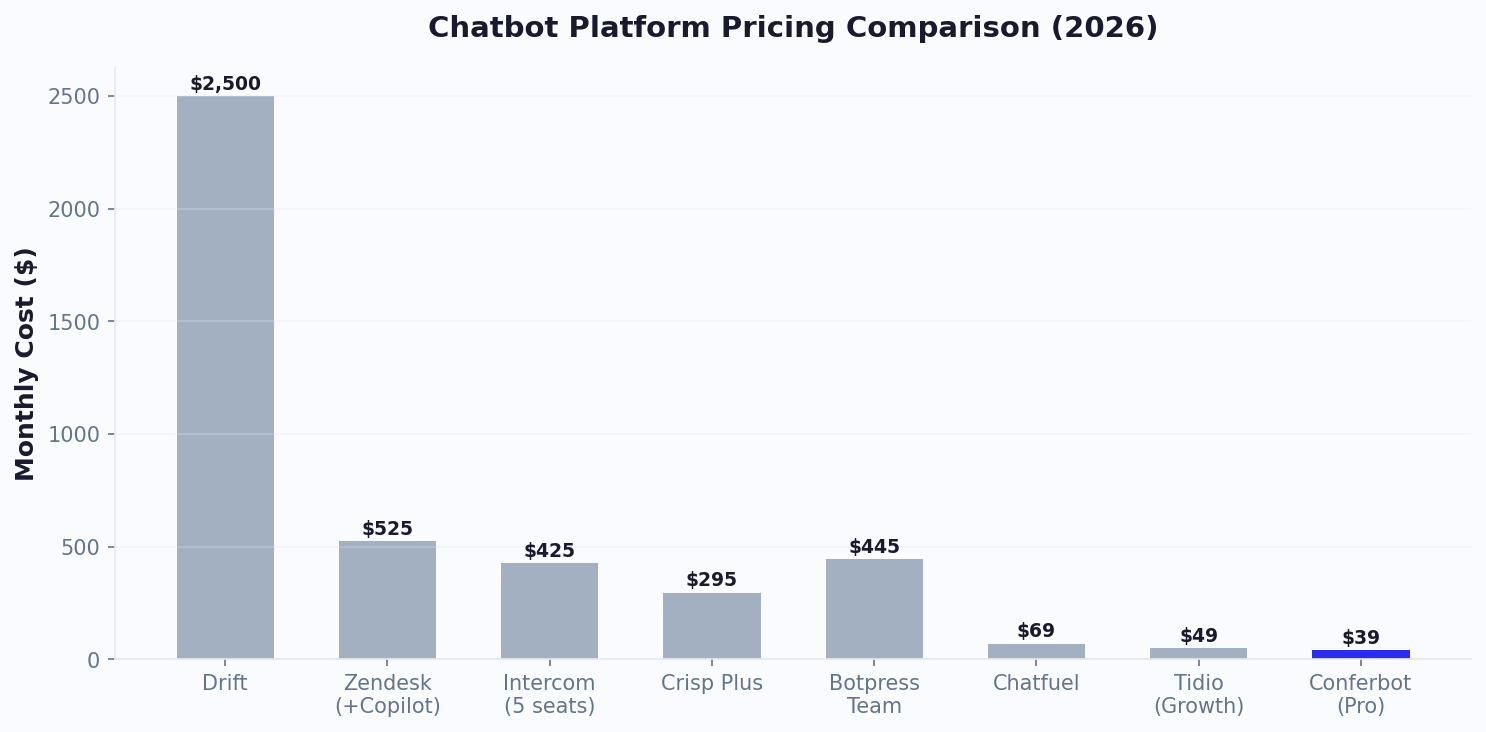
The starting price of a chatbot platform tells you almost nothing about what you will actually pay. The real cost emerges when your chatbot succeeds and conversation volume grows. We calculated the total monthly cost for each platform at three volume tiers, including all add-ons, per-seat fees, AI usage charges, and overage costs.
Total Monthly Cost at Scale
| Platform | 1,000 Conversations | 10,000 Conversations | 50,000 Conversations | Pricing Model |
|---|---|---|---|---|
| Conferbot | $49 | $99-199 | $199-399 | Flat-rate tiers |
| Tidio | $68 | $295-450 | $1,200-1,800 | Per-seat + AI add-on (per convo) |
| Chatfuel | $14.99 | $149.90 | $749.50 | Per-conversation tiers |
| ManyChat | $65 | $235 | $835 | Per-contact tiers |
| Botpress | $0 (self-host) | $150-300 (cloud) | $500-1,200 (cloud) | Usage-based (AI tokens + hosting) |
| Voiceflow | $50 | $625 | $2,500+ | Per-seat + usage |
| Landbot | $45 | $450 | $2,250+ | Per-conversation tiers |
| Drift | $2,500 | $2,500 | $5,000+ | Flat enterprise + usage |
| Intercom | $238 | $738 | $2,850+ | Per-seat + $0.99/AI resolution |
| Zendesk Bots | $165 | $550 | $1,650+ | Per-agent tiers |
The Hidden Cost Multipliers
Several platforms have pricing mechanisms that are not obvious from their pricing pages:
Tidio's AI surcharge: Lyro AI costs $0.50-0.70 per AI-handled conversation on top of the base plan. At 10,000 conversations where 70% are AI-handled, that is $3,500-4,900 in AI costs alone - not reflected in the base plan price. Their website markets "from $29/month" but the realistic cost at scale is 10-15x higher.
Intercom's resolution fee: Fin AI charges $0.99 per successful resolution. If Fin handles 5,000 of your 10,000 conversations, that is $4,950/month in resolution fees added to your per-seat cost. Intercom is transparent about this pricing but it surprises teams who budget based on the seat price alone.
ManyChat's contact-based growth: ManyChat charges based on contacts, not conversations. A single customer who chats 10 times counts once, but a viral campaign that adds 5,000 new contacts in a month can jump you several pricing tiers overnight.
Voiceflow's seat scaling: At $50/editor/month, a team of 5 conversation designers costs $250/month before any AI usage. Enterprise teams with 10+ designers face $500+/month in seat fees alone.
Five-Year Total Cost of Ownership
For a business averaging 10,000 monthly conversations, here is the projected five-year cost:
| Platform | Year 1 | 5-Year Total | vs Conferbot |
|---|---|---|---|
| Conferbot | $1,188-2,388 | $5,940-11,940 | Baseline |
| Tidio | $3,540-5,400 | $17,700-27,000 | 2-3x more |
| Intercom | $8,856+ | $44,280+ | 4-7x more |
| Drift | $30,000+ | $150,000+ | 13-25x more |
The pricing model matters more than the starting price. Flat-rate platforms like Conferbot reward growth - your cost per conversation decreases as volume increases. Per-conversation and per-seat platforms penalize growth - your costs scale linearly (or worse) with success. For a small business planning to scale, this distinction can mean tens of thousands of dollars over several years. See how chatbot costs compare to the cost of having no chatbot at all.
Migration Guide: How to Switch Between Chatbot Platforms
Switching chatbot platforms feels daunting, but it is more common than you think - and far less painful than most businesses fear. Whether you are outgrowing your current platform, frustrated with pricing changes, or need features your current tool does not offer, here is a practical migration playbook.
When to Consider Switching
Migration makes sense when:
- Costs are escalating unpredictably: Per-conversation or per-seat pricing is growing faster than your revenue
- Channel limitations are blocking growth: You need WhatsApp, Telegram, or Slack but your platform does not support them
- AI quality is insufficient: Your bot misunderstands too many queries and the platform's NLU cannot be improved
- You have outgrown the platform: You need advanced analytics, knowledge base AI, or enterprise integrations that your current tool lacks
- Support is unresponsive: Platform issues go unresolved for weeks
The Migration Process: Step by Step
Step 1: Audit your current chatbot (1-2 hours). Document everything: all conversation flows, FAQ answers, integration connections, custom variables, lead capture fields, and analytics benchmarks. Export conversation history if possible - this data is gold for training your new bot.
Step 2: Set up the new platform in parallel (2-4 hours). Do not rip and replace. Build your chatbot on the new platform while the old one continues running. Use a template as a starting point and customize it to match your current flows. This is also an opportunity to improve - fix issues and add capabilities that were impossible on the old platform.
Step 3: Rebuild integrations (1-2 hours). Reconnect your CRM, calendar, email marketing, and other tools. Most integrations use standard connectors (Zapier, native OAuth) that work identically across platforms. If you use calendar booking, test that availability displays correctly and bookings flow into your calendar.
Step 4: Test extensively (2-4 hours). Run through every conversation scenario on the new platform. Test on mobile and desktop. Have a colleague test without guidance. Compare the experience to your old platform - it should be equal or better in every area.
Step 5: Switch over (15 minutes). Replace the old embed code with the new one on your website. Update WhatsApp and Messenger connections to point to the new platform. The switch is instantaneous - customers will not notice a transition.
What Transfers and What Does Not
| Asset | Transferable? | How to Transfer |
|---|---|---|
| Conversation flows / logic | Must rebuild | Use documentation from Step 1 as blueprint |
| FAQ content / knowledge base | Yes (text export) | Export as CSV/JSON and import into new platform's knowledge base |
| Conversation history | Partially | Export from old platform's analytics; useful for training, not for continuity |
| Customer data / leads | Yes (via CRM) | Already lives in your CRM - not dependent on chatbot platform |
| Integration connections | Must reconnect | Re-authorize OAuth connections; Zapier zaps need new triggers |
| Analytics / performance data | Export only | Export reports before closing old account; benchmarks restart on new platform |
| Branding / widget design | Must recreate | Apply brand colors, logo, and positioning on new platform |
Migration Timeline
For most small and mid-size businesses, the entire migration takes 1-2 business days of actual work, spread across a week to allow for testing:
- Monday: Audit old platform, sign up for new platform, start building
- Tuesday: Complete rebuild, reconnect integrations
- Wednesday-Thursday: Internal testing, fix issues
- Friday: Switch over, monitor first day of live traffic
The most important advice: do not let switching costs keep you on an inferior platform. The sunk cost of your old chatbot is zero - your conversation design knowledge, customer insights, and FAQ content transfer to any new platform. What matters is choosing the right tool for where your business is headed, not where it has been. Read our detailed small business chatbot guide to find the right fit for your next chapter.
Common Migration Pitfalls to Avoid
Based on feedback from businesses that have switched platforms, here are the mistakes that cause the most friction during migration:
- Not exporting analytics before switching: Once you close your old account, your historical performance data disappears. Export conversation logs, conversion rates, and funnel metrics before canceling. You need this baseline to measure whether the new platform performs better.
- Switching during peak season: Migrate during your quietest month, not during Black Friday or your busiest campaign period. Allow 1-2 weeks of overlap where both platforms run simultaneously to ensure the new one performs as expected.
- Forgetting to update all embed points: Your chatbot code may live in your website header, specific landing pages, WordPress widgets, email templates, and QR codes. Create a checklist of every location and update them all. One missed embed means a broken experience for some visitors.
- Not re-testing integrations end-to-end: Even if you reconnect the same Zapier or CRM integration, test the full flow: submit a lead through the new chatbot, verify it appears in your CRM, and confirm the email notification arrives. Integration reconnection is where most migration issues hide.
Migration is a one-time effort that takes 1-2 days. Staying on the wrong platform costs you every month in higher fees, missing features, or limited channels. If your current platform does not support the channels your customers use - WhatsApp, Instagram, Telegram - that is revenue you are leaving on the table every single day. Use our ROI calculator to quantify what a better platform would be worth to your business.
7 Common Mistakes When Choosing a No-Code Chatbot Builder (And How to Avoid Them)
After testing all 10 platforms and speaking with dozens of businesses that switched providers, we identified the most common decision-making mistakes that lead to wasted money and migration headaches. Avoid these and you will save months of frustration.
Mistake 1: Choosing Based on Starting Price Alone
The platform that costs $15/month today may cost $1,500/month when you scale to 10,000 conversations. According to Gartner's Total Cost of Ownership framework, businesses should evaluate 3-year projected costs, not just entry pricing. Per-conversation and per-seat models punish growth, while flat-rate platforms reward it.
How to avoid it: Calculate your costs at 1K, 10K, and 50K monthly conversations before committing. Our chatbot pricing comparison breaks this down for every major platform.
Mistake 2: Ignoring Channel Limitations
Many businesses choose a platform for website chat, then realize months later they need WhatsApp or Instagram support - and their platform does not offer it. Migration at that point means rebuilding every flow from scratch.
How to avoid it: Choose a platform that supports more channels than you currently need. Your customers' channel preferences will evolve, and your chatbot should grow with them. Read our omnichannel chatbot guide for channel strategy best practices.
Mistake 3: Underestimating Integration Needs
A standalone chatbot delivers 30-40% of its potential value. A chatbot integrated with your CRM, calendar, help desk, and analytics stack delivers 100%. According to HubSpot's State of Marketing report, businesses with integrated tech stacks see 38% higher conversion rates than those with siloed tools.
How to avoid it: Before choosing, list every tool your chatbot needs to connect to (CRM, email, calendar, payment processor). Verify the platform supports each integration natively or through Zapier/webhooks.
Mistake 4: Not Testing with Real Conversations
Reading feature pages is not the same as using the product. We found significant differences between marketed capabilities and real-world performance across all 10 platforms.
How to avoid it: Sign up for free trials on your top 2-3 options. Build the same bot on each platform and test with real customers for at least one week before committing.
Mistake 5: Choosing Developer-Oriented Tools for Non-Technical Teams
Botpress and Voiceflow are excellent platforms, but they require technical comfort that many marketing and support teams lack. Choosing a platform your team cannot operate independently creates a permanent dependency on developers.
How to avoid it: Have the person who will manage the chatbot daily evaluate the platform - not your CTO or agency. If they cannot build a basic flow in 30 minutes, it is too complex.
Mistake 6: Forgetting About Analytics
You cannot improve what you cannot measure. Some platforms offer minimal analytics, making it impossible to identify where your chatbot is failing or succeeding. Statista's chatbot market data shows that businesses actively optimizing their chatbots achieve 2.5x better outcomes than those who deploy and forget.
How to avoid it: Ensure your platform provides conversation-level analytics, funnel visualization, drop-off identification, and A/B testing capabilities. See our chatbot analytics metrics guide for what to track.
Mistake 7: Signing Long-Term Contracts
Some enterprise platforms (Drift, Intercom) require annual contracts with significant minimums. If the platform does not work out, you are locked in for 12 months.
How to avoid it: Prefer month-to-month billing, especially for your first chatbot platform. Once you have validated the ROI over 3-6 months, annual billing (often discounted 15-20%) makes sense. Check our chatbot implementation cost breakdown for budgeting guidance.
Platform Selection Checklist
| Evaluation Criteria | Must-Have | Nice-to-Have |
|---|---|---|
| Channel coverage | Website + your primary messaging channel | 5+ channels including SDKs |
| AI capabilities | NLU for FAQ handling | AI flow generation, knowledge base ingestion |
| Integrations | CRM + calendar connectivity | Native connections to 20+ tools |
| Analytics | Conversation metrics and funnel view | A/B testing, revenue attribution |
| Pricing | Predictable at 10x current volume | Flat-rate without per-message fees |
| Support | Documentation + email support | Live chat support, dedicated CSM |
| Compliance | GDPR basics | HIPAA, SOC 2, data residency options |
How to Choose: Decision Framework Based on Your Needs
Skip the analysis paralysis. Answer these three questions and the right platform becomes obvious.
Question 1: What Is Your Primary Use Case?
| Primary Use Case | Best Option | Runner Up |
|---|---|---|
| Lead generation + qualification | Conferbot | Drift (if enterprise budget) |
| Customer support automation | Conferbot | Intercom (if per-seat budget OK) |
| E-commerce support + live chat | Tidio | Conferbot |
| Social media marketing | ManyChat | Chatfuel |
| Appointment booking | Conferbot | Landbot |
| Internal team bots | Conferbot | Botpress (if self-hosting needed) |
| Voice + chat combined | Voiceflow | Botpress |
| Maximum customization | Botpress | Voiceflow |
Question 2: What Is Your Budget?
| Monthly Budget | Best Option |
|---|---|
| $0 (free only) | Conferbot Free or Botpress (self-hosted) |
| $15-50/month | Conferbot, Tidio, or Chatfuel |
| $50-200/month | Conferbot (best value at this tier) |
| $200-500/month | Conferbot or Intercom (depending on use case) |
| $500+/month | Intercom or Conferbot |
| $2,500+/month | Drift (only if enterprise sales-focused) |
Question 3: Which Channels Do You Need?
| Channels Needed | Best Option |
|---|---|
| Website only | Any platform works |
| Website + WhatsApp | Conferbot, Landbot |
| Website + Messenger + Instagram | Chatfuel, ManyChat, Tidio |
| Website + WhatsApp + Messenger + more | Conferbot (only platform covering 13+ channels) |
| Slack / Teams (internal) | Conferbot, Botpress |
| Mobile app (SDK) | Conferbot (only no-code platform with native SDKs) |
The Bottom Line
If you need one platform that handles everything - lead gen, support, booking, and omnichannel deployment - without enterprise pricing, Conferbot delivers the best value. If you have specific niche needs (Shopify-first e-commerce, Facebook marketing automation, or self-hosted open source), the specialized tools excel in their lanes.
The worst choice is no choice. Every day without a chatbot is a day of lost leads and missed revenue. Pick a platform, deploy in 10 minutes, and iterate from there. You can always switch later - the conversation design skills transfer across platforms.
Was this article helpful?
Build and deploy in 10 minutes. No coding needed.
10 Best No-Code Chatbot Builders in 2026 FAQ
Everything you need to know about chatbots for 10 best no-code chatbot builders in 2026.
About the Author
The Conferbot team writes about building, deploying, and improving AI chatbots.
View all articles

