
Customer Support Chatbot Templates
Get free, ready-to-use customer support chatbot templates that help boost conversions and automate customer interactions. Start building in 2 minutes with no coding required.
Explore Templates & Resources
Browse templates, learn about the category, or find answers to common questions
Customer Support Templates
Choose from our collection of proven customer support chatbot templates
Templates Coming Soon
We're working on amazing templates for this category. Check back soon!
Ticket Deflection: Reduce Volume by 40-60% in 90 Days
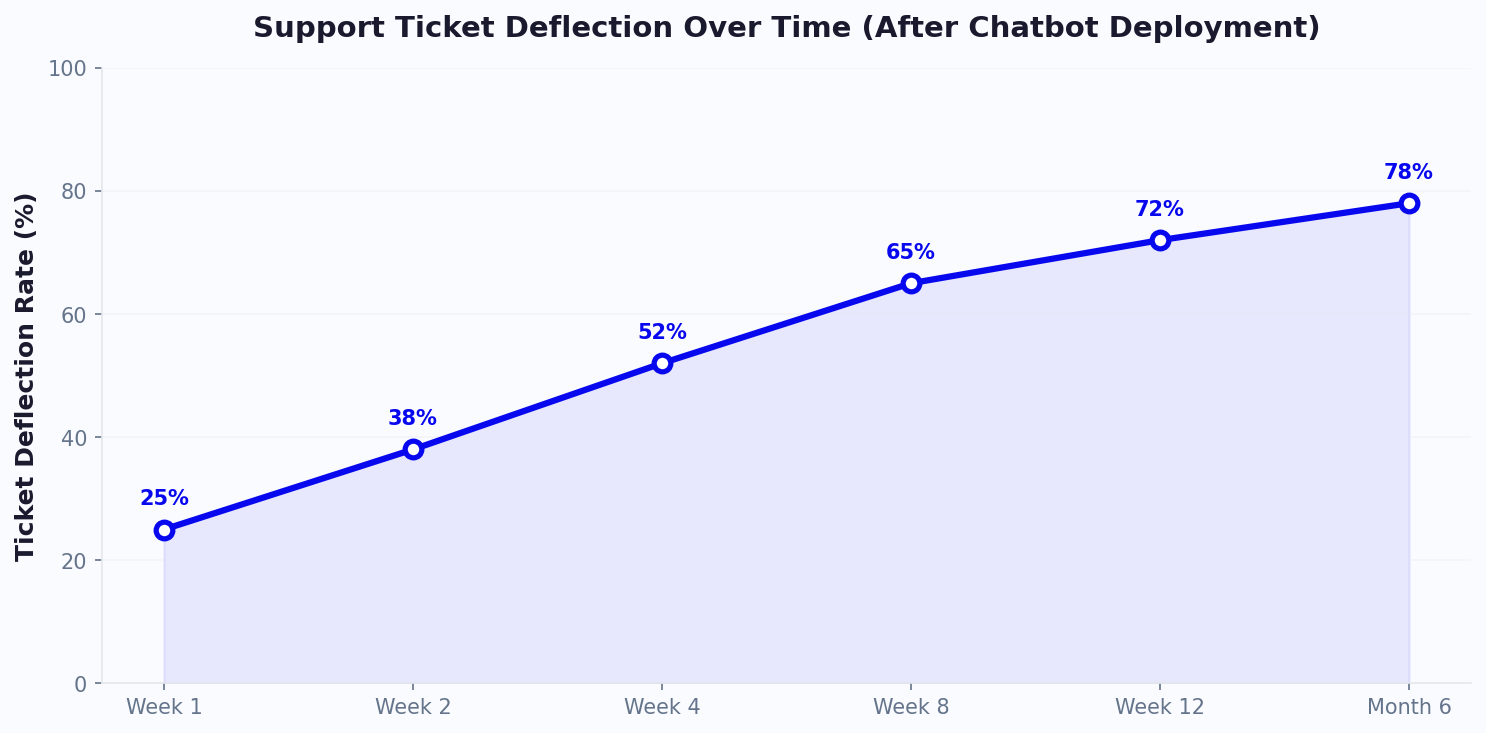
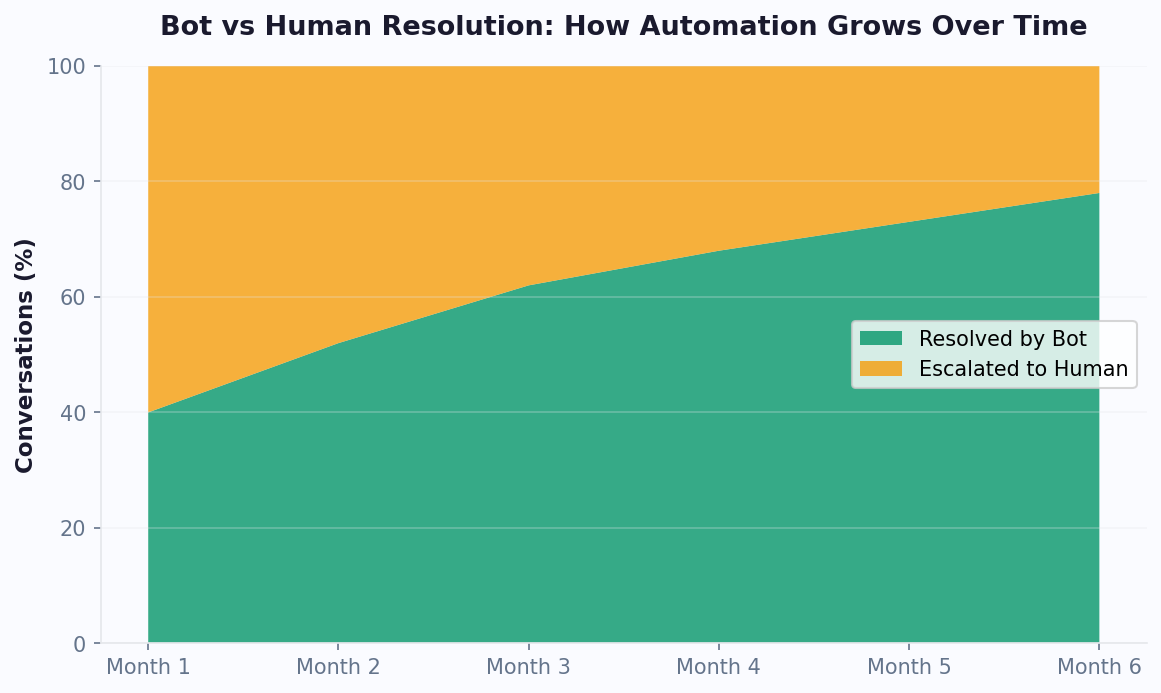
Ticket deflection is the practice of resolving customer inquiries before they become support tickets. It is the most impactful metric for any support team adopting chatbot automation - and the results are dramatic. Organizations that deploy well-configured support chatbot templates typically see a 40% to 60% reduction in ticket volume within the first 90 days, with some reaching 70% after six months of continuous optimization.
💡 Key Insight
80% of routine customer queries - password resets, order status, billing questions - can be fully resolved by a chatbot without human intervention, freeing agents to focus on complex, high-value interactions.
How Deflection Works in Practice
Deflection does not mean ignoring customers. It means equipping them with instant answers so they never need to wait in a queue. The process follows a clear hierarchy:
- Instant resolution: The chatbot answers the question directly using its knowledge base - e.g., "Your order #4521 shipped yesterday and arrives Thursday." No ticket created, customer satisfied.
- Guided self-service: The bot walks the user through a troubleshooting sequence - "Try restarting the device, then hold the power button for 10 seconds." If the issue resolves, the conversation ends positively.
- Smart escalation: When the bot cannot resolve an issue, it collects context (account number, error message, screenshots) and routes to the right agent with full history - saving 2-3 minutes of agent time per ticket.
The 90-Day Deflection Curve
Deflection does not happen overnight. The typical trajectory looks like this:
| Timeframe | Deflection Rate | Key Activity |
|---|---|---|
| Week 1-2 | 15-20% | Bot handles top 10 FAQs; agents monitor for gaps |
| Week 3-4 | 25-35% | Add 20-30 more intents based on unmatched queries |
| Month 2 | 35-45% | Enable order lookup, account actions, and password resets |
| Month 3 | 45-60% | AI learns from resolved conversations; confidence thresholds tuned |
The key to accelerating this curve is reviewing unmatched queries weekly and adding new intents. Conferbot's analytics dashboard highlights the top unanswered questions, making it simple to close knowledge gaps. Learn more about setting up automated support in our customer support chatbot guide.
AI vs Human Support: When to Automate, When to Escalate
The debate over AI versus human support creates a false dichotomy. The highest-performing support teams do not choose one over the other - they build a hybrid model where AI handles volume and humans handle complexity. Understanding where each excels is the foundation of a successful support chatbot deployment.
Capability Comparison
| Capability | AI Chatbot | Human Agent | Winner |
|---|---|---|---|
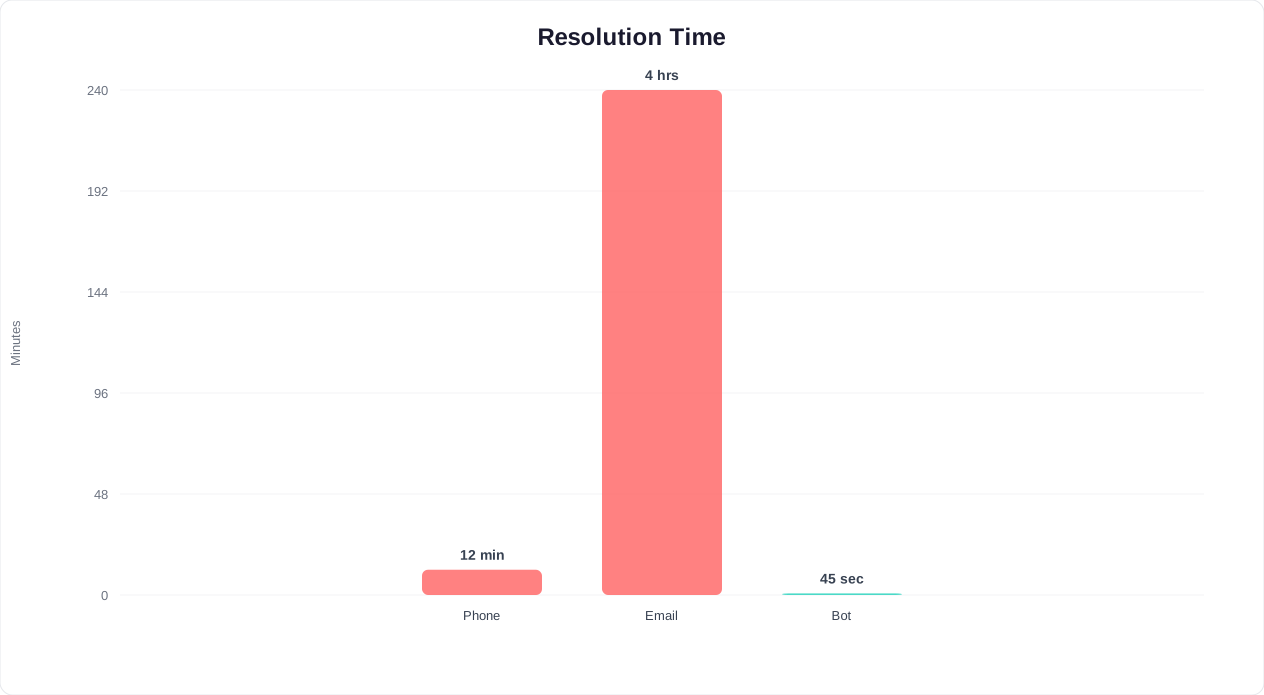
| Response time | <2 seconds | 4-8 minutes (avg) | AI |
| Availability | 24/7/365 | Business hours + shifts | AI |
| Consistency | 100% consistent | Varies by agent | AI |
| Handling volume spikes | Unlimited concurrent | Limited by headcount | AI |
| Empathy in crisis | Scripted empathy | Genuine emotional support | Human |
| Complex troubleshooting | Rule-based; limited | Creative problem-solving | Human |
| Negotiation / retention | Offer-based scripts | Adaptive persuasion | Human |
| Multi-system investigation | API-connected lookups | Cross-reference + judgment | Human |
⚡ Efficiency Insight
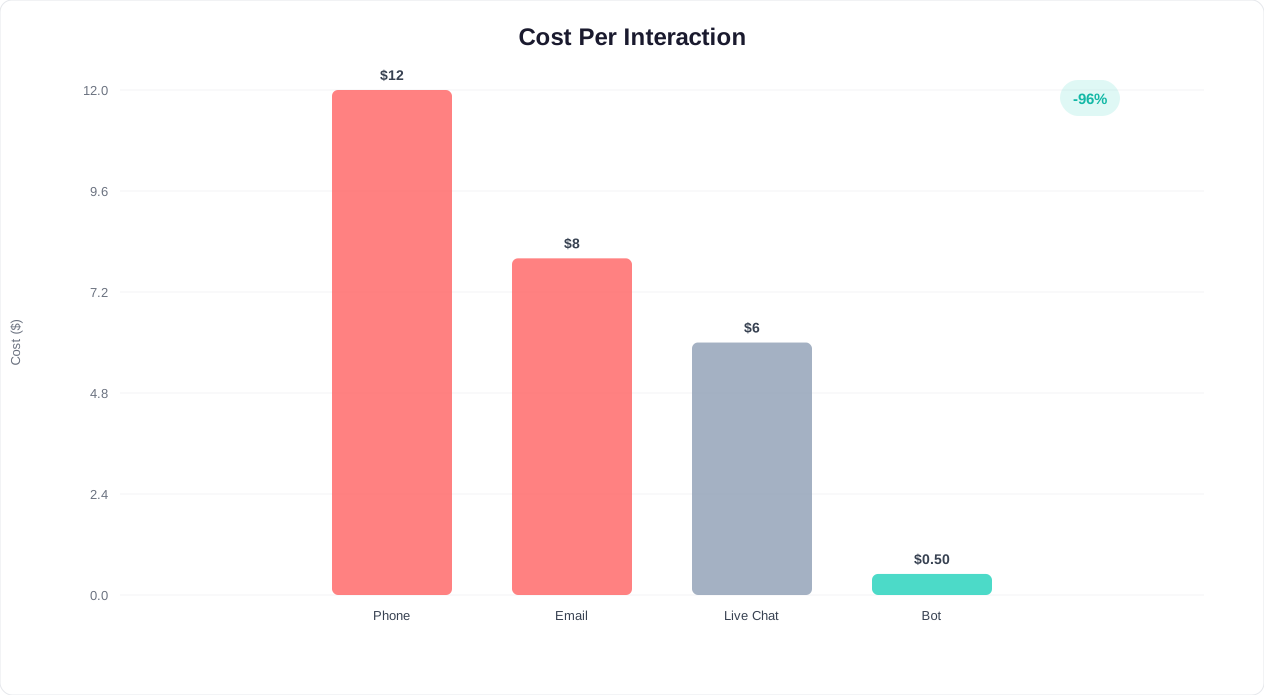
AI chatbot cost per interaction: $0.50-$1.20. Human agent cost per interaction: $6-$12. That is an 85-95% cost reduction per resolved query - and the chatbot handles unlimited concurrent conversations 24/7.
The 80/20 Rule of Support Automation
In most organizations, 80% of tickets fall into 20% of categories. Password resets, order status checks, billing inquiries, return policies, and basic how-to questions account for the overwhelming majority of volume. These are perfect automation candidates - they are repetitive, well-documented, and low-emotion.
The remaining 20% of tickets are high-complexity, high-emotion interactions: product failures, billing disputes, account compromises, and complaints. These require a human touch - and by automating the routine 80%, you free your best agents to focus exclusively on these cases, improving both resolution quality and agent satisfaction.
Building the Handoff
A seamless handoff is critical. Customers despise repeating themselves. When Conferbot's live chat handoff triggers, it passes the full conversation transcript, detected intent, customer account details, and sentiment score to the agent. The agent sees everything the bot discussed and can pick up mid-conversation. Read more about designing effective escalation paths in our escalation best practices guide.
CSAT Benchmarks: What Good Looks Like for Bot-Assisted Support
Customer Satisfaction Score (CSAT) is the gold standard for measuring support quality, and it is the metric most skeptics point to when questioning chatbot adoption. The concern is valid: poorly built bots frustrate customers. But well-designed bots - built on proven templates with clear escalation paths - consistently match or exceed human-only CSAT scores.
Industry CSAT Benchmarks
| Industry | Human-Only CSAT | Bot + Human CSAT | Bot-Only CSAT (resolvable queries) |
|---|---|---|---|
| SaaS / Technology | 82% | 86% | 79% |
| E-commerce | 78% | 84% | 81% |
| Financial Services | 75% | 80% | 72% |
| Healthcare | 80% | 83% | 74% |
| Telecommunications | 68% | 76% | 70% |
| Travel / Hospitality | 74% | 82% | 77% |
📊 Performance Insight
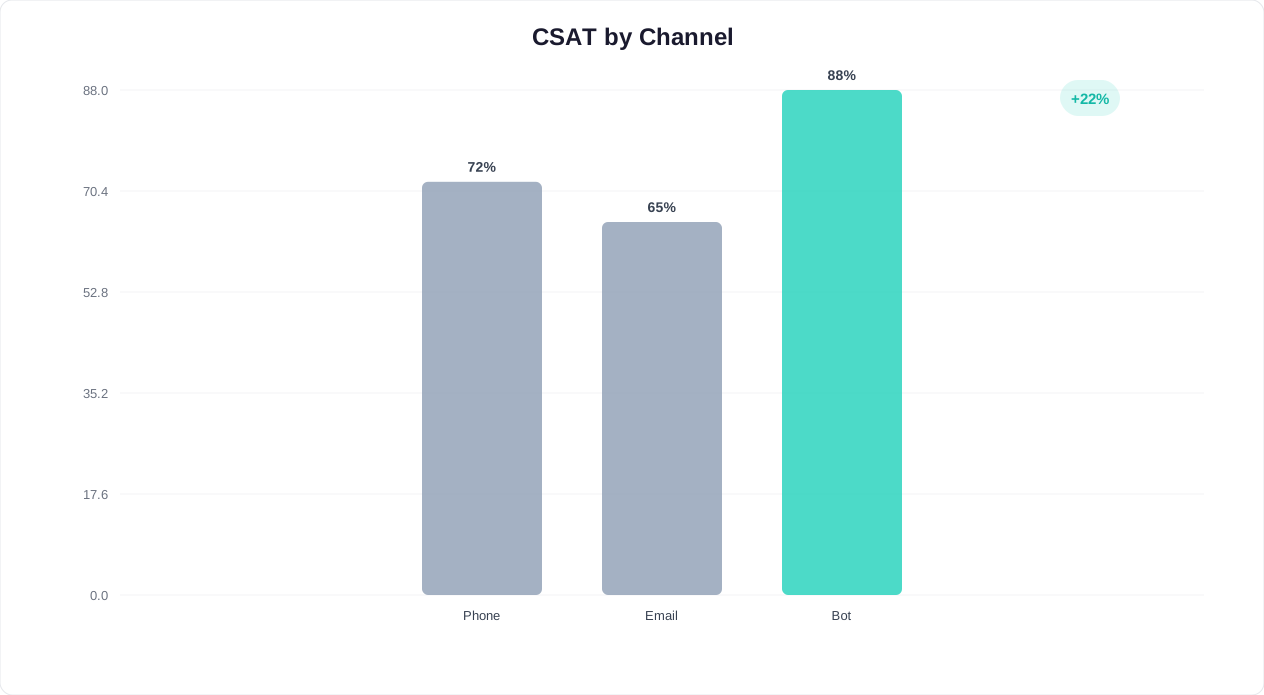
Hybrid bot-plus-human support scores 4-8 CSAT points higher than human-only teams. The bot delivers instant answers for routine queries, while agents - freed from repetitive work - provide exceptional service on complex cases.
Why Hybrid Scores Higher
The counterintuitive finding is that bot-plus-human CSAT often exceeds human-only scores. Three factors explain this:
- Speed satisfaction: Customers who get an instant answer to a simple question rate higher than those who waited 8 minutes for a human to provide the same answer. Speed is the strongest predictor of CSAT for routine inquiries.
- Agent focus effect: When agents handle only complex cases, they have more time and energy per interaction. They are not burned out from answering "What's my tracking number?" for the 50th time. This focus elevates the quality of every human interaction.
- Consistent baseline: Bots never have a bad day. They never give incorrect policy information because they forgot a recent update. This consistency establishes a reliable CSAT floor that human-only teams cannot guarantee.
Measuring Bot CSAT Correctly
Do not measure bot CSAT the same way you measure agent CSAT. Segment by resolution type: bot-resolved, bot-assisted (escalated), and human-only. Compare each segment against its own baseline. Conferbot's analytics suite breaks down CSAT by resolution path automatically, giving you granular visibility into where satisfaction is strongest and where improvement is needed.
For tips on boosting CSAT across all channels, read our guide to improving customer satisfaction with chatbots.
Support Cost Savings: The Complete Financial Picture
Cost reduction is often the primary business case for deploying a customer support chatbot. The savings are real, measurable, and compound over time as the bot handles an increasing share of inquiries. Below is a comprehensive breakdown of where the savings come from and how to calculate them for your organization.
Cost Per Resolution by Channel
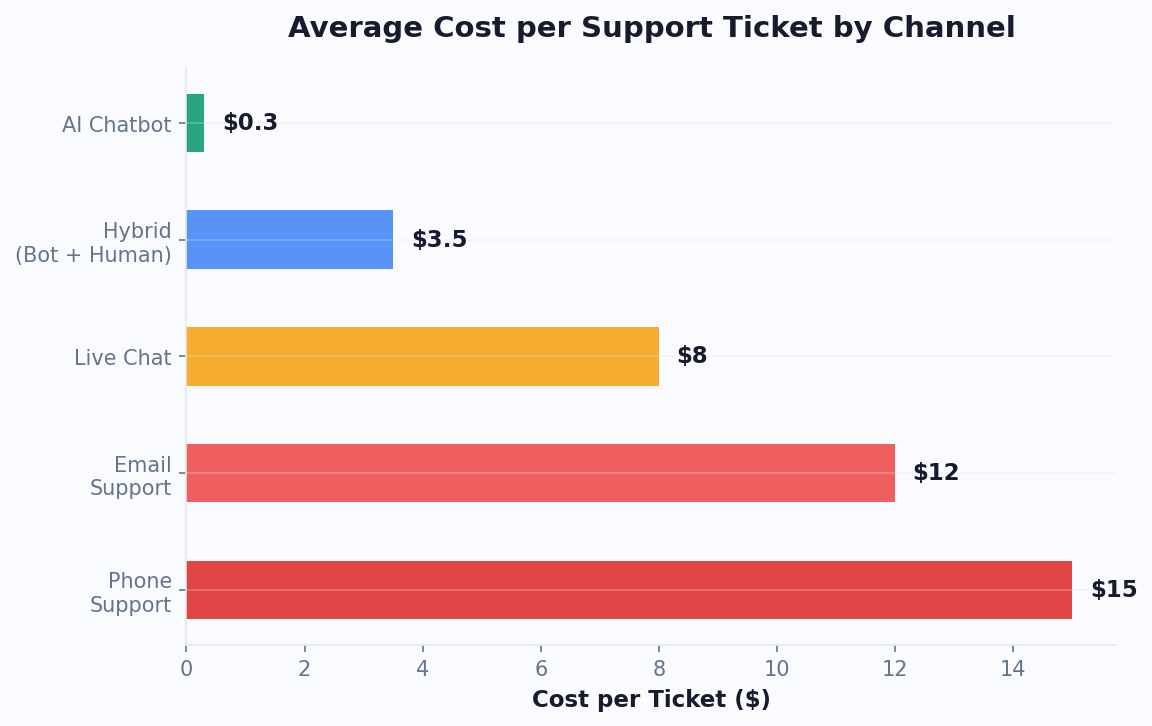
| Channel | Cost Per Resolution | Avg Handle Time | Concurrency |
|---|---|---|---|
| Phone support | $12.00 - $16.00 | 8.2 min | 1 call |
| Email support | $5.00 - $8.00 | 24 hours (response) | 3-5 threads |
| Live chat (human) | $4.00 - $7.00 | 6.5 min | 2-3 chats |
| AI chatbot | $0.50 - $1.20 | <45 seconds | Unlimited |
💡 Key Insight
A team handling 5,000 tickets/month at $7 average cost saves $186,000/year by deflecting 50% to a chatbot at $0.80 per resolution - with most businesses achieving full ROI within 30-60 days.
Building the Business Case
To calculate your savings, use this formula: Monthly Savings = (Tickets Deflected) x (Current Cost Per Resolution - Bot Cost Per Resolution). For a team handling 5,000 tickets per month at $7 average cost, deflecting 50% to a bot at $0.80 per resolution yields: 2,500 x ($7.00 - $0.80) = $15,500/month, or $186,000/year.
But direct ticket cost is only part of the equation. Factor in these additional savings:
- Hiring avoidance: Each support agent costs $45,000-$65,000/year fully loaded. A chatbot handling 2,500 tickets/month replaces 2-3 full-time agents in terms of volume capacity.
- Training reduction: New agents require 4-6 weeks of training. A chatbot requires initial setup and periodic updates - no ongoing onboarding costs.
- Infrastructure savings: Fewer agents means fewer seats, licenses, headsets, and management overhead.
- Reduced churn cost: Support agent turnover averages 30-45% annually. Each departure costs $10,000-$15,000 in recruiting and training. Fewer agents needed means less exposure to churn costs.
Use our support cost savings calculator to model your specific numbers. For a detailed look at plan pricing and what is included at each tier, visit the pricing page.
Escalation Best Practices: Designing Seamless Bot-to-Human Handoffs
The moment a chatbot hands off to a human agent is the most fragile point in the customer journey. Done poorly, it destroys trust - the customer has to repeat everything, wait in a new queue, and deal with context loss. Done well, it feels like a seamless continuation of the same conversation, with the agent already informed and ready to help.
When to Escalate
Not every question needs a human. Escalation should trigger under specific conditions:
- Confidence threshold: When the bot's confidence in its answer drops below 70%, it should offer escalation rather than risk a wrong answer. Conferbot's AI engine provides real-time confidence scoring for every response.
- Sentiment detection: If the customer's language signals frustration (repeated questions, negative keywords, caps lock), the bot should proactively offer a human. "I can see this is important to you - would you like me to connect you with a specialist right away?"
- Complexity markers: Multi-part questions, references to previous interactions, or requests that require cross-system actions (refund + replacement + complaint escalation) should route to agents.
- Customer request: Always provide a visible "Talk to a human" option. Forcing customers to stay in a bot loop is the fastest path to a 1-star review.
What to Pass to the Agent
A good handoff includes:
| Data Point | Why It Matters |
|---|---|
| Full conversation transcript | Agent sees everything the customer already said |
| Detected intent | Agent knows the category before reading the transcript |
| Customer account details | No need to ask for order number or email again |
| Sentiment score | Agent adjusts tone - empathetic for frustrated customers |
| Attempted solutions | Agent avoids suggesting steps the bot already tried |
| Priority classification | VIP customers or urgent issues get routed to senior agents |
⚡ Efficiency Insight
24/7 chatbot coverage captures the 35-40% of support queries that arrive outside business hours - without this, 25% of those customers contact a competitor before your team even opens the next morning.
Post-Escalation Feedback Loop
Every escalation is a learning opportunity. Track which intents escalate most frequently and analyze whether the bot could have resolved them with better training data. Over time, this feedback loop continuously shrinks the escalation rate. Teams using Conferbot's conversation analytics typically reduce escalation rates by 5-8% per quarter through systematic intent expansion. For more on building a robust hybrid support model, see our complete escalation playbook.
FAQ Chatbot Template: The Top 20 Questions to Automate First
Every customer support chatbot template starts with the same question: which FAQs should we automate first? The answer is not guesswork - it is data-driven. Across industries, a remarkably consistent set of question categories accounts for 80% or more of total support volume. Automating these top 20 FAQ types with a well-built FAQ chatbot template eliminates the majority of repetitive tickets and frees your team for complex, high-value interactions.
The Universal Top 20 by Industry
The table below maps the 20 most common support questions across four major verticals. While the specific wording varies, the underlying intent categories are consistent - making them ideal candidates for any customer support chatbot template deployment.
| # | Question Category | SaaS | E-Commerce | Finance | Healthcare |
|---|---|---|---|---|---|
| 1 | Account login / password reset | 14% | 8% | 16% | 12% |
| 2 | Order / appointment status | 3% | 22% | 5% | 15% |
| 3 | Pricing and plan details | 11% | 6% | 9% | 4% |
| 4 | Refund / cancellation policy | 7% | 12% | 8% | 3% |
| 5 | Billing and payment issues | 9% | 7% | 14% | 11% |
| 6 | Shipping / delivery information | 1% | 15% | 2% | 1% |
| 7 | Product / service features | 8% | 5% | 6% | 5% |
| 8 | How to get started / onboarding | 6% | 2% | 4% | 7% |
| 9 | Technical troubleshooting | 10% | 3% | 3% | 2% |
| 10 | Contact information / hours | 2% | 4% | 5% | 9% |
| 11 | Account upgrade / downgrade | 5% | 1% | 4% | 2% |
| 12 | Return / exchange process | 1% | 9% | 1% | 1% |
| 13 | Data privacy / security | 3% | 1% | 7% | 8% |
| 14 | Integration / compatibility | 6% | 1% | 2% | 1% |
| 15 | Discount / promo codes | 2% | 4% | 1% | 1% |
| 16 | Account deletion | 3% | 1% | 3% | 2% |
| 17 | Service outage / status | 4% | 1% | 3% | 2% |
| 18 | Warranty / guarantee | 1% | 3% | 2% | 1% |
| 19 | Feedback / complaint | 2% | 2% | 3% | 6% |
| 20 | Loyalty / rewards program | 1% | 3% | 2% | 3% |
How to Prioritize Your FAQ Chatbot
Start by pulling your last 90 days of support tickets and categorizing them against this list. The categories with the highest volume and lowest complexity should be automated first - they deliver the fastest deflection gains. For most teams, password resets, order status, and billing inquiries represent 30-40% of total volume and can be fully automated with a chatbot for customer service in under a week. Conferbot's customer support chatbot templates come pre-loaded with intent models for all 20 categories, so you are not starting from scratch.
Building Rich FAQ Responses
A great FAQ chatbot does not just spit out a text answer - it provides a guided experience. For "How do I reset my password?" the bot walks the user through the steps in real time, offers a direct reset link, and confirms success. For "What's your return policy?" the bot asks what product and when it was purchased, then gives a personalized answer: "Your running shoes are within the 30-day return window. Want me to start the return process now?" This interactive approach is what separates a true help desk chatbot from a glorified FAQ page. Explore our conditional logic builder to design these multi-step resolution flows visually.
Help Desk Integration: Zendesk, Freshdesk & HubSpot Compared
A customer support chatbot template reaches its full potential only when it is connected to your existing help desk platform. The integration ensures that every chatbot conversation, escalation, and resolution flows into the system your agents already use - eliminating data silos, enabling unified reporting, and creating a seamless experience for both customers and support teams. The three most popular help desk platforms - Zendesk, Freshdesk, and HubSpot Service Hub - each integrate with Conferbot, but they differ in depth, flexibility, and ideal use case.
Help Desk Integration Comparison
| Feature | Zendesk | Freshdesk | HubSpot Service Hub |
|---|---|---|---|
| Integration type | Native + API | Native + API | Native + API |
| Ticket creation from chatbot | Automatic | Automatic | Automatic |
| Transcript attachment | Full conversation log | Full conversation log | Full conversation log + timeline |
| Agent handoff | Real-time with context | Real-time with context | Real-time with CRM context |
| Custom field mapping | Unlimited custom fields | Up to 50 custom fields | Tied to CRM properties |
| SLA tracking | Full SLA integration | Full SLA integration | Basic SLA rules |
| Knowledge base sync | Bi-directional | One-way (pull) | Bi-directional |
| Reporting / analytics | Combined bot + agent reports | Separate dashboards | Unified CRM + service reports |
| Best for | Enterprise, high-volume teams | SMBs, cost-conscious teams | Teams already on HubSpot CRM |
| Setup time | 30-60 minutes | 15-30 minutes | 20-45 minutes |
Zendesk Integration Deep Dive
Zendesk is the gold standard for enterprise support teams. Conferbot's Zendesk integration creates tickets with full conversation transcripts, detected intent tags, sentiment scores, and custom field data collected by the chatbot. When a chatbot for customer service escalates, the Zendesk agent sees the complete interaction history in their existing workspace - no tab switching, no context loss. The bi-directional knowledge base sync means that when your team updates a Zendesk help article, the FAQ chatbot automatically reflects the change in its next response. This ensures your help desk chatbot always serves the latest information without manual updates.
Freshdesk: The SMB Sweet Spot
Freshdesk offers the fastest setup and the most cost-effective integration for small and mid-sized teams. The Conferbot-Freshdesk connection handles ticket creation, transcript logging, and agent handoff with minimal configuration. While it lacks some of Zendesk's enterprise features (like bi-directional knowledge sync), it covers 90% of what most support teams need at a fraction of the cost. Teams running Freshdesk can deploy a fully integrated customer support chatbot template within 15 minutes using our pre-built templates.
HubSpot Service Hub: CRM-First Support
If your organization already runs on HubSpot CRM, the Service Hub integration is the natural choice. Every chatbot interaction is logged against the contact's CRM record, giving sales and support teams a unified view of the customer journey. A support inquiry can trigger a sales workflow - for example, if a customer asks about a feature available only on a higher plan, the chatbot can both answer the question and notify the account manager of an upsell opportunity. This CRM-first approach makes HubSpot the best choice for teams that view support as a revenue driver, not just a cost center. Connect your help desk through Conferbot's integration hub, or visit our comparison page to see how Conferbot complements your existing support stack.
Customer Support Templates FAQ
Everything you need to know about chatbots for customer support templates.
Why Choose Customer Support Chatbot Templates?
Our proven templates help businesses like yours achieve better results with automation
24/7 Support
Provide round-the-clock customer assistance
Instant Resolution
Resolve common issues immediately
Higher Satisfaction
Improve customer satisfaction with quick responses
Reduce Support Costs
Lower operational costs with automation
Ready to Transform Your Customer Support?
Join the businesses already using Conferbot templates to automate conversations and boost conversions. Start free in 2 minutes.
How to Use Customer Support Chatbot Templates
Follow these simple steps to get your customer support chatbot up and running in minutes
Choose from templates designed for different support scenarios and industries.
Add your FAQs, help articles, and common issue resolutions to the chatbot.
Set up when and how complex issues should be transferred to human agents.
Connect with Zendesk, Freshdesk, or other helpdesk systems for ticket management.
Monitor conversations and continuously improve responses based on customer feedback.
Why Choose Our Customer Support Templates?
Compare the benefits of using professional templates vs. building from scratch
✅ With Conferbot Templates
- ✓Deploy in 10 minutes
- ✓Proven conversion patterns
- ✓Industry best practices included
- ✓Ready-made integrations
- ✓Continuous updates & improvements
- ✓24/7 expert support
- ✓Free to start
❌ Building From Scratch
- ✗Weeks or months to develop
- ✗Trial and error approach
- ✗No proven patterns
- ✗Complex integration setup
- ✗Ongoing maintenance burden
- ✗Limited support resources
- ✗High development costs
Ready to Transform Your Customer Support?
Join thousands of businesses using our customer support templates to automate conversations and boost results
🚀 Build your first bot free - no credit card requiredLast updated September 22, 2026 · Maintained by the Conferbot team
Learn More About Chatbots
New to chatbots? These in-depth guides explain how customer support chatbots work and how to choose the right builder.