Why Chatbot-to-Human Handoff Is the Make-or-Break Moment
AI chatbots are remarkably capable in 2026, handling 70-85% of customer inquiries without human involvement. But the remaining 15-30% of conversations that do need a human agent represent the most critical interactions your business will have. These are the frustrated customers, the complex edge cases, the high-value deals that need a personal touch. How you handle the transition from bot to human determines whether these interactions end in loyalty or churn.
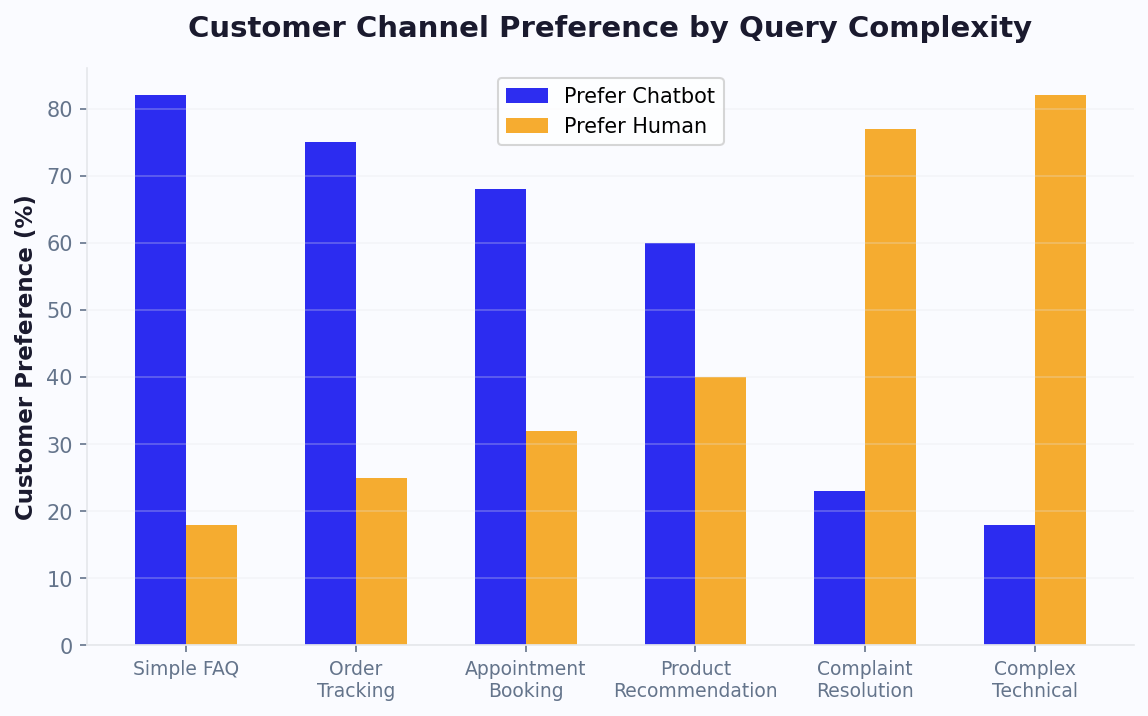
The data is stark: 86% of consumers say they want the option to transfer to a human agent when interacting with a chatbot, according to a 2025 Salesforce study. Even more concerning, 40% of customers abandon the conversation entirely when they cannot find a way to reach a human. That is not just a missed support ticket; it is lost revenue, damaged brand perception, and a customer who may never return.
Yet the handoff moment itself introduces its own risks. The most common complaint about chatbot-to-human transfers is having to repeat information already provided to the bot. When a customer spends 5 minutes explaining their issue to a chatbot only to be connected to an agent who asks "How can I help you today?", the frustration compounds. It signals that the business does not respect the customer's time.
A well-designed handoff flow does three things simultaneously:
- Preserves context: Every piece of information the customer shared with the bot travels with them to the human agent, including conversation history, identified intent, sentiment, customer profile data, and any partial resolutions attempted.
- Sets expectations: The customer knows what is happening, why they are being transferred, and how long the wait will be.
- Equips the agent: The human agent receives a structured summary that lets them pick up the conversation naturally without asking redundant questions.
This guide walks through exactly how to build this experience using modern chatbot platforms like Conferbot, from identifying when to trigger a handoff to measuring its quality over time.
When to Trigger a Handoff: Sentiment, Complexity, and Explicit Requests
The timing of a handoff is just as important as the handoff itself. Transfer too early and you waste human agent time on issues the bot could resolve. Transfer too late and you frustrate customers who needed help minutes ago. Getting this right requires a multi-signal approach that combines explicit triggers with intelligent detection.
Explicit Request Triggers
The most straightforward trigger is when a customer directly asks for a human. Phrases like "talk to a person," "speak to an agent," "I want a human," or "let me talk to someone real" should immediately initiate the handoff flow. Always include a visible "Talk to a human" button or quick-reply option in your chatbot interface so customers never feel trapped. Research shows that simply having this option visible reduces frustration even when customers do not use it.
Sentiment-Based Triggers
Modern AI and NLP engines can detect negative sentiment in real time. Configure your chatbot to monitor for escalating frustration indicators:
- Explicit frustration: "This is useless," "You don't understand," "I'm so frustrated."
- Repeated rephrasing: When a customer asks the same question three or more times using different words, the bot is clearly not understanding their need.
- Short angry responses: Single-word negative responses like "No," "Wrong," or "Ugh" following a bot response indicate dissatisfaction.
- Profanity or caps lock: While not always indicative of genuine anger, these signals warrant escalation consideration.
Complexity-Based Triggers
Some topics should always route to humans regardless of sentiment:
- Billing disputes and refund requests above a certain threshold.
- Legal or compliance-related inquiries.
- Technical issues that the bot has attempted to resolve twice without success.
- Account security concerns such as suspected unauthorized access.
- Conversations involving emotional sensitivity such as bereavement policies, medical situations, or complaint escalations.
Confidence Score Triggers
Configure your chatbot to monitor its own confidence score for each response. When the AI's confidence drops below a threshold (typically 60-70%), it should proactively offer to connect the customer with a human rather than providing a potentially incorrect answer. This prevents the bot from guessing wrong and making the situation worse. A transparent "I'm not confident I can help with this, let me connect you with a specialist" response builds more trust than a wrong answer.
Passing Full Context to Human Agents: What to Transfer and How
The context package you pass to the human agent determines whether the handoff feels seamless or starts from scratch. Think of it as a detailed briefing that lets the agent walk into the conversation fully prepared. Here is exactly what to include and how to structure it.
The Context Package
Every handoff should transfer these data points to the receiving agent:
- Complete conversation transcript: The full chat history between the customer and the bot, timestamped and formatted for easy scanning.
- Identified intent: What the customer is trying to accomplish, stated in plain language (e.g., "Customer wants to return a defective product purchased 3 days ago").
- Customer profile: Name, email, phone number, account type, purchase history, lifetime value, and any previous support interactions.
- Sentiment summary: Current emotional state of the customer (neutral, mildly frustrated, very frustrated, angry) so the agent can calibrate their tone.
- Actions already taken: What the bot attempted (e.g., "Provided return policy link, offered exchange, customer declined both").
- Suggested next steps: Based on the conversation, the AI can suggest what the agent should try next.
Structuring the Agent View
Raw data is not helpful if the agent has to dig through it. Present the context in a structured card format that the agent sees immediately upon accepting the conversation:
The top section should contain a one-sentence summary of the issue. Below that, show the customer's key details (name, account, recent orders). Then display the conversation highlights (most relevant messages, not the entire transcript). Finally, include recommended actions the agent can take.
Integration with Helpdesk Platforms
Conferbot's integrations hub connects with major helpdesk platforms including Zendesk, Freshdesk, Intercom, and HubSpot Service Hub. When a handoff occurs, a support ticket is automatically created in your helpdesk with the full context package attached. The agent can view the chatbot conversation directly within their familiar helpdesk interface without switching between tools.
For businesses using WhatsApp or Messenger, the context transfer works identically across channels. Whether the customer started on your website widget and needs to be transferred, or they are chatting on WhatsApp, the agent receives the same comprehensive context package. This omnichannel consistency ensures that your handoff quality does not vary by channel.
Implementing Escalation Flows: Step-by-Step Technical Setup
Building an effective escalation flow requires configuring both the customer-facing experience and the agent-facing routing logic. Here is how to set up the complete flow from trigger to resolution.
Step 1: Configure Escalation Triggers
In your chatbot platform's flow builder, add escalation trigger nodes at strategic points in your conversation flows. Each trigger should specify:
- Trigger type: Explicit request, sentiment threshold, confidence threshold, or topic-based.
- Priority level: High (billing disputes, security issues), medium (product complaints, complex questions), or standard (general inquiries, preference for human).
- Required context fields: Which data points must be collected before handoff (at minimum: customer name and issue category).
Step 2: Design the Transition Message
When escalation triggers, the chatbot should send a clear transition message to the customer. A good template is: "I understand this needs personal attention. Let me connect you with a specialist who can help. I'm sharing our conversation so you won't need to repeat anything. Current wait time is approximately [X] minutes."
If no agents are currently available, offer alternatives:
- "Would you like to wait in queue? Estimated wait: 12 minutes."
- "I can have an agent call you back within 2 hours. What number should we call?"
- "I can create a support ticket and you'll get a response via email within 4 hours."
Step 3: Configure Agent Routing
Route escalated conversations to the right agent based on:
- Skill-based routing: Technical issues go to technical agents, billing issues go to billing specialists.
- Language routing: If the customer is chatting in Spanish, route to a Spanish-speaking agent.
- Priority routing: High-priority escalations jump to the front of the queue.
- Availability routing: Check agent workload and route to the agent with the most capacity.
Step 4: Enable Warm Transfer
A warm transfer means the chatbot introduces the situation to the agent before the customer is connected. The agent has 10-15 seconds to review the context card and conversation summary. Only after the agent accepts and is prepared does the customer see "You're now connected with [Agent Name]." This prevents the awkward silence that occurs during cold transfers where the agent needs time to read the history.
For after-hours escalations, configure your chatbot to collect all necessary information, create a detailed ticket, set a follow-up commitment, and send a confirmation to the customer via their preferred channel. Use analytics to track after-hours escalation volume and optimize your staffing schedule accordingly. For escalation paths that go beyond text - voice calls, video and co-browsing sessions started from the same conversation - see our guide to chatbot escalation to voice, video and co-browse.
Measuring Handoff Quality: Key Metrics and Benchmarks
You cannot improve what you do not measure. Tracking handoff quality metrics reveals whether your escalation flows are working well or creating friction. Here are the essential metrics to monitor and the benchmarks you should aim for.
Primary Handoff Metrics
- Handoff rate: The percentage of total chatbot conversations that escalate to a human agent. Target: 15-25%. Below 10% might mean customers cannot find the escalation option. Above 30% suggests the bot is undertrained or customers do not trust it.
- Context utilization rate: The percentage of handoffs where the agent uses the provided context without asking the customer to repeat information. Target: 90%+. Track this by monitoring whether agents ask questions already answered in the bot conversation.
- Time to agent connection: How long the customer waits between the handoff trigger and being connected to a human. Target: under 60 seconds during business hours. Every additional 30 seconds of wait increases abandonment probability by 10%.
- Post-handoff resolution rate: The percentage of escalated conversations that the human agent resolves successfully. Target: 85-95%. If this is low, agents may not be getting enough context or the right agents are not being matched to the right issues.
- Customer effort score (CES): Ask customers after the interaction how easy it was to get their issue resolved on a scale of 1-7. Target: 5.5+. The handoff should feel effortless, not like an obstacle course.
Secondary Metrics
- Repeat contact rate: Do customers who experience a handoff contact support again about the same issue within 7 days? Target: under 10%. High repeat rates indicate incomplete resolutions.
- Handoff abandonment rate: The percentage of customers who leave during the handoff process (after the bot initiates transfer but before connecting with an agent). Target: under 15%.
- Agent handle time for escalated conversations: How long agents spend on conversations that came from the chatbot vs. conversations that started directly with a human. Well-contextualized handoffs should result in shorter handle times.
Building a Quality Dashboard
Use Conferbot's analytics dashboard to build a handoff quality view that surfaces these metrics in real time. Set up automated alerts for anomalies: if the handoff rate spikes above 35% in an hour, there may be a bot issue. If post-handoff satisfaction drops below 3.5, review recent escalated conversations to identify the pattern. Weekly reviews of these metrics with your support team create a continuous improvement loop that steadily improves both bot and human performance over time.
Handoff Quality Metrics: Measuring Context Preservation
Most teams measure whether a handoff happened, but few measure how well it happened. Context preservation - the degree to which information gathered by the bot survives the transition to a human agent - is the single biggest determinant of post-handoff customer satisfaction. A structured scoring system makes this measurable and improvable.
The Context Preservation Scoring Rubric
Rate every handoff on a 1-5 scale across five dimensions. Agents complete this 30-second assessment after each escalated conversation:
| Dimension | Score 1 (Poor) | Score 3 (Adequate) | Score 5 (Excellent) | Weight |
|---|---|---|---|---|
| Issue Summary | No summary provided; agent must ask customer to explain from scratch | Basic intent captured but missing key details | One-sentence summary fully describes the issue, customer intent, and urgency | 25% |
| Customer Identity | No customer data passed; agent must collect name and email | Name and email present but no account/order info | Full profile: name, email, account ID, order history, loyalty tier | 20% |
| Conversation History | No transcript available; agent starts blind | Transcript present but unformatted or incomplete | Full timestamped transcript with highlighted key exchanges | 20% |
| Actions Already Attempted | No record of what the bot tried; agent repeats troubleshooting steps | List of bot actions present but vague | Specific actions logged with outcomes (e.g., "Offered refund - customer declined, wants exchange") | 20% |
| Recommended Next Steps | No suggestions; agent must assess from scratch | Generic suggestion (e.g., "escalate to billing") | Specific actionable recommendation based on conversation context | 15% |
Calculating the Handoff Quality Score (HQS)
Multiply each dimension score by its weight and sum to get a composite score from 1.0 to 5.0:
HQS = (Issue Summary x 0.25) + (Customer Identity x 0.20) + (Conversation History x 0.20) + (Actions Attempted x 0.20) + (Next Steps x 0.15)
Benchmarks based on industry data:
- Below 2.5: Critical - customers are repeating themselves, agent handle time is inflated, and CSAT suffers. Immediate chatbot configuration changes needed.
- 2.5-3.5: Functional but leaky. Some context is lost in transit. Focus on improving the weakest dimension.
- 3.5-4.5: Good. Most handoffs feel seamless. Optimize the edges.
- Above 4.5: Excellent. Customers rarely notice the transition from bot to human.
Correlating HQS with Business Outcomes
Track HQS alongside your standard support metrics to quantify its impact:
| HQS Range | Avg Agent Handle Time | Post-Handoff CSAT | Repeat Contact Rate | Customer Effort Score |
|---|---|---|---|---|
| 1.0-2.0 | 18 minutes | 52% | 35% | 2.1 / 7 |
| 2.0-3.0 | 12 minutes | 68% | 22% | 3.8 / 7 |
| 3.0-4.0 | 8 minutes | 81% | 12% | 5.2 / 7 |
| 4.0-5.0 | 5 minutes | 92% | 6% | 6.1 / 7 |
The data is clear: every 1-point improvement in HQS cuts agent handle time by approximately 30%, improves CSAT by 10-15 points, and halves the repeat contact rate. For a team handling 500 escalations per month at an average agent cost of $25/hour, improving HQS from 2.5 to 4.0 saves roughly $5,200/month in agent time alone.
Implementing Automated HQS Tracking
Rather than relying solely on agent self-assessment, automate portions of the score. Your chatbot platform can programmatically verify: whether a summary was generated (Issue Summary), whether customer profile data was attached (Customer Identity), whether the transcript was included (Conversation History), and whether bot actions were logged (Actions Attempted). Only the "Recommended Next Steps" dimension typically requires human rating. Use Conferbot's analytics to build a real-time HQS dashboard that flags low-scoring handoffs for review. Feed the findings into your weekly bot training cycle to continuously raise the baseline.
Common HQS Pitfalls and How to Fix Them
The most frequent context preservation failures fall into predictable categories. Missing customer identity (score 1 on that dimension) usually means the bot did not ask for an email or account number before escalating - add a mandatory identification step to your pre-handoff flow. Vague issue summaries (score 2-3) typically occur when the bot uses the customer's raw message as the summary instead of generating a structured one-liner - configure your AI to produce a formatted summary from the conversation context. No record of attempted actions happens when bot actions are logged in a separate system that the agent view does not pull from - ensure your integrations pipe action logs into the same context card the agent sees. Fixing these three issues alone can lift the average HQS by 1.0-1.5 points across your team. For more on designing effective escalation flows, see our customer support chatbot guide. According to HubSpot's State of AI research, companies with well-structured handoff protocols see 22% higher customer lifetime value compared to those with abrupt bot-to-human transitions.
Reducing Unnecessary Handoffs: Making Your Bot Smarter Over Time
Every unnecessary handoff costs you money (agent time is expensive) and often delivers a worse experience than the bot could have provided (customers just want fast answers). Reducing unnecessary escalations is a continuous optimization process that pays dividends in both cost savings and customer satisfaction.
Analyze Your Escalation Reasons
Start by categorizing every handoff by the reason it occurred. Common categories include:
- Knowledge gap: The bot did not have information about a specific product, policy, or process. Solution: add this knowledge to your chatbot's training data.
- Phrasing gap: The customer asked something the bot should know but used unexpected phrasing. Solution: add these phrasings as training examples.
- Trust gap: The customer did not trust the bot's answer even though it was correct. Solution: add social proof, policy links, or offer to send confirmation via email.
- Legitimate complexity: The issue genuinely required human judgment. These handoffs are appropriate and should not be reduced.
Weekly Bot Training Cycles
Establish a weekly routine for improving your chatbot:
- Monday: Export last week's escalated conversations from your analytics dashboard.
- Tuesday: Categorize each escalation and identify the top 5 preventable handoff reasons.
- Wednesday: Update your chatbot's knowledge base, add new training phrases, and refine conversation flows for the identified gaps.
- Thursday: Test the updates in your staging environment.
- Friday: Deploy updates and set benchmarks for the following week.
Proactive Confidence Building
Many handoffs happen not because the bot cannot help, but because the customer does not believe it can. Build confidence with these techniques:
- Show sources: When the bot provides policy information, include a link to the official policy page.
- Offer verification: "I can send this confirmation to your email for your records" makes the response feel more official.
- Use rich media: Product images, video tutorials, and annotated screenshots are more convincing than text-only responses.
- Demonstrate capability: When the bot resolves a step ("I've updated your shipping address"), confirm the action with a summary card showing the change.
Setting Reduction Targets
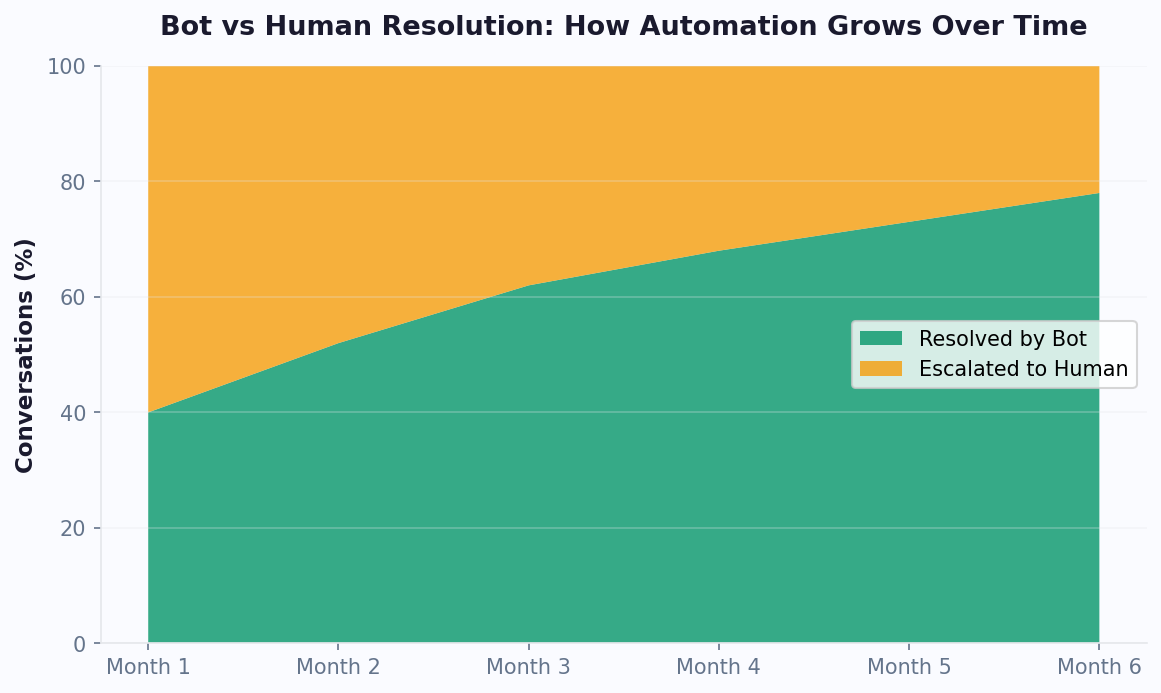
A realistic target is to reduce unnecessary handoffs by 5-10% per month through consistent training and optimization. Over six months, this can bring your overall handoff rate down from 30% to 15-18%, cutting agent workload nearly in half while maintaining or improving customer satisfaction. Gartner's conversational AI predictions suggest that organizations optimizing their handoff flows achieve 30% lower support costs within the first year. Track progress weekly and celebrate wins with your support team to maintain momentum. For more on building the AI knowledge that reduces handoffs, see our train chatbot on knowledge base guide. And for ready-to-use escalation scripts, check our chatbot flow templates.
Cross-Channel Handoff: Maintaining Context Across WhatsApp, Web, and Messaging Apps
In an omnichannel world, handoff complexity multiplies. A customer might start chatting on your website, leave, then return via WhatsApp expecting the conversation to continue. The handoff from bot to human must work seamlessly regardless of which channel the customer uses - and ideally, should work even when the customer switches channels mid-conversation.
Channel-Specific Handoff Challenges
| Channel | Unique Challenge | Solution |
|---|---|---|
| Website Chat | Session expires when visitor closes browser - agent cannot follow up | Collect email/phone before handoff, send follow-up via persistent channel |
| 24-hour messaging window after last customer message | Agent must respond within window; bot sends template message if window expires | |
| Facebook Messenger | 24-hour response window plus message tag restrictions | Use human_agent message tag (allows 7-day response for escalated conversations) |
| Instagram DM | No persistent bot session - every message is standalone | Store context server-side, reconstruct from customer ID on each message |
| Slack/Teams | Agent must join the customer's workspace or use an integration layer | Route to a shared channel or use Conferbot's unified inbox |
The Unified Inbox Solution
The technical solution to cross-channel handoff is a unified inbox where agents see all customer conversations regardless of channel. When a bot escalates from any channel, the conversation appears in the same agent queue with the same context card format. The agent does not need to switch tools or learn different interfaces for different channels.
Key requirements for cross-channel handoff:
- Customer identity resolution: Match the same person across channels using email, phone number, or account ID. When a customer who chatted on your website yesterday opens WhatsApp today, the agent should see their complete history.
- Persistent context storage: Conversation context must be stored centrally, not in the channel session. If a website chat session expires, the context survives for the next interaction on any channel.
- Agent channel flexibility: Agents should be able to respond on the customer's preferred channel without switching tools. If the customer is on WhatsApp, the agent responds via WhatsApp from the unified inbox.
- Consistent handoff experience: The customer receives the same quality handoff message regardless of channel - wait time estimate, context preservation confirmation, and agent name.
Handoff Quality by Channel: Benchmarks
| Metric | Website Chat | Messenger | Target | |
|---|---|---|---|---|
| Handoff success rate | 92% | 88% | 85% | >90% all channels |
| Context preservation rate | 95% | 90% | 88% | >90% all channels |
| Customer wait time | 45 sec | 2 min | 3 min | <60 sec all channels |
| Post-handoff CSAT | 4.3/5 | 4.1/5 | 3.9/5 | >4.0 all channels |
Website chat typically has the best handoff metrics because the customer is actively present and agents can respond immediately. Messaging channels like WhatsApp and Messenger have slightly lower metrics because of asynchronous communication patterns - the customer may not respond instantly when the agent connects. The goal is to bring all channels to parity through consistent processes and technology.
For businesses building an omnichannel support strategy, our omnichannel customer service strategy guide covers the full framework. And for specific channel setup, see our guides on WhatsApp chatbot deployment and when to use chatbot vs. live chat.
Was this article helpful?
Build and deploy in 10 minutes. No coding needed.
How to Build a Chatbot That Hands Off to a Human Agent Without Losing Context (2026) FAQ
Everything you need to know about chatbots for how to build a chatbot that hands off to a human agent without losing context (2026).
About the Author
The Conferbot team writes about building, deploying, and improving AI chatbots.
View all articles