
Why Wix Websites Need an AI Chatbot
Wix is built for fast website creation. That is exactly why many Wix sites have the same growth problem: the site looks polished, but every visitor still has to figure out pricing, availability, service fit, and next steps alone. An AI chatbot for Wix turns that passive browsing experience into a guided conversation.
The best Wix chatbot does three jobs at once: it answers common questions, captures qualified leads, and routes urgent conversations to a human when needed. For a service business, that means booking consultations after hours. For an ecommerce store, it means answering shipping and return questions before the shopper abandons the cart. For a consultant, agency, or local business, it means turning anonymous visitors into named prospects with context.
Conferbot works well for Wix because it does not require a native plugin or custom backend. You build the chatbot in the no-code chatbot builder, copy one embed script, and add it to Wix's custom code area. The Wix Developer Center documents the custom code options available across all Wix plans, so you can verify compatibility before getting started. From there, the same bot can also run on WhatsApp, Messenger, Instagram, and other channels if your customers prefer messaging apps over website chat.
The Fastest Way to Add a Chatbot to Wix
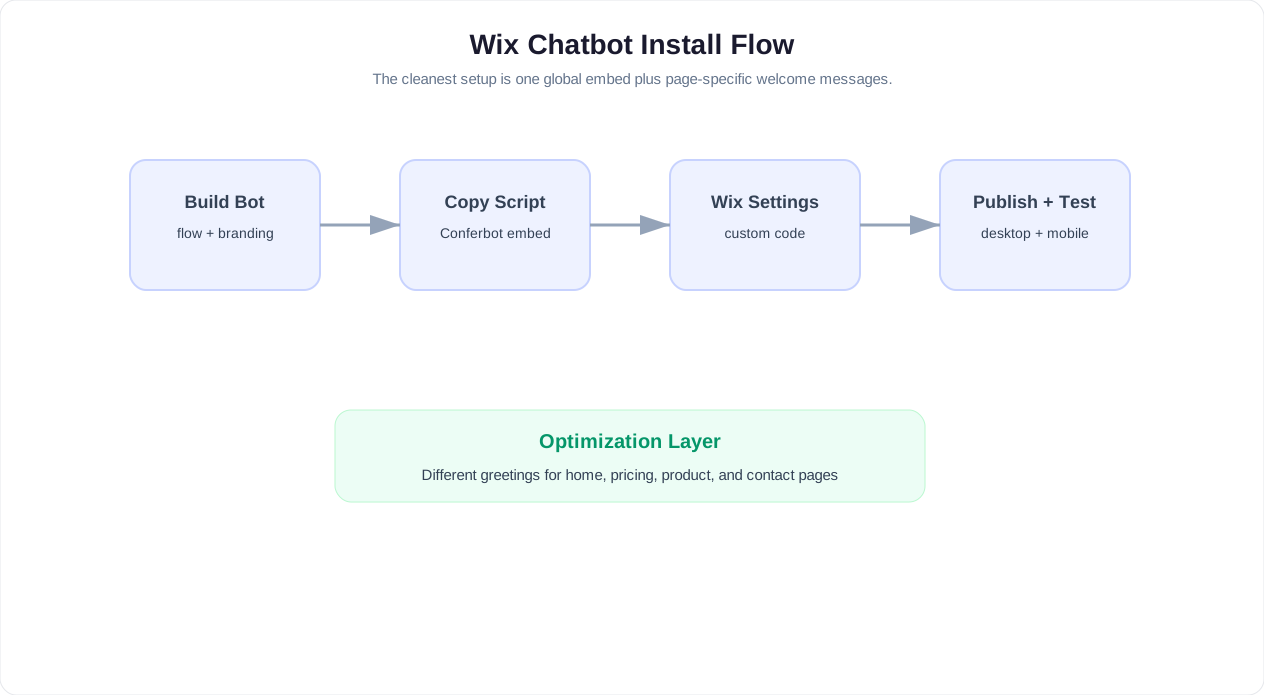
The fastest setup path is a global website widget. You add the chatbot script once, publish the site, and the chat bubble appears across your Wix pages. This is the right starting point for most businesses because it is simple, reversible, and easy to test.
- Create your chatbot: Start with a template from Conferbot's chatbot template library or build a flow from scratch.
- Define the main goal: Choose one primary conversion: book an appointment, collect a quote request, answer product questions, route support, or qualify leads.
- Customize the welcome message: Match the page intent. A pricing page should invite questions about plans. A services page should qualify project fit. A contact page should offer immediate booking.
- Copy the embed script: Use the website channel script from your bot settings.
- Add it to Wix custom code: Place the script in the body or footer area so it loads across the site. If you need help locating the custom code panel, Wix's custom code support article walks through the exact steps for each site type.
- Publish and test: Test on desktop, mobile, and at least one incognito browser session.
If you want a more detailed platform-neutral walkthrough, use the broader how to add a chatbot to any website guide. The Wix-specific difference is mainly where you paste the script and how you decide which pages should show the chatbot.
Related: How to Add an AI Chatbot to Webflow: Designer-Friendly Setup, Styling, and Lead Capture
Best Wix Chatbot Flows to Launch First
A Wix chatbot should not start with a blank "How can I help?" prompt. That puts the work back on the visitor. Start with three to five clear paths tied to the reason people visit your site.
| Business Type | Recommended Flow | Primary Conversion |
|---|---|---|
| Local service business | Quote request + service area check | Qualified lead |
| Consultant or agency | Project intake + calendar booking | Discovery call |
| Restaurant or venue | Reservation, menu, event inquiry | Booking or inquiry |
| Ecommerce store | Product finder + shipping FAQ + cart help | Sale or recovered cart |
| Course creator | Program matcher + FAQ + enrollment nudge | Application or checkout |
For lead generation, connect the flow to the principles in the lead generation chatbot guide. Ask only the questions needed to route or qualify the visitor: name, email or phone, problem, urgency, budget range if relevant, and preferred next step. Every additional question should earn its place.
For appointment-heavy businesses, use the calendar booking flow so visitors can book while intent is highest. Wix sites for salons, clinics, coaches, tutors, repair services, and consultants usually see the fastest ROI from this flow. The Wix Bookings feature can complement a chatbot setup by handling calendar availability natively within the platform.
Related: How to Add a Chatbot to Squarespace in 5 Minutes (No Code Required)
Wix Chatbot Use Cases by Business Type
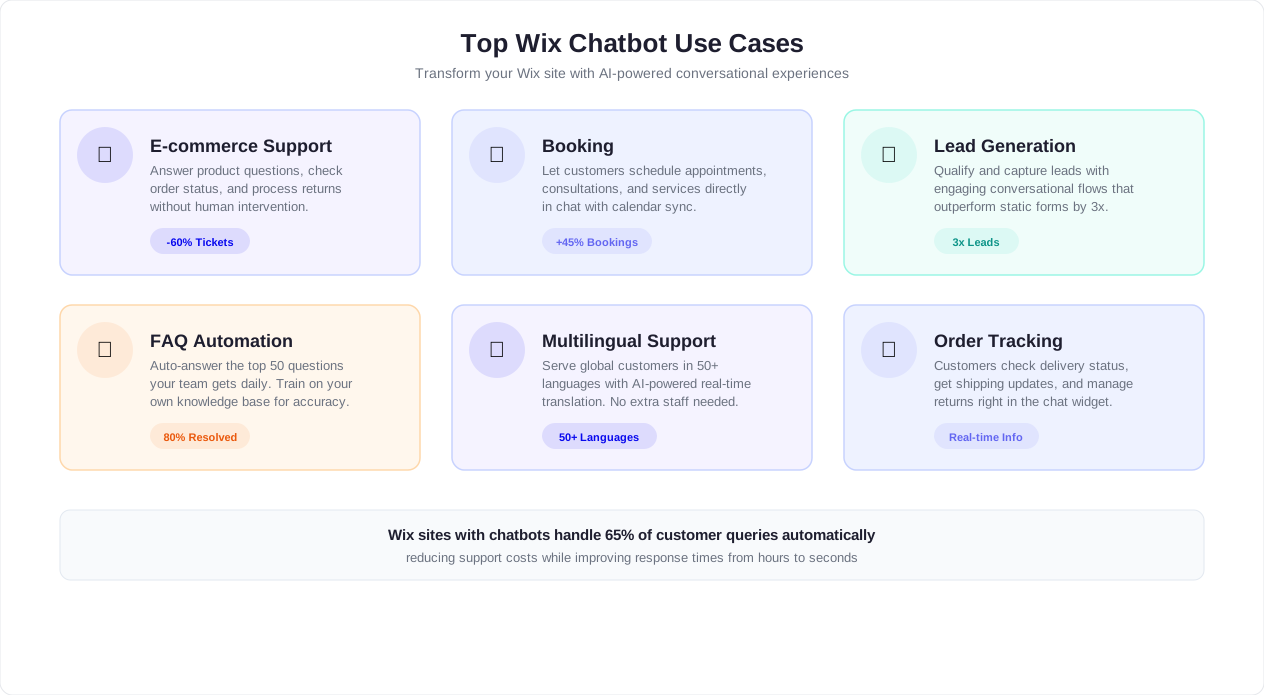
Every Wix site serves a different audience, which means the chatbot should be tuned to the specific conversations that drive revenue for that business model. Below is a detailed breakdown of how five common Wix business types should configure their chatbot flows, what questions to expect, and which conversion actions matter most.
Ecommerce Stores on Wix
Wix ecommerce stores sell everything from handmade jewelry to pet supplies. The chatbot's main job is reducing purchase hesitation. Shoppers want fast answers about shipping cost, delivery time, return policy, sizing, materials, and stock availability. A well-designed ecommerce chatbot handles those questions and then nudges the visitor toward checkout.
Recommended flow: Product finder that asks what the shopper is looking for, followed by shipping and return FAQ triggers on cart and checkout pages, and a last-chance prompt when exit intent is detected.
| Visitor Question | Chatbot Action | Outcome |
|---|---|---|
| Do you ship to my country? | Check shipping zone from knowledge base | Removes hesitation or routes to custom quote |
| What size should I order? | Launch size finder flow | Reduces returns and increases confidence |
| Can I return this? | Show return policy summary | Builds trust before purchase |
| Is this item in stock? | Confirm availability or suggest alternatives | Prevents bounces on out-of-stock pages |
| Do you have a discount code? | Offer email signup for first-purchase offer | Captures lead even if they do not buy today |
Service Businesses on Wix
Plumbers, electricians, cleaning companies, landscapers, photographers, and other service providers use Wix to establish credibility and generate leads. The chatbot replaces the slow process of filling out a contact form and waiting days for a reply.
Recommended flow: Service area check first, then service type selection, urgency level, and a choice between instant booking or quote request. End with email or phone capture and an automated notification to the business owner.
Example conversation:
- Bot: What type of service do you need? (Buttons: Plumbing repair, Water heater, Drain cleaning, Other)
- Visitor taps: Plumbing repair
- Bot: Is this urgent or can it wait a few days? (Buttons: Emergency, This week, Just getting a quote)
- Visitor taps: This week
- Bot: Great. What is your zip code so I can confirm we service your area?
- Visitor types zip code
- Bot: We cover that area. I can book a visit or send you a ballpark estimate. Which do you prefer?
Portfolios and Agency Sites
Creative professionals and agencies use Wix to showcase work and attract clients. The chatbot qualifies inbound interest so the founder or sales team spends time only on serious prospects.
Recommended flow: Project type selector (branding, web design, marketing, video, other), budget range, timeline, and a booking link for a discovery call. The bot should also handle common questions about process, pricing structure, and previous work.
Key chatbot advantage: Agencies often receive vague inquiries like "How much does a website cost?" The chatbot breaks that into manageable questions: What kind of site? How many pages? Do you need ecommerce? Do you have a brand guide? This pre-qualifies the lead and saves the first sales call from being a qualification call.
Restaurants and Hospitality
Restaurant Wix sites need chatbots that handle three peak scenarios: reservations, menu questions, and event inquiries. Most restaurant visitors are on mobile, so the chatbot must be thumb-friendly with large buttons and short messages.
Recommended flow: First choice between Reserve a table, View menu, Ask about events, and Contact us. Reservation flow collects party size, date, time, and name. Menu flow answers dietary questions (vegan, gluten-free, allergens). Event flow qualifies group size, date, and budget for private dining or catering.
After-hours value: Restaurants miss reservation requests that come in after closing. The chatbot captures those requests and sends a confirmation or follow-up the next morning. For restaurants using the calendar booking feature, reservations can be confirmed instantly without staff involvement.
Coaches and Consultants
Life coaches, business consultants, financial advisors, and wellness practitioners rely on Wix for credibility and client acquisition. Their chatbot should feel like a helpful intake coordinator, not a sales pitch.
Recommended flow: Start with a goal-matching question: What are you looking to achieve? Then narrow by situation, timeline, and budget. End with a calendar booking link for an initial consultation. For coaches with multiple programs, the chatbot should recommend the right program based on the visitor's answers.
Example: A business coach might offer a 1-on-1 program, group coaching, and a self-paced course. The chatbot asks about budget, time commitment, and learning preference, then recommends the best fit and links directly to enrollment or booking.
For all five business types, the underlying principle is the same: ask questions that move the visitor closer to a decision, give value before asking for contact details, and route the conversation to the right next step. Use chatbot analytics to see which flows generate the most completions and adjust weekly.
Related: Best AI Chatbot for WooCommerce in 2026: Product Questions, Order Lookup, and Cart Recovery
Page Targeting: Do Not Use the Same Greeting Everywhere
The biggest mistake on Wix sites is showing the same chatbot greeting on every page. A homepage visitor is still orienting. A pricing page visitor is evaluating cost. A contact page visitor is ready to act. Treat those as different moments.
Homepage Greeting
"Hi — I can help you find the right service, answer pricing questions, or book a quick call. What brings you here today?"
Pricing Page Greeting
"Comparing options? I can explain pricing, estimate the right plan, or connect you with someone for a custom quote."
Service Page Greeting
"Want to know if this service fits your situation? Answer 3 quick questions and I will point you to the right next step."
Contact Page Greeting
"Need a faster answer than email? I can book a call, collect your request, or route you to the right team."
This is where Conferbot's chatbot analytics matters. Track which page produces the most starts, completions, and qualified leads. Then adjust the greeting and first three buttons based on actual behavior instead of guessing.
Related: AI Receptionist for Small Business: Website Chatbot, Voice Bot, or Both?
How to Design Wix Lead Capture Without Annoying Visitors
A Wix chatbot should feel like helpful guidance, not a pop-up form with extra steps. The difference is timing. Do not ask for contact details before giving value. First answer a question, estimate fit, recommend a product, or show available times. Then ask for the visitor's email or phone so the team can follow up.
A strong lead capture sequence looks like this:
- Intent: "What are you looking for?"
- Context: "Which option best describes your situation?"
- Value: Give a recommendation, estimate, next step, or relevant resource.
- Contact: "Where should we send the details?"
- Routing: Book, notify sales, create ticket, or send to CRM.
For higher-quality leads, use conditional logic instead of one generic form. A visitor looking for emergency plumbing should not see the same flow as someone asking about a remodeling estimate. A Shopify or Wix store visitor asking about returns should not be pushed into a sales demo. The more specific the flow, the more trustworthy the chatbot feels.
If you need proven scripts, adapt the examples from 7 chatbot flows you can copy-paste. For broader lead generation strategy, check our lead generation chatbot guide.
Advanced Wix Chatbot Features
Once the basic chatbot is live and generating conversations, unlock the advanced features that separate a basic FAQ bot from a high-performing conversion tool. These features let you personalize the experience, reach international visitors, and connect the website bot with messaging channels your customers already use.
Conditional Logic and Branching
Conditional logic routes visitors down different paths based on their answers. Instead of a linear questionnaire, the chatbot adapts. A visitor who selects "Emergency" gets a fast-track to phone contact. A visitor who selects "Just browsing" gets educational content and a soft follow-up offer.
Use conditional logic for:
- Budget-based routing: High-budget leads go directly to a senior sales rep or calendar booking. Lower-budget leads receive self-service resources or group program recommendations.
- Location-based service: Ask for a zip code or city, then confirm service availability before continuing the intake flow. No point collecting a full lead if you do not serve that area.
- Returning visitor detection: If the chatbot recognizes a returning visitor, skip the intro and ask if they want to continue where they left off or start fresh.
- Product or service matching: Based on 2-3 qualifying answers, branch to the specific service page, product recommendation, or pricing tier that fits.
Multilingual Chatbots on Wix
Wix supports multilingual websites, and your chatbot should too. If your Wix site serves visitors in multiple languages, configure the chatbot to detect browser language or let the visitor choose at the start.
Implementation approach:
- Build the primary flow in your main language.
- Duplicate and translate for each additional language.
- Use a language selector as the first interaction: "Choose your language: English / Espanol / Francais"
- Route each selection to the corresponding flow version.
For businesses targeting tourists, international clients, or multilingual local markets, this removes a major friction point. A French-speaking visitor on a Montreal photography site should not have to navigate an English-only chatbot to book a session.
A/B Testing Chat Flows
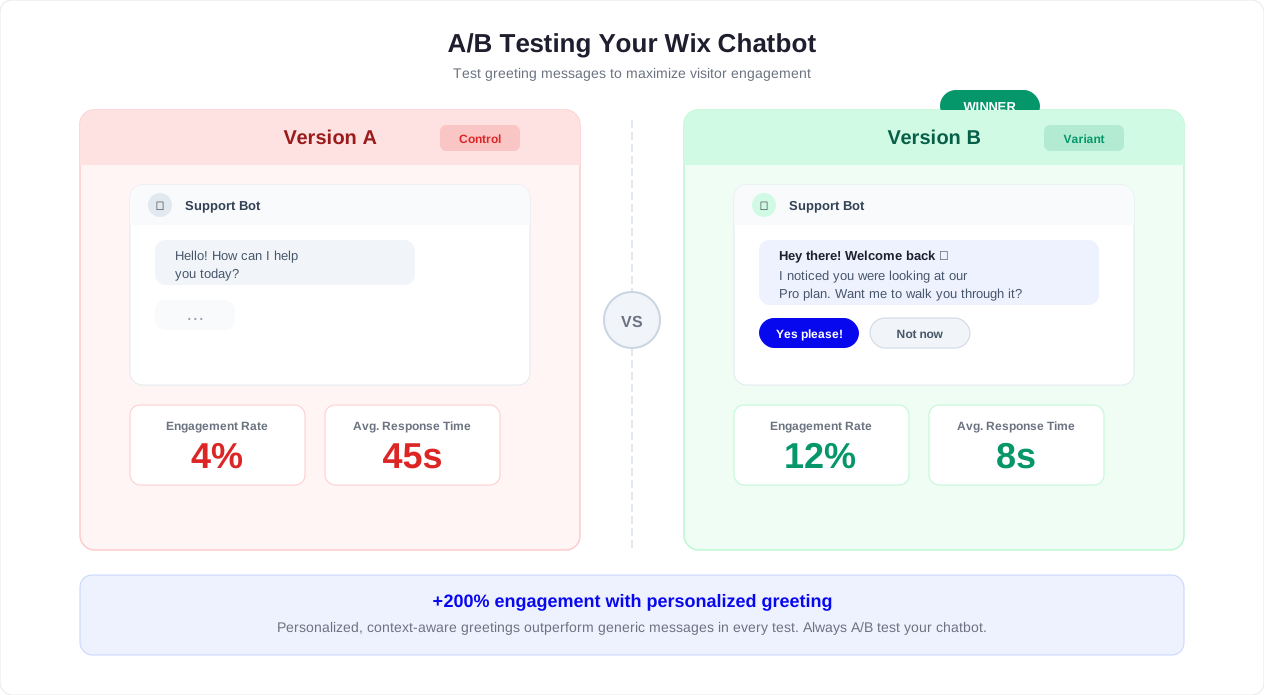
Do not guess which greeting, button layout, or flow order works best. A/B test them. Run two versions of the same chatbot and compare completion rates, lead quality, and conversion rates.
What to test:
- Opening message: Does a question-based opener ("What brings you here?") outperform a statement-based opener ("I can help with pricing, booking, or questions")?
- Number of first-choice buttons: Does 3 buttons beat 5 buttons for engagement?
- Contact timing: Does asking for email after 2 exchanges perform better than after 4 exchanges?
- Tone: Does a casual tone generate more completions than a professional tone for your audience?
Track results in chatbot analytics and let the data decide. A 15% improvement in completion rate can mean dozens of additional leads per month for a busy Wix site.
Custom CSS Styling Within Wix
Wix provides limited but useful custom CSS controls. While the Conferbot widget handles its own styling through the builder, you can fine-tune placement and spacing using Wix's custom code to ensure the chat bubble sits exactly where you want it.
Common adjustments:
- Move the bubble up if your Wix site uses a sticky footer bar.
- Adjust z-index if the bubble appears behind a Wix lightbox or pop-up.
- Hide the bubble on specific pages using CSS display rules tied to page-specific classes.
- Match the widget border radius and shadow to your Wix theme's design tokens.
Always test styling changes on mobile. Wix renders differently on mobile viewports, and a bubble that looks perfect on desktop may overlap navigation or cart buttons on smaller screens.
WhatsApp and Messenger Integration Alongside Website Chat
The website chatbot is the starting point, but many visitors prefer to continue conversations on messaging apps. After the website bot is generating leads, extend the same flows to WhatsApp and Messenger.
Practical setup:
- Add a "Continue on WhatsApp" button at the end of the website chat flow for visitors who want follow-up reminders or appointment confirmations on their phone.
- Use WhatsApp for after-hours conversations. The website bot captures the initial request, and WhatsApp delivers the follow-up when the business is ready to respond.
- For ecommerce, use Messenger for order updates and shipping notifications since many Wix store customers already have Messenger active.
- Run the same lead qualification flow across all channels so data is consistent in your CRM regardless of where the conversation started.
This omnichannel approach means the Wix website captures the first interaction, but the relationship continues wherever the customer is most responsive. See the omnichannel chatbot strategy guide for detailed workflows.
Wix Chatbot vs Wix Built-in Chat
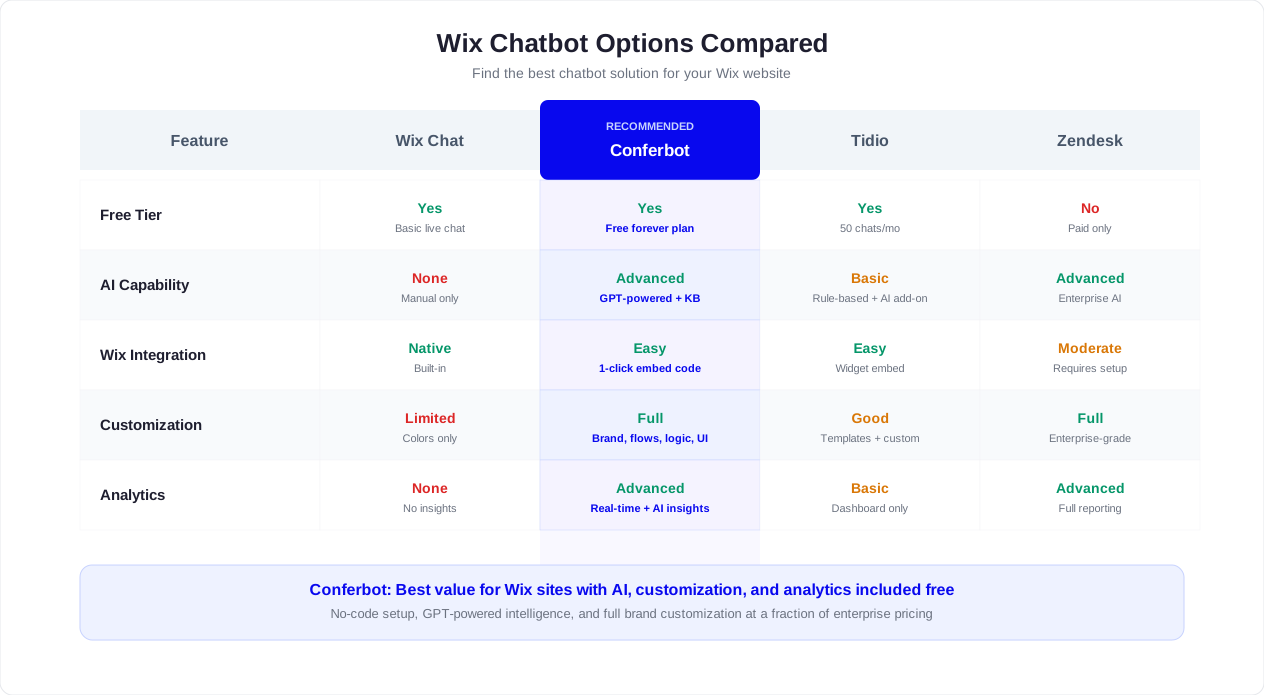
Wix offers a built-in chat feature through its native tools. It works for basic conversations, but it was not designed to automate, qualify, or scale. Understanding the differences helps you decide whether native Wix chat is enough or whether a dedicated AI chatbot for Wix delivers more value.
| Feature | Wix Built-in Chat | Dedicated AI Chatbot (Conferbot) |
|---|---|---|
| Automated responses | Limited auto-replies | Full AI-powered conversation flows with branching logic |
| 24/7 availability | Only when a human is online | Always available with AI answers and escalation |
| Lead qualification | Manual, by the person chatting | Automated scoring based on answers, budget, urgency |
| Conditional logic | Not available | Branch flows based on visitor answers, page, device, and behavior |
| Knowledge base training | Not available | Train on FAQs, policies, product data, and custom content |
| Calendar booking | Requires separate Wix Bookings setup | Built into the conversation flow |
| CRM integration | Wix CRM only | HubSpot, Salesforce, Google Sheets, Zapier, and more |
| Omnichannel | Website only | Website + WhatsApp + Messenger + Instagram + Telegram + SMS |
| Customization | Limited to Wix design controls | Full control over colors, position, avatar, tone, and behavior |
| Analytics | Basic chat metrics | Conversion tracking, completion rates, lead quality, revenue attribution |
| A/B testing | Not available | Test greetings, flows, and placement |
| Multilingual | Manual translation only | Language detection and multi-language flow routing |
| Cost | Included with Wix plan | Starts free, paid plans scale with usage and features |
When Wix Chat Is Enough
Wix's built-in chat works if you have a small site with low traffic, you are always online to respond, and you do not need automation, qualification, or analytics. A solo freelancer who handles 2-3 inquiries per week may not need more.
When You Need a Dedicated Chatbot
Switch to a dedicated chatbot platform when any of these are true:
- You receive inquiries outside business hours and cannot respond until the next day.
- You spend more than 30 minutes per day answering the same questions repeatedly.
- You need to qualify leads before they reach your calendar or inbox.
- Your conversion rate on key pages is below industry benchmarks.
- You want to run the same conversation on WhatsApp, Messenger, or other channels.
- You need analytics to understand which pages and flows generate the best leads.
The practical difference is scale. Wix chat is a communication tool. A dedicated chatbot is a conversion system. For most growing Wix businesses, the chatbot pays for itself within the first month through better lead capture, faster response times, and fewer missed opportunities. Check Conferbot pricing to compare plans.
Common Wix Chatbot Mistakes
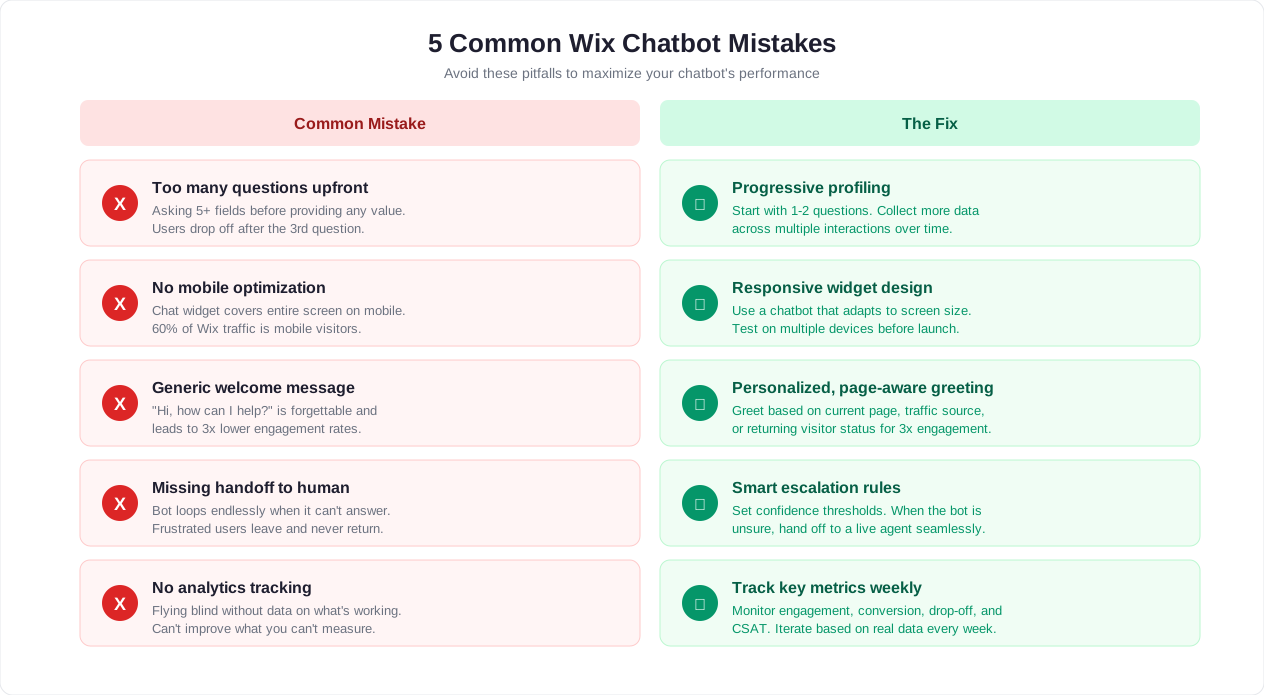
After reviewing hundreds of Wix chatbot implementations, these are the seven most common mistakes that reduce performance. Avoiding them during setup saves weeks of troubleshooting later.
1. Wrong Placement and Overlap
The chatbot bubble covers the "Add to Cart" button on mobile. Or it sits behind a cookie banner. Or it overlaps the sticky phone button that service businesses rely on. Always test placement on mobile portrait, mobile landscape, and tablet viewports. Check against every sticky element on your Wix site: navigation bars, cookie consent banners, scroll-to-top buttons, and promotional bars.
2. No Mobile Testing
According to Statista's mobile traffic data, more than 60% of Wix site traffic comes from mobile devices. Yet many businesses install the chatbot, test on desktop, and publish. Mobile testing should include: opening and closing the chat, completing a full flow, tapping buttons without accidental taps on nearby elements, and verifying that the keyboard does not push the chat window off-screen when a visitor types a message.
3. Asking Too Many Questions
A chatbot that asks 8 questions before providing value feels like a government form, not a helpful assistant. Keep qualification flows to 3-5 questions maximum. Every question must earn its place by either improving the recommendation, routing the lead better, or giving the visitor something useful in return. If you need detailed information, collect basics in the chatbot and follow up by email or phone for the rest.
4. No Fallback Response
When the chatbot cannot understand a question, what happens? The worst outcome is silence or a generic "I did not understand." A good fallback response should:
- Acknowledge the question
- Offer 2-3 alternative paths (browse FAQs, talk to a human, leave a message)
- Provide a direct contact method (email, phone, or live chat handoff)
Every unanswered question is also a content gap. Review fallback triggers weekly and add missing answers to the AI knowledge base.
5. Ignoring Analytics
Installing a chatbot and never checking performance is like running ads without looking at the dashboard. At minimum, review these metrics weekly during the first month:
- Which pages generate the most chat starts?
- Where do visitors drop off in the flow?
- What percentage of conversations result in a lead, booking, or sale?
- What are the top unanswered questions?
Use chatbot analytics to make data-driven improvements instead of guessing what visitors want.
6. Not Connecting the CRM
A chatbot that captures leads but stores them only in chat history is a leaky bucket. Every qualified lead should flow into your CRM, Google Sheet, email inbox, or project management tool within seconds. Use the integrations hub to connect the chatbot to HubSpot, Salesforce, Google Sheets, or Zapier so leads are actionable immediately.
Without CRM integration, leads go cold. A prospect who chats at 10 PM and does not hear back until 2 PM the next day has likely contacted a competitor. Automated routing and instant notifications close that gap.
7. Generic Greetings on Every Page
"Hi, how can I help you?" is the chatbot equivalent of a store greeter who says the same thing to everyone. It works, but it does not convert. A pricing page visitor needs pricing help. A blog reader needs related resources. A returning visitor needs continuity, not a fresh introduction.
Map each high-traffic page to a specific greeting and set of starting buttons. Even three distinct greetings (homepage, service pages, contact page) will outperform one generic message. See the page targeting section above for specific examples.
SEO, Performance, and UX Considerations
Adding a chatbot to Wix should not damage the page experience. Keep the widget lightweight, avoid intrusive full-screen openings, and make sure it does not cover key mobile buttons such as checkout, booking, or phone call CTAs.
- Load placement: Use the standard embed location rather than placing scripts inside visual content blocks.
- Mobile spacing: Check that the bubble does not overlap sticky footers, cookie banners, or checkout controls.
- Accessibility: Use clear button labels and avoid relying only on color to show options. Following WCAG accessibility guidelines helps ensure the chatbot is usable by visitors with disabilities.
- Indexing: Do not hide important SEO copy inside the chatbot. The bot is for conversion and support, not a replacement for crawlable page content.
- Analytics: Track starts, completions, captured leads, booked calls, and handoffs.
The chatbot should support your SEO pages by helping visitors act on the information they just read. For example, an article targeting "best wedding photographer in Dubai" should still have crawlable page content, while the chatbot helps the visitor check availability and book a consultation.
Integrations to Connect After Launch
Once the Wix chatbot is live and collecting useful conversations, connect it to the tools your business already uses. The best integrations depend on what the bot is responsible for.
| Goal | Integration | Why It Matters |
|---|---|---|
| Book appointments | Google Calendar, Calendly, calendar booking | Turns conversations into confirmed meetings |
| Manage leads | HubSpot, Salesforce, Google Sheets, Zapier | Prevents leads from staying trapped in chat history |
| Support customers | Ticketing, live chat, shared inbox | Preserves context during human handoff |
| Follow up | Email, WhatsApp, SMS | Keeps the conversation alive after the visitor leaves |
Use Conferbot's integrations hub when the chatbot needs to create records, notify teams, or trigger follow-up automation. For many Wix businesses, the first high-value integration is simple: send every qualified lead to a Google Sheet and notify the owner instantly.
Wix Chatbot Launch Checklist
Before publishing the chatbot across your Wix site, run this checklist:
- The welcome message matches the page intent.
- The bot has 3-5 clear starting options.
- Every flow has a success state: booked, submitted, answered, escalated, or routed.
- The bot asks for contact details only after giving value.
- Human handoff is available for edge cases.
- The widget is tested on mobile, tablet, and desktop.
- The bot does not overlap checkout, booking, or phone buttons.
- Analytics events are enabled.
- Internal notifications go to the right person or channel.
- The fallback response gives visitors a useful next step.
After launch, review the first 100 conversations. Look for repeated unanswered questions, drop-off points, and moments where visitors ask for a human. Those are the highest-leverage improvements.
Wix Chatbot FAQ
The most common Wix chatbot questions are about setup, cost, and whether the bot can be customized enough to match the website. The short answer: yes, as long as you use a platform that supports custom styling, page-aware messaging, and integrations beyond basic live chat.
If your goal is simple support, start with FAQs and handoff. If your goal is revenue, start with lead capture, product recommendations, appointment booking, or quote qualification. If your customers prefer messaging apps, connect the same flow to WhatsApp or Messenger after the website version is working.
Was this article helpful?
How to Add an AI Chatbot to Wix in 5 Minutes FAQ
Everything you need to know about chatbots for how to add an ai chatbot to wix in 5 minutes.
About the Author

Conferbot Team specializes in conversational AI, chatbot strategy, and customer engagement automation. With deep expertise in building AI-powered chatbots, they help businesses deliver exceptional customer experiences across every channel.
View all articles