
Why Chatbots Are the Future of Lead Generation
Traditional lead generation is broken. The average landing page converts at 2-5%, meaning 95-98% of your paid traffic leaves without giving you anything. Web forms feel like homework. Pop-ups get blocked. And gated content strategies have been declining in effectiveness since 2023 as buyers grow immune to "Download our whitepaper" CTAs.
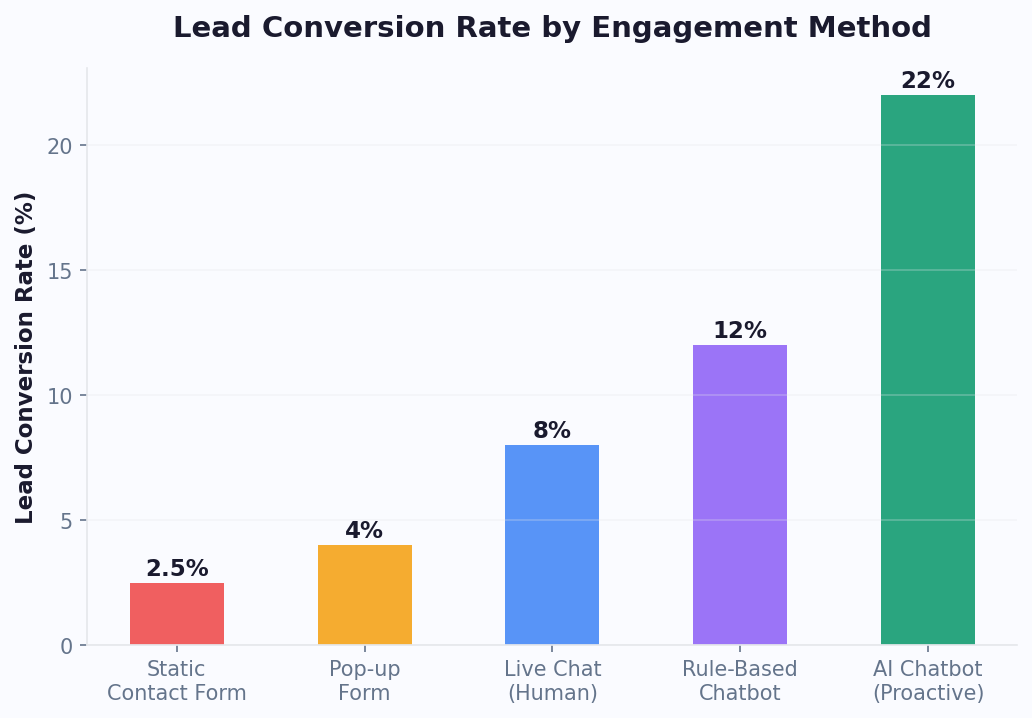
Lead generation chatbots flip the model. Instead of asking visitors to fill out a static form, a chatbot starts a conversation — and conversations convert dramatically better:
- 67% more qualified leads compared to traditional web forms (Drift Conversational Marketing Report, 2025)
- far higher conversion rate on landing pages with chatbots vs. those with forms alone
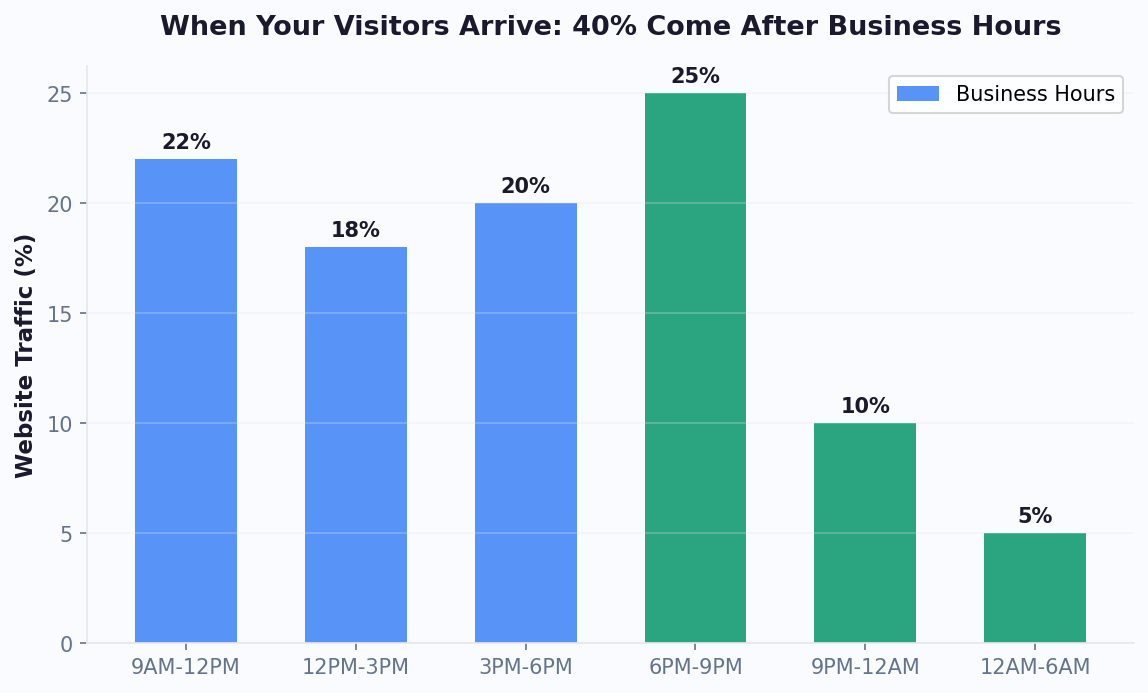
- 45% of leads captured outside business hours — times when forms collect data but nobody follows up
- 36% shorter sales cycle when leads are qualified and routed by a chatbot in real time
Why the dramatic difference? Psychology. A web form is a one-sided demand: "Give me your name, email, phone number, company size, and budget." A chatbot is a two-sided exchange: "What are you looking for? Let me help you find the right solution." The chatbot gives value (answers, recommendations, calculations) while collecting qualifying data naturally through conversation.
The business case is clear. If you're spending $5,000/month on paid traffic driving 10,000 visitors to a landing page that converts at 3%, you're getting 300 leads at $16.67 per lead. Add a lead generation chatbot and push that conversion to 9-12%, and you're getting 900-1,200 leads at $4.17-5.56 per lead. Same traffic budget, 3-4x the leads. Furthermore, research from Salesforce indicates that 69% of consumers prefer chatbots for quick communication with brands, and businesses that adopt conversational lead capture early gain a compounding advantage as their AI models learn from each interaction, improving qualification accuracy and personalization over time.
In 2026, every serious marketing team has a chatbot on their website. This guide shows you exactly how to build one that turns visitors into qualified leads.
How Lead Generation Chatbots Work
A lead generation chatbot operates at the intersection of marketing and sales. It engages website visitors, qualifies them through conversation, and routes qualified leads to your sales team or CRM. Here's the mechanics:
The Lead Gen Chatbot Funnel
- Trigger: The chatbot activates based on visitor behavior — time on page, scroll depth, exit intent, specific page visits, or UTM parameters from ad campaigns
- Engagement: An attention-grabbing opening message starts the conversation. This isn't "How can I help you?" — it's value-led: "Want to see which plan saves you the most? I can calculate it in 30 seconds."
- Qualification: Through a series of conversational questions, the bot collects qualifying data: company size, budget range, timeline, pain points, and use case
- Value Exchange: The bot provides something useful — a price estimate, a product recommendation, a custom report — in exchange for contact information
- Routing: Based on lead score, the bot either books a sales call immediately (hot leads), sends a follow-up email sequence (warm leads), or adds to a nurture list (cold leads)
What Makes Chatbots Better Than Forms
| Factor | Static Web Form | Lead Gen Chatbot |
|---|---|---|
| User experience | Transactional, impersonal | Conversational, engaging |
| Completion rate | 20-30% start, 10-15% complete | 40-60% start, 25-35% complete |
| Data quality | Often fake/incomplete data | Higher quality (conversational context reduces fake entries) |
| Qualification depth | Limited (more fields = more abandonment) | Deep (questions feel natural in conversation) |
| Personalization | One-size-fits-all | Branching logic adapts to each visitor |
| Lead scoring | Post-submission, manual | Real-time, automatic based on responses |
| Follow-up speed | Hours to days | Instant (book a call, send resources, notify sales) |
The key insight: chatbots don't just collect more leads — they collect better leads. Because the conversation is adaptive, the bot can ask follow-up questions, skip irrelevant fields, and score leads based on actual buying signals rather than just demographic data.
4 Types of Lead Generation Bots That Convert
1. Quiz & Assessment Bots
Quiz-based chatbots are among the highest-converting lead gen tools available, with completion rates of 40-60%. They work by offering personalized results in exchange for engagement:
- "Which plan is right for you?" — 5-7 questions about needs, budget, and team size, ending with a personalized recommendation
- "What's your marketing maturity score?" — Assessment that scores the visitor and suggests improvements
- "Find your ideal solution" — Product finder that narrows options based on requirements
The psychology is powerful: people love learning about themselves. A quiz feels like getting value, not giving away information. By the time the visitor reaches the results page (which requires an email to unlock), they're invested in the outcome.
2. Calculator & ROI Bots
ROI calculators are the gold standard for B2B lead generation because they directly quantify the value of your solution:
- "Calculate your chatbot ROI" — Input current support costs, volume, and resolution time. Output: projected savings with automation.
- "Pricing estimator" — Answer questions about usage to get a custom quote
- "Cost comparison tool" — Compare current spending vs. switching to your solution
Calculator bots qualify leads automatically: someone who inputs "500 support tickets/month" and "$50,000/month support budget" is a much more qualified lead than someone filling out a generic "Contact Us" form.
3. Booking & Scheduling Bots
These bots eliminate the back-and-forth of scheduling by combining qualification with calendar access:
- Ask 3-4 qualifying questions to ensure the visitor is a fit
- Show available time slots from your sales team's calendar
- Book the meeting instantly with calendar booking and a confirmation message
- Send calendar invites and reminders automatically
Companies using booking bots report 55% fewer no-shows compared to manual scheduling, because the meeting is booked in the moment of highest intent.
4. Survey & Feedback Bots
Survey bots capture leads while simultaneously gathering market intelligence:
- "Help us improve — take a 2-minute survey" — Collect product feedback and contact info simultaneously
- "What challenges are you facing?" — Identify pain points and match to solutions
- "Rate your current solution" — Identify dissatisfied prospects ready to switch
Survey bots work particularly well for competitive displacement campaigns: visitors who rate their current vendor poorly are immediately offered a personalized demo of your alternative.
Building Your First Lead Gen Bot: Step by Step
Here's how to build a high-converting lead generation chatbot using Conferbot's no-code builder in under an hour:
Step 1: Define Your Goal and Audience
Before touching the builder, answer these questions:
- What's the primary conversion action? (Book a demo, get a quote, download a resource, start a trial)
- Who are you targeting? (Define 2-3 buyer personas with their pain points and motivations)
- What value can you offer immediately? (Free assessment, custom recommendation, price estimate)
- What qualifying criteria matter? (Budget, company size, timeline, decision authority)
Step 2: Write Your Opening Hook
The first message determines whether visitors engage or ignore the bot. Effective openers are specific, value-oriented, and low-pressure:
- Good: "Curious how much you could save by automating customer support? I can estimate it in 30 seconds."
- Good: "Looking for the right chatbot plan? Answer 3 quick questions and I'll recommend the best fit."
- Bad: "Hi! How can I help you today?" (Too vague, no incentive to engage)
- Bad: "Fill out this form to get started!" (You're just a form in disguise)
Step 3: Design the Qualification Flow
Map out 4-6 qualification questions that feel conversational, not interrogative:
- Use case question: "What's your main goal?" (Support automation / Lead generation / Sales / Other)
- Scale question: "How many customer conversations does your team handle monthly?" (Under 500 / 500-2000 / 2000-10000 / 10000+)
- Timeline question: "When are you looking to get started?" (This month / Next quarter / Just exploring)
- Budget question: "What's your monthly budget range for a chatbot solution?" ($0-50 / $50-200 / $200-500 / $500+)
- Value delivery: Based on answers, provide a personalized recommendation or estimate
- Contact capture: "Want me to send the full report to your email?" + calendar booking for hot leads
Step 4: Set Up Lead Scoring
Assign point values to each answer to automatically score and segment leads:
- Hot lead (80+ points): High volume, near-term timeline, adequate budget → Route to sales for immediate follow-up
- Warm lead (50-79 points): Medium signals → Send personalized email sequence
- Cold lead (below 50): Just exploring → Add to nurture campaign
Step 5: Connect Your CRM
Push leads directly to your CRM via Conferbot's API integrations. Set up field mappings so every qualifying answer populates the right CRM field automatically.
Step 6: Deploy and Test
Add the chatbot to your highest-traffic pages first (homepage, pricing page, product pages). Test every conversation path with colleagues before going live. Monitor the first 100 conversations closely and adjust messaging based on real user behavior.
Proven Conversation Flow Templates
Don't start from scratch. Here are three proven conversation flow templates you can adapt for your business. Each has been tested across thousands of deployments and optimized for maximum conversion.
Template 1: The Quick Qualifier (B2B SaaS)
Best for: Software companies, agencies, professional services
- Hook: "See which plan fits your team in 60 seconds"
- Q1: "What's your team size?" [1-10 / 11-50 / 51-200 / 200+]
- Q2: "What's your primary use case?" [Customer support / Lead gen / Internal ops / Other]
- Q3: "How soon do you need a solution?" [ASAP / Within 3 months / Just researching]
- Result: Personalized plan recommendation with pricing
- CTA: "Want a custom demo? Pick a time that works." [Calendar embed]
This template converts at 12-18% of visitors who engage with the bot.
Template 2: The ROI Calculator (Enterprise)
Best for: High-ACV products where ROI justification matters
- Hook: "Calculate how much you could save with automation"
- Q1: "How many support tickets do you handle monthly?" [Number input]
- Q2: "What's your average cost per ticket?" [$5 / $10 / $15 / $20+]
- Q3: "What percentage are repetitive/FAQ-type questions?" [25% / 50% / 75%]
- Calculation: Display projected monthly savings, annual savings, and ROI timeline
- Gate: "Enter your email to get the full report with implementation roadmap"
- CTA: "Want to discuss these numbers with our team?" [Book a call]
ROI calculator bots achieve 20-30% email capture rates because the output feels personalized and valuable.
Template 3: The Product Finder (Ecommerce / Multi-Product)
Best for: Product-led businesses with multiple options
- Hook: "Not sure which option is right for you? Let me help."
- Q1: "What's your biggest challenge right now?" [List of 4-5 pain points]
- Q2: "What have you tried before?" [Competitor A / Competitor B / Nothing yet / DIY]
- Q3: "What matters most to you?" [Price / Features / Ease of use / Support]
- Result: Top 2-3 product recommendations with reasoning
- CTA: "Start a free trial" or "Get a personalized demo"
Product finder bots work because they mirror the experience of talking to a knowledgeable salesperson. Visitors who complete the flow are far more likely to convert than those who browse the product page alone.
Integrating With Your CRM: Zapier, HubSpot & Salesforce
A lead generation chatbot is only as valuable as the system it feeds into. Without CRM integration, leads sit in a dashboard nobody checks. With it, leads flow automatically into your sales pipeline with full context. Here's how to connect the dots:
Zapier Integration (Universal)
Conferbot's integrations hub and Zapier integration connect your chatbot to 5,000+ apps without code:
- Trigger: "New lead captured in Conferbot"
- Actions: Create contact in CRM, add to email list, notify sales on Slack, create task in project management tool
- Advanced: Use Zapier Paths to route leads differently based on score (hot leads get Slack notification + CRM entry; cold leads get email sequence only)
Setup takes 10-15 minutes. Zapier handles the data mapping and ensures every lead reaches the right destination instantly.
HubSpot Integration
For HubSpot users, the native integration is seamless:
- Contact creation: New chatbot leads automatically become HubSpot contacts with all qualifying data mapped to custom properties
- Pipeline management: Hot leads create new deals in your sales pipeline at the appropriate stage
- Workflow triggers: HubSpot workflows fire based on chatbot data (e.g., lead score > 80 triggers sales sequence)
- List segmentation: Chatbot responses feed into smart lists for targeted marketing
Salesforce Integration
Enterprise teams using Salesforce get deep integration:
- Lead/Contact creation: New records with mapped fields, including custom objects
- Lead assignment rules: Salesforce routing rules apply to chatbot-generated leads (round-robin, territory-based, etc.)
- Campaign attribution: Chatbot leads are attributed to the correct marketing campaign for ROI tracking
- Activity logging: Full chatbot conversation transcript attached to the lead record
Data Mapping Best Practices
Regardless of your CRM, follow these data mapping principles:
- Map every qualifying answer to a CRM field: Don't lose data in translation. Budget range, use case, timeline — each should have a dedicated field.
- Include the lead source: Tag all chatbot leads with source = "Chatbot" and include the specific page URL where the conversation started
- Attach the transcript: The full conversation provides context that a few form fields never could. Sales reps who read the transcript before calling close 28% more deals.
- Set up lead scoring sync: Pass the chatbot's lead score to your CRM so it contributes to your overall scoring model
With proper CRM integration via Conferbot's API, your chatbot becomes the top of a well-oiled sales funnel — no manual data entry, no leads falling through cracks, no delay between capture and follow-up.
Measuring and Improving Lead Quality
Capturing more leads means nothing if the quality drops. The real metric isn't "number of leads" — it's cost per qualified lead and lead-to-customer conversion rate. Here's how to measure and improve both:
Key Lead Quality Metrics
| Metric | What It Measures | Target Benchmark |
|---|---|---|
| Engagement Rate | % of visitors who interact with the bot | 5-15% of page visitors |
| Completion Rate | % who finish the qualification flow | 25-40% of engaged visitors |
| Lead Capture Rate | % who provide contact info | 15-30% of those who complete flow |
| SQL Rate | % of captured leads that become Sales Qualified | 30-50% |
| Lead-to-Customer Rate | % of leads that convert to paying customers | 5-15% |
| Cost Per Lead (CPL) | Total spend / total leads captured | 40-60% lower than form-based CPL |
| Cost Per Qualified Lead (CPQL) | Total spend / qualified leads only | Varies by industry |
How to Improve Lead Quality
1. Add disqualification logic. Not every lead is worth pursuing. Add branching logic that politely filters out unqualified visitors:
- If budget is "$0 — I'm looking for free," direct to self-service resources instead of sales
- If timeline is "no plans to buy," offer educational content and add to a long-term nurture list
- If company size doesn't match your ICP, suggest a more appropriate solution
2. Use progressive profiling. Don't ask everything in the first conversation. For returning visitors, skip questions they've already answered and ask new ones. Over 2-3 visits, you build a comprehensive profile without overwhelming anyone in a single session.
3. Validate data in real-time. Use email verification, phone number formatting, and company name lookup to ensure the data you collect is accurate. Conferbot supports real-time validation within flows.
4. Score based on behavior, not just demographics. A visitor who engaged with your pricing page chatbot at 2 PM on a Tuesday is likely more qualified than one who casually browsed a blog post at midnight. Factor page context, time of day, and engagement depth into your scoring model.
5. Close the feedback loop. Use analytics to track which chatbot-generated leads actually close. Feed this data back to refine your scoring model and conversation flows. The best lead gen chatbots improve every month because they learn from real conversion outcomes.
Lead Generation Chatbot ROI Model: Calculate Your Expected Returns
Before deploying a lead gen chatbot, you need a realistic ROI model that justifies the investment. According to Forrester's 2025 marketing automation research, businesses that model expected returns before deployment are far more likely to achieve positive ROI in the first quarter. Here is a framework you can apply to your specific numbers.
The Lead Gen Chatbot ROI Formula
Monthly ROI = (Additional Revenue from Chatbot Leads) - (Chatbot Cost + Opportunity Cost)
Breaking this down into measurable components:
| Variable | How to Calculate | Example (B2B SaaS) | Example (E-commerce) |
|---|---|---|---|
| Monthly website visitors | Google Analytics | 15,000 | 50,000 |
| Current form conversion rate | Leads / visitors | 3% | 2% |
| Expected chatbot conversion rate | Industry benchmark: 8-15% | 10% | 7% |
| Additional leads/month | (Chatbot rate - form rate) x visitors | 1,050 | 2,500 |
| Lead-to-customer rate | Historical close rate | 8% | 3% |
| Average customer value | LTV or first purchase | $5,000 | $85 |
| Additional monthly revenue | Extra leads x close rate x value | $420,000 | $6,375 |
| Monthly chatbot cost | Platform + integration | $199 | $99 |
| Monthly ROI | Revenue / cost | 2,110x | 64x |
Conservative vs. Optimistic Scenarios
The model above uses optimistic assumptions. Here is a more conservative view that assumes only 50% of the theoretical improvement materializes (accounting for learning curves, seasonal variation, and traffic quality):
- Conservative scenario: Chatbot adds 525 leads/month for B2B SaaS at same close rate = $210,000/month additional pipeline
- Break-even point: At $199/month cost, you need just ONE additional closed deal per quarter to achieve positive ROI on a $5,000 ACV product
HubSpot's marketing statistics confirm that conversational marketing tools (including chatbots) reduce cost per lead compared to traditional paid advertising alone. G2's chatbot category data shows that businesses with chatbot-assisted lead capture have a median 28% lower customer acquisition cost than those using forms exclusively.
For a more detailed calculation tailored to your business, use our interactive ROI calculator guide. To see how other businesses have achieved similar results, read our chatbot ROI case studies. Understanding the latest chatbot statistics also helps you benchmark against industry averages and set realistic targets.
A/B Testing Chatbot Flows for Maximum Conversion
A/B testing is how good chatbots become great ones. Small changes in wording, timing, and flow structure can move conversion rates. Here's a systematic approach to testing your lead gen chatbot:
What to Test (In Priority Order)
- Opening message (highest impact): The first message determines whether a visitor engages. Test different value propositions, tones, and CTAs. Example: "Calculate your ROI in 30 seconds" vs. "Find the right plan for your team" vs. "Got questions? I can help."
- Trigger timing: Test when the chatbot appears — immediately on page load, after 5 seconds, after 30% scroll, or on exit intent. Our data shows 5-10 second delay outperforms immediate popup.
- Number of questions: Test 3-question vs. 5-question vs. 7-question flows. Shorter flows have higher completion rates but lower lead quality. Find the sweet spot for your business.
- Question order: Lead with an easy, engaging question ("What's your biggest challenge?") vs. a direct qualifying question ("What's your budget?"). Easy-first typically wins.
- CTA wording: "Book a demo" vs. "Get your free assessment" vs. "See pricing" vs. "Talk to an expert." The right CTA depends on your audience and where they are in the buying journey.
- Button vs. free text: Buttons convert 30-40% higher than free-text inputs for most qualification questions, but free text captures richer data. Test the tradeoff.
How to Run Chatbot A/B Tests
Conferbot's analytics platform supports built-in A/B testing:
- Create a variant: Duplicate your existing flow and modify one element
- Set traffic split: Start with 50/50. For lower-traffic sites, 70/30 (control/variant) ensures your main flow still performs.
- Define your metric: Choose ONE primary metric per test — engagement rate for opening messages, completion rate for flow changes, lead capture rate for CTA tests
- Run until significant: You need at least 200-300 conversations per variant for reliable results. Don't call a test early based on small sample sizes.
- Implement the winner: Roll out the winning variant to 100% of traffic, then start the next test
Real A/B Test Results From Conferbot Users
| Test | Control | Variant | Result |
|---|---|---|---|
| Opening message | "How can I help you?" | "Want to see your estimated savings?" | +47% engagement |
| Trigger timing | Immediate popup | 8-second delay | +23% engagement |
| Question count | 7 questions | 4 questions | +35% completion, -8% SQL rate |
| CTA text | "Submit" | "Get my free report" | +31% conversion |
| Email gate | Email required for results | Results shown, email for full report | +52% completion, -12% email capture |
The compounding effect of testing is dramatic. Running one test per week over 3 months can double or triple your chatbot's conversion rate. Each incremental improvement builds on the last, creating a lead generation machine that continuously outperforms static forms.
Start with your highest-traffic page, test the opening message first (biggest lever), and work your way down the list. Within 90 days, you'll have a chatbot that captures leads at rates your marketing team didn't think were possible.
Lead Quality Scoring and Continuous Improvement
The most sophisticated lead generation chatbot deployments implement closed-loop quality scoring that continuously improves lead capture effectiveness. The process works as follows: the chatbot captures and scores leads based on qualification criteria, sales teams work those leads and report outcomes (converted, lost, unqualified), and the chatbot scoring model is adjusted based on which characteristics actually predicted conversion versus which did not.
After 3-6 months of closed-loop data, most businesses discover that their initial scoring assumptions were partially wrong - certain signals they thought indicated high intent actually did not correlate with conversion, while other signals they overlooked turned out to be strong predictors. This iterative refinement typically improves lead quality scores over six months, meaning sales teams spend progressively less time on unqualified leads and more time on prospects likely to convert.
The data also reveals optimal follow-up timing, preferred communication channels, and common objections by lead segment - intelligence that informs not just chatbot optimization but broader marketing and sales strategy. Businesses that treat their lead generation chatbot as a learning system rather than a static tool achieve compounding improvements that widen the gap between their conversion rates and those of competitors still relying on traditional lead forms.
Was this article helpful?
Build and deploy in 10 minutes. No coding needed.
Lead Generation Chatbot FAQ
Everything you need to know about chatbots for lead generation chatbot.
About the Author
The Conferbot team writes about building, deploying, and improving AI chatbots.
View all articles

