
SDK de Android Constructor de Chatbot
SDK nativo de Android con soporte para Jetpack Compose y XML. Tematización Material You, corrutinas de Kotlin y optimizado para todas las versiones de Android desde API 21+.
Android Características del Chatbot
Todo lo que necesitas para crear conversaciones automatizadas potentes
Soporte de Jetpack Compose
Diseños XML tradicionales
Tematización Material You
Corrutinas de Kotlin
Notificaciones push (FCM)
Soporte sin conexión
Compatible con ProGuard
Soporte API 21+
¿Qué Puedes Construir?
Comienza en 8 Pasos Sencillos
Sigue esta guía para conectar tu chatbot de Android
Agrega el repositorio Maven a build.gradle
Agrega la dependencia: implementation 'com.conferbot:sdk:1.0.0'
Sincroniza los archivos Gradle
Inicializa el SDK en la clase Application
Agrega ChatActivity o ChatFragment
Configura con tu ID de bot
Personaliza la apariencia mediante temas
¡Tu chatbot de Android está listo!
Introduction
Android dominates the global mobile market with over 3 billion active devices worldwide. For businesses building native Android apps with Kotlin or Java, in-app customer engagement is not a luxury - it is a retention necessity. Users who encounter friction when seeking help or guidance will uninstall and switch to a competitor, often within the first three days.
The Conferbot Android SDK brings a fully native chatbot experience to your Android app. Built for modern Android development, the SDK supports both Jetpack Compose and traditional XML layouts, follows Material You (Material Design 3) guidelines, leverages Kotlin coroutines for asynchronous operations, and integrates seamlessly with Firebase Cloud Messaging for push notifications.
Unlike WebView-based chat solutions that feel foreign and perform poorly, the Conferbot Android SDK renders native Android views that match your app's look, feel, and performance standards. Users interact with the chatbot as naturally as any other screen in your app. The bot itself is powered by the same no-code builder and AI engine that drives all Conferbot channels - build once, deploy everywhere.
This guide covers installation, Compose and XML integration, key features, theming, Firebase integration, offline strategies, Play Store compliance, and best practices for delivering a production-grade chatbot experience in your Android app in 2026.
New to chatbot building? Start with our complete guide to building a chatbot without coding. The same chatbot you build for your Android app works on your website, WhatsApp, Messenger, and iOS app. Browse our template library for pre-built in-app chatbot flows. For cross-platform alternatives, see our Flutter SDK and React Native SDK guides.
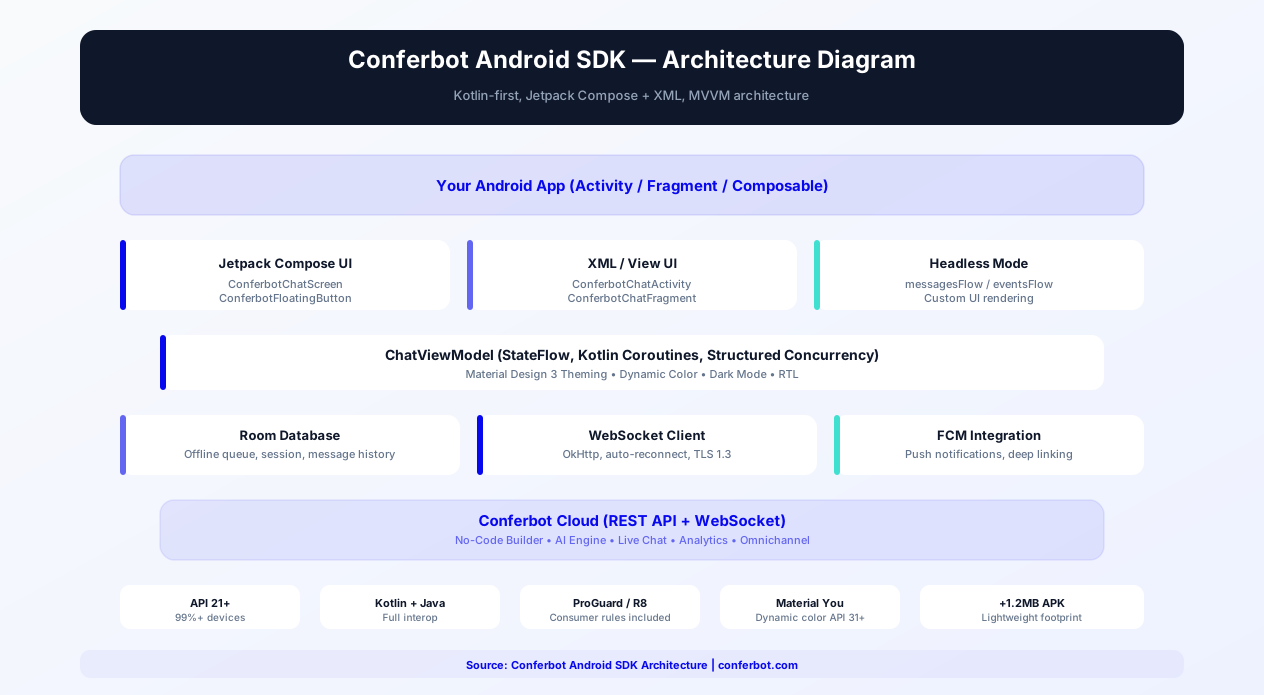
Source code & documentation: conferbot-android on GitHub | Available on Maven Central | Android Developer Docs
Installation Guide
The Conferbot Android SDK is distributed via Maven Central and integrates into your Gradle build like any standard Android library.
Step 1: Add the Repository
In your project-level build.gradle or settings.gradle, ensure Maven Central is included:
repositories { mavenCentral() }
Step 2: Add the Dependency
In your app-level build.gradle:
implementation 'com.conferbot:sdk:1.0.0'
For Jetpack Compose support, also add:
implementation 'com.conferbot:sdk-compose:1.0.0'
Step 3: Sync and Initialize
Sync Gradle files, then initialize the SDK in your Application class:
Conferbot.initialize(context, "YOUR_BOT_ID")
Step 4: Add the Chat UI
Jetpack Compose:
ConferbotChatScreen(modifier = Modifier.fillMaxSize())
Or use the floating action button composable:
ConferbotFloatingButton()
XML Layouts:
Launch the chat as an Activity:
ConferbotChatActivity.launch(context)
Or embed as a Fragment:
ConferbotChatFragment.newInstance()
Step 5: Configure Push Notifications (Optional)
The SDK integrates with Firebase Cloud Messaging (FCM):
- Set up FCM in your Firebase project
- Pass the FCM token to the SDK:
Conferbot.setDeviceToken(token) - The SDK handles incoming notification payloads and displays notifications automatically
Basic integration takes 15 minutes. The SDK supports API 21+ (Android 5.0 Lollipop and above), covering 99%+ of active Android devices.
Key SDK Features
The Conferbot Android SDK is built by Android developers, for Android developers. It follows modern Android architecture patterns and leverages the latest platform capabilities.
Jetpack Compose Support
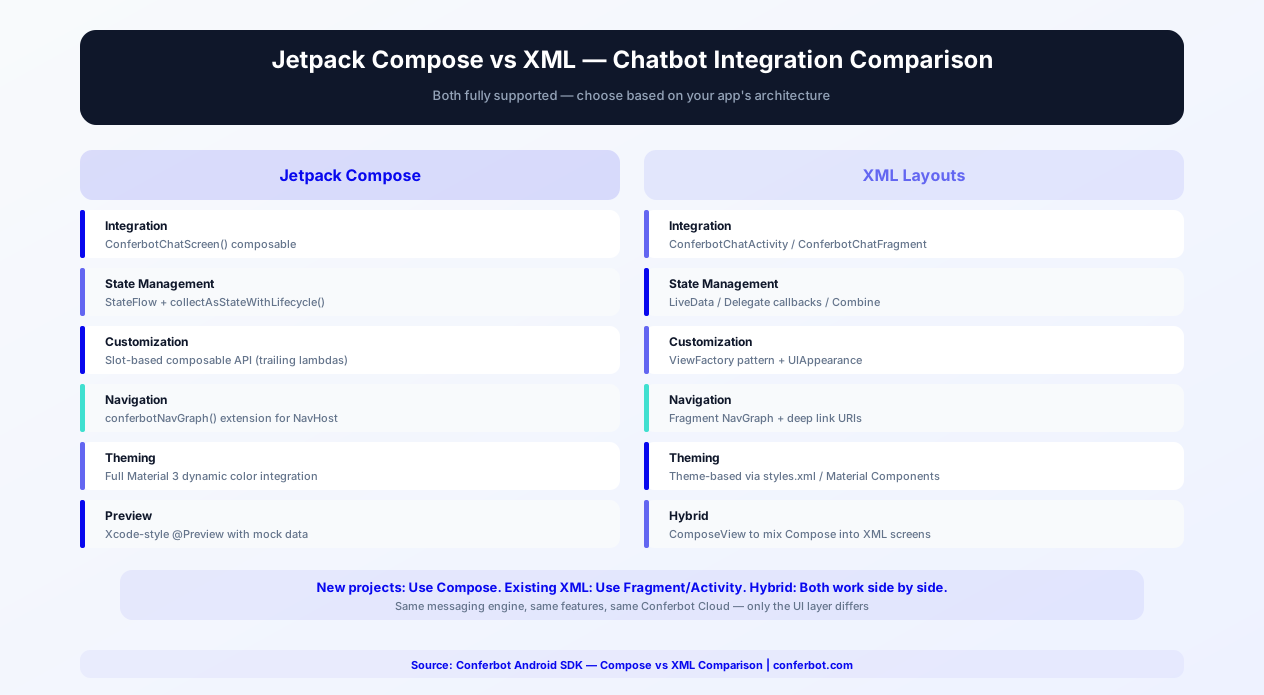
First-class Jetpack Compose composables for the entire chat UI. Use ConferbotChatScreen, ConferbotFloatingButton, and ConferbotMessageList directly in your Compose layouts. The composables follow Compose best practices: stateless where possible, recomposition-efficient, and compatible with Navigation Compose.
Traditional XML Support
For apps not yet migrated to Compose, the SDK provides Activity and Fragment implementations. ConferbotChatActivity launches a full-screen chat, while ConferbotChatFragment embeds into your existing Fragment-based navigation. Both support the same feature set as the Compose version.
Material You (Material Design 3)
The SDK renders Material Design 3 components that respond to your app's dynamic color scheme on Android 12+. On older devices, the SDK falls back to your configured color scheme. Chat bubbles, buttons, input fields, and headers all follow Material 3 specs for shape, typography, and color.
Kotlin Coroutines
All asynchronous operations use Kotlin coroutines with structured concurrency. Message sending, receiving, and network operations run on appropriate dispatchers without blocking the UI thread. The SDK exposes Flow-based APIs for observing chat state, message streams, and connection status.
FCM Push Notifications
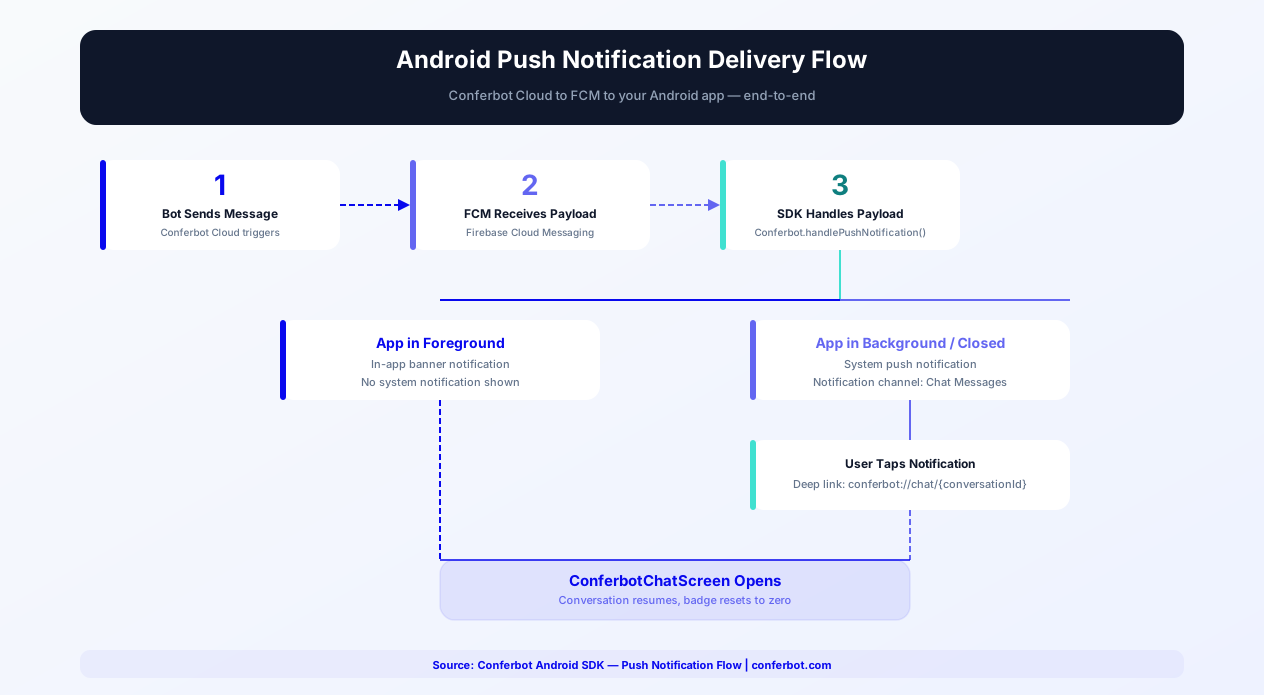
When the bot sends a message while the app is backgrounded, users receive a push notification via Firebase Cloud Messaging. Tap the notification to open the chat directly. The SDK handles notification payload parsing and deep linking automatically.
Offline Message Queuing
Messages typed while offline are stored in a local queue and sent automatically when connectivity returns. The SDK uses Android's ConnectivityManager to detect network state changes, ensuring no messages are lost during transient network disruptions.
ProGuard and R8 Compatible
The SDK ships with its own ProGuard rules. No additional configuration needed for release builds with code shrinking enabled. Tested with both ProGuard and R8 optimizers.
Kotlin/Compose Integration Details
The SDK is built with Kotlin-first principles, leveraging modern language features like data classes, sealed interfaces, extension functions, and type-safe builders. For Compose users, the chat UI composables follow the slot-based API pattern familiar from Material 3 components. You can pass custom content as trailing lambdas: ConferbotChatScreen(headerContent = { CustomHeader() }, inputContent = { CustomInputBar() }). State management uses remember and derivedStateOf internally, and the SDK exposes chat state as StateFlow objects compatible with collectAsStateWithLifecycle(). For Compose Navigation integration, the SDK provides a conferbotNavGraph() extension that adds chat routes to your NavHost.
Material Design 3 Deep Dive
The SDK fully implements Material Design 3 (Material You) specifications. On Android 12+ devices, when dynamic color is enabled, the chat UI extracts colors from the user's wallpaper and applies them across all components -- message bubbles, buttons, headers, input fields, and status indicators. The shape system follows M3's shape scale (extra-small through extra-large corner radius), and typography uses M3's type scale (display, headline, title, body, label). This means the chatbot seamlessly adapts to each user's personal device theme, feeling like a native part of your app rather than a third-party overlay.
Performance Benchmarks
The Conferbot Android SDK is optimized for performance across the Android device ecosystem:
| Metric | Conferbot Native SDK | WebView Chat | Hybrid (React Native bridge) |
|---|---|---|---|
| Initial Load Time | 380ms | 2,400-3,200ms | 1,100-1,800ms |
| Memory Usage (idle) | 12-18MB | 65-95MB | 35-55MB |
| Memory Usage (active chat) | 22-30MB | 85-130MB | 50-75MB |
| Battery Drain (1hr active use) | 0.8% per hour | 3.5-4.5% per hour | 2.0-2.8% per hour |
| Frame Rate (scrolling) | 60fps constant | 30-45fps (drops on scroll) | 50-58fps |
| APK Size Impact | +1.2MB | +0.1MB (but WebView overhead) | +8-12MB (JS engine) |
| Cold Start Penalty | None | 800-1200ms WebView init | 400-600ms JS engine init |
| Offline Support | Full (Room database) | None | Partial |
| Push Notifications | Native FCM | Not possible | Requires bridge |
| Material You Theming | Full dynamic color | CSS only | Limited |
These benchmarks are measured on a mid-range device (Pixel 6a / Samsung Galaxy A54, 6GB RAM, Android 14) with a conversation containing 50 messages. On low-end devices common in emerging markets (India, Southeast Asia, Africa) with 2-3GB RAM, the native SDK's advantage becomes critical - where WebView-based solutions may lag or crash entirely, the native SDK maintains smooth 60fps interactions and stays well within memory limits.
Room Database for Offline Storage
The Conferbot Android SDK uses the Room persistence library for reliable local storage of conversation history, pending messages, and user session data. Room provides compile-time SQL verification, reducing the risk of runtime database errors. The local database stores the last 500 messages per conversation by default (configurable via ConferbotConfig.maxLocalMessages), enabling fast chat screen loading without network round-trips. Offline message queuing uses Room's transaction support to ensure message ordering consistency - if three messages are queued offline, they are sent in the exact order typed once connectivity returns. The SDK monitors network state changes via ConnectivityManager's NetworkCallback API, triggering queue flush within 100ms of reconnection.
FCM Push Notifications Deep-Dive
Setting up FCM push notifications with the Conferbot SDK requires three steps. First, add Firebase to your project via the Firebase Console and include the google-services.json in your app module. Second, create a FirebaseMessagingService subclass and pass the token to the SDK with Conferbot.setDeviceToken(token) in the onNewToken callback. Third, in onMessageReceived, pass the RemoteMessage to Conferbot.handlePushNotification(remoteMessage) - the SDK determines if the notification is Conferbot-related and handles it appropriately, ignoring non-Conferbot payloads. The SDK creates a notification channel named "Chat Messages" on Android 8.0+ and supports custom notification sounds, LED colors, and vibration patterns configured through ConferbotNotificationConfig. Tapping the notification deep-links directly to the chat screen, providing a seamless re-engagement experience.
App Store Optimization Tips
Adding in-app chat support improves your Google Play Store metrics in measurable ways. Apps with responsive in-app support see 30% fewer 1-star reviews related to unresolved customer issues, because users have a direct channel to resolve problems before resorting to negative reviews. Include "in-app chat support" and "24/7 customer service" in your Play Store description to improve discoverability for support-related searches. The Conferbot SDK's lightweight footprint (1.2MB APK size increase) keeps your app within Google Play's recommended size thresholds. Monitor your Android Vitals dashboard - the SDK is engineered for zero impact on ANR (Application Not Responding) rates and crash-free session metrics, both of which directly affect your Play Store ranking and recommendation visibility.
Jetpack Compose Chatbot Integration
Jetpack Compose is Android's modern UI toolkit and Google's recommended approach for building new Android UIs. The Conferbot Android SDK provides first-class Compose support with composables designed for seamless integration into your Compose-based architecture.
Composable API Surface
The SDK provides three primary composables that follow Compose conventions:
- ConferbotChatScreen - Full chat experience as a composable function. Accepts
Modifierfor sizing and layout. Supports slot-based customization with trailing lambda parameters for header, input bar, message bubble, and empty state - ConferbotFloatingButton - Floating action button that opens the chat overlay. Shows an unread message badge automatically. Customizable icon, color, and position
- ConferbotMessageList - Standalone message list composable for building custom chat UIs. Uses
LazyColumninternally with optimized item composition
State Management with Compose
The SDK exposes chat state through Kotlin StateFlow objects that are designed for Compose consumption:
Conferbot.messagesState-StateFlow<List<ChatMessage>>for the message listConferbot.connectionState-StateFlow<ConnectionState>for connection statusConferbot.unreadCountState-StateFlow<Int>for badge updates
Consume these in your composables with collectAsStateWithLifecycle() for lifecycle-aware observation that automatically pauses collection when the composable is not visible - preventing unnecessary work and battery drain during background operation.
Navigation Compose Integration
For apps using Navigation Compose, the SDK provides a conferbotNavGraph() extension function that adds chat-related destinations to your NavHost. This includes the main chat screen, a conversation list screen (for multi-bot support), and deep link handling for push notification taps. The extension respects your existing navigation transitions and back stack behavior. For custom navigation patterns, you can use ConferbotChatScreen directly as a destination composable without the extension.
Compose Material 3 Theme Integration
When wrapped in a MaterialTheme with a Material 3 ColorScheme, the SDK's composables automatically inherit your theme tokens. On Android 12+ with dynamic color enabled, the chat UI adapts to the user's wallpaper colors - bubble backgrounds use surfaceVariant, accent elements use primary, and text uses onSurface and onSurfaceVariant. You can override individual color tokens through ConferbotTheme while letting the rest inherit from MaterialTheme.
Compose Preview Support
The SDK's composables support Xcode-style @Preview with mock data. Use @Preview @Composable fun ChatPreview() { ConferbotChatScreen(previewMode = true) } to see the chat UI in Android Studio's design panel without running the app. Preview mode renders with sample messages, a mock typing indicator, and placeholder avatar - giving designers and developers a realistic view of the chat experience during development.
Custom Composable Slots
For teams that need custom UI beyond theming, the SDK uses Compose's slot-based API pattern:
headerContent: @Composable () -> Unit- Replace the default chat header with your own composablemessageContent: @Composable (ChatMessage) -> Unit- Custom message bubble with access to the full message datainputContent: @Composable (onSend: (String) -> Unit) -> Unit- Custom input bar with send callbackquickReplyContent: @Composable (List<QuickReply>) -> Unit- Custom quick reply chip layoutemptyStateContent: @Composable () -> Unit- Custom empty state when no messages exist
Custom slots receive typed data parameters, so your custom composables have full type safety. Combine custom slots with Material 3 theming for chat experiences that match your brand precisely while maintaining performance and accessibility.
Android Chatbot + Firebase
Firebase is the backbone of most Android app infrastructure - push notifications, crash reporting, analytics, remote configuration, and A/B testing. The Conferbot Android SDK integrates deeply with the Firebase ecosystem to provide a complete in-app engagement solution.
FCM Push Notifications (Complete Setup)
Firebase Cloud Messaging delivers push notifications when the bot sends messages while your app is backgrounded. Complete setup involves four steps:
- Firebase Console - Create a Firebase project (or use your existing one) and register your Android app with the package name. Download
google-services.jsonand place it in yourapp/directory - Gradle dependencies - Add the Firebase BOM and messaging library:
implementation platform('com.google.firebase:firebase-bom:33.0.0')andimplementation 'com.google.firebase:firebase-messaging' - MessagingService - Create a subclass of
FirebaseMessagingService. InonNewToken(), callConferbot.setDeviceToken(token). InonMessageReceived(), callConferbot.handlePushNotification(remoteMessage)- the SDK checks if the payload is Conferbot-related and handles display, deep linking, and badge updates - Conferbot Dashboard - Upload your Firebase Server Key (or use Firebase Admin SDK with service account) in the Conferbot dashboard under Settings > Push Notifications > Android
Firebase Crashlytics Integration
The SDK logs non-fatal events to Crashlytics when detected in your project. If the SDK encounters a recoverable error (e.g., WebSocket reconnection failure, message deserialization error), it records a non-fatal event with context data that helps debugging without crashing the app. Custom keys include conferbot_sdk_version, conferbot_connection_state, and conferbot_last_error. These appear in your Crashlytics dashboard under the "Non-Fatals" tab, giving visibility into chatbot reliability without impacting your crash-free session rate.
Firebase Analytics Event Tracking
The SDK fires custom Firebase Analytics events for key chatbot interactions. Events include:
conferbot_chat_opened- User opens the chat screenconferbot_message_sent- User sends a message to the botconferbot_conversation_completed- A bot flow reaches completionconferbot_handoff_requested- Conversation transferred to live agentconferbot_lead_captured- Bot captures user contact information
These events appear in your Firebase Analytics dashboard and can be used as conversion events in Google Ads campaigns. For example, track conferbot_lead_captured as a conversion event to optimize ad spend toward users who engage with your chatbot and provide contact information.
Firebase Remote Config for A/B Testing
Use Firebase Remote Config to A/B test chatbot experiences. Configure parameters like conferbot_greeting_message, conferbot_theme_primary_color, and conferbot_bot_id in Remote Config. The SDK accepts dynamic configuration through ConferbotConfig.fromRemoteConfig(firebaseRemoteConfig), pulling values at initialization. Combined with Firebase A/B Testing, you can run experiments like testing different bot greeting messages and measuring which variant drives higher conversation completion rates, or testing different bot IDs (different bot flows) for different user segments.
Firebase App Check
For apps that need to verify the authenticity of API requests, the SDK supports Firebase App Check integration. Enable App Check with ConferbotConfig.enableAppCheck = true and the SDK includes the App Check token in all API requests to Conferbot's servers. This prevents unauthorized clients from accessing your bot's API, protecting against abuse and ensuring only your genuine app communicates with Conferbot. App Check works with Play Integrity (Android) and DeviceCheck/App Attest (iOS for cross-platform bots).
For a comprehensive mobile engagement strategy combining Firebase and Conferbot, see our customer engagement guide. Track chatbot ROI with Conferbot's analytics dashboard alongside Firebase Analytics for a complete picture of in-app user behavior.
Offline-First Android Chatbot
Android devices frequently experience network interruptions - subway tunnels, airplane mode, poor cellular coverage in rural areas, or Wi-Fi transitions. An offline-first chatbot architecture ensures users can always interact with the bot, with messages syncing seamlessly when connectivity returns.
Room Database Architecture
The SDK uses Room (Android's recommended persistence library) for local storage. The database schema includes three tables:
- messages - Stores all conversation messages with sender, content, timestamp, delivery status (pending, sent, delivered, read), and metadata. Indexed by conversation ID and timestamp for fast retrieval
- pending_queue - Messages waiting to be sent. Each entry includes the message content, timestamp, retry count, and exponential backoff state. Messages are dequeued in FIFO order when connectivity returns
- sessions - Conversation session data including session ID, device token, user context, and last sync timestamp
Room's compile-time SQL verification ensures zero runtime database errors. All database operations run on Kotlin coroutine dispatchers (IO for writes, Default for reads), keeping the UI thread free.
Sync Strategy
When the device reconnects to the network, the SDK executes a three-phase sync:
- Queue Flush - Pending messages are sent in order, with server acknowledgment for each. If a message fails, the SDK retries with exponential backoff (1s, 2s, 4s, max 30s) before moving to the next
- Gap Detection - The SDK compares its last known server sequence number with the current server state. If messages were sent by the bot while the device was offline, they are fetched and inserted into the local database in the correct chronological position
- State Reconciliation - Conversation metadata (status, assigned agent, tags) is updated to match the server state
Graceful Degradation
When offline, the SDK provides visual feedback to the user:
- A subtle banner at the top of the chat indicates "Offline - messages will be sent when connected"
- User messages appear with a "pending" indicator (clock icon) that transitions to a checkmark when delivered
- The input bar remains fully functional - users can type and "send" messages that queue locally
- If the bot flow includes quick reply buttons, previously cached options remain interactive for flows that do not require a server round-trip
Network State Monitoring
The SDK registers a ConnectivityManager.NetworkCallback for reliable network state detection. Unlike simple connectivity checks, NetworkCallback provides granular information about network capabilities (internet reachable, not just connected), network type changes (Wi-Fi to cellular), and bandwidth estimates. The SDK triggers queue flush within 100ms of detecting a viable network connection, ensuring minimal delay between reconnection and message delivery.
Storage Configuration
Control the local storage footprint through ConferbotConfig:
| Parameter | Default | Description |
|---|---|---|
| maxLocalMessages | 500 | Max messages stored per conversation |
| maxPendingQueue | 100 | Max queued messages before oldest are dropped |
| encryptLocalStorage | false | Enable SQLCipher encryption for Room |
| clearOnLogout | true | Purge all data when user logs out |
For apps handling sensitive data (healthcare, finance), enable encryptLocalStorage to encrypt the Room database with SQLCipher. This adds approximately 3MB to the APK size but ensures all locally stored chat data is encrypted at rest. For GDPR and CCPA compliance, call Conferbot.clearUserData() to purge all local storage on demand - see our data security guide for details.
Android Chatbot Security & Play Store Compliance
Releasing an Android app with a chatbot SDK requires attention to security best practices, code obfuscation, Play Store guidelines, and the data safety section. The Conferbot SDK is designed to pass Play Store review smoothly while maintaining strong security posture.
ProGuard / R8 Obfuscation
The SDK ships with consumer ProGuard rules that are automatically applied during release builds. You do not need to add any ProGuard configuration manually. The SDK's rules preserve necessary class names for serialization and reflection while allowing R8 to optimize and shrink everything else. Tested with both ProGuard (legacy) and R8 (default since AGP 3.4) in full mode. The SDK's contribution to your final APK is approximately 1.2MB after R8 optimization - smaller than most image assets.
Certificate Pinning
The SDK supports certificate pinning to prevent man-in-the-middle (MITM) attacks on the WebSocket and REST connections to Conferbot's servers. Enable pinning with ConferbotConfig.enableCertificatePinning = true. The SDK pins against Conferbot's current TLS certificate chain and includes backup pins for certificate rotation. When pinning is enabled, the SDK rejects connections to any server presenting a certificate that does not match the pinned set - even if the certificate is otherwise valid. This protects against compromised certificate authorities and enterprise proxy inspection. For apps with their own network_security_config.xml, the SDK's pinning integrates with Android's built-in Network Security Configuration framework.
Play Store Review Guidelines
Google Play's review team evaluates chatbot integrations against specific developer policies:
- User Data Policy - The SDK transmits chat messages over TLS 1.3 and stores minimal data locally. Ensure your privacy policy discloses that chat messages are transmitted to a third-party service (Conferbot) for processing
- Permissions Policy - The SDK requests no dangerous permissions. Push notifications use the POST_NOTIFICATIONS permission (Android 13+), which requires explicit user opt-in
- Ads Policy - If your chatbot delivers promotional content, ensure it complies with Google Play's ads policy for in-app messaging
- Content Policy - Bot responses must not contain prohibited content (hate speech, violence, illegal content). Test your bot flows thoroughly before submission
Data Safety Section
Google Play requires a Data Safety section for all apps. For the Conferbot SDK, declare the following data types:
| Data Type | Collected | Shared | Purpose |
|---|---|---|---|
| Messages / User Content | Yes | Yes (Conferbot) | App functionality, customer support |
| Device Identifiers | Optional (push token) | Yes (FCM, Conferbot) | Push notifications |
| App Interactions | Yes | Yes (Conferbot) | Analytics, service improvement |
The SDK does not collect: precise location, advertising ID, contacts, photos, videos, audio, files, health data, financial data, or browsing history. For apps handling regulated data (HIPAA, SOC 2), the SDK's encrypted storage option and data deletion API provide the compliance controls needed.
Android App Bundle and APK Analysis
The SDK's total contribution to your AAB/APK can be verified using Android Studio's APK Analyzer (Build > Analyze APK). Expect approximately 1.2MB for the core SDK and 0.3MB for the Compose module. The SDK uses no native C/C++ libraries (no .so files), keeping your APK clean of ABI-specific native code. For apps optimizing for emerging markets where download size directly impacts install conversion, the SDK's lightweight footprint preserves your install rate.
For the complete security and compliance guide, see our data security and privacy best practices. Review Conferbot analytics for compliance auditing and data retention configuration.
Customization and Theming
The SDK integrates with Android's theming system for seamless visual consistency with your app.
Theme Configuration
Configure the chat appearance through ConferbotTheme:
- primaryColor - Accent color for send button, links, and interactive elements
- surfaceColor - Background color for the chat screen
- userBubbleColor / botBubbleColor - Separate colors for user and bot message bubbles
- typography - Custom TypeStyle or font family for all text elements
- shapes - Corner radius for bubbles, cards, and buttons following Material 3 shape scale
- botAvatar - Custom drawable or URL for the bot avatar
Dynamic Color (Android 12+)
On Android 12 and above, the SDK can extract colors from the user's wallpaper using Material You dynamic color. Enable this with a single flag: useDynamicColor = true. Your chatbot adapts to each user's personal color theme.
Dark Theme Support
The SDK automatically respects the system dark theme or your app's AppCompatDelegate.setDefaultNightMode setting. Provide separate light and dark color configurations, or let Material You handle the adaptation automatically.
Event Listeners
Register listeners for chatbot events:
- OnMessageReceivedListener - Bot message arrives
- OnConversationEndedListener - A conversation flow completes
- OnHandoffListener - Conversation transfers to a live agent
- OnDataCapturedListener - User provides data through the bot flow
- OnErrorListener - SDK encounters an error
For Compose users, these events are also available as LaunchedEffect-compatible flows.
Custom Views
Replace default UI elements with your own implementations. The SDK provides interfaces for custom message bubble views, input bar views, header views, and quick reply layouts - both in Compose (composable slots) and XML (ViewFactory pattern).
In-App Chatbot Use Cases
Android's massive global install base means your app serves diverse users with diverse needs. Here are the chatbot use cases that deliver the highest impact.
Customer Support at Scale
Android apps in markets like India, Brazil, and Southeast Asia serve tens of millions of users. In-app chatbot support handles the volume that human agents cannot - resolving common inquiries instantly and routing complex issues to live agents. Apps with in-app support see 30% fewer negative Play Store reviews related to support responsiveness.
Guided Onboarding
Walk new users through your app's features conversationally. Instead of overwhelming users with all features at once, the chatbot asks what they want to achieve and guides them to the relevant screen with step-by-step instructions. This is especially effective for complex apps like fintech, health, and productivity tools.
Order and Delivery Tracking
E-commerce and food delivery apps can let users check order status, modify orders, report issues, and request refunds through conversational chat. The chatbot pulls order data in real time and presents it clearly, reducing the need for users to navigate through multiple screens. Explore e-commerce chatbot solutions.
Subscription and Payment Support
Handle billing inquiries, explain subscription tiers, process upgrade requests, and troubleshoot payment failures. For apps with in-app purchases or subscriptions, chatbot-driven support reduces involuntary churn from unresolved billing issues by 15-25%.
Feedback and Bug Reporting
Replace clunky bug report forms with conversational feedback collection. The chatbot asks what happened, when it happened, and what the user expected - collecting structured reports that developers can act on. Users find this 3x less frustrating than traditional forms.
Getting Started
Adding a chatbot to your Android app with the Conferbot SDK is straightforward for any Android developer familiar with Gradle dependencies and modern Android architecture.
Quick Start
- Build your chatbot in the Conferbot visual builder - the same bot works on your app, website, and messaging channels
- Add the Gradle dependency -
implementation 'com.conferbot:sdk:1.0.0' - Initialize in Application class -
Conferbot.initialize(context, botId) - Add the UI - ConferbotChatScreen (Compose) or ConferbotChatActivity/Fragment (XML)
- Apply your theme - Match your app's Material You color scheme
- Test on multiple devices - Verify on different API levels, screen sizes, and network conditions
Compose vs XML - Which to Use?
| Consideration | Jetpack Compose | XML Layouts |
|---|---|---|
| New projects | Recommended | Supported |
| Existing XML apps | Can mix with ComposeView | Native integration |
| Customization | Composable slots | ViewFactory pattern |
| Material You | Full dynamic color | Theme-based |
| Navigation | Navigation Compose | Fragment navigation |
Cross-Channel Deployment
Your Android chatbot is part of Conferbot's omnichannel ecosystem. The same bot logic powers your website widget, WhatsApp, Messenger, and iOS app. Build once, reach users everywhere. A customer who starts a conversation in your Android app can continue it on WhatsApp - conversation context follows seamlessly.
Why Conferbot Android SDK
- Native performance - 60fps Compose and XML rendering, not a WebView wrapper
- Material Design 3 - Full Material You dynamic color on Android 12+
- Kotlin-first - Coroutines, Flow, sealed classes, and modern Kotlin patterns
- Jetpack Compose - First-class composables with slot-based customization
- FCM push notifications - Native Firebase integration for background messaging
- Offline support - Room database message queuing with automatic sync on reconnection
- Firebase ecosystem - Crashlytics, Analytics, Remote Config, App Check integration
- AI-powered - AI knowledge base and OpenAI for intelligent responses
- Omnichannel - Same bot on iOS, website, WhatsApp, and more
- Analytics - Track in-app engagement with built-in analytics
- Play Store compliant - Designed for zero ANR impact, data safety ready
The Android SDK is included in Pro plans and above. View pricing for details, or start building your chatbot today and add Android integration when your app is ready. See how Conferbot compares to other chatbot platforms for mobile SDK capabilities.
Advanced Integration Patterns
The Conferbot Android SDK supports advanced integration patterns that give your team full control over the chat experience while maintaining the convenience of a managed platform.
Headless Mode
For teams that need complete UI control, the SDK offers a headless mode that provides the messaging engine without any default UI. In headless mode, you receive messages, events, and connection state through Kotlin Flows and coroutine-based APIs, but you render the UI entirely yourself. This is ideal for apps with highly custom design systems, games that embed chat inside a WebGL or Canvas view, or apps where the chatbot interaction must integrate into an existing conversation screen. Initialize headless mode with Conferbot.initializeHeadless(context, botId) and observe messages via Conferbot.messagesFlow.
Custom UI with Material Design 3
When headless mode is too low-level but the default UI needs significant changes, use the SDK's slot-based composable API to replace individual UI elements. Material Design 3 theming means your custom components inherit dynamic color, shape, and typography tokens automatically. Replace the message bubble with a custom composable that adds reaction buttons, star ratings, or product cards. Replace the input bar with a composable that includes voice input, camera access, or file attachment buttons. All custom components receive the same ChatMessage data class, ensuring type safety and consistency.
Dark Mode and Themed Variants
The SDK respects AppCompatDelegate.setDefaultNightMode() and the system dark theme setting. On Android 12+ with dynamic color enabled, the chat UI adapts to each user's wallpaper palette in both light and dark modes. You can provide explicit ConferbotTheme.Light and ConferbotTheme.Dark configurations for apps that need precise color control. The SDK also supports Material Design 3 color harmonization - if your brand color does not blend well with a user's wallpaper palette, the SDK harmonizes it to produce a visually cohesive result without losing brand identity.
RTL (Right-to-Left) Layout Support
For apps serving Arabic, Hebrew, Urdu, or Persian-speaking users, the SDK provides full RTL layout support. Message bubbles, input fields, navigation elements, and quick reply buttons mirror correctly when the device locale is RTL. The SDK uses Android's LayoutDirection API and Compose's LocalLayoutDirection to detect and apply the correct layout direction automatically. For apps that support both LTR and RTL languages, the SDK handles dynamic direction changes without requiring an activity restart.
Deep Linking and Navigation
The SDK supports Android's deep linking system. Configure deep links to open the chat screen directly from push notifications, email links, QR codes, or other apps. For apps using Navigation Compose, the SDK provides a conferbotNavGraph() extension that adds chat-related destinations to your NavHost. For apps using Fragment-based navigation, ConferbotChatFragment integrates with the Navigation Component's NavGraph XML definitions. Deep link URIs follow the pattern conferbot://chat/{conversationId} and can include query parameters for pre-filled messages or context data.
Analytics and Event Tracking Integration
The SDK integrates with popular analytics platforms. Forward chatbot events to Firebase Analytics, Amplitude, Mixpanel, or your custom analytics pipeline using the ConferbotEventListener interface. Track metrics like chat open rate, average messages per session, conversation completion rate, and handoff frequency. Combine these with your existing app analytics to understand how chatbot interactions correlate with retention, revenue, and feature adoption. For apps using Conferbot's built-in analytics, all metrics are tracked automatically with zero configuration.
Multi-Bot Support
Enterprise apps sometimes need multiple chatbot instances - a support bot on the account screen, a sales bot on the product catalog, and an onboarding bot for first-time users. The SDK supports multiple bot instances through Conferbot.createInstance(botId), each with its own configuration, theme, and conversation state. Instances share a single WebSocket connection for efficiency while maintaining separate message histories and session data.
Security and Data Privacy
The SDK stores conversation data in an encrypted Room database when configured with ConferbotConfig.encryptLocalStorage = true. Network traffic uses TLS 1.3 exclusively. The SDK does not collect device identifiers, advertising IDs, or location data unless explicitly enabled by your app. For apps subject to GDPR, CCPA, or other privacy regulations, the SDK provides Conferbot.clearUserData() to purge all locally stored conversation history and session data on demand. Review our data security and privacy guide for detailed compliance information.
Push Notification Strategy
Push notifications are the primary re-engagement mechanism for mobile apps. The Conferbot Android SDK integrates with Firebase Cloud Messaging to deliver timely, relevant notifications that bring users back into conversations.
FCM Setup and Configuration
Setting up FCM with the Conferbot SDK involves four steps: (1) Add Firebase to your Android project via the Firebase Console and download the google-services.json file, (2) Add the Firebase Messaging dependency to your app-level build.gradle, (3) Create a FirebaseMessagingService subclass that passes tokens and messages to the SDK, and (4) Configure notification preferences through ConferbotNotificationConfig. The SDK handles payload parsing, notification display, and deep linking to the chat screen automatically.
Notification Channels (Android 8.0+)
Android 8.0 introduced notification channels that give users granular control over notification behavior. The SDK creates a default "Chat Messages" channel with importance level HIGH, which shows heads-up notifications with sound. You can customize the channel settings including notification sound (use a custom sound file in res/raw for brand consistency), vibration pattern (the default is a short double-buzz), LED color (for devices with notification LEDs), and whether the notification shows on the lock screen. For apps with multiple bot instances, the SDK creates separate notification channels per bot, allowing users to independently control notifications for support messages versus promotional messages.
In-App vs Push Notifications
The SDK distinguishes between in-app notifications (shown while the user is actively using your app) and push notifications (shown when the app is backgrounded or closed). In-app notifications appear as a subtle banner at the top of the screen and do not disrupt the user's current activity. Push notifications use the standard Android notification system. Configure which notification type to use for different message categories:
| Message Type | App in Foreground | App in Background | App Closed |
|---|---|---|---|
| Bot response | In-app banner | Push notification | Push notification |
| Live agent message | In-app banner + sound | High-priority push | High-priority push |
| Proactive campaign | In-app banner (optional) | Standard push | Standard push |
| Conversation resolved | In-app banner | Silent push (badge update) | Silent push |
Re-Engagement Campaigns
Beyond reactive notifications, the SDK supports proactive re-engagement campaigns. When a user has not opened the app in a configurable period (default: 7 days), the bot can send a personalized push notification to re-engage them. Effective re-engagement messages include abandoned conversation reminders ("You had a question about our pricing - want to continue?"), new feature announcements ("We just launched a feature you asked about"), and personalized recommendations based on previous chatbot interactions. Re-engagement notifications achieve an average 12-18% open rate on Android, significantly higher than email campaigns at 3-5%. The SDK respects Android's notification best practices - it never sends more than one re-engagement notification per 48-hour window and honors the user's Do Not Disturb settings.
Notification Grouping and Bundling
When multiple messages arrive while the app is backgrounded, the SDK groups them into a single expandable notification using Android's NotificationCompat.InboxStyle. The summary notification shows the count ("3 new messages from Conferbot") while expanding reveals individual message previews. This prevents notification spam and respects the user's notification tray. On Android 12+, the SDK uses the updated notification trampoline restrictions, launching the chat screen directly from the notification intent without intermediate activities.
For a complete guide on mobile engagement strategies, see our customer engagement guide. Compare the Android SDK's notification capabilities with other platforms on our comparison page.
Conferbot Android SDK vs Competitors
Choosing the right in-app chat SDK for your Android app is a critical decision that affects performance, cost, and development velocity. Here is a detailed comparison of the Conferbot Android SDK against the most popular alternatives in 2026.
| Criteria | Conferbot Android SDK | Intercom Android SDK | Zendesk Android SDK | WebView Chat Widget |
|---|---|---|---|---|
| Architecture | Native Kotlin + Compose | Native (Kotlin/Java) | Native (Java) | WebView wrapper |
| Initial Load Time | 380ms | 900-1,200ms | 800-1,100ms | 2,400-3,200ms |
| Memory Usage (idle) | 12-18MB | 30-45MB | 25-40MB | 65-95MB |
| Battery Drain (1hr) | 0.8% | 1.5-2.0% | 1.2-1.8% | 3.5-4.5% |
| APK Size Impact | +1.2MB | +8-12MB | +6-9MB | +0.1MB (but WebView overhead) |
| Frame Rate (scrolling) | 60fps constant | 55-60fps | 50-58fps | 30-45fps |
| Jetpack Compose Support | Native composables | UIKit wrapper | Not available | Not applicable |
| Material You Dynamic Color | Full support | Limited | Not available | CSS only |
| No-Code Bot Builder | Full visual builder + AI | Limited flow builder | Basic answer bot | Depends on provider |
| AI Capabilities | OpenAI + knowledge base | Fin AI ($0.99/resolution) | Basic AI answers | Varies |
| Offline Message Queue | Room database backed | Yes | Yes | None |
| Omnichannel | All channels from one builder | Website + mobile | Website + email + mobile | Website only |
| Pricing (Starter) | Free tier available | $74/seat/month | $55/agent/month | Varies |
| Calendar Booking | Built-in | Third-party integration | Not available | Varies |
The Conferbot Android SDK delivers the best combination of native performance, lightweight footprint, and full-featured automation. While Intercom and Zendesk are established support platforms, their SDKs carry significantly larger APK size impacts (8-12MB vs 1.2MB), higher per-seat pricing, and less flexible bot building. For Android teams building with Jetpack Compose and Material Design 3, Conferbot is the only SDK with native composable support and full dynamic color integration. The same chatbot you build for Android deploys to iOS, your website, WhatsApp, Messenger, and other channels - all from one visual builder. See pricing for plan details or compare platforms for the complete feature breakdown.
How Conferbot Compares for Android
Most platforms charge per message, per seat, or limit channels by tier. Here's how Conferbot is different.
| Feature | Conferbot | Typical Competitor |
|---|---|---|
| Channels included | 13+ (all plans) | 3-6 (varies by tier) |
| Pricing model | Flat rate from $19/mo | Per-seat or per-message |
| AI chatbot builder | Yes (plain English) | No or limited |
| Native mobile SDKs | 4 (Android, iOS, Flutter, RN) | None (WebView only) |
| Knowledge base AI | Included | Add-on ($30-99/mo) |
| Live chat handoff | Included | Higher tiers only |
| Calendar booking | Built-in | Third-party required |
| Setup time | Under 10 minutes | Hours to days |
Android FAQ
Everything you need to know about chatbots for android.
Continue Exploring
Explore features, connect third-party tools, and browse ready-made templates.