
AI Knowledge Base: Auto-Generate Your Support Content From Any Source
Point Conferbot at your website, docs, or files and our AI crawls, understands, and generates a complete knowledge base automatically. Your chatbot answers customer questions accurately using your own content - no manual article writing required.
Knowledge Base On Autopilot
Import content from any source, let AI organize and optimize it, and power your chatbot with accurate, up-to-date answers.
Import content from any source
Our AI web crawler scans your website, extracts meaningful content, and ignores navigation, ads, and boilerplate. Upload PDFs, Word docs, or paste raw text. Connect existing help centers from Zendesk, Intercom, or Freshdesk for seamless migration.
AI-powered article generation
The AI doesn't just copy your content - it understands it. It restructures information into clear, well-organized articles with proper headings, summaries, related topics, and actionable steps. Duplicate content is merged, gaps are identified, and tone is standardized.
Smart categorization and tagging
AI automatically categorizes articles into logical groups, adds relevant tags, creates internal cross-links, and builds a navigable table of contents. Your knowledge base is organized from day one without manual taxonomy work.
Why AI Knowledge Base Matters
Manually creating and maintaining support content is slow, expensive, and always out of date. AI changes that.
Save 100+ Hours
Stop writing support articles manually. AI generates complete knowledge base content from your existing website, docs, and files in minutes instead of weeks.
Always Up-to-Date
Schedule automatic re-crawls to keep your knowledge base current. When your website or docs change, the AI updates articles automatically.
SEO-Optimized
AI-generated articles follow SEO best practices with proper headings, meta descriptions, internal linking, and keyword optimization for search engine visibility.
Instant Search
Built-in semantic search lets customers find answers instantly. The AI understands meaning, not just keywords, so 'how to cancel' matches 'subscription cancellation policy.'
Multi-Language
Generate knowledge base content in 50+ languages automatically. Translate your entire help center with one click while maintaining accuracy and context.
Usage Analytics
Track which articles are most viewed, which searches return no results, and where customers drop off. Use data to improve content coverage and quality.
How the AI Knowledge Base Works
From raw content to intelligent knowledge base in three steps.
Point to Your Content Sources
Enter your website URL, upload documents, or paste text. The AI web crawler automatically extracts and processes your existing content.
AI Generates Structured Articles
The AI organizes your content into searchable, categorized knowledge base articles with proper headings, formatting, and internal cross-references.
Embed in Chatbot & Publish
Connect the knowledge base to your chatbot for instant AI-powered answers. Optionally publish as a public help center for SEO traffic.
AI Knowledge Base for Every Need
From product docs to internal wikis - auto-generate any knowledge base from your existing content.
Product Documentation
Import your product specs, API docs, and user guides. AI generates searchable, categorized documentation with code examples and tutorials
FAQ Generation
Point to your website and AI identifies common questions, extracts answers from your content, and creates a comprehensive FAQ section
Policy Documentation
Upload company policies, terms of service, and compliance docs. AI creates easy-to-understand summaries and searchable policy articles
Training Materials
Convert training manuals, SOPs, and onboarding docs into interactive knowledge base content with step-by-step guides
Help Center
Build a complete customer help center from your existing support emails, chat logs, and ticket resolutions automatically
Internal Wiki
Create a searchable internal knowledge base from scattered documents, Notion pages, and Google Docs for your team
Ready to Build Your Knowledge Base on Autopilot?
Stop writing support articles manually. Let AI generate your entire knowledge base from existing content. Start free, no credit card required.
What Is an AI Knowledge Base for Chatbots?
An AI knowledge base is a system that trains your chatbot on your company's specific content - documents, FAQs, help articles, product specs, and policies - so it can answer questions accurately using your own information rather than generic responses. Unlike traditional FAQ bots that match keywords to pre-written answers, an AI knowledge base understands context, synthesizes information from multiple sources, and generates natural-language responses that directly address the user's question.
How AI KB Differs from Traditional FAQ
Traditional chatbot FAQ systems work on exact-match or keyword-match principles. If a user asks "What are your business hours?" and the FAQ contains exactly that question, it works. But if they ask "When are you open?" or "Can I visit at 6pm?" the traditional system fails. An AI knowledge base understands that all three questions are asking about the same information and draws from the relevant source to answer naturally.
The technology uses vector embeddings and retrieval-augmented generation (RAG) to find the most relevant content chunks, then uses a language model to compose a coherent answer. This means your chatbot can handle thousands of unique question phrasings without pre-programming each one - it simply needs access to the underlying information.
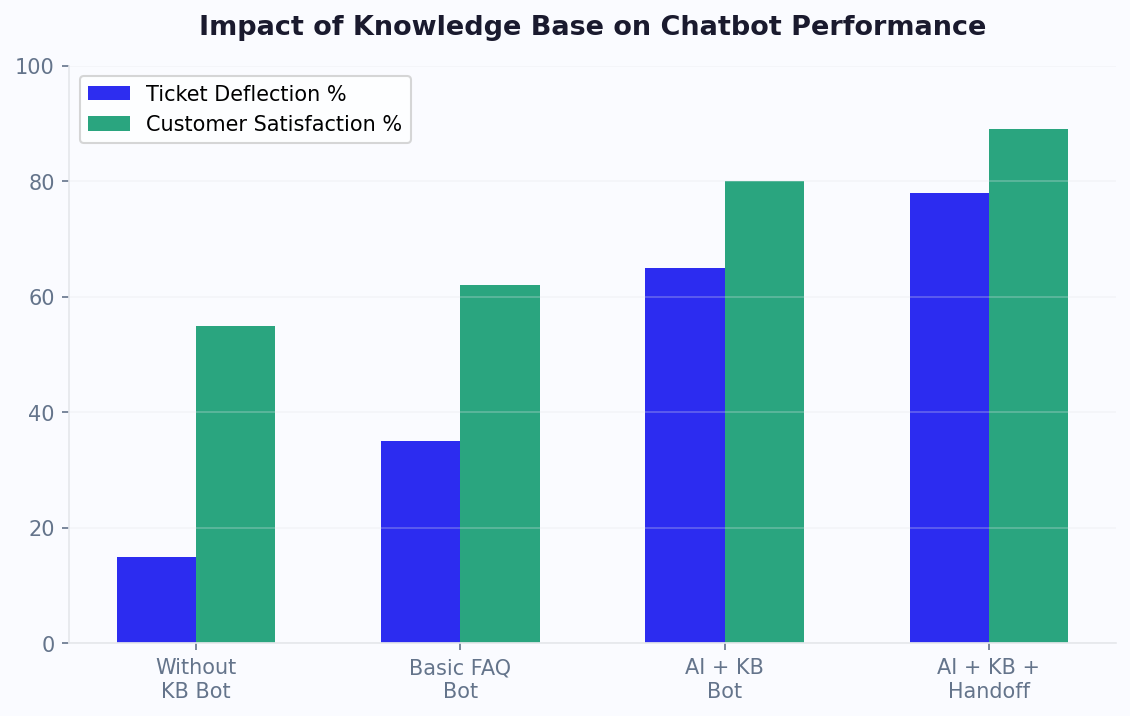
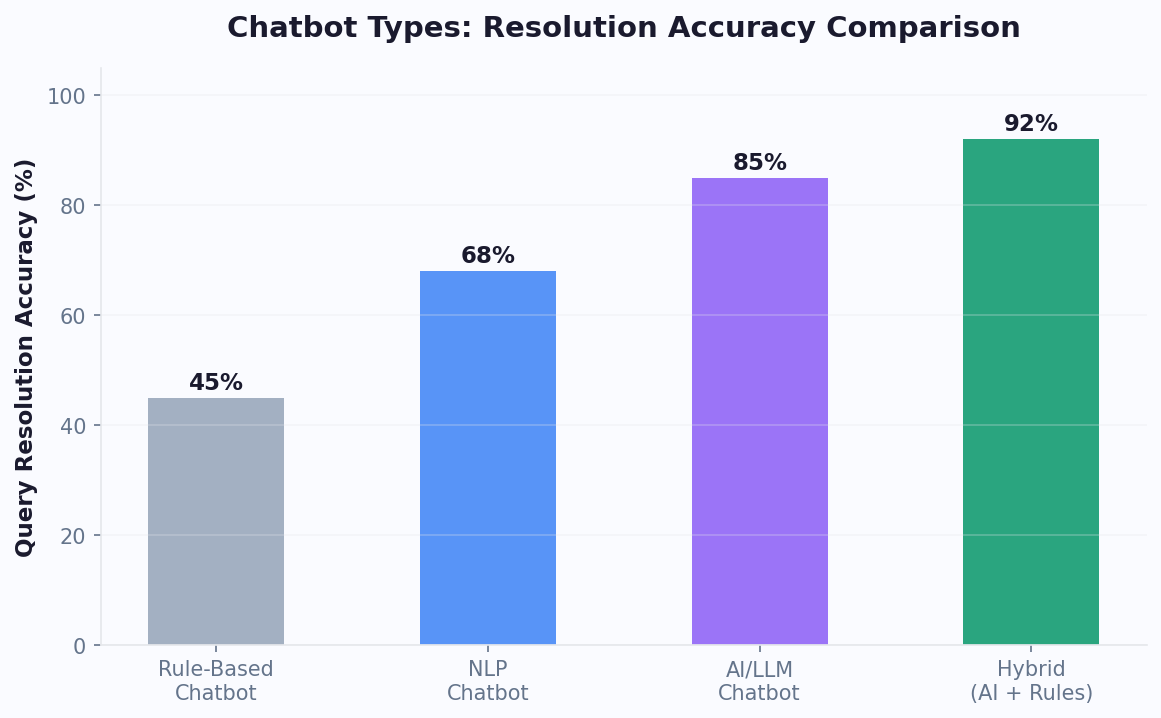
Businesses using AI knowledge bases report 85-92% question resolution rates compared to 40-55% for traditional FAQ bots. The improvement comes from the AI's ability to handle variations in phrasing, combine information from multiple sources, and gracefully handle ambiguous queries by asking clarifying questions. For implementation guidance, see our customer support chatbot guide or calculate expected impact with our ROI calculator.
How Your AI Knowledge Base Learns
Understanding how the AI knowledge base processes and learns from your content helps you provide better training material and achieve higher accuracy. The learning process involves several stages that happen automatically when you upload content.
The Processing Pipeline
Stage 1 - Ingestion: You upload documents (PDFs, web pages, text files, spreadsheets) or point the system to your existing knowledge base URL. The system extracts text content, preserving structure like headings, lists, and tables that help it understand information hierarchy.
Stage 2 - Chunking: Large documents are split into meaningful chunks (typically 200-500 words each) that represent complete thoughts or topics. The chunking algorithm respects paragraph boundaries, heading breaks, and logical content divisions to ensure each chunk is self-contained.
Stage 3 - Embedding: Each chunk is converted into a vector embedding - a mathematical representation that captures semantic meaning. Similar concepts cluster together in vector space, so "refund policy" and "return process" are recognized as related even without shared keywords.
Stage 4 - Indexing: Embeddings are stored in a vector database optimized for rapid similarity search. When a user asks a question, their query is also embedded and compared against all stored chunks to find the most relevant matches.
Stage 5 - Generation: The top-matching content chunks are passed to a language model along with the user's question. The model synthesizes a natural-language answer that draws directly from your content, citing sources when appropriate.
Continuous Learning
The knowledge base improves over time through:
- New content additions: Upload updated docs and the system automatically re-indexes
- Feedback loops: When users rate answers as helpful or unhelpful, the system adjusts relevance scoring
- Gap identification: Questions the system cannot answer well are flagged for content creation
- Usage patterns: Frequently asked topics get prioritized in retrieval ranking
The entire process is invisible to end users - they simply ask questions in natural language and receive accurate, contextual answers drawn from your specific content. Build your knowledge base alongside the AI chatbot builder for a complete conversational AI solution.
What to Upload: Content Types and Priority
The quality of your AI knowledge base directly depends on the quality and comprehensiveness of the content you feed it. Here is a prioritized guide to what content to upload and in what order for maximum impact.
Content Priority Matrix
| Content Type | Priority | Impact on Resolution | Best Format |
|---|---|---|---|
| FAQ/Help articles | Highest | +30-40% resolution | Structured Q&A format |
| Product documentation | High | +20-25% resolution | PDF/web pages with headings |
| Policies (shipping, returns, privacy) | High | +15-20% resolution | Plain text with clear sections |
| Pricing/plan details | High | +10-15% resolution | Tables and comparison data |
| Blog posts/guides | Medium | +5-10% resolution | URLs for web scraping |
| Past chat transcripts | Medium | +5-8% resolution | CSV export from support tools |
| Training manuals | Lower | +3-5% resolution | PDF documents |
Content Formatting Tips
- Use clear headings: The AI uses heading structure to understand topic boundaries. Well-structured content with H2/H3 headings processes more accurately.
- Write in Q&A format where possible: "Q: How do I return an item? A: You can initiate a return within 30 days..." format trains the AI to match questions to answers precisely.
- Include specific data: Prices, dates, dimensions, and policies should be explicit. Avoid vague references like "competitive pricing" - the AI cannot infer specifics.
- Keep content current: Outdated information in the KB leads to wrong answers. Set a monthly review schedule to catch stale content.
Start with your top 20 most-asked support questions and their answers. This alone will resolve 40-50% of incoming queries. Then progressively expand. Connect your knowledge base to your live chat system so that unresolved questions are flagged as KB gaps for content creation.
Accuracy Benchmarks: What to Expect
Setting realistic accuracy expectations helps you evaluate your AI knowledge base performance objectively. Here are benchmarks based on data from thousands of Conferbot deployments across different content volumes and industries.
Accuracy by Content Volume
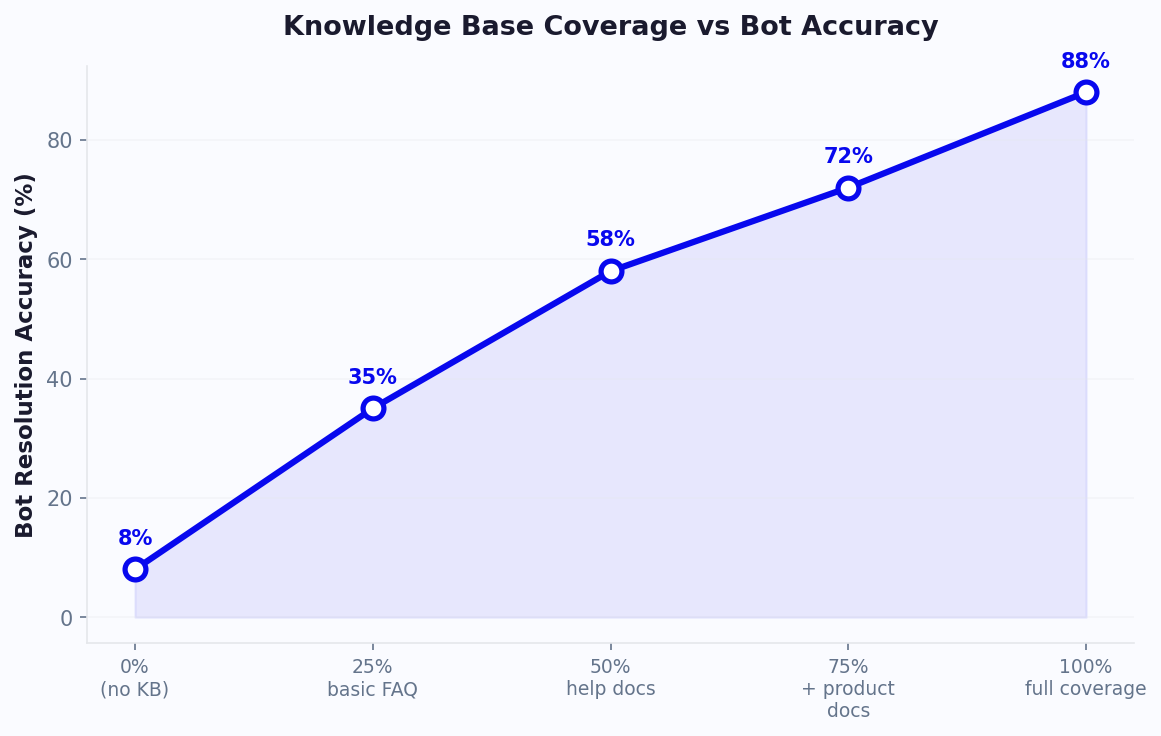
- 10-20 FAQ entries: 55-65% question resolution rate. The KB handles common questions well but struggles with anything not directly covered.
- 50-100 FAQ entries + product docs: 70-78% resolution rate. Most routine queries are handled accurately.
- 200+ articles + full documentation: 82-90% resolution rate. The KB becomes comprehensive enough to handle edge cases and multi-part questions.
- 500+ articles + past transcripts: 88-95% resolution rate. Near-human accuracy for most queries with graceful handling of ambiguity.
Accuracy Factors
Several factors influence KB accuracy beyond raw content volume:
Content quality: Well-written, specific, and structured content produces 15-20% higher accuracy than poorly formatted or vague content. Investing time in content quality pays off in fewer unresolved queries.
Domain specificity: KBs focused on a single product or domain achieve 10-15% higher accuracy than those covering multiple unrelated topics, because the AI has clearer context about what information is relevant.
Update frequency: KBs updated weekly maintain 5-8% higher accuracy than those updated monthly, because stale information leads to wrong answers that damage user trust.
Feedback incorporation: KBs that use thumbs-up/thumbs-down feedback to refine answers improve accuracy by 1-2% per week on average, compounding to significant gains over months.
Monitor accuracy in your analytics dashboard through the "Resolution Rate" and "Confidence Score Distribution" reports. Target steady improvement of 2-3% per month through content additions and refinement. For businesses wanting to maximize KB performance, our Business plan includes advanced analytics showing exactly which topics need more content coverage.
Training Best Practices for Maximum Accuracy
Training your AI knowledge base is an ongoing process, not a one-time setup. Teams that follow systematic training practices achieve 20-30% higher accuracy than those who upload content once and forget about it. Here are the proven practices that maximize KB performance.
Content Writing for AI
Be explicit, not implicit: Do not assume the AI will infer information. If your return window is 30 days, state "Our return window is 30 days from the date of delivery" - not "We have a generous return policy."
Cover variations: People ask the same question in many ways. Including alternative phrasings in your content helps the AI match better. Write naturally and include synonyms (refund/return/money back, shipping/delivery/dispatch).
Use examples: Including concrete examples helps the AI provide better answers. "For example, if you ordered on January 1st, you can return until January 31st" gives the AI a template for generating specific responses.
Structure with headings: Clear heading hierarchy (H2 for topics, H3 for subtopics) helps the chunking algorithm preserve logical content units. Each section under a heading should be self-contained.
Systematic Training Workflow
- Week 1: Upload core FAQ (top 20 questions), product/service descriptions, and key policies. Test with 50+ sample questions. Identify gaps.
- Week 2: Fill identified gaps with new content. Add pricing details, comparison information, and edge cases. Retest.
- Week 3: Review unresolved conversations from the first two weeks. Create content addressing recurring unanswered topics.
- Week 4: Analyze confidence score distribution. Questions with confidence scores of 50-70% often need better content coverage (the AI found something relevant but is not sure). Review and strengthen these areas.
- Ongoing: Weekly review of "low confidence" queries and "thumbs down" ratings. Monthly review of topic coverage against actual question distribution.
Common Training Mistakes
- Uploading marketing copy instead of factual content (the AI needs facts, not superlatives)
- Neglecting to update content when products/policies change
- Not including negative information ("We do NOT support X") - users ask about limitations too
For ongoing KB management, establish a content owner who reviews analytics weekly and publishes updates. Integrate with your ticketing system to automatically flag unresolved topics as content creation tasks.
Knowledge Base Maintenance Schedule
An AI knowledge base requires regular maintenance to stay accurate and comprehensive. Stale content leads to wrong answers, eroding user trust and increasing escalation rates. Here is a maintenance schedule that keeps your KB performing at peak accuracy with manageable time investment.
Maintenance Calendar
Daily (5 minutes): Check the "Unresolved Queries" report in your analytics dashboard. Star any questions that represent genuine content gaps (vs. irrelevant spam or out-of-scope queries). This takes just a quick scan to identify priority content needs.
Weekly (30 minutes): Review the week's low-confidence answers and negative feedback. Create or update 3-5 KB articles addressing the most common gaps. Check if any product/policy changes from the week need to be reflected in existing content.
Monthly (2 hours): Run a comprehensive content audit. Check all articles for accuracy against current product state. Review the topic distribution report - are there emerging question categories not well covered? Update pricing, feature lists, and time-sensitive information. Archive outdated content that references discontinued products or old policies.
Quarterly (half-day): Strategic review. Analyze resolution rate trends over 90 days. Identify which content investments had the biggest impact. Plan next quarter's content roadmap based on predicted product changes and seasonal patterns. Benchmark accuracy against industry standards.
Automation Opportunities
- Auto-flag stale content: Set rules to flag articles not reviewed in 60+ days for manual check
- Gap detection alerts: Configure notifications when the same unanswered topic appears 5+ times in a week
- Source monitoring: If your KB syncs from web pages, set up change detection to alert when source pages are updated
- Performance degradation alerts: Notify when any topic's resolution rate drops more than 10% week-over-week
The maintenance investment pays off directly in resolution rate. Teams following this schedule maintain 85-92% resolution rates consistently, while neglected KBs degrade to 60-70% within 3-4 months as products evolve and content becomes outdated. Pair your KB with the AI chatbot builder for a complete solution that stays accurate over time.
AI Knowledge Base vs Traditional FAQ Bot
The difference between an AI knowledge base and a traditional FAQ bot is the difference between talking to a knowledgeable colleague and browsing a phone book. Both can help you find information, but the experience and effectiveness are dramatically different.
Comparison Table
| Capability | AI Knowledge Base | Traditional FAQ Bot |
|---|---|---|
| Question understanding | Semantic (understands meaning) | Keyword matching |
| Handling paraphrases | Handles infinite variations | Only pre-programmed phrasings |
| Multi-part questions | Combines info from multiple sources | One question → one answer |
| Follow-up handling | Maintains context across turns | Each question is independent |
| Maintenance effort | Upload docs, AI handles the rest | Program each Q&A pair manually |
| Resolution rate | 82-92% | 40-55% |
| Scaling effort | Add more docs | Program more Q&A pairs |
Real-World Performance Gap
In head-to-head tests with 1,000 user questions across multiple industries, AI knowledge bases resolved 84% of queries correctly compared to 47% for keyword-matching FAQ bots. The gap is largest for complex queries (questions containing multiple topics, conditional questions like "Can I return a sale item if I lost the receipt?", and questions using non-standard phrasing).
The maintenance advantage is equally significant. Adding coverage for a new topic in a traditional FAQ bot requires writing 5-15 question variations manually. With an AI KB, you upload a single article explaining the topic, and the AI handles all possible phrasings automatically. This makes it 10x faster to expand coverage and keep the bot current.
For businesses currently running traditional FAQ bots, migrating to an AI knowledge base typically produces a 30-40% improvement in resolution rate within the first week, with continued improvement as feedback refines relevance scoring. Explore Conferbot's AI knowledge base to see the difference, or read about integrating it with live chat for a complete hybrid support system.
Measuring Knowledge Base Performance
Effective KB measurement goes beyond simple accuracy percentages. A comprehensive measurement framework tracks content coverage, retrieval quality, answer accuracy, and user satisfaction to identify specific improvement opportunities.
Key KB Metrics
- Coverage Rate: What percentage of incoming questions does your KB have relevant content for? Target: 85%+. Measured by tracking questions where the system returns "no relevant content found." Low coverage means you need more content on more topics.
- Retrieval Precision: When the system finds content, how often is it the right content? Target: 90%+. Measured by sampling queries and manually checking whether retrieved chunks are actually relevant. Low precision means your content is ambiguous or overlapping.
- Answer Accuracy: When the system generates an answer, how often is it factually correct? Target: 95%+. Measured through user feedback (thumbs up/down) and periodic manual review. Low accuracy means content is outdated or the model is hallucinating.
- Resolution Without Escalation: What percentage of KB-powered conversations are resolved without needing a human? Target: 70-80%. This is the ultimate business impact metric.
- User Satisfaction: CSAT for KB-powered answers specifically. Target: 4.0+/5. Low satisfaction despite high accuracy may indicate tone issues or insufficient detail.
Diagnostic Framework
When KB performance is below target, use this diagnostic tree:
- Low coverage + relevant content exists → Chunking or embedding issue (content is there but not retrieved)
- Low coverage + no content → Content gap (need to create new articles)
- Good retrieval + bad answers → Generation issue (model misinterpreting content or hallucinating)
- Good answers + low satisfaction → Tone, formatting, or completeness issue
Track these metrics weekly in your Conferbot analytics dashboard. The "Knowledge Base Health" report provides all five metrics in a single view with trend lines and automated recommendations. For maximum impact, correlate KB improvements with support cost reduction using our ROI calculator.
Getting Started: Your First AI Knowledge Base
Building your first AI knowledge base is simpler than you might expect. Follow this quick-start guide to go from zero to a functional KB-powered chatbot in under an hour.
30-Minute Setup Guide
Minutes 1-5: Gather Content. Collect your top 20 most-asked customer questions and their answers. If you have a help center or FAQ page, export it. If you have support email templates, gather those. This is your seed content.
Minutes 5-10: Upload to Conferbot. Navigate to your chatbot's Knowledge Base section. Upload files (PDF, DOCX, TXT) or paste URL links to web pages. Conferbot automatically extracts, chunks, and indexes the content.
Minutes 10-20: Test and Refine. Use the testing interface to ask questions as your customers would. Note which questions get good answers, which get partial answers, and which fail. For partial answers, check if the source content needs more detail.
Minutes 20-25: Fill Critical Gaps. For the questions that failed, quickly write or paste the relevant content. Often the answer exists in your head or in internal docs but was not included in the initial upload.
Minutes 25-30: Deploy. Connect the KB to your chatbot (or create a new bot with the AI builder that uses the KB for answers). Deploy to your website, WhatsApp, or other channels.
First-Week Growth Plan
- Day 1-2: Monitor conversations. Let the KB handle real questions and gather data.
- Day 3: Review unresolved queries. Add content for the top 5 unanswered topics.
- Day 4-5: Expand content depth. Add product documentation and policy pages.
- Day 6-7: Review accuracy feedback. Fix any wrong answers by updating source content.
Integration Points
Your KB becomes more powerful when integrated with other Conferbot features:
- Live Chat - KB answers as agent suggestions during human conversations
- Analytics - Track which KB topics get the most queries and lowest satisfaction
- Integrations - Pull dynamic data from CRM/databases into KB answers
- Ticketing - Auto-create tickets for queries the KB cannot resolve
Start simple, measure results, and expand systematically. Most businesses see 50-60% resolution rate in week one, growing to 80%+ within a month as content is refined. Check pricing plans for KB storage limits and features at each tier.
AI Knowledge Base FAQ
Everything you need to know about auto-generating knowledge bases with AI.
Continue Exploring
Explore features, connect third-party tools, and browse ready-made templates.