
Best Practices 1-5: Conversation Design That Keeps Users Engaged
1. Lead with Value, Not Questions
Most chatbots open with "Hi, how can I help you?" — a question that puts the burden on the visitor to articulate their need. High-converting chatbots flip this: they lead with value based on context. On a pricing page: "I can help you pick the right plan — want a quick comparison?" On a product page: "This product pairs well with [X]. Want to see the bundle deal?" Context-aware greetings convert 3-5x better than generic ones because they demonstrate the bot already understands the visitor's intent.
2. One Question at a Time, Always
Sending multiple questions in a single message overwhelms users and tanks completion rates. Instead of "What's your name, email, and company?" send three separate messages. Each should feel like a natural turn in a conversation, not a form field. Data from chatbot analytics dashboards consistently shows that single-question messages achieve 40-60% higher completion rates than multi-question blocks.
3. Keep Messages Under 60 Words
On mobile (60%+ of traffic), long messages scroll off-screen and users lose context. The optimal message length is 20-40 words — enough to be helpful, short enough to read in a glance. If you need to convey more information, break it into multiple sequential messages with a slight delay between each. This mimics natural conversation rhythm and maintains engagement.
4. Use Quick-Reply Buttons Over Open Text
Whenever possible, offer tappable buttons instead of asking users to type. "Are you looking for personal or business use?" with two buttons eliminates typing friction, reduces errors, and speeds up the conversation. Reserve open text fields for genuinely unique inputs like names, emails, or specific descriptions. A well-designed bot built in the Conferbot AI builder uses buttons for 70% of interactions and text input for only the 30% that requires it.
5. Mirror Your Brand Voice Consistently
Your chatbot's tone should be indistinguishable from your brand's other communication. If your marketing is casual and playful, your bot should be too. If your brand is professional and precise, drop the emojis and exclamation marks. Create a simple voice guide for your chatbot: list 5 words that describe your tone (e.g., "friendly, direct, knowledgeable, casual, encouraging") and 5 words that do not (e.g., "formal, stiff, salesy, robotic, vague"). Apply this consistently across all bot messages.
Best Practices 6-9: AI Training and Knowledge Management
6. Train on Real Customer Data, Not Assumptions
The biggest mistake in chatbot training is writing responses based on what you think customers ask instead of what they actually ask. Before building a single flow, audit your existing support channels: pull the top 50 questions from email, phone logs, help desk tickets, and social DMs. These real questions become your chatbot's foundation. Upload this data directly to your AI knowledge base for the most accurate training.
7. Upload Everything to Your Knowledge Base
The more context your AI chatbot has, the better it answers. Feed it everything:
- Your entire website (URL crawl)
- Product documentation and spec sheets
- Help center articles and FAQs
- Return/refund policies
- Pricing pages and comparison charts
- Past conversation transcripts (anonymized)
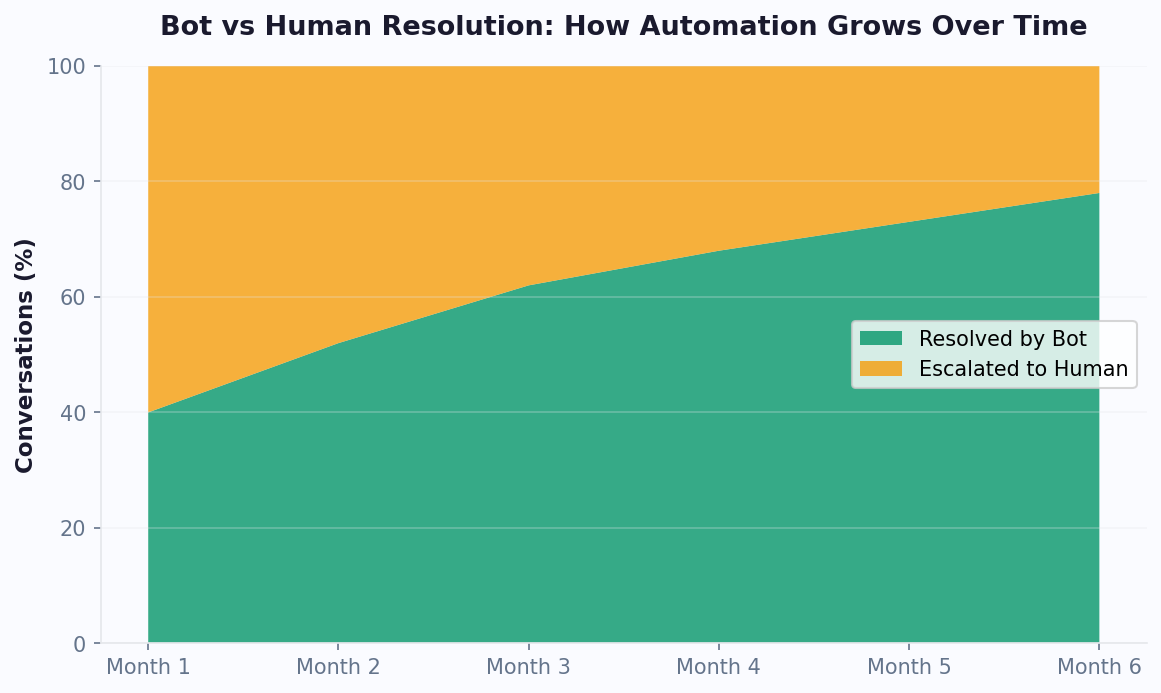
Platforms like Conferbot let you train your chatbot on business data by uploading URLs and documents. The AI indexes this content and uses it to answer questions accurately. The difference between a bot trained on 5 FAQ answers and one trained on 200 pages of documentation is dramatic — containment rates jump from 30% to 70%+.
8. Review and Retrain Weekly
Your chatbot's knowledge should evolve continuously. Set a weekly 30-minute review cadence:
| Weekly Task | Time | Expected Outcome |
|---|---|---|
| Review unanswered questions in analytics | 10 min | Identify knowledge gaps |
| Add answers for top 5 new questions | 10 min | Expand coverage by 2-3% weekly |
| Review low-rated conversations | 5 min | Fix confusing or incorrect responses |
| Check drop-off points in flows | 5 min | Remove friction from key paths |
After 90 days of weekly retraining, most chatbots reach their optimal performance plateau — 70-80% containment with 85%+ satisfaction scores. This ongoing optimization is what separates chatbots that deliver ROI from those that gather dust. Track everything in your chatbot analytics dashboard.
9. Set Confidence Thresholds for AI Responses
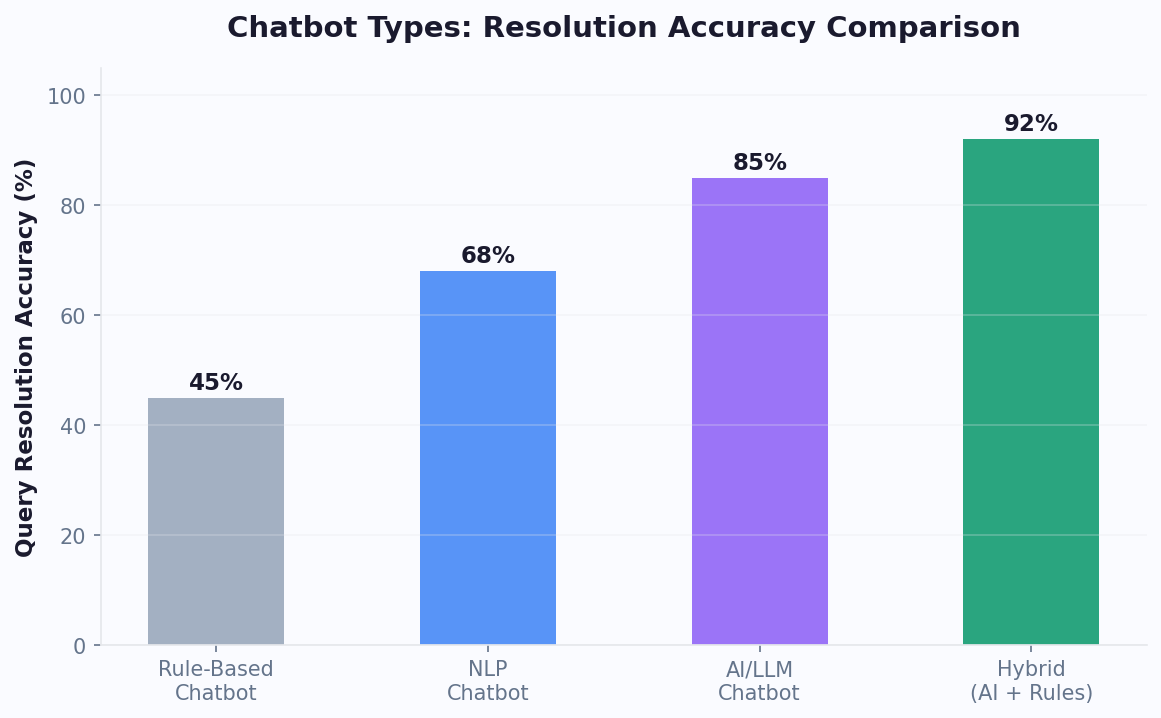
Not all AI-generated answers are equal. Configure your chatbot to only deliver autonomous answers when confidence is above 85%. For medium-confidence answers (60-85%), add a qualifier: "Based on our documentation, I believe the answer is [X]. Would you like me to confirm with a team member?" For low-confidence queries (below 60%), route directly to a live agent. This prevents the bot from confidently delivering wrong answers — the fastest way to destroy user trust.
Best Practices 10-13: Personalization and Contextual Intelligence
10. Use Page Context to Personalize Every Interaction
A visitor on your pricing page has different intent than one on your blog. Your chatbot should recognize this and adapt automatically. Here is how to configure page-aware behavior:
| Page Type | Visitor Intent | Bot Behavior | Conversion Goal |
|---|---|---|---|
| Homepage | Exploring, general interest | Offer guided tour of key features | Feature page visit |
| Pricing page | Evaluating, comparing options | Offer plan comparison or custom quote | Trial signup or demo booking |
| Product/feature page | Researching specific capability | Highlight use cases, offer demo | Demo or trial |
| Blog post | Learning, top of funnel | Offer related content or lead magnet | Email capture |
| Help center | Needs support | Ask about issue, attempt resolution | Ticket deflection |
| Checkout | Ready to buy, possible objections | Answer last-minute questions | Purchase completion |
Implement this in your chatbot builder using URL-based conditional triggers. Each page type gets a different greeting, different flow, and different call-to-action.
11. Remember Returning Visitors
A returning visitor should never get the same generic greeting as a first-time visitor. Use cookies or authenticated user data to personalize:
- Second visit: "Welcome back! You were looking at [product/page] last time. Want to pick up where you left off?"
- Post-purchase: "Hi [Name]! Need help with your recent order, or looking for something new?"
- Returning lead: "Hey [Name], did you have a chance to review the proposal I sent? Happy to answer any questions."
This level of personalization transforms the chatbot from a generic tool into a personal assistant that builds relationship continuity.
12. Segment and Route Based on User Attributes
Not all visitors deserve the same experience — and that is not elitism, it is efficiency. Route conversations based on attributes:
- Enterprise visitors (company domain recognition): Route to enterprise sales team
- Existing customers (logged in): Route to support, skip sales qualification
- High-intent signals (pricing page + 3rd visit): Priority routing to top closer
- Language detection: Auto-route to agents who speak the visitor's language
This routing intelligence ensures every visitor gets the most relevant experience. Configure routing rules in your integrations hub connected to your CRM data.
13. Use Dynamic Variables in Messages
Static messages feel robotic. Dynamic variables make conversations personal and contextual. Replace "Check out our product" with "Check out [product name they viewed]." Replace "Our plans start at $X" with "Based on your team size of [captured value], the [specific plan] would be the best fit at $X/month." Every modern chatbot builder supports dynamic variable insertion. Use it aggressively.
Best Practices 14-16: Human Handoff and Escalation Protocols
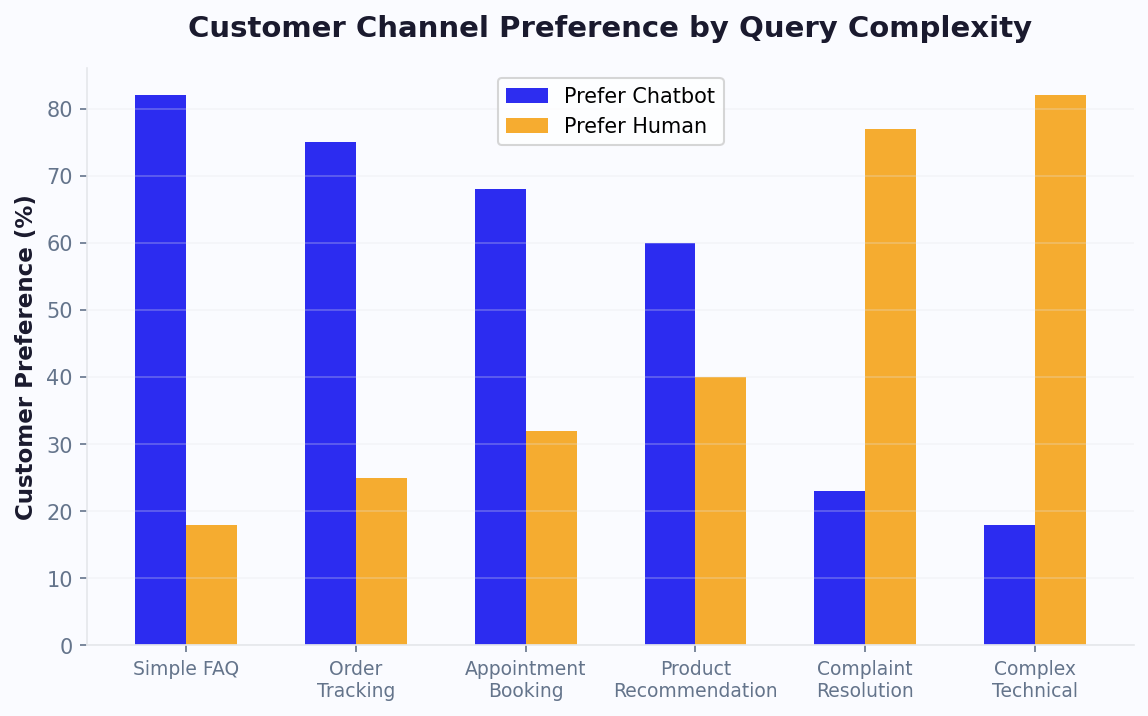
14. Always Offer a Human Option
No matter how good your AI chatbot is, some visitors want a human. Always provide a visible path to reach one. The best implementation is a persistent "Talk to a person" option accessible from any point in the conversation — not buried in a menu, not available only after the bot fails. Chatbots that hide the human option in an attempt to maximize containment rate actually increase frustration and decrease overall satisfaction.
With Conferbot's live chat feature, the handoff is seamless: one click transfers the conversation to an available agent with the full chat history attached. No repeat context. No starting over.
15. Pass Full Context on Every Handoff
The single biggest complaint about chatbot-to-human handoffs is having to repeat information. When your bot transfers a conversation to an agent, the agent must receive:
- Complete conversation transcript
- Visitor's name and email (if collected)
- Current page and browsing history
- Device type, location, and timezone
- Any forms or data collected during the bot conversation
- The bot's assessment of the visitor's intent
This context enables the agent to start with: "Hi Sarah, I see you've been asking about our enterprise plan's API limits. Let me get you the exact details" — not "Hi, how can I help you today?" This practice alone increases handoff CSAT by 25-35%. Read our complete human handoff guide for detailed implementation steps.
16. Define Clear Escalation Triggers
Do not leave escalation to chance. Define explicit triggers that move a conversation from bot to human:
| Trigger Type | Example | Action |
|---|---|---|
| Explicit request | "I want to talk to a human" | Immediate transfer |
| Sentiment detection | Frustrated or angry language | Transfer with priority flag |
| Repeated failure | Bot fails to answer 2 times | Offer transfer option |
| Topic-based | Billing dispute, legal, complaint | Auto-route to specialist |
| Value-based | Enterprise lead, high cart value | Route to senior agent |
| Complexity | Multi-step technical issue | Transfer with diagnostic notes |
Configure these triggers in your chatbot flow and test them regularly. A missed escalation — where the bot keeps trying when it should hand off — causes more damage than the bot never answering at all. Monitor escalation patterns in your analytics dashboard to ensure triggers fire correctly.
Best Practices 17-18: Conversion Optimization Techniques
17. Place CTAs at Natural Conversation Milestones
Do not wait until the end of a long conversation to ask for a conversion. Insert calls-to-action at natural milestones throughout the dialogue. After answering a product question: "Want to see this in action? I can book you a 10-minute demo." After resolving a support query: "Glad that's sorted! By the way, have you seen our new [feature]?" After lead qualification: "Based on what you've told me, our [plan] would be perfect. Want me to set up a free consultation call?"
The key is natural placement. The CTA should feel like a logical next step, not an interruption. Chatbots that place CTAs at 3-4 points in a conversation convert 45% better than those that only have a CTA at the end.
18. A/B Test Everything Systematically
Intuition is unreliable. The only way to know what works is to test. Here is a systematic testing framework for chatbot optimization:
Priority 1 — Test first (highest impact):
- Opening message (generic vs. page-specific vs. value-led)
- Proactive trigger timing (10 sec vs. 20 sec vs. 30 sec)
- Number of qualification questions (3 vs. 5 vs. 7)
Priority 2 — Test second:
- Message tone (formal vs. casual)
- Button labels ("Book a demo" vs. "See it in action" vs. "Get started free")
- Use of images and rich media vs. text-only
Priority 3 — Test third:
- Bot avatar (logo vs. photo vs. illustration)
- Widget color and position
- Follow-up message timing
| Element Tested | Typical Impact Range | Minimum Test Duration | Minimum Sample Size |
|---|---|---|---|
| Opening message | 20-50% engagement change | 2 weeks | 500 visitors per variant |
| Trigger timing | 15-40% engagement change | 2 weeks | 500 visitors per variant |
| Number of questions | 10-30% completion change | 1 week | 200 conversations per variant |
| CTA wording | 10-25% click-through change | 1 week | 300 conversations per variant |
| Bot avatar | 5-15% engagement change | 2 weeks | 1000 visitors per variant |
Run one test at a time to isolate variables. Use your analytics to track statistical significance before declaring a winner. Most chatbot platforms support native A/B testing — if yours does not, it is time to evaluate alternatives.
Best Practices 19-20: Channel-Specific and Compliance Rules
19. Adapt to Each Channel's Conventions
A chatbot that works perfectly on your website may fail on WhatsApp or Messenger. Each channel has unique constraints and user expectations:
| Channel | Max Message Length | Rich Media Support | User Expectation | Best Practice |
|---|---|---|---|---|
| Website widget | Unlimited | Full (buttons, carousels, images) | Quick help or browsing | Use rich media aggressively |
| 4,096 chars | Buttons, lists, media | Personal, asynchronous | Shorter messages, casual tone | |
| Messenger | 2,000 chars | Quick replies, templates | Social, quick interaction | Visual-first with image cards |
| 1,000 chars | Quick replies, stickers | Casual, visual | Short messages, link to website for detail | |
| Telegram | 4,096 chars | Inline keyboards, HTML | Tech-savvy, feature-rich | Leverage inline keyboards and commands |
| Slack / Teams | 40,000 chars | Blocks, cards, actions | Professional, contextual | Use rich blocks, respect workspace etiquette |
The golden rule: design for the most constrained channel first (Instagram at 1,000 chars), then enhance for channels that support more. This ensures your core experience works everywhere while taking advantage of each platform's unique capabilities.
20. Comply with Privacy Regulations from Day One
Chatbot privacy is not optional — it is a legal requirement that carries significant penalties when violated. Here is the compliance checklist every chatbot must meet:
GDPR (EU/UK):
- Display a clear privacy notice before collecting personal data
- Obtain explicit consent for data processing (not pre-checked boxes)
- Allow users to request data deletion ("right to be forgotten")
- Store conversation data in EU-compliant infrastructure
- Include your data processing details in your privacy policy
CCPA (California):
- Disclose what data the chatbot collects and how it is used
- Provide opt-out mechanism for data sharing
- Honor "Do Not Sell My Information" requests
General best practices:
- Never store sensitive data (credit card numbers, SSNs, health records) in chat logs
- Encrypt all conversation data in transit and at rest
- Set automatic data retention limits (delete conversations older than 12 months)
- Use a platform with SOC 2 Type II compliance
Platforms like Conferbot handle most compliance requirements automatically — encrypted storage, consent collection, data retention controls, and GDPR-compliant infrastructure. But the responsibility for what data you collect and how you disclose it remains yours. Read our detailed chatbot GDPR compliance guide for a complete walkthrough. Using the ROI calculator, you can also factor in risk reduction from compliance automation when evaluating chatbot platforms.
Complete Implementation Checklist: All 20 Practices at a Glance
Here is the full list organized by implementation phase so you can systematically apply every best practice.
Phase 1: Foundation (Week 1)
| # | Best Practice | Status Checkpoint |
|---|---|---|
| 1 | Lead with value, not questions | Context-specific greeting on every key page |
| 2 | One question at a time | All multi-question messages split into singles |
| 3 | Messages under 60 words | No message exceeds 60 words; long content is split |
| 4 | Quick-reply buttons over open text | Buttons used for 70%+ of interactions |
| 5 | Mirror brand voice | Voice guide created and applied to all messages |
| 6 | Train on real customer data | Top 50 real questions identified and loaded |
Phase 2: Intelligence (Week 2)
| # | Best Practice | Status Checkpoint |
|---|---|---|
| 7 | Upload everything to knowledge base | All docs, URLs, and FAQs uploaded to knowledge base |
| 8 | Weekly review and retrain | 30-minute weekly review scheduled |
| 9 | Confidence thresholds set | 85% threshold for autonomous answers configured |
| 10 | Page context personalization | Different greetings on different page types |
| 11 | Returning visitor recognition | Repeat visitors get personalized greetings |
Phase 3: Optimization (Week 3)
| # | Best Practice | Status Checkpoint |
|---|---|---|
| 12 | Segment and route by attributes | Routing rules configured for key segments |
| 13 | Dynamic variables in messages | Variables used in 50%+ of bot messages |
| 14 | Always offer human option | "Talk to a person" visible at every conversation stage |
| 15 | Full context on handoff | Agent receives transcript + metadata on every transfer |
| 16 | Clear escalation triggers | All trigger types configured and tested |
Phase 4: Growth (Week 4+)
| # | Best Practice | Status Checkpoint |
|---|---|---|
| 17 | CTAs at natural milestones | 3-4 CTA points per conversation flow |
| 18 | A/B test systematically | First test running (opening message recommended) |
| 19 | Channel-specific adaptation | Flows optimized per channel |
| 20 | Privacy compliance | GDPR/CCPA checklist completed |
Print this checklist. Work through it methodically. Most teams complete all 20 practices within 30 days and see measurable improvement in engagement, conversion, and satisfaction within the first 2 weeks. For a step-by-step builder walkthrough, see our no-code chatbot building guide, or explore ready-made chatbot templates that already follow these best practices out of the box.
10 Common Chatbot Mistakes That Kill Engagement (and How to Fix Them)
Even with best practices in hand, teams frequently stumble on avoidable errors. According to Gartner's 2025 chatbot research, 40% of chatbot projects fail to meet initial engagement targets — usually due to one or more of the mistakes below. Eliminating these issues typically doubles engagement within 30 days.
Mistake 1: Building Without Customer Data
Many teams write chatbot flows based on internal assumptions rather than real customer queries. Fix: Audit 200+ support tickets, calls, and emails before writing a single bot message. HubSpot's State of Marketing report confirms that data-driven personalization increases engagement by 202%. Our guide on training chatbots on business data walks through the exact process.
Mistake 2: No Fallback Strategy
When the chatbot has no answer and no graceful exit, users leave. Always configure a fallback message: "I'm still learning — let me connect you with someone who can help." Link this to your human handoff workflow.
Mistake 3: Ignoring Mobile UX
With 65% of chatbot interactions on mobile (Statista, 2025), messages over 60 words, missing quick-reply buttons, and tiny tap targets destroy the experience.
Mistake 4: Over-Automating Without Exit Ramps
Chatbots that refuse to hand off create viral complaints. Research from G2's chatbot category reviews shows that "no way to reach a human" is the top 1-star review trigger across all platforms.
Mistake 5: Skipping A/B Tests
Most teams deploy a chatbot once and never iterate. Fix: Test one element weekly — opening message, trigger timing, or CTA wording. Track results in your analytics dashboard.
Mistake 6: No Compliance Review
GDPR fines for improper chatbot data collection reached €200M+ in 2025. Review our GDPR compliance checklist before launching. The official GDPR text provides the legal baseline.
Mistake 7: Generic Opening Messages
"Hi, how can I help?" converts at 2-3%. Context-specific openers convert at 8-15%. Always tailor your greeting to the page the visitor is on.
Mistake 8: Not Measuring ROI
Without ROI tracking, budget holders cut chatbot spend during reviews. Use our ROI calculator guide to quantify savings from day one.
Mistake 9: Deploying on One Channel Only
73% of buyers use 3+ channels. A website-only bot misses WhatsApp, Messenger, and Instagram traffic entirely.
Mistake 10: Never Retraining
Chatbot accuracy degrades as products and policies change. Set a calendar reminder for 30 minutes weekly — review unanswered questions, update the knowledge base, and retire outdated answers.
Mistake-to-Fix Priority Matrix
| Mistake | Impact Level | Fix Time | Expected Lift |
|---|---|---|---|
| No fallback strategy | Critical | 30 min | +20% satisfaction |
| Generic opening messages | High | 1 hour | +40% engagement |
| No A/B testing | High | Ongoing | +50% over 90 days |
| Ignoring mobile UX | High | 2 hours | +25% completion |
| Building without data | High | 1 day | +30% accuracy |
| Over-automating | Medium | 1 hour | +15% CSAT |
| No compliance review | Medium | 2 hours | Risk elimination |
| Single channel only | Medium | 1 day | +25% reach |
| Not measuring ROI | Medium | 2 hours | Budget protection |
| Never retraining | Medium | 30 min/week | +10% accuracy/month |
Measuring the Impact: Before and After Applying Best Practices
Best practices only matter if they move metrics. Here is what businesses typically see before and after systematically implementing the 20 practices outlined in this guide.
Expected Impact by Metric
| Metric | Before Best Practices | After Best Practices (90 days) | Improvement |
|---|---|---|---|
| Engagement rate | 3-5% | 15-25% | +300-500% |
| Conversation completion rate | 35-45% | 65-80% | +80-100% |
| Lead conversion rate | 2-4% | 8-15% | +200-400% |
| Bot containment rate | 25-35% | 65-75% | +100-200% |
| Customer satisfaction (CSAT) | 68-72% | 85-92% | +20-30% |
| Average resolution time | 8-12 minutes | 1-3 minutes | -75% |
| Support cost per resolution | $8-15 | $2-5 | -65% |
These are not theoretical projections — they are aggregated results from businesses that moved from ad-hoc chatbot deployment to systematic best-practice implementation.
How to Track Progress
Set up a simple dashboard that tracks the seven metrics above on a weekly basis. Most platforms, including Conferbot's analytics suite, provide these metrics out of the box. The key is reviewing them consistently, not just glancing at them when something seems off.
Weekly review agenda (30 minutes):
- Check engagement rate trend — is it climbing or flat?
- Identify the #1 drop-off point in your primary conversation flow
- Review 5 low-rated conversations — what went wrong?
- Check unanswered question log — add answers for the top 3
- Review one A/B test result and implement the winner
This cadence compounds. Week over week, your chatbot gets smarter, more accurate, and more aligned with what your visitors actually need. After 90 days, the chatbot that started as a simple FAQ bot has evolved into a conversion engine that understands your customers better than most of your team members do.
Need help calculating the expected ROI for your specific business? Use our chatbot ROI calculator to model the impact of improved engagement, containment, and conversion rates on your bottom line. And if you want to avoid the most common pitfall — not having a chatbot at all — read about the true cost of not having a chatbot on your website.
ROI Benchmarks by Business Size
The return on investment from applying these best practices varies by business size and traffic volume, but the pattern is consistent across all segments:
- Small businesses (under 5,000 monthly visitors): Expect $2,000-$5,000 in monthly value from improved lead capture and reduced support costs within 60 days of implementation. The primary driver is after-hours lead capture that would otherwise be lost entirely.
- Mid-market (5,000-50,000 monthly visitors): Expect $8,000-$25,000 in monthly value through a combination of increased conversion rates, reduced support ticket volume, and faster qualification cycles. The compound effect of multiple best practices creates exponential rather than linear gains at this scale.
- Enterprise (50,000+ monthly visitors): Expect $50,000-$200,000+ in monthly value. At enterprise scale, even small percentage improvements in engagement or conversion translate to significant revenue. A 2% improvement in conversion on 100,000 visitors equals 2,000 additional leads per month.
The key insight is that these best practices are not one-time improvements. They create a compounding optimization loop where each week of data makes the next week better. Businesses that commit to the weekly review cadence consistently outperform those that set and forget their chatbot deployment.
Was this article helpful?
Build and deploy in 10 minutes. No coding needed.
20 Chatbot Best Practices FAQ
Everything you need to know about chatbots for 20 chatbot best practices.
About the Author

Conferbot Team specializes in conversational AI, chatbot strategy, and customer engagement automation. With deep expertise in building AI-powered chatbots, they help businesses deliver exceptional customer experiences across every channel.
View all articles
