
Why Structured Conversation Flows Are the Key to Ticket Deflection
Most chatbots fail not because of bad AI, but because of bad conversation design. A chatbot with a state-of-the-art NLP engine will still frustrate users if the conversation flow leads to dead ends, loops, or irrelevant responses. Structured flows are the skeleton that makes a chatbot genuinely useful.
The data supports this. Companies with well-designed conversation flows commonly achieve 50-70% ticket deflection rates, while those that rely solely on free-text AI often see only 20-30%. The difference is structure. When a chatbot guides users through a logical sequence of steps toward resolution, it succeeds. When it tries to understand open-ended questions without a framework, it often fails.
Consider the math of ticket deflection. If your support team handles 3,000 tickets per month at an average cost of $8 per ticket, that is $24,000/month in support labor. A chatbot that deflects 50% of those tickets saves $12,000/month — every month, compounding as your customer base grows while your support costs stay flat. HubSpot's State of Service report confirms that companies using structured chatbot automation see 45% lower cost-per-resolution than those relying solely on human agents. For real businesses achieving these numbers, see our chatbot cost savings case studies.
The 80/20 Rule of Support Automation
Analysis of support ticket data across industries consistently reveals that 80% of tickets fall into 5-10 categories. These categories are:
- Frequently asked questions (hours, policies, pricing, features)
- Order status and tracking
- Returns, refunds, and exchanges
- Account access and password issues
- Billing questions and payment issues
The five flow templates in this article cover these exact categories. Each template is designed as a decision tree with branching logic, fallback paths, and human escalation points. They are written in a format you can adapt directly into any chatbot builder, including Conferbot's visual flow editor.
Before/After Impact
Companies that implement all five flows typically see these aggregate results within 60-90 days:
| Metric | Before Flows | After Flows | Improvement |
|---|---|---|---|
| Monthly support tickets | 3,000 | 1,500 | -50% |
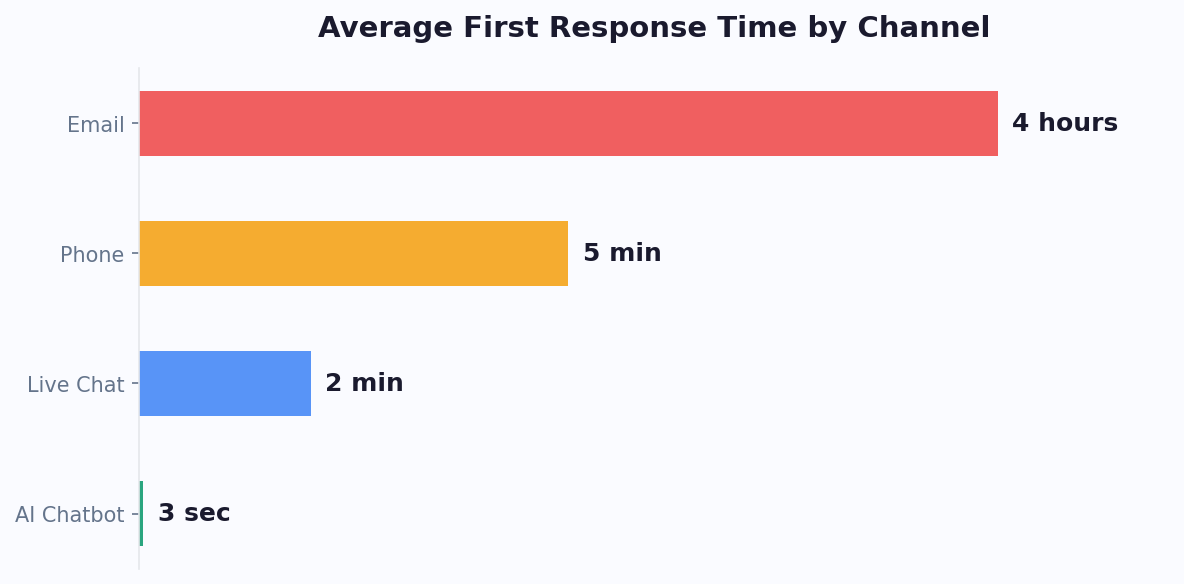
| Average resolution time | 4.2 hours | 2.1 minutes (bot) / 2.8 hours (human) | -98% (bot) |
| First-contact resolution | 62% | 84% | +22 points |
| Customer satisfaction (CSAT) | 3.9 / 5 | 4.3 / 5 | +0.4 points |
| Monthly support cost | $24,000 | $13,200 | -$10,800 |
Flow 1: The FAQ Auto-Resolver
FAQ questions are the single largest category of support tickets for most businesses. Customers ask about business hours, shipping policies, pricing, return windows, and product specifications — information that already exists on your website but is hard to find or too much effort to locate.
Decision Tree Structure
The FAQ auto-resolver follows this flow:
User Message Received
  |
  v
[NLP Intent Detection]
  |
  +-- Intent Matched (confidence > 80%)
  |     |
  |     v
  |   [Display Answer Card]
  |     |
  |     +-- "Was this helpful?" [Yes] --> "Glad I could help! Anything else?"
  |     +-- "Was this helpful?" [No]  --> [Show Related Topics]
  |           |
  |           +-- User selects topic --> [Display New Answer]
  |           +-- "None of these"   --> [Escalate to Human]
  |
  +-- Intent Matched (confidence 50-80%)
  |     |
  |     v
  |   [Show Top 3 Matching Topics]
  |     +-- User selects topic --> [Display Answer Card]
  |     +-- "Something else"   --> [Collect Free-Text Question]
  |                                  --> [Escalate to Human]
  |
  +-- No Intent Match (confidence < 50%)
        |
        v
      [Show Popular Topic Categories]
        +-- User selects category --> [Show Sub-Topics]
        +-- "Talk to someone"     --> [Escalate to Human]
Sample Messages
Greeting: "Hi! I can answer questions about our products, shipping, returns, and account. What would you like to know?"
Answer card format:
- Bold topic header
- Concise answer (2-3 sentences)
- Link to full article: "Read more: [link]"
- Feedback buttons: "Helpful" / "Not what I needed"
Disambiguation: "I found a few topics that might match. Which one are you asking about?" followed by 3 quick-reply buttons with topic names.
Escalation: "Let me connect you with a team member who can help. Could you briefly describe your question so they have context?"
Implementation Tips
- Start with your top 30 questions. Analyze your last 500 support tickets and identify the 30 most frequent questions. These will cover 60-70% of FAQ volume
- Use rich formatting. Tables for pricing comparisons, bullet lists for policy details, and rich media cards for visual answers perform 40% better than plain text
- Update weekly. Review unanswered questions from the chatbot logs every week and add new FAQ entries. This compounds over time — by month 3, your coverage should exceed 90%. Use our chatbot analytics metrics guide to identify which questions go unresolved
- Add contextual awareness. If the user is on a product page, pre-filter FAQs for that product. If they are logged in, skip questions about account setup
Impact data: Companies implementing this flow report 25-35% reduction in total support tickets within the first month, with the FAQ deflection rate improving to 85-90% as the knowledge base expands.
Flow 2: The Order Status Lookup
"Where is my order?" is the most common ecommerce support question. It accounts for 15-20% of all support tickets for online retailers (Narvar Consumer Report, 2025). Yet the answer is almost always a simple status check that requires zero human judgment. This flow connects your chatbot to your order management system and delivers real-time tracking information in seconds.
Decision Tree Structure
User asks about order status
  |
  v
[Is user logged in / identified?]
  |
  +-- Yes --> [Show recent orders list]
  |            |
  |            +-- User selects order --> [Fetch order status via API]
  |            |                           |
  |            |                           v
  |            |                        [Display Status Card]
  |            |                           |
  |            |                           +-- Status: Processing --> "Your order is being prepared."
  |            |                           +-- Status: Shipped    --> "Shipped via [carrier]. Tracking: [link]"
  |            |                           +-- Status: Delivered  --> "Delivered on [date]. Was there an issue?"
  |            |                           +-- Status: Delayed    --> "Delayed due to [reason]. New ETA: [date]."
  |            |
  |            +-- "Different order" --> [Ask for order number]
  |
  +-- No  --> [Ask for order number + email]
               |
               +-- Match found    --> [Fetch order status via API]
               +-- No match found --> "I could not find that order. Double-check the number?"
                                       |
                                       +-- Retry --> [Re-ask]
                                       +-- "Help" --> [Escalate to Human]
Sample Messages
Identification: "I would love to help you track your order. Could you share your order number? It starts with # and is in your confirmation email."
Status — Shipped: "Great news! Your order #12345 shipped on March 25 via FedEx. Here is your tracking link: [link]. Estimated delivery: March 28. Want me to help with anything else?"
Status — Delayed: "I see your order #12345 is experiencing a slight delay due to high demand. The updated estimated delivery is March 30. I apologize for the inconvenience. Would you like me to notify you when it ships, or is there anything else I can help with?"
Status — Delivered but issue: "Records show order #12345 was delivered on March 22 to the address on file. If you did not receive it, I would like to help resolve this. Let me connect you with our support team who can investigate."
Integration Requirements
This flow requires API integration with your order management system. The chatbot needs read access to:
- Order status (processing, shipped, delivered, cancelled, delayed)
- Carrier name and tracking number
- Estimated delivery date
- Shipping address (last 4 characters for verification)
With the Conferbot integrations hub, you can connect to Shopify, WooCommerce, Magento, and custom order systems via REST API. The integration typically takes 1-2 hours to configure.
Impact data: Order status flows deflect 10-15% of total support tickets and have the highest customer satisfaction ratings (4.6/5 average) because they provide immediate, accurate answers. Response time drops from hours to seconds.
Flow 3: The Return and Refund Processor
Returns and refunds are emotionally charged interactions. The customer is already disappointed — either the product did not meet expectations, arrived damaged, or was incorrect. A chatbot that handles this smoothly can turn a negative experience into a retention opportunity. Done poorly, it drives the customer away for good.
Decision Tree Structure
User requests return/refund
  |
  v
[Identify order]
  |
  v
[Check return eligibility]
  |
  +-- Within return window
  |     |
  |     v
  |   [Ask return reason] (Multiple choice)
  |     +-- Wrong size/color   --> Offer exchange first, then return
  |     +-- Damaged/defective  --> Skip to immediate return label
  |     +-- Not as described    --> Offer photo upload + immediate return
  |     +-- Changed mind        --> Standard return process
  |     +-- Other               --> Collect description + route to team
  |     |
  |     v
  |   [Confirm return details]
  |     +-- User confirms --> [Generate return label + instructions]
  |     |                     "Your return label is ready. Here is what to do next:"
  |     |                     1. Pack item in original packaging
  |     |                     2. Attach this shipping label: [PDF link]
  |     |                     3. Drop off at [carrier] location
  |     |                     "Refund will be processed within 5-7 business days."
  |     +-- User cancels  --> "No problem! Let me know if you need anything else."
  |
  +-- Outside return window
  |     |
  |     v
  |   "This order is past our [X]-day return window (purchased [date])."
  |     +-- "Can you make an exception?" --> [Escalate to Human with context]
  |     +-- "I understand"               --> "Is there anything else I can help with?"
  |
  +-- Non-returnable item
        |
        v
      "Unfortunately, [item type] items are not eligible for return per our policy."
        +-- "Why not?"      --> [Display return policy details]
        +-- "Talk to agent" --> [Escalate to Human]
Sample Messages
Reason collection: "I am sorry to hear you want to return this item. To get started, could you tell me the reason? This helps us improve." [Quick replies: "Wrong size", "Damaged", "Not as described", "Changed my mind", "Other"]
Exchange offer (wrong size): "Before processing the return, would you like to exchange it for a different size instead? We can ship the new size at no extra cost and include a return label for the original. This is usually faster than a return + repurchase." [Quick replies: "Yes, exchange", "No, I want a refund"]
Damage flow: "I am really sorry about that. Could you upload a photo of the damage? This helps us process your return faster and prevents it from happening to other customers." [Image upload prompt]
Return label generated: "Your return is all set. Here is everything you need:" followed by a card containing the return shipping label (PDF), step-by-step instructions, refund timeline, and a reference number.
Key Design Decisions
- Always offer exchange before refund: This retains 15-20% of return requests as exchanges, preserving revenue
- Automate damage claims: If the customer uploads a photo showing clear damage, auto-approve the return without human review (for items under a threshold value, e.g., $100)
- Collect return reason data: Feed this into your analytics dashboard to identify product quality issues, listing accuracy problems, and packaging improvements
- Provide proactive tracking: After the return label is generated, send automated updates when the return is received and when the refund is processed
Impact data: Return/refund flows deflect 8-12% of support tickets. The exchange-first strategy recovers 15-20% of returns as exchanges. See how real ecommerce brands implement this in our chatbot case studies with ROI data. Average handling time drops from 12 minutes (agent) to 2 minutes (bot), and the consistency of policy application eliminates one-off exceptions that erode margins.
Flow 4: The Password Reset and Account Recovery Flow
Password resets and account access issues are among the simplest support tickets to automate, yet they account for 5-10% of all support volume across industries. Each password reset ticket costs $5-$15 in agent time for what is fundamentally a self-service operation. A well-designed chatbot flow eliminates virtually all of these tickets.
Decision Tree Structure
User reports account access issue
  |
  v
[What is the issue?] (Quick replies)
  |
  +-- Forgot password
  |     |
  |     v
  |   [Ask for account email]
  |     |
  |     +-- Email found in system
  |     |     |
  |     |     v
  |     |   [Trigger password reset email via API]
  |     |   "I have sent a password reset link to [masked email].
  |     |    Check your inbox (and spam folder). The link expires in 30 minutes."
  |     |     |
  |     |     +-- "I did not receive it" (after 2 min)
  |     |     |     +-- [Resend] --> "Sent again. Check spam/junk folders."
  |     |     |     +-- [Still nothing after resend]
  |     |     |           +-- "Try a different email" --> [Re-ask email]
  |     |     |           +-- "Help" --> [Escalate with context]
  |     |     |
  |     |     +-- "Got it, thanks!" --> "Great! Anything else I can help with?"
  |     |
  |     +-- Email NOT found
  |           |
  |           v
  |         "I could not find an account with that email."
  |           +-- "Try different email" --> [Re-ask]
  |           +-- "I am not sure which email I used" --> [Suggest checking
  |                browser saved passwords, offer search by name/phone]
  |           +-- "Help" --> [Escalate to Human]
  |
  +-- Account locked
  |     |
  |     v
  |   "Accounts are temporarily locked after multiple failed login attempts."
  |     +-- Locked < 30 min ago --> "Your account will automatically unlock in
  |     |                           [time remaining]. Want a password reset in
  |     |                           the meantime?"
  |     +-- Locked > 30 min ago --> [Trigger unlock + password reset]
  |     +-- Locked for security  --> [Escalate to security team]
  |
  +-- Cannot access email
  |     |
  |     v
  |   "If you cannot access your registered email, I will need to verify your
  |    identity another way."
  |     +-- [Security questions] --> [Verify answers] --> [Send reset to
  |                                                        alternate method]
  |     +-- [No alternate method] --> [Escalate to Human for ID verification]
  |
  +-- Two-factor authentication issue
        |
        v
      "Having trouble with your 2FA code?"
        +-- Lost authenticator app --> [Provide backup code instructions]
        +-- SMS not arriving       --> [Check phone number, suggest
        |                               resend or alternate method]
        +-- Other                  --> [Escalate to security team]
Sample Messages
Email entry: "No worries, I can help you reset your password. What is the email address associated with your account?"
Reset sent: "Done! I have sent a password reset link to j***@email.com. It should arrive within 1-2 minutes. If you do not see it, check your spam or junk folder. The link will expire in 30 minutes."
Account locked: "It looks like your account was temporarily locked after several login attempts. This is a security measure to protect your account. It will automatically unlock in 22 minutes, or I can send you a password reset link now so you are ready to go."
Cannot find email: "No account found with that email. Here are some things to try: check if you signed up with a different email, look for our welcome email in your inbox, or check your browser's saved passwords. Want to try another email address?"
Security Considerations
- Never confirm whether an email exists in your system to unauthenticated users — this prevents account enumeration attacks. Use a generic message like "If an account exists with that email, a reset link has been sent"
- Rate-limit reset requests to prevent abuse (max 3 per email per hour)
- Log all reset attempts for security audit purposes
- Do not send passwords in chat — always use secure email-based reset links
Impact data: Password reset flows deflect 5-8% of total tickets and have near-100% automation rates when integrated with your authentication system. The average cost per resolution drops from $8 (agent-handled) to $0.05 (automated). Platforms like Conferbot support API integrations with Auth0, Firebase, Okta, and custom authentication systems for seamless password reset automation.
Flow 5: The Billing Question Handler
Billing questions are sensitive — they involve money, and customers often contact support when they are confused or upset about a charge. A chatbot that handles billing inquiries must be accurate, empathetic, and transparent. When done well, billing automation reduces support costs and improves customer trust.
Decision Tree Structure
User has billing question
  |
  v
[Identify user + verify account]
  |
  v
[What is your billing question?] (Quick replies)
  |
  +-- View recent invoices/charges
  |     |
  |     v
  |   [Fetch billing history via API]
  |   Display last 3 invoices: date, amount, status
  |     +-- "Download invoice" --> [Send PDF link]
  |     +-- "I have a question about a specific charge" --> [Ask which charge]
  |           +-- [Explain line items from invoice data]
  |           +-- "Still unclear" --> [Escalate to billing team]
  |
  +-- Unexpected charge
  |     |
  |     v
  |   "I understand seeing an unexpected charge is concerning. Let me look into it."
  |   [Fetch recent transactions]
  |     +-- Charge matches subscription renewal --> "This is your [plan] renewal
  |     |   from [date]. Your plan renews [frequency] at [price]."
  |     +-- Charge matches usage overage       --> "This charge is for usage
  |     |   above your plan limit. You used [amount] vs. [limit] included."
  |     +-- Charge matches upgrade/add-on      --> "This charge is for [add-on]
  |     |   added on [date]."
  |     +-- Charge does not match records       --> [Escalate to billing team]
  |     |
  |     v
  |   "Does this explanation resolve your question?"
  |     +-- Yes --> "Great! Anything else?"
  |     +-- No / "I want a refund" --> [Check refund eligibility]
  |           +-- Eligible   --> [Process refund or escalate per policy]
  |           +-- Ineligible --> [Explain policy + offer escalation]
  |
  +-- Update payment method
  |     |
  |     v
  |   [Redirect to secure payment portal via webview/link]
  |   "For security, please update your payment method through our secure portal.
  |    Here is the direct link: [link]"
  |   (Never collect card details in chat)
  |
  +-- Cancel subscription
  |     |
  |     v
  |   [Retention flow - see below]
  |
  +-- Request refund
        |
        v
      [Check eligibility: within policy period, no previous refund, etc.]
        +-- Auto-approve (meets all criteria) --> "Your refund of $[amount]
        |   has been processed. It will appear in 5-10 business days."
        +-- Requires review --> [Escalate to billing team with full context]
The Subscription Cancellation Retention Flow
When a user asks to cancel, the chatbot should attempt to retain them before processing:
- Acknowledge the request: "I am sorry to hear you are considering canceling. Before I process this, could you tell me what is prompting the change?" [Quick replies: "Too expensive", "Not using it enough", "Missing features", "Switching to competitor", "Other"]
- Targeted retention offer based on reason:
- Too expensive: Offer a downgrade to a cheaper plan or a 30% discount for 3 months
- Not using it enough: Share usage tips and offer a free onboarding session
- Missing features: Explain the feature roadmap and offer to add them to the beta program
- Switching to competitor: Highlight unique value props and offer a competitive win-back discount
- If user still wants to cancel: Process immediately without making it difficult. A frustrating cancellation experience guarantees they will never return
Security Requirements
- Identity verification: Always verify the user's identity before showing billing information. Use account email + last 4 digits of card or a one-time verification code
- No card details in chat: Never ask for or display full credit card numbers, CVVs, or bank account details in the chatbot conversation
- PCI compliance: Payment method updates must happen through a PCI-compliant portal, not through the chatbot interface
- Audit logging: Log all billing actions taken by the chatbot (refunds, plan changes, cancellations) with timestamps and user verification method
Impact data: Billing flows deflect 7-10% of support tickets. The cancellation retention sub-flow saves 15-25% of cancellation requests, directly improving revenue retention. Use Conferbot analytics to track which retention offers are most effective and optimize over time.
Building and Testing Your Flows: From Template to Production
Having the templates is step one. Implementing them effectively requires a structured approach to building, testing, and iterating on your conversation flows.
Step 1: Audit Your Current Ticket Data
Before building any flow, analyze your last 30 days of support tickets to determine priority:
- Export your ticket data from your help desk (Zendesk, Freshdesk, Intercom, etc.)
- Categorize tickets into the 5 flow types: FAQ, order status, returns, password/account, billing
- Calculate the volume and cost of each category
- Prioritize the category with the highest volume x cost combination
Do not build all 5 flows at once. Start with the highest-impact flow, get it to 80%+ automation rate, then move to the next one.
Step 2: Map Real Conversations to Decision Trees
Read at least 50 real support conversations for each flow type. Note:
- How customers phrase their requests (these become NLP training phrases)
- What information agents ask for (these become your chatbot questions)
- Where conversations get complicated (these become escalation triggers)
- What resolutions look like (these become your success messages)
The templates above provide the structure. Your real conversations provide the language and edge cases that make the flow feel natural.
Step 3: Build with Progressive Complexity
Start simple and add complexity in phases:
- Phase 1 (Week 1): Build the happy path — the most common scenario where everything goes right. Test with 5 internal users
- Phase 2 (Week 2): Add the 3-4 most common edge cases (e.g., order not found, return window expired, payment method declined). Test with 20 internal users
- Phase 3 (Week 3): Add error handling, fallback messages, and human escalation paths. Deploy to 10% of live traffic (shadow mode)
- Phase 4 (Week 4): Review shadow-mode data, fix issues, and roll out to 100% of traffic
Step 4: Measure and Iterate
Track these metrics for each flow after launch:
| Metric | Target | Action if Below Target |
|---|---|---|
| Automation rate | 70-85% | Add more NLP training phrases, handle more edge cases |
| Drop-off rate | Below 20% | Simplify flow steps, reduce questions, add clearer options |
| Escalation rate | 15-30% | If too low: check if bot is giving wrong answers. If too high: expand bot capabilities |
| CSAT per flow | 4.0+ / 5 | Read negative feedback, identify pain points, adjust messaging tone |
| Resolution accuracy | 95%+ | Audit bot resolutions against agent review, fix misrouted flows |
Common Mistakes to Avoid
- Over-engineering from day one: A flow that handles 80% of cases well is better than one that tries to handle 100% and fails at 60%
- Ignoring the escalation experience: When the bot cannot help, the handoff to a human must be seamless. Never make users repeat information they already provided
- Static flows after launch: Review chatbot logs weekly and update flows based on real user behavior. The best chatbots improve continuously
- Forgetting mobile users: Over 70% of chat interactions happen on mobile. Keep messages short, use quick replies over free text, and test every flow on a phone
According to G2's chatbot software reviews, businesses that implement structured flow templates see results within the first week. With Conferbot's AI-powered NLP and visual flow builder, you can implement all five templates without writing code. The drag-and-drop interface maps directly to the decision tree structures above, and built-in analytics provide the metrics you need to iterate toward maximum ticket deflection.
If you would rather not build the decision trees by hand, the free chatbot template library ships these flows as editable starting points across support, booking and e-commerce categories. For the principles underneath the templates - turn-taking, confirmation, error recovery - see the conversation design glossary entry, and for the measurement side of ticket reduction, the guide to reducing support tickets covers which baseline numbers to capture before you launch.
Was this article helpful?
Build and deploy in 10 minutes. No coding needed.
5 Chatbot Flows to Reduce Support Tickets (Templates) FAQ
Everything you need to know about chatbots for 5 chatbot flows to reduce support tickets (templates).
About the Author
The Conferbot team writes about building, deploying, and improving AI chatbots.
View all articles