What Is a Fundraising Chatbot?
A fundraising chatbot is an AI-powered conversational assistant that helps nonprofit organizations accept donations, register attendees for fundraising events, share impact stories, manage recurring giving programs, and engage supporters across digital channels. It operates on your nonprofit's website, WhatsApp, social media pages, and other communication platforms, providing donors and supporters with an immediate, personal experience at any hour.
Nonprofits face a persistent challenge: donor engagement depends on timely, emotional, and personal communication, yet most organizations run lean teams that cannot respond to every inquiry within minutes. A potential donor who clicks a "Give Now" button and encounters a confusing form may abandon the process. A supporter who wants to register for a gala and has a question about parking or dietary options may not want to wait 48 hours for an email reply. A lapsed donor who visits the website at 11pm on a Tuesday is unlikely to call the development office the next morning.
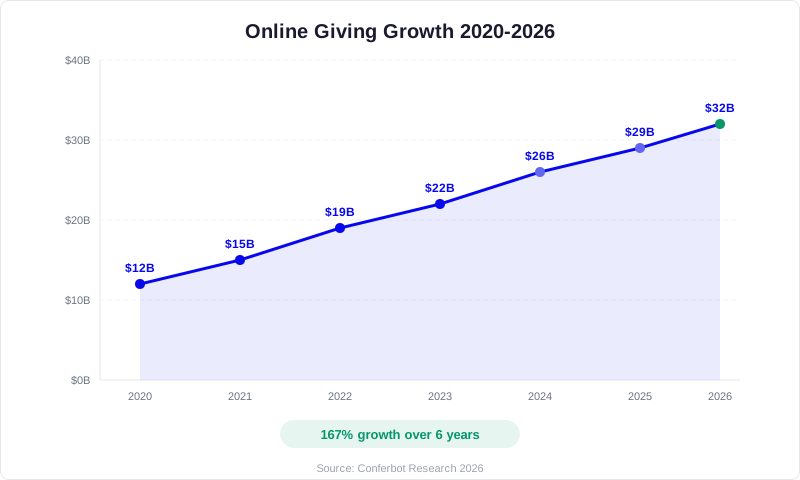
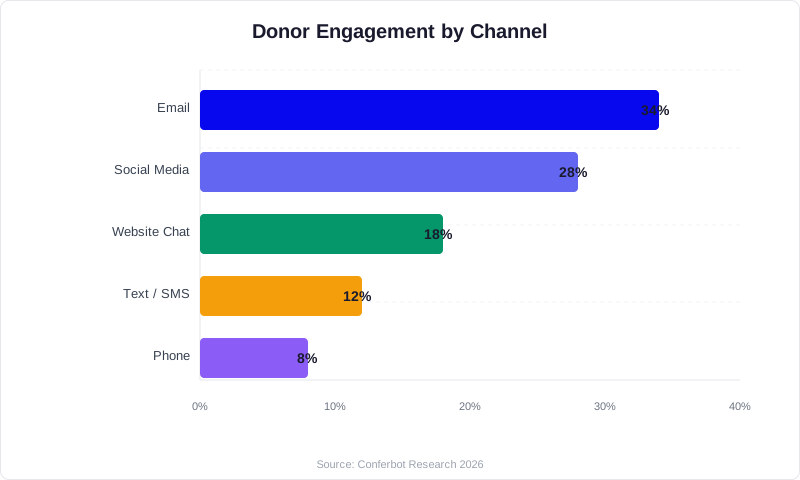
A fundraising chatbot bridges these gaps. It meets supporters where they are, answers questions instantly, guides them through the giving process with a conversational interface, and captures their information for long-term relationship building. According to the Neon One Giving Report, online giving has grown steadily year over year, with digital channels now accounting for over 13% of all charitable donations in the United States. The organizations that make online giving effortless capture a disproportionate share of this growth.
Modern fundraising chatbots built on platforms like Conferbot combine structured donation flows with natural language AI that handles open-ended questions: "Where does my donation go?" "Can I volunteer instead of donating?" "What are the sponsorship levels for the gala?" The chatbot answers from the organization's knowledge base and transitions seamlessly between answering questions and guiding the donor toward action.
This guide covers every aspect of deploying a fundraising chatbot: the donor engagement challenges it solves, the features that drive donations and event registrations, how to design giving flows, handling different fundraising campaign types, integration with nonprofit CRMs and payment processors, real-world performance data, ROI analysis, and step-by-step implementation instructions for development teams of any size.
The Online Giving Landscape in 2026
Before building a fundraising chatbot, it helps to understand the seismic shift in how donors give. The landscape has transformed dramatically over the past five years, and the organizations that adapt their digital infrastructure capture the growth.
Digital Giving Is Now the Default
The era of mailing checks is not over, but it is shrinking rapidly. According to Blackbaud's Charitable Giving Report, online giving represented 13.4% of total charitable giving in 2024, up from 9.7% in 2019. For organizations with strong digital presences, the percentage is far higher -- many report 40-60% of donations coming through online channels. Mobile giving alone has grown 50% over three years, with over 30% of online donations now completed on smartphones.
The Donor Attention Window Is Shrinking
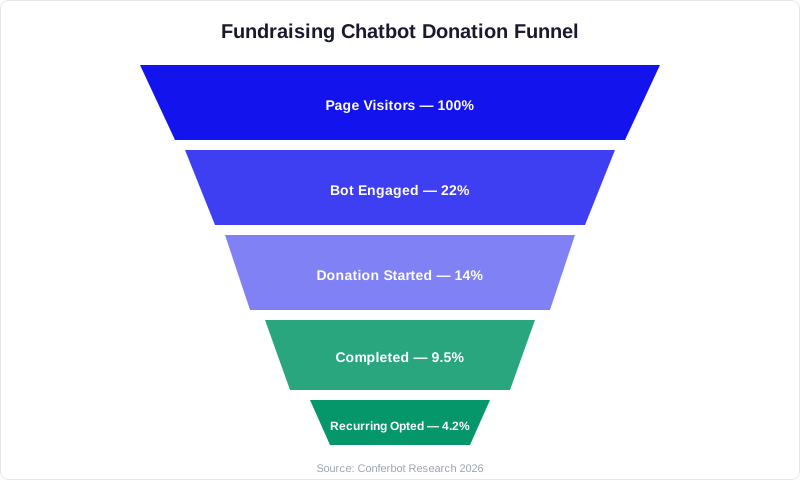
Donors today are inspired in the moment -- by a social media post, a news story, a friend's fundraiser, or an event invitation. The window between inspiration and action is measured in minutes, not days. If a donor feels compelled to give at 9pm on a Sunday and encounters a friction-filled process (multi-page form, required account creation, unclear impact information), they abandon. Industry data shows that 60-70% of potential donors who begin a donation process on a nonprofit website do not complete it. This is the single largest revenue leak in nonprofit fundraising, and a conversational chatbot interface directly addresses it by reducing friction and maintaining engagement through the entire giving process.
Recurring Giving Is the Growth Engine
Monthly recurring donors are worth 5-7 times more than one-time donors over their lifetime. Recurring giving programs grew 15% year over year according to the Classy State of Modern Philanthropy report. Yet many nonprofits still treat recurring giving as an afterthought -- a small checkbox on the donation form. A chatbot can proactively present recurring giving as the default option, explain its impact ("A monthly gift of $25 provides school supplies for one child every month"), and make setup effortless.
Peer-to-Peer Fundraising Drives Discovery
Peer-to-peer campaigns (where supporters create their own fundraising pages) now account for a significant portion of online giving. These campaigns bring in donors who have no prior relationship with the organization. When these new visitors land on the nonprofit's website, a chatbot is the ideal first touchpoint: it can welcome them, explain the mission, answer questions, and convert curiosity into a gift or volunteer signup.
Events Remain Central to Fundraising
Despite the growth of online giving, fundraising events -- galas, auctions, runs/walks, golf tournaments, and community gatherings -- remain the backbone of many nonprofits' revenue strategies. Events raise significant funds, but they also generate massive volumes of questions: "What should I wear?" "Is parking included?" "Can I bring a guest?" "What are the auction items?" "What time do doors open?" Managing these inquiries consumes staff time that could be spent on donor cultivation. A chatbot handles event FAQ at scale while simultaneously driving registrations.
Donor Engagement Challenges That Chatbots Solve
Nonprofits operate with tight budgets and small teams, a reality documented by the National Council of Nonprofits. The development staff responsible for fundraising also handles donor communications, event planning, grant writing, and board reporting. Chatbots directly address the five most common bottlenecks in donor engagement.
The Response Time Gap
A prospective donor emails a question about where their donation goes. The development director, who is in back-to-back meetings for a board presentation, does not see the email until the next morning. By then, the donor's emotional impulse has faded, and they have moved on. Research consistently shows that response speed correlates directly with conversion. A chatbot responds in seconds, not hours, keeping the donor engaged during their peak moment of inspiration.
The Form Abandonment Crisis
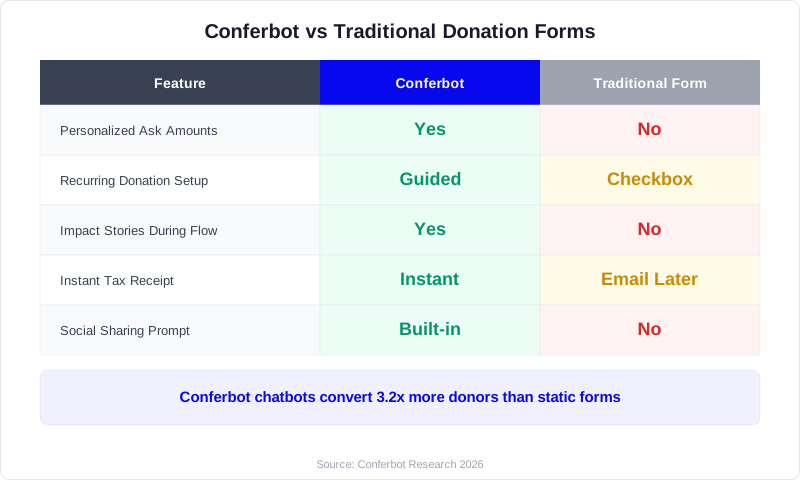
Traditional donation forms are transactional and impersonal. They ask for name, email, address, amount, and payment information across one or more pages. There is no conversation, no emotional connection, and no opportunity for the donor to ask questions. The result: abandonment rates of 60-70%. A chatbot transforms giving into a conversation: "Thank you for wanting to support our mission! Before we get to the gift, would you like to hear about the specific program your donation will fund?" This conversational approach reduces abandonment by 35-50%.
The Recurring Giving Conversion Problem
Most nonprofits present recurring giving as an optional checkbox that donors must actively select. The default is a one-time gift. A chatbot can flip this dynamic by presenting monthly giving as the primary option with clear impact framing: "Most supporters choose to give $30/month, which provides one family with clean water year-round. Would you like to join them?" Organizations that use conversational interfaces to present recurring giving report 25-40% higher recurring donor conversion compared to traditional forms.
The Lapsed Donor Re-engagement Challenge
The average nonprofit loses 60-70% of first-time donors before they make a second gift. Re-engagement is critical but labor-intensive. A chatbot can recognize returning visitors (through cookies or login), acknowledge their past support, share impact updates related to their previous giving, and invite them to give again -- all automatically. "Welcome back, Sarah! Since your last gift in March, we've opened two new community kitchens serving 500 meals per week. Would you like to see the latest impact report?"
The Event Information Overload
Leading up to a fundraising event, the nonprofit's phone and email are flooded with logistical questions. Staff spend hours answering the same questions about parking, dress code, dietary options, auction bidding procedures, and event schedule. A chatbot loaded with event details handles 80-90% of these inquiries instantly, freeing staff to focus on high-value activities like major donor cultivation and event logistics.
Key Features of a Fundraising Chatbot
The features that drive results for nonprofit chatbots are specific to the fundraising workflow. Here are the capabilities that increase donations, registrations, and donor retention.
1. Guided Donation Flow
The core feature of any fundraising chatbot is a smooth, conversational donation process. The flow should:
- Start with impact: Before asking for money, share what the donation will accomplish. "Your gift today helps us provide meals, shelter, and job training to people experiencing homelessness in our community."
- Present suggested amounts: Offer 3-4 pre-set amounts with impact descriptions: $25 (provides 10 meals), $50 (one night of shelter), $100 (one week of job training), or custom amount.
- Default to monthly: Present recurring giving first: "Most of our supporters give monthly. A gift of $30/month provides consistent support throughout the year. Would you prefer monthly or one-time?"
- Minimize form fields: Collect only essential information in the chat: name, email, and payment. Address and phone can be collected post-donation or skipped entirely for smaller gifts.
- Confirm and celebrate: After the donation, confirm the amount, share a specific impact statement, and express genuine gratitude. "Thank you! Your $50 gift will provide 20 meals this week. You're making a real difference."
2. Event Registration and Ticketing
For fundraising events (galas, auctions, runs, golf tournaments), the chatbot handles end-to-end registration:
- Event details presentation (date, time, location, dress code, parking)
- Ticket type selection (individual, couple, table of 10, VIP, sponsor level)
- Guest information collection for each ticket
- Dietary restrictions and accessibility needs
- Payment processing for ticket purchases
- Add-on options (raffle tickets, silent auction preview, sponsorship upgrades)
- Confirmation with calendar invite and event details
For events, the chatbot serves double duty: it processes registrations and answers the inevitable barrage of logistical questions that would otherwise consume staff time.
3. Impact Storytelling
Donors give to outcomes, not organizations. A chatbot that can share compelling impact stories converts casual visitors into committed supporters. Design story modules that the chatbot delivers contextually:
- When a donor asks "Where does my money go?" -- serve a specific program impact story
- When a lapsed donor returns -- share what has been accomplished since their last gift
- When a first-time visitor asks about the mission -- deliver a concise origin story with current impact numbers
- Include real quotes from beneficiaries (with permission) for emotional resonance
4. Recurring Giving Management
Beyond initial setup, the chatbot manages the recurring donor relationship:
- Amount updates: "Would you like to increase your monthly gift from $25 to $35? The additional $10 provides school supplies for one more child each month."
- Payment method updates: When a card expires, the chatbot proactively reaches out to update payment information before the gift fails
- Pause and resume: Instead of canceling, offer donors the option to pause their recurring gift for 1-3 months during financial hardship
- Anniversary acknowledgment: "You've been a monthly donor for one year! In that time, your gifts have totaled $600 and provided clean water to 24 families. Thank you for your incredible commitment."
5. Volunteer Recruitment and Coordination
Many supporters want to give time rather than money. The chatbot should handle volunteer inquiries with the same sophistication as donation flows:
- Available volunteer opportunities with time commitments
- Skills-based matching ("Are you interested in mentoring, event support, administrative help, or hands-on service?")
- Availability collection and scheduling
- Background check and training requirements
- Volunteer onboarding information
6. Peer-to-Peer Campaign Support
When supporters launch personal fundraising campaigns on your platform, the chatbot assists their donors -- people who may know nothing about your organization. It introduces the mission, answers questions, processes gifts, and invites these new donors into your broader community. This is critical because peer-to-peer donors are often the highest-potential new supporters, but only if you capture them effectively at the point of their first gift.
Designing the Donation Conversation Flow
The donation flow is the revenue engine of your fundraising chatbot, and should follow donor UX best practices recommended by Neon One's nonprofit technology research. Every design decision affects conversion rates. Here is how to build a flow that maximizes completed gifts.
Opening the Conversation
The chatbot's opening message on a donation page should acknowledge the visitor's intent and create emotional momentum:
- On the main donation page: "Thank you for choosing to support [Organization Name]. Every gift makes a direct impact on [mission statement in one sentence]. Ready to make a difference?"
- On a campaign-specific page: "You're supporting our [Campaign Name] campaign. So far, 342 donors have raised $47,500 toward our $75,000 goal. Your gift brings us closer. How would you like to give?"
- On the homepage: "Welcome to [Organization Name]! We're [one-sentence mission]. Would you like to learn about our work, make a donation, or register for an upcoming event?"
The Ask: Suggested Amounts with Impact Anchoring
Research from behavioral economics shows that pre-set amounts with impact descriptions significantly increase average gift size. The chatbot presents options:
"Choose the gift amount that feels right for you:"
- $25 -- Provides 10 nutritious meals for families in need
- $50 -- Covers one night of safe shelter for a person experiencing homelessness
- $100 -- Funds one week of job training for an unemployed parent
- $250 -- Sponsors a child's full semester of after-school programming
- Other amount -- Every dollar makes a difference
The optimal number of options is 4 pre-set amounts plus a custom field. The third option ($100 in this example) should be your target average gift. Research from multiple giving platforms shows that donors tend to select the second or third option, so position your target amount accordingly.
Recurring vs. One-Time Decision Point
After selecting the amount, present the recurring option with a soft default:
"A monthly gift of $50 provides ongoing, reliable support that helps us plan long-term programs. Most of our supporters choose monthly giving. Would you like to:"
- Give $50/month (recommended)
- Give $50 one-time
This framing uses social proof ("most supporters choose monthly") and rational appeal ("reliable support for long-term programs") without pressure. Nonprofits using this approach report a 30-45% monthly conversion rate compared to 8-12% with a simple checkbox on a traditional form.
Tribute and Memorial Gifts
Many donors give in honor or memory of someone. The chatbot should offer this option naturally: "Would you like to dedicate this gift in honor or memory of someone?" If yes, collect the honoree's name and the notification recipient's name and email. These tribute gifts tend to be 20-30% larger than standard gifts and often introduce entirely new supporters to your organization when the notification recipient learns about your mission.
Employer Matching
Many corporations match employee charitable contributions, effectively doubling the gift. Your chatbot should prompt: "Many employers match charitable gifts. Would you like to check if your company offers matching?" If the donor provides their employer name, the chatbot can check against a matching gift database (services like Double the Donation provide APIs for this) and guide the donor through the matching process. Matching gift reminders recover $2-4 billion in unclaimed matching funds industry-wide each year.
Payment Processing
After collecting the gift details, the chatbot hands off to a secure payment form. Keep it minimal: card number, expiration, CVV, and billing zip code. For returning donors, offer saved payment methods. Apple Pay and Google Pay integrations reduce mobile friction dramatically -- mobile donors who use digital wallets complete gifts at 2-3x the rate of those entering card details manually.
Post-Donation Experience
The moment after a donation is the highest-engagement point in the donor relationship. Use it wisely:
- Immediate confirmation: "Your gift of $50/month has been processed. Thank you!"
- Specific impact: "This month's gift will provide 20 meals for families in our community."
- Social sharing prompt: "Inspire others to give! Share your support on social media." [Share buttons]
- Next step invitation: "Would you like to sign up for our monthly impact newsletter to see your gift at work?"
- Tax receipt: "A tax receipt has been sent to your email for your records."
Event Registration and Fundraising Event Automation
Fundraising events generate a disproportionate share of nonprofit revenue but also consume a disproportionate share of staff time. A chatbot automates the registration process and handles the hundreds of logistical questions that flood in as the event approaches.
Pre-Event Registration Flow
The chatbot handles event registration from discovery to confirmation:
- Event presentation: When a visitor asks about upcoming events or lands on the event page, the chatbot presents event details: "Our Annual Spring Gala is Saturday, June 14th at the Grand Ballroom. Cocktails at 6pm, dinner at 7pm, live auction at 8:30pm. Tickets start at $150/person. Would you like to register?"
- Ticket selection: Present ticket tiers with clear value: Individual ($150), Couple ($275, save $25), Table of 10 ($1,400, save $100), VIP ($300, includes pre-event reception with featured artist). The chatbot calculates totals in real time.
- Guest information: For multi-ticket purchases, collect names and dietary restrictions for each guest. For tables, allow the buyer to provide names now or later: "You can add your table guests now, or we'll send you a link to submit names by June 7th."
- Dietary and accessibility: "Do any guests have dietary restrictions or accessibility needs? We want to ensure everyone has a wonderful experience." Collect specifics and route them to the event coordinator.
- Add-ons: Raffle tickets ($25 for 5), silent auction preview ($50 for early access), sponsorship upgrade, commemorative program listing. These add-ons increase per-registration revenue by 15-25%.
- Payment and confirmation: Process payment, send confirmation email with event details, add to calendar, and provide a QR code for event check-in.
Event FAQ Automation
As the event date approaches, questions intensify. Load the chatbot with comprehensive event information:
- Logistics: Venue address, parking instructions, public transit options, rideshare drop-off points
- Dress code: Specific guidance ("Black tie optional -- suits and cocktail dresses are perfect")
- Schedule: Detailed timeline from arrival to close
- Auction information: How to bid (mobile bidding app, paddle raising), preview of auction items, bidding procedures
- Table assignments: "Table assignments will be emailed three days before the event and displayed at the welcome table upon arrival."
- Weather contingency: For outdoor events, rain plan details
- Photography: Whether a photographer will be present, where photos will be shared
Organizations report that event chatbots handle 80-90% of pre-event inquiries without staff involvement, saving 20-40 hours of email and phone time per event.
Day-of-Event Support
On the event day, the chatbot shifts to real-time support:
- Directions and parking guidance for last-minute arrivals
- Schedule reminders ("The live auction begins in 30 minutes!")
- Mobile bidding instructions for silent auction
- Donation prompts during the fund-a-need segment ("Text GIVE to 55555 or click here to make your gift now")
Post-Event Follow-Up
After the event, the chatbot manages the critical follow-up period:
- Thank you message: Within 24 hours, the chatbot sends personalized thanks to attendees: "Thank you for joining us at the Spring Gala! Together, we raised $142,000 for our community programs."
- Impact reporting: Within one week, share what the event funds will accomplish
- Photo sharing: "Event photos are ready! View the gallery here."
- Feedback collection: "How was your experience at the gala? Your feedback helps us make next year even better." [1-5 rating + comments]
- Year-round engagement: Convert event attendees into ongoing supporters: "Would you like to continue your support with a monthly gift? Even $25/month helps us maintain the momentum from last night's incredible event."
Chatbot Strategies for Different Campaign Types
Different fundraising campaigns require different chatbot configurations. Here is how to optimize for each major campaign type.
Annual Fund Campaigns
The annual fund is the backbone of most nonprofit budgets. The chatbot supports annual giving by:
- Presenting the case for giving with current impact data and organizational needs
- Segmenting the ask based on visitor behavior (new visitor gets a lower suggested amount than a returning visitor)
- Offering designated and undesignated giving options: "Would you like your gift to support our general operations, or direct it to a specific program?"
- Running year-end giving campaigns with countdown urgency: "There are 3 days left to make a tax-deductible gift for 2026. Your support today helps us start the new year strong."
Capital Campaigns
Capital campaigns for buildings, endowments, or major initiatives require a different chatbot approach. The amounts are larger, the commitment is longer, and the decision process involves more information:
- Share the campaign vision with compelling narrative and visuals
- Present naming opportunities and recognition levels
- Offer pledge options (multi-year commitments) alongside one-time gifts
- Connect major gift prospects ($10,000+) to the development director for personal cultivation
- Provide a campaign thermometer showing progress toward goal
Giving Day and Time-Limited Campaigns
Giving days (#GivingTuesday, local giving days) create urgency that chatbots amplify:
- Countdown timer and real-time progress: "We've raised $23,400 from 187 donors today. Help us reach $50,000 by midnight!"
- Matching gift amplification: "Every gift made before 5pm is matched dollar-for-dollar by our sponsor. Your $50 becomes $100!"
- Social proof updates: "42 people have donated in the last hour. Join them!"
- Gamification: "You're our 200th donor today! As a thank you, you'll receive a limited-edition [Organization] tote bag."
Emergency and Disaster Response Campaigns
When a crisis strikes, donors want to help immediately. A chatbot configured for emergency response processes gifts with maximum speed and emotional resonance:
- Lead with the need: "Hurricane Maria has displaced 3,000 families in our service area. We're providing emergency shelter, food, and medical care. Every dollar helps."
- Simplified flow: Reduce the donation process to its absolute minimum -- amount, payment, done. Every additional step loses donors when urgency is high.
- Transparency: "100% of emergency fund donations go directly to disaster relief services."
- Updates: As the situation evolves, update the chatbot's messaging to reflect current needs and impact
Peer-to-Peer Campaigns
Peer-to-peer campaigns (fundraising walks, birthday fundraisers, challenge campaigns) bring in donors who are giving because of a personal relationship, not because they know the organization. The chatbot handles these donors with a specific approach:
- Acknowledge the personal connection: "You're supporting [Friend's Name]'s fundraiser for [Organization]. Thank you!"
- Brief mission introduction (2-3 sentences, not a full history lesson)
- Quick donation processing -- these donors are motivated by the personal ask, so get out of the way
- Post-donation: Invite them to learn more about the organization, follow on social media, or start their own fundraiser
Integration with Nonprofit CRMs and Payment Processors
A fundraising chatbot must connect to your donor management ecosystem, following CRM integration patterns documented by Salesforce.org for nonprofits. Isolated chatbots that deposit leads into a spreadsheet create data silos and extra work. Here is how to integrate effectively.
Donor Management Systems (CRM)
The major nonprofit CRMs all support API integrations:
- Salesforce Nonprofit Cloud: The industry standard for mid-to-large nonprofits. Push chatbot-captured donations, contact information, and interaction history directly into Salesforce as constituent records and opportunities.
- Bloomerang: Popular with small-to-mid nonprofits for its donor retention focus. Integrate chatbot interactions as engagement touchpoints to improve retention scoring.
- Little Green Light: Affordable CRM for small nonprofits. Sync chatbot-captured donor data for acknowledgment and reporting.
- Raiser's Edge / Blackbaud: Enterprise-level donor management. Map chatbot data fields to RE constituent records, gifts, and actions.
- Network for Good: Built specifically for small nonprofits. Direct integration for donation processing and donor management.
The critical data points to sync from chatbot to CRM include: donor name and email, gift amount and frequency, campaign or designation, source channel (website, WhatsApp, social), interaction transcript (for donor profile enrichment), event registration details, and communication preferences.
Payment Processing
Donation payment processing requires PCI-compliant integrations. The chatbot should hand off to a secure payment form at the point of transaction:
- Stripe: The most developer-friendly option with excellent recurring payment support. Stripe's Checkout or Payment Links integrate cleanly with chatbot flows.
- PayPal: Broad donor familiarity and trust. Offer as an alternative payment method alongside credit card.
- Apple Pay and Google Pay: Essential for mobile donors. These reduce the payment step to a single biometric confirmation, dramatically improving mobile conversion.
- ACH/Bank Transfer: For larger donations, offer bank transfer as a lower-fee option. "For gifts over $500, bank transfer saves us processing fees, meaning more of your gift goes to programs."
Email Marketing Platforms
Integrate with your email platform (Mailchimp, Constant Contact, Campaign Monitor) to add chatbot-captured contacts to appropriate lists and trigger acknowledgment sequences. When a donor gives through the chatbot, they should receive an automated email receipt, a welcome series if they are a first-time donor, and ongoing impact communications based on their giving interests.
Event Management Platforms
If you use dedicated event platforms (Eventbrite, GiveSmart, Greater Giving, OneCause), sync chatbot registrations with the event platform for seamless check-in, seating management, and auction bidding. The chatbot captures the registration and guest details, and the event platform manages the day-of logistics.
Analytics and Reporting
Connect the chatbot to analytics tools to track performance metrics: donation conversion rate, average gift amount, recurring conversion rate, event registration completion rate, and chatbot engagement rate. These metrics should flow into your nonprofit's reporting dashboard for board reporting and campaign optimization.
Nonprofit Success Stories
These examples illustrate the measurable impact of fundraising chatbots across different nonprofit types and sizes.
Example 1: Regional Food Bank
A food bank serving three counties deployed a chatbot on their website and Facebook page. Before the chatbot, their online donation page had a 68% abandonment rate, and they received 15-20 donor inquiries per week that took 2-3 days to answer during busy periods.
Results after 8 months:
- Donation page abandonment: 68% down to 31% (chatbot guided donors through the process)
- Average online gift: increased from $42 to $67 (impact-anchored suggested amounts)
- Monthly recurring donors: 45 up to 189 (chatbot defaulted to recurring with impact framing)
- Volunteer signups: increased 55% (chatbot presented volunteer opportunities to non-donors)
- Staff time on donor inquiries: reduced from 12 hours/week to 3 hours/week
- Annual online revenue increase: $127,000 attributable to chatbot-driven improvements
Example 2: Education Nonprofit Annual Gala
An education nonprofit running a 500-person annual gala deployed a chatbot to handle event registration and pre-event inquiries. Previously, the two-person development team spent 3-4 weeks managing registrations, answering questions, and coordinating dietary needs and seating preferences by email and phone.
Results:
- Registration completion rate: 73% up to 91% (chatbot eliminated form confusion)
- Pre-event inquiries handled by chatbot: 87% (only 13% required human response)
- Add-on revenue (raffle tickets, sponsorship upgrades): increased 34% (chatbot systematically presented options)
- Dietary restriction collection: 100% of attendees prompted (previously only 60% were asked, leading to last-minute scrambles)
- Staff time on event administration: reduced by an estimated 80 hours over the 6-week registration period
- Post-event donor conversion: 22% of first-time gala attendees became monthly donors (chatbot follow-up sequence)
Example 3: Animal Rescue Organization
An animal rescue with 15,000 social media followers but only 200 active donors deployed a chatbot to convert social media engagement into giving. The chatbot shared adoption stories, program updates, and direct donation appeals.
Results:
- New donors acquired in 6 months: 380 (90% increase in active donor base)
- Social media follower-to-donor conversion: 2.5% (up from 0.3%)
- Emergency campaign response: During a natural disaster requiring emergency animal rescue, the chatbot processed 245 donations totaling $18,700 in 48 hours -- more than 3 times the typical monthly online giving
- Recurring donor program: grew from 28 to 112 monthly donors
- Volunteer applications: increased 70% through chatbot-driven volunteer matching
Example 4: Community Health Nonprofit -- Giving Tuesday
A community health organization used the chatbot for their Giving Tuesday campaign, configuring it with real-time progress updates, matching gift announcements, and social proof messaging.
Results:
- Giving Tuesday donations: $34,200 (up from $12,800 the previous year without a chatbot)
- Number of donors: 287 (up from 94)
- Average gift: $119 (up from $136 -- more donors at lower amounts, but far more total revenue)
- Matching gift activation: 41 donors submitted matching gift requests (up from 8), adding an estimated $12,300 in matching funds
- Donor acquisition cost: $2.40 per new donor (vs. $18-25 industry average for direct mail)
ROI Analysis for Nonprofit Fundraising Chatbots
Nonprofits must be responsible stewards of every dollar. A chatbot investment must justify itself with clear returns. Here is the transparent analysis.
Investment
| Cost Category | Amount |
|---|---|
| Chatbot platform (Conferbot) | $50-150/month |
| Setup and customization | $0 (DIY with no-code builder) |
| Content creation (impact stories, FAQ) | 4-8 hours one-time |
| Monthly maintenance and content updates | 2-3 hours/month |
Annual cost: $600-$1,800
Returns Model (Based on Mid-Size Nonprofit)
| Metric | Without Chatbot | With Chatbot |
|---|---|---|
| Online donation completion rate | 32% | 69% |
| Average online gift | $45 | $68 |
| Monthly recurring donors | 50 | 175 |
| Event registration completion | 73% | 91% |
| Donor inquiries handled/week | 15 (manual) | 50+ (automated) |
| Staff hours on donor comms/week | 12 | 3 |
Revenue Impact Calculation
Consider a nonprofit that receives 500 unique visits per month to their donation page:
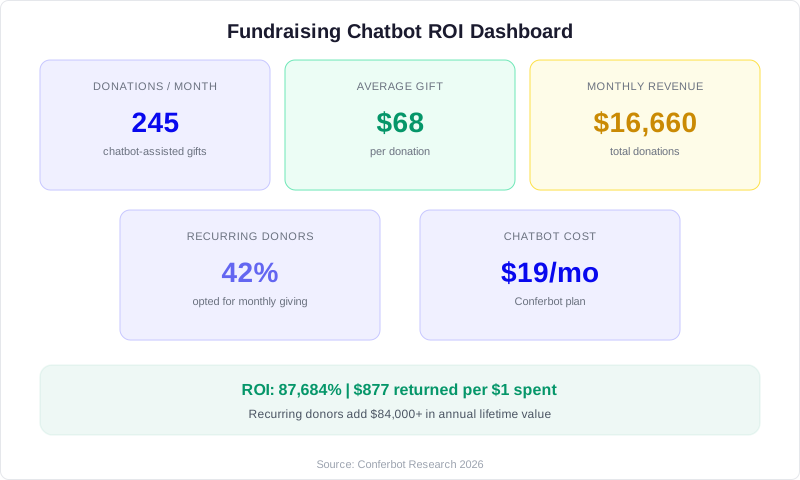
- Without chatbot: 500 visits x 32% completion = 160 donations x $45 average = $7,200/month
- With chatbot: 500 visits x 69% completion = 345 donations x $68 average = $23,460/month
- Monthly revenue increase: $16,260
- Annual revenue increase: $195,120
Add recurring giving: 125 new recurring donors at $35/month average = $4,375/month additional recurring revenue, compounding each month as the base grows.
Add event registration improvements: For a nonprofit running 4 major events per year, improved registration completion and add-on revenue contributes an additional $15,000-$30,000 annually.
Time Savings Value
Staff time saved on donor communications: 9 hours/week x 52 weeks = 468 hours/year. At a development coordinator salary of $25-35/hour, that is $11,700-$16,380 in recovered productive time. This time can be redirected to major donor cultivation, grant writing, and strategic planning -- activities that generate far more revenue per hour than answering routine questions.
Total First-Year ROI
For a mid-size nonprofit investing $1,200/year in a chatbot platform:
- Revenue increase: $195,000+
- Time savings value: $12,000-$16,000
- Event revenue increase: $15,000-$30,000
- Total return: $222,000-$241,000
- ROI: 18,000-20,000%
Even if your results are one-tenth of these projections (and for many small nonprofits, they will be), the return is still 1,800-2,000% -- making a fundraising chatbot one of the highest-ROI investments a nonprofit can make in their digital infrastructure.
Data Privacy, Compliance, and Donor Trust
Nonprofits hold a position of public trust, as emphasized by the GuideStar (Candid) transparency standards. Donor data must be handled with the highest standards of privacy and security. Here is how to ensure your chatbot maintains that trust.
PCI Compliance for Payment Processing
Any chatbot that processes donations must be PCI-DSS compliant. This means the chatbot itself should never store, process, or transmit credit card numbers. Instead, it hands off to a PCI-compliant payment processor (Stripe, PayPal, or similar) at the point of transaction. The chatbot collects the gift amount and donor information, then redirects to a secure payment form for the financial transaction. This separation ensures that a chatbot vulnerability cannot expose payment data.
Donor Data Protection
Donor information is sensitive. Names, emails, addresses, giving history, and giving capacity research must be protected:
- Encryption: All chatbot data should be encrypted in transit (TLS/SSL) and at rest
- Access control: Limit who can view chatbot conversation transcripts containing donor information
- Data retention: Define and communicate how long chatbot conversation data is retained
- GDPR compliance: For organizations with European donors, ensure chatbot data handling complies with GDPR requirements including consent, right to access, and right to deletion
- CCPA compliance: For California donors, honor CCPA data rights requests
Transparency and Consent
Donors should know they are interacting with a chatbot, not a human. Begin the conversation with a clear identifier: "Hi, I'm [Organization]'s virtual assistant. I can help you make a donation, register for events, or answer questions about our programs. How can I help?" This transparency builds trust rather than diminishing it -- donors appreciate the instant availability and do not mind interacting with a chatbot when it is clearly identified and genuinely helpful.
Tax Receipt and Acknowledgment Compliance
IRS regulations require written acknowledgment for charitable contributions of $250 or more. Your chatbot's post-donation flow must trigger a proper tax receipt that includes the organization's name and EIN, the donation date and amount, a statement that no goods or services were provided in exchange (or a description and good-faith estimate of the value if they were, such as a gala dinner), and the organization's physical address. For event tickets where a portion is tax-deductible, clearly state the deductible amount versus the fair market value of benefits received.
Building and Maintaining Donor Trust
Beyond legal compliance, maintaining donor trust requires consistent, honest communication through the chatbot. Never use manipulative tactics (false urgency, guilt-based messaging, or inflated impact claims). Present clear information about how funds are used. Respect the donor's time by keeping the conversation focused and providing a way to reach a human when the chatbot cannot help. Trust is the foundation of every donor relationship, and your chatbot is often the first interaction a new supporter has with your organization.
Step-by-Step Implementation Guide
Here is the complete roadmap to deploy a fundraising chatbot, designed for nonprofit development teams of any size.
Week 1: Preparation
- Audit your current giving process: Document your online donation flow, event registration process, and common donor questions. Identify the biggest friction points and highest-volume inquiries.
- Gather your content: Compile impact statements for each giving level, FAQ answers (aim for 30-50 common questions), event details for upcoming events, and 3-5 impact stories with specific outcomes and beneficiary quotes.
- Choose your platform: Sign up for Conferbot and explore the template library for nonprofit and fundraising templates.
- Define your metrics: Set targets for donation completion rate, average gift amount, recurring donor conversion, and event registration completion.
Week 2: Building
- Build the donation flow: Create the guided giving conversation with suggested amounts, impact anchoring, recurring giving default, and tribute gift options. Test with 3-5 team members for clarity and emotional tone.
- Build the event registration flow: Configure registration for your next upcoming event with ticket tiers, guest information collection, dietary/accessibility needs, and add-on options.
- Upload FAQ content: Add all common questions to your knowledge base. Prioritize questions about mission, impact, financial transparency, and event logistics.
- Configure impact stories: Create story modules that the chatbot delivers in response to questions about organizational impact.
Week 3: Integration and Testing
- Connect your CRM: Integrate with your donor management system so chatbot-captured gifts and contacts flow directly into your database.
- Set up payment processing: Configure Stripe, PayPal, or your existing payment processor for in-conversation donation processing.
- Install on your website: Add the chatbot to your homepage, donation page, event page, and about page with context-specific greetings.
- Test the complete flow: Process test donations through the entire flow from chatbot greeting to payment confirmation to CRM record creation. Verify tax receipts are generated correctly.
Week 4: Launch and Optimize
- Soft launch: Go live and monitor closely for the first week. Review conversation transcripts daily to identify confusion points or missing answers.
- Add unanswered questions: When the chatbot cannot answer a question, add the answer to the knowledge base immediately.
- Review analytics: Track donation completion rate, average gift, recurring conversion, and event registration completion. Compare to pre-chatbot baselines.
- Optimize amounts and framing: A/B test different suggested amounts, impact statements, and conversation flows to maximize giving.
Ongoing Maintenance
- Monthly: Update impact statistics, add new FAQ answers, refresh event information
- Quarterly: Review donation and engagement trends, adjust suggested amounts based on performance data, update impact stories
- Annually: Comprehensive review of chatbot performance against fundraising goals, major content refresh, consideration of new features and channels
The implementation timeline is designed for speed. A fundraising chatbot does not need to be perfect at launch -- it needs to be live and capturing donations. Every day without a chatbot is a day of lost gifts, abandoned donation forms, and unanswered questions. Deploy, measure, and improve continuously. The organizations that succeed with chatbots treat them as living tools that evolve with every conversation, not as one-time projects that are built and forgotten.
Was this article helpful?
About the Author
The Conferbot team specializes in conversational AI, chatbot strategy, and customer engagement automation. With deep expertise in building AI-powered chatbots, they help businesses deliver exceptional customer experiences across every channel.
View all articles