
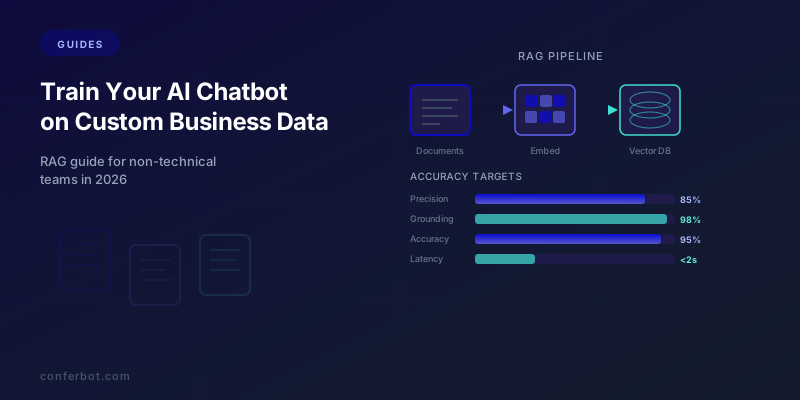
Why Off-the-Shelf AI Is Not Enough: The Case for Custom Business Data
Large language models like GPT-4, Claude, and Gemini are remarkable generalists. They can write poetry, explain quantum physics, and hold natural conversations on virtually any topic. But ask them about your company's return policy, your product specifications, your pricing tiers, or your internal processes, and they will either hallucinate a plausible-sounding but incorrect answer or admit they do not have the information.
This is the fundamental gap between a general-purpose AI and a business-specific AI chatbot. Your customers do not want generalized knowledge -- they want accurate answers about your products, your policies, and your services. A chatbot that confidently states the wrong return window or invents a product feature that does not exist is worse than no chatbot at all.
The solution is to train your chatbot on your own business data. But "training" does not mean what most people think. You do not need to retrain a billion-parameter model from scratch. You do not need a team of machine learning engineers. You do not need GPUs or months of development time. What you need is Retrieval-Augmented Generation (RAG) -- a technique that lets you connect your existing business documents to an AI model so it can answer questions using your data as the source of truth.

RAG was first introduced in the landmark 2020 paper by Lewis et al. at Facebook AI Research, and it has since become the industry standard for building AI systems grounded in specific knowledge. The concept is elegant: instead of trying to stuff all your business knowledge into the AI model itself, you keep your knowledge in a searchable database and retrieve the relevant pieces at query time. The AI model then generates its answer using the retrieved information as context.
The result is a chatbot that answers questions accurately, cites your actual documentation, and updates instantly when you change your content -- without any model retraining. In this guide, we break down every component of a RAG-powered chatbot system in plain language, explain how to set it up for your business, and show you how to measure and improve its accuracy over time.
If you have already built a basic knowledge base chatbot and want to improve its accuracy, skip ahead to retrieval quality metrics. For a foundational overview of training chatbots on business content, read our companion knowledge base training guide.
RAG Explained Simply: How Retrieval-Augmented Generation Works
Retrieval-Augmented Generation sounds intimidating, but the concept maps to something every business person already understands. Think of it this way: when a new employee answers a customer question, they do not rely solely on memory. They look up the answer in the company handbook, product documentation, or knowledge base, read the relevant section, and then formulate a response in their own words. RAG works the same way, except the employee is an AI model and the handbook is your document database.
The Three Stages of RAG
Stage 1: Ingestion (Prepare Your Documents)
You upload your business documents -- help articles, product manuals, policy documents, FAQ pages, training materials -- to the system. The RAG pipeline processes these documents by:
- Parsing: Extracting text from PDFs, Word documents, web pages, spreadsheets, and other formats
- Chunking: Breaking large documents into smaller, semantically meaningful pieces (more on this in the chunking strategies section)
- Embedding: Converting each chunk into a numerical representation (a vector) that captures its meaning
- Indexing: Storing these vectors in a specialized database optimized for similarity search
Stage 2: Retrieval (Find the Right Information)
When a customer asks a question, the system:
- Converts the question into a vector using the same embedding model
- Searches the vector database for chunks whose vectors are most similar to the question vector
- Returns the top 3-5 most relevant chunks as context
This is fundamentally different from keyword search. The question "Can I return something I bought last week?" retrieves chunks about your return policy even if none of those chunks contain the exact words "return something I bought last week." The embedding model understands meaning, not just word matches.
Stage 3: Generation (Compose the Answer)
The AI model receives the customer's question plus the retrieved document chunks as context, and generates a natural language answer grounded in your actual content. The prompt to the AI looks something like:
You are a helpful customer support agent for [Company]. Answer the customer's question using ONLY the information provided below. If the answer is not in the provided context, say you do not have that information and offer to connect them with a human agent.
[Retrieved Document Chunks]
Customer Question: [question]
This grounding instruction is critical. It tells the AI to use your documents as the source of truth and prevents hallucination by forbidding the model from making up answers when the information is not available.
RAG vs. Fine-Tuning: Which Do You Need?
| Dimension | RAG | Fine-Tuning |
|---|---|---|
| What it does | Provides the AI with external knowledge at query time | Permanently modifies the AI model's weights with your data |
| Setup time | Hours to days | Days to weeks |
| Data requirements | Any document format; no minimum | Thousands of structured training examples |
| Knowledge updates | Instant (just update the document) | Requires retraining the model |
| Cost | $0-500/month for vector database | $500-50,000+ per training run |
| Best for | Business knowledge, FAQs, policies, product info | Teaching the model a new language, tone, or specialized domain |
| Technical skill required | Low (no-code platforms available) | High (ML engineering required) |
For 95% of business chatbot use cases, RAG is the right choice. Fine-tuning is only necessary when you need the model to learn a completely new behavior (like responding in a specialized technical language) rather than simply accessing your information. Most businesses need their chatbot to know their content, not learn a new way of thinking.
For more on the practical differences between RAG and fine-tuning in chatbot deployments, see our chatbot hallucination prevention guide, which covers grounding strategies in depth.
Preparing Your Business Data: What to Include and How to Format It
The quality of your RAG chatbot depends entirely on the quality of the data you feed it. The principle is straightforward: if the answer to a customer question exists somewhere in your uploaded documents, the chatbot will find it and use it. If the answer is not in your documents, the chatbot cannot help. This means your data preparation step is the single most important factor in chatbot accuracy.
What Business Data to Include
Start with the documents that address your most common customer questions. For most businesses, this means:
- Help center articles and FAQs: These are purpose-built for answering questions and typically produce the highest retrieval accuracy. If you have a Zendesk, Intercom, or Freshdesk knowledge base, export all articles.
- Product documentation: Product descriptions, specifications, user manuals, sizing guides, and comparison sheets. These power product-related queries.
- Policy documents: Return policies, shipping policies, privacy policies, terms of service, warranty information, and SLAs. These handle the second-most-common query category after product questions.
- Pricing information: Pricing pages, plan comparison tables, discount structures, and enterprise pricing guidelines. Pricing is one of the top reasons people contact support.
- Internal SOPs and playbooks: If your chatbot handles internal employee queries (IT helpdesk, HR questions), include standard operating procedures, employee handbooks, and IT troubleshooting guides.
- Past support conversations: Anonymized transcripts of resolved support tickets provide excellent training data because they already contain real questions paired with verified answers.
Data Formatting Best Practices
The way you format your documents significantly impacts retrieval quality:
| Format | Best Practices | Common Mistakes |
|---|---|---|
| Help articles | One topic per article; clear headings; Q&A format where possible | Combining multiple unrelated topics in one article |
| PDFs | Use text-based PDFs (not scanned images); include headers and structure | Uploading scanned documents without OCR processing |
| Product specs | Structured tables with labeled columns; one product per section | Embedding specs in dense paragraph text |
| Policies | Use numbered sections with clear headings; date each version | Long paragraphs without structure or headings |
| Spreadsheets | Include column headers; keep data in consistent format | Using cell formatting (colors, merged cells) for meaning |
Data Quality Checklist
Before uploading, run through this checklist:
- Accuracy: Is every document current and correct? Outdated information is worse than no information because the chatbot will serve it confidently.
- Completeness: Does your document set cover the top 50 customer questions? Review your support ticket history to identify gaps.
- Clarity: Can a new employee understand each document without context? If a human cannot parse it, the AI will struggle too.
- No contradictions: Do any documents contradict each other? For example, does one page say returns are accepted within 30 days while another says 14 days? Resolve contradictions before uploading.
- Metadata included: Add dates, categories, and version numbers to each document. This helps the system retrieve the most current information.

For platforms like Conferbot, the data upload process is simple: drag and drop your files into the AI knowledge base panel. The system handles parsing, chunking, embedding, and indexing automatically. You can upload PDFs, Word documents, web page URLs, plain text files, and CSV spreadsheets.
Chunking Strategies: How to Break Documents Into AI-Friendly Pieces
Chunking is the process of breaking your documents into smaller segments that the AI can process and retrieve individually. It is one of the most critical and least understood aspects of building a high-quality RAG chatbot. Get chunking wrong, and your chatbot will either retrieve irrelevant information (chunks too large) or lose important context (chunks too small).
Why Chunking Matters
AI models have a limited context window -- the amount of text they can process in a single request. Even models with large context windows (128K+ tokens) perform better when given focused, relevant context rather than massive documents. The RAG system retrieves the top 3-5 most relevant chunks for each query, so each chunk needs to be:
- Self-contained: The chunk should make sense on its own, without requiring context from surrounding text.
- Focused: Each chunk should address one topic or one aspect of a topic.
- Appropriately sized: Large enough to contain useful information, small enough to be relevant to specific queries.
Chunking Methods Compared
| Method | How It Works | Best For | Typical Chunk Size |
|---|---|---|---|
| Fixed-size chunking | Splits text every N characters/tokens with overlap | Uniform documents; quick setup | 500-1000 tokens |
| Sentence-based chunking | Splits at sentence boundaries, groups 3-5 sentences | Narrative content; articles | 200-500 tokens |
| Section/heading-based chunking | Splits at headings (H1, H2, H3) | Well-structured documents; help articles | Variable (50-2000 tokens) |
| Semantic chunking | Uses AI to detect topic boundaries | Unstructured content; long documents | Variable (200-800 tokens) |
| Recursive chunking | Tries section-based first, falls back to sentence, then fixed-size | Mixed document types | Variable |
Practical Chunking Guidelines
For help center articles: Use heading-based chunking. Each H2 section typically addresses one topic and makes an ideal chunk. Include the article title as a prefix in each chunk for context: "[Article: Return Policy] Customers can return any unused item within 30 days of delivery..."
For product documentation: Use section-based chunking aligned to product attributes. One chunk for specifications, one for usage instructions, one for warranty information. Always include the product name in each chunk.
For policy documents: Use numbered section chunking. Each numbered policy clause becomes its own chunk. Include the policy title and effective date as a prefix.
For FAQ pages: Each question-answer pair is a natural chunk. This is the ideal format because each chunk maps directly to a customer query.
The Overlap Technique
When using fixed-size or sentence-based chunking, include a 10-20% overlap between adjacent chunks. This means the last few sentences of chunk N are also the first few sentences of chunk N+1. Overlap prevents information loss at chunk boundaries -- if an answer spans two chunks, the overlap ensures the complete answer appears in at least one chunk.
For example, with 500-token chunks and 100-token overlap:
- Chunk 1: tokens 1-500
- Chunk 2: tokens 400-900
- Chunk 3: tokens 800-1300
According to Pinecone's documentation on chunking strategies, the optimal chunk size and overlap depend on your embedding model's context window and your typical query length. Shorter queries work better with smaller chunks; longer, more complex queries benefit from larger chunks.
Most no-code chatbot platforms like Conferbot handle chunking automatically using optimized defaults. Advanced users can configure chunk size and overlap in the knowledge base settings.
Vector Databases and Embedding Models: The Engine Behind Smart Retrieval
Vector databases and embedding models are the two technologies that make RAG possible. Together, they enable the chatbot to find relevant information based on meaning rather than exact keyword matches. Understanding these components helps you make better decisions about your chatbot setup and troubleshoot accuracy issues.
What Are Embeddings?
An embedding is a numerical representation of text that captures its semantic meaning. The embedding model converts a sentence like "What is your return policy?" into a list of numbers (a vector), for example: [0.021, -0.153, 0.847, ...]. Similar sentences produce similar vectors, even if they use completely different words.
For instance, these three questions would all produce vectors that are very close to each other:
- "What is your return policy?"
- "Can I send back an item I purchased?"
- "How do refunds work?"
While this question would produce a very different vector:
- "What colors does this shirt come in?"
This semantic similarity is what allows the chatbot to match customer questions to the right document chunks, even when the customer uses different words than those in your documentation.
Popular Embedding Models in 2026
The choice of embedding model affects retrieval quality. According to the MTEB (Massive Text Embedding Benchmark) leaderboard, the top embedding models for retrieval tasks in 2026 include:
| Model | Provider | Dimensions | MTEB Retrieval Score | Best For |
|---|---|---|---|---|
| text-embedding-3-large | OpenAI | 3072 | 64.6 | General-purpose; high accuracy |
| text-embedding-3-small | OpenAI | 1536 | 62.3 | Cost-effective; most use cases |
| voyage-3 | Voyage AI | 1024 | 67.2 | Retrieval-specialized; highest accuracy |
| e5-mistral-7b-instruct | Microsoft | 4096 | 66.6 | Open-source; self-hosted |
| embed-v4 | Cohere | 1024 | 65.0 | Multilingual; international businesses |
For most business chatbots, OpenAI's text-embedding-3-small offers the best balance of accuracy and cost. It processes text at approximately $0.00002 per 1,000 tokens, making the cost of embedding an entire 10,000-document knowledge base less than $1.
What Is a Vector Database?
A vector database is a specialized database optimized for storing and searching vectors (embeddings). Unlike traditional databases that search for exact matches (SQL) or keyword matches (Elasticsearch), vector databases search for semantic similarity -- finding the stored vectors that are closest in meaning to the query vector.
The major vector database options in 2026:
| Database | Type | Strengths | Best For |
|---|---|---|---|
| Pinecone | Managed cloud | Fully managed; fast; excellent documentation | Production deployments; teams without infra experience |
| Weaviate | Open-source / managed | Hybrid search (vector + keyword); rich filtering | Complex queries; multi-tenant applications |
| Chroma | Open-source | Simple API; lightweight; easy to prototype | Development and testing; small knowledge bases |
| Qdrant | Open-source / managed | High performance; Rust-based; efficient memory usage | Large-scale deployments; performance-critical applications |
| pgvector (PostgreSQL) | Extension | Uses existing PostgreSQL infrastructure | Teams already running PostgreSQL; cost-conscious deployments |
How Retrieval Works in Practice
When a customer asks a question, the retrieval process takes 50-200 milliseconds:
- The question is converted to a vector using the embedding model (~20ms)
- The vector database performs an Approximate Nearest Neighbor (ANN) search to find the 3-5 most similar document chunks (~10-50ms)
- Each retrieved chunk is assigned a similarity score (0 to 1, where 1 is a perfect match)
- Chunks above the relevance threshold (typically 0.7+) are passed to the AI model as context
- The AI model generates the answer using the retrieved context (~100-500ms)
For no-code chatbot platforms like Conferbot's AI builder, the vector database, embedding model, and retrieval pipeline are fully managed. You upload documents and the platform handles everything behind the scenes.
Measuring Retrieval Quality: How to Know If Your RAG System Is Working
A RAG chatbot is only as good as its retrieval. If the system retrieves the wrong document chunks, the AI will generate a confident answer based on irrelevant information -- which may be worse than no answer at all. Measuring retrieval quality is essential for building a chatbot you can trust.
The Five Core Retrieval Metrics
| Metric | What It Measures | Target | How to Improve |
|---|---|---|---|
| Retrieval Precision | % of retrieved chunks that are actually relevant to the query | 80%+ | Improve chunking; add metadata filters |
| Retrieval Recall | % of all relevant chunks that were successfully retrieved | 90%+ | Increase top-K (retrieve more chunks); improve embeddings |
| Answer Accuracy | % of chatbot answers that are factually correct | 95%+ | Improve retrieval; add answer verification step |
| Grounding Rate | % of chatbot answers that are grounded in retrieved documents (not hallucinated) | 98%+ | Strengthen system prompt; lower temperature; add citations |
| Latency | Time from question to answer | Under 3 seconds | Optimize embedding model; cache frequent queries; use faster vector DB |
How to Test Retrieval Quality
Build a test suite of 50-100 question-answer pairs based on your actual business data:
- Collect real questions: Pull the top 50 most common customer questions from your support tickets or chat logs.
- Find the correct source: For each question, identify which document and which specific section contains the correct answer.
- Run the RAG pipeline: Send each question through your chatbot and record which chunks were retrieved and what answer was generated.
- Score each result: Did the system retrieve the correct chunks? Did the generated answer match the expected answer? Was the answer grounded in the retrieved content?
This evaluation process, sometimes called a "golden set" or "ground truth" evaluation, gives you concrete metrics to optimize against.
Common Retrieval Failures and Fixes
| Failure Pattern | Symptoms | Root Cause | Fix |
|---|---|---|---|
| Wrong topic retrieved | Answer is about the wrong product or policy | Chunks lack context; similar terminology across different topics | Add product/topic names to chunk prefixes; use metadata filtering |
| Partial information | Answer is incomplete; misses key details | Relevant info split across chunk boundary | Increase chunk overlap; use larger chunk sizes |
| Outdated information | Answer cites old policy or discontinued product | Old document versions still in the database | Remove outdated documents; add date-based filtering |
| Hallucinated details | Answer includes facts not in any document | Weak grounding prompt; high temperature setting | Strengthen system prompt; lower temperature to 0.1-0.3 |
| "I don't know" when answer exists | Bot says it cannot find information that is in the knowledge base | Poor embedding similarity; question phrasing not matching document language | Add alternative phrasings to documents; lower similarity threshold |

For a comprehensive guide to preventing chatbot hallucinations with grounding strategies, see our hallucination prevention guide.
Keeping Your Knowledge Base Current: Update Strategies and Automation
A RAG chatbot's biggest advantage over fine-tuning is that knowledge updates are instant. You change a document, and the chatbot immediately uses the new information. But this advantage only works if you actually keep your documents updated. The most common reason RAG chatbots degrade over time is not a technical failure -- it is stale content.
Content Freshness Framework
Organize your knowledge base content into update frequency tiers:
| Tier | Content Type | Update Frequency | Examples |
|---|---|---|---|
| Tier 1: Dynamic | Information that changes frequently | Real-time or daily | Pricing, inventory, promotions, operating hours |
| Tier 2: Periodic | Information that changes occasionally | Weekly or monthly | Product specs, shipping rates, team directory |
| Tier 3: Stable | Information that rarely changes | Quarterly review | Return policies, terms of service, company history |
| Tier 4: Evergreen | Foundational content | Annual review | How-to guides, educational content, industry overviews |
Automated Content Sync
The best RAG systems do not rely on manual updates. Configure automated sync connections between your content sources and your chatbot's knowledge base:
- Help center integration: Connect your Zendesk, Intercom, Freshdesk, or HelpScout knowledge base directly. When you publish or update an article, the chatbot's knowledge base updates automatically within minutes.
- Website crawler: Set up a scheduled crawler that re-indexes specific pages on your website (pricing page, product pages, policy pages) on a daily or weekly basis.
- CMS integration: If your content lives in a CMS (WordPress, Notion, Confluence), connect the CMS API so document changes propagate automatically.
- Google Drive / SharePoint sync: For internal chatbots, connect to shared drives where teams maintain SOPs and process documents.
Version Control for Knowledge Bases
Implement version control practices for your chatbot's knowledge base:
- Track document versions: Every time you update a document, keep a record of what changed and when. This makes it easy to identify if a chatbot accuracy issue was caused by a recent content change.
- Review before publishing: For critical documents (pricing, legal policies), implement an approval workflow where changes are reviewed before being pushed to the live chatbot.
- Rollback capability: If a content update causes accuracy problems, you need the ability to quickly revert to the previous version.
- Change notifications: Set up alerts that notify the chatbot administrator whenever a synced document changes, so you can verify the chatbot handles the new content correctly.
The Content Audit Cycle
Schedule a monthly content audit using this process:
- Review chatbot logs: Identify questions the bot could not answer or answered incorrectly. These reveal content gaps.
- Check for stale content: Review all Tier 1 and Tier 2 documents for accuracy. Flag anything that has changed since the last update.
- Add new content: Based on new products, policy changes, or emerging customer questions, add new documents to the knowledge base.
- Remove obsolete content: Delete documents about discontinued products, expired promotions, or superseded policies. Stale content in the knowledge base actively harms accuracy.
- Re-run the accuracy test: Use your golden set evaluation (from the retrieval metrics section) to verify that accuracy remains above your target threshold.
Conferbot's AI knowledge base supports all of these update strategies including automated help center sync, website crawling, and manual document management -- all configurable from a single dashboard without engineering involvement.
Grounding and Accuracy: Preventing Your RAG Chatbot From Hallucinating
Hallucination -- when the AI generates information that is not in your documents -- is the primary risk of any AI chatbot deployment. In a RAG system, hallucination typically occurs when retrieval fails (no relevant chunks found, so the model fills in the gap from its general training data) or when the grounding instructions in the system prompt are weak. The goal is to achieve a grounding rate above 98%, meaning 98+ out of every 100 answers are directly supported by your knowledge base.
The Grounding Stack: Five Layers of Hallucination Prevention
Layer 1: Retrieval quality
The foundation. If retrieval is accurate (precision above 80%, recall above 90%), the AI receives relevant context and has little reason to hallucinate. Improve retrieval by optimizing chunking, choosing the right embedding model, and tuning the similarity threshold.
Layer 2: System prompt engineering
The system prompt tells the AI how to behave. A well-crafted grounding prompt includes:
- An explicit instruction to answer ONLY from provided context
- A directive to say "I don't have information about that" when the context does not cover the question
- A prohibition against making assumptions or extrapolating beyond the provided content
- An instruction to cite which document the answer comes from
Layer 3: Temperature control
Temperature controls the randomness of the AI's output. For factual business chatbots, use a temperature of 0.1 to 0.3 (on a 0-1 scale). Higher temperatures increase creativity but also increase the risk of generating information not present in the context. A temperature of 0.0-0.1 produces the most deterministic, grounded answers.
Layer 4: Confidence scoring
Implement a confidence score for each answer based on the similarity scores of the retrieved chunks. If the best chunk has a similarity score below 0.6, the chatbot should not attempt to answer -- instead, it should acknowledge the limitation and offer to connect the customer with a human agent.
| Similarity Score Range | Chatbot Behavior | Example Response |
|---|---|---|
| 0.85+ | Confident answer | Direct answer with source citation |
| 0.70-0.84 | Qualified answer | "Based on our documentation, [answer]. Let me know if you need more detail." |
| 0.50-0.69 | Cautious response | "I found some related information, but I'm not fully certain. Here's what I have: [answer]. Would you like me to connect you with our team for a definitive answer?" |
| Below 0.50 | Decline to answer | "I don't have specific information about that in our knowledge base. Let me connect you with a team member who can help." |
Layer 5: Answer verification
Advanced RAG systems add a verification step where a second AI call checks whether the generated answer is actually supported by the retrieved chunks. This "self-check" catches hallucinations that slip through the other layers. While it adds 200-400ms of latency, it reduces hallucination rates by an additional 40-60%.

For an in-depth technical guide to hallucination prevention strategies, including specific prompt templates and testing frameworks, read our complete hallucination prevention guide.
Implementation Without Code: Setting Up RAG on Conferbot in 30 Minutes
You do not need to be a developer to build a RAG-powered chatbot. No-code platforms abstract away the complexity of vector databases, embedding models, and retrieval pipelines, letting you focus on what matters: your business content and customer experience. Here is a step-by-step walkthrough of building a RAG chatbot on Conferbot.
Step 1: Create Your Bot (3 Minutes)
Log into your Conferbot account and click Create New Bot. Select the "AI Knowledge Base Bot" template, which comes pre-configured with RAG capabilities. Name your bot, set the primary language, and choose a personality tone (professional, friendly, casual, or custom).
Step 2: Upload Your Knowledge Base (10 Minutes)
Navigate to the Knowledge Base section and upload your documents:
- Drag and drop files: PDF, DOCX, TXT, CSV, and XLSX files are all supported.
- Import web pages: Paste URLs and the system crawls and indexes the page content automatically. Useful for importing your existing help center articles.
- Connect integrations: Link your Zendesk, Intercom, Notion, or Google Drive for automatic syncing.
- Manual entry: Type or paste content directly for quick additions.
The platform handles parsing, chunking, embedding, and indexing automatically. For most knowledge bases (under 500 documents), processing completes in 2-5 minutes.
Step 3: Configure Grounding Settings (5 Minutes)
In the bot's AI settings panel, configure these grounding parameters:
- Grounding mode: Set to "Strict" for business-critical bots (the AI will never answer outside the knowledge base) or "Balanced" for general-purpose bots (the AI may provide general context when knowledge base content is sparse).
- Confidence threshold: Set the minimum similarity score required to generate an answer (recommended: 0.70 for most businesses).
- Fallback behavior: Configure what happens when the bot cannot find a relevant answer -- options include "Offer to connect with human agent," "Suggest related topics," or "Collect the question and email the answer later."
- Citation mode: Enable to have the bot cite which document it used to generate each answer, increasing transparency and user trust.
Step 4: Test With Real Questions (10 Minutes)
Use the built-in testing panel to send your chatbot real customer questions:
- Test with the top 20 most common customer questions
- Verify each answer is accurate and grounded in your documents
- Test edge cases: questions with no answer in the knowledge base, ambiguous questions, and questions that require information from multiple documents
- Check the retrieval panel to see which chunks were used for each answer -- this is invaluable for debugging accuracy issues
Step 5: Deploy and Monitor (2 Minutes)
Add the chatbot to your website by copying the embed code or installing the WordPress plugin. Once live, monitor performance through the analytics dashboard:
- Containment rate: What percentage of conversations are resolved without human handoff?
- Accuracy feedback: Enable the thumbs-up/thumbs-down feedback buttons so customers can rate answer quality
- Unanswered questions log: Review questions the bot could not answer to identify knowledge base gaps

For a complete walkthrough of building your first chatbot without code, see our no-code chatbot building guide. For specific platform features and pricing tiers, visit our pricing page.
Advanced RAG Techniques: Hybrid Search, Re-Ranking, and Multi-Hop Retrieval
Once your basic RAG chatbot is running, there are several advanced techniques that can push accuracy from good (90-95%) to excellent (97-99%). These techniques are increasingly available in no-code platforms, but understanding how they work helps you make better configuration decisions.
Hybrid Search: Combining Vector and Keyword Search
Pure vector search excels at understanding meaning but sometimes misses exact matches. If a customer asks for order #12345, vector search might retrieve chunks about order processes in general rather than the specific order format. Hybrid search combines vector similarity with traditional keyword matching (BM25) to get the best of both worlds.
How it works: the system runs both a vector search and a keyword search in parallel, then merges the results using a technique called Reciprocal Rank Fusion (RRF). Chunks that rank highly in both searches are boosted to the top.
Hybrid search typically improves retrieval accuracy by 5-15% compared to pure vector search, especially for queries that include specific identifiers (order numbers, product SKUs, policy names). According to Weaviate's research on hybrid search, the optimal blend ratio is 60-70% vector and 30-40% keyword for most business knowledge bases.
Re-Ranking: A Second Pass for Better Relevance
Initial retrieval casts a wide net -- it finds 20-50 potentially relevant chunks quickly using approximate nearest neighbor search. Re-ranking applies a more computationally expensive but more accurate model to reorder those results and select the truly best matches.
The re-ranking step uses a cross-encoder model that evaluates each (question, chunk) pair directly, rather than comparing pre-computed vectors. This is slower (~100ms added latency) but significantly more accurate for nuanced queries.
Re-ranking typically improves retrieval precision by 10-20% and is especially valuable when your knowledge base contains many similar documents (e.g., multiple products with similar descriptions, or policy documents with overlapping language).
Multi-Hop Retrieval: Answering Complex Questions
Some customer questions require information from multiple documents to answer completely. For example: "If I buy the Premium Plan, can I use it on my WooCommerce store and my Shopify store at the same time?" This requires the chatbot to retrieve information about the Premium Plan features, the WooCommerce integration details, and the Shopify integration details -- three separate knowledge base areas.
Multi-hop retrieval works by:
- Breaking the complex question into sub-queries ("Premium Plan features", "WooCommerce support", "Shopify support")
- Running separate retrieval passes for each sub-query
- Combining the retrieved chunks into a comprehensive context
- Generating a single coherent answer from the combined context
This technique is particularly valuable for product comparison queries, cross-referencing policies, and integration compatibility questions.
Contextual Compression
When the retrieved chunks contain a lot of surrounding text that is not relevant to the specific question, contextual compression extracts only the relevant sentences from each chunk before passing them to the AI model. This reduces noise, improves answer focus, and allows the system to include more total chunks within the model's context window.
According to LangChain's documentation on contextual compression, this technique improves answer relevance by 15-25% for knowledge bases with long-form documents.
Which Advanced Techniques to Use
| Technique | Accuracy Improvement | Latency Impact | When to Use |
|---|---|---|---|
| Hybrid search | +5-15% | +10-20ms | Always recommended; minimal cost |
| Re-ranking | +10-20% | +80-150ms | Knowledge bases with 500+ documents or similar content |
| Multi-hop retrieval | +15-30% on complex queries | +200-500ms | Product comparisons; cross-referencing questions |
| Contextual compression | +15-25% on relevance | +50-100ms | Long-form documents; verbose knowledge bases |
Conferbot's AI chatbot builder includes hybrid search and re-ranking on Growth plans and above, with multi-hop retrieval available on Scale and Enterprise plans.
Was this article helpful?
How to Train Your AI Chatbot on Custom Business Data (RAG Guide for 2026) FAQ
Everything you need to know about chatbots for how to train your ai chatbot on custom business data (rag guide for 2026).
About the Author

Conferbot Team specializes in conversational AI, chatbot strategy, and customer engagement automation. With deep expertise in building AI-powered chatbots, they help businesses deliver exceptional customer experiences across every channel.
View all articles