
Why Teams Are Moving Away From LiveChat in 2026
LiveChat has been a fixture in the customer communication market since 2002. With over 36,000 businesses on the platform and a reputation for clean design and reliable uptime, it earned its place as the default choice for website live chat throughout the 2010s. But the market has evolved in ways that expose LiveChat's fundamental architecture as increasingly outdated.
The core issue is structural: LiveChat was built in an era when customer support meant typing messages back and forth between a human agent and a customer. AI was an afterthought, and when LiveChat finally addressed automation, it did so by creating a separate product -- ChatBot.com -- rather than integrating AI natively into the live-chat experience. This separation has cascading consequences for pricing, feature integration, and customer experience.
According to G2 reviews, LiveChat maintains a strong 4.5 out of 5 overall rating, but reviews filtered to pricing and AI capabilities drop to 3.7 and 3.5 respectively. The pattern in recent reviews is clear: users praise the core chat experience but express frustration at the escalating costs and the artificial separation between human chat and AI automation.
LiveChat's pricing page shows four tiers: Starter at $20 per agent per month, Team at $41 per agent per month, Business at $59 per agent per month, and Enterprise with custom pricing. These are per-agent, per-month charges -- meaning costs scale linearly with team size. A 15-agent support team on the Team plan pays $615 per month ($7,380 per year) just for live chat, with zero AI automation included.
To add AI, you need a separate ChatBot.com subscription starting at $52 per month for 1,000 chats. The two products integrate, but they are separately billed, separately configured, and separately maintained. A Featurebase analysis of LiveChat alternatives found that the combined LiveChat plus ChatBot.com cost exceeds purpose-built AI-first platforms by 40 to 200 percent for equivalent functionality.
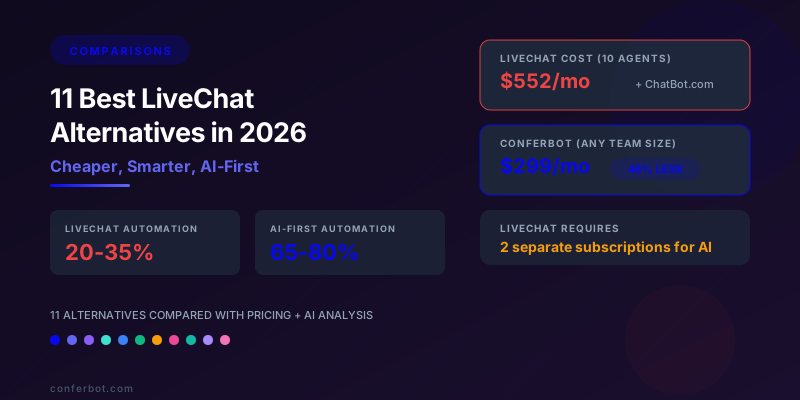
Meanwhile, the competitive landscape has shifted decisively toward AI-first platforms that unify live chat and AI automation in a single product with flat-rate or more efficient pricing. These platforms do not treat AI as a bolt-on but as the primary interaction layer, with human agents serving as an escalation path rather than the default. The result is dramatically higher automation rates (55 to 80 percent versus LiveChat plus ChatBot.com's typical 20 to 35 percent), lower total cost, and a more seamless customer experience.
This guide compares 11 LiveChat alternatives across pricing, AI capabilities, channel support, integration depth, and total cost of ownership. We include detailed pricing tables, a feature matrix, a migration playbook, and use-case recommendations. Whether you need a free starting point, an AI-first platform that replaces both LiveChat and ChatBot.com, or an enterprise solution with omnichannel reach, there is an option here that outperforms the LiveChat stack on the metrics that matter.
For teams comparing specific platforms, our comparison hub offers head-to-head matchups. For related comparisons, see our Freshdesk chatbot alternative guide and Intercom alternative analysis.
LiveChat Limitations: Per-Agent Pricing, Separate AI Subscription, and the Automation Gap
Before comparing alternatives, let us dissect LiveChat's specific shortcomings in 2026. The limitations cluster into four categories: pricing structure, AI architecture, channel coverage, and analytics depth.
Per-Agent Pricing That Punishes Growing Teams
LiveChat's per-agent model means every new hire on the support team increases the monthly bill. This creates a direct conflict between scaling your team and controlling costs. Seasonal businesses face the worst of both worlds: they need more agents during peak periods but pay the same per-agent rate year-round unless they constantly add and remove seats -- an administrative headache that no team enjoys.
Consider a 20-agent team on the Business plan: $59 times 20 equals $1,180 per month ($14,160 per year) for live chat alone, before any AI automation costs. If that same team needs ChatBot.com's Business plan for 5,000 chats, add another $142 per month. The combined stack costs $1,322 per month -- $15,864 per year -- for a capability set that AI-first platforms deliver at one-third to one-fifth the price.

Separate ChatBot.com Subscription for AI
This is LiveChat's most architecturally significant limitation. To add AI chatbot capabilities, you must subscribe to ChatBot.com -- a separate product with separate billing, separate configuration, separate analytics, and a separate learning curve. The integration between the two products is functional but imperfect: conversation context does not always transfer cleanly during handoffs, analytics are split across two dashboards, and configuration requires toggling between two admin panels.
The practical impact: your team manages two products to deliver one customer experience. When something goes wrong -- a misconfigured handoff, a missing escalation trigger, conflicting greeting messages -- debugging requires checking two systems. For fast-moving support teams, this friction slows iteration and increases the chance of customer-facing errors.
Automation Ceiling of 20 to 35 Percent
ChatBot.com uses a visual builder with decision-tree logic and optional AI text interpretation. Its design philosophy is rule-based-first with AI as an enhancement, rather than AI-first with rules as guardrails. This inverted approach limits automation rates to 20 to 35 percent of conversations -- the bot handles scripted paths well but struggles with the long tail of customer queries that do not fit predefined trees. Purpose-built AI chatbot platforms that use large language models as the primary response engine typically achieve 55 to 80 percent automation, reducing the volume that reaches human agents by 2 to 3 times more.

Limited Channel Support
LiveChat supports web chat, Facebook Messenger, email (as ticketing), Apple Messages for Business, and SMS (via integration). Notably absent from native support are WhatsApp Business API, Telegram, Instagram DM, and Slack. For businesses with customers on WhatsApp (3 billion monthly active users globally, dominant in APAC, LATAM, and Europe), the lack of native WhatsApp support is a significant gap. Third-party integrations exist but add cost and complexity.
No Revenue Generation Features
LiveChat is designed for support, not sales. It does not include product recommendation engines, abandoned-cart recovery flows, lead scoring, conversion attribution, or proactive sales triggers based on browsing behavior. For e-commerce and SaaS businesses, this means the chat tool sits entirely on the cost side of the ledger with no direct revenue contribution.
Analytics Fragmentation
With live-chat data in LiveChat and chatbot data in ChatBot.com, building a unified view of customer interaction requires exporting from both platforms, normalizing the data, and combining it externally. There is no single dashboard showing the complete customer journey from first chatbot interaction through AI resolution or human escalation to ticket closure. This fragmentation makes it difficult to identify optimization opportunities that span both the AI and human layers of support.
11 Best LiveChat Alternatives Compared: Pricing, AI, and Channels
The table below compares all 11 alternatives against LiveChat across the dimensions that matter most. Pricing reflects published rates as of June 2026.
| Platform | Starting Price | Pricing Model | Built-In AI | Channels | Free Tier |
|---|---|---|---|---|---|
| LiveChat + ChatBot.com | $20/agent/mo + $52/mo | Per-agent + per-chat | Separate product | Web, Messenger, email, SMS | Trial only |
| Conferbot | Free / $19/mo | Flat rate | Yes (GPT-4o, Claude, Gemini) | 13+ (Web, WhatsApp, Messenger, Slack, Telegram, SMS, etc.) | Yes |
| Intercom | $39/seat/mo | Per-seat + per-resolution | Yes (Fin AI, GPT-4) | Web, WhatsApp, Messenger, email | Trial only |
| Tidio | Free / $29/mo | Tiered flat rate | Yes (Lyro AI, Claude) | Web, Messenger, Instagram, email | Yes |
| Crisp | Free / $25/mo | Flat rate (no per-agent) | Yes (MagicReply, LLM) | Web, WhatsApp, Messenger, email, Telegram | Yes |
| tawk.to | Free forever | Free (monetizes via services) | AI Assist (basic) | Web, email | Yes |
| Zendesk | $55/agent/mo | Per-agent + per-resolution | Yes (Zendesk AI) | Web, WhatsApp, Messenger, email, voice | Trial only |
| Olark | $29/seat/mo | Per-seat | CoPilot (basic AI) | Web only | Trial only |
| Freshchat | Free / $19/agent/mo | Per-agent | Freddy AI ($0.49/session) | Web, WhatsApp, Messenger, email | Yes (limited) |
| Drift (Salesloft) | $2,500/mo (est.) | Platform fee | Yes (Bionic AI) | Web, email | No |
| HubSpot Chat | Free / $20/mo (CRM Suite) | Bundled with CRM | ChatSpot (basic) | Web, Messenger, email | Yes |
| JivoChat | Free / $19/agent/mo | Per-agent | Basic AI assist | Web, WhatsApp, Messenger, Telegram, Instagram, email, phone | Yes |
Total Monthly Cost: 10-Agent Team Handling 5,000 Conversations per Month
| Platform | Monthly Cost | Annual Cost | Savings vs LiveChat Stack |
|---|---|---|---|
| LiveChat Team + ChatBot.com Business | $552 | $6,624 | -- |
| Conferbot Business | $299 | $3,588 | 46% |
| Intercom (10 seats + Fin) | $1,390+ | $16,680+ | -152% (costlier) |
| Tidio Growth + Lyro | $394 | $4,728 | 29% |
| Crisp Unlimited | $95 | $1,140 | 83% |
| tawk.to | $0 | $0 | 100% |
| Zendesk Suite Pro + AI | $5,550+ | $66,600+ | -905% (costlier) |
| Olark (10 seats) | $290 | $3,480 | 47% |
| Freshchat Pro + Freddy AI | $2,940 | $35,280 | -433% (costlier) |
| Drift | $2,500+ | $30,000+ | -353% (costlier) |
| HubSpot Service Hub Pro | $450 | $5,400 | 18% |
| JivoChat Professional | $190 | $2,280 | 66% |
The pricing landscape divides into three tiers. Budget options (tawk.to, Crisp, JivoChat) cost under $200 per month. Mid-range platforms (Conferbot, Tidio, Olark, HubSpot) fall between $200 and $500. Premium and enterprise solutions (Intercom, Zendesk, Freshchat, Drift) exceed $1,000 per month. LiveChat's combined stack sits in the mid-range by price but delivers budget-tier AI capabilities -- the worst value proposition in the comparison.
For a comprehensive pricing breakdown across even more platforms, visit our pricing page.
Detailed Alternative Reviews: Strengths, Weaknesses, and Best-Fit Scenarios
1. Conferbot -- Best Overall LiveChat Alternative
Conferbot unifies what LiveChat splits across two products. AI-powered chatbot and live-agent chat exist in a single platform with seamless handoff, shared analytics, and unified configuration. The AI handles 65 to 80 percent of conversations autonomously; human agents handle the rest with full AI-assisted context.
Why it beats LiveChat:
- Unified AI plus live chat: No separate subscription. AI automation and human chat are one product, one dashboard, one bill.
- Flat-rate pricing: No per-agent fees. The Business plan at $299 per month covers your entire team -- whether that is 5 agents or 50 -- with unlimited conversations.
- 13+ channels: Native WhatsApp Business API, Messenger, Telegram, Slack, web widget, SMS, Instagram, and more.
- Multi-model AI: GPT-4o, Claude, and Gemini -- switch models without rebuilding. LiveChat's ChatBot.com is locked to its proprietary AI.
- Workflow automation: The chatbot builder creates flows that take actions (process refunds, book appointments, check order status) without human intervention.
Limitations: Smaller agent-productivity feature set compared to Zendesk's mature workforce management tools. Best for teams under 100 agents.
Best for: Teams of any size that want AI-first customer communication with live-chat fallback, flat-rate pricing, and omnichannel deployment.
2. Intercom -- Best Premium AI-First Platform
Intercom has completed its transformation from a messaging tool to an AI-first customer service platform. Its Fin AI agent uses GPT-4 to resolve conversations end-to-end, with a polished human-handoff experience when needed. The product suite includes help center, ticketing, product tours, and in-app messaging.
Why it beats LiveChat: Far superior AI with autonomous resolution capability, elegant product tour and in-app messaging features, and a unified platform that does not split AI and chat into separate products.
Limitations: Per-seat pricing ($39/seat) plus per-resolution AI fees ($0.99/resolution) make it expensive at scale. A 10-agent team resolving 5,000 conversations via Fin pays $5,340 per month. The Intercom alternative guide covers this cost analysis in detail.
Best for: SaaS companies and tech-forward teams that value best-in-class AI and can absorb premium pricing.
3. Tidio -- Best for Small E-Commerce Teams
Tidio combines live chat and AI chatbot (Lyro) in an affordable, e-commerce-optimized package. The platform includes a visual chatbot builder, Shopify and WooCommerce integrations, and a combined inbox that handles human and AI conversations side by side.
Why it beats LiveChat: Integrated AI without a separate subscription, native e-commerce integrations, and lower total cost for small teams. For a deeper analysis, see our Tidio alternative comparison.
Limitations: Lyro's conversation caps (50 to 200 per month on standard plans) restrict growing stores. Limited WhatsApp support. Agent features less mature than LiveChat's polished interface.
Best for: Shopify and WooCommerce stores with under 2,000 monthly conversations that want live chat plus AI in one affordable tool.
4. Crisp -- Best Budget Flat-Rate Option
Crisp offers live chat, chatbot, CRM, knowledge base, and email campaigns at a flat monthly rate with no per-agent charges. The Unlimited plan at $95 per month covers your entire team regardless of size. MagicReply uses LLM-based AI to draft agent responses from your knowledge base.
Why it beats LiveChat: No per-agent pricing (83 percent savings for a 10-agent team), built-in CRM eliminates a separate subscription, and LLM-powered AI assist is included -- not billed separately like ChatBot.com.
Limitations: MagicReply assists agents with drafts rather than autonomously resolving conversations. AI depth is moderate compared to Conferbot or Intercom. The interface can feel cluttered as you enable more modules.
Best for: Budget-conscious teams that want all-in-one communication (chat, email, CRM) without per-agent pricing or separate AI subscriptions.
5. tawk.to -- Best Free Live Chat
tawk.to is completely free live-chat software used by over 4 million businesses. It monetizes through optional paid agent services ($1/hour for hired chat agents) and branding removal ($29/month). AI Assist provides basic AI-drafted suggestions for agents.
Why it beats LiveChat: It is free. Period. For bootstrapped teams that need live chat today, tawk.to eliminates cost entirely while delivering a solid core chat experience.
Limitations: No autonomous AI chatbot. AI is agent-assist only, not customer-facing. Limited to web chat and email. No WhatsApp, Messenger, or modern channel support. Analytics are basic.
Best for: Startups and micro-businesses that need live chat immediately with zero budget and plan to add AI chatbot capabilities (via Conferbot's free tier) later.
6. Zendesk -- Best for Enterprise With Existing Zendesk Stack
Zendesk's chat (formerly Zopim) is deeply integrated with its ticketing, knowledge base, and workforce management suite. Zendesk AI provides autonomous resolution with the Sunshine platform enabling custom actions. The trade-off is price: $55 to $115 per agent per month plus $1.00 per automated resolution.
Why it beats LiveChat: Mature enterprise features (HIPAA, SOC 2, workforce management, voice support), superior AI with autonomous actions, and a unified platform that does not require separate products for chat and AI.
Limitations: Most expensive option on this list. Per-agent plus per-resolution pricing makes costs unpredictable. Overkill for teams under 50 agents.
Best for: Large enterprises already in the Zendesk ecosystem with compliance requirements and budgets to match.
7. Olark -- Best Minimalist Live Chat
Olark is a simple, focused live-chat tool with clean design and easy setup. CoPilot adds basic AI-powered suggestions and automation. It is less feature-rich than LiveChat but also less complex and less expensive.
Why it beats LiveChat: Simpler to use, lower per-seat pricing ($29 versus $41 on Team), and CoPilot AI is included rather than requiring a separate subscription. Good for teams that want straightforward chat without enterprise complexity.
Limitations: Web-only. No WhatsApp, Messenger, or multi-channel support. AI capabilities are basic -- CoPilot assists agents but does not resolve conversations autonomously. Limited automation and integration options.
Best for: Small teams that want simple, reliable web chat with basic AI assist and do not need multi-channel or advanced automation.
8. Freshchat -- Best Alternative Within the Freshworks Ecosystem
Freshchat is Freshworks' messaging product, tightly integrated with Freshdesk, Freshsales, and the Freshworks CRM suite. It supports web, WhatsApp, Messenger, and email with Freddy AI for automation. See our Freshdesk chatbot alternative guide for the full analysis.
Why it beats LiveChat: Native WhatsApp support, deeper CRM integration through the Freshworks ecosystem, and a unified inbox across channels.
Limitations: Per-agent pricing plus Freddy AI session fees ($0.49/session) create the same cost-scaling problem as LiveChat. Total cost for a 10-agent team exceeds $2,940 per month at 5,000 sessions.
Best for: Teams already using Freshdesk or Freshsales that want messaging integrated with their existing Freshworks stack.
9. Drift (Salesloft) -- Best for Enterprise B2B Sales Teams
Drift (now part of Salesloft) is a conversational marketing and sales platform designed for B2B pipeline generation. Its Bionic AI chatbot qualifies leads, books meetings with sales reps, and routes conversations based on account data from Salesforce or HubSpot.
Why it beats LiveChat: Purpose-built for B2B sales engagement, with account-based routing, meeting scheduling, and pipeline attribution that LiveChat does not offer.
Limitations: Extremely expensive (estimated $2,500 per month minimum). Not designed for customer support. Limited channel support (web and email only). Opaque pricing requires a sales call.
Best for: Enterprise B2B companies with dedicated sales development teams and budgets exceeding $30,000 per year for conversational sales tooling.
10. HubSpot Chat -- Best Free Chat Bundled With CRM
HubSpot's chat widget is included free with the HubSpot CRM. It provides basic live chat, a simple chatbot builder, and meeting scheduling -- all integrated with HubSpot's contact database, email marketing, and deal pipeline.
Why it beats LiveChat: Free with CRM included. For teams that need live chat plus a CRM, HubSpot eliminates the cost of both tools. ChatSpot AI provides basic conversational capabilities.
Limitations: AI capabilities are rudimentary compared to purpose-built chatbot platforms. The chatbot builder is limited to decision-tree flows without LLM-powered responses. Advanced features require the Service Hub ($20 to $130 per month per seat).
Best for: Teams already using HubSpot CRM that want basic live chat and a simple bot without adding another vendor. Upgrade to Conferbot when AI automation becomes a priority.
11. JivoChat -- Best Multi-Channel Budget Option
JivoChat is a multi-channel communication platform supporting web chat, WhatsApp, Messenger, Telegram, Instagram, email, phone, and Apple Business Chat. Its per-agent pricing is competitive ($19 per agent per month on Professional), and the free tier supports up to 5 agents.
Why it beats LiveChat: Broader channel support including WhatsApp, Telegram, and Instagram at a lower per-agent price. The free tier for 5 agents is more generous than LiveChat's trial-only approach. Built-in telephony adds phone support without a separate tool.
Limitations: AI capabilities are basic (agent-assist suggestions, not autonomous chatbot). The interface can feel dated compared to LiveChat's polished design. Limited automation and workflow features.
Best for: Teams that need multi-channel live chat (especially WhatsApp, Telegram, and phone) at a budget price, with plans to add AI automation from Conferbot or another platform later.
Feature-by-Feature Matrix: What Each Platform Actually Delivers
Beyond pricing, the feature depth of each platform determines whether it can fully replace the LiveChat plus ChatBot.com stack. This matrix evaluates the capabilities that matter most based on G2 live-chat category reviews and Capterra live-chat software comparisons.
| Feature | LiveChat | Conferbot | Intercom | Tidio | Crisp | tawk.to | Zendesk | Olark | JivoChat |
|---|---|---|---|---|---|---|---|---|---|
| Autonomous AI chatbot | Separate (ChatBot.com) | Built-in | Built-in (Fin) | Built-in (Lyro) | Basic (MagicReply) | No | Built-in | No | No |
| Live agent chat | Yes | Yes | Yes | Yes | Yes | Yes | Yes | Yes | Yes |
| Unified AI + chat dashboard | No (two products) | Yes | Yes | Yes | Yes | N/A | Yes | N/A | N/A |
| WhatsApp native | No | Yes | Yes | Paid add-on | Yes | No | Yes | No | Yes |
| Telegram | No | Yes | No | No | Yes | No | No | No | Yes |
| AI-powered actions | Limited | Full API | Workflows | Shopify orders | Basic | No | Sunshine | No | No |
| Abandoned cart recovery | No | Yes | Yes | Yes | No | No | No | No | No |
| Lead scoring | No | Yes | Yes | No | No | No | Limited | No | No |
| Built-in CRM | No | Yes | Yes | Basic | Yes | No | No | No | Yes |
| Phone/voice support | No | No | No | No | No | No | Yes | No | Yes |

The data confirms the core thesis: LiveChat excels as a live-chat tool but falls behind on every AI, automation, and multi-channel dimension. The two-product architecture (LiveChat plus ChatBot.com) is not just more expensive -- it is architecturally inferior to platforms that natively integrate AI and human chat in a unified experience.
For teams evaluating the broader AI chatbot landscape, our best no-code chatbot builders guide provides additional context on builder capabilities.
Which Alternative Is Right for You? Decision Guide by Scenario
Selecting the right LiveChat alternative depends on your team structure, primary use case, channel requirements, and budget constraints. This decision guide maps nine common scenarios to the best-fit platform.
Scenario 1: Replace Both LiveChat and ChatBot.com With One Platform
Best choice: Conferbot. The most direct LiveChat stack replacement. Conferbot unifies AI chatbot and live-agent chat in a single product with flat-rate pricing, 13-plus channels, and workflow automation. Eliminate two subscriptions, two dashboards, and two learning curves.
Scenario 2: Enterprise Support Team With Complex Workflows
Best choice: Zendesk. Mature workforce management, HIPAA and SOC 2 compliance, voice support, and sophisticated routing rules justify the premium for large teams. Accept the higher cost if your team exceeds 50 agents and you need enterprise-grade features.
Scenario 3: SaaS Company With In-App Messaging Needs
Best choice: Intercom. Product tours, in-app messaging, and Fin AI's resolution quality make Intercom ideal for SaaS companies that need customer engagement beyond support. Budget for per-seat plus per-resolution costs.
Scenario 4: Small E-Commerce Store Needing Live Chat Plus AI
Best choice: Tidio. Purpose-built for e-commerce with Shopify and WooCommerce integrations, Lyro AI for product questions, and a combined inbox. Affordable entry pricing with a functional free tier.
Scenario 5: Budget-Conscious Team Wanting No Per-Agent Fees
Best choice: Crisp. Flat $95 per month for unlimited agents, built-in CRM, and LLM-assisted replies. The best value for teams where per-agent pricing is the primary pain point.
Scenario 6: Zero Budget, Need Live Chat Today
Best choice: tawk.to. Completely free with no catch (monetization is through optional services). Solid core chat. Plan to add Conferbot's free tier for AI automation once you are ready.
Scenario 7: B2B Sales Team Focused on Pipeline Generation
Best choice: Drift. Purpose-built for B2B lead qualification, meeting booking, and account-based routing. Worth the premium if your average deal size exceeds $10,000 and chat-sourced pipeline justifies the investment.
Scenario 8: Team Already Using HubSpot CRM
Best choice: HubSpot Chat. Free with your existing CRM. No additional vendor, no additional bill. Upgrade to Conferbot for AI automation when your team outgrows HubSpot's basic chatbot builder.
Scenario 9: Multi-Channel Live Chat Including Phone
Best choice: JivoChat. The broadest channel support at a budget price, including built-in telephony. Ideal for teams that need WhatsApp, Telegram, phone, and web chat in one affordable tool.
Migration Playbook: Moving From LiveChat in 4 Weeks
Migrating from LiveChat involves transferring two layers: the live-chat configuration and, if applicable, the ChatBot.com automation. Most teams complete the migration in four weeks with zero customer-facing disruption.
Week 1: Audit and Baseline
- Export chat history: LiveChat allows exporting chat transcripts and archives. Download the last 90 days of conversations to analyze top topics, resolution patterns, and escalation triggers.
- Document ChatBot.com flows: If you use ChatBot.com, screenshot or document every automation flow, decision tree, and trigger. Identify which flows resolve conversations (keep) and which just collect information before escalating (replace with AI).
- Baseline metrics: Record current chat volume, average response time, first-response time, CSAT scores, ChatBot.com resolution rate, and agent utilization. These become comparison benchmarks for the new platform.
- Export canned responses: Download LiveChat's predefined responses and tag groups. These become training data or quick-reply templates in the new platform.
- Choose your replacement: Use the decision guide in Section 7 to select your platform. Sign up for a free tier or trial.
Week 2: Build the AI Layer
- Import knowledge base: Upload help articles, FAQs, product documentation, and policy pages to the new platform's AI training pipeline. Conferbot, Intercom, and Tidio accept URLs, PDFs, and text imports.
- Configure top conversation flows: Recreate the highest-volume ChatBot.com flows in the new platform. If migrating to an AI-first platform like Conferbot, most rule-based decision trees can be replaced by AI-powered conversations that handle the same intent more naturally.
- Set up integrations: Connect your e-commerce platform, CRM, scheduling tool, and any other systems the chatbot should access for mid-conversation actions. Test with sample data.
- Configure human handoff: Set escalation triggers, agent routing rules, operating hours, and after-hours behavior. Test the handoff flow from AI to human and verify context transfer.

Week 3: Agent Onboarding and Parallel Testing
- Train agents on the new interface: Most modern platforms require less than 2 hours of training. Focus on the inbox layout, conversation assignment, AI-assist features, and internal notes.
- Deploy to a subset of traffic: Route 30 percent of visitors to the new platform while LiveChat handles the rest. Compare CSAT, resolution time, automation rate, and agent efficiency side by side.
- Iterate on AI training: Identify topics where the new AI underperforms and add training data. Adjust confidence thresholds and escalation triggers based on real conversations.
Week 4: Full Cutover and Optimization
- Switch 100 percent of traffic: Remove the LiveChat widget and deploy the new platform's widget across all pages.
- Monitor for 7 days: Watch escalation rates, new conversation topics, agent feedback, and customer satisfaction closely.
- Cancel LiveChat and ChatBot.com: Once satisfied with the new platform (typically within 1 to 2 weeks post-cutover), cancel both subscriptions. For a 10-agent team on LiveChat Team plus ChatBot.com Business, this saves $552 per month immediately.
- Set a 30-day review: Evaluate automation rate improvement, cost savings, channel expansion success, and overall CSAT against Week 1 baselines.
For migration guides from related platforms, see our comparisons for Freshdesk and Intercom.
Head-to-Head: LiveChat vs Conferbot Deep Dive
Since Conferbot is the recommended overall replacement, this section provides a granular comparison for teams evaluating the two platforms directly.
Architecture: Two Products vs One
LiveChat requires two separate subscriptions (LiveChat plus ChatBot.com) to deliver what Conferbot provides in a single platform. This architectural difference affects every downstream decision: configuration is unified in Conferbot but split in LiveChat, analytics are consolidated versus fragmented, and the customer experience is seamless versus stitched together.
Pricing Model: Per-Agent vs Flat Rate
LiveChat charges per agent. Conferbot charges per plan. For a 10-agent team on comparable tiers:
| Cost Component | LiveChat Stack | Conferbot |
|---|---|---|
| Live chat (10 agents) | $410/mo (Team plan) | Included |
| AI chatbot | $142/mo (ChatBot.com Business) | Included |
| WhatsApp deployment | Not available | Included |
| Workflow automation | Not available | Included |
| Total monthly | $552+ | $299 |
| Total annual | $6,624+ | $3,588 |
| Annual savings | -- | $3,036 (46%) |
The savings compound as team size grows. At 20 agents, LiveChat's stack costs $962 per month versus Conferbot's flat $299 -- a 69 percent savings.
AI Capabilities
ChatBot.com uses a visual decision-tree builder with optional AI text interpretation. Conferbot uses large language models (GPT-4o, Claude, Gemini) as the primary response engine with decision trees available as guardrails. The practical difference: ChatBot.com requires you to anticipate every possible customer question and build a branch for it. Conferbot's AI understands natural language, handles unexpected questions, maintains multi-turn context, and takes autonomous actions -- resolving the long tail of queries that break decision trees.
Channel Support
LiveChat supports web, Messenger, email, Apple Messages for Business, and SMS (via integration). Conferbot adds WhatsApp, Telegram, Slack, Microsoft Teams, Instagram, and more -- 13-plus channels from a single configuration. For businesses with global customers, the WhatsApp gap alone is a compelling reason to switch.
Analytics
LiveChat's analytics cover chat volume, response times, agent ratings, and ticket data. ChatBot.com adds separate chatbot analytics. Conferbot provides unified analytics across AI and human conversations: automation rate, confidence scores, conversation funnels, revenue attribution, A/B test results, and CSAT tracking -- all in one dashboard without needing to reconcile data from two systems.
For the complete head-to-head comparison, visit our comparison hub.
Verdict: The Best LiveChat Alternative for Each Budget and Use Case
LiveChat built a strong business on reliable, well-designed live chat. But in 2026, live chat without native AI automation is like a car without power steering -- functional but unnecessarily difficult to operate at scale. The two-product architecture of LiveChat plus ChatBot.com adds cost, complexity, and friction to what should be a unified customer experience.
Here is the final recommendation matrix:
| Priority | Best Alternative | Key Reason |
|---|---|---|
| Best overall replacement | Conferbot | Unified AI + live chat, flat pricing, 13+ channels, workflows |
| Best premium AI | Intercom (Fin AI) | Best-in-class AI resolution, product tours, in-app messaging |
| Best for small e-commerce | Tidio | Shopify/WooCommerce native, affordable combined live chat + AI |
| Best budget flat-rate | Crisp | $95/mo unlimited agents, built-in CRM, no per-seat fees |
| Best free live chat | tawk.to | Completely free, solid core chat, 4M+ businesses |
| Best enterprise | Zendesk | Workforce management, voice, compliance, mature ecosystem |
| Best minimalist chat | Olark | Simple setup, clean design, included CoPilot AI |
| Best Freshworks stack | Freshchat | Deep Freshdesk/Freshsales integration |
| Best B2B sales | Drift | Account-based routing, meeting booking, pipeline attribution |
| Best free with CRM | HubSpot Chat | Free chat bundled with free CRM, meeting scheduling |
| Best multi-channel budget | JivoChat | WhatsApp, Telegram, phone, web at $19/agent/mo |

The trend documented across G2, Capterra, and our own analysis is unambiguous: the market is moving from live-chat-with-optional-AI to AI-first-with-optional-live-chat. Platforms built around this architecture deliver 2 to 3 times higher automation rates, lower total cost, and a more seamless customer experience. LiveChat's two-product approach positioned it well for 2015 but creates unnecessary friction and cost in 2026.
If you are ready to consolidate your LiveChat plus ChatBot.com stack into a single, more capable platform, start with Conferbot's free tier. Import your knowledge base, configure the AI, invite your agents, and see the difference a unified AI-first platform makes. The per-agent charges and fragmented dashboards are problems you no longer need to accept.
Was this article helpful?
11 Best LiveChat Alternatives in 2026 (Cheaper, Smarter, AI-First) FAQ
Everything you need to know about chatbots for 11 best livechat alternatives in 2026 (cheaper, smarter, ai-first).
About the Author

Conferbot Team specializes in conversational AI, chatbot strategy, and customer engagement automation. With deep expertise in building AI-powered chatbots, they help businesses deliver exceptional customer experiences across every channel.
View all articles