
Why No-Code Chatbot Builders Have Taken Over in 2026
Five years ago, building a chatbot meant hiring developers, configuring NLP models, and spending months on custom code. In 2026, the landscape has fundamentally shifted. No-code chatbot builders have democratized chatbot creation, putting powerful automation tools in the hands of marketers, customer support managers, and business owners who have never written a line of code.
What Is a No-Code Chatbot Builder?
A no-code chatbot builder is a visual platform - featured extensively on directories like G2's chatbot category and Capterra - that lets you design, build, and deploy chatbots using drag-and-drop interfaces, point-and-click configuration, and pre-built templates - without any programming knowledge. You create conversation flows visually, connect integrations through simple forms, and deploy across channels with a few clicks.
Why the Shift to No-Code?
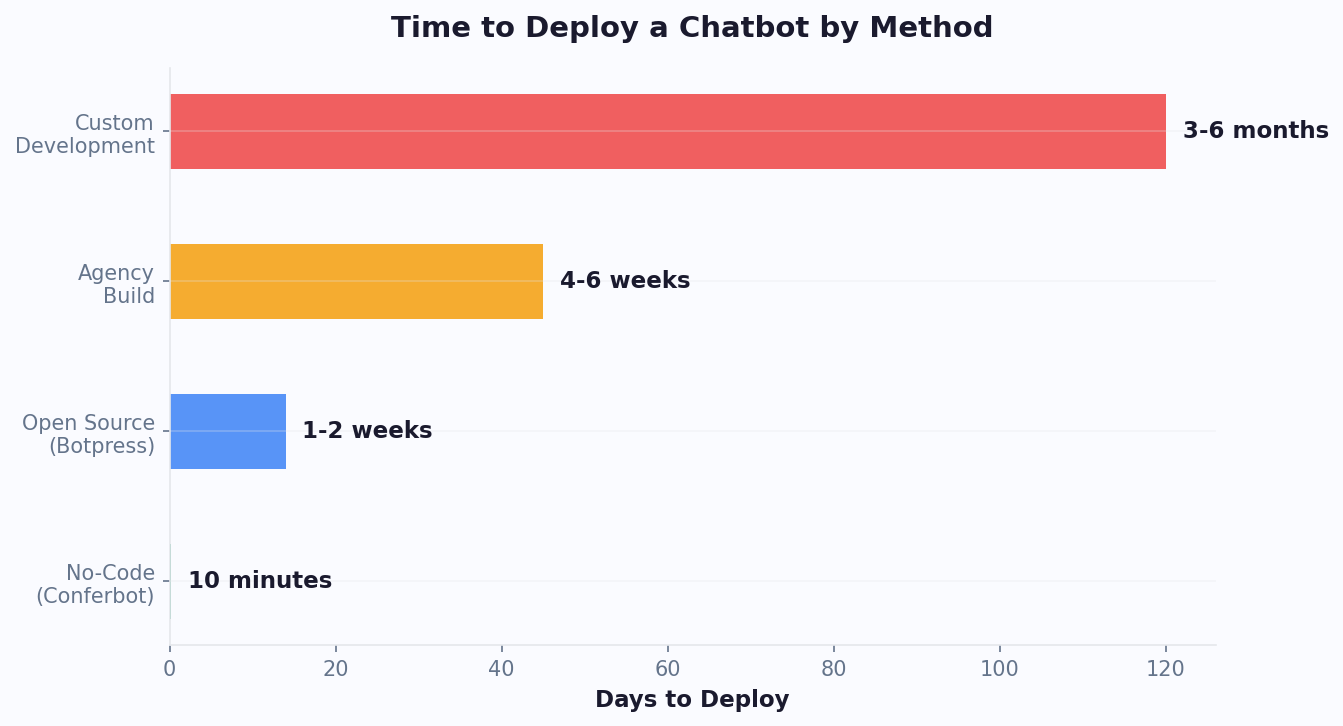
1. Speed to market. Custom-coded chatbots take 3-6 months. No-code chatbots can be live in hours. In a business environment where customer expectations change rapidly, the ability to deploy and iterate quickly is a competitive advantage.
2. Developer shortage and cost. Hiring developers for chatbot projects is expensive ($100-200/hour for experienced conversational AI engineers) and slow (developer talent is scarce). Sites like Product Hunt regularly feature new no-code chatbot tools precisely because of this demand. No-code builders let existing team members - support managers, marketing leads, operations staff - build and manage chatbots themselves.
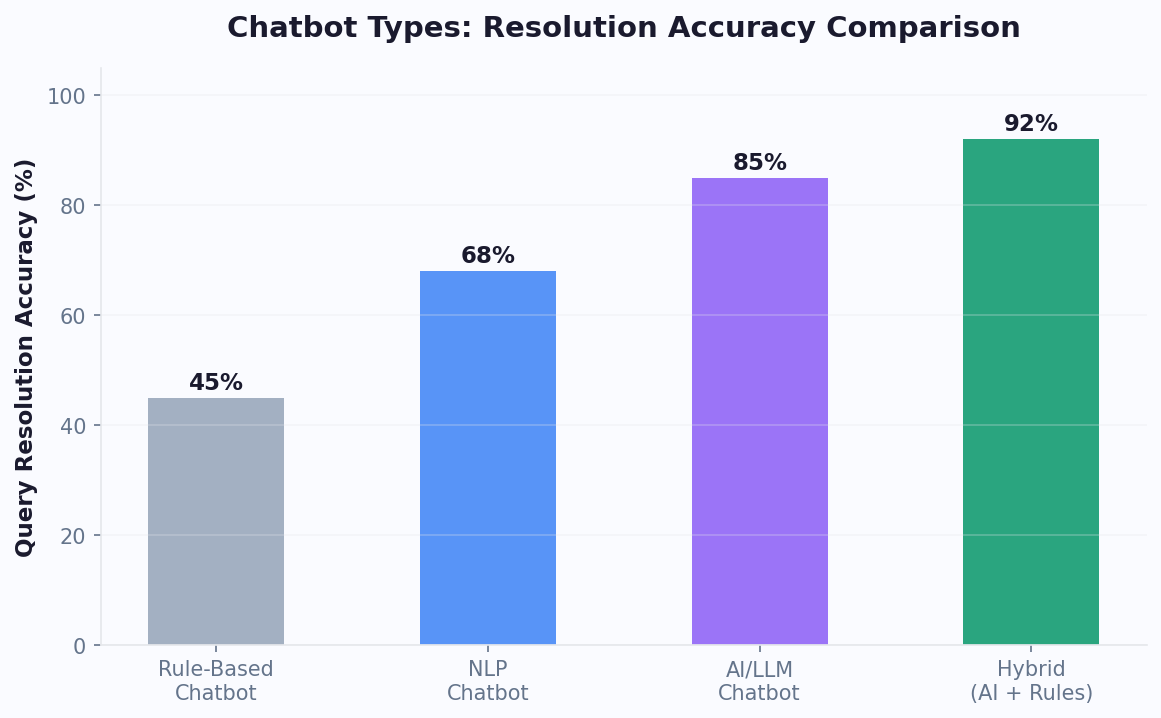
3. AI has changed the equation. Modern no-code platforms integrate GPT-powered AI that would have required sophisticated NLP engineering just two years ago. You can now create an AI chatbot that understands natural language, maintains conversation context, and generates human-like responses - all through a visual interface.
4. Maintenance without bottlenecks. When your chatbot needs updating (new products, policy changes, seasonal promotions), non-technical team members can make changes immediately. No developer tickets, no sprint planning, no two-week wait for a simple content update.
5. Cost reduction. As the NoCode.tech community documents, no-code platforms range from free to $150/month for most business needs. Custom chatbot development projects typically cost $20,000-100,000+ for initial build alone, plus ongoing maintenance costs.
What to Look for in a No-Code Builder
Not all no-code builders are created equal. The best platforms in 2026 offer:
- Visual flow builder with drag-and-drop nodes, conditional branching, and variable management
- AI/NLP integration that can be activated within flows without technical configuration
- Multi-channel deployment from a single build (website, WhatsApp, Messenger, etc.)
- Template library for common use cases to accelerate development
- Analytics dashboard to monitor and optimize chatbot performance
- Integration capabilities to connect with CRM, e-commerce, calendar, and other business tools
- Testing tools to preview and debug flows before deploying
The 11 Best No-Code Chatbot Builders, Ranked
1. Conferbot - Best Overall No-Code Chatbot Builder
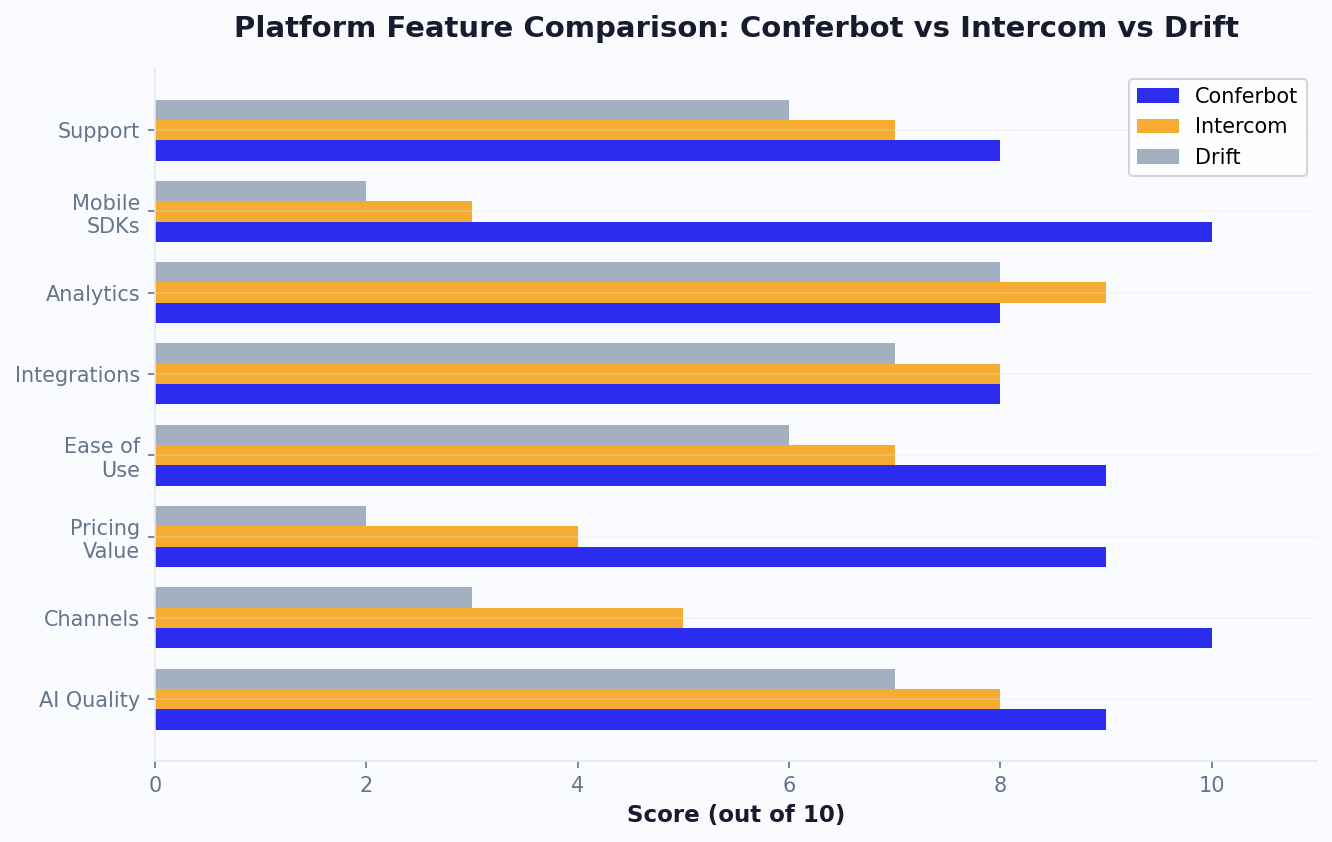
Conferbot leads this list because it combines the most intuitive visual builder with the deepest AI integration and the broadest channel support - all at an accessible price point. Non-technical users can build sophisticated chatbots in hours, while advanced users can leverage API integrations and conditional logic for complex workflows.
Key features:
- Drag-and-drop visual flow builder with conditional branching, loops, and variable management
- GPT-powered AI that can be activated within any node of your flow
- Deploy on 13+ channels from a single build: website, WhatsApp, Messenger, Slack, and more
- Pre-built templates for lead generation, customer support, e-commerce, and appointment booking
- Built-in analytics with funnel analysis and drop-off tracking
- API integration nodes for connecting to external services
Pricing: Free tier available, paid plans from $49/month with AI included
Best for: Businesses of all sizes wanting the most capable no-code builder with AI
2. Tidio - Best for E-Commerce
Tidio's chatbot builder is optimized for online stores with Shopify and WooCommerce templates, product card displays, and cart-aware triggers. The visual builder is intuitive for creating sales and support flows.
Pricing: Free tier, paid from $29/month, AI (Lyro) $39/month extra
Best for: Shopify and WooCommerce stores
3. ChatBot.com - Best Visual Builder
ChatBot.com (from the LiveChat family) offers one of the most polished visual builders on the market. Complex flows are easy to visualize and manage, and the AI training interface lets you refine bot responses without technical knowledge.
Pricing: From $52/month, 14-day trial
Best for: Teams that prioritize visual flow design and bot management
4. Landbot - Best Conversational Form Builder
Landbot specializes in turning traditional forms into conversational experiences. Its builder excels at lead generation, surveys, and data collection flows that feel like natural conversations rather than form-filling.
Pricing: Free tier (limited), paid from $40/month
Best for: Lead generation and data collection through conversational forms
5. ManyChat - Best for Social Media
ManyChat dominates the social media chatbot space with deep Instagram, Facebook Messenger, and WhatsApp integrations. Its flow builder is designed for marketing automation, drip sequences, and social commerce.
Pricing: Free tier (limited), paid from $15/month
Best for: Social media marketers and influencers
Builders 6-11: More Options for Every Need
6. Botpress - Best for Technical Teams
Botpress bridges the gap between no-code and custom development. Its visual builder handles simple flows, but it also offers a code editor for advanced logic, custom integrations, and AI model configuration. It is open-source, giving you full control over your chatbot infrastructure.
Pricing: Free tier (generous), paid plans for hosting and support
Best for: Technical teams wanting no-code speed with custom-code flexibility
7. Voiceflow - Best for Conversational Design
Voiceflow is built for conversational designers and product teams. Its collaborative canvas supports multi-user editing, prototyping, and user testing. It supports both chat and voice bot design, making it unique among no-code platforms.
Pricing: Free tier, paid from $50/month
Best for: Product teams and conversational designers building voice and chat experiences
8. BotPenguin - Best Ultra-Budget Option
BotPenguin offers a functional chatbot builder at the lowest price point in the market. Its free tier is generous, and paid plans start at just $5/month. The trade-off is less polished UI and fewer advanced features.
Pricing: Free tier (generous), paid from $5/month
Best for: Solopreneurs and micro-businesses with minimal budgets
9. Tars - Best for Landing Page Bots
Tars specializes in conversational landing pages - standalone pages where a chatbot replaces traditional forms and content. This approach can dramatically increase conversion rates for PPC campaigns and lead generation.
Pricing: From $99/month
Best for: Performance marketers running PPC campaigns
10. Flow XO - Best for Multi-Platform Automation
Flow XO combines chatbot building with workflow automation, similar to Zapier but with conversational interfaces. You can build bots that trigger complex multi-step workflows across dozens of integrated apps.
Pricing: Free tier (5 bots), paid from $25/month
Best for: Businesses needing chatbot + workflow automation in one tool
11. Collect.chat - Best for Simple Feedback Bots
Collect.chat focuses on one thing: turning surveys and feedback forms into chatbot conversations. Its builder is extremely simple, making it the fastest way to deploy a data collection chatbot without any learning curve.
Pricing: Free tier, paid from $24/month
Best for: Quick feedback collection and survey chatbots
This list covers the full spectrum from enterprise-grade platforms to ultra-budget options. The right choice depends on your specific needs, but for most businesses, Conferbot provides the best balance of ease of use, AI power, channel coverage, and value. Its free tier lets you evaluate the builder before committing.
Feature and Pricing Comparison Table
Here is a comprehensive comparison to help you narrow your shortlist. All pricing reflects 2026 published rates.
| Platform | Starting Price | AI Included? | Channels | Templates | Free Tier? |
|---|---|---|---|---|---|
| Conferbot | Free / $49/mo | Yes | 13+ | 50+ | Yes |
| Tidio | Free / $29/mo | $39/mo extra | 5 | 35+ | Yes |
| ChatBot.com | $52/mo | Yes | 6 | 40+ | Trial |
| Landbot | Free / $40/mo | Add-on | 3 | 30+ | Limited |
| ManyChat | Free / $15/mo | Add-on | 4 | 25+ | Yes |
| Botpress | Free | Yes | 8 | 20+ | Yes |
| Voiceflow | Free / $50/mo | Yes | 5+ | 15+ | Yes |
| BotPenguin | Free / $5/mo | Basic | 4 | 20+ | Yes |
| Tars | $99/mo | Yes | 2 | 100+ | Trial |
| Flow XO | Free / $25/mo | Basic | 6 | 15+ | Yes |
| Collect.chat | Free / $24/mo | No | 1 | 50+ | Yes |
What the Table Reveals
AI inclusion is the key differentiator. Platforms that include AI in base plans (Conferbot, ChatBot.com, Botpress, Voiceflow) provide significantly better value than those charging extra for AI. As AI becomes the expected standard for chatbot interactions, paying separately for it feels increasingly outdated.
Channel count matters more than you think. A chatbot built on a platform with limited channels eventually becomes a bottleneck when you want to expand to WhatsApp, Telegram, or other messaging apps. Starting with a platform that supports 10+ channels (like Conferbot) future-proofs your investment.
Free tiers vary enormously. Some free tiers (Conferbot, Botpress, BotPenguin) are genuinely useful for small-scale deployment. Others (Landbot, Voiceflow) are limited to testing only. Evaluate whether the free tier supports your initial use case or merely serves as a demo.
Templates accelerate launch. Platforms with extensive template libraries (Conferbot, Tars, Collect.chat) let you deploy a functional chatbot in minutes. Starting from a template and customizing is almost always faster than building from scratch.
How to Evaluate a No-Code Chatbot Builder
Beyond features and pricing, the quality of the builder itself determines your long-term satisfaction. Here is how to evaluate a no-code chatbot builder during a free trial or demo.
1. The 30-Minute Test
Set a timer for 30 minutes and try to build a complete chatbot from scratch. A good no-code builder should let you create a functional bot (greeting, 3-5 question paths, fallback message) within this time. If you are struggling after 30 minutes, the platform may be too complex for non-technical users.
During this test, evaluate:
- How intuitive is the drag-and-drop interface?
- Can you create conditional branches without reading documentation?
- Is the preview/testing feature easy to access and accurate?
- Can you add media (images, videos, buttons) to messages easily?
2. The AI Activation Test
If the platform offers AI capabilities, try activating them. Upload a small knowledge base (your FAQ page or product descriptions) and test whether the AI provides accurate, relevant responses to natural language questions. Evaluate:
- How easy is it to upload or connect knowledge base content?
- Does the AI answer accurately based on your content?
- Can you control where AI is used within your flows?
- What happens when the AI does not know the answer?
3. The Integration Test
Try connecting one integration you actually use (CRM, email, calendar). The process should be straightforward - ideally OAuth-based (click connect, authorize, done) rather than manual API configuration. Evaluate:
- Are your key integrations available?
- How many steps are required to connect?
- Can you test the integration within the builder?
4. The Multi-Channel Test
Deploy your test chatbot on at least two channels (e.g., website and WhatsApp). Verify that the experience is consistent across channels and that the management dashboard shows conversations from all channels in a unified view. This is where many builders fall short - they support multiple channels in theory but deliver an inconsistent experience in practice.
5. The Analytics Test
After running your test chatbot for a few conversations, check the analytics dashboard. A good platform should show you:
- Total conversations and messages
- Completion/drop-off rates for each flow
- Most common user messages and intents
- Response time and resolution metrics
- At minimum, basic charts and exportable data
6. The Team Collaboration Test
If your team has multiple members who will manage the chatbot, test the collaboration features. Can multiple people edit flows? Are there role-based permissions? Is there a version history or change log? For teams, these features prevent conflicts and enable oversight.
This evaluation framework should take 2-3 hours per platform. Test your top 2-3 choices and compare the experience. The platform that feels most natural and productive during testing will serve you best long-term.
7. The Migration Test
Before committing to any platform, consider how easy it would be to migrate away if your needs change. Evaluate data portability: can you export conversation logs, contact lists, and flow configurations? Platforms that lock you in with proprietary formats or no export options create long-term risk. The best platforms offer full data export in standard formats and allow you to download your chatbot configurations, conversation history, and analytics data at any time. This flexibility is especially important for growing businesses that may outgrow a platform or need to consolidate tools in the future. Additionally, check whether the platform provides API access on higher tiers, which lets you extend functionality through custom code when visual builders reach their limits. A platform that scales from no-code simplicity to API-level customization protects your investment across every growth stage.
5 Common Mistakes When Building No-Code Chatbots
Even the best no-code builder cannot prevent poor chatbot design. Here are the most common mistakes businesses make and how to avoid them.
1. Building Too Much Too Fast
The mistake: Trying to build a chatbot that handles every possible customer interaction on day one. This leads to overly complex flows, long development time, and a bot that does many things poorly instead of a few things well.
The fix: Start with your single highest-volume use case. Build a chatbot that handles that one thing excellently. Deploy it, learn from real conversations, then expand. A chatbot that resolves 80% of your top support question perfectly is more valuable than one that handles 50 topics at 40% accuracy.
2. Ignoring the Fallback Experience
The mistake: Focusing all effort on the happy path - the ideal conversation flow - and neglecting what happens when the bot does not understand. Users who hit a dead end with no way forward will leave frustrated.
The fix: Design your fallback experience as carefully as your main flows. When the bot cannot help, offer clear alternatives: a human handoff option, a link to your help center, a phone number, or a form to submit their question for follow-up. Never leave users stranded.
3. Writing Like a Robot
The mistake: Using stiff, formal language that makes the chatbot feel impersonal and mechanical. Messages like "Please select from the following options to proceed with your inquiry" make users feel like they are interacting with a form, not a conversation.
The fix: Write chatbot messages the way your best support agent would talk - friendly, helpful, and concise. Use conversational language: "What can I help you with?" instead of "Please select your inquiry type." Match your brand voice. Your chatbot is a reflection of your brand personality.
4. Not Testing on Mobile
The mistake: Designing and testing chatbot flows exclusively on desktop, then discovering that buttons are too small, messages are too long, and the experience is frustrating on mobile devices - where 60-70% of users interact.
The fix: Test every flow on mobile before deploying. Keep messages concise (under 100 words per message), limit button options to 3-4 per prompt, and use quick replies instead of long lists. The mobile experience should be your primary design target.
5. Launching Without Analytics
The mistake: Deploying a chatbot and never checking how it performs. Without analytics, you cannot identify which flows have high drop-off, which questions the bot fails to answer, or whether the chatbot is actually delivering value.
The fix: Set up analytics tracking before launch and establish a weekly review cadence. Track resolution rate, drop-off points, common unhandled questions, and user satisfaction. Use this data to make targeted improvements. The best chatbots are built iteratively based on real performance data, not assumptions.
Avoiding these five mistakes will put your chatbot ahead of 80% of implementations. The key theme: start small, focus on user experience, test on mobile, and iterate based on data.
The Future of No-Code Chatbot Building
No-code chatbot builders are evolving rapidly. Here are the trends shaping the future of the space and what they mean for your chatbot strategy.
AI-First Building
The next generation of no-code builders will not just include AI in chatbot responses - they will use AI to build the chatbots themselves. Describe your use case in natural language ("I want a chatbot that qualifies leads for my real estate business and books property viewings") and the AI chatbot builder generates a complete, functional flow. Platforms like Conferbot are already moving in this direction, with AI-assisted flow creation that dramatically reduces build time.
Deeper Integration Ecosystems
No-code chatbots are becoming central hubs that connect to every tool in your business stack. Expect tighter integrations - via a centralized integrations hub - with CRM, e-commerce, payment processors, scheduling tools, and internal databases. The chatbot becomes a conversational interface to your entire business - not just a standalone tool.
Voice and Multimodal Experiences
As voice interfaces mature, no-code builders are adding voice bot capabilities alongside text chat. Building a chatbot that works across text (website, WhatsApp) and voice (phone, smart speakers) from a single builder will become standard. Multimodal interactions - where users can share images, documents, and locations within the chat - are also becoming more common.
Autonomous Agent Capabilities
The next evolution beyond chatbots is autonomous agents - with tools like version control for safely iterating on complex flows - AI that can take actions (not just answer questions) on behalf of users. Booking appointments, processing returns, updating account information, and placing orders without human intervention. No-code platforms are beginning to support these agentic workflows, allowing non-technical users to configure AI agents that handle end-to-end processes.
What This Means for Your Strategy
If you are evaluating no-code chatbot builders today, prioritize platforms that:
- Invest heavily in AI: The platforms leading on AI today will be first with autonomous agent capabilities tomorrow
- Support broad channel deployment: Multi-channel support ensures your chatbot investment reaches customers wherever they are
- Offer flexible builder architecture: Platforms with modular, extensible builders can adapt to new capabilities as they emerge
- Provide strong analytics: Data-driven optimization becomes even more critical as chatbots take on more complex tasks
The no-code chatbot builder you choose today will shape your customer engagement capabilities for years to come. Select a platform that is not just solving today's problems but investing in tomorrow's opportunities. Conferbot's combination of visual building, AI integration, omnichannel deployment, and analytics-driven optimization positions it well for both current needs and future evolution.
Switching No-Code Chatbot Platforms: Migration Guide and Decision Framework
Many businesses start with one chatbot platform and eventually need to switch - either because they outgrew the tool, found a better fit, or need features their current platform lacks. Switching chatbot platforms doesn't have to be painful if you approach it systematically. If you're coming from a free plan, our free chatbot comparison can help you evaluate upgrade options.
When to Switch Platforms
Not every frustration warrants a platform migration. Here are the legitimate reasons to switch versus issues that can be resolved on your current platform:
| Switch-Worthy Issues | Fix-on-Current-Platform Issues |
|---|---|
| Platform lacks channels you need (no WhatsApp, etc.) | Chatbot flows need improvement |
| AI capabilities are insufficient | Knowledge base needs updating |
| Pricing scales aggressively with growth | Better templates or flows could improve results |
| No API access for critical integrations | Available integrations not configured yet |
| Platform reliability issues (downtime, bugs) | Analytics not being reviewed regularly |
| Vendor is sunsetting the product | Team not trained on platform features |
The Migration Checklist
Before starting a migration, document everything from your current platform:
- Export all conversation flows. Take screenshots or use the export feature if available. Map every node, condition, and message in your flows.
- Export conversation history. This data is invaluable for training your new chatbot's AI. Most platforms allow CSV or JSON exports of chat transcripts.
- Document all integrations. List every connected tool (CRM, email, calendar, e-commerce) with the specific data being synced and the triggers configured.
- Record analytics baselines. Capture your current performance metrics - engagement rate, resolution rate, lead capture rate, CSAT - so you can compare against post-migration performance.
- Inventory your knowledge base. Download all FAQ content, training phrases, and uploaded documents from your current platform.
Migration Timeline
| Phase | Duration | Activities |
|---|---|---|
| Planning | 3-5 days | Export data, document flows, select new platform |
| Rebuild | 3-7 days | Recreate flows, upload knowledge base, configure integrations |
| Testing | 2-3 days | Internal testing, edge case validation, integration verification |
| Parallel run | 3-5 days | Run both platforms simultaneously on different pages |
| Cutover | 1 day | Switch all traffic to new platform, decommission old one |
Avoiding Migration Pitfalls
- Don't just replicate - improve. Migration is an opportunity to fix the issues that prompted the switch. Rebuild your flows with improvements, don't carbon-copy the old ones.
- Test with real users before full cutover. A parallel run on a single page catches issues that internal testing misses.
- Plan for a temporary performance dip. Expect a 2-4 week adjustment period where metrics may dip as the new AI learns from real conversations. This is normal and recovers quickly.
- Communicate with your team. If multiple people manage the chatbot, ensure everyone is trained on the new platform before cutover.
Platform Comparison Shortcut
If you're currently evaluating alternatives, here's a quick decision framework based on your primary need. For a detailed breakdown, see our guide to building chatbots without coding or our comprehensive pricing comparison:
- Need better AI: Move to Conferbot or Botpress - both include GPT-level AI on base plans
- Need more channels: Conferbot (13+ channels) or ManyChat (social media focus)
- Need lower cost: BotPenguin ($5/month) or Conferbot free tier (500 conversations)
- Need better analytics: Conferbot or ChatBot.com - both offer detailed funnel analytics
- Need developer flexibility: Botpress (open-source, code editor) or Conferbot (API-first architecture)
For most businesses switching from a competitor that doesn't meet their needs, our detailed builder comparison provides the data you need to make a confident decision. The right platform should feel like an upgrade from the first day of use, not a lateral move.
Was this article helpful?
Build and deploy in 10 minutes. No coding needed.
11 Best No-Code Chatbot Builders in 2026 FAQ
Everything you need to know about chatbots for 11 best no-code chatbot builders in 2026.
About the Author
The Conferbot team writes about building, deploying, and improving AI chatbots.
View all articles

