
Why Businesses Are Switching Away From Intercom in 2026
Intercom pioneered the modern customer messaging space, and for years it was the default choice for startups and SaaS companies. But in 2026, the landscape has shifted, and an increasing number of businesses are actively seeking alternatives. Here is why:
1. Pricing Has Become Prohibitive
Intercom's pricing has steadily increased while becoming more complex. Their current plans start at $29/seat/month on annual billing ($39 monthly) for Essential, but the features most businesses actually need - custom bots, workflows, advanced reporting - require Advanced at $85/seat/month ($99 monthly) or Expert at $132 ($139 monthly). For a team of 5 agents on Advanced, that is $425-$495/month before add-ons. Fin, the AI agent, is billed on top at $0.99 per resolution with a 50-resolution monthly minimum, so it is never free even in a quiet month.
Add-ons are where costs really escalate:
- Fin AI Agent: $0.99 per resolution (at 1,000 resolutions/month, that is an extra $990)
- Product Tours: Additional monthly fee
- WhatsApp: Per-conversation charges on top of Meta's fees
- Surveys: Only available on premium plans
A mid-size company can easily spend $1,500-3,000/month on Intercom - a budget that many businesses cannot justify, especially when alternatives offer comparable features at a fraction of the cost.
2. Complexity Overload
Intercom has evolved from a simple messenger into a sprawling platform with dozens of features. For businesses that just need a chatbot and live chat, the learning curve is steep and unnecessary. Teams report spending weeks configuring Intercom before seeing value, compared to hours with simpler alternatives.
3. AI Features Require Premium Pricing
Intercom's Fin AI is impressive, but charging per resolution on top of an already expensive subscription feels like double-dipping. Many newer platforms include AI capabilities in their base pricing.
4. One-Size-Fits-All Approach
Intercom was built for B2B SaaS companies. If you run an e-commerce store, healthcare practice, agency, or local business, you are paying for features designed for a different use case. Specialized alternatives often provide better value and a more tailored experience.
This is not to say Intercom is bad - it remains excellent for large SaaS companies with big budgets and complex needs. But for the majority of businesses, there are now better options that cost less, do more with AI, and are easier to use.
5. Limited Messaging Channel Support
While Intercom excels at in-app messaging and website chat, its support for messaging channels like WhatsApp, Telegram, and Instagram DM is either limited or requires expensive add-ons. For businesses whose customers primarily communicate through messaging apps, this is a significant limitation. Platforms built from the ground up for omnichannel deployment often provide broader channel coverage at lower cost, with unified conversation management across all channels from a single dashboard. In markets where WhatsApp has 90%+ penetration (Latin America, India, parts of Europe), a platform without native WhatsApp support is essentially invisible to a large portion of your customer base.
Intercom vs. Alternatives: Pricing Comparison Table
Before diving into individual alternatives, here is a side-by-side pricing comparison to give you the full picture. All prices reflect 2026 published rates for plans suitable for a small-to-mid-size team (3-5 agents).
| Platform | Starting Price | Price for 5 Agents | AI Chatbot Included? | Free Tier? |
|---|---|---|---|---|
| Intercom | $29-$132/seat/mo | $145-$660/mo | $0.99/resolution extra (50/mo minimum) | 14-day trial |
| Conferbot | Free tier available | $19-$59/mo flat, not per seat | Yes, included | Yes |
| Tidio | Free tier available | $29-99/mo | $39/mo add-on | Yes |
| Drift | Being sunset by Salesloft/Clari since March 2026 - not a migration target. See Drift alternatives. | |||
| Zendesk | $55/agent/mo | $275-495/mo | $1/resolution extra | 14-day trial |
| Crisp | Free tier available | $95/mo (flat) | Yes, on paid plans | Yes |
| LiveChat | $20/agent/mo | $100-250/mo | Via ChatBot.com integration | 14-day trial |
| Freshdesk | Free tier available | $0-79/agent/mo | Freddy AI extra | Yes |
| HubSpot | Free tier available | $0-800/mo | Basic only on free | Yes |
| Olark | $29/seat/mo | $145/mo | CoPilot add-on | 14-day trial |
| Tawk.to | Free | Free | AI Assist $29/mo | Yes (fully free) |
| Chatbot.com | $52/mo | $52-142/mo | Yes | 14-day trial |
| Help Scout | $20/user/mo | $100-200/mo | AI drafts included | 15-day trial |
| Kommunicate | $40/mo | $40-100/mo | Yes, included | 30-day trial |
| BotPenguin | Free tier available | $5-49/mo | Yes | Yes |
| Smartsupp | Free tier available | $19-48/mo | Yes, on paid plans | Yes |
Key takeaway: Most Intercom alternatives cost 50-80% less for comparable functionality. The savings are especially significant when you factor in AI costs, which Intercom charges per resolution while many alternatives include in the base price.
The 15 Best Intercom Alternatives, Ranked
1. Conferbot - Best Overall Intercom Alternative
Conferbot is an AI-first chatbot platform designed for businesses that want powerful automation without Intercom's complexity or price tag. It combines a no-code chatbot builder, live chat, AI-powered responses, and omnichannel deployment in a single, affordable package.
Why it tops this list:
- AI chatbot capabilities - including AI agent handover - included in all paid plans - no per-resolution charges
- Deploys on 13+ channels including WhatsApp, Messenger, Slack, and website
- Built-in analytics with conversation insights, drop-off analysis, and performance tracking
- Visual no-code builder that non-technical teams can master in hours, not weeks
- Transparent pricing with a free tier for getting started
Pros: Best value for AI features, easiest setup, excellent omnichannel support, generous free tier
Cons: Newer platform (smaller community than established players), fewer native integrations than Intercom (though growing rapidly)
Best for: SMBs, e-commerce, SaaS, agencies, and any business that wants AI-first chat without enterprise pricing
See the full Conferbot vs. Intercom comparison
Try it against your Intercom bill: see what the free plan includes, or create a free account and rebuild one of your Intercom bots in it. No card, no per-resolution meter.
2. Tidio - Best for E-Commerce
(Weighing these two directly? See Tidio vs Intercom.)
Tidio combines live chat and chatbots with deep Shopify and WooCommerce integrations. Its Lyro AI can handle customer conversations using your help content.
Pros: Excellent e-commerce integrations, affordable, user-friendly
Cons: AI (Lyro) costs extra ($39/mo), limited to 50 AI conversations on base plan, less suitable for B2B
Best for: Shopify and WooCommerce stores
See Conferbot vs. Tidio comparison
3. Drift - Do Not Migrate Here: It Is Being Wound Down
Drift used to be the obvious Intercom alternative for enterprise sales teams, and older versions of this list said so. That advice is now wrong. On 6 March 2026, Clari and Salesloft announced the gradual sunset of the standalone Drift conversational marketing platform, naming 1mind as its AI successor. No hard end-of-life date has been published, which means active development has ended without a deadline you can plan around.
If you are leaving Intercom, Drift is a product you would have to leave again. If you are already on Drift, your question is not "Intercom or Drift" but "how do I get my playbooks and routing rules out" - covered in our Drift alternatives guide, the head-to-head Intercom vs Drift, and the Conferbot vs. Drift page.
4. Zendesk - Best for Large Support Teams
Zendesk is the industry standard for enterprise customer support. Its suite includes ticketing, live chat, knowledge base, and AI agents.
Pros: Mature, comprehensive, extensive integrations, strong reporting
Cons: Expensive for small teams, complex setup, AI charges per resolution like Intercom
Best for: Companies with 10+ support agents and complex ticketing needs
See Conferbot vs. Zendesk comparison
5. Crisp - Best Budget All-in-One
Crisp offers live chat, chatbot, knowledge base, and CRM features at a flat rate (not per-agent pricing), making it predictable and affordable.
Pros: Flat pricing regardless of team size, built-in CRM and knowledge base, clean UI
Cons: AI features less mature than competitors, smaller integration ecosystem
Best for: Small teams wanting an all-in-one solution at a fixed price
Alternatives 6-15: More Options for Every Budget
6. LiveChat - Best Pure Live Chat Experience
LiveChat excels at what its name suggests: real-time human-to-human chat. It is polished, fast, and well-designed, but AI chatbots require a separate ChatBot.com subscription.
Pros: Best-in-class live chat UI, excellent agent tools, strong integrations
Cons: No built-in AI chatbot (requires ChatBot.com), per-agent pricing adds up, no free tier
Best for: Teams that prioritize human live chat over automation
7. Freshdesk - Best for Growing Support Teams
Freshdesk (by Freshworks) is a full helpdesk with ticketing, live chat, and AI capabilities (Freddy AI). The free tier is generous for small teams.
Pros: Generous free tier (up to 10 agents), strong ticketing system, Freshworks ecosystem
Cons: Chatbot features are basic compared to dedicated platforms, Freddy AI costs extra, UI can feel cluttered
Best for: Growing teams that need ticketing + basic chat
8. HubSpot Service Hub - Best if You Already Use HubSpot
HubSpot's Service Hub includes live chat, basic chatbots, ticketing, and a knowledge base. The real value is the CRM integration - every chat conversation is linked to the customer's full history.
Pros: Seamless CRM integration, free tier available, excellent marketing synergy
Cons: Advanced features require expensive Professional plan ($800+/mo), chatbot builder is basic, lock-in to HubSpot ecosystem
Best for: Businesses already using HubSpot CRM
9. Olark - Best Simple Live Chat
Olark is a no-frills live chat tool that does one thing well. Recent additions include CoPilot AI for agent assistance and automated messaging.
Pros: Dead simple to set up, reliable, fair per-seat pricing, good for small teams
Cons: Limited chatbot capabilities, no omnichannel (website only), fewer integrations
Best for: Small businesses wanting basic live chat without complexity
10. Tawk.to - Best Free Option
Tawk.to is completely free for live chat with unlimited agents. They monetize through paid agent services and add-ons. AI Assist is available for $29/month.
Pros: Truly free for live chat, unlimited agents, solid feature set for $0
Cons: AI features are basic and paid, revenue model relies on upselling hired agents, limited chatbot builder, support can be slow
Best for: Bootstrapped businesses with zero budget for chat tools
11. ChatBot.com - Best Standalone Chatbot Builder
ChatBot.com (sister product to LiveChat) is a dedicated chatbot builder with a strong visual flow editor and AI capabilities.
Pros: Excellent visual builder, good template library, strong AI training tools
Cons: No live chat included (need LiveChat for that), pricing based on active chatbots, limited free trial
Best for: Businesses focused purely on chatbot automation
12. Help Scout - Best for Email-First Support
Help Scout is primarily a shared inbox tool that has expanded into live chat (Beacon) and AI features. It excels at email-based support.
Pros: Best-in-class email support, clean UI, AI drafts for agents, good knowledge base
Cons: Live chat and chatbot features are secondary, limited chatbot customization
Best for: Teams whose primary support channel is email
13. Kommunicate - Best for Developer Teams
Kommunicate combines chatbot automation with human handoff and offers strong API access. It integrates with Dialogflow, Rasa, and other NLP engines.
Pros: Flexible bot framework, supports multiple NLP engines, good for technical teams
Cons: Requires more technical setup, UI less polished than competitors, smaller user base
Best for: Developer-led teams wanting chatbot flexibility
14. BotPenguin - Best Ultra-Budget Option
BotPenguin offers chatbot building with a generous free tier and very low paid plans. It supports website, WhatsApp, Facebook, and Telegram.
Pros: Extremely affordable, multi-channel support, easy setup
Cons: AI features are basic, limited customization, smaller ecosystem
Best for: Micro-businesses and solopreneurs on a tight budget
15. Smartsupp - Best for European Businesses
Smartsupp combines live chat with visitor recording (session replay) and chatbots. It is GDPR-focused and popular in Europe.
Pros: Built-in session recording, GDPR-compliant by design, affordable
Cons: AI chatbot features are developing, limited English documentation, smaller integration set
Best for: European businesses needing GDPR compliance and visitor analytics
Feature Comparison Matrix: What Matters Most
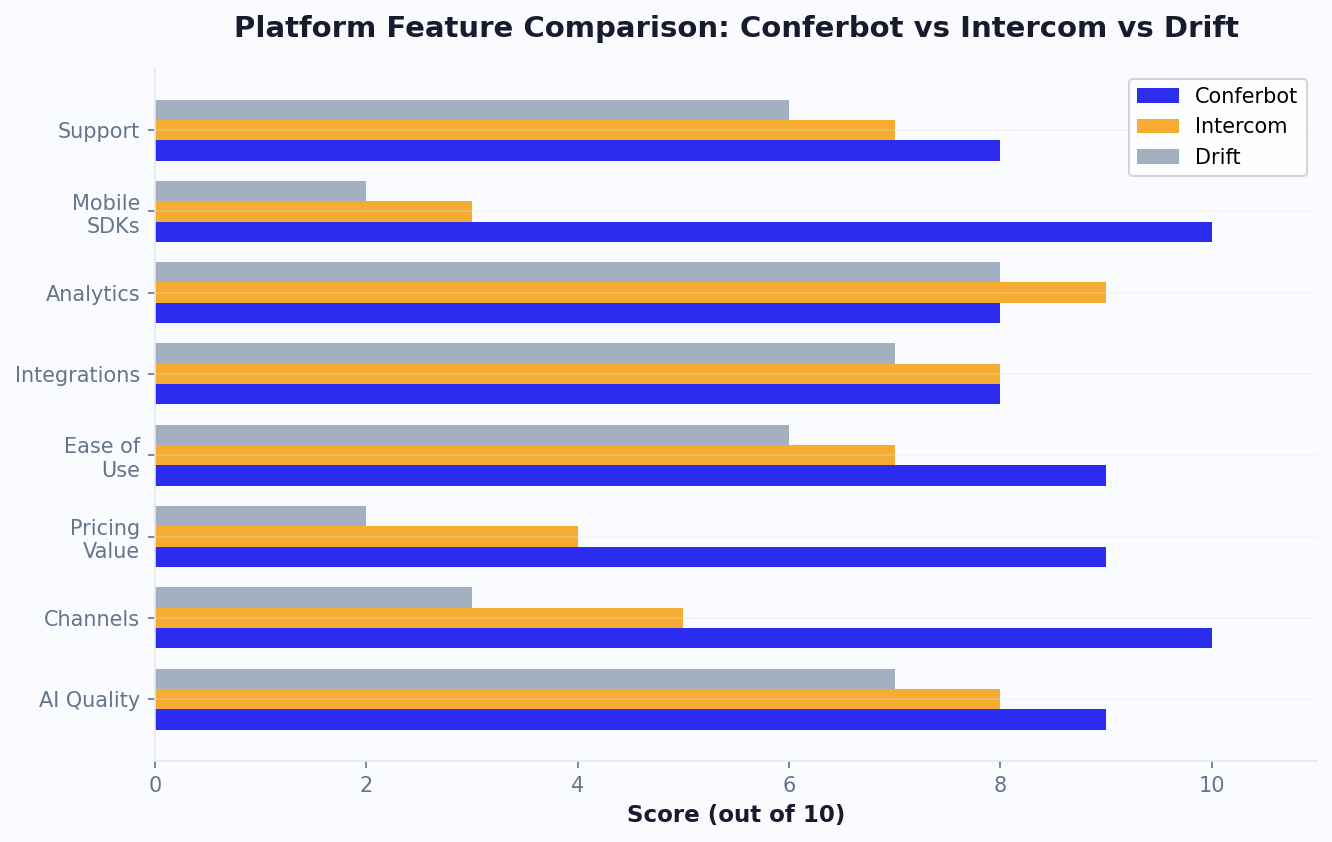
Price is important, but features determine whether a platform actually solves your problems. Here is how the top alternatives compare on the features businesses care most about when leaving Intercom.
| Feature | Conferbot | Tidio | Crisp | Zendesk | HubSpot | Tawk.to |
|---|---|---|---|---|---|---|
| No-code chatbot builder | Excellent | Good | Good | Basic | Basic | Basic |
| AI/NLP chatbot | Included | Add-on | Included | Add-on | Basic | Add-on |
| Live chat | Yes | Yes | Yes | Yes | Yes | Yes |
| Omnichannel (5+ channels) | 13+ channels | 5 channels | 6 channels | 8 channels | 4 channels | 3 channels |
| Analytics dashboard | Advanced | Good | Basic | Advanced | Good | Basic |
| Custom branding | Full | Full | Full | Full | Limited (free) | Paid add-on |
| Knowledge base | Yes | No | Yes | Yes | Yes | Yes |
| Ticketing system | Built-in | Basic | Basic | Advanced | Good | Yes |
| API access | Yes | Yes | Yes | Yes | Yes | Yes |
| GDPR compliance | Yes | Yes | Yes | Yes | Yes | Yes |
What This Tells Us
A few patterns emerge from this comparison:
- Conferbot leads on AI value: Including AI chatbot capabilities in the base price (rather than charging per resolution) is a significant differentiator. At scale, this saves hundreds to thousands per month versus Intercom or Zendesk.
- Omnichannel is a differentiator: If your customers reach you on WhatsApp, Messenger, and your website, you need a platform that supports all three from a single dashboard. Conferbot's 13+ channel support is the broadest in this comparison.
- Complexity varies enormously: Zendesk and HubSpot are powerful but require significant setup time. Conferbot, Tidio, and Crisp prioritize fast time-to-value.
- Free tiers are not equal: Tawk.to offers the most generous free live chat, but its chatbot and AI features are limited. Conferbot's free tier includes basic AI chatbot functionality, making it a stronger starting point.
The right choice depends on your priorities. The next section breaks down the best platform for each specific use case.
Best Intercom Alternative for Each Use Case
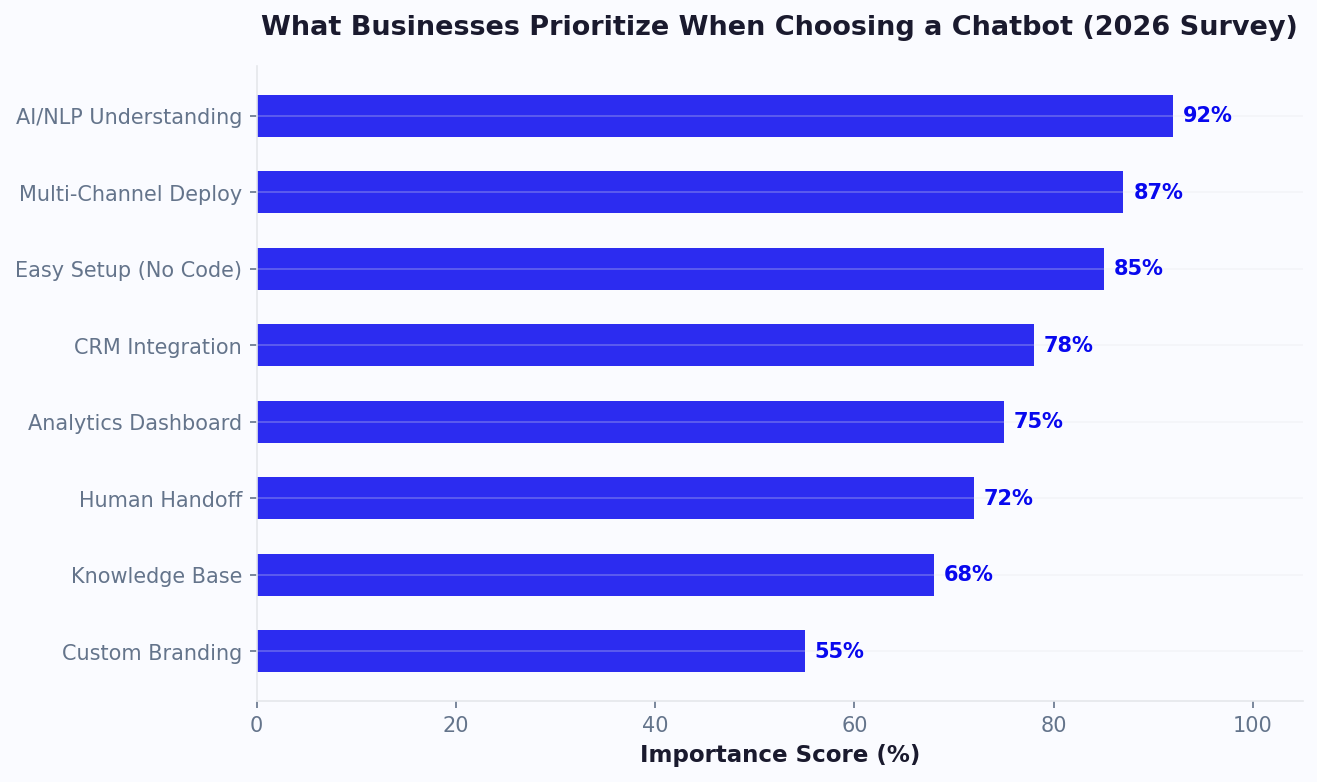
Rather than declaring a single "best" alternative, here are our recommendations based on specific business situations. Your ideal platform depends on your use case, budget, and team size.
Best for Small Business (Under 10 Employees)
Winner: Conferbot
Small businesses need maximum automation with minimum complexity. Conferbot's team management makes it easy to organize even small support teams efficiently. Conferbot's no-code builder lets anyone on the team create and manage chatbots without developer help. The included AI features mean you are not paying per resolution as your volume grows, and the free tier lets you start without financial risk.
Best for E-Commerce
Winner: Tidio
Tidio's deep Shopify and WooCommerce integrations (product cards in chat, order lookup, cart value display) give it an edge for online stores. However, Conferbot is a strong runner-up if you need omnichannel support beyond your website.
Best for SaaS Companies
Winner: Conferbot or Intercom (depends on budget)
If you can afford $500+/month and need product tours, advanced user segmentation, and deep analytics, Intercom still delivers. For SaaS companies on a tighter budget, Conferbot provides 80% of the functionality at 20% of the cost.
Best for Enterprise (100+ Employees)
Winner: Zendesk
Large organizations with complex routing rules, SLAs, and compliance requirements are best served by Zendesk's mature, enterprise-grade infrastructure. The per-agent cost is justified at this scale.
Best for Sales-Focused Teams
Winner: Drift
If your primary goal is booking meetings and qualifying leads (not support), Drift's conversational sales features are purpose-built for this. The $2,500/month minimum is steep but justified for high-value B2B sales teams.
Best for Zero Budget
Winner: Tawk.to (live chat) + Conferbot (chatbot)
Tawk.to provides unlimited free live chat. Pair it with Conferbot's free tier for basic chatbot automation, and you have a functional customer messaging setup at zero cost.
Best for Teams Already in HubSpot
Winner: HubSpot Service Hub
If your CRM, marketing, and sales tools are already in HubSpot, adding Service Hub is the path of least resistance. The CRM integration is seamless and eliminates data silos.
Best for Developer Teams
Winner: Kommunicate
Kommunicate's flexible bot framework, support for multiple NLP engines (Dialogflow, Rasa, IBM Watson), and strong API access make it ideal for teams that want to build custom solutions.
No matter which platform you choose, the key is to start small, measure results, and expand based on data. Every platform on this list offers a free trial or free tier - take advantage of that before committing.
Remember that switching platforms is an investment in long-term savings. While there is short-term effort involved in migration, businesses that switch from Intercom to a more affordable alternative typically recover the migration cost within 2-3 months through lower subscription fees alone - and then enjoy ongoing savings of $500-2,000 per month indefinitely.
How to Migrate From Intercom: Step-by-Step
Switching customer messaging platforms can feel daunting, but with a structured approach, you can migrate from Intercom to a new platform with minimal disruption. Here is the step-by-step process.
Phase 1: Preparation (1-2 Weeks Before)
- Export your data from Intercom:
- Conversation history (Settings > Data Management > Export)
- Contact/company data (People section > Export)
- Help Center articles (if using Intercom Articles)
- Custom bot flows (screenshot or document your flows)
- Saved replies and macros
- Document your current configuration:
- Business hours and routing rules
- Auto-assignment settings
- SLA policies
- Custom attributes and tags
- Integration configurations (CRM, helpdesk, etc.)
- Set up the new platform in parallel. Do not remove Intercom yet. Configure your new platform alongside it so you can test thoroughly before switching.
Phase 2: Configuration (1 Week)
- Recreate your chatbot flows. Using your documentation, rebuild your chatbot conversation flows in the new platform. This is also a good time to improve them - you probably have insights about what works and what does not.
- Import your knowledge base. If moving help articles, most platforms support bulk import via CSV or API.
- Configure integrations. Set up CRM sync, helpdesk integration, email notifications, and any other tools your team relies on.
- Set up team access. Create agent accounts, configure roles and permissions, and set up routing rules.
- Customize appearance. Match your brand colors, logo, and chat widget position to maintain consistency for customers.
Phase 3: Testing (3-5 Days)
- Have every team member test the new platform as both an agent and a customer
- Test every chatbot flow, especially edge cases and escalation paths
- Verify integrations are syncing correctly (CRM records updating, tickets creating)
- Test on mobile devices and different browsers
- Run a small pilot with real customers (deploy on one low-traffic page)
Phase 4: Cutover (1 Day)
- Update your website chat widget code. Replace Intercom's JavaScript snippet with the new platform's code.
- Update any deep links to Intercom's messenger (email signatures, in-app links, etc.).
- Inform your team. Brief all agents on the new platform, provide quick-reference guides, and ensure everyone knows the escalation process.
- Monitor closely for 48 hours. Watch for issues with the new platform and keep Intercom accessible (but hidden) as a fallback.
Phase 5: Cleanup (1 Week After)
- Cancel your Intercom subscription (note cancellation terms - some plans require 30-day notice)
- Confirm all data exports are complete and stored securely
- Remove Intercom's JavaScript snippet from all pages
- Update internal documentation to reference the new platform
Timeline: Plan for 3-4 weeks total. Most businesses complete the migration in under a month with zero customer-facing disruption.
The customer messaging market favors businesses that move quickly and test systematically. With free trials available from nearly every platform on this list, there is no excuse for not evaluating at least two or three options before making a commitment.
Most teams find that the fastest way to evaluate a replacement is to rebuild one high-volume Intercom flow on the candidate platform and run both in parallel for two weeks. On Conferbot you can do that on the free plan - sign up and you are in the builder in about a minute.
How to Choose: A Decision Framework
With 15 alternatives to consider, here is a simple decision framework to narrow your shortlist to 2-3 platforms worth testing.
Step 1: Define Your Budget Ceiling
Be honest about what you can spend monthly, including anticipated growth. If your budget is:
- $0: Tawk.to + Conferbot free tier
- Under $100/month: Conferbot, Tidio, Crisp, Smartsupp, BotPenguin
- $100-300/month: Conferbot, Tidio, Crisp, Olark, Help Scout, Kommunicate
- $300-1,000/month: Conferbot, Zendesk, HubSpot, ChatBot.com + LiveChat
- $1,000+/month: Zendesk, Drift, Intercom (maybe it is worth staying)
Step 2: Identify Your Primary Use Case
- Customer support automation: Conferbot, Zendesk, Freshdesk, Help Scout
- Sales and lead generation: Conferbot, Drift, HubSpot, Tidio
- Omnichannel messaging: Conferbot, Zendesk, Crisp
- E-commerce: Tidio, Conferbot, Smartsupp
- Pure live chat: LiveChat, Olark, Tawk.to
Step 3: Check Your Must-Have Features
Create a checklist of non-negotiable features and verify each shortlisted platform supports them. Common must-haves include:
- Specific channel support (WhatsApp, Messenger, etc.)
- CRM integration (which CRM?)
- AI/NLP chatbot capabilities
- GDPR compliance or specific regulatory requirements
- Multi-language support
- Custom branding
Step 4: Test Before You Commit
Sign up for free trials of your top 2-3 choices. During each trial:
- Build a simple chatbot flow (how long did it take?)
- Test the live chat experience from both agent and customer sides
- Set up one integration (how smooth was it?)
- Review the analytics dashboard (do you get the insights you need?)
- Contact their support team with a question (how fast and helpful are they?)
Step 5: Calculate Total Cost of Ownership
Do not just compare sticker prices. Calculate your total monthly cost including:
- Base subscription for your team size
- AI/chatbot usage charges (per resolution or included?)
- Channel fees (WhatsApp conversations, SMS, etc.)
- Integration costs (premium plan required for your CRM?)
- Projected cost at 2x your current volume (will the platform scale affordably?)
This framework should reduce your options from 15 to 2-3 platforms you can confidently test. For most small-to-mid-size businesses seeking an Intercom alternative, Conferbot delivers the best combination of AI capabilities, channel coverage, ease of use, and value - but do not take our word for it. Start a free trial and see for yourself.
Industry Context and Market Trends
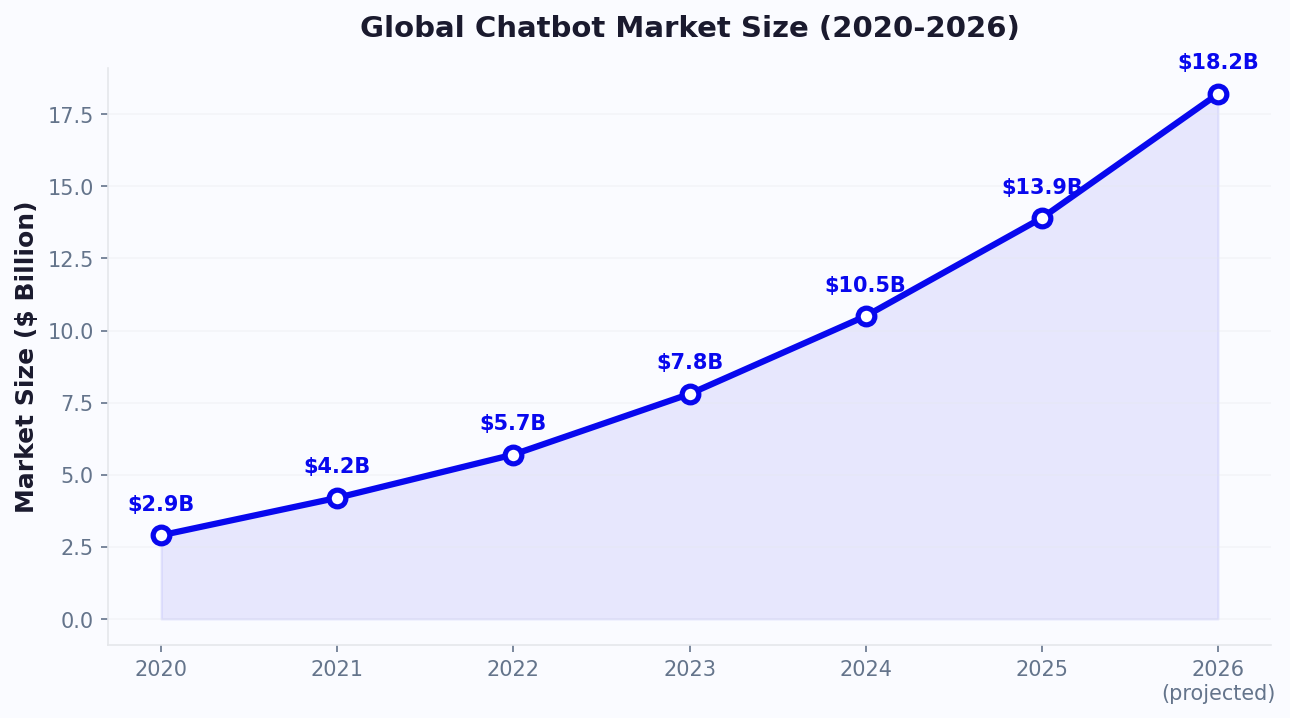
The customer messaging platform market is evolving rapidly. According to Gartner, by 2027, more than 50% of enterprises will use industry cloud platforms that include built-in AI messaging and chatbot capabilities. Grand View Research estimates the global chatbot market will reach $27.3 billion by 2030, growing at 23.3% CAGR. This growth means more options, lower prices, and better AI capabilities for businesses evaluating alternatives to legacy platforms like Intercom.
The pricing pressure is real: Forrester's research on customer engagement platforms shows that businesses switching from enterprise platforms to purpose-built alternatives save an average of 40-60% while maintaining or improving their customer experience metrics. The shift toward AI-inclusive pricing (rather than per-resolution charges) is accelerating this trend - as AI inference costs continue to drop, platforms that still charge per interaction are increasingly seen as overpriced relative to the actual compute costs involved.
Further Resources for Your Evaluation
To help you make the best decision for your business, explore these additional comparisons and guides:
- Chatbot Pricing Comparison 2026 - A comprehensive breakdown of pricing across 20+ platforms
- Chatbot vs Live Chat - When to prioritize automation versus human interaction
- AI Chatbot vs Rule-Based - Understanding the technology differences that matter
- Best No-Code Chatbot Builders - If ease-of-use is your top priority
- How to Calculate Chatbot ROI - Quantify the value before you commit
Additional context from G2's live chat category reviews and Capterra's live chat software directory can help you compare real user reviews and satisfaction scores across all the platforms discussed in this guide.
Comparing Intercom against a specific rival rather than the whole field? Our Intercom vs Drift head-to-head covers that pairing in detail, including what Drift's March 2026 sunset means for teams still running it.
Was this article helpful?
Build and deploy in 10 minutes. No coding needed.
15 Best Intercom Alternatives in 2026 FAQ
Everything you need to know about chatbots for 15 best intercom alternatives in 2026.
About the Author
The Conferbot team writes about building, deploying, and improving AI chatbots.
View all articles
