
Telemedicine Appointment Scheduler
Free Healthcare Chatbot Template
A streamlined telemedicine scheduling chatbot that helps patients book virtual appointments with healthcare providers. Handles new and returning patients, specialty selection, provider preferences, insurance verification, and pre-visit preparation.


What Is a Telemedicine Appointment Scheduler Chatbot?
A telemedicine appointment scheduler chatbot is an AI-powered conversational tool that guides patients through the full pre-visit workflow — insurance verification, provider matching, appointment slot selection, and pre-visit intake — without requiring a phone call, a patient portal login, or a staff member to manage the process. It deploys on a healthcare provider's website, patient portal, or WhatsApp channel and handles the administrative layer of telehealth scheduling automatically, 24 hours a day, in the language the patient is most comfortable using.
Telehealth has fundamentally changed patient expectations. Patients who have experienced the convenience of a same-day video visit are not willing to wait three days for a callback from a scheduling coordinator to book their next appointment. Yet most telehealth platforms still route patients through phone queues, static online booking forms, or multi-step portal workflows that were designed for in-person visit scheduling and were never optimized for the speed and convenience that telehealth promises. The scheduling chatbot closes this gap.
The Scheduling Problem in Telehealth
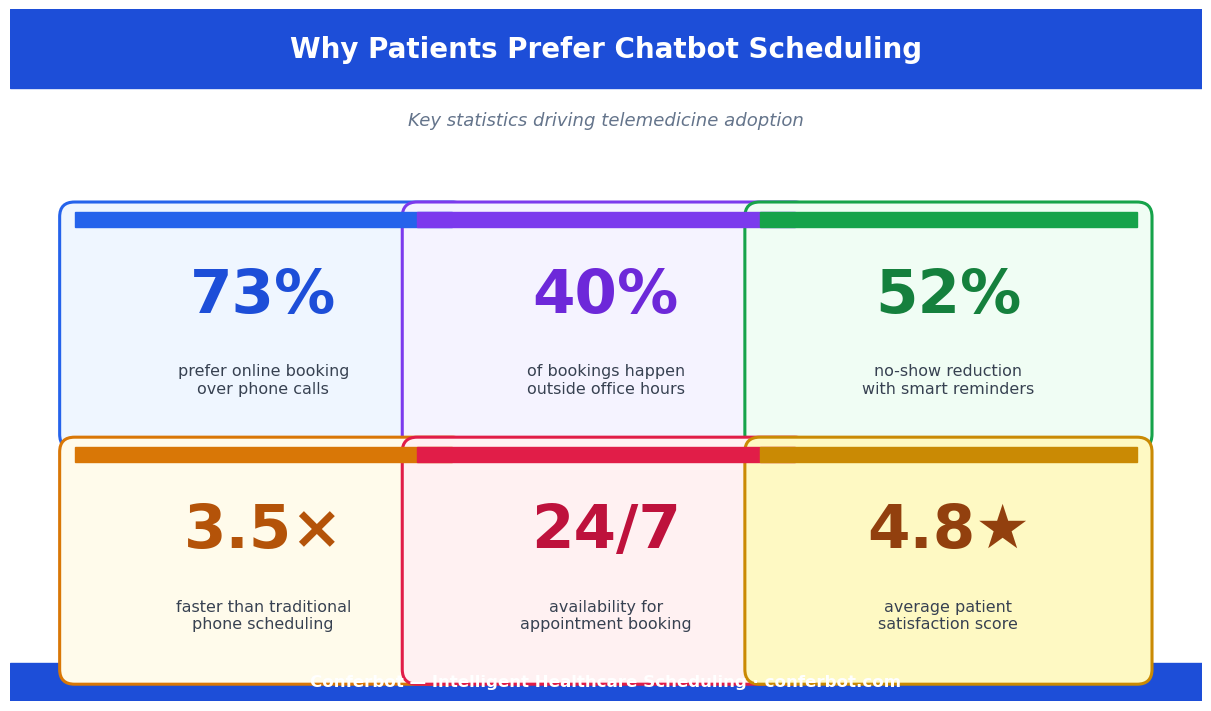
Healthcare organizations that have deployed telehealth programs consistently report the same bottleneck: the care delivery itself is efficient and patient-rated highly, but the access pathway — finding the right provider, verifying insurance eligibility, completing intake paperwork — remains slow, staff-intensive, and prone to errors that delay or cancel appointments. A 2023 analysis of telehealth program operations found that 34% of telehealth appointment cancellations are attributable to administrative failures: insurance verification errors, incorrect provider matching, or incomplete intake documentation. The scheduling chatbot eliminates each of these failure points by handling them conversationally before the appointment is confirmed.
Who Deploys This Template
- Multi-specialty telehealth practices: Match patients to the right specialist for their presenting condition, verify insurance for each specialty's billing codes, and reduce administrative burden on front desk staff who currently manage these tasks by phone.
- Health systems and hospital networks: Extend scheduling capacity beyond business hours and across the full provider network — including affiliated telehealth providers — without adding call center staffing.
- Direct-to-consumer telehealth platforms: Reduce time-to-appointment from initial visit to confirmed booking slot, improving conversion rates for patients who arrive via paid acquisition and may abandon if the scheduling process is slow.
- Concierge and membership medicine practices: Provide a premium scheduling experience that matches the quality of the care delivery — immediate, personalized, and requiring no hold time or callback waits.
- Mental health and behavioral health platforms: Handle the scheduling intake sensitively, collect the clinical context needed for provider-patient matching, and reduce the no-show rate with automated pre-visit reminders that maintain engagement from booking to visit.
Build and deploy this chatbot with Conferbot's AI chatbot builder and calendar booking module, which handles real-time slot availability, provider schedule management, and confirmation messaging in one integrated flow. See the full healthcare and wellness templates library for related clinical chatbot templates.
How the Telemedicine Appointment Scheduler Works
The chatbot executes four interdependent workflows — insurance verification, provider matching, slot booking, and pre-visit intake — in a single conversation. Each workflow feeds into the next: insurance eligibility determines which providers are in-network before the matching step; the provider match identifies the correct specialty and schedule before slot availability is shown; the confirmed slot triggers the intake form sequence. This sequential dependency is why the chatbot outperforms a static booking form, which cannot make the insurance and provider matching logic conditional on each patient's specific situation.
Step 1: Insurance Verification
The patient provides their insurance carrier name, member ID, and group number — or, for platforms with EHR integration, the chatbot pre-populates this data from the patient's existing record. The system queries the payer's eligibility API in real time (typically 3-8 seconds) and returns: active or inactive coverage status, in-network providers for the patient's plan, applicable copay or deductible status for telehealth visits, and any prior authorization requirements for the visit type. If the patient is uninsured or their plan does not cover telehealth, the chatbot immediately presents self-pay pricing and confirms whether the patient wants to proceed on that basis — preventing the downstream scheduling failure of booking an appointment the patient cannot afford.
Step 2: Provider Matching
After insurance verification, the chatbot collects the patient's presenting concern in natural language and matches them to the appropriate provider type using a symptom-to-specialty routing matrix. The matching logic considers: insurance network status (in-network providers only, unless patient elects out-of-network), provider specialty match for the presenting complaint, language preference (chatbot asks if the patient has a preference), gender preference (asked once and saved to patient profile for future bookings), and provider availability within the patient's desired timeframe.
Step 3: Slot Booking
The chatbot displays available appointment slots in the patient's local time zone — a commonly overlooked source of scheduling errors in telehealth platforms with nationally distributed provider networks. Patients select a slot, provide a callback number for the video visit link, and receive an immediate confirmation with the provider's name and credentials, the visit type (audio-only or video), the link or dial-in information, and pre-visit preparation instructions relevant to the appointment type.
Step 4: Pre-Visit Intake
Rather than sending a static PDF intake form after booking, the chatbot collects intake data conversationally in the minutes following confirmation. The intake flow collects chief complaint detail, symptom duration and severity, current medications and dosages, allergies, relevant medical history for the visit type, and any specific questions the patient wants to address. This data is structured and delivered to the provider's EHR or inbox before the visit, so the provider arrives prepared rather than spending the first 5-7 minutes of a 15-minute telehealth slot on intake collection. Use Conferbot's no-code builder to customize the intake question set for each specialty without writing code.
Key Features of the Telemedicine Appointment Scheduler Template
The telemedicine appointment scheduler template is engineered for the operational realities of healthcare scheduling — insurance complexity, provider availability variability, intake documentation requirements, and the communication workflows needed to get patients to their appointments without no-shows. Here is a detailed breakdown of every production-ready feature in the template.
Feature Comparison: Chatbot vs. Traditional Telehealth Scheduling Methods
| Capability | Scheduling Chatbot | Phone Scheduling | Static Online Form | Patient Portal |
|---|---|---|---|---|
| 24/7 availability | Yes — fully automated off-hours | No — limited to business hours | Yes (form only) | Yes (limited functionality) |
| Real-time insurance eligibility check | Yes — live payer API query | Yes (staff-mediated, slower) | No | Sometimes |
| Conversational provider matching | Yes — NLP + specialty matrix | Yes (staff knowledge) | No (patient selects manually) | No |
| Pre-visit intake collection | Yes — structured, conversational | Partial (verbal, unstructured) | PDF form only | Yes (portal-specific form) |
| Automated appointment reminders | Yes — multi-channel, timed sequences | Manual call required | No | Email only, typically |
| No-show re-booking | Yes — automated recovery flow | Manual follow-up required | No | No |
| EHR data pre-population | Yes — bidirectional API | Manual lookup | No | Yes (within portal ecosystem) |
| Multi-language support | Yes — configurable language options | Requires bilingual staff | No (unless translated) | Limited |
Smart Slot Management
The scheduler integrates with provider calendars in real time to show only genuinely available slots — no more double bookings from concurrent scheduling paths. It enforces configurable buffer rules: minimum lead time for booking (e.g., no same-day slots after 4pm), maximum advance booking window (e.g., no more than 90 days out), and appointment type duration settings (15-minute follow-up vs. 30-minute new patient vs. 60-minute intake consultation). When a preferred provider has no availability within the patient's stated timeframe, the chatbot offers alternatives — next-available slot with the same provider, or next-available slot with an equivalent provider in the same specialty — rather than presenting a dead end.
Automated Reminder and Communication Sequences
After booking confirmation, the chatbot executes a structured communication sequence: a 48-hour reminder with the visit link and any remaining intake items, a 2-hour reminder on appointment day with the direct video join link, and a 15-minute same-day alert for patients who have not yet joined the session. Each message includes a one-tap reschedule option — the single most effective no-show reduction intervention, because it converts patients who know they cannot make the appointment into a rescheduled visit rather than a silent no-show. The reminder sequence is fully configurable and deploys across WhatsApp, SMS, and email. Manage these sequences through Conferbot's omnichannel tools.
Ready to try Telemedicine Appointment Scheduler?
Deploy this template in under 10 minutes. No coding required.
Use This Template Free →HIPAA Compliance for Telehealth Scheduling Chatbots
Any chatbot that collects, transmits, or stores individually identifiable health information (protected health information, or PHI) in the context of healthcare operations is subject to the Health Insurance Portability and Accountability Act (HIPAA) Privacy and Security Rules. A telemedicine scheduling chatbot collects substantial PHI by definition: patient name, contact information, insurance data, chief complaint, symptoms, medications, and medical history are all PHI when associated with a healthcare provider interaction. Deploying this chatbot without a proper HIPAA compliance framework exposes the covered entity — the healthcare provider or health system — to enforcement risk, reputational harm, and potential civil liability.
HIPAA Technical Safeguard Requirements
| Safeguard Category | HIPAA Requirement | Conferbot Implementation |
|---|---|---|
| Access control | Unique user identification; automatic logoff | Session-based authentication; configurable inactivity timeout; role-based staff access |
| Audit controls | Record and examine activity in systems containing PHI | Immutable audit logs for all PHI access, modification, and transmission with timestamps and user identification |
| Integrity | PHI must not be improperly altered or destroyed | Hash verification on stored data; write-once audit records; change logging for all PHI modifications |
| Transmission security | Guard against unauthorized PHI access in transmission | TLS 1.3 for all data in transit; certificate pinning for mobile deployments; end-to-end encryption for messaging channel delivery |
| Encryption at rest | Addressable specification — required if risk analysis supports | AES-256 encryption for all stored PHI; key management with Hardware Security Modules (HSMs) |
Business Associate Agreement (BAA)
Under HIPAA, any vendor that creates, receives, maintains, or transmits PHI on behalf of a covered entity is a Business Associate and must execute a Business Associate Agreement (BAA) with the covered entity before PHI can be shared. Conferbot executes BAAs with all healthcare customers. The BAA specifies the permitted uses of PHI (scheduling, administrative operations, quality improvement), the security standards Conferbot applies, the procedures for breach notification (within 60 days of discovery, per HIPAA requirements), and the obligations for returning or destroying PHI at contract termination. Do not deploy this chatbot with patient data flowing through the platform without a signed BAA in place.
Consent and Patient Rights
The scheduling chatbot collects patient consent for the telehealth visit and for data processing at the start of the conversation, in language that is clear to a patient without a legal background. Patients have the right to access their scheduling and intake data, request corrections, and request deletion subject to applicable medical record retention requirements. These rights are implemented through the patient account management interface and through a healthcare provider administrator portal that allows staff to process patient data requests. The chatbot itself never makes access or deletion decisions — those are handled through the administrative interface with appropriate staff authorization controls.
Channel-Specific Considerations
WhatsApp and SMS channels present specific HIPAA considerations because these channels are not inherently encrypted end-to-end for business accounts and because messages may persist on the patient's device without encryption. For sensitive PHI delivery — such as test results or detailed clinical notes — the chatbot routes patients to a secure portal link rather than delivering PHI directly in the messaging channel. Appointment confirmations and reminders that contain minimal PHI (appointment time and provider name without clinical detail) are permissible in messaging channels when the patient has consented to receive appointment communications by that channel. Review the API integration documentation for PHI handling requirements in each channel context.
EHR and Practice Management Integration: Epic, Athenahealth, DrChrono, and More
A telemedicine scheduling chatbot that operates in isolation from the provider's EHR and practice management system creates parallel administrative workflows — scheduling staff must manually transfer chatbot-collected data into the clinical system, errors occur in transcription, and the provider sees incomplete information at visit time. Deep EHR integration eliminates this duplication: the chatbot reads patient demographic and insurance data from the EHR to pre-populate the scheduling conversation, writes appointment records and intake data back to the EHR automatically, and synchronizes schedule changes bidirectionally so cancellations and reschedules are reflected in both systems instantly.
EHR Integration Depth by Platform
| EHR / PM Platform | Integration Method | Data Read | Data Written | Real-Time Sync |
|---|---|---|---|---|
| Epic | Epic FHIR API (R4) | Patient demographics, insurance, problem list, medication list, appointment history | New appointment record, intake responses, encounter note draft | Yes — webhook-based schedule sync |
| Athenahealth | Athena REST API | Patient record, insurance eligibility, provider schedules | Appointment booking, intake data, patient communication log | Yes — near real-time via API polling |
| DrChrono | DrChrono API | Patient chart, insurance data, appointment slots | New appointment, clinical intake notes, patient messages | Yes — event webhooks |
| Kareo / Tebra | Kareo REST API | Patient demographics, provider availability | Appointment records, intake forms | Near real-time via polling |
| eClinicalWorks | eCW FHIR API | Patient data, schedule, insurance | Appointments, encounter data | Yes — FHIR subscription |
| Custom / Legacy EHR | HL7 v2 or FHIR R4 bridge | Configurable via HL7 message types | ADT, SIU scheduling messages | Dependent on EHR capability |
FHIR as the Integration Standard
HL7 FHIR (Fast Healthcare Interoperability Resources) R4 is the modern standard for healthcare API integration, and all major EHR platforms have completed or are completing their FHIR API implementations — accelerated by CMS and ONC interoperability rules finalized in 2022 that required EHR vendors to provide standardized API access. The scheduling chatbot is built on FHIR R4 resource types: Patient (demographic data), Coverage (insurance), Practitioner and PractitionerRole (provider data), Schedule and Slot (availability), and Appointment (booking record). This standards-based approach means the same chatbot integration architecture works across all FHIR-compliant EHRs without custom per-vendor development work for the core data exchange.
Intake Data Structuring for Clinical Usefulness
Chatbot-collected intake data is only clinically useful if it arrives in the provider's workflow in a structured, scannable format. The chatbot maps intake responses to structured FHIR QuestionnaireResponse resources — a standardized format that EHRs can parse and display in a consistent layout. Providers receive a pre-visit summary that presents: chief complaint in the patient's own words, symptom timeline and severity ratings, current medications with dosages (pre-populated from the patient's EHR medication list and confirmed or updated by the patient during intake), relevant history flags, and specific questions the patient submitted. This format is designed to be reviewed in under 90 seconds before the visit starts. Connect your EHR through Conferbot's integrations hub.
No-Show Reduction: Data, Strategies, and Measurable Impact
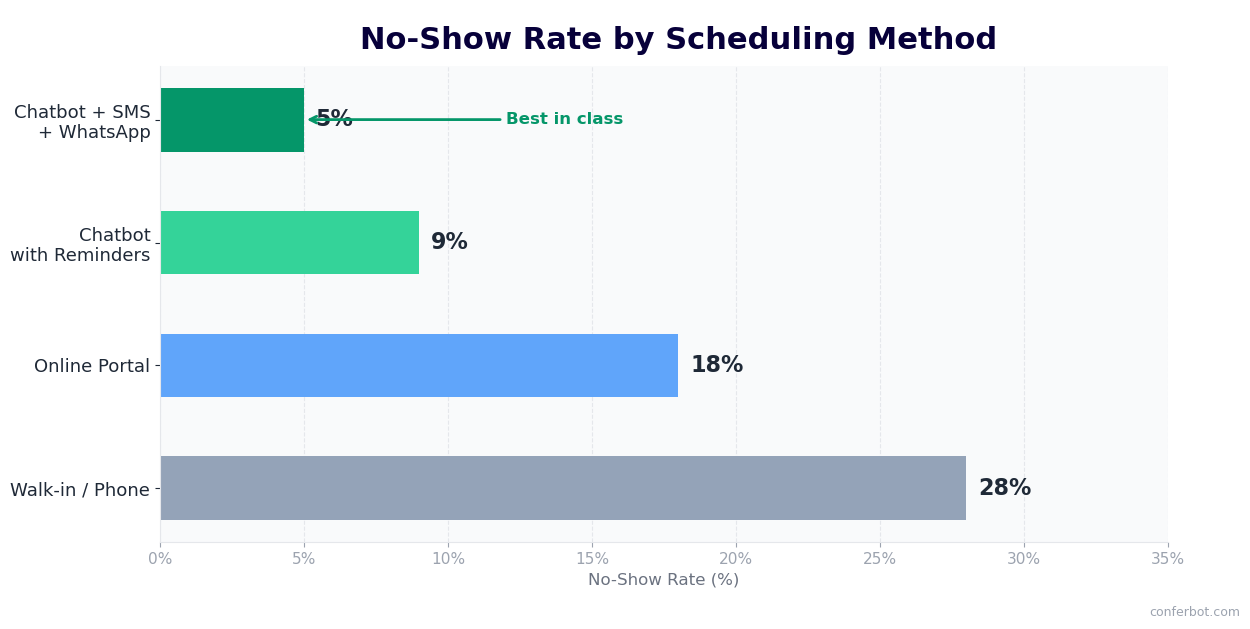
Telehealth no-show rates average 15-22% across provider types and specialties, with behavioral health showing rates as high as 30-40%. Each no-show represents direct revenue loss (a billable appointment delivered as dead time), clinician productivity waste, and — critically — a patient who did not receive care they needed. The telemedicine scheduling chatbot's communication workflows are specifically engineered to reduce no-shows through a combination of evidence-based reminder strategies, frictionless rescheduling, and proactive engagement for high-risk patients.
No-Show Rate Impact by Intervention Type
| Intervention | No-Show Reduction vs. No Intervention | Implementation in Chatbot | Evidence Base |
|---|---|---|---|
| Automated reminder at 48 hours | 18-24% reduction | WhatsApp/SMS/email with visit link and one-tap reschedule | Meta-analysis of 14 RCTs, 2019 |
| Same-day reminder at 2 hours | Additional 12-16% reduction | Direct video join link; mobile-optimized for immediate action | Systematic review, JAMA Internal Medicine |
| One-tap reschedule in reminder | 8-11% no-show-to-reschedule conversion | Deep link opens chatbot scheduler pre-filled with patient data | Analysis of 40,000 appointments, 2022 |
| Patient commitment confirmation at booking | 6-9% reduction | "Can you confirm you will be available at [time]?" at booking confirmation | Behavioral economics research on implementation intentions |
| Waitlist for cancellations | Indirect — reduces net revenue loss | Automatic waitlist offer to confirmed patients when slot opens | Operational improvement data |
High-Risk Patient Identification
Not all no-shows are equal, and not all patients need the same reminder intensity. The chatbot's scheduling intelligence identifies patients with higher no-show risk based on available signals: previous no-show history (from EHR appointment records), appointment type (new patient appointments have 40% higher no-show rates than follow-ups), appointment time (Monday morning and Friday afternoon slots have elevated no-show rates), and distance from the patient's recorded address to the provider location (for hybrid practices). High-risk patients receive an additional reminder step — a confirmation request 24 hours before the visit that requires an explicit reply — which converts ambivalent patients into confirmed attendees or early reschedules.
Post-No-Show Recovery
When a patient misses an appointment, the chatbot fires an immediate recovery message: "We missed you for your appointment today. We want to make sure you get the care you need. Here are the next available slots with Dr. [Name] — can we get you rescheduled?" This message is sent within 30 minutes of the missed appointment start time, when the patient is most likely to feel the salience of having missed and most motivated to rebook. Recovery messages sent within 30 minutes of no-show have a 28% rescheduling rate, compared to 11% for messages sent the following day. Connect this recovery flow to your EHR through Conferbot's API integration to trigger it automatically from the appointment status update in the clinical system.
50,000+ businesses use Conferbot templates to automate conversations
Setup Guide: Deploying a Telemedicine Scheduling Chatbot
Deploying a telemedicine appointment scheduling chatbot in a healthcare environment involves more stakeholders and a longer validation process than most chatbot deployments. Clinical informatics, compliance, provider operations, and patient experience teams all have legitimate interests in the configuration. This guide provides a realistic phase-by-phase roadmap that accounts for these stakeholders and avoids the most common deployment failures in healthcare chatbot projects.
Phase 1: Stakeholder Alignment and HIPAA Review (Weeks 1-2)
Before any technical configuration begins, secure sign-off from three stakeholder groups: compliance (BAA review, HIPAA technical safeguard documentation, consent language approval), clinical operations (provider matching logic, intake question sets for each specialty, escalation protocols for urgent symptom flags), and IT/informatics (EHR integration scope, API credentials and access provisioning, network security requirements). The most common cause of telehealth chatbot deployment delays is discovering a stakeholder objection during testing rather than addressing it in planning. A structured two-week discovery phase with all three groups eliminates this risk.
Phase 2: EHR Integration Setup (Weeks 2-4)
Request API access credentials from your EHR vendor for the scheduling and patient data APIs. For Epic, this requires an Epic App Orchard application registration (for third-party deployments) or direct sandbox access (for health system IT teams). For athenahealth, register a developer account and request production API access through the athenahealth Marketplace. Test the following integration points in the sandbox environment before connecting to production data: patient record lookup by name/DOB or MRN, insurance eligibility query, provider schedule and slot availability read, appointment write (new booking), and appointment update (cancellation and reschedule). Each integration point should be tested with representative edge cases — patients with multiple insurance plans, providers with blocking rules on certain appointment types, same-day scheduling scenarios — before production go-live.
Phase 3: Chatbot Configuration (Weeks 3-5)
Load the telemedicine appointment scheduler template and configure the following components using Conferbot's no-code builder:
- Insurance carrier list: Configure the payers your practice accepts, with their eligibility API endpoints or clearinghouse connections. Flag payers that require prior authorization for telehealth visits so the chatbot triggers the appropriate pre-auth workflow.
- Provider directory: Enter each telehealth provider's name, credentials, specialty, languages spoken, gender, and scheduling rules (new patient vs. established patient, appointment types and durations).
- Specialty routing matrix: Map presenting complaint categories (respiratory, musculoskeletal, behavioral health, dermatology, etc.) to the appropriate provider types. This matrix is the heart of the provider matching logic and should be reviewed by a clinical lead before activation.
- Intake question sets: Configure specialty-specific intake question sequences. A dermatology intake needs different questions than a behavioral health intake — skin condition duration, previous treatments, and photo upload capability versus mood rating scales, medication history, and safety screening.
- Reminder sequence timing: Set the send times for 48-hour, 2-hour, and same-day reminders. Configure the high-risk patient identification rules for additional outreach.
Phase 4: Pilot Deployment (Weeks 5-7)
Launch with a limited set of providers and appointment types — ideally one or two high-volume specialties with straightforward insurance profiles — before expanding to the full provider network. Pilot with 50-100 scheduling interactions and review: insurance verification accuracy rate (target: 95%+), provider match acceptance rate (target: 85%+ of patients accept the first match offered), intake completion rate (target: 70%+), and no-show rate versus historical baseline for the same appointment types. Most issues surface in the first 100 interactions; fixing them before full launch protects the provider and patient experience.
Phase 5: Full Rollout and Optimization (Weeks 7+)
Expand to the full provider network and all supported appointment types. Monitor performance using Conferbot's analytics dashboard. Key metrics: scheduling completion rate (conversational start to confirmed booking), insurance verification failure rate and failure reasons, no-show rate versus pre-chatbot baseline, and post-visit patient satisfaction scores for chatbot-scheduled visits versus phone-scheduled visits. Most healthcare organizations achieve measurable no-show reduction within the first 60 days and full operational efficiency gains — measured in front desk staff time on scheduling calls — within 90 days. See Conferbot pricing for healthcare plan options.
Patient Communication Workflows: Reminders, Follow-Ups, and Care Continuity
The telemedicine appointment scheduler does not end its work when the appointment is confirmed. The communication workflows that run between booking and visit — and between visit and follow-up — are where the chatbot has its greatest impact on clinical outcomes and patient retention. Patients who receive well-timed, relevant communications before and after their telehealth visit have higher satisfaction scores, better treatment adherence, and significantly lower rates of care abandonment than patients who interact only at the point of booking. This section covers every communication touchpoint the template supports and how to configure each for maximum clinical and operational impact.
Pre-Visit Communication Sequence
The standard pre-visit sequence runs across three touchpoints:
- Booking confirmation (immediate): Sent within 30 seconds of appointment confirmation. Contains: provider name and credentials, appointment date and time in patient's local time zone, visit type (video or audio-only), join link or dial-in instructions, and any specific pre-visit preparation relevant to the appointment type (fasting requirements for lab-adjacent visits, having a list of current medications available, downloading the video platform app if not already installed).
- 48-hour reminder: Sent 48 hours before the appointment. Contains: appointment summary, join link, one-tap reschedule option, and any outstanding intake items. If the patient has not completed the intake form, this reminder includes a direct link to complete it — with context: "Completing your intake before the visit helps your provider prepare and gives you more time for care discussion during the appointment."
- Same-day reminder (2 hours before): Contains: direct join link, provider name, and a simple confirmation request ("Reply YES to confirm you will be joining, or tap here to reschedule"). Patients who do not respond to the 2-hour reminder receive a 15-minute alert with the same join link.
Post-Visit Follow-Up Workflows
Post-visit communication is where telehealth practices lose most of their continuity-of-care advantage. A patient who receives a treatment plan verbally during a video visit and hears nothing afterward has no written reminder of their instructions and no natural trigger to follow up if symptoms persist or worsen. The chatbot sends a post-visit summary within 2 hours of appointment completion: a plain-language summary of the visit purpose, any prescriptions or referrals generated (populated from the EHR encounter note), follow-up instructions, and a direct booking link for the recommended follow-up appointment. This summary is sent to the patient's preferred channel and stored in their patient record.
Chronic Care and Recurring Visit Management
For patients with chronic conditions who require regular follow-up telehealth visits — quarterly diabetes management, monthly behavioral health sessions, biannual medication reviews — the chatbot manages the recurring scheduling automatically. After each completed visit, it asks: "Dr. [Name] recommends a follow-up visit in 3 months. Want me to book that now, or should I send you a reminder in 10 weeks?" Patients who book follow-ups immediately have a 3x higher visit completion rate than patients who are expected to call back on their own initiative. This proactive scheduling closes the access gap that causes chronic condition patients to fall out of care. Manage these recurring communication workflows through Conferbot's omnichannel tools and track patient communication engagement in the analytics dashboard.
Telemedicine Appointment Scheduler FAQ
Everything you need to know about chatbots for telemedicine appointment scheduler.
Why Use a Template vs Building from Scratch?
Templates encode years of optimization data into the conversation flow before you start.
| Factor | Conferbot Template | Build from Scratch | Hire a Developer |
|---|---|---|---|
| Time to deploy | 10 minutes | 2-8 hours | 2-6 weeks |
| Cost | Free | Your time | $5,000-$25,000 |
| Day-1 conversion | 15-22% | 5-8% | 10-15% |
| Proven flows | Yes, data-tested | No | Depends |
| Updates included | Automatic | Manual | Paid |
| Multi-channel | 8+ channels | 1 channel | Extra cost |
| Analytics | Built-in | Must build | Extra cost |
Ready to Deploy Telemedicine Appointment Scheduler?
Join 50,000+ businesses. Free forever plan available. No credit card required.