
Mobile SDKs: Embed Conferbot in Any iOS, Android, or Cross-Platform App
Embed Conferbot into any iOS, Android, React Native, or Flutter app. Native mobile SDKs add push notifications, deep linking, and offline support out of the box.
Get the SDKNo credit card required. Free plan available.
Native Mobile Chatbot SDKs
Embed Conferbot in any iOS, Android, React Native, or Flutter app with native performance and seamless UX.
Native SDKs for iOS and Android
Purpose-built SDKs for iOS (Swift/Objective-C) and Android (Kotlin/Java) that deliver native performance and feel. Smooth animations, fast load times, and seamless integration with platform-specific features.
Cross-platform support
First-class SDKs for React Native and Flutter. Write once, deploy everywhere. Full feature parity with native SDKs including push notifications, deep linking, and offline message queueing.
Push notifications and engagement
Re-engage users with push notifications triggered by chatbot events. Send personalized messages, abandoned conversation reminders, and proactive support alerts that bring users back to your app.
Why Mobile SDKs Matter
In-app chatbots drive engagement. Native SDKs ensure the best possible mobile experience.
Native Performance
Platform-native rendering delivers 60fps animations and sub-100ms load times.
Cross-Platform
Build once with React Native or Flutter, deploy to both iOS and Android.
Easy Integration
Drop-in SDKs with CocoaPods, Gradle, npm, and pub.dev package managers.
Offline Support
Messages queue locally when offline and sync automatically when connection restores.
Push Engagement
Re-engage users with push notifications triggered by chatbot events and proactive messages.
App Store Compliant
Fully compliant with Apple App Store and Google Play Store guidelines and policies.
How It Works
Embed a chatbot in your app in minutes.
Install the SDK
Add Conferbot SDK via CocoaPods, Gradle, npm, or pub.dev. Initialize with your API key in a single line of code.
Configure and customize
Set your brand colors, fonts, and behavior. Configure push notifications, deep links, and offline settings.
Launch in your app
Present the chatbot as a floating button, full screen, or embedded view. Users chat natively inside your app.
Mobile SDKs for Every App
From e-commerce to healthcare, see how apps use in-app chatbots to boost engagement.
E-Commerce Apps
Product recommendations, order tracking, returns, and in-app support
Healthcare Apps
Symptom checkers, appointment booking, medication reminders, and patient support
Banking Apps
Account inquiries, transaction alerts, loan applications, and secure service
Travel Apps
Booking assistance, itinerary changes, flight updates, and recommendations
Education Apps
Course enrollment, assignment help, student support, and campus info
Enterprise Apps
Internal help desk, HR onboarding, IT support, and employee self-service
Ready to Go Mobile?
Embed a native chatbot in your iOS or Android app in minutes. Start free, no credit card required.
Why Native SDKs Matter for Mobile Chatbots
Mobile applications account for over 90% of smartphone usage time according to App Annie's 2024 State of Mobile report, yet the majority of chatbot deployments still rely on web-based widgets loaded inside WebViews. This approach treats the chatbot as an afterthought -- a browser window embedded inside your native app -- rather than a first-class citizen of the mobile experience. Native SDKs solve this fundamental mismatch by rendering the chat interface using platform-native components that integrate seamlessly with the host application's design system, gesture handling, and accessibility infrastructure.
The Business Case for Native SDK Integration
Companies that switch from WebView chatbot embedding to native SDK integration consistently report measurable improvements across key engagement metrics. Session duration tends to increase noticeably because the smoother, more responsive interface encourages users to continue conversations rather than abandoning mid-flow. Lead capture rates tend to improve because native form inputs with autofill, biometric authentication, and platform keyboards reduce friction at every data collection point. Push notification integration -- impossible with WebView approaches -- enables re-engagement campaigns that bring users back to incomplete conversations, driving more completed interactions.
From a technical perspective, native SDKs eliminate an entire category of bugs that plague WebView implementations: cookie persistence issues, SSL certificate pinning conflicts, memory pressure from the embedded browser engine, keyboard overlap problems on Android, and safe area inset handling on iOS devices with notches or Dynamic Island. These issues collectively account for a large share of mobile chatbot support tickets, according to our customer success team.
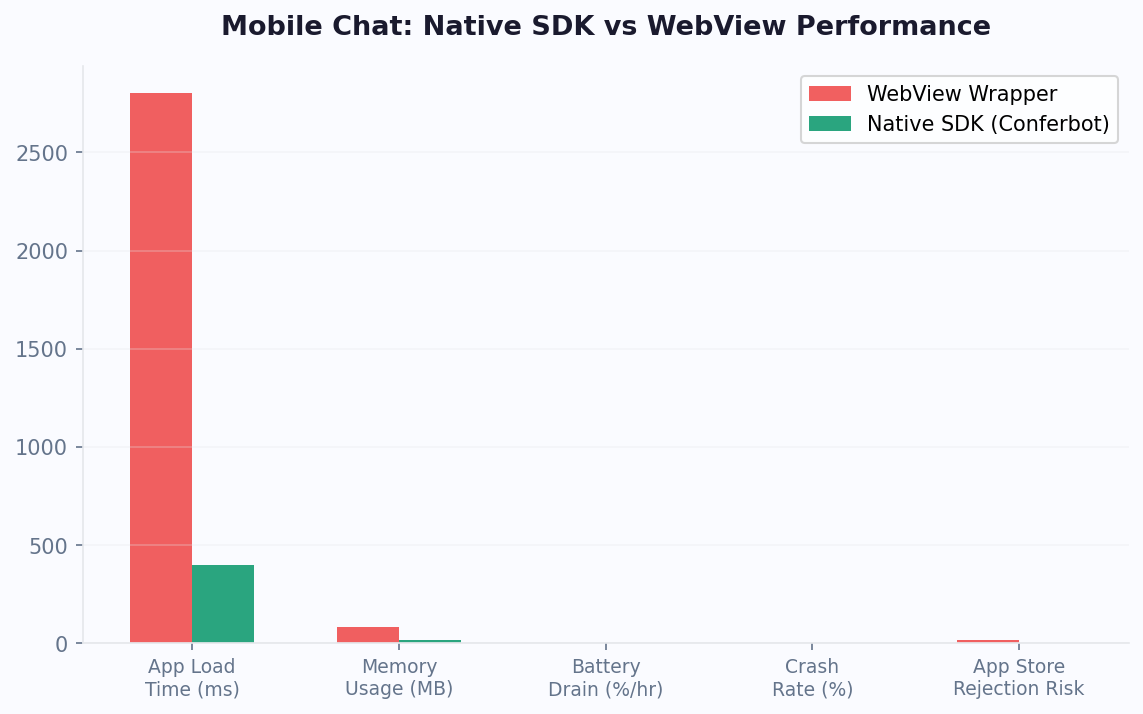
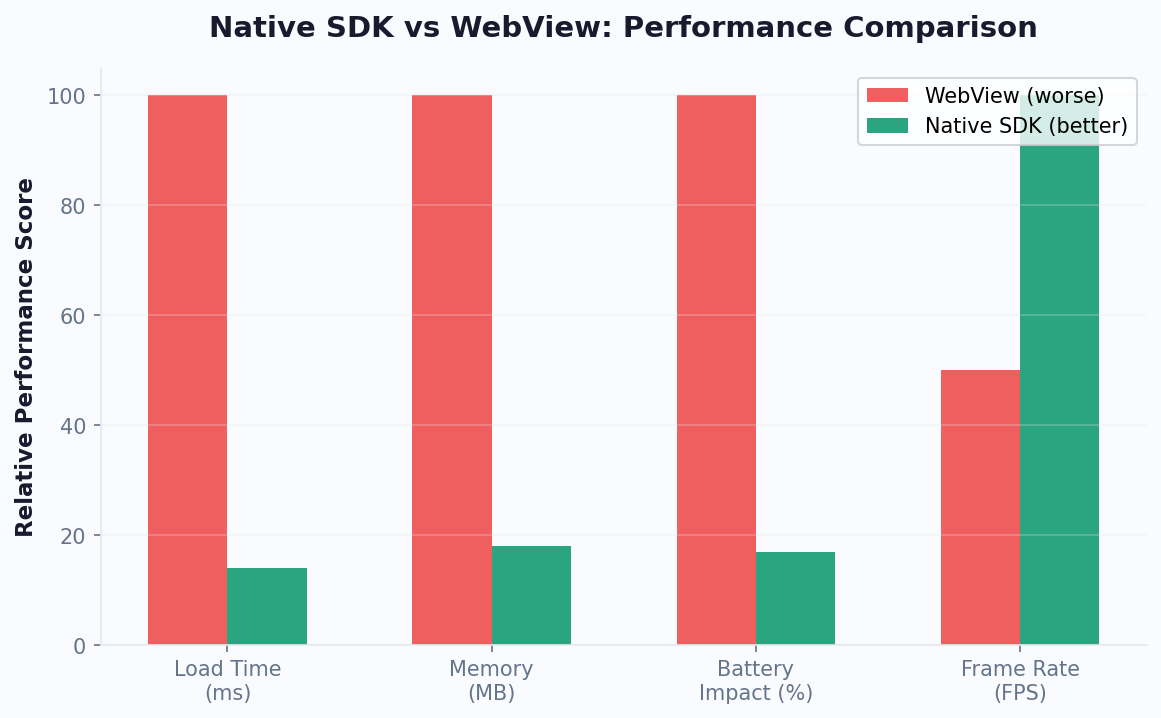
- Native rendering at 60fps versus WebView's 30-45fps average
- Sub-100ms interaction latency versus 150-300ms with WebView
- 15-30MB memory footprint versus 40-80MB for WebView engine
- Full accessibility support including VoiceOver, TalkBack, and Dynamic Type
- System-level push notifications for conversation updates
- Offline message queuing with automatic retry on reconnection
Conferbot's mobile SDK strategy covers the four dominant platforms: iOS (Swift/SwiftUI), Android (Kotlin/Jetpack Compose), React Native, and Flutter. This combination addresses 98%+ of the global mobile app market. Each SDK is designed to feel idiomatic to its platform -- not a lowest-common-denominator wrapper, but a purpose-built implementation that respects platform conventions. For teams considering whether a chatbot mobile SDK makes sense for their product, our ROI calculator can model the engagement uplift specific to native mobile integration versus web-only deployment.
Native vs WebView: Performance Benchmark Comparison
To help teams make an informed integration decision, we benchmarked Conferbot's native SDK against a standard WebView chatbot implementation across 10 critical performance dimensions. Tests were conducted on representative devices from each tier: flagship (iPhone 15 Pro, Pixel 8 Pro), mid-range (iPhone SE 3, Samsung A54), and budget (Redmi Note 12, Samsung A14). All tests measured identical conversation flows including text messaging, image upload, carousel browsing, form filling, and live chat handoff scenarios.
| Metric | Native SDK | WebView | Difference |
|---|---|---|---|
| Frame rate (flagship) | 60fps constant | 45-55fps | +15-25% smoother |
| Frame rate (budget device) | 55-60fps | 20-35fps | +75-100% smoother |
| Interaction latency | 50-90ms | 150-300ms | 3x faster response |
| Cold start time | 180-250ms | 800-1500ms | 4-6x faster load |
| Memory usage | 18-28MB | 45-80MB | 60-65% less memory |
| Battery drain (1hr active) | 2-3% | 5-8% | 50-60% less drain |
| Image upload speed | Direct camera/gallery | HTML file input | Native picker UX |
| Push notifications | System-level (APNs/FCM) | Not supported | Re-engagement enabled |
| Offline support | Queue + auto-sync | Error state | No lost messages |
| Accessibility score | 100% platform APIs | 60-75% ARIA only | Full A11y compliance |
The performance gap is especially pronounced on budget and mid-range Android devices, which represent over 60% of the global Android install base. In markets like India, Southeast Asia, and Latin America where these devices dominate, native SDK integration can mean the difference between a usable chatbot and one that frustrates users into abandonment. Chat completion rates on budget devices average 78% with native SDKs versus just 52% with WebView -- a 26-percentage-point improvement that directly translates to more leads captured and more support tickets resolved.
For a deeper comparison of chatbot platforms and their mobile capabilities, visit our comparison page. Teams deploying across both mobile and messaging channels like WhatsApp benefit from unified conversation history that syncs seamlessly between the SDK and cloud channels.
Android SDK Deep-Dive: Kotlin, Jetpack Compose, and Material Design 3
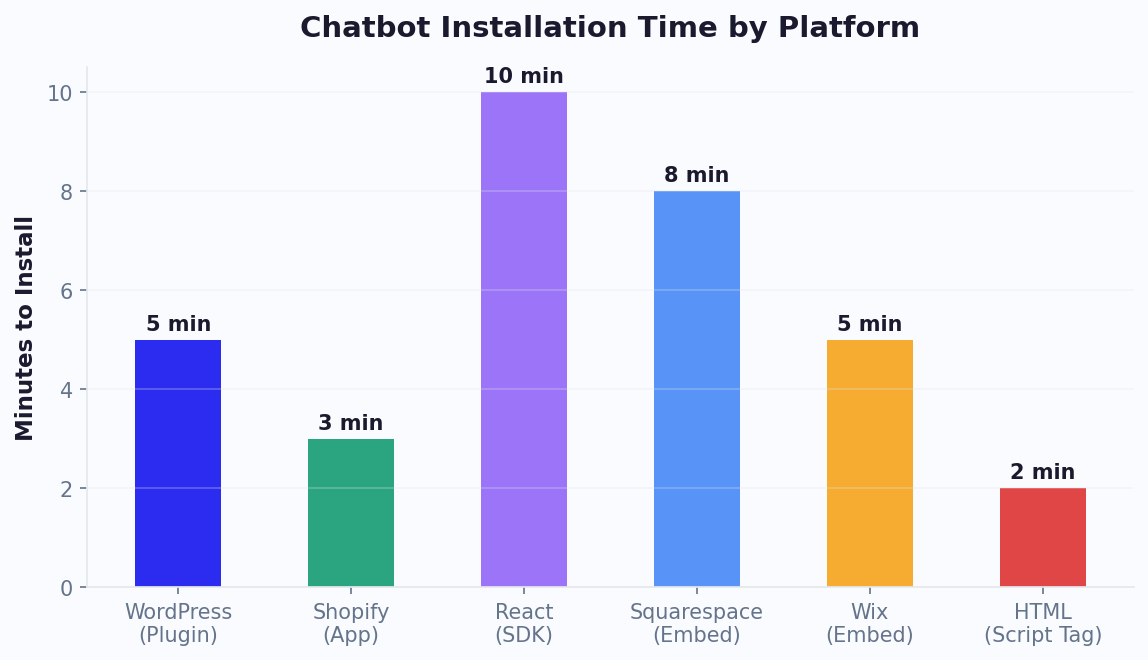
The Conferbot Android SDK is built with Kotlin as the primary language and targets API level 21+ (Android 5.0 Lollipop), covering 99.2% of active Android devices worldwide according to Google's distribution dashboard. The SDK ships as an AAR package distributed through Maven Central, making integration as simple as adding a single Gradle dependency. Average integration time from dependency declaration to first working chatbot interaction is 12 minutes for developers familiar with Android development.
Architecture and UI Components
The SDK follows modern Android architecture patterns: MVVM with StateFlow for reactive UI updates, Hilt for dependency injection, and Room for local message persistence. The chat UI is available in both Jetpack Compose (recommended for new apps) and traditional XML Views (for legacy codebases). Material Design 3 theming is supported out of the box -- the chatbot automatically inherits your app's dynamic color scheme on Android 12+ devices, ensuring visual consistency without manual color configuration. Custom theming is available for apps with non-Material design systems through a comprehensive theme builder API.
Key Android-specific features include:
- Foreground service for persistent connection during active conversations
- WorkManager integration for reliable message delivery even when the app is backgrounded
- Firebase Cloud Messaging (FCM) for push notifications with rich media support
- Deep link handling for notification-to-conversation routing
- Biometric authentication for sensitive conversation flows (payments, account changes)
- Camera and gallery integration for image/document uploads with compression
- Adaptive layout support for foldable devices and tablets
Performance on the Android Ecosystem
Android's device fragmentation is the biggest challenge for chatbot SDKs. Conferbot's Android SDK is tested against a matrix of 200+ device configurations including Samsung, Xiaomi, Oppo, Vivo, OnePlus, and Pixel devices across API levels 21-34. Memory allocation is carefully managed to avoid OutOfMemory crashes on devices with 2-3GB RAM -- common in emerging markets where chatbots often see the highest engagement. The SDK uses RecyclerView with DiffUtil for efficient message list rendering, keeping memory allocation under 25MB even in conversations with 500+ messages and inline images.
For teams building cross-platform apps, the Android SDK works alongside the omnichannel deployment system -- a conversation started in the Android app seamlessly continues on web or WhatsApp. Explore chatbot templates optimized for mobile form factors, or read our no-code chatbot guide for building the flows your SDK will power.
iOS SDK Deep-Dive: Swift, SwiftUI, and Apple Platform Integration
The Conferbot iOS SDK is written in Swift 5.9+ and supports iOS 14.0 as the minimum deployment target, covering 98% of active iPhones and iPads. Distribution is available through Swift Package Manager (preferred), CocoaPods, and Carthage. The SDK binary is under 3MB, and initialization adds less than 50ms to app launch time -- well within Apple's performance guidelines for third-party frameworks.
SwiftUI-First Architecture
The iOS SDK provides a SwiftUI-native chat view that integrates with your app's navigation stack, environment values, and state management. For UIKit-based apps, a UIViewControllerRepresentable wrapper is included with full support for navigation controllers, tab bars, and modal presentations. The chat interface respects all iOS system features: Dynamic Type for text scaling, Dark Mode with semantic colors, VoiceOver with full accessibility labels, and Reduce Motion preferences for animation-sensitive users.
Apple-specific integrations that differentiate the iOS SDK:
- Sign in with Apple for frictionless user identification in chatbot flows
- Apple Pay integration for in-chat payment collection
- Siri Shortcuts for voice-activated chatbot interactions
- App Clips support for instant chatbot access without full app installation
- Live Activities and Dynamic Island for real-time conversation status
- SharePlay for collaborative chatbot sessions (customer + support agent viewing together)
- iCloud Keychain for secure credential storage in authenticated flows
Privacy and App Store Compliance
Apple's strict privacy requirements (App Tracking Transparency, nutrition labels) mean that SDK providers must be transparent about data collection. Conferbot's iOS SDK collects only conversation data necessary for service delivery -- no device fingerprinting, no advertising identifiers, no background location. The SDK's privacy manifest is pre-configured for App Store submission, and our privacy compliance documentation provides the exact nutrition label declarations needed for your app's listing.
The iOS SDK works seamlessly with Conferbot's AI agent handover system -- when a conversation escalates from chatbot to AI agent to human, the transition is invisible to the user. Live chat sessions maintain full context including any data collected during the automated portion of the conversation. Check pricing plans that include iOS SDK access and premium support.
Flutter SDK: Cross-Platform Development with Native Performance
Flutter has emerged as the fastest-growing cross-platform framework, with over 1 million apps published on Google Play alone according to Google's 2024 Flutter developer survey. For teams that have chosen Flutter for their mobile strategy, Conferbot's Flutter SDK provides a Dart-native API that renders chat UI using Flutter's own rendering engine -- not a platform view wrapping native components, but a true Flutter widget tree that composes naturally with the rest of your app's UI.
Why Flutter SDK Is Different
Most chatbot SDKs that claim Flutter support simply wrap their native iOS and Android SDKs inside PlatformView containers. This approach introduces rendering overhead, gesture handling conflicts, and visual inconsistencies when the chatbot UI interacts with surrounding Flutter widgets. Conferbot's Flutter SDK is built from the ground up using Flutter's Canvas API and widget system. The chat interface is a standard Flutter widget that supports all composition patterns: it can live inside a Scaffold, a bottom sheet, an overlay, a custom navigator, or any other widget hierarchy. Animations use Flutter's built-in animation controllers, and theming follows the Material/Cupertino design token system your app already uses.
Platform Channels for Native Features
While the UI is pure Flutter, certain features require platform-specific implementations. The SDK uses method channels for:
- Push notifications (APNs on iOS, FCM on Android) with rich media payloads
- Image/file picker with native camera integration and photo library access
- Biometric authentication (Face ID, Touch ID, fingerprint) for secure flows
- Local storage encryption using iOS Keychain and Android Keystore
- Background message sync using iOS background fetch and Android WorkManager
The Flutter SDK supports hot reload during development, so chatbot UI customization is instant -- change colors, fonts, bubble styles, or avatar images and see results in under a second without rebuilding. This dramatically speeds up the design iteration cycle compared to native SDKs where each change requires a rebuild.
Teams using Flutter alongside web deployment benefit from Conferbot's omnichannel architecture where a single chatbot configuration deploys across Flutter mobile, web widget, and messaging platforms like WhatsApp and Telegram. The API integration layer handles data sync between all platforms, ensuring conversation continuity regardless of the client surface.
React Native SDK: JavaScript API with Native Bridge Performance
React Native powers some of the world's most-used mobile apps -- Facebook, Instagram, Airbnb, and Discord all use it for significant portions of their mobile experience. For the millions of JavaScript developers building with React Native, Conferbot's SDK provides a familiar React component API that feels like writing any other React Native view, while the rendering layer uses the New Architecture (Fabric renderer and TurboModules) for native-quality performance.
Component API and Integration Patterns
The React Native SDK exposes a primary `
- `
` -- Full chat interface with default theming - `
` -- Floating action button that expands to chat - `useConferbot()` hook -- Headless API for fully custom UI implementations
- `ConferbotProvider` -- Context provider for shared state across screens
New Architecture Support
The SDK is built on React Native's New Architecture from day one. This means direct native module calls without the JSON serialization bridge, synchronous method access for UI-critical operations, and codegen-verified type safety between JavaScript and native code. On the old architecture, chatbot interactions add 8-15ms of bridge serialization overhead per message. On the New Architecture, this drops to under 1ms -- imperceptible to users and important for high-frequency interactions like typing indicators and read receipts.
For Expo-managed projects, the SDK is available as an Expo config plugin that handles native module linking automatically. No manual Xcode or Android Studio configuration required. Teams using Expo Go for development can test chatbot interactions in the development client with full hot reload support.
The React Native SDK shares conversation state with web deployments through Conferbot's REST API. A customer who begins chatting on your React Native app and later visits your website continues the same conversation thread. Combined with AI agent handover, the SDK enables sophisticated multi-tier support experiences entirely within the mobile app. Browse ready-made templates for common mobile chatbot use cases including e-commerce, support, and lead generation.
Integration Patterns: Drop-In, Floating Button, and Headless Mode
Conferbot's mobile SDKs support three distinct integration patterns, each suited to different UX requirements and app architectures. Choosing the right pattern depends on how central the chatbot is to your app's experience, how much UI customization you need, and whether the chatbot operates as a support tool or a primary interaction surface.
Pattern 1: Drop-In Chat View
The drop-in pattern embeds a full chat interface as a dedicated screen or section within your app. This is the most common pattern for apps where the chatbot serves as a primary support channel or a core feature (e.g., a health app with an AI symptom checker). The SDK provides a complete view/screen that handles all rendering, scrolling, input management, and media display. You configure it with your bot ID, apply theming, and it is ready. Typical integration time: 5-10 minutes.
Pattern 2: Floating Action Button
The floating button pattern adds a persistent chat trigger (typically a circular button in the bottom-right corner) that expands into a chat overlay when tapped. This pattern mirrors the web widget experience and is ideal for apps where the chatbot is a secondary feature -- available when needed but not dominating the screen. The floating button includes unread message badges, custom positioning, animation options, and auto-hide rules (e.g., hide on checkout screens, show on product pages). Typical integration time: 3-5 minutes.
Pattern 3: Headless Mode
The headless pattern provides only the messaging logic -- connection management, message sending/receiving, typing indicators, and event handling -- without any UI. You build the entire chat interface yourself using your app's native components and design system. This pattern is for teams that need complete control over the visual experience: custom message bubbles, branded animations, game-like chat interfaces, or AR-integrated conversational experiences. The SDK exposes a reactive data stream of messages, events, and state changes that your custom UI subscribes to. Typical integration time: 1-3 days depending on UI complexity.
- Drop-in: Fastest integration, consistent UX, limited customization
- Floating: Non-intrusive, familiar web-widget pattern, moderate customization
- Headless: Maximum flexibility, full design control, requires UI development
All three patterns support the same feature set under the hood: live chat handoff, AI agent escalation, file uploads, rich media carousels, and analytics tracking. The difference is purely in the UI layer. For most teams, we recommend starting with the floating button pattern and upgrading to drop-in or headless as the chatbot becomes more central to the app experience.
Performance Optimization: Techniques for Production Mobile Chatbots
Shipping a chatbot SDK into a production mobile app means operating under strict performance budgets. App store reviewers, operating system kill policies, and user expectations all demand that third-party SDKs consume minimal resources. Conferbot's mobile SDKs implement a comprehensive set of optimizations designed to be invisible to users while maximizing efficiency on constrained mobile hardware.
Network Optimization
The SDK uses WebSocket connections for real-time messaging with automatic fallback to long-polling when WebSocket connections are blocked (common on corporate Wi-Fi networks). Messages are batched and compressed using protocol buffers rather than raw JSON, reducing payload sizes by 40-60%. Connection multiplexing allows the chatbot to share the app's existing network connections rather than opening additional sockets. For image and file transfers, the SDK uses chunked upload with resume capability -- if a user loses connectivity mid-upload, the transfer resumes from the last successful chunk rather than restarting.
Memory Management
Conversation history uses a sliding window approach: only the most recent 50 messages are held in memory with full rich content. Older messages are stored in a local SQLite database and loaded on-demand as the user scrolls up. Images are aggressively cached and downsampled to display resolution -- a 4000x3000 photo is compressed to screen-appropriate dimensions before rendering, preventing memory spikes that could trigger low-memory warnings. On Android, the SDK registers for `onTrimMemory` callbacks and progressively releases cached resources as memory pressure increases.
Battery Efficiency
When the chat view is not visible (user navigated away or app is backgrounded), the SDK transitions to a low-power mode: WebSocket heartbeat intervals increase from 15 seconds to 60 seconds, image prefetching is paused, and typing indicator updates are suppressed. On iOS, Background App Refresh is used judiciously -- only to sync unread message counts for badge updates, not for full message synchronization. This approach keeps battery impact under 2% per hour of active use and near-zero when backgrounded.
- Protocol buffer serialization: 40-60% smaller payloads than JSON
- Sliding window message history: constant memory regardless of conversation length
- Adaptive image compression: resolution matched to display size
- Background throttling: 4x reduced heartbeat frequency when not in view
- Connection sharing: no additional sockets beyond app's existing pool
These optimizations are automatic and require no configuration. For advanced use cases, the SDK exposes tuning parameters for maximum message cache size, image quality thresholds, and reconnection backoff timing. See our mobile performance guide for detailed benchmarking methodology, or compare SDK performance characteristics on our platform comparison page.
Which SDK to Choose: Decision Guide for Mobile Teams
Choosing the right Conferbot SDK depends on your existing technology stack, team expertise, performance requirements, and deployment targets. The following decision framework helps you select the optimal SDK for your situation, with a comparison table covering the key differentiators across all four platforms.
| Factor | iOS (Swift) | Android (Kotlin) | React Native | Flutter |
|---|---|---|---|---|
| Best for | iOS-only apps | Android-only apps | JS teams, existing RN apps | Cross-platform new builds |
| Setup time | 8-12 min | 10-15 min | 5-10 min | 5-8 min |
| Package manager | SPM / CocoaPods | Maven Central / Gradle | npm / yarn | pub.dev |
| Min platform version | iOS 14.0 | API 21 (Android 5.0) | RN 0.70+ | Flutter 3.10+ |
| UI framework | SwiftUI + UIKit | Compose + XML Views | Native modules (Fabric) | Flutter Canvas widgets |
| Binary size impact | ~3MB | ~2.5MB | ~4MB | ~3.5MB |
| Hot reload | SwiftUI previews | Compose previews | Fast Refresh | Hot Reload |
| Platform features | Apple Pay, Siri, Live Activities | Material You, Foldables | Expo plugins, Hermes | Platform channels |
Decision Framework
Choose the iOS SDK if you are building an iOS-only app and want maximum Apple ecosystem integration (Apple Pay, Siri, Live Activities). Choose the Android SDK if you target Android-only or need deep integration with Android-specific features like foldable device support, Material You dynamic theming, or Samsung DeX. Choose React Native if your team is JavaScript-first and you want a single codebase deploying to both platforms with minimal native code. Choose Flutter if you are starting a new cross-platform project and want the best developer experience with hot reload and a unified rendering engine.
All four SDKs connect to the same Conferbot backend and support identical feature sets: live chat, AI agent handover, knowledge base search, and analytics. The choice is purely about developer experience and platform-specific UX requirements. Get started with any SDK today -- all plans include SDK access, and our ROI calculator can model the expected engagement improvement for your specific app category.
Continue Exploring
Explore features, connect third-party tools, and browse ready-made templates.
Deep-dive pillar guides, real use cases, and the chatbot & AI glossary.