
Slackボット チャットボットビルダー
人事、ITサポート、チームの生産性向上のための内部チャットボットをデプロイ。内部プロセスを自動化し、反復的な質問を削減したい企業チームに最適。
To build a Slackボット chatbot with Conferbot, sign up free, design your flow in the no-code visual builder, connect your Slackボット account, and publish — typically live in a few minutes with no coding. The free plan needs no credit card, and the same bot can also run on your website and other messaging channels.
Slack チャットボット機能
強力な自動会話を構築するために必要なすべて
ワークスペース統合
ボタン付きインタラクティブメッセージ
ダイレクトメッセージとチャネル応答
リアルタイムメッセージ用イベントサブスクリプション
ボタン/メニューのインタラクティビティサポート
ユーザープロフィール情報
スムーズな有人対応への切り替え
エンタープライズグレードのセキュリティ
何を 構築できますか?
開始する 12つの簡単なステップで
このガイドに従ってSlackチャットボットを接続します
Slack API Portal(api.slack.com/apps)にアクセス
新しいSlack Appを作成(スクラッチから)
OAuth & Permissionsに移動
ボットスコープを追加: chat:write、im:history、im:read、users:read
ワークスペースにアプリをインストール
Bot User OAuth Token(xoxb-で始まる)をコピー
Conferbotで、チャネル → Slack → 接続に移動
ボットトークンを貼り付けて接続をクリック
ConferbotからEvent Subscriptions URLをコピー
Slack AppでEvent Subscriptionsを有効化してURLを貼り付け
ボットイベントをサブスクライブ: message.im
Slackボットが稼働開始!
Why Businesses Are Building Slack Chatbots
Slack has become the central nervous system of the modern workplace. With over 32 million daily active users and 750,000+ organizations relying on it as their primary communication hub, Slack is where work happens - from quick questions to complex cross-functional projects. But as teams grow and messages pile up, repetitive questions and manual workflows start to erode productivity. That is exactly where Slack chatbots come in.
A well-designed Slack chatbot acts as a tireless digital teammate that can answer employee questions instantly, automate routine workflows, surface critical notifications, and guide new hires through onboarding - all without leaving the workspace. Instead of waiting hours for an IT support response or scrolling through a long FAQ document, team members simply ask the bot and get an immediate, accurate answer.
Companies like Salesforce, Shopify, and Atlassian have used internal Slack bots to cut support ticket volume by 30-40%, reduce onboarding time by half, and keep distributed teams aligned across time zones. Whether you are a 10-person startup or a 10,000-person enterprise, a Slack chatbot can transform how your team communicates and operates.
With Conferbot's no-code chatbot builder, you do not need engineering resources to create a sophisticated Slack bot. You can design conversational flows visually, connect them to your knowledge base, and deploy to your Slack workspace in under 10 minutes. This guide walks you through everything you need to know about building, deploying, and optimizing a Slack chatbot in 2026.
New to chatbot building? Start with our complete guide to building a chatbot without coding. For enterprise teams evaluating Slack vs Microsoft Teams for bot deployment, see our Teams chatbot guide. Browse our template library for IT helpdesk, HR FAQ, and onboarding bot templates ready to deploy.
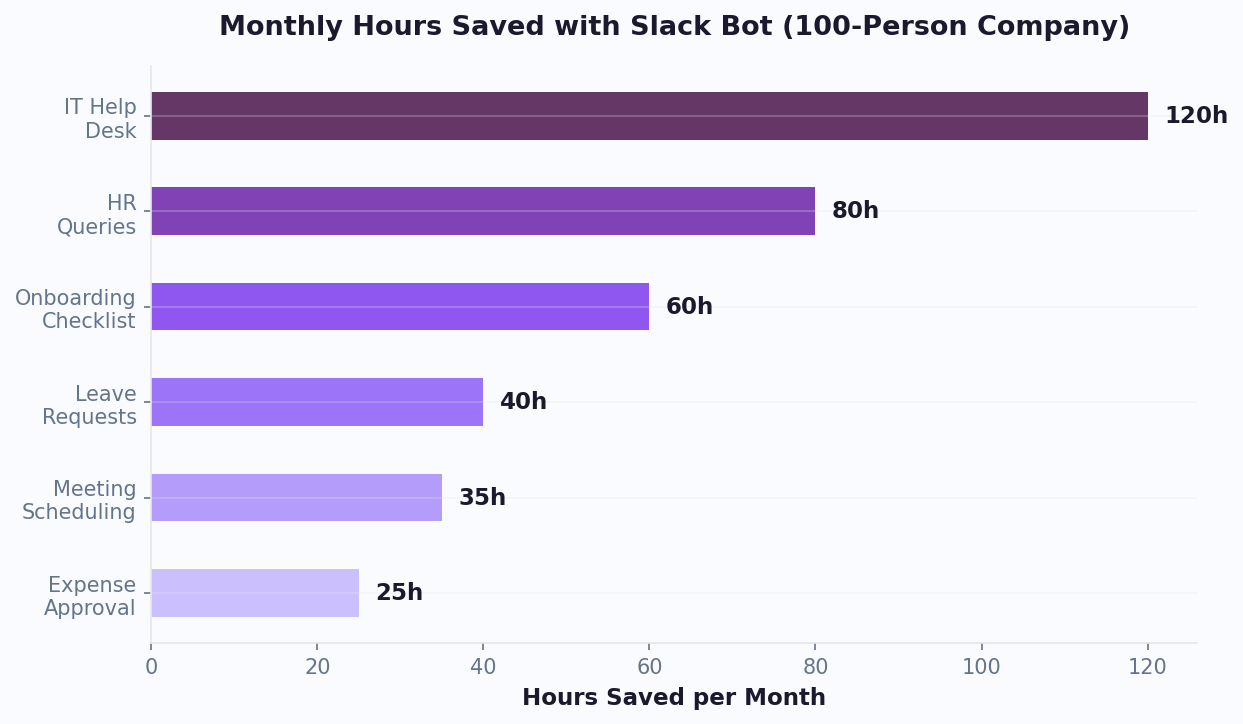
What Can a Slack Chatbot Do?
Slack chatbots are far more versatile than simple auto-responders. Modern bots leverage AI and natural language processing to understand context, hold multi-turn conversations, and execute complex actions. Here is what a Slack chatbot can handle for your organization:
Internal Support and Self-Service
The most common use case is automating answers to repetitive internal questions. Employees can ask the bot about company policies, IT troubleshooting steps, benefits information, or software access requests and receive instant, consistent answers - 24 hours a day, regardless of time zone. This alone can reduce internal support tickets by 30% or more.
Employee Onboarding
New hires join a dedicated onboarding channel where the bot walks them through their first week - sharing documents, scheduling introduction meetings, explaining company tools, and checking in on progress. Instead of overwhelming new employees with a wall of emails, the bot delivers information in digestible, conversational chunks.
Notifications and Alerts
Slack bots can push real-time notifications from external systems directly into relevant channels. Think deployment alerts for engineering, lead notifications for sales, system health dashboards for DevOps, or campaign performance summaries for marketing. With Conferbot's API integrations, your bot can pull data from virtually any source.
Workflow Automation
From approving PTO requests to filing expense reports, Slack bots can guide users through multi-step workflows using interactive buttons, dropdown menus, and modal dialogs. The bot collects the required information conversationally and routes it to the right person or system - no forms, no context switching.
Team Productivity
Bots can run daily standups asynchronously, manage meeting agendas, track action items, schedule reminders, and even run quick polls. These micro-automations save just a few minutes each, but they compound across an entire team into hours of recovered productivity every week.
IT Helpdesk Automation
The IT helpdesk is the single highest-ROI use case for Slack chatbots. According to industry data, 40-60% of IT support tickets are repetitive Tier 1 questions -- password resets, VPN troubleshooting, software installation, account access requests, and device setup. A Slack IT bot resolves these instantly with step-by-step troubleshooting flows, links to relevant documentation from your AI knowledge base, and automated ticket creation when escalation is needed. Companies deploying IT helpdesk bots in Slack report saving $15-25 per deflected ticket and reducing average resolution time from 4+ hours to under 2 minutes for common issues. The bot can also integrate with ITSM tools like ServiceNow, Jira Service Management, and Zendesk through Conferbot's integrations hub.
HR Bot Use Cases
HR teams field hundreds of repetitive questions every month: "How many PTO days do I have left?", "What is the parental leave policy?", "When is the next company holiday?", "How do I enroll in benefits?", "What is the expense reimbursement process?" An HR chatbot in Slack provides instant, consistent answers to all of these, plus it can handle onboarding checklists for new hires (delivering day-by-day tasks, scheduling introduction meetings, and sharing company handbooks), collect pulse survey responses, remind managers about performance review deadlines, and distribute company-wide announcements. HR teams using Slack bots often report a meaningful reduction in repetitive inquiries and higher employee satisfaction with internal support responsiveness. For industry-specific HR automation, see our HR chatbot solutions guide.
Slack Connect for External Partners
Slack Connect lets you create shared channels with external organizations -- clients, vendors, partners, and agencies. Deploying a chatbot in Slack Connect channels extends your automation to external stakeholders. Use cases include: shared support channels where partners can ask your bot product questions without contacting your support team directly, client onboarding flows that guide new clients through setup and configuration, vendor coordination bots that handle procurement questions and delivery tracking, and agency collaboration bots that share project updates and collect deliverables. This is especially powerful for B2B companies that manage relationships across multiple external organizations simultaneously.
Slack App Directory vs Custom Bot
When you need a Slack bot, you have two paths: install an existing app from the Slack App Directory or build your own custom bot. Each approach has trade-offs that matter depending on your use case, budget, and technical resources.
| Factor | Slack App Directory | Custom Bot (Conferbot) |
|---|---|---|
| Setup Time | 1-5 minutes | 10-15 minutes |
| Customization | Limited to app's settings | Fully customizable flows and responses |
| Branding | Third-party branding | Your company name, icon, and personality |
| Knowledge Base | Generic or limited | Your own docs, policies, FAQs |
| AI Capabilities | Varies by app | GPT-powered with your data |
| Analytics | Basic or none | Full conversation analytics |
| Multi-Channel | Slack only | Slack + 10 other channels |
| Data Privacy | Data shared with third party | You control your data |
| Cost | $5-50/month per app | Starts at $0/month |
| Coding Required | No | No |
Pre-built Slack apps work well for generic tasks like polls, reminders, or project management integrations. But when you need a bot that knows your company inside and out - one that can answer questions about your specific policies, products, and processes - a custom bot built on Conferbot is the clear winner.
With Conferbot, you get the best of both worlds: the simplicity of a no-code builder with the power of a custom solution. You can train your bot on your own documentation, create branching conversational flows, and track every interaction with detailed analytics. And because Conferbot supports 10+ channels, the same bot you build for Slack can also serve your customers on WhatsApp, Microsoft Teams, or your website.
How to Create a Slack Chatbot with Conferbot
Setting up a Slack chatbot with Conferbot takes about 10 minutes and requires zero coding. Follow these steps to go from zero to a fully functional Slack bot:
Step 1: Create Your Chatbot on Conferbot
Sign up for a free Conferbot account and use the visual chatbot builder to design your conversational flows. You can start from one of our pre-built templates - such as IT Helpdesk, HR FAQ, or Employee Onboarding - or build from scratch. Add your company knowledge base, configure AI responses with OpenAI integration, and test the bot in the preview panel.
Step 2: Create a Slack App
Go to api.slack.com/apps and click "Create New App." Choose "From scratch" and give your app a name that your team will recognize (e.g., "AcmeBot" or "IT Helper"). Select the workspace where you want to install it. Slack's official app creation documentation provides detailed guidance on each configuration option.
Step 3: Configure Bot Permissions
Navigate to OAuth & Permissions in the left sidebar. Under "Bot Token Scopes," add the following permissions:
- chat:write - Allows the bot to send messages
- im:history - Lets the bot read direct message history
- im:read - Allows the bot to view direct message channels
- users:read - Lets the bot access user profile information
Step 4: Install to Your Workspace
Click "Install to Workspace" and authorize the requested permissions. After installation, you will see a Bot User OAuth Token starting with xoxb-. Copy this token - you will need it in the next step.
Step 5: Connect Slack to Conferbot
In your Conferbot dashboard, go to Channels → Slack → Connect. Paste your Bot User OAuth Token and select the chatbot you want to deploy. Click "Connect" and Conferbot will provide you with an Event Subscriptions URL.
Step 6: Enable Event Subscriptions
Back in the Slack API portal, navigate to Event Subscriptions and toggle it on. Paste the Event Subscriptions URL from Conferbot into the "Request URL" field. Slack will verify the URL automatically. Under "Subscribe to bot events," add message.im to receive direct messages.
Step 7: Test Your Bot
Open Slack, find your bot in the direct messages sidebar, and send it a message. Your Conferbot-powered Slack bot is now live. Monitor conversations and refine responses using Conferbot's analytics dashboard.
Key Features of Slack Chatbots
Slack's platform offers a rich set of features that make chatbots feel like a native part of the workspace experience. Here are the key capabilities you can leverage with a Conferbot-powered Slack bot:
Slash Commands
Users can trigger specific bot actions by typing slash commands like /helpdesk, /pto-balance, or /submit-request. These commands provide quick access to bot functionality without starting a full conversation. They are perfect for frequently used queries where the user knows exactly what they need.
Interactive Messages with Buttons and Menus
Slack bots can send messages that include clickable buttons, dropdown menus, date pickers, and multi-select options. Instead of typing responses, users simply click the appropriate option. This dramatically reduces friction and error rates in workflows like ticket categorization, approval routing, or survey responses. These rich media capabilities make the bot experience feel polished and professional.
Modal Dialogs
For multi-step data collection, Slack bots can open modal dialog windows with structured form fields. Modals are ideal for use cases like bug reports, PTO requests, or expense submissions where you need to collect multiple pieces of information in a clean, organized format.
Rich Message Formatting
Slack supports Block Kit - a UI framework for building rich, structured messages. Your bot can send messages with headers, dividers, images, context blocks, and formatted sections that look polished and professional. This transforms the bot from a plain text responder into a visual, engaging interface.
Direct Messages and Channel Responses
Your bot can respond privately via direct messages for sensitive queries (like salary questions) or publicly in channels for team-wide information. This flexibility allows a single bot to serve both individual and group use cases.
Real-Time Event Handling
Through Slack's Events API, your bot receives messages and events in real time - no polling, no delays. When someone messages the bot or mentions it in a channel, the response comes back in under a second. Combined with Conferbot's live chat handoff, your bot can seamlessly escalate complex issues to a human agent without the user ever leaving Slack.
Publishing to Slack App Directory
If you want to distribute your Slack chatbot beyond a single workspace - whether to customers, partners, or the broader Slack community - publishing to the Slack App Directory is the most powerful distribution channel available. The App Directory is Slack's official marketplace where over 2,600 apps are listed, and it is the first place teams look when they need new capabilities for their workspace.
Why Publish to the Slack App Directory?
Publishing your Conferbot-powered chatbot to the Slack App Directory unlocks several strategic advantages. First, discoverability: your bot becomes searchable by any of Slack's 750,000+ organizations. Second, credibility: apps listed in the directory carry an implicit trust signal - they have been reviewed by Slack's team and meet their quality and security standards. Third, frictionless installation: users can install your bot with a single click, dramatically reducing adoption barriers.
Public vs Workspace Distribution
Slack offers two distribution models for bot apps:
| Distribution Type | Best For | Review Required | Visibility |
|---|---|---|---|
| Internal (Single Workspace) | Company-specific bots for internal teams | No | Your workspace only |
| Multi-Workspace (Org Install) | Enterprise Grid orgs deploying across workspaces | Admin approval only | All workspaces in the org |
| Public (App Directory) | SaaS products, agencies, consultants | Yes (Slack review) | All Slack users worldwide |
For internal company bots - such as an IT helpdesk or HR FAQ bot - the single workspace installation described in our setup guide above is all you need. No review process, no approval wait times. But if you are building a product or service that other organizations will use, public distribution through the App Directory is the path forward.
The Slack App Review Process
To list your app publicly, Slack requires a review that typically takes 2-4 weeks. Slack's review team evaluates your app against several criteria: security practices (proper OAuth implementation, minimal scopes), user experience (clear onboarding, responsive interactions), functionality (the app does what it claims), and documentation (clear instructions and support channels). Conferbot handles many of these requirements automatically - OAuth flows, event handling, and message formatting are all built into our platform, so you can focus on the conversational design rather than the infrastructure.
Preparing Your Bot for the App Directory
Before submitting for review, ensure your bot meets these requirements:
- Clear app listing page - Write a compelling description, upload branded screenshots, and define your app's categories
- Minimal OAuth scopes - Request only the permissions your bot actually needs (see our security section below for scope best practices)
- Landing page and support - Provide a public URL where users can learn more about your bot and get help
- Privacy policy - Required for all public apps. Describe how you handle user data
- Tested on multiple workspace sizes - Ensure your bot works for small teams and large organizations alike
Conferbot customers who distribute through the App Directory benefit from our white-label capabilities - your bot carries your branding, not ours. Combined with custom domains, you can create a fully branded Slack bot experience that feels like a native product.
Slack Workflow Builder + Chatbot Integration
Slack Workflow Builder is a native automation tool that lets anyone in the workspace create simple automations without code - like sending a form when someone joins a channel or posting a reminder on a schedule. When you combine Slack Workflow Builder with a Conferbot AI chatbot, you get the best of both worlds: Slack's native triggers and routing with Conferbot's intelligent, conversational AI responses.

Why Integrate Rather Than Choose One or the Other?
Slack Workflow Builder excels at structured, predictable automations: form submissions, channel notifications, scheduled messages, and simple routing. But it cannot understand natural language, hold conversations, or make intelligent decisions based on context. That is where Conferbot fills the gap. By connecting the two, you create workflows that are triggered by Slack-native events but powered by AI when they reach a decision point.
Common Integration Patterns
Here are the most impactful ways to connect Slack Workflow Builder with your Conferbot chatbot:
Pattern 1: Form Submission → AI Triage
A Slack workflow presents a form (e.g., "Report an Issue") when someone types a slash command. The form collects the issue type, description, and urgency. Once submitted, the workflow sends the data to Conferbot via webhook. Conferbot's NLP engine analyzes the description, classifies the issue category, determines the appropriate team, and either resolves it instantly (for known issues) or creates a ticket in Jira/ServiceNow with full context.
Pattern 2: Channel Join → Personalized Onboarding
When a new employee joins the #new-hires channel, a Slack workflow triggers automatically. Instead of sending a static welcome message, it hands off to a Conferbot onboarding flow that adapts based on the employee's department, role, and location. The bot delivers a personalized checklist, answers questions in real time, and tracks completion progress in the analytics dashboard.
Pattern 3: Scheduled Check-In → AI Standup
A Slack workflow sends a scheduled message every morning at 9 AM asking each team member for their standup update. When team members respond, Conferbot processes the responses, extracts blockers and action items, and posts a formatted summary to the team channel - complete with follow-up questions for flagged items.
Pattern 4: Emoji Reaction → Escalation
Team members react to a message with a specific emoji (e.g., the warning sign). The Slack workflow detects the reaction and forwards the message to Conferbot, which evaluates whether it requires human attention, creates a ticket if needed, and notifies the appropriate on-call person. This is particularly popular with engineering teams for incident management.
Setting Up the Integration
Connecting Slack Workflow Builder to Conferbot requires minimal configuration. In Conferbot, enable the incoming webhook endpoint under Settings → Webhooks. In Slack Workflow Builder, add a "Send a webhook" step and paste the Conferbot webhook URL. The bot receives the workflow data as structured JSON and routes it to the appropriate conversational flow. The entire setup takes under 5 minutes and requires no code - just drag-and-drop configuration on both sides.
For teams that need even more sophisticated workflow orchestration, Conferbot's API integration layer supports connecting to Zapier and other iPaaS platforms, enabling workflows that span Slack, CRM systems, project management tools, and more.
Slack Enterprise Grid Bot Deployment
For large organizations running Slack Enterprise Grid, deploying chatbots involves unique considerations around multi-workspace management, org-level permissions, data residency, and compliance. Enterprise Grid is Slack's premium tier designed for organizations with 500+ employees, and it introduces an organizational layer above individual workspaces that fundamentally changes how bots are deployed and managed.
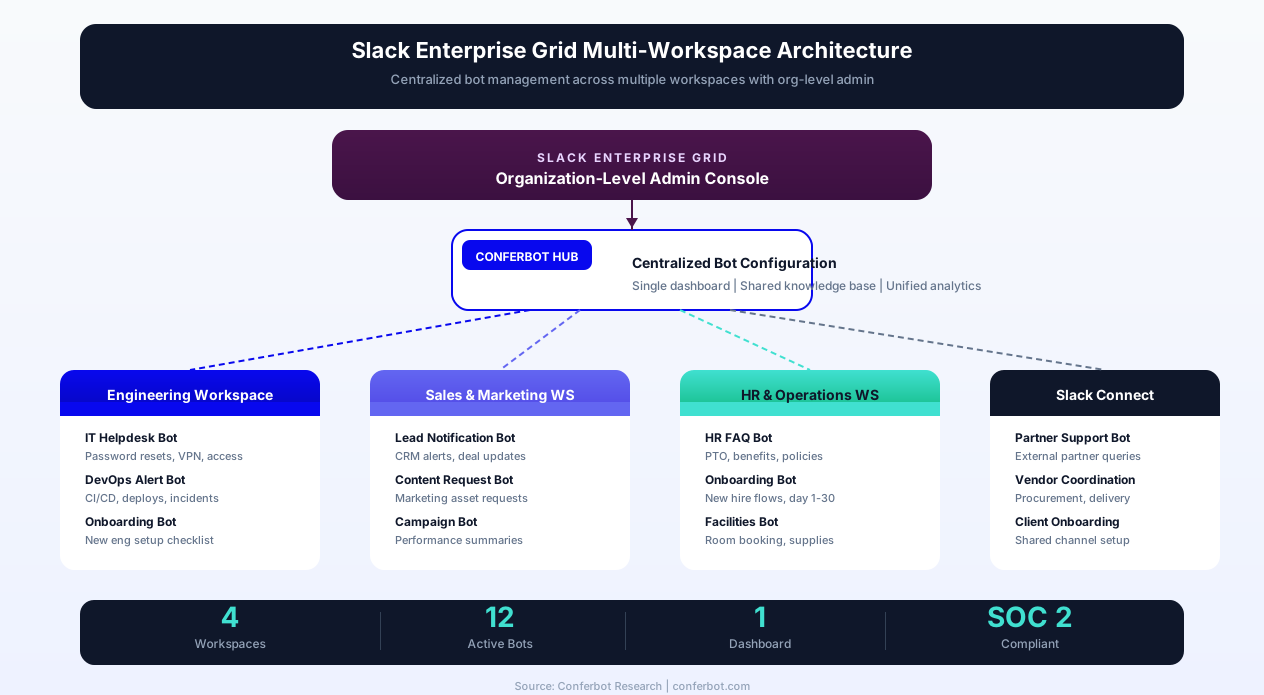
How Enterprise Grid Differs for Bot Deployment
In a standard Slack workspace, you install a bot once and it serves everyone in that workspace. With Enterprise Grid, your organization may have dozens or even hundreds of workspaces - one for each department, region, or business unit. A Slack bot can be deployed at the org level, meaning it is automatically available across all workspaces, or at the workspace level, where it is installed individually per workspace. Conferbot supports both deployment models, giving your IT team full control over which workspaces get which bots.
Org-Level App Management
Enterprise Grid introduces an Org Admin Console where IT administrators manage apps centrally. This is where you approve or restrict which apps can be installed across the organization, manage OAuth tokens at the org level, and enforce security policies. When you deploy a Conferbot chatbot at the org level, it inherits the organization's security settings and can access user data across all connected workspaces - ideal for bots like IT helpdesk or HR FAQ that serve the entire company.
Multi-Workspace Bot Strategy
Most Enterprise Grid organizations take a layered approach to bot deployment:
- Org-wide bots: IT helpdesk, HR FAQ, company policy bot - deployed to every workspace via org install
- Department-specific bots: Sales notification bot, DevOps alert bot, finance approval bot - deployed only to relevant workspaces
- Slack Connect bots: Partner support bot, client onboarding bot - deployed to shared external channels
With Conferbot's team management features, different departments can manage their own bot configurations while IT retains central oversight through the admin dashboard.
Enterprise Compliance and Data Residency
Enterprise Grid organizations typically have strict compliance requirements. Conferbot supports the key enterprise needs:
- Data residency: Conversation data is stored in your specified region, supporting compliance with GDPR, CCPA, and other data sovereignty regulations
- SSO integration: Bots respect your organization's SSO (SAML/OIDC) authentication policies
- Audit logging: Every bot interaction is logged and exportable for compliance review
- Token management: Org-level tokens are rotated automatically and stored using industry-standard encryption
- DLP compatibility: Bot responses respect your Data Loss Prevention policies and can be configured to avoid surfacing sensitive information in non-secure channels
For organizations in regulated industries like healthcare, insurance, or legal, Enterprise Grid's compliance features combined with Conferbot's security infrastructure make Slack chatbot deployment viable even under strict regulatory oversight.
Enterprise Grid Pricing Considerations
Slack Enterprise Grid pricing is custom-quoted based on organization size, but the good news is that bot integrations are included at no extra cost regardless of your Grid tier. Conferbot's Business and Enterprise plans are designed for Grid deployments, with features like unlimited workspaces, dedicated support, SLA guarantees, and custom onboarding assistance.
Slack Bot + CRM/Helpdesk Integrations
The real power of a Slack chatbot emerges when it connects to the business systems your team already uses. Instead of being a standalone Q&A tool, your Conferbot-powered Slack bot becomes a conversational interface to your entire tech stack - pulling data from CRMs, creating tickets in helpdesk platforms, updating project management tools, and syncing information across systems, all from within Slack.
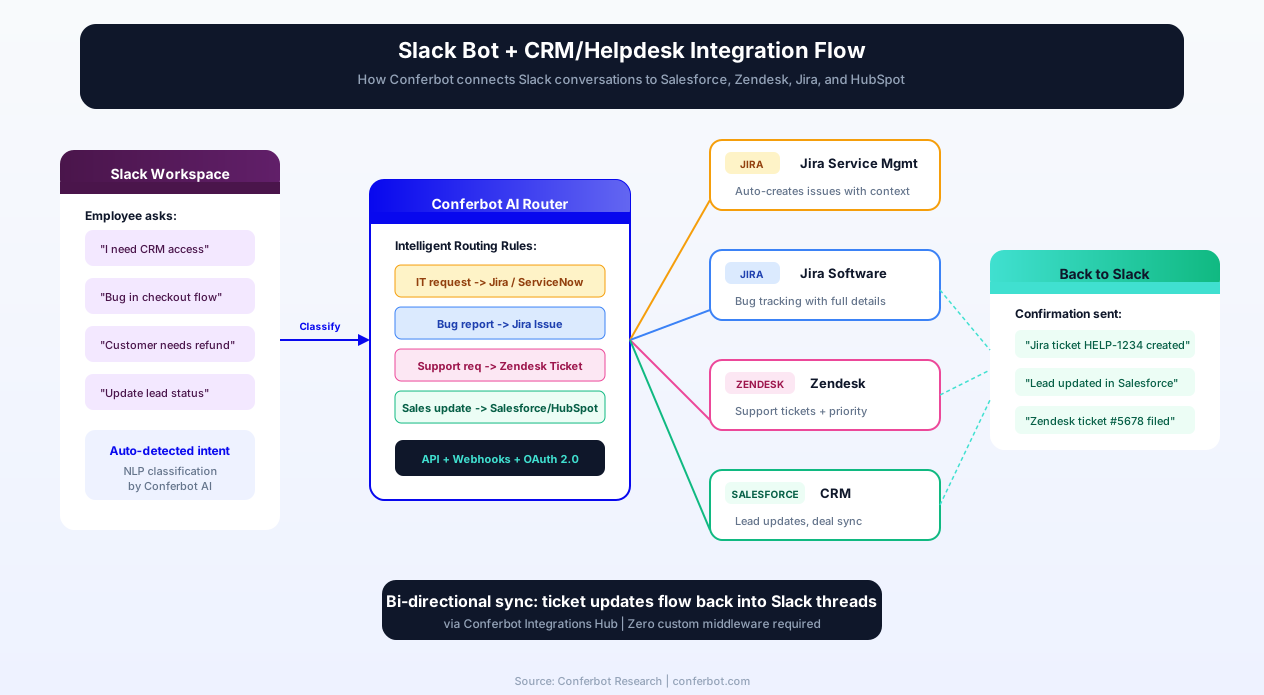
Salesforce Integration
Connect your Slack bot to Salesforce to give sales teams instant access to CRM data without leaving Slack. Ask the bot "What is the status of the Acme Corp deal?" and it pulls the latest opportunity data from Salesforce. When a new lead comes in, the bot pushes a notification to the sales channel with contact details, lead score, and suggested next steps. Sales reps can update deal stages, log activities, and create follow-up tasks - all through conversational commands in Slack. This integration is especially powerful for real estate teams and e-commerce businesses managing high-volume lead pipelines.
Zendesk Integration
For customer support teams, the Slack-Zendesk integration creates a seamless support workflow. When an employee reports an issue in Slack, the bot automatically creates a Zendesk ticket with full context - including the Slack conversation thread, user details, and bot's preliminary triage assessment. Support agents receive the ticket in Zendesk and can respond there; the response is relayed back to the Slack thread so the employee stays updated. This bi-directional sync eliminates the need to copy-paste between platforms.
Jira and Jira Service Management
Engineering and IT teams can use the Slack bot to create, update, and query Jira issues directly. "Create a bug for checkout page - payment fails on mobile" becomes a fully formatted Jira issue with the right project, issue type, labels, and priority. The bot can also surface sprint progress, blocked items, and upcoming release milestones in daily channel digests. For IT service management, the bot creates Jira Service Management tickets with SLA tracking and approval workflows built in.
HubSpot Integration
Marketing and sales teams using HubSpot can connect their Slack bot to sync lead data, trigger workflows, and receive deal notifications. When the bot qualifies a lead through a conversational flow, it pushes the contact directly into HubSpot with custom properties mapped from the conversation. Marketing automation sequences can be triggered based on bot interactions, creating a closed-loop system between Slack conversations and HubSpot campaigns.
Additional Integrations
Conferbot's integrations hub supports connections to dozens of business tools:
- ServiceNow: Enterprise ITSM ticket creation, change request workflows, and CMDB queries
- Google Workspace: Calendar scheduling via calendar booking, Drive document search, and Sheets data import
- Microsoft 365: Teams cross-posting, Outlook calendar integration, and SharePoint document retrieval
- PagerDuty: Incident creation, on-call escalation, and status page updates
- Confluence/Notion: Knowledge base search and document linking directly in bot responses
- Zapier: Connect to 3,000+ apps via Zapier for any integration not natively supported
All integrations use Conferbot's secure API layer, which handles authentication, rate limiting, error handling, and data transformation - so you connect systems through configuration, not custom code.
Slack Bot Security & Compliance
Security is a non-negotiable requirement for any Slack bot that handles company data, employee information, or customer interactions. Organizations deploying Slack chatbots need to understand the security model, OAuth permissions, token management, and compliance considerations that govern how bots interact with workspace data.
OAuth Scopes and the Principle of Least Privilege
Every Slack bot operates under a set of OAuth scopes that define exactly what it can and cannot do. Following the principle of least privilege, your bot should request only the scopes it needs to function. Here are the scope categories and when to use them:
| Scope Category | Examples | When to Request |
|---|---|---|
| Read scopes | channels:read, im:read, users:read | Bot needs to receive messages or access user info |
| Write scopes | chat:write, files:write | Bot needs to send messages or upload files |
| History scopes | im:history, channels:history | Bot needs to read past messages (use sparingly) |
| Admin scopes | admin.users:read, admin.teams:read | Enterprise Grid org-level management only |
Conferbot's Slack integration is pre-configured with the minimum required scopes for each feature you enable. If you only need DM-based Q&A, you will not request channel-wide history access. This minimizes your security surface area and makes workspace admin approval faster.
Token Management and Storage
Slack bot tokens (xoxb- prefix for bot tokens, xoxp- for user tokens) are the keys to your bot's capabilities. Secure token management is critical:
- Never expose tokens in code repositories - Conferbot stores tokens in encrypted vaults, not in configuration files
- Automatic rotation: Conferbot supports Slack's token rotation API, refreshing tokens periodically to limit the window of exposure if a token is compromised
- Granular revocation: If a bot is decommissioned or a security incident occurs, tokens can be revoked instantly from both the Conferbot dashboard and the Slack admin console
Data Retention and Privacy
Slack conversations processed by your bot pass through Conferbot's servers for NLP processing and response generation. Understanding the data flow is essential for compliance:
- Conversation data: Stored in Conferbot's encrypted database with configurable retention periods (30, 90, 365 days, or custom)
- PII handling: Conferbot can be configured to redact personally identifiable information from stored conversations
- Data deletion: GDPR-compliant data deletion on request - all conversation data, analytics, and derived insights are permanently removed
- No training on your data: Your conversations are never used to train Conferbot's AI models or shared with other customers
Compliance Certifications and Standards
For organizations in regulated industries, here is how a Conferbot + Slack deployment aligns with major compliance frameworks:
- Encryption & access controls: Data is encrypted in transit (SSL/TLS) and at rest (AES-256), with role-based access controls and audit logging
- GDPR: Full compliance including data processing agreements, right to erasure, and data portability
- HIPAA: For healthcare organizations, Conferbot can sign a Business Associate Agreement (BAA) and enforce HIPAA-compliant data handling for PHI-containing conversations
- CCPA: California Consumer Privacy Act compliance for handling California residents' data
- ISO 27001: Information security management aligned with ISO 27001 controls
Slack itself maintains SOC 2/3, ISO 27001, and FedRAMP certifications at the platform level. When combined with Conferbot's security infrastructure, you get end-to-end compliance coverage from the Slack client through to the bot backend. For a deep dive into our security practices, see our version control and audit trail features.
Slack Chatbot Pricing
One of the biggest advantages of building a Slack chatbot with Conferbot is the transparent, affordable pricing. Here is what you need to know about costs in 2026:
Slack Platform Costs
Slack itself does not charge anything extra for bot integrations. Whether you are on Slack's Free, Pro, Business+, or Enterprise Grid plan, you can create and install custom Slack apps at no additional cost. The Slack API and Events API are completely free to use. However, keep in mind that Slack's Free plan has message history limits (90 days), which may affect how much conversation history your bot can reference.
Conferbot Plans
Conferbot offers flexible plans that scale with your needs:
| Feature | Free Plan | Pro Plan | Business Plan |
|---|---|---|---|
| Slack Integration | Included | Included | Included |
| Monthly Conversations | 100 | 5,000 | Unlimited |
| AI Responses (OpenAI) | 50 | 2,000 | Unlimited |
| Chatbot Flows | 3 | Unlimited | Unlimited |
| Team Members | 1 | 5 | Unlimited |
| Analytics | Basic | Advanced | Advanced + Export |
| Live Chat Handoff | No | Yes | Yes |
For most small teams getting started with a Slack bot, the Free plan is more than enough to validate the concept and see real results. As your usage grows, you can upgrade seamlessly. Visit our pricing page for full details and current promotions.
Total Cost of Ownership
Unlike building a custom Slack bot from scratch - which can cost $5,000-$20,000+ in developer time for design, coding, testing, hosting, and maintenance - Conferbot lets you launch a production-quality bot for $0 upfront. You also avoid ongoing infrastructure costs since Conferbot handles hosting, scaling, and uptime for you.
Slack Chatbot Use Cases
Slack bots deliver the most value when they solve specific, repetitive pain points that every organization faces. Here are the highest-impact use cases for tech companies and beyond:
IT Helpdesk Bot
The IT helpdesk is the most popular Slack bot use case - and for good reason. Employees constantly need help with password resets, VPN issues, software installation, access permissions, and device troubleshooting. An IT helpdesk bot can resolve 40-60% of Tier 1 tickets instantly, freeing your IT team to focus on complex infrastructure work. The bot can walk users through troubleshooting steps, link to relevant documentation, and automatically create Jira or ServiceNow tickets when escalation is needed.
HR and People Ops Bot
HR teams answer the same questions hundreds of times: "How many PTO days do I have?", "When is the next company holiday?", "How do I update my benefits?", "What is our parental leave policy?" A Slack HR bot provides instant answers to all of these, plus it can handle onboarding checklists, collect feedback through pulse surveys, and remind managers about performance review deadlines. Explore our HR chatbot industry page for detailed implementation strategies.
Sales Notification Bot
Sales teams thrive on timely information. A Slack bot can push real-time alerts when a new lead comes in, a deal moves stages in your CRM, a contract is signed, or a customer churns. These instant notifications keep the team informed and responsive without constantly checking dashboards.
DevOps and Engineering Bot
Engineering teams use Slack bots for deployment notifications, CI/CD pipeline status updates, incident management, on-call rotation reminders, and infrastructure monitoring alerts. When a build fails or a service goes down, the bot posts immediately to the relevant channel with context and links to logs. During incidents, the bot can help coordinate the response by creating incident channels and assigning roles.
Knowledge Management Bot
As organizations grow, institutional knowledge becomes scattered across Confluence, Notion, Google Drive, and dozens of other tools. A knowledge management bot acts as a single search interface - employees ask a question in Slack and the bot searches across all connected sources to find the answer. This is especially powerful when combined with Conferbot's OpenAI integration, which can synthesize information from multiple documents into a coherent response. See also our knowledge base feature for more on document ingestion.

Conferbot vs Slack Native Bot vs Custom Build
When evaluating how to bring a chatbot to your Slack workspace, teams typically consider three paths: using Slack's built-in tools (Workflow Builder and the native Slackbot), building a custom bot from scratch using the Slack API, or using a no-code chatbot platform like Conferbot. Each approach has very different implications for cost, capability, time-to-value, and ongoing maintenance.
Feature Comparison
| Capability | Slack Native (Slackbot + Workflow Builder) | Custom Build (Bolt SDK / API) | Conferbot |
|---|---|---|---|
| Setup Time | Minutes (limited) | Weeks to months | 10-15 minutes |
| AI / NLP | No | You build and maintain | Built-in GPT + NLP |
| Knowledge Base | No | You build and host | Upload docs, auto-indexed |
| Multi-turn Conversations | No | Complex to implement | Visual flow builder |
| Analytics Dashboard | Basic workflow metrics | You build it | Built-in, exportable |
| Live Agent Handoff | No | Complex to implement | One-click enable |
| Multi-Channel | Slack only | Slack only (unless you build more) | Slack + 10 channels |
| Maintenance Burden | Low (limited features) | High (ongoing dev work) | Zero (managed platform) |
| Coding Required | No | Yes (Node.js / Python) | No |
| Upfront Cost | $0 | $5,000-$20,000+ | $0 (free tier) |
| Monthly Cost | $0 | $200-$2,000+ (hosting + maintenance) | From $0/month |
| Enterprise Support | Slack support | Your team | Dedicated success manager |
When Each Approach Makes Sense
Slack native tools are ideal when you need simple, structured automations - welcome messages, form-based workflows, or basic reminders. They are free, require no external dependencies, and work instantly. But they hit a ceiling fast: no AI, no knowledge base, no conversational intelligence.
Custom build is the right choice when you have very specific, unique requirements that no platform can satisfy - like a bot that interfaces with proprietary internal systems through custom protocols, or a bot that requires highly specialized ML models. The trade-off is significant: you need dedicated engineering resources for initial development and ongoing maintenance, plus you own the hosting, scaling, and security infrastructure.
Conferbot occupies the sweet spot for the vast majority of organizations: the power of a custom bot (AI responses, knowledge base, integrations, analytics) with the simplicity of a no-code platform. You get a production-ready Slack bot in minutes, not months, and you never worry about server uptime, API rate limits, or security patches. For teams that want to deploy across Slack plus other channels like WhatsApp, Messenger, Telegram, Instagram, or Discord, the multi-channel capability alone justifies the platform approach.
Migration Path
Already using Slack's native Slackbot or a custom-built solution and considering a switch? Conferbot makes migration straightforward. You can import your existing FAQ content into the AI knowledge base, recreate conversational flows with the visual builder, and connect to the same Slack workspace. Most migrations are completed in under a day with no disruption to users. See our platform comparison page for detailed feature-by-feature comparisons with other chatbot builders.
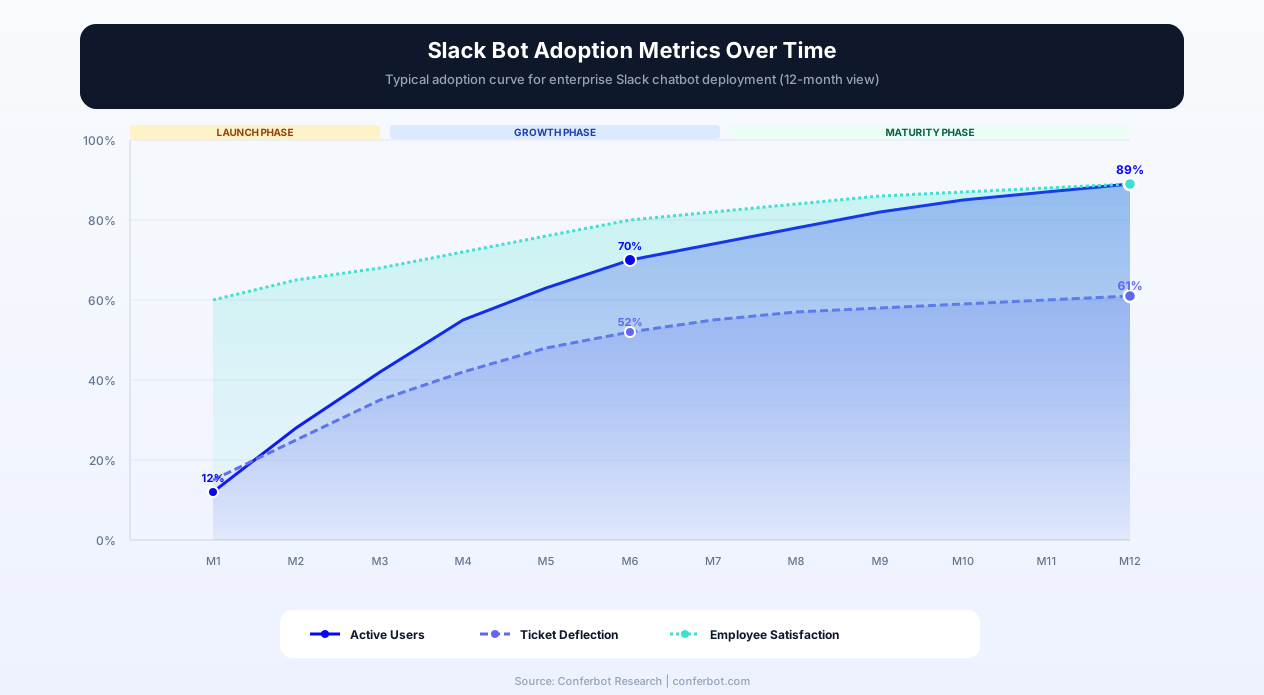
Slack Bot vs Other Messaging Channels
Slack is one of many channels where you can deploy a chatbot. Understanding how it compares to other platforms helps you choose the right channel - or combination of channels - for your needs.
| Feature | Slack | Microsoft Teams | Discord |
|---|---|---|---|
| Primary Audience | Tech companies, startups | Enterprises, corporate | Gaming, communities |
| Daily Active Users | 32M+ | 320M+ | 200M+ |
| Bot Setup Complexity | Easy (10 min) | Moderate (15-20 min) | Easy (10 min) |
| Interactive Messages | Buttons, menus, modals | Adaptive Cards | Buttons, select menus |
| Slash Commands | Yes | Yes (Message Extensions) | Yes |
| File Sharing | All types | All types | All types (up to limits) |
| Enterprise Security | SOC 2, HIPAA eligible | Microsoft 365 compliance | Basic |
| API Quality | Excellent | Good | Excellent |
| Best For | Internal automation | Corporate internal bots | Community engagement |
When to choose Slack: If your team already lives in Slack, a Slack bot is the obvious choice for internal automation. Slack's developer ecosystem is mature, the API is well-documented, and the interactive message features are among the best in the industry. Slack bots are particularly strong for tech companies, startups, and digital-first organizations.
When to consider multi-channel: Many organizations use Slack internally but serve customers on other platforms. With Conferbot, you can build your bot once and deploy it to Slack for internal teams, WhatsApp for customer support, Telegram for community engagement, and your website for lead generation - all from a single dashboard. For mobile-first teams, consider our mobile SDK to embed the same bot in your iOS or Android app. This omnichannel approach ensures consistent answers everywhere while letting you manage everything in one place.
Best Practices for Slack Chatbots
Deploying a Slack bot is the easy part. Making it a tool your team actually loves using requires thoughtful design and ongoing refinement. Follow these best practices to maximize adoption and impact:
Channel Organization
Create a dedicated channel (e.g., #ask-hr-bot or #it-helpdesk) for each bot use case. This keeps bot conversations organized and makes it easy for employees to find the right resource. Pin a brief introduction message explaining what the bot can help with and how to use it.
Permission Boundaries
Request only the Slack API scopes your bot actually needs. Over-permissioned bots create security concerns and may face resistance during workspace admin approval. Start with minimal permissions and add more only as your bot's capabilities expand. Be transparent with your team about what data the bot can access.
Notification Etiquette
Nothing kills bot adoption faster than notification fatigue. Configure your bot to send critical alerts to channels and routine updates as threads or digests. Let users customize their notification preferences where possible. A bot that spams channels will quickly get muted or removed.
Graceful Fallbacks
Your bot will not know the answer to every question. Design clear fallback messages that acknowledge the limitation and offer alternatives: "I do not have an answer for that yet. Would you like me to create a ticket for the IT team, or would you prefer to chat with a human agent?" This builds trust and ensures no question goes unanswered.
Continuous Improvement
Use Conferbot's analytics to monitor which questions your bot handles well, where it struggles, and what questions users are asking that the bot cannot answer yet. Review these insights weekly and update your bot's knowledge base accordingly. The best Slack bots improve steadily over time because someone is actively curating the content.
Personality and Tone
Give your bot a consistent personality that matches your company culture. A casual, friendly tone works well for most Slack workspaces. Use the bot's name and avatar to reinforce its identity. Avoid making the bot sound robotic - conversational language drives higher engagement and trust.
Onboarding Users to the Bot
Do not assume employees will discover and adopt your bot organically. Run a brief launch campaign: post an announcement in #general, demo the bot in a team meeting, and encourage managers to direct common questions to the bot. Track adoption through analytics and follow up with teams that have low usage. The first two weeks after launch are critical - early positive experiences drive long-term adoption.
A/B Testing Bot Responses
Use Conferbot's AI chatbot builder to test different response formats and find what resonates best with your team. Try short vs detailed answers, bullet points vs paragraphs, and formal vs casual tone. Small adjustments in response style can significantly impact user satisfaction and engagement rates.
Get Started with Your Slack Chatbot Today
Building a Slack chatbot does not have to be a weeks-long engineering project. With Conferbot, you can go from zero to a fully functional, AI-powered Slack bot in under 15 minutes - no coding, no complex infrastructure, no ongoing maintenance headaches.
Here is how to get started right now:
- Step 1: Create a free Conferbot account - no credit card required
- Step 2: Choose an IT helpdesk or HR FAQ template to jumpstart your bot
- Step 3: Customize the conversational flows and add your company's knowledge base using our AI knowledge base feature
- Step 4: Connect your Slack workspace using the steps outlined above
- Step 5: Share the bot with your team and start collecting feedback
Within the first week, you will see which questions your team asks most often and how the bot is performing. Use those insights to refine and expand the bot's capabilities. Many teams see a meaningful reduction in repetitive support requests within the first month.
Ready to transform your Slack workspace into a self-service powerhouse? Start building your Slack chatbot for free or explore our plans to find the right fit for your team. If you want to deploy across multiple channels, check out our integrations for Microsoft Teams, Discord, WhatsApp, Telegram, and Messenger.
Why Conferbot for Slack
- No code required - Build sophisticated Slack bots with our visual AI chatbot builder
- AI knowledge base - Train the bot on your company docs for accurate, contextual answers
- IT helpdesk ready - Pre-built templates for password resets, VPN troubleshooting, and software requests
- HR automation - Onboarding flows, PTO queries, benefits information, and pulse surveys for HR teams
- Slack Connect support - Extend automation to external partner channels
- Rich integrations - Connect ServiceNow, Jira, Salesforce, and more via the integrations hub
- Omnichannel deployment - Same bot works on Slack, Teams, website, WhatsApp, and customer-facing channels
- Real-time analytics - Track ticket deflection, usage, and satisfaction with built-in analytics
- Seamless handoff - Route complex issues to live agents with full conversation context
- NLP intelligence - Natural language processing that understands intent, not just keywords
- File handling - Accept and process file uploads directly in Slack conversations
- Geo-targeting - Use geolocation features for location-aware responses across distributed teams
See how Conferbot compares to other chatbot platforms for Slack automation. For industry-specific use cases, explore our solutions for tech companies, e-commerce, education, hospitality, and healthcare.
How Conferbot Compares for Slack
Most platforms charge per message, per seat, or limit channels by tier. Here's how Conferbot is different.
| Feature | Conferbot | Typical Competitor |
|---|---|---|
| Channels included | 8 (all plans) | 3-6 (varies by tier) |
| Pricing model | Flat rate from $19/mo | Per-seat or per-message |
| AI chatbot builder | Yes (plain English) | No or limited |
| Native mobile SDKs | 4 (Android, iOS, Flutter, RN) | None (WebView only) |
| Knowledge base AI | Included | Add-on ($30-99/mo) |
| Live chat handoff | Included | Higher tiers only |
| Calendar booking | Built-in | Third-party required |
| Setup time | Under 10 minutes | Hours to days |
Slack FAQ
Everything you need to know about chatbots for slack.
Continue Exploring
Explore features, connect third-party tools, and browse ready-made templates.
Deep-dive pillar guides, real use cases, and the chatbot & AI glossary.