
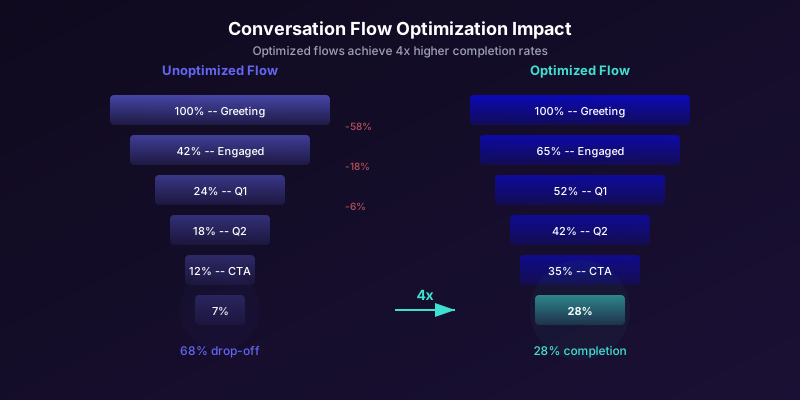

Mapping Drop-Off Points: The Step-by-Step Funnel Audit
Before you can fix drop-offs, you need to know exactly where they happen. A conversation funnel audit maps every step in your chatbot flow and measures the percentage of users who proceed from one step to the next. This reveals the specific friction points that need attention.
Building Your Conversation Funnel Map
For each chatbot flow, create a table that tracks -- following the funnel analysis methodology described by Nielsen Norman Group's conversion funnel research --:
| Step | Description | Users Entering | Users Completing | Step CVR | Cumulative CVR |
|---|---|---|---|---|---|
| 0 | Widget visible on page | 10,000 | -- | -- | 100% |
| 1 | Greeting displayed | 10,000 | 4,200 | 42% | 42% |
| 2 | User responds to greeting | 4,200 | 2,940 | 70% | 29.4% |
| 3 | Answers first question | 2,940 | 2,350 | 80% | 23.5% |
| 4 | Answers second question | 2,350 | 1,880 | 80% | 18.8% |
| 5 | Answers third question | 1,880 | 1,410 | 75% | 14.1% |
| 6 | Sees CTA | 1,410 | 1,270 | 90% | 12.7% |
| 7 | Clicks CTA | 1,270 | 890 | 70% | 8.9% |
| 8 | Completes action | 890 | 710 | 80% | 7.1% |
This example reveals three major drop-off points:
- Step 0 to 1 (42% conversion): Most visitors see the widget but do not engage. This is a greeting and trigger optimization problem.
- Step 4 to 5 (75% conversion): The third question has the lowest step conversion rate. This question is likely too sensitive, confusing, or perceived as unnecessary.
- Step 6 to 7 (70% conversion): Users see the CTA but do not click. The CTA wording, placement, or value proposition needs work.
How to Collect This Data
The Conferbot analytics dashboard provides step-by-step funnel visualization automatically. If you are using a custom chatbot, instrument each step with event tracking:
// Track each conversation step
function trackStep(stepId, stepName, userId) {
  analytics.track('chatbot_step', {
    step_id: stepId,
    step_name: stepName,
    user_id: userId,
    timestamp: Date.now(),
    session_id: getSessionId(),
    device: getDeviceType(),
    page_url: window.location.pathname
  })
}

// Track drop-offs
function trackDropOff(lastStepId, userId, reason) {
  analytics.track('chatbot_drop_off', {
    last_step_id: lastStepId,
    user_id: userId,
    reason: reason, // 'timeout', 'closed', 'navigated'
    time_on_step: getTimeOnCurrentStep(),
    total_conversation_time: getTotalTime()
  })
}
The 80/20 Rule for Drop-Off Fixes
In almost every chatbot funnel audit, one or two steps account for 60-80% of total drop-offs. Fix those first. Spending time optimizing a step with 90% completion rate when another step has 50% completion rate is a misallocation of effort.
Prioritize fixes using this framework:
- Calculate the absolute number of users lost at each step
- Rank steps by users lost (not by percentage -- a step with 70% conversion at the top of the funnel loses more users in absolute terms than a step with 50% conversion at the bottom)
- Focus on the top 2-3 steps that lose the most users
- Estimate the potential improvement (typically 15-30% lift per optimized step)
- Calculate the downstream revenue impact of each fix
This prioritized approach ensures you work on the highest-impact optimizations first, following the data rather than intuition. For the specific metrics to track at each step, see our chatbot analytics metrics guide.
The Five Root Causes of Conversation Drop-Offs (And How to Fix Each One)
Every conversation drop-off traces back to one of five root causes. Understanding which cause drives each drop-off point in your funnel determines the correct fix. Applying the wrong fix (for example, shortening a flow that is dropping users due to confusion rather than length) wastes time and can make things worse.
Cause 1: Perceived Effort Exceeds Perceived Value
The user looks at the conversation ahead and decides it is not worth the effort. This happens when the flow is too long, the questions seem irrelevant, or the payoff is unclear.
Symptoms: High drop-off at step 1 (after seeing the greeting) or within the first 2-3 questions. Users start but quickly disengage.
Fixes:
- Show the payoff upfront: "Answer 3 quick questions and I'll find the best plan for you." Setting explicit expectations reduces perceived effort.
- Progress indicators: "Question 2 of 4" reduces uncertainty about how long the conversation will take.
- Quick wins early: Provide a useful piece of information (a price estimate, a recommendation) before asking for more from the user. This establishes reciprocity.
Cause 2: Confusion or Ambiguity
The user does not understand what the chatbot is asking or how to respond. This is the most common cause of drop-offs at specific question steps.
Symptoms: High drop-off at a single step. Users who reach that step disproportionately abandon. When they do respond, their answers are often off-topic or confused.
Fixes:
- Simplify the question: Replace jargon with plain language. "What is your monthly marketing budget?" becomes "Roughly how much do you spend on marketing each month?"
- Add examples: "What industry are you in? (For example: e-commerce, SaaS, healthcare, real estate)"
- Use quick reply buttons: Replace open-text questions with predefined options when possible. Buttons reduce cognitive load and eliminate the anxiety of composing a response. Our conversation design masterclass covers when to use buttons vs. free text in detail.
Cause 3: Sensitive or Intrusive Questions
The user is willing to continue the conversation but balks at a specific question that feels too personal, too early in the relationship.
Symptoms: High drop-off at a specific step that asks for email, phone number, budget, or company information. Step conversion is 20-40% lower than surrounding steps.
Fixes:
- Delay sensitive questions: Move the sensitive question later in the flow, after the user has invested more time and received more value.
- Explain why you need it: "I'll need your email to send you the custom report. We never spam." Context reduces resistance.
- Make it optional: "What's your budget range? (Skip if you'd prefer not to say)" Optional questions have 40-60% higher completion than mandatory ones, and the data you do collect is higher quality because it is freely given.
- Offer alternatives: Instead of asking for a phone number, offer email or chat as alternatives.

Cause 4: Technical Friction
The chatbot's technology gets in the way. Slow responses, broken buttons, unrecognized inputs, or mobile display issues cause users to leave.
Symptoms: Higher drop-off rates on mobile than desktop. Drop-offs correlate with slow response times. Users send messages like "?" or "hello?" indicating they are waiting for a response that did not come.
Fixes:
- Optimize response time: Every additional second of response delay increases drop-off by 7%, consistent with Google's Core Web Vitals performance research. Target under 2 seconds for bot responses.
- Test on mobile: 60%+ of chatbot traffic is mobile. Test every flow on actual mobile devices, not just desktop browser emulation.
- Handle input errors gracefully: When the chatbot does not understand an input, say "I didn't quite get that. Could you choose from these options?" rather than repeating the original question verbatim.
- Ensure buttons work: Broken or unresponsive quick reply buttons are a surprisingly common cause of drop-offs. Test every button in every flow. See our chatbot page speed guide for performance optimization details.
Cause 5: Mismatched Intent
The user's intent does not match the flow they entered. They wanted support but got sales. They wanted pricing but got a product demo flow. The conversation is going somewhere they do not want to go.
Symptoms: Users respond with messages that are off-topic for the flow they are in. High drop-off in the first 2-3 steps as users realize the flow does not match their needs.
Fixes:
- Intent detection upfront: Start with a question or buttons that route users to the right flow: "Are you looking for product info, pricing, or support?"
- Escape hatches: At every step, provide an option to switch to a different flow or talk to a human.
- Context-aware flows: Use the page the user is on to select the appropriate flow. A user on the pricing page should enter a pricing flow, not a general greeting flow.
Step Minimization: The Art of Asking Less to Get More
Every step in a chatbot conversation is a potential exit point. As documented in Harvard Business Review's AI strategy research, each additional question reduces the percentage of users who complete the flow. The math is simple: if each step has an 80% continuation rate, a 5-step flow retains only 33% of users (0.8^5), while a 3-step flow retains 51% (0.8^3). Reducing from 5 to 3 steps increases completion by 55%.
But step minimization is not about blindly removing questions. It is about eliminating questions that do not justify their drop-off cost. Every question in your flow should pass the value test: does the information this question collects increase the quality or value of the conversion enough to offset the users it causes to drop off?
The Question Value Framework
Evaluate each question in your flow using this matrix:
| Question Value | Step Drop-Off Cost | Action |
|---|---|---|
| High (essential for conversion) | Low (< 15%) | Keep |
| High (essential for conversion) | High (> 25%) | Optimize (reword, add context, make optional) |
| Low (nice-to-have data) | Low (< 15%) | Keep but move to end |
| Low (nice-to-have data) | High (> 25%) | Remove |
Techniques for Eliminating Steps
1. Combine questions: Instead of asking "What industry are you in?" and "How large is your company?" separately, combine them into a single set of buttons: "I'm a small business (1-10 employees)" / "I'm a mid-size company (11-100)" / "I'm enterprise (100+)". This captures both data points in one step.
2. Infer from context: If you know what page the user is on, you can infer their interest without asking. A user on your "Pricing" page does not need to be asked "Are you interested in our product?" -- they already demonstrated interest by visiting that page.
3. Use enrichment APIs: If you collect an email address, you can use enrichment services (Clearbit, Apollo) to automatically fill in company name, size, industry, and role. This eliminates 3-4 questions at the cost of a single email capture step.
4. Progressive profiling: Do not collect all information in one conversation. Capture essential data (name, email, primary need) in the first interaction, then collect additional details in follow-up conversations or email sequences. This reduces the initial flow to 2-3 steps while still building a complete profile over time.
// Progressive profiling logic
const existingData = await getContactProfile(userId)

const missingFields = [
  'industry', 'company_size', 'budget', 'timeline'
].filter(field => !existingData[field])

// Only ask for fields we don't already have
if (missingFields.length === 0) {
  // Skip to recommendation/CTA
  skipToStep('recommendation')
} else {
  // Ask 1-2 missing fields, not all
  askNextQuestion(missingFields.slice(0, 2))
}
The Minimum Viable Flow
For each chatbot use case, here is the minimum number of steps required for a valuable conversion:
| Use Case | Minimum Steps | Essential Data Points |
|---|---|---|
| Newsletter signup | 1 | |
| Free trial start | 2 | Email + use case |
| Demo booking | 3 | Name + email + preferred time |
| Lead qualification | 3-4 | Need + company size + timeline + contact |
| Support triage | 2 | Issue category + description |
| Product recommendation | 3 | Use case + budget + preferences |
If your current flow has more steps than the minimum for your use case, audit each additional step using the Question Value Framework. You may be asking questions out of habit rather than necessity. For a comprehensive treatment of conversation flow architecture, see our conversation design masterclass.
Branching Logic Best Practices: Keep Conversations Natural
Branching logic is what transforms a chatbot from a linear questionnaire into a dynamic conversation. According to Nielsen Norman Group's progressive disclosure guidelines, good branching makes the chatbot feel intelligent and responsive; bad branching creates confusion, dead ends, and frustrated users. The goal is to create flows that adapt to each user's responses while remaining simple enough to maintain and test.
The Three Types of Branches
1. Routing branches: Direct users to entirely different flows based on their intent. Example: "I need help with billing" routes to the billing flow; "I want to learn about features" routes to the product education flow. These should appear early in the conversation (typically step 1 or 2).
2. Conditional branches: Skip or add questions based on previous answers. Example: If the user selects "enterprise" as their company size, ask about current solutions and contract timeline; if they select "solo/freelancer," skip these and go directly to pricing. These appear throughout the flow.
3. Adaptive branches: Modify the tone, depth, or content of responses based on the user's behavior. Example: If the user gives short, terse answers, keep responses brief. If they ask detailed follow-up questions, provide more comprehensive answers. These are most relevant for AI-powered chatbots.
Branching Architecture Patterns

Linear flow (no branching): Every user follows the same path. Simple to build and test but feels robotic and wastes time asking irrelevant questions.
Binary tree: Each question leads to one of two paths. Creates highly personalized journeys but becomes exponentially complex (5 binary branches create 32 possible paths). Hard to maintain and test.
Diamond pattern (recommended): Users branch out based on early questions, follow personalized paths for 2-3 steps, then converge back to a common CTA. This balances personalization with maintainability. A 3-branch diamond with 3 personalized steps creates only 9 paths (manageable to test) while delivering a personalized experience.
Hub-and-spoke: A central hub handles general questions, and specialized spokes handle specific topics. Users can return to the hub at any time. Best for support chatbots with many topic categories.
Rules for Effective Branching
- Limit branch depth to 3 levels. More than 3 levels of nesting creates flows that are impossible to debug and test. If your logic requires deeper nesting, refactor into separate sub-flows.
- Every branch must have a path to the CTA. Dead-end branches that lead nowhere are the most common branching bug. Audit every terminal node in your flow to ensure it either reaches a CTA or hands off to a human.
- Provide escape hatches at every branch point. "None of these apply" or "I'd rather talk to a person" should always be an option. Without escape hatches, users who do not fit neatly into your predefined branches are trapped.
- Test every path end-to-end. Enumerate every possible path through your flow and test each one. For a diamond pattern with 3 branches and 3 personalized steps, that is 9 paths. For a binary tree with 5 levels, that is 32 paths. This is a strong argument for the diamond pattern.
- Use default branches. Every conditional must have a default (else) branch. If the user's input does not match any expected option, the default branch should either ask for clarification or proceed with the most common path. Never leave a conditional without a default -- it creates silent failures where the conversation simply stops.
These branching principles work across all chatbot platforms. Conferbot's visual flow builder makes branching logic visual and testable, but even if you are building flows in code, the architectural principles remain the same.
Fallback Handling: Recovering Users Instead of Losing Them
Fallback handling is what happens when the chatbot does not understand the user's input or the user goes off-script. This is the moment where most chatbots fail catastrophically: they either repeat the same question verbatim (infuriating), say "I don't understand" (unhelpful), or silently ignore the input (confusing).
Research from Voiceflow's conversational design best practices confirms that good fallback handling recovers 30-50% of users who would otherwise drop off. It is one of the highest-ROI optimizations you can make to any chatbot flow.
The Fallback Escalation Ladder
Instead of a single fallback response, implement a graduated escalation:
// Fallback escalation ladder
const fallbackLadder = [
  {
    level: 1,
    trigger: 'First unrecognized input',
    response: 'I want to make sure I understand correctly.'
      + ' Could you choose from these options?',
    action: 'Show quick reply buttons for current step'
  },
  {
    level: 2,
    trigger: 'Second unrecognized input',
    response: 'No worries! Let me ask this differently.'
      + ' [Rephrased question with simpler language]',
    action: 'Rephrase current question with examples'
  },
  {
    level: 3,
    trigger: 'Third unrecognized input',
    response: 'It seems like I\'m not quite getting'
      + ' what you need. Would you like to:',
    action: 'Offer: skip this question / talk to human'
      + ' / start over'
  }
]
Each level provides a different type of help, progressively reducing expectations. By level 3, the chatbot explicitly acknowledges the communication failure and offers an exit. This prevents the user from feeling trapped in a loop of misunderstandings.
Smart Fallback Strategies
1. Context-Aware Rephrasing: When the user's input is not recognized, do not repeat the exact same question. Rephrase it with different words and add examples:
- Original: "What is your budget range?"
- Fallback rephrase: "Roughly how much are you planning to spend? For example: under $500/month, $500-2,000/month, or more than $2,000/month."
2. Partial Match Recognition: If the user's input partially matches an expected response, confirm the match rather than treating it as a failure:
// Instead of failing on partial match
User: "maybe the medium one"

// Good fallback: confirm the partial match
Bot: "It sounds like you're interested in our Growth
plan (the mid-tier option). Is that right?"

// Bad fallback: treat as unrecognized
Bot: "I didn't understand that. Please choose:
Starter, Growth, or Business."
3. Topic Detection Fallback: When the user asks something unrelated to the current flow step, detect the topic and offer to help with it rather than forcing them back into the flow:
// User is in lead qualification flow, step 3
User: "actually, how much does this cost?"

// Good: Address the new topic, then return
Bot: "Great question! Our plans start at $29/month.
Here's a quick overview:
- Starter: $29/mo (1,000 conversations)
- Growth: $79/mo (5,000 conversations)
- Business: $199/mo (unlimited)

Now, back to finding the right fit for you --
what's your primary use case?"
This pattern respects the user's intent while gently guiding them back to the flow. It is far more effective than rigidly insisting they answer the current question. For comprehensive fallback scripting, see our chatbot copywriting guide.
The "Skip and Recover" Pattern
When a user cannot or will not answer a specific question, allow them to skip it and attempt to recover the information later or from another source:
Bot: "What's your monthly marketing budget?"
User: "I'd rather not say"
Bot: "No problem at all! I can still help you
find the right plan. Let me ask about your
team size instead -- that'll help me narrow
down the best options."
The skip-and-recover pattern maintains flow momentum while respecting the user's boundaries. It is especially effective for lead qualification flows where budget is important but not essential for initial routing.
Progressive Disclosure: Reducing Perceived Complexity
Progressive disclosure is a UX design principle that shows only the information and options the user needs at each moment, revealing more as they progress. In chatbot design, progressive disclosure means presenting simple choices first and adding complexity only as needed. This reduces cognitive load -- a principle extensively studied by Interaction Design Foundation's UX research -- and makes long flows feel shorter.
How Progressive Disclosure Works in Chatbots
Consider a product recommendation chatbot for a software company with 50+ features. A naive approach asks the user to specify their needs from a long list of features. A progressive disclosure approach:
- High-level category: "What's your main goal? Marketing / Sales / Support / Operations"
- Sub-category: (Based on their answer) "Which marketing area? Email campaigns / Social media / Lead generation / Analytics"
- Specific need: (Based on sub-category) "For lead generation, what matters most? More leads / Better lead quality / Faster response time"
- Recommendation: Present 2-3 tailored options based on their progressive selections.
Each step presents only 3-5 options, but the user has effectively navigated a tree with hundreds of possible outcomes. The experience feels simple because they only see the relevant slice at each step.
Progressive Disclosure Patterns
Pattern 1: Drill-Down Questions
Start broad and narrow progressively. Each answer filters the next question's options:
Step 1: "What type of business are you?"
  [E-commerce / SaaS / Services / Other]

Step 2 (if E-commerce): "What platform?"
  [Shopify / WooCommerce / BigCommerce / Custom]

Step 3 (if Shopify): "What's your main challenge?"
  [Cart abandonment / Product discovery / Support]

--> Tailored recommendation based on 3 answers
Pattern 2: Reveal-on-Demand
Present the minimum information and offer to expand:
Bot: "Our Growth plan ($79/mo) includes 5,000
conversations and 5 chatbots. Would you like
more details on what's included?"

[Yes, show me details] [Sounds good, sign me up]
Users who need more information can request it. Users who are ready to act can proceed immediately. Neither group is burdened with the other's needs.
Pattern 3: Layered Complexity
For technical products, start with benefits and offer technical depth on request:
Bot: "Our chatbot uses AI to understand customer
questions and provide instant answers from
your knowledge base."

[How does the AI work?] [What can it integrate with?]
[Start free trial]

// If "How does the AI work?" clicked:
Bot: "We use Retrieval-Augmented Generation (RAG)
with your content. When a customer asks a
question, the AI searches your uploaded docs,
finds the most relevant answers, and generates
a natural response -- cited directly from
your materials. Want to see it in action?"
Implementing Progress Indicators
When users cannot see the end of the conversation, they drop off due to uncertainty. Progress indicators set expectations and reduce abandonment:
// Simple step counter
Bot: "Quick question 2 of 3: What's your team size?"

// Percentage-based
Bot: "Almost done (75%)! Last question: when are
you looking to get started?"

// Time-based
Bot: "One more question and we'll have your
custom recommendation ready (about 30 seconds)"
Our data shows that adding progress indicators to a 5-step flow increases completion rate by 12-18%. The effect is strongest for flows with 4+ steps, where users have the most uncertainty about remaining effort. This is a simple change that requires minimal development work and delivers consistent results across every chatbot type we have tested.
Analytics-Driven Optimization: The Continuous Improvement Loop
One-time optimization produces one-time results. As emphasized by Optimizely's continuous improvement framework, sustained improvement requires a continuous loop of measurement, hypothesis, testing, and implementation. This section establishes the analytics framework and cadence that keeps your chatbot improving month over month.
The Four Metrics That Drive Flow Optimization
Out of the dozens of chatbot metrics you can track, four are essential for flow optimization:
| Metric | Formula | Benchmark | What It Tells You |
|---|---|---|---|
| Flow Completion Rate | Users completing flow / Users starting flow | 35-55% (typical), 60-75% (optimized) | Overall flow effectiveness |
| Step-Level Drop-Off Rate | Users not proceeding / Users at step | < 20% per step (target) | Which specific steps need work |
| Average Steps to Conversion | Total steps across converting users / Conversions | Varies by use case | Whether the flow is too long or too short |
| Time to Completion | Median time from first message to conversion | 2-5 minutes (lead gen), 1-3 minutes (support) | Friction and engagement level |
The Weekly Optimization Review
Schedule a 30-minute weekly review of your chatbot's flow performance. Here is the agenda:
- Check dashboard metrics (5 min): Review the four core metrics compared to the previous week. Flag any metric that changed by more than 10%.
- Identify top drop-off step (5 min): Find the step with the highest absolute user loss this week. Is it the same as last week?
- Read 5-10 drop-off transcripts (10 min): Read actual conversations where users dropped off at the identified step. Look for patterns: confusion, frustration, off-topic requests, technical issues.
- Form a hypothesis (5 min): Based on the transcripts, hypothesize why users are dropping off. Map it to one of the five root causes.
- Plan the fix (5 min): Define a specific change to test. Use the A/B testing framework if you have sufficient traffic, or make the change directly if traffic is low (under 200 conversations per week).
The Monthly Optimization Cycle
Beyond the weekly review, conduct a deeper monthly analysis:
- Full funnel audit: Rebuild the step-by-step conversion table from the funnel audit section. Compare to the previous month's audit to see which steps improved and which regressed.
- Segment analysis: Break down completion rates by device, traffic source, and time of day. Mobile users often have different drop-off patterns than desktop users.
- A/B test results review: Analyze completed tests, implement winners, and plan the next month's tests.
- Competitive review: Test competitors' chatbots to discover flow patterns and techniques worth adopting.
Automation for Scale
As your chatbot handles more traffic, automate the optimization loop where possible:
// Automated drop-off alerting
function checkDropOffAlerts(dailyData) {
  for (const step of dailyData.steps) {
    const dropOffRate =
      1 - (step.completions / step.entries)
    const historicalAvg = getHistoricalAvg(
      step.id, 30 // last 30 days
    )
    // Alert if drop-off rate exceeds historical
    // average by more than 20%
    if (dropOffRate > historicalAvg * 1.2) {
      sendAlert({
        step: step.id,
        current: dropOffRate,
        average: historicalAvg,
        severity: dropOffRate > 0.4
          ? 'high' : 'medium'
      })
    }
  }
}
The Conferbot analytics dashboard provides built-in drop-off alerts and trend tracking, eliminating the need to build custom monitoring. But even with a custom chatbot, the principles and cadence described here apply universally.
The continuous improvement loop is what separates chatbots that plateau from chatbots that compound their performance gains over time. Each weekly fix and monthly optimization builds on the last, creating a chatbot that becomes more effective with every passing month.
Advanced Patterns: Multi-Flow Orchestration and Conversation Recovery
Once your individual flows are optimized, the next level of sophistication involves orchestrating multiple flows together and recovering users who have previously abandoned conversations.
Multi-Flow Orchestration
Most production chatbots have multiple flows: a lead qualification flow, a support flow, a pricing flow, and an FAQ flow. The orchestration layer decides which flow to route each user into and handles transitions between flows.
Design principles for multi-flow orchestration:
- Intent detection at the top: Use the first 1-2 exchanges to detect intent and route to the appropriate flow. Misrouting is the number one cause of early drop-offs in multi-flow chatbots.
- Cross-flow transitions: When a user in the lead qualification flow asks a support question, do not force them back into qualification. Address the support question (or hand off to support), then offer to resume qualification. Hard boundaries between flows feel rigid and inhuman.
- Shared context: Information collected in one flow should be available in all flows. If the user provided their name in the support flow, the lead qualification flow should use it without asking again.
- Flow priority rules: When multiple flows could apply (user is both a support requester and a potential upsell candidate), define priority rules. Generally: support > sales > education > survey. Resolve the user's immediate need before pursuing business goals.

Conversation Recovery
Users who abandon a conversation are not permanently lost. Conversation recovery re-engages them at the point where they left off, significantly increasing overall completion rates.
Strategy 1: Proactive re-engagement. When a user returns to your site within 24 hours of an abandoned conversation, proactively offer to continue:
Bot: "Welcome back! Last time we were finding the
right plan for your team. You mentioned you're
in e-commerce with about 50 employees. Want
to pick up where we left off?

[Yes, continue] [Start over] [No thanks]"
Our data shows that 25-35% of returning visitors who see a recovery prompt choose to continue the conversation, versus only 5-10% who restart on their own.
Strategy 2: Email-based recovery. If you captured the user's email before they dropped off, send a follow-up email within 2 hours:
Subject: We didn't get to finish -- here's your
  personalized recommendation

Hi [Name],

I noticed we didn't get to complete your chatbot
setup recommendation. Based on what you told me:
- Industry: E-commerce
- Team size: 50

I'd suggest our Growth plan. Here's a link to
pick up where we left off: [deep link to chat
with context pre-loaded]

Or if you'd prefer, reply to this email and I'll
connect you with a specialist.
Strategy 3: Progressive nudging. For users who are still on the page but have gone silent (typing indicator gone, no response for 60+ seconds), send a gentle nudge:
// After 60 seconds of inactivity
Bot: "Still there? No worries if you need a moment.
If you'd like, I can save your progress and
you can come back anytime."

// After 120 seconds of inactivity
Bot: "I've saved where we left off. Feel free to
come back whenever you're ready -- I'll
remember your answers."

// After 180 seconds
Bot: "Before you go -- here's a quick summary of
what we covered: [summary]. You can always
start a new chat to continue."
These nudging patterns recover 10-15% of users who would otherwise silently abandon. The key is a non-pushy tone that respects the user's autonomy while making it easy to re-engage.
For the complete strategic framework that connects flow optimization to business outcomes, see our chatbot marketing strategy guide. For the specific copywriting techniques that make every message in your flow as effective as possible, see the chatbot copywriting guide. And for the A/B testing methodology to validate every optimization, see our chatbot A/B testing guide.
Was this article helpful?
Conversation Flow Optimization FAQ
Everything you need to know about chatbots for conversation flow optimization.
About the Author

Conferbot Team specializes in conversational AI, chatbot strategy, and customer engagement automation. With deep expertise in building AI-powered chatbots, they help businesses deliver exceptional customer experiences across every channel.
View all articles
