Why Website Forms Are Killing Your Conversion Rate
Your website contact form is the most expensive piece of dead weight in your marketing stack. It sits on a page that receives hundreds or thousands of visitors each month, and it quietly bleeds leads with every field it forces a visitor to complete. The data is damning: according to HubSpot's marketing research, the average website form has an abandonment rate of 67%. That means for every three prospects who start filling out your form, two of them leave before submitting. They had enough interest to click, enough intent to begin typing -- and your form drove them away.
The problem is structural, not cosmetic. Reducing your form from eight fields to five helps marginally, but it does not solve the fundamental issue: forms are a one-directional, impersonal, effort-intensive interaction that asks prospects to do work before receiving any value in return. In a world where buyers expect instant, personalized engagement, static forms feel like standing in line at a government office. (source: Gartner on B2B buying journey).
The Form Abandonment Crisis in Numbers
| Metric | Static Web Form | Conversational Chatbot | Difference |
|---|---|---|---|
| Average form/chat completion rate | 33% | 72% | Chatbot converts 3x higher |
| Visitor engagement rate | 2-4% | 10-18% | 5x more visitors interact |
| Average time to first response | 17 hours | 1.3 seconds | 47,000x faster |
| After-hours lead capture | Form only (no engagement) | Full qualification + booking | Chatbot works 24/7 |
| Lead quality (SQL rate) | 18-25% | 38-52% | 2x better lead quality |
| Cost per qualified lead | $45-$120 | $8-$25 | 4-5x cheaper |
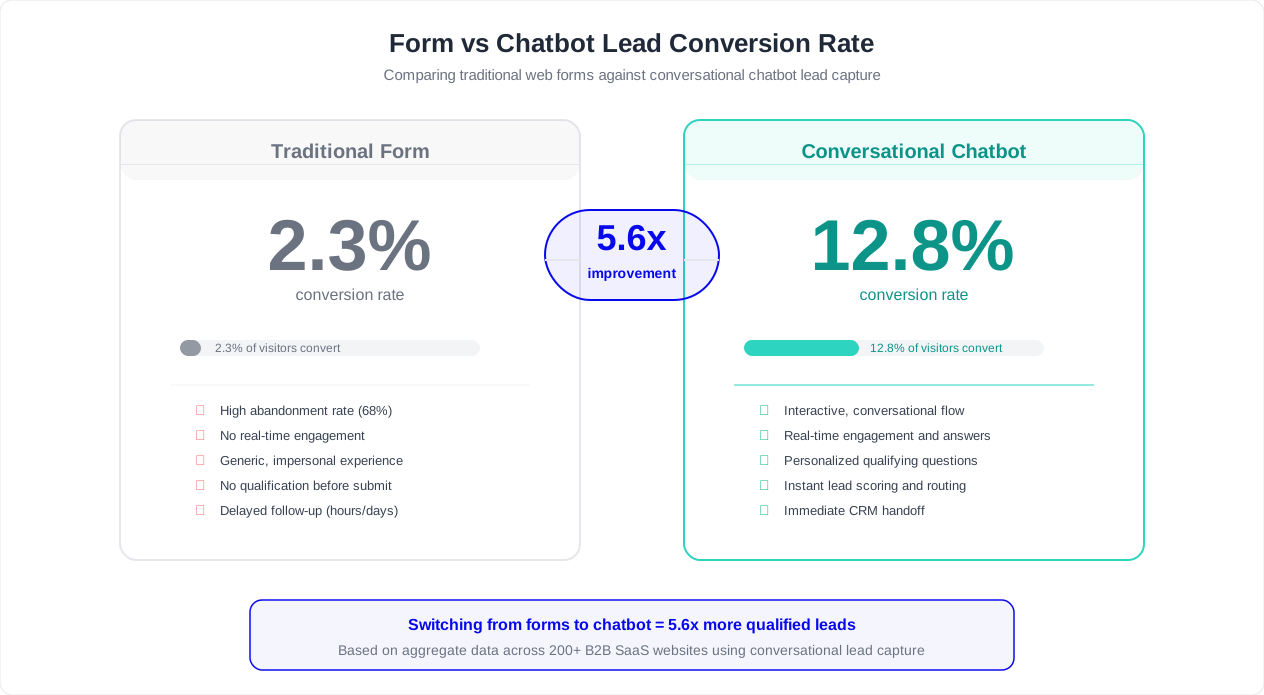
The 3x conversion gap between forms and chatbots is not a marginal improvement -- it is the difference between a marketing funnel that leaks and one that captures. If your website receives 5,000 monthly visitors and 3% engage with a form (150 visitors), with a 33% completion rate you get 50 leads. Replace that form with a chatbot, and 12% engage (600 visitors) with a 72% completion rate, yielding 432 leads. Same traffic, same ad spend, 8.6x more leads.
Why Forms Fail at Qualification
Even the leads that do complete your form arrive in your CRM as undifferentiated rows in a spreadsheet. A CEO at a Fortune 500 company with an urgent need looks identical to a college student doing research. Your sales team wastes hours manually sorting through submissions, calling every lead, and discovering that the majority are unqualified. Sales teams commonly report that reps spend about a fifth of their time on lead qualification activities -- time that could be spent closing deals if a chatbot had pre-qualified those leads before they reached the CRM. (source: Salesforce on lead qualification frameworks).
Forms also create a dangerous time gap. A prospect fills out your form at 2 PM on a Tuesday. Your sales team responds at 9 AM on Wednesday -- 19 hours later. By then, that prospect has visited three competitor sites, started a free trial with one of them, and mentally moved on. Research from Harvard Business Review shows that the odds of qualifying a lead drop by 400% if you wait more than 5 minutes to respond. A chatbot responds in under 2 seconds.
The Shift to Conversational Lead Qualification
Over 60% of companies now use chatbots for some form of lead qualification, according to Gartner's B2B buying research. The shift is driven by three converging factors: buyer preferences (61% of B2B buyers prefer chatbot interactions over forms when researching solutions), economic pressure (companies need more leads without proportionally increasing headcount), and technology maturity (AI chatbots now qualify leads as accurately as junior SDRs at a fraction of the cost).
The rest of this guide shows you exactly how to build a chatbot lead qualification system that scores, routes, and converts leads automatically. You will learn the BANT framework adapted for conversational flows, how to design the optimal 3-5 question qualification sequence, the scoring matrix that separates hot leads from tire-kickers, real-time routing to your sales team, automated nurture sequences for cold leads, and CRM integration to push everything into your existing pipeline. (source: HubSpot on lead scoring methodology).
Key Insight
Chatbot-based lead qualification forms convert 3x higher than static web forms, capture leads 24/7, and deliver 2x better lead quality -- all while reducing cost per qualified lead by 4-5x. The ROI case for replacing forms with conversational qualification is overwhelming.
The BANT Framework Adapted for Chatbots
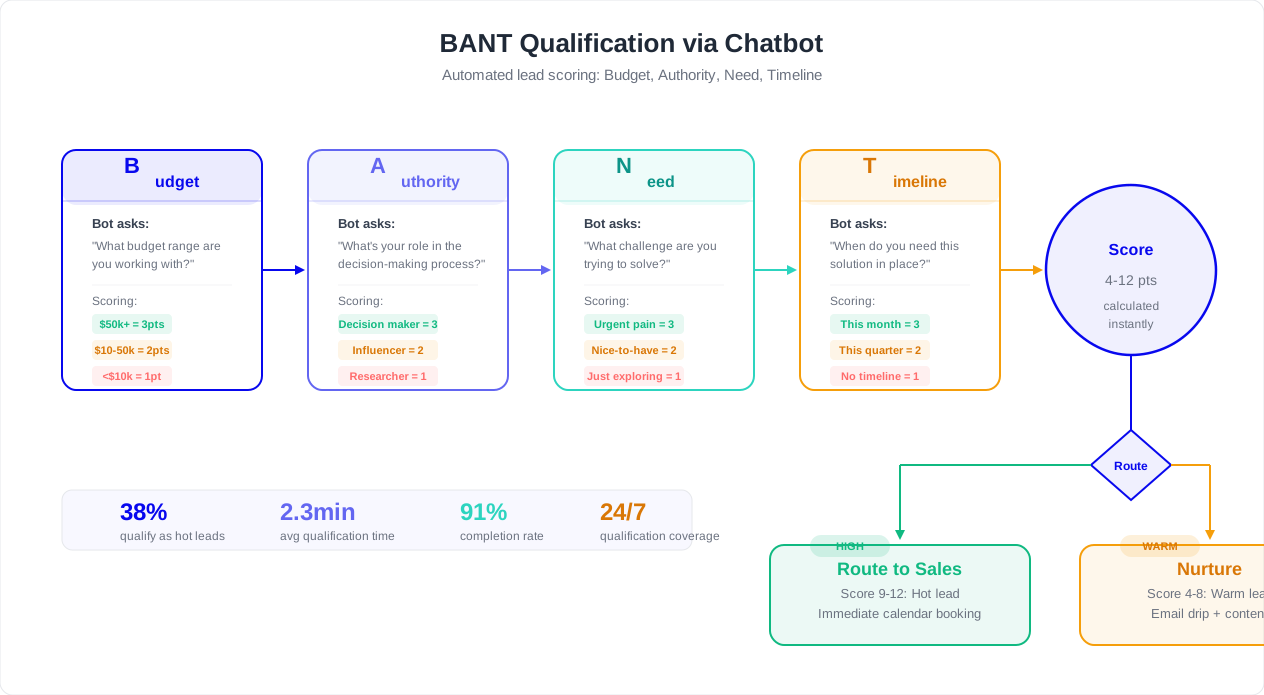
BANT -- Budget, Authority, Need, Timeline -- has been the gold standard for B2B lead qualification since IBM developed it in the 1960s. It endures because it captures the four essential dimensions of purchase readiness: can they afford it, can they decide, do they need it, and when do they need it? But applying BANT in a chatbot conversation requires a fundamentally different approach than how a sales rep uses it on a discovery call. The key difference: order matters more than completeness.
Why Traditional BANT Order Fails in Chatbots
A human SDR can read body language, adjust tone, and build rapport before asking sensitive questions. A chatbot cannot. If the first thing your chatbot asks is "What is your budget?" you will see drop-off rates above 80%. The question feels invasive, transactional, and presumptuous when asked by a machine within seconds of the conversation starting. The visitor has not received any value yet, has no reason to trust you with financial information, and will close the chat window.
The solution is to invert the traditional BANT order. Start with Need (which feels helpful), move to Authority (framed as personalization), then Timeline (framed as urgency matching), and save Budget for last (framed as finding the right fit). This reordering reduces the perceived intrusiveness of each question by embedding it within a value-giving context.
The Conversational BANT Sequence
| BANT Element | Question Order | Traditional Framing (Feels Salesy) | Conversational Framing (Feels Helpful) | Drop-off Rate |
|---|---|---|---|---|
| Need | 1st (Start here) | "What are your requirements?" | "What challenge are you trying to solve?" | 8-12% |
| Authority | 2nd | "Are you the decision-maker?" | "What is your role? I want to tailor my recommendations." | 10-15% |
| Timeline | 3rd | "When are you buying?" | "How soon are you looking to implement a solution?" | 12-18% |
| Budget | 4th (Only if qualified) | "What is your budget?" | "To recommend the right plan, are you looking for a starter solution or an enterprise-grade platform?" | 15-22% |
Detailed Question Design for Each BANT Element
Need (Question 1) -- The Engagement Hook
The need question serves double duty: it qualifies the prospect's use case AND it feels like the chatbot is trying to help rather than interrogate. Present it with button options to reduce cognitive load and capture structured data for scoring:
"Hi there! What brings you here today?"
- I want to generate more leads from my website
- I need to automate customer support
- I want to improve customer engagement
- I am looking for appointment scheduling
- Something else (open text)
The button options should map to your core product use cases. Each option carries a different qualification weight -- a visitor selecting "generate more leads" on a marketing SaaS website is higher intent than "something else."
Authority (Question 2) -- The Personalization Frame
Never ask "Are you the decision-maker?" directly. It feels like gatekeeping and implies that non-decision-makers will be dismissed. Instead, frame the question as personalization:
"So I can give you the most relevant information -- what best describes your role?"
- Founder / CEO / Owner
- VP / Director
- Marketing / Growth Manager
- Sales Manager
- IT / Operations
- Other
A C-suite title scores highest, but a manager-level title is still valuable -- they are often the researcher and recommender in the buying process. The key insight: authority in modern B2B purchasing is distributed. A marketing manager who champions your product internally can be more valuable than a CEO who delegates all software decisions.
Timeline (Question 3) -- The Urgency Matcher
"When are you looking to get started?"
- Immediately -- we need a solution this week
- Within the next month
- Within the next quarter
- Just exploring options for now
Timeline is the strongest predictor of conversion speed. A prospect with an immediate timeline and moderate fit will often close faster than a perfect-fit prospect who is "just exploring." Your routing rules should weight timeline heavily -- an immediate-need prospect should get a human callback within minutes, not hours.
Budget (Question 4) -- The Fit Finder
Only ask this question if the prospect has answered the first three and shows qualifying signals. For visitors who selected "just exploring" on timeline, skip budget entirely and move to nurture. For qualified prospects:
"To recommend the best solution for your needs, which range best describes your investment level?"
- Getting started -- free or under $50/month
- Growing -- $50 to $200/month
- Scaling -- $200 to $500/month
- Enterprise -- custom solution needed
Notice the framing: "investment level" not "budget," and range-based options rather than an open field. Range-based options reduce anxiety (nobody worries about picking the "wrong" exact number) and provide sufficient data for scoring without feeling invasive.
BANT Adaptation for Different Business Types
| Business Type | Skip or Modify | Reasoning |
|---|---|---|
| B2B SaaS ($100+/mo) | Full BANT (all 4 questions) | High ACV justifies thorough qualification |
| B2B Services (consulting, agencies) | Full BANT, add "team size" to Need | Project scope determines fit as much as budget |
| B2B Low-ticket ($10-50/mo) | Skip Budget, emphasize Need + Timeline | Low ACV means budget is rarely a blocker |
| B2C E-commerce | Need + Timeline only | Authority and budget are irrelevant for individual buyers |
| Real Estate | Need (buy/sell/rent) + Budget (range) + Timeline | Authority is assumed; budget and timeline drive routing |
| Healthcare / Professional Services | Need + Timeline + Insurance/Coverage | Replace budget with coverage verification |
The BANT framework is not a rigid script -- it is a qualification logic that your chatbot applies adaptively. The questions change based on the visitor's previous answers, the page they are on, and the signals they have given. A visitor on your pricing page who selects "Immediately" for timeline should get a faster path to a demo booking than a blog reader who is "just exploring." Build your chatbot flows to branch based on these signals, and you will qualify leads with the precision of a seasoned SDR at the speed of software.
Related: How to Calculate Chatbot ROI: Formula, Benchmarks, and Free Calculator
Designing the 3-5 Question Qualification Flow
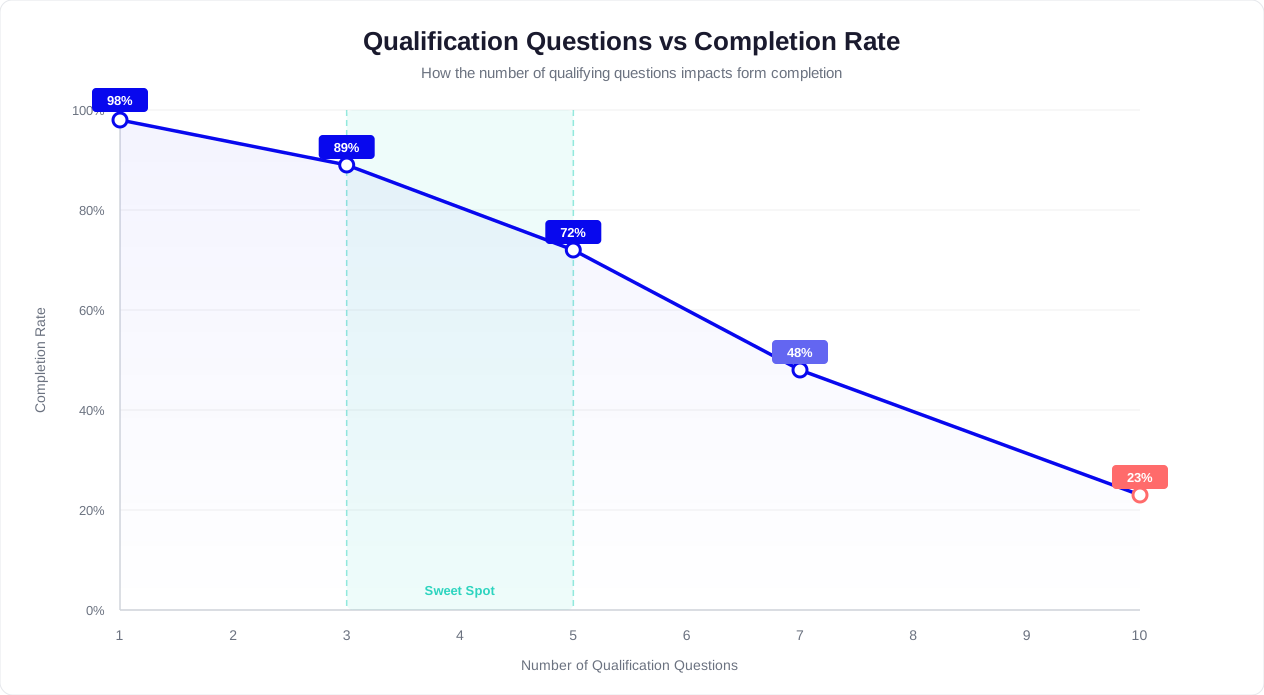
The most effective qualification chatbots ask between 3 and 5 questions before making a routing decision. Fewer than 3 questions produces insufficient data for accurate scoring. More than 5 questions causes completion rates to drop below 50%, erasing the chatbot's conversion advantage over forms. The sweet spot is a flow that gathers enough information to score and route leads while maintaining the conversational momentum that keeps prospects engaged.
The Completion Rate Curve
| Number of Questions | Average Completion Rate | Data Quality | Recommendation |
|---|---|---|---|
| 1-2 questions | 85-92% | Insufficient for scoring | Too few -- cannot differentiate lead quality |
| 3 questions | 74-82% | Adequate for basic scoring | Minimum for B2C and low-ticket B2B |
| 4 questions | 65-74% | Good for BANT scoring | Optimal for most B2B scenarios |
| 5 questions | 55-65% | Comprehensive qualification | Maximum recommended -- use for high-ACV sales |
| 6-8 questions | 35-48% | Thorough but costly | Avoid -- form-like drop-off negates chatbot advantage |
| 9+ questions | Below 30% | Exhaustive but impractical | Never -- worse than the form you replaced |
The Optimal 4-Question Flow (B2B)
Here is the exact flow structure that balances qualification depth with completion rate. Each question uses button-based responses to minimize friction and capture structured data: (source: Harvard Business Review on lead response time).
Question 1: Need Identification (Engagement)
Trigger: Visitor has been on the site for 8+ seconds, or clicks the chat widget, or lands on a high-intent page (pricing, demo, comparison).
"Welcome! I can help you find the right solution. What are you looking to accomplish?"
- [Generate more leads] -- scores +15 (high-value use case)
- [Automate customer support] -- scores +12
- [Book more appointments] -- scores +10
- [Improve customer engagement] -- scores +8
- [Just browsing] -- scores +0, branch to content offer
If the visitor selects "Just browsing," do not abandon them. Offer a valuable content piece (guide, case study, or tool) and capture their email in exchange. They are a cold lead, not a lost lead.
Question 2: Role Identification (Authority)
"Great choice. To personalize my recommendations -- what is your role?"
- [Founder / CEO] -- scores +20
- [VP / Director] -- scores +15
- [Manager] -- scores +10
- [Individual Contributor] -- scores +5
- [Student / Researcher] -- scores +0
Question 3: Timeline (Urgency)
"And when are you hoping to have a solution in place?"
- [This week -- urgent] -- scores +25
- [This month] -- scores +15
- [This quarter] -- scores +8
- [No specific timeline] -- scores +0
Question 4: Contact Capture (Conversion)
This question adapts based on the cumulative score from Questions 1-3:
If score >= 40 (hot/warm): "Based on your needs, I think a personalized demo would be most helpful. Can I grab your email and have our team set one up? It takes about 15 minutes and we will show you exactly how to [solve their stated need]."
If score 15-39 (cool): "I have a case study that is perfect for [their use case]. Want me to send it over? Just drop your email below."
If score 0-14 (cold): "Here is a free guide on [related topic] that might help with your research. Enter your email and I will send it right over."
Question Design Principles
Every question in your qualification flow should follow these five principles:
- Lead with value, not extraction. Each question should feel like the chatbot is trying to help the visitor, not interrogate them. "What challenge are you trying to solve?" feels helpful. "What is your company revenue?" feels extractive. Reframe every question through the lens of "how does answering this help the visitor?"
- Use buttons, not open text. Button-based responses increase completion rates by 25-35% compared to open text fields. They reduce cognitive effort, eliminate typing friction (especially on mobile), and produce structured data that is easier to score and route. Reserve open text for the email capture field and optional "tell me more" follow-ups.
- Provide an escape hatch. Every question should include a low-commitment option ("Just browsing," "No specific timeline," "Other"). Visitors who feel trapped abandon. Visitors who feel in control continue. The escape hatch data is valuable too -- it tells you exactly which prospects need nurturing rather than sales outreach.
- Keep response options to 4-6 per question. Fewer than 4 options feels limiting. More than 6 creates decision paralysis (the paradox of choice). Five options is the sweet spot for most qualification questions.
- Acknowledge each answer before the next question. After each response, the chatbot should briefly acknowledge the selection before asking the next question. "Lead generation -- excellent choice. Let me ask a couple more questions so I can point you to the best resources." This micro-validation sustains conversational momentum and reduces the feeling of being interrogated.
Branching Logic: Adaptive Flows
The power of chatbot qualification over static forms is adaptive branching. The chatbot adjusts the flow based on previous answers:
| Scenario | Branching Rule | Outcome |
|---|---|---|
| Visitor selects "Just browsing" on Q1 | Skip Q2 and Q3, jump to content offer | Captures email with value exchange, enters nurture |
| Visitor selects "CEO" + "This week" | Skip remaining questions, offer instant demo booking | High-intent decision-maker gets fastest path to sales |
| Visitor comes from pricing page | Skip Q1 (need is implied), start with Q2 | Reduces one question, increases completion rate by 8-12% |
| Visitor is a returning user | Greet by name, skip previously answered questions | Personalized experience, zero repeated friction |
| Visitor selects "Student / Researcher" | Skip qualification, offer free resources | No sales pressure, builds brand awareness for future |
Branching logic transforms a linear questionnaire into an intelligent conversation. The visitor never feels like they are filling out a form because the chatbot responds to their answers, adapts the flow, and provides relevant value at every step. This is why chatbot qualification flows achieve 3x higher completion rates than equivalent static forms -- they feel like a dialogue, not a data entry task.
Build your adaptive qualification flow in minutes using Conferbot's visual flow builder, which supports unlimited branching conditions, page-based triggers, and returning user recognition out of the box.
Related: Chatbot Analytics: 10 Metrics You Must Track to Prove ROI in 2026
Lead Scoring: Assigning Points Based on Responses
Lead qualification without scoring is like a medical exam without a diagnosis. You collect the data but have no systematic way to interpret it. Lead scoring assigns numerical values to each chatbot response, behavioral signal, and demographic indicator, producing a composite score that tells your sales team exactly how likely a prospect is to buy -- and how much attention they deserve. The scoring model transforms subjective guesswork ("this lead seems good") into objective prioritization ("this lead scored 87, call them first").
The Two-Dimensional Scoring Model
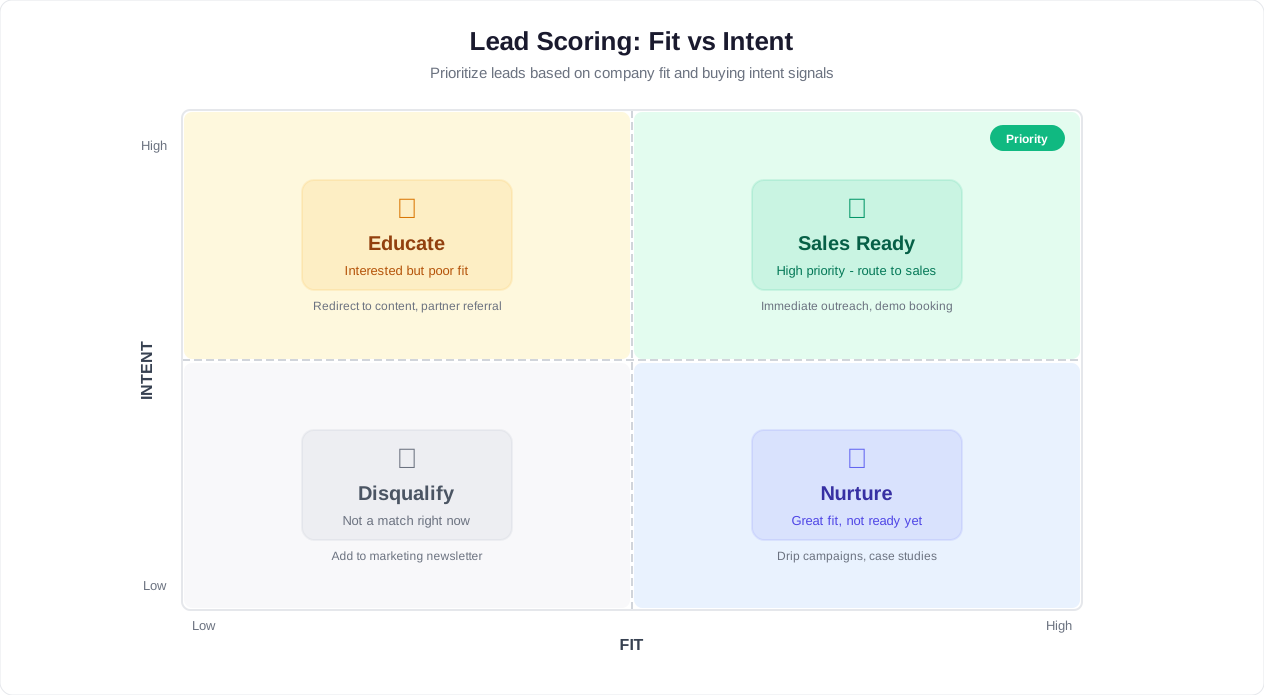
Effective lead scoring operates across two independent dimensions: Fit Score (who the lead is) and Intent Score (what the lead does). A lead can be a perfect fit with zero intent (a CEO who is just browsing) or high intent with poor fit (an intern urgently researching solutions they cannot buy). Only leads that score high on both dimensions are truly sales-ready.
Fit Score: Demographic and Firmographic Signals
| Signal | Response / Value | Points | Rationale |
|---|---|---|---|
| Role (from BANT Q2) | Founder / CEO / Owner | +25 | Ultimate decision-maker, highest authority |
| VP / Director | +20 | Senior decision influence, budget authority | |
| Manager | +12 | Recommender and champion, moderate authority | |
| Individual Contributor / Student | +3 | Researcher, low buying authority | |
| Company Size (if collected) | Enterprise (500+ employees) | +25 | Highest ACV potential |
| Mid-market (51-500) | +18 | Strong ACV with faster sales cycle | |
| Small business (11-50) | +10 | Moderate ACV, self-serve potential | |
| Micro (1-10) | +4 | Low ACV, high volume segment | |
| Budget Range (from BANT Q4) | Enterprise / Custom | +25 | High willingness to invest |
| $200-500/month | +18 | Strong commitment level | |
| $50-200/month | +10 | Moderate investment | |
| Free / Under $50 | +2 | Testing phase, may upgrade later | |
| Industry Match | Core ICP industry | +15 | Highest product-market fit |
| Adjacent industry | +8 | Proven use cases exist | |
| Non-target industry | +0 | Fit uncertain |
Intent Score: Behavioral and Conversational Signals
| Signal | Trigger | Points | Rationale |
|---|---|---|---|
| Need (from BANT Q1) | High-value use case (lead gen, revenue) | +15 | Directly tied to revenue outcomes |
| Medium-value use case (support, scheduling) | +10 | Operational value, strong ROI story | |
| Low-value use case (engagement, research) | +5 | Exploratory intent | |
| "Just browsing" | +0 | No specific need identified | |
| Timeline (from BANT Q3) | This week -- urgent | +30 | Highest urgency, fastest conversion potential |
| This month | +18 | Active evaluation phase | |
| This quarter | +8 | Planning phase | |
| No specific timeline | +0 | No urgency signal | |
| Page Context | Started chat on pricing page | +20 | Actively evaluating cost and commitment |
| Started chat on comparison page | +15 | Comparing solutions, near decision | |
| Started chat on features page | +10 | Evaluating capabilities | |
| Started chat on blog / homepage | +3 | General interest, early stage | |
| Demo Request | Explicitly asked for a demo | +30 | Strongest buying signal possible |
| Return Visit | Has visited the site 2+ times | +12 | Sustained interest, not casual browsing |
| Conversation Depth | Exchanged 5+ messages | +8 | Engaged in meaningful dialogue |
| Asked About Pricing | Mentioned pricing, cost, or plans in chat | +18 | Active purchase consideration |
Score Thresholds and Lead Classification
With both dimensions scored, calculate the total composite score and classify leads into four tiers:
| Total Score | Classification | Percentage of Leads | Sales Action | Response Time Target |
|---|---|---|---|---|
| 80-150+ | Hot Lead (Sales Qualified) | 8-15% | Immediate notification, auto-book demo, priority call queue | Under 5 minutes |
| 50-79 | Warm Lead (Marketing Qualified) | 20-30% | Sales follow-up within 2 hours, personalized email sequence | Under 2 hours |
| 25-49 | Cool Lead (Nurture) | 25-35% | Add to nurture email sequence, retarget with relevant content | Under 24 hours (automated) |
| 0-24 | Cold Lead (Monitor) | 25-40% | Add to newsletter, no direct sales outreach, monitor for re-engagement | Automated only |
Why Scoring Matters
Without lead scoring, your sales team treats all leads equally -- spending the same time on a cold researcher and a hot decision-maker. With scoring, sales reps focus 80% of their time on the 15% of leads most likely to close. Companies that implement lead scoring see a 77% increase in lead generation ROI, according to HubSpot research.
Calibrating Your Scoring Model
No scoring model is perfect on day one. The initial weights above are starting points based on aggregate data across thousands of chatbot deployments. Your specific business will have unique patterns. To calibrate:
- Month 1: Deploy with the default weights above. Track which scored leads actually convert to customers.
- Month 2: Run a correlation analysis. Which individual signals most strongly predict closed deals in your data? Increase weights for high-correlation signals, decrease weights for low-correlation signals.
- Month 3: Adjust thresholds. If your sales team reports that "warm" leads are converting at the same rate as "hot" leads, your hot threshold is too high. If "cool" leads are converting better than expected, your cool-to-warm boundary needs adjustment.
- Ongoing: Review monthly. Markets shift, buyer behavior evolves, and your product changes. A scoring model that worked six months ago may misclassify leads today. Treat your scoring model as a living system, not a set-and-forget configuration.
Track your lead scoring performance through Conferbot's analytics dashboard, which provides conversion rate breakdowns by score tier and automated recommendations for threshold adjustments.
Related: Chatbot for SaaS Onboarding: How to Reduce Churn in the First 7 Days (2026)
Hot Lead Routing: Instant Handoff to Your Sales Team
A hot lead has a half-life measured in minutes, not hours. When a decision-maker with an urgent need and adequate budget completes your chatbot qualification flow, the clock starts ticking. Every minute between qualification and human contact reduces the probability of conversion. The goal of hot lead routing is to compress that gap to under 5 minutes -- and ideally to under 60 seconds -- by automating the handoff from chatbot to sales rep the instant a lead crosses the hot threshold.
The Speed-to-Lead Imperative
| Response Time | Relative Qualification Probability | What Happens Psychologically |
|---|---|---|
| Under 1 minute | 100% (baseline) | Prospect is still engaged, emotional momentum at peak |
| 1-5 minutes | 85-95% | Prospect still on your site, attention starting to drift |
| 5-30 minutes | 50-70% | Prospect has opened competitor tabs, comparing options |
| 30-60 minutes | 25-40% | Prospect has moved on to other tasks, momentum lost |
| 1-4 hours | 10-20% | Prospect has forgotten the emotional trigger that drove interest |
| 24+ hours | Under 5% | Prospect has likely spoken with competitors, made a shortlist |
The data is stark. A hot lead contacted within 1 minute is 21x more likely to qualify than one contacted after 30 minutes. This is not because the lead's objective situation changes -- their budget, authority, need, and timeline are identical. It is because their psychological engagement decays rapidly once the conversation ends. The chatbot creates a window of peak interest, and your routing system's job is to keep that window open by connecting the prospect to a human before it closes.
Building the Instant Routing System
An effective hot lead routing system has four components, each triggered automatically when a lead's score crosses the hot threshold (80+):
Component 1: Real-Time Sales Alert
The moment a lead scores 80+, push a notification to your sales team with full context:
- Slack/Teams notification: "New hot lead: [Name] from [Company]. Score: [87]. Need: [Lead generation]. Timeline: [This week]. Role: [VP Marketing]. Source page: [Pricing]. Chat transcript: [link]. Suggested action: Call within 5 minutes."
- Email alert: Same content, sent to the assigned sales rep and the sales manager as backup.
- SMS alert (for highest-value leads): For leads scoring 100+, send an SMS to the rep's phone. When a potential $50K+ deal is on the line, a Slack notification that gets buried in channels is not enough.
Component 2: Automated Calendar Booking
Do not wait for a sales rep to manually reach out. The chatbot should offer instant demo booking directly within the conversation:
"Based on what you have shared, I think a personalized demo would be the fastest way to show you how this solves [their stated need]. I can book a 15-minute session with our team right now -- here are the available times:"
[Show embedded calendar with next 3 available slots]
When the prospect books, the calendar event is created with full chatbot context in the event description: BANT answers, lead score, pages visited, and chat transcript. The sales rep walks into the demo already informed, and the prospect never has to repeat themselves. Use Conferbot's calendar integration to connect your Google Calendar or Calendly directly within the chat flow.
Component 3: Live Agent Handoff
For prospects who want to talk now rather than book a future meeting, route to live chat with a human agent. The handoff must be seamless:
- The chatbot says: "Let me connect you with [Rep Name] who specializes in [their use case]. They will have the full context of our conversation."
- The agent receives the complete chat transcript, lead score, and BANT data before they type a single message.
- The agent greets the prospect by name and references their specific need: "Hi Sarah, I see you are looking for a lead generation solution and hoping to get started this week. Let me show you exactly how we can help."
Zero cold handoffs. The prospect should never feel like they are starting over with a new person.
Component 4: Round-Robin Assignment with Fallback
Route leads to sales reps using round-robin distribution with intelligent fallback:
| Rule | Logic | Example |
|---|---|---|
| Primary assignment | Round-robin among available reps | Lead goes to next rep in rotation who is online |
| Specialty routing | Match lead's use case to rep's expertise | Lead gen leads go to marketing-focused reps |
| Territory routing | Match lead's location to rep's territory | EMEA leads go to London-based reps |
| Capacity check | Skip reps with 3+ active conversations | Overloaded reps are temporarily removed from rotation |
| Availability fallback | If no rep available within 2 minutes, book demo instead | After-hours leads get calendar booking, not dead silence |
| Manager escalation | If 100+ score lead unclaimed after 5 minutes, alert manager | Highest-value leads never fall through cracks |
After-Hours Routing Strategy
42% of website traffic occurs outside business hours. Hot leads do not wait for your team to arrive at 9 AM. Your after-hours routing should follow this cascade:
- First: Offer calendar booking for the next available slot (the chatbot can book demos at 2 AM for 10 AM the next day).
- Second: Send the prospect an automated email confirming the booking, including a personalized resource relevant to their stated need.
- Third: Push a priority notification to the assigned rep's queue so they see it first thing in the morning.
- Fourth: If the lead scored 100+, send an SMS to the sales manager so they can follow up personally first thing.
The worst possible after-hours experience is silence. A prospect who qualifies as hot at 11 PM and hears nothing until 9 AM the next day has already visited your competitors and may have started a free trial elsewhere. Even without a live human, the chatbot can maintain engagement through instant booking, relevant content delivery, and confirmation messages that keep your brand top of mind.
Speed Wins Deals
Companies that respond to leads within 5 minutes are 100x more likely to connect and 21x more likely to qualify the lead compared to companies that wait 30 minutes. Automated chatbot routing eliminates the human delay that kills conversion. If you only implement one thing from this guide, make it instant hot lead routing.
Related: Collect Customer Feedback With a Chatbot: NPS, CSAT, and Survey Guide
Cold Lead Nurturing: Automated Follow-Up Sequences
Not every lead is ready to buy today. In fact, based on the scoring model in Section 4, 50-75% of chatbot-captured leads will score below the hot threshold. These cool and cold leads are not worthless -- they are future revenue sitting in your pipeline, waiting to be warmed. The difference between companies that convert 5% of cold leads and those that convert 20% is not luck. It is a systematic nurture process that stays in front of prospects with the right message at the right time until they are ready to engage.
The Nurture Waterfall
Cold lead nurturing should follow a multi-stage waterfall, with each stage delivering increasing value and progressively stronger calls to action. The timing and content adapt based on the lead's engagement with previous touches:
| Stage | Timing | Channel | Content | Goal |
|---|---|---|---|---|
| 1. Immediate Value | Within 5 minutes of chat | Resource relevant to their stated need (guide, case study, template) | Deliver on the promise made during chat, establish credibility | |
| 2. Education | Day 3 | Blog post or video addressing their specific use case | Deepen understanding of the problem and your solution | |
| 3. Social Proof | Day 7 | Customer success story from a similar company/industry | Reduce risk perception, build trust through peer validation | |
| 4. Re-engagement | Day 14 | Email + Chatbot | "Checking in" email + proactive chatbot greeting on return visit | Reignite conversation, capture new intent signals |
| 5. Offer | Day 21 | Free trial, consultation offer, or limited-time promotion | Create urgency, lower the barrier to next step | |
| 6. Last Touch | Day 30 | "Is this still on your radar?" with easy yes/no response | Clean the pipeline: active leads re-engage, dead leads self-select out |
Personalizing Nurture Based on Chatbot Data
The most powerful advantage of chatbot-captured leads over form-captured leads is the depth of data available for personalization. Your chatbot knows their stated need, their role, their timeline, and the exact words they used during the conversation. Use this data to personalize every nurture touchpoint:
| Chatbot Data Point | Nurture Personalization | Example |
|---|---|---|
| Stated need (BANT Q1) | Content topic selection | Lead interested in lead gen gets lead gen case studies, not support automation content |
| Role (BANT Q2) | Tone and depth of content | CEO gets ROI-focused executive summaries; Manager gets tactical implementation guides |
| Timeline (BANT Q3) | Urgency of follow-up cadence | "This quarter" leads get weekly touches; "Just exploring" leads get bi-weekly touches |
| Source page | Feature emphasis | Lead from pricing page gets pricing comparison content; Lead from blog gets educational content |
| Specific questions asked | Objection handling content | Lead who asked about integrations gets integration guide; Lead who asked about setup gets onboarding walkthrough |
The Chatbot Re-engagement Loop
Email nurture is necessary but not sufficient. The highest-converting re-engagement channel is the chatbot itself, triggered when a nurtured lead returns to your website. Here is how the loop works:
- Lead visits site during nurture sequence. The chatbot recognizes them (via cookie or email match from the original conversation).
- Personalized re-engagement greeting. Instead of the generic first-time visitor greeting, the chatbot says: "Welcome back, [Name]! Last time we talked about [their stated need]. Have your plans progressed since then?"
- Updated qualification. Based on their response, the chatbot re-scores the lead. If their timeline has accelerated or their role has changed, the score updates in real time.
- Upgraded routing. A cold lead who returns to the pricing page and tells the chatbot they now need a solution "this month" has just become a warm or hot lead. Route accordingly.
This re-engagement loop is the mechanism by which cold leads warm themselves. The chatbot does not just capture leads -- it maintains an ongoing relationship with them, re-qualifying at every touchpoint and surfacing newly sales-ready prospects automatically.
Nurture Sequence Performance Benchmarks
| Metric | Industry Average | Top Performers | What Drives the Gap |
|---|---|---|---|
| Email open rate (nurture) | 22-28% | 35-45% | Subject line personalization using chatbot data |
| Email click rate (nurture) | 3-5% | 8-14% | Content relevance matched to stated need |
| Cold-to-warm conversion rate | 8-12% over 90 days | 18-25% over 90 days | Chatbot re-engagement loop on return visits |
| Cold lead eventual purchase rate | 2-5% over 12 months | 8-15% over 12 months | Consistent multi-channel nurture with scoring updates |
| Nurture sequence unsubscribe rate | 1-2% per email | Under 0.5% per email | Relevant, personalized content that respects the lead's stated interests |
The Long Game Pays Off
Companies that excel at lead nurturing generate 50% more sales-ready leads at 33% lower cost (Forrester Research). The chatbot's role does not end at initial qualification -- it is the ongoing relationship engine that turns today's cold leads into next quarter's customers. Build the nurture infrastructure once, and it compounds returns indefinitely.
Connect your chatbot nurture flows to your email platform through Conferbot's integration hub. Use Zapier workflows to trigger email sequences based on lead score tiers, and set up return-visit chatbot greetings that reference previous conversations for a seamless re-engagement experience.
CRM Integration: Pushing Qualified Leads to HubSpot or Salesforce
A chatbot that qualifies leads but does not sync them to your CRM is a chatbot that creates orphaned data. Every qualified lead that lives only in the chatbot dashboard is a lead that your sales team cannot see in their pipeline, your marketing team cannot include in segmentation, and your leadership cannot track in revenue reports. CRM integration is the bridge that turns chatbot conversations into actionable pipeline entries -- and it takes less than 15 minutes to set up.
Integration Architecture
The data flow from chatbot to CRM follows this path:
Visitor answers qualification questions ---> Chatbot calculates lead score ---> Score triggers CRM action via webhook or Zapier ---> CRM record created with full context ---> Sales rep notified based on routing rules
Every data point the chatbot captures should map to a corresponding CRM field. Here is the complete field mapping for the two most popular CRMs:
HubSpot Integration Field Mapping
| Chatbot Data Point | HubSpot Field | Field Type | Notes |
|---|---|---|---|
| Name | Contact: First Name, Last Name | Default | Parse from single name field if needed |
| Contact: Email | Default | Primary identifier for deduplication | |
| Company | Company: Name | Default | Auto-associate contact to company |
| Phone | Contact: Phone Number | Default | Optional field |
| Need (BANT Q1) | Contact: Custom - Primary Interest | Dropdown | Create custom property with your use case options |
| Role (BANT Q2) | Contact: Job Title | Default | Map button selections to standard titles |
| Timeline (BANT Q3) | Contact: Custom - Purchase Timeline | Dropdown | Create custom property |
| Budget (BANT Q4) | Contact: Custom - Budget Range | Dropdown | Create custom property |
| Lead Score | Contact: HubSpot Score | Number | Use HubSpot's built-in lead scoring or custom property |
| Score Classification | Contact: Lifecycle Stage | Dropdown | Hot = SQL, Warm = MQL, Cool = Lead, Cold = Subscriber |
| Source Page URL | Contact: Custom - Chat Source Page | Text | Tracks which page converted |
| Chat Transcript | Contact: Notes (Activity) | Text | Logged as a note on the contact timeline |
| UTM Parameters | Contact: Original Source Data | Default | Preserves campaign attribution |
Salesforce Integration Field Mapping
| Chatbot Data Point | Salesforce Object / Field | Notes |
|---|---|---|
| Name + Email + Phone | Lead: Name, Email, Phone | Standard lead creation |
| Company | Lead: Company | Required field in Salesforce |
| Need | Lead: Custom - Primary_Interest__c | Create custom picklist field |
| Role | Lead: Title | Standard field |
| Timeline | Lead: Custom - Purchase_Timeline__c | Create custom picklist field |
| Budget | Lead: Custom - Budget_Range__c | Create custom picklist field |
| Lead Score | Lead: Custom - Chatbot_Score__c | Number field |
| Score Classification | Lead: Status | Map to: New, Working, Qualified, Nurturing |
| Source Page | Lead: LeadSource + Custom field | LeadSource = "Chatbot", custom field for specific page |
| Transcript | Task: Description (linked to Lead) | Create task with subject "Chatbot Conversation" |
| Assignment | Lead: OwnerId | Use assignment rules or round-robin |
Step-by-Step Setup via Zapier
For most businesses, Zapier provides the fastest path to CRM integration without any code:
- Create the Zap. Trigger: "New Lead in Conferbot" (select your chatbot from the dropdown). Action: "Create/Update Contact in HubSpot" or "Create Lead in Salesforce."
- Map the fields. Match each chatbot data point to the corresponding CRM field using the mapping tables above. For custom fields that do not exist yet in your CRM, create them first in the CRM settings.
- Add conditional logic. Use Zapier's filter step to route leads differently based on score:
- If lead score >= 80: Create contact + Create deal in pipeline + Send Slack alert
- If lead score 50-79: Create contact + Enroll in sales email sequence
- If lead score 25-49: Create contact + Add to nurture workflow
- If lead score < 25: Create contact only (no sales action)
- Add a notification step. For hot leads, add a Slack or email notification action: "Hot lead captured: [Name] from [Company], Score: [X]. Need: [Need]. Timeline: [Timeline]. View transcript: [link]."
- Test with a real conversation. Run through your chatbot qualification flow yourself, verify the lead appears correctly in your CRM with all fields populated, and confirm the notification fires.
Native Integration vs. Zapier: When to Use Which
| Factor | Zapier | Native API Integration |
|---|---|---|
| Setup time | 10-15 minutes | 2-8 hours (developer needed) |
| Cost | $19-49/month for most volumes | Free (developer time excluded) |
| Reliability | 99.9% uptime, retry on failure | Depends on implementation quality |
| Customization | Moderate (filters, formatters, paths) | Unlimited (full API access) |
| Real-time speed | 1-15 minute delay (depends on plan) | Sub-second (webhook-based) |
| Best for | Teams without developers, rapid setup | High-volume, real-time requirements |
For most businesses, start with Zapier. It covers 90% of integration needs and takes minutes instead of hours. Move to native API integration only when you need sub-second sync speed (for live agent handoff scenarios) or when Zapier costs exceed the cost of developer time to build a custom integration.
Avoiding Common Integration Pitfalls
- Duplicate contacts: Configure your Zap to "Create or Update" rather than just "Create." Use email as the deduplication key. Without this, repeat chatbot visitors will generate duplicate CRM records that pollute your pipeline data.
- Missing required fields: Salesforce requires Company on lead records. If your chatbot does not always capture company name, set a default value ("Unknown - Update Required") to prevent the integration from failing silently.
- Score drift: If you adjust your chatbot scoring model, update the CRM lifecycle stage mapping simultaneously. A score of 75 that used to be "warm" should not remain "warm" in your CRM if your new model classifies 75 as "hot."
- Attribution loss: Pass UTM parameters from the visitor's session through the chatbot to the CRM. Without this, your marketing team cannot attribute chatbot leads to the campaigns that drove them.
Set up your integrations through the Conferbot integration hub, which provides pre-built connectors for HubSpot, Salesforce, Pipedrive, Zoho, Google Sheets, and 3,000+ other apps via Zapier. Most integrations are live in under 15 minutes.
Template: Lead Qualification Chatbot With Scoring Rules
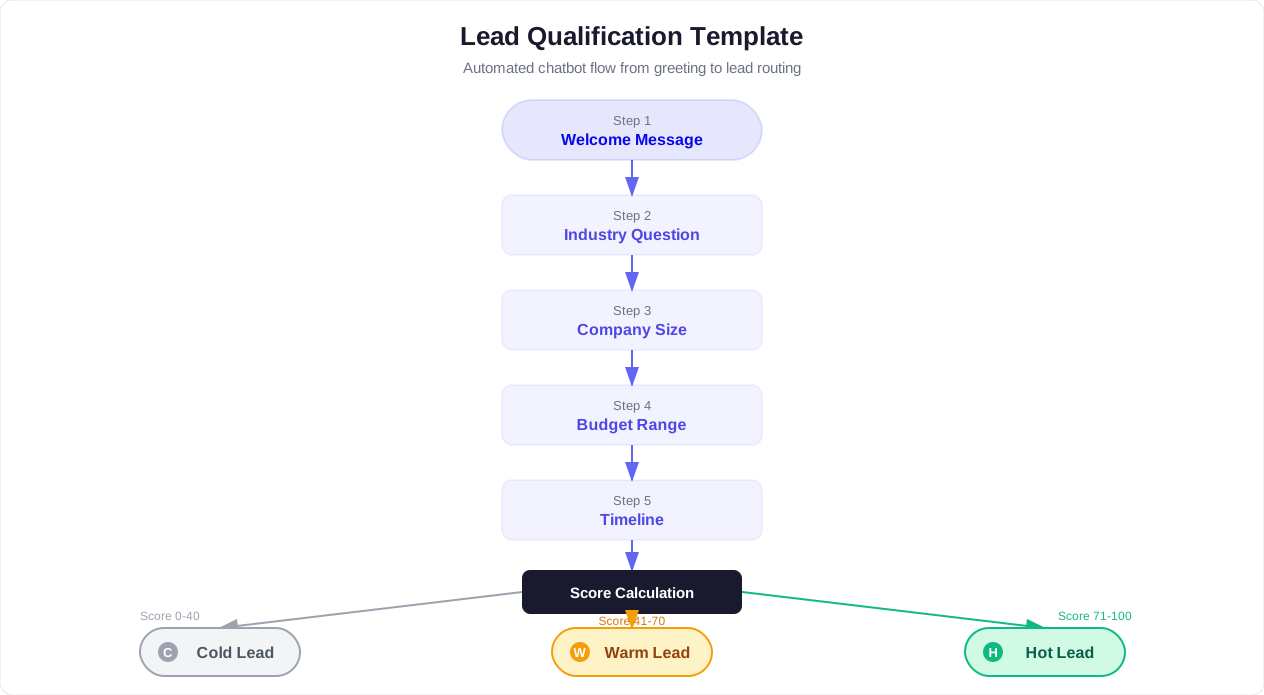
Below is a complete, ready-to-deploy lead qualification chatbot template with embedded scoring rules. You can import this structure directly into Conferbot's visual builder or use it as a blueprint to build your own qualification flow from scratch. Every question, score weight, branching condition, and routing rule is specified so you can go from reading to live deployment in under 30 minutes.
Template Overview
| Property | Value |
|---|---|
| Template name | B2B Lead Qualification Bot with BANT Scoring |
| Questions | 4 qualification + 1 capture (5 total, adaptive) |
| Expected completion rate | 62-70% |
| Average conversation time | 45-90 seconds |
| Lead score range | 0-150 |
| Routing tiers | Hot (80+), Warm (50-79), Cool (25-49), Cold (0-24) |
| Integrations required | CRM (HubSpot/Salesforce), Calendar (optional), Email (optional) |
Complete Conversation Flow
Node 1: Greeting (Trigger-based)
Trigger conditions:
- New visitor: Show after 8 seconds on site
- Pricing page visitor: Show after 3 seconds
- Returning visitor: Show immediately with personalized greeting
Default greeting message: "Hi there! I can help you find the right solution for your business. It takes about 60 seconds -- want to see what I recommend?"
Buttons: [Yes, show me] [Not right now]
If "Not right now" --> offer value: "No problem! Here is a free guide on [topic]. Drop your email and I will send it over." (Captures cold lead with email)
Node 2: Need Identification (BANT - Need)
Message: "What is your primary goal right now?"
| Button Option | Score | Data Tag |
|---|---|---|
| Generate more leads from my website | +15 | need:lead_gen |
| Automate customer support | +12 | need:support |
| Book more appointments automatically | +10 | need:scheduling |
| Improve customer engagement | +8 | need:engagement |
| Something else | +3 | need:other |
Acknowledgment: "Great -- [selected need] is one of our strongest use cases. A couple more quick questions so I can point you to the best solution."
Node 3: Role Identification (BANT - Authority)
Message: "What best describes your role?"
| Button Option | Score | Data Tag |
|---|---|---|
| Founder / CEO / Owner | +25 | role:executive |
| VP / Director | +20 | role:senior_leader |
| Manager | +12 | role:manager |
| Individual Contributor | +5 | role:ic |
| Student / Researcher | +0 | role:researcher |
Branching rule: If role = researcher AND need = other, skip to content offer (cold path). No further qualification needed.
Node 4: Timeline Assessment (BANT - Timeline)
Message: "How soon are you looking to get started?"
| Button Option | Score | Data Tag |
|---|---|---|
| This week -- it is urgent | +30 | timeline:immediate |
| Within the next month | +18 | timeline:month |
| Within the next quarter | +8 | timeline:quarter |
| No specific timeline | +0 | timeline:none |
Branching rule: If cumulative score >= 60 after this question (executive + high-value need + urgent timeline), skip budget question and go directly to demo booking (hot path).
Node 5: Adaptive Capture (Score-Based Branching)
This node adapts based on the cumulative lead score:
Path A: Hot Lead (Score 80+)
Message: "Based on what you have shared, you are a great fit for a personalized demo. Our team can walk you through exactly how to [solve their stated need] in about 15 minutes. Can I book that for you right now?"
Action: Show embedded calendar widget with next 3 available demo slots.
After booking: "You are all set! [Rep Name] will meet you at [time]. They will have the full context of our conversation. In the meantime, here is a quick overview of what to expect: [link to demo prep page]. Can I get your email so we can send you the calendar invite?"
CRM action: Create contact as SQL, create deal in pipeline, notify sales rep via Slack, assign to round-robin rep.
Path B: Warm Lead (Score 50-79)
Message: "I think you would find this really valuable -- we have a case study from a [similar company/industry] that achieved [relevant result] using our platform. Want me to send it over? Just drop your email below."
After email capture: "Sent! Our team will also follow up with some personalized recommendations based on your needs. Talk soon!"
CRM action: Create contact as MQL, enroll in sales email sequence, add to demo invitation drip campaign.
Path C: Cool Lead (Score 25-49)
Message: "I put together a free guide on [topic matched to their stated need] that covers the strategies behind successful implementations. Want a copy?"
After email capture: "On its way! We will also send you some tips and insights over the next few weeks. Feel free to come back and chat anytime."
CRM action: Create contact as Lead, enroll in nurture email sequence.
Path D: Cold Lead (Score 0-24)
Message: "Thanks for chatting! If you want to stay up to date on [topic], we send a weekly newsletter with tips and trends. Want in?"
After email capture (optional): "You are on the list! Browse around and feel free to chat again whenever you have questions."
CRM action: Create contact as Subscriber, add to newsletter only.
Scoring Summary Table
| BANT Element | Highest Score Option | Points | Lowest Score Option | Points | |
|---|---|---|---|---|---|
| Need | Lead generation | +15 | Something else | +3 | |
| Authority | Founder / CEO | +25 | Student / Researcher | +0 | |
| Timeline | This week | +30 | No specific timeline | +0 | |
| Budget (if asked) | Enterprise | +25 | Free / Under $50 | +2 | |
| Page context bonus | Pricing page | +20 | Blog / Homepage | +3 | |
| Return visitor bonus | 2+ visits | +12 | First visit | +0 | |
| Maximum possible score | 127 (with all bonuses) | ||||
Customization Guide
This template is designed as a starting point. Here is how to customize it for your specific business:
- Replace need options (Node 2) with your actual product use cases. Use your top 4-5 customer segments as the button options.
- Adjust role options (Node 3) based on your buyer personas. If you sell to individual consumers, replace this with a demographics question or remove it entirely.
- Calibrate score weights based on your historical conversion data. If timeline is a stronger predictor than role for your business, increase timeline weights and decrease role weights.
- Customize capture messaging (Node 5) with your specific value propositions, case study names, and resource titles.
- Connect integrations: Link your CRM, calendar, and email platform through the integrations hub.
Deploy this template now: Lead Qualification Bot Template
Deploy in Under 30 Minutes
This template includes everything you need to go live: qualification questions, scoring rules, branching logic, and routing paths. Import it into Conferbot, customize the messaging for your brand, connect your CRM, and start qualifying leads automatically. Most users go from import to live deployment in under 30 minutes.
Measuring Template Performance
After deployment, track these KPIs weekly to measure and optimize your qualification chatbot:
| KPI | Target (First 30 Days) | Target (After Optimization) | How to Measure |
|---|---|---|---|
| Chat engagement rate | 8-12% | 14-20% | Visitors who interact / Total visitors |
| Flow completion rate | 55-65% | 68-78% | Users who reach capture / Users who start |
| Lead capture rate | 40-55% | 58-72% | Emails captured / Users who reach capture |
| Hot lead percentage | 8-12% | 10-18% | Hot leads / Total leads captured |
| Hot lead demo booking rate | 40-55% | 60-75% | Demos booked / Hot leads |
| Overall visitor-to-lead rate | 3-5% | 6-10% | Total leads / Total visitors |
Review performance through Conferbot analytics and adjust scoring weights, question wording, and routing thresholds monthly based on which leads actually close. The template is your starting line, not your finish line -- continuous optimization based on real conversion data is what turns a good qualification chatbot into a great one.
Was this article helpful?
Build and deploy in 10 minutes. No coding needed.
Chatbot Lead Qualification FAQ
Everything you need to know about chatbots for chatbot lead qualification.
About the Author
The Conferbot team writes about building, deploying, and improving AI chatbots.
View all articles