Why Telegram Is a Top Channel for Customer Support
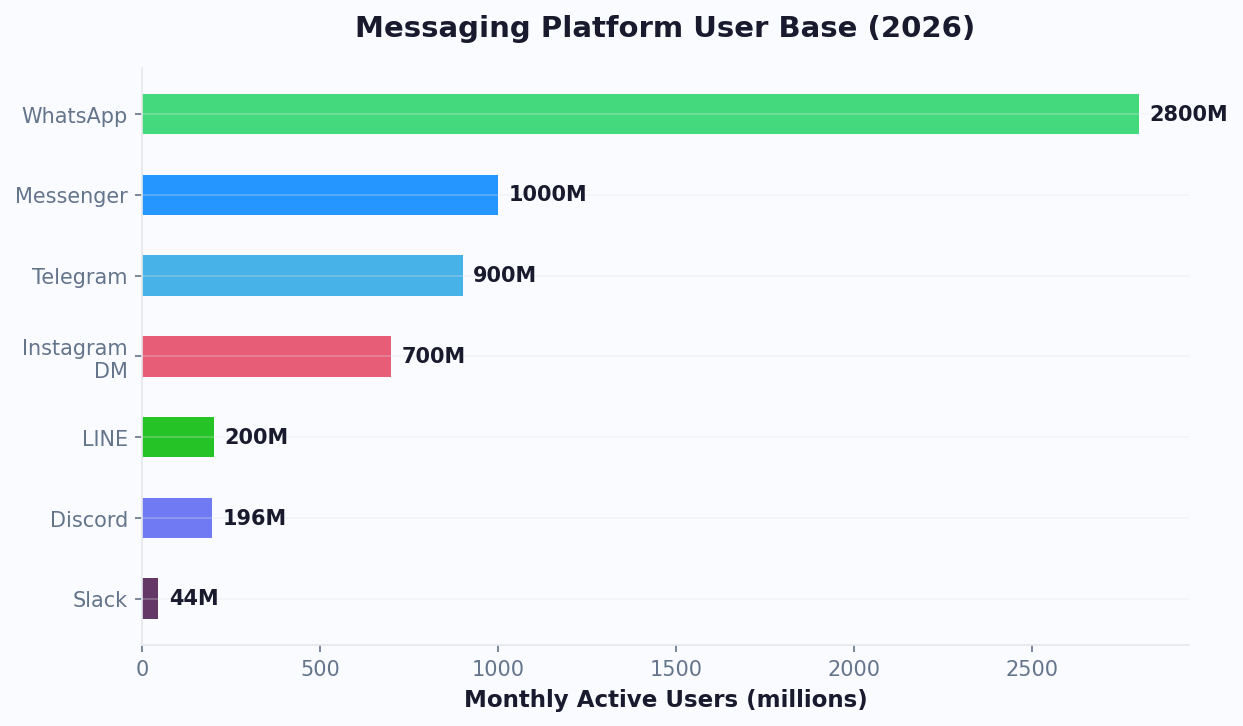
Telegram has grown into one of the world's most developer-friendly and feature-rich messaging platforms, with over 900 million monthly active users as of 2026. According to Statista's latest messaging app report, Telegram is now the fourth-largest messaging platform globally. While it started as a privacy-focused alternative to WhatsApp, Telegram has evolved into a powerful platform for businesses, communities, and customer support.
What makes Telegram uniquely suited for customer support:
- Unlimited Bot API access: Unlike WhatsApp and Messenger, Telegram's Bot API is completely free with no per-message charges
- No messaging windows: Bots can message users at any time — no 24-hour restrictions
- Rich interactive features: Inline keyboards, custom keyboards, inline mode, web apps, and more
- Group and channel support: Bots can operate in group chats and channels with thousands of members
- File sharing: Send files up to 2GB per message, far exceeding other platforms
- Global reach: Strong user bases in Eastern Europe, Central Asia, the Middle East, Southeast Asia, and Latin America
For businesses, these advantages translate into concrete benefits:
| Benefit | Impact |
|---|---|
| Zero messaging costs | No per-conversation fees from Telegram |
| Instant deployment | Bot goes live in minutes, not days |
| 24/7 availability | Respond to customers across all time zones |
| Rich interactions | Inline keyboards, media, web apps for complex workflows |
| Community integration | Support bots work in groups alongside community discussions |
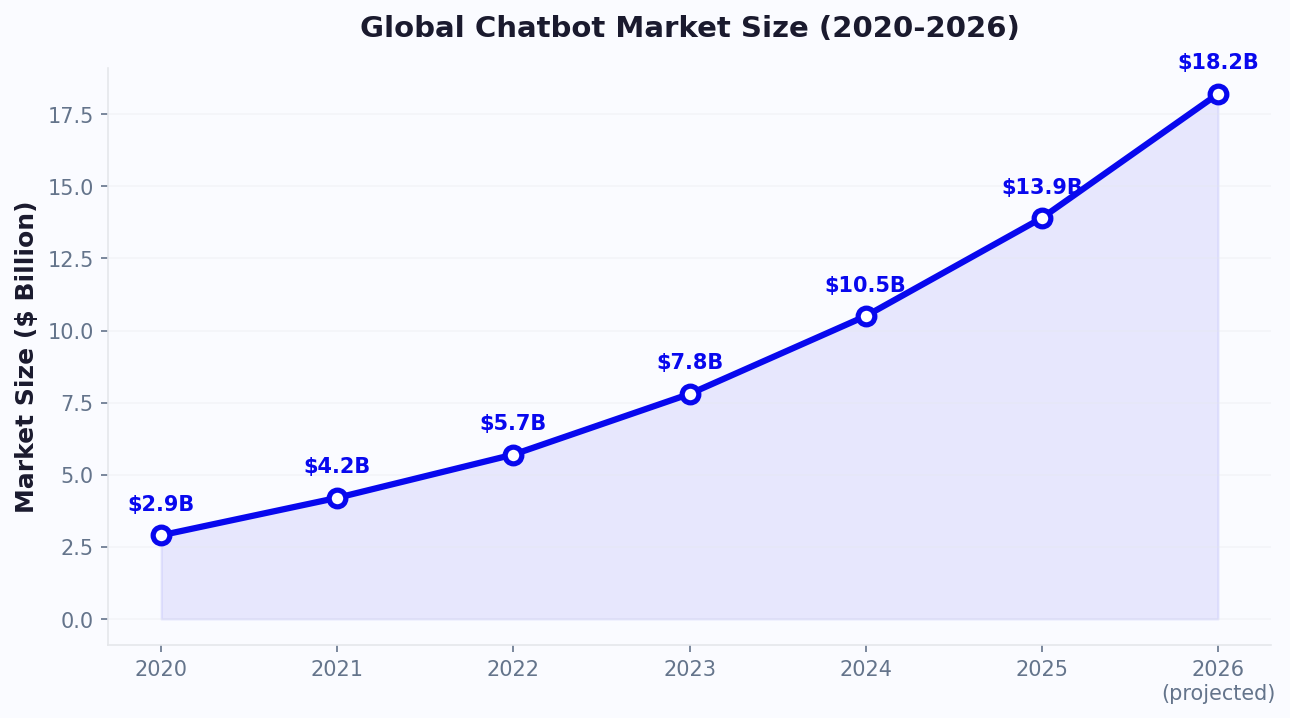
A Gartner forecast projects that by 2027, chatbots will become the primary customer service channel for a quarter of all organizations. Companies using Telegram bots for customer support report 50% faster ticket resolution, 35% lower support costs, and significantly higher customer satisfaction compared to email-based support. The platform's technical flexibility makes it ideal for businesses that want powerful automation without the restrictions and costs imposed by Meta's platforms.
Understanding the Telegram Bot API
Telegram's Bot API is one of the most powerful and accessible bot platforms available. Understanding its architecture is key to building effective support bots.
How Telegram Bots Work
Every Telegram bot is created through @BotFather, Telegram's official bot for managing other bots. When you create a bot, you receive an API token that your platform (like Conferbot) uses to send and receive messages.
Key Bot API Features
| Feature | Description | Support Use Case |
|---|---|---|
| Inline Keyboards | Buttons attached to messages | Quick-action menus, ticket actions |
| Custom Keyboards | Persistent keyboard replacing the default one | Always-visible menu options |
| Inline Mode | Bot suggestions in any chat via @mention | Quick information lookup |
| Web Apps | Full web pages embedded inside Telegram | Complex forms, dashboards |
| Payments API | Native payment processing | In-chat invoice and payment |
| Commands | Slash commands (/start, /help, /status) | Quick access to common actions |
| Media Groups | Send multiple photos/documents together | Product images, documentation |
| Location Sharing | Request and receive user location | Store locator, delivery tracking |
Bot Permissions and Privacy
Telegram gives you fine-grained control over bot behavior:
- Privacy Mode: In group chats, bots only see messages that are commands or @mentions (unless privacy mode is disabled)
- Admin Permissions: Bots can be granted admin rights to manage groups (delete messages, ban users, pin messages)
- Deep Linking: Create custom start parameters to track user acquisition sources:
t.me/yourbot?start=campaign123
Rate Limits
Telegram imposes fair-use limits on bot messaging:
- Individual chats: 30 messages per second
- Group chats: 20 messages per minute per group
- Bulk notifications: Up to 30 users per second for broadcast messages
These limits are generous for customer support scenarios. Most support bots never come close to hitting them. For high-volume use cases, Conferbot's API integration layer manages rate limiting and message queuing automatically, ensuring every customer receives their response without delays.
Building Your Telegram Support Bot With Conferbot
Setting up a Telegram support bot takes just minutes. Here's a complete walkthrough using Conferbot's platform.
Step 1: Create Your Bot via BotFather
- Open Telegram and search for @BotFather
- Send the command
/newbot - Choose a display name for your bot (e.g., "Acme Support")
- Choose a username ending in "bot" (e.g., "AcmeSupportBot")
- BotFather returns your API token — copy it securely
Step 2: Connect to Conferbot
- Log into your Conferbot dashboard
- Navigate to Channels > Telegram
- Paste your Bot API token
- Click "Connect" — Conferbot verifies the token and links your bot
- Your Telegram bot is now connected and ready for flow configuration
Step 3: Configure Bot Commands
Set up standard commands that Telegram users expect:
/start— Welcome message with main menu/help— List of available support topics/status— Check an existing ticket's status/contact— Connect with a live agent/faq— Browse frequently asked questions
Step 4: Build Support Flows
Design conversation flows using Conferbot's visual builder:
- Welcome Flow: Triggered by
/start, presents the main support menu via inline keyboard - FAQ Flow: Categorized knowledge base with inline keyboard navigation
- Ticket Creation Flow: Collects issue details (category, description, screenshots), creates a ticket via the built-in ticket system or your help desk
- Order Tracking Flow: Accepts order number, queries your API, returns real-time status
- Live Agent Handoff: Transfers the conversation to your support team with full context
Step 5: Set Up Auto-Responses
Configure automated responses for common patterns:
- Greeting messages ("hi," "hello") → Welcome flow
- Keywords ("order," "tracking," "shipping") → Order tracking flow
- Negative sentiment detection → Priority escalation
- Unknown input → Fallback with menu and human handoff option
Step 6: Test and Deploy
Open your bot in Telegram and test every flow end-to-end. Verify that inline keyboards render correctly, API integrations return accurate data, and handoff procedures work smoothly. Once testing is complete, your bot is live immediately. Share your bot link (t.me/YourBotName) on your website, social media, and support pages to start deflecting tickets.
Support Automation Strategies for Telegram
Effective support automation on Telegram goes beyond simple FAQ bots. Here are advanced strategies that deliver measurable results.
1. Tiered Support Architecture
Design your Telegram bot with three support tiers:
- Tier 1 (Bot): Handles 70-80% of queries — FAQs, order status, account info, policy questions
- Tier 2 (Agent): Complex issues escalated by the bot with full context and conversation history via AI agent handover
- Tier 3 (Specialist): Technical or billing issues that require domain expertise
This architecture ensures that human agents only handle conversations that truly require human judgment, reducing workload by 60-80%.
2. Proactive Support Notifications
Unlike other platforms, Telegram allows proactive messaging. Use this to:
- Send order status updates without waiting for the customer to ask
- Notify customers about service disruptions or maintenance windows
- Follow up after a support interaction to check resolution satisfaction
- Alert users about expiring subscriptions or upcoming renewals
3. Group-Based Community Support
Telegram groups offer a unique support model:
- Create a public support group where customers can ask questions
- Deploy your bot in the group to handle common queries automatically
- Community members often help each other, reducing your support burden
- Moderator bots can manage spam, enforce rules, and pin important announcements
4. Knowledge Base Integration
Connect your existing knowledge base to your Telegram bot:
| User Action | Bot Response |
|---|---|
| Types a question | NLP identifies intent, returns matching KB article |
| Taps "Was this helpful?" | Yes: closes ticket. No: escalates to agent |
Uses /search [topic] | Returns top 3 matching articles via inline keyboard |
| Sends a screenshot | Image analysis identifies the issue, suggests solution |
5. Multilingual Support
Telegram's global user base speaks dozens of languages. Configure your bot to:
- Auto-detect the user's language from their Telegram settings
- Respond in the user's preferred language using NLP language detection
- Offer a language selection menu on first interaction
- Maintain separate knowledge bases per language
Multilingual support is especially important for Telegram, where user bases span from Brazil to Indonesia. Conferbot's NLP engine supports 95+ languages out of the box, making global support deployment straightforward. For more on multi-language chatbot strategy, see our multilingual chatbot guide.
Integrations and Workflow Automation
The real power of a Telegram support bot emerges when it's connected to your business systems. API integrations transform a standalone bot into a central hub that orchestrates support workflows across your entire tech stack.
Help Desk Integration
Connect your Telegram bot to Zendesk, Freshdesk, Intercom, or any help desk platform:
- Ticket Creation: Bot collects issue details and creates a ticket with category, priority, and description
- Status Lookup: Users check ticket status by providing their ticket number or email
- Agent Notifications: New tickets trigger alerts in your team's Telegram group or channel
- Resolution Updates: When an agent closes a ticket, the bot notifies the customer automatically
CRM Integration
Sync customer data between Telegram and your CRM:
- Identify returning customers by their Telegram user ID and pull their profile from your CRM
- Log every Telegram interaction as a CRM activity
- Update lead scores based on support interaction quality
- Trigger sales follow-ups when support conversations reveal purchase intent
Ecommerce Integration
For ecommerce businesses, connect your Telegram bot to Shopify, WooCommerce, or Magento:
| User Request | Integration Action | Bot Response |
|---|---|---|
| "Where's my order?" | Query order API by email/order number | Order status + tracking link |
| "I want to return this" | Check return eligibility via API | Return instructions + label |
| "Is [product] in stock?" | Check inventory API | Availability + purchase link |
| "Apply my coupon" | Validate coupon code via API | Confirmation + updated total |
Internal Tool Integration
Telegram bots also excel as internal support tools for your team:
- IT Support: Employees submit IT tickets via a private Telegram bot instead of email
- HR Queries: Bot answers policy questions, PTO balances, and benefits information
- DevOps Alerts: Bot posts server monitoring alerts and allows on-call engineers to acknowledge directly in Telegram
Webhook and Custom API Support
For custom integrations, Conferbot supports:
- Outbound Webhooks: Send conversation data to your server in real time
- Inbound Webhooks: Trigger bot messages from external events (e.g., new order placed, payment received)
- Custom API Calls: Make HTTP requests to any API from within your bot flow
These integrations ensure your Telegram bot isn't an isolated tool but a connected component of your support infrastructure, reducing context switching and enabling end-to-end automation of support workflows. For a step-by-step guide on building these automated flows, check out our copy-paste chatbot flow templates.
Measuring Telegram Bot Performance
To optimize your Telegram support bot, you need clear visibility into how it's performing. Here are the metrics that matter and how to track them.
Core Support Metrics
| Metric | Description | Target |
|---|---|---|
| Bot Resolution Rate | % of queries resolved without human handoff | 70-85% |
| First Response Time | Time from user message to bot response | Under 2 seconds |
| Avg Resolution Time | Time from first message to issue resolved | Under 3 minutes (bot), under 15 min (agent) |
| Escalation Rate | % of conversations handed to humans | 15-30% |
| CSAT Score | Customer satisfaction rating | 4.2+ out of 5 |
| Fallback Rate | % of messages the bot couldn't understand | Under 10% |
Conversation Quality Analysis
Beyond quantitative metrics, analyze the quality of bot conversations:
- Unhandled Queries: Review messages that triggered the fallback flow. These reveal gaps in your bot's knowledge base and training data.
- Sentiment Trends: Track whether user sentiment improves or degrades during conversations. A declining trend signals frustration with the bot experience.
- Repeat Contact Rate: If the same users contact support repeatedly for the same issue, the bot isn't resolving their problem effectively.
- Flow Abandonment: Identify which conversation steps cause users to stop responding. These are your optimization priorities.
ROI Calculation
Quantify the financial impact of your Telegram support bot:
- Cost Savings: (Bot-resolved conversations) x (Average cost of human-resolved ticket) = Monthly savings
- Example: 3,000 bot-resolved conversations x $8 per human ticket = $24,000/month saved
- Platform Cost: Telegram API: $0 + Conferbot subscription: $49-99/month
- Net ROI: $23,900+/month in this example
Continuous Improvement Process
Implement a weekly optimization cycle:
- Monday: Review last week's analytics — identify top 5 unhandled queries
- Tuesday: Add new training phrases and flows for identified gaps
- Wednesday: Review escalated conversations — could the bot have handled them?
- Thursday: A/B test message copy and flow changes
- Friday: Review test results and deploy winning variations
This iterative approach ensures your Telegram bot gets smarter every week. According to HubSpot's State of AI report, companies that implement weekly chatbot optimization cycles see a 25-40% improvement in resolution rates within the first quarter. Use Conferbot's NLP engine to continuously retrain intent models based on real conversation data, pushing your resolution rate higher and your escalation rate lower over time. For more on the metrics that matter, see our chatbot analytics metrics guide.
Telegram Groups vs Channels: Chatbot Strategies for Each
Telegram offers two distinct community surfaces — Groups and Channels — and each requires a completely different chatbot strategy. Confusing the two is one of the most common mistakes businesses make when deploying Telegram support automation.
Groups vs Channels: Core Differences
| Feature | Telegram Group | Telegram Channel |
|---|---|---|
| Communication style | Multi-directional (anyone can post) | One-to-many broadcast (only admins post) |
| Max members | 200,000 | Unlimited subscribers |
| Member interaction | Chat, reply, react, share media | View, react, comment (if enabled) |
| Bot capabilities | Full: respond to messages, moderate, commands | Limited: post content, manage comments |
| Ideal for | Community support, discussion, peer help | Announcements, content distribution, updates |
| Noise level | High (many voices) | Low (controlled publishing) |
Group Chatbot Strategy: Community-Driven Support
In Telegram Groups, your bot operates alongside human conversations. The strategy is to automate the repetitive while letting community members help each other with nuanced questions:
- Auto-answer common questions: When a member asks "How do I reset my password?" or "What are your business hours?", the bot responds instantly with the answer from your knowledge base. This prevents the same question from being asked and answered manually 20 times a week.
- Smart moderation: The bot deletes spam, blocks phishing links, and enforces group rules silently. In groups with 1,000+ members, automated moderation reduces moderator workload by 70-80%.
- Escalation tagging: When the bot cannot answer a question, it tags a human moderator or support agent: "@support — this one needs a human touch." The customer gets help; the agent only handles what matters.
- Peer help recognition: The bot can award points or badges to members who consistently help others, gamifying community support and reducing reliance on your staff.
Channel Chatbot Strategy: Automated Content + Feedback Loops
Channels are broadcast tools — your bot's role shifts from responder to publisher and data collector:
- Scheduled content publishing: The bot auto-posts product updates, blog articles, maintenance alerts, and promotional offers on a configured schedule.
- Comment management: If channel comments are enabled, the bot monitors and responds to common questions in the comment thread, ensuring that every published update has responsive support beneath it.
- Feedback collection: After posting an update, the bot adds reaction buttons or polls: "Was this update helpful? [Yes] [No] [Need more info]." This data feeds back into your content and product strategy.
- Cross-posting to Groups: The bot can automatically share Channel posts into linked Discussion Groups, where the community can discuss the content in detail.
The Hybrid Architecture
The most effective Telegram support setup combines both: a Channel for official announcements (product updates, release notes, maintenance windows) linked to a Group for community discussion and support. The bot operates in both: publishing on the Channel and answering questions in the Group. Members subscribe to the Channel for updates and join the Group when they need help. This architecture serves 10,000+ member communities while keeping support costs near zero.
Configure different bot personas for each surface — professional and concise in the Channel, friendly and conversational in the Group. Track engagement across both with conversation analytics to understand where members prefer to interact. For businesses also active on other messaging platforms, read about building a unified multi-channel support strategy or explore WhatsApp automation to complement your Telegram presence.
Performance Benchmarks: Groups vs Channels
| Metric | Group Bot | Channel Bot |
|---|---|---|
| Avg queries handled/day | 50-200 (depending on community size) | 5-15 (comment-based) |
| Resolution rate | 70-85% automated | N/A (broadcast-focused) |
| Member engagement lift | +25-40% | +15-20% (via reactions and comments) |
| Moderator time saved | 10-15 hours/week | 3-5 hours/week |
Review these metrics monthly through Conferbot analytics and adjust your bot's role in each surface based on where it delivers the most value. Communities that optimize separately for Groups and Channels consistently outperform those using a one-size-fits-all approach.
Best Practices for Telegram Support Bots
Telegram users have high expectations for bot quality because the platform has a mature bot ecosystem. Follow these best practices to build a support bot that meets those expectations.
1. Use Commands and Keyboards Together
Telegram users are familiar with bot commands (/start, /help). Combine them with inline keyboards for a dual-interface approach:
- Power users can type commands directly for speed
- New users can tap buttons for guided navigation
- Always provide both options to accommodate different user preferences
2. Leverage Telegram's Rich Features
Take advantage of features that other platforms lack:
- Web Apps: Embed mini-applications for complex interactions (forms, dashboards, configurators)
- File Sharing: Send detailed documentation, invoices, or guides as PDF files
- Inline Mode: Let users invoke your bot from any chat with @YourBot queries
- Bot Menu Button: Use Telegram's native bot menu button to provide a permanent entry point
3. Design for Speed
Telegram is known for its speed. Your bot should match that expectation:
- Respond to every message in under 2 seconds
- Use typing indicators for responses that require API calls (shows the bot is "thinking")
- Pre-fetch common data to avoid delays
- Keep conversation flows short — aim for resolution in 3-5 exchanges
4. Handle Groups and Private Chats Differently
If your bot operates in both group chats and private conversations, customize the behavior:
- Groups: Only respond to @mentions and commands (respect privacy mode). Keep responses concise to avoid cluttering the group.
- Private Chats: Full interactive experience with inline keyboards, rich media, and multi-step flows.
5. Implement Smart Fallbacks
When the bot encounters an unrecognized input:
- First attempt: suggest the closest matching command or topic
- Second attempt: offer the main menu with all available options
- Third attempt: connect to a human agent with the conversation context
- Log all unrecognized inputs for weekly review and bot improvement
6. Security and Privacy
Telegram users value privacy. Respect that:
- Never ask for sensitive information (passwords, full credit card numbers) in chat
- Use Telegram's Web App feature for secure data collection via HTTPS forms
- Store minimal personal data and be transparent about data usage
- Comply with GDPR and local data protection regulations
A well-built Telegram support bot doesn't just answer questions — it becomes an indispensable part of your customers' Telegram experience. By following these best practices and leveraging Conferbot's Telegram integration, you can deploy a support bot that handles the majority of customer queries while maintaining the speed and quality that Telegram users expect.
Telegram Bot ROI: Implementation Timeline and Cost-Benefit Analysis
Deploying a Telegram support bot is one of the highest-ROI investments a business can make in customer service infrastructure. Unlike other channels that charge per conversation or impose messaging windows, Telegram's free API means your only costs are the chatbot platform and the time invested in setup. Here is a detailed breakdown of what to expect in terms of timeline, costs, and returns.
Implementation Timeline
| Phase | Duration | Tasks | Resources Needed |
|---|---|---|---|
| Planning | 1-2 days | Define use cases, map top 20 questions, identify integrations needed | 1 person (support manager or ops lead) |
| Bot Setup | 1-2 hours | Create bot via BotFather, connect to Conferbot, configure basic settings | 1 person (any team member) |
| Flow Building | 3-5 days | Design conversation flows, write response copy, configure conditional logic | 1-2 people (content + support knowledge) |
| Integration | 2-3 days | Connect CRM, help desk, order system, calendar | 1 person (with API knowledge or using no-code connectors) |
| Testing | 2-3 days | End-to-end testing, edge cases, load testing, user acceptance | 2-3 people (diverse testers) |
| Launch + Optimization | Ongoing | Monitor analytics, refine flows, expand coverage weekly | 30 min/day |
Total time from decision to live bot: 10-15 business days for a comprehensive implementation, or as little as 2-3 days for a basic FAQ bot. This is significantly faster than WhatsApp Business API (which requires Meta approval) or custom bot development (which takes months).
Cost-Benefit Analysis (Monthly)
| Cost Item | Amount | Notes |
|---|---|---|
| Telegram Bot API | $0 | Always free, no per-message charges |
| Conferbot Platform | $49-149/month | Depends on conversation volume and features |
| Staff time for optimization | ~$200-400/month | 10-15 hours/month at typical support manager rates |
| Total Monthly Cost | $250-550 |
| Benefit Item | Monthly Value | Calculation |
|---|---|---|
| Ticket deflection savings | $8,000-24,000 | 1,000-3,000 deflected tickets x $8 avg cost per human ticket |
| After-hours lead capture | $3,000-10,000 | 15-50 additional leads captured that would have bounced |
| Reduced first-response time | $2,000-5,000 | Higher CSAT = lower churn, valued at customer LTV impact |
| Agent productivity gain | $1,500-4,000 | Agents handle only complex issues, resolve faster with context |
| Total Monthly Benefit | $14,500-43,000 |
The typical ROI ranges from 25x to 80x in the first year, making Telegram bots one of the most cost-effective customer service investments available. According to IBM's research on chatbot economics, businesses save an average of $0.70 per customer interaction when using chatbots, with savings compounding as conversation volumes increase.
Common Implementation Mistakes to Avoid
Based on analyzing hundreds of Telegram bot deployments, these are the mistakes that most commonly undermine ROI:
- Launching without a knowledge base: The bot needs comprehensive content to draw from. Spend time documenting your top 50 customer questions and answers before going live.
- Ignoring group chat behavior: Bots in group chats need different logic than private chats. Without privacy mode configuration, the bot may respond to irrelevant messages.
- No human handoff path: Customers who cannot reach a human when needed will leave permanently. Always implement a clear escalation to live agents.
- Forgetting mobile UX: 85% of Telegram users are on mobile. Keep messages short, use inline keyboards instead of long text menus, and test on actual mobile devices.
- Setting and forgetting: Bots that are not actively maintained degrade over time as products change and new questions emerge. Commit to weekly optimization cycles.
- Not tracking the right metrics: If you only track message volume, you miss the insights that drive improvement. Track resolution rate, fallback rate, sentiment, and flow abandonment from day one.
By following this implementation roadmap and avoiding these common pitfalls, your Telegram support bot will deliver measurable value within its first week of operation and continue compounding returns as you refine and expand its capabilities over time. For businesses also exploring other messaging channels, our omnichannel customer service strategy guide covers how to unify Telegram with WhatsApp, Messenger, and website chat into a single support experience.
Was this article helpful?
Telegram Bots for Customer Support FAQ
Everything you need to know about chatbots for telegram bots for customer support.
About the Author

Conferbot Team specializes in conversational AI, chatbot strategy, and customer engagement automation. With deep expertise in building AI-powered chatbots, they help businesses deliver exceptional customer experiences across every channel.
View all articles