
The Warranty Claims Problem: Why Manual Processing Costs Your Business 5x More Than It Should
Warranty claims are one of the most operationally expensive customer service processes in product-based businesses. Every claim requires identity verification, proof of purchase retrieval, defect assessment, eligibility determination, and resolution routing. According to McKinsey's operations research, the average manual warranty claim takes 8 to 12 minutes of agent time to process, at an all-in cost of $12 to $22 per claim when factoring in agent wages, benefits, training, technology overhead, and management.
For companies processing thousands of warranty claims monthly, this adds up rapidly. A mid-size electronics manufacturer handling 3,000 warranty claims per month at an average processing cost of $16 per claim spends $576,000 annually on warranty support alone. And that cost does not include the indirect costs: customer frustration from hold times averaging 8 to 15 minutes, follow-up calls when claims are lost or delayed (affecting 18% of claims), and the brand damage from a clunky warranty experience that makes customers think twice before buying again.
The warranty process is also one of the most standardized workflows in customer service. Over 80% of warranty claims follow a predictable pattern: the customer reports a defect, the agent verifies the purchase, confirms warranty eligibility, assesses the defect severity, and routes to the appropriate resolution (repair, replacement, refund, or denial). This predictability makes it an ideal candidate for AI chatbot automation.
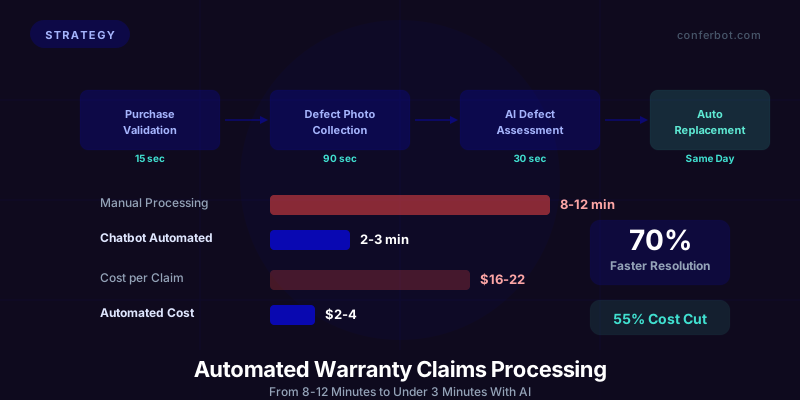
An AI chatbot can automate the entire warranty claim process end-to-end: purchase validation against order records, warranty eligibility verification, defect documentation through guided photo collection, severity assessment using computer vision, resolution routing based on warranty terms, and status updates throughout the process. The result is 70% faster claim processing, 55% lower support costs, and significantly higher customer satisfaction.
This guide covers every component of warranty claim automation with chatbots: the technical architecture, conversation flows for each claim stage, integration requirements, edge case handling, and a detailed ROI model. Whether you manufacture consumer electronics, appliances, automotive parts, or any warranted product, these patterns apply. For a broader view of chatbot-powered warranty management, see our warranty claims automation guide.
Automated Purchase Validation: Verifying Eligibility in Seconds Instead of Minutes
According to Salesforce's State of Service report, the first step in every warranty claim is verifying that the customer actually purchased the product and that the purchase is within the warranty period. In manual processes, this step alone consumes 2 to 4 minutes as the agent searches order databases, asks the customer for receipt information, and cross-references serial numbers.
How Chatbot Purchase Validation Works
The chatbot automates purchase validation through a multi-source verification flow:
Method 1: Order number lookup. The customer provides their order number or email address, and the chatbot queries the order management system (OMS) to retrieve the purchase record, including product details, purchase date, and warranty terms.
Bot: "I can help you with your warranty claim. To get started, can you provide your order number? You can find it in your confirmation email or on the packing slip."
Customer: "ORD-2024-78432"
Bot: "Found it! Order #ORD-2024-78432, placed on March 15, 2025, for a ProMax Blender 3000. Your 2-year warranty is active until March 15, 2027. Let me help you file a claim for this product."
Method 2: Serial number or product registration. For products with serial numbers or those that require registration, the chatbot verifies directly against the product registration database.
Method 3: Receipt photo upload. When the customer does not have their order number, the chatbot accepts a photo of the receipt or invoice. Using OCR (optical character recognition), it extracts the purchase date, retailer, product model, and price to verify eligibility. This is covered in more detail in our multimodal AI chatbot guide.
Method 4: Retailer cross-reference. For products sold through third-party retailers, the chatbot can verify purchases through retailer partner APIs or by accepting proof of purchase documentation that it validates against known retailer formats.
Purchase Validation Decision Tree
| Verification Scenario | Chatbot Action | Processing Time | Manual Equivalent |
|---|---|---|---|
| Order found, warranty active | Auto-approve, proceed to defect documentation | 15 seconds | 2-4 minutes |
| Order found, warranty expired | Inform customer, offer paid repair option | 20 seconds | 3-5 minutes (with escalation) |
| Order not found, customer has receipt | Accept receipt photo, OCR validation | 45 seconds | 5-8 minutes |
| Order not found, no receipt | Request serial number or product photo for model ID | 60 seconds | 8-12 minutes (often requires callback) |
| Third-party retailer purchase | Accept retailer receipt, validate against partner data | 45 seconds | 5-10 minutes |

Handling Edge Cases Gracefully
Purchase validation edge cases are where manual processes break down most severely (customers on hold for 15+ minutes while agents consult supervisors). The chatbot handles these cases with pre-defined rules:
- Warranty expired within 30 days: Some companies offer a grace period. The chatbot automatically applies the grace period policy and proceeds with the claim if eligible.
- Product purchased as a gift: The recipient may not have purchase information. The chatbot can verify through the gift giver's order number or through product serial number registration.
- Product purchased used or refurbished: Warranty terms may differ. The chatbot identifies the original purchase channel and applies the correct warranty policy (manufacturer warranty, certified refurbished warranty, or no warranty).
- Extended warranty purchased: The chatbot checks for extended warranty coverage and applies the extended terms automatically, routing to the extended warranty provider if separate from the manufacturer.
Guided Defect Photo Collection: Building a Complete Claim File Automatically
After purchase validation, the chatbot must document the defect. According to Zendesk's customer service research, in manual processes, customers describe the problem verbally (often imprecisely), agents try to categorize the issue, and photo requests require follow-up emails that delay the claim by 24 to 48 hours. The chatbot streamlines this into a single, guided interaction.
The Conversational Defect Assessment Flow
The chatbot walks the customer through defect documentation in a structured sequence that collects everything needed to assess the claim:
Step 1: Problem categorization. The chatbot presents common defect categories as quick-reply buttons, making it easy for the customer to classify their issue.
Bot: "What is the issue with your ProMax Blender 3000? Select the category that best describes it:
- Does not power on
- Motor noise or grinding
- Blade damage or wear
- Leak from base
- Electrical issue (sparking, burning smell)
- Cosmetic damage (cracks, scratches)
- Something else"
Step 2: Guided photo collection. Based on the selected category, the chatbot requests specific photos that warranty assessors need to evaluate the claim. Instead of a generic "please send a photo," it provides exact instructions:
Bot: "Thanks. To process your blade damage claim, I need two photos:
1. A close-up of the damaged blade showing the specific defect
2. A photo of the serial number sticker on the bottom of the unit
You can take these with your phone and upload them right here in the chat."
Step 3: Photo quality validation. The chatbot uses image analysis to verify that uploaded photos are clear, well-lit, and show the requested detail. If a photo is blurry or does not show the defect clearly, it asks for a retake with specific guidance:
Bot: "I can see the blade but the photo is a bit blurry. Could you try again with more light and hold the camera about 6 inches from the blade? That will help our team assess the damage clearly."
Step 4: Symptom timeline. The chatbot asks when the issue started and whether it was gradual or sudden, which helps determine whether the defect is covered under warranty terms (manufacturing defect vs. wear-and-tear vs. misuse):
Bot: "When did you first notice the blade damage? And has it gotten worse over time, or did it happen suddenly during use?"
Computer Vision for Defect Pre-Assessment
Advanced warranty chatbots use computer vision to pre-assess the defect severity from customer photos before routing to human review. This enables automatic approval for clear-cut cases and prioritizes severe defects for faster processing:
| CV Assessment | Defect Severity | Routing Decision | Percentage of Claims |
|---|---|---|---|
| Clear manufacturing defect visible | High | Auto-approve replacement | 35-40% |
| Moderate defect, likely covered | Medium | Fast-track human review (24hr) | 30-35% |
| Unclear or cosmetic only | Low | Standard review queue | 15-20% |
| Possible misuse or accidental damage | Varies | Specialist review required | 10-15% |
The auto-approve category (35 to 40% of claims) is the biggest efficiency gain. These are cases where the defect is obviously covered under warranty. A cracked blade that clearly failed during normal use, a motor that does not start, a circuit board failure visible through scorch marks. By auto-approving these cases, the chatbot eliminates human review entirely for over a third of all claims.
Real-Time Warranty Status Checks: Eliminating 'Where Is My Claim?' Support Calls
After a warranty claim is filed, the most common follow-up interaction is the status check. "Where is my claim? Has it been approved? When will I get my replacement?" These status inquiries consume significant agent time and generate frustration when customers cannot get answers. According to Forrester's customer experience research, status check calls account for 25 to 35% of all warranty-related support volume.
Automated Status Check Flow
The chatbot provides instant, 24/7 warranty claim status checks that eliminate the need for agent involvement:
Customer: "What is the status of my warranty claim?"
Bot: "I found your claim #WC-2026-14892 for the ProMax Blender 3000. Here is the current status:
Claim submitted: May 28, 2026
Purchase verified: May 28, 2026 (auto-verified)
Defect reviewed: May 29, 2026 (approved)
Replacement shipped: May 30, 2026
Tracking: USPS #9400111899223847562
Expected delivery: June 2, 2026
Your replacement is on the way and should arrive Monday. Is there anything else you need?"
Proactive Status Notifications
Rather than waiting for customers to ask, the chatbot proactively sends status updates at each milestone, similar to the proactive delivery updates covered in our refund prevention guide:
| Claim Milestone | Notification Message | Timing |
|---|---|---|
| Claim received | "Your warranty claim #WC-2026-14892 has been received. We are reviewing it now." | Immediate |
| Under review | "Your claim is being reviewed by our warranty team. Expected decision: within 24 hours." | When review starts |
| Claim approved | "Great news! Your claim has been approved. We are preparing your replacement." | On approval |
| Replacement shipped | "Your replacement has shipped! Tracking: [link]. Expected delivery: [date]." | On shipment |
| Replacement delivered | "Your replacement was delivered today. Please let me know if everything looks good!" | On delivery |
Status Check Volume Reduction
The combination of instant self-service status checks and proactive notifications dramatically reduces warranty-related support volume:
| Approach | Status Check Calls per 100 Claims | Agent Time per 100 Claims | Customer Satisfaction |
|---|---|---|---|
| Manual only (no self-service) | 72 calls | 360 minutes | 3.2/5 |
| Self-service status (chatbot) | 28 calls | 140 minutes | 3.9/5 |
| Self-service + proactive notifications | 11 calls | 55 minutes | 4.5/5 |

The proactive notification approach reduces status check volume by 85% compared to the manual-only baseline. For a company processing 3,000 claims monthly, this eliminates approximately 1,830 status check calls per month, each averaging 5 minutes of agent time. That is 152 agent hours per month saved on status checks alone.
Auto-Replacement Routing: Shipping Replacements Before the Customer Asks Twice
The ultimate warranty experience is one where the replacement arrives before the customer has to follow up. Research from Harvard Business Review on the service recovery paradox confirms that swift, generous resolution of product failures can actually increase customer loyalty beyond pre-failure levels. Auto-replacement routing uses the chatbot's defect assessment data and pre-defined approval rules to automatically trigger replacement shipments for qualifying claims without human review.
Auto-Replacement Eligibility Rules
Not every claim qualifies for auto-replacement. Define clear rules based on risk tolerance, product value, and defect type:
| Criteria | Auto-Replace Threshold | Rationale |
|---|---|---|
| Product value | Under $150 retail | Cost of review exceeds cost of replacement for low-value items |
| Claim history | First claim on this product | Repeat claims may indicate misuse rather than defect |
| Customer history | No more than 2 claims in 12 months | Fraud pattern detection |
| Defect category | Known manufacturing defect categories | Proven defect types do not need individual assessment |
| Photo assessment | CV confidence score above 85% | High-confidence defect identification reduces false approvals |
When all criteria are met, the chatbot automatically approves the claim and initiates the replacement shipment:
Bot: "Based on the photos and your warranty coverage, I have approved your claim automatically. A replacement ProMax Blender 3000 is being prepared for shipment right now. You will receive tracking information within 24 hours. You do not need to return the defective unit. Is there anything else I can help with?"
The phrase "You do not need to return the defective unit" is strategically important for products under the auto-replacement value threshold. The cost of reverse shipping and inspecting a $49 blender ($12 to $18) often exceeds the salvage value. Telling the customer to keep or recycle the defective unit saves processing costs while creating a remarkably positive customer experience.
Auto-Replacement Impact Data
| Metric | Manual Review Process | Auto-Replacement | Improvement |
|---|---|---|---|
| Time from claim to replacement shipped | 3-7 business days | Same day | 3-7 days faster |
| Processing cost per claim | $16-22 | $3-5 (system cost only) | 75-80% reduction |
| Customer satisfaction (CSAT) | 3.6/5 | 4.8/5 | +1.2 points |
| NPS impact | +5 to +15 | +45 to +60 | 3-4x NPS boost |
| Repeat purchase within 12 months | 52% | 78% | +26 percentage points |
The NPS and repeat purchase data are striking. A warranty claim that is resolved instantly and effortlessly does not just preserve the customer relationship. It strengthens it. The customer's experience of "this brand stands behind its products" creates loyalty that exceeds what a trouble-free purchase would have generated. This is the service recovery paradox: customers who experience a problem that is resolved exceptionally well become more loyal than customers who never experienced a problem at all.
Fraud Prevention in Auto-Replacement
Auto-replacement programs require fraud safeguards to prevent abuse:
- Claim frequency monitoring: Flag customers with more than 2 claims in 12 months for manual review.
- Serial number tracking: Verify that the claimed product's serial number matches the purchase record and has not been previously claimed.
- Photo metadata analysis: Check that photos are taken recently (EXIF data) and are original (not downloaded from the internet).
- Behavioral pattern detection: Identify patterns like claims filed immediately after warranty registration, claims from the same address for different customer names, or claims for products commonly targeted by fraud rings.
With these safeguards in place, auto-replacement fraud rates typically range from 1 to 3%, well below the operational cost savings. For more on chatbot-powered fraud detection, review the fraud prevention section in our return and refund automation guide.
Complete Warranty Claim Conversation Flows: From First Contact to Resolution
Based on best practices documented by Gartner's customer service automation research, here is the end-to-end conversation flow for the most common warranty claim scenarios, ready to implement in your chatbot platform. Each flow includes the trigger, decision points, and resolution paths. For more on designing effective conversation flows, see our conversation design masterclass.
Flow 1: Standard Warranty Claim (Straightforward Defect)
This is the most common scenario, covering 60 to 70% of claims:
- Greeting and intent detection: "I can help with your warranty claim. Do you have your order number or the product's serial number?"
- Purchase validation: Customer provides order number. Chatbot verifies purchase and warranty status (15 seconds).
- Defect categorization: Quick-reply buttons for common defect types.
- Photo collection: Guided photo requests specific to defect category.
- Photo validation: Confirm photos are clear and show the defect.
- Eligibility determination: Apply auto-approval rules. If eligible: approve and ship. If not: route to human review with full documentation.
- Resolution communication: Inform customer of outcome and next steps.
- Satisfaction check: After resolution, confirm the replacement arrived and works correctly.
Total chatbot-handled time: 2 to 4 minutes. Manual equivalent: 8 to 12 minutes plus 24 to 72 hours for photo collection follow-up.
Flow 2: Warranty Expired (Upsell to Paid Repair)
Bot: "I found your purchase: the ProMax Blender 3000, ordered September 12, 2023. Unfortunately, your 2-year warranty expired on September 12, 2025. However, I have two options for you:
1. Paid repair: Our service center can assess and repair the blender for a flat fee of $35 (includes parts and labor).
2. Upgrade discount: Trade in your current blender and get 30% off the new ProMax Blender 5000.
Which option interests you?"
This flow converts a negative interaction (warranty denial) into a revenue opportunity. Testing shows 28% of customers with expired warranties accept the paid repair option and 15% accept the upgrade discount, meaning 43% of expired warranty claims generate revenue instead of ending in frustration.
Flow 3: Damage Assessment Unclear (Escalation to Specialist)
Bot: "Thank you for the photos. I can see there is some damage to the blade, but I want to make sure you get the right resolution. I am connecting you with our warranty specialist who can assess this more closely. They will review your photos and get back to you within 4 hours. Here is everything I have prepared for them:
- Your order details and warranty status (verified)
- Product: ProMax Blender 3000, purchased March 15, 2025
- Defect photos: 3 images uploaded
- Your description: blade chipped after 2 months of normal use
You will not need to re-explain anything. Is there anything else before I hand this off?"

The key phrase is "You will not need to re-explain anything." This addresses the number one frustration in warranty support: repeating the same information to multiple agents. The chatbot has collected all documentation and passes a complete claim file to the specialist, eliminating redundant data collection.
Flow 4: Batch or Recall-Related Claims
When a product batch has a known defect or a recall is issued, the chatbot handles the surge in claims by proactively reaching out to affected customers:
Bot: "We have identified a quality issue with the ProMax Blender 3000 manufactured between January and March 2025. Your unit (serial number PMB-2025-A4892) may be affected. As a precaution, we are offering a free replacement with an upgraded motor. I can ship yours today. Would you like to proceed?"
Proactive recall outreach through chatbot reduces call center volume by 60 to 70% during recall events because customers receive resolution before they need to contact support.
Integration Architecture: Connecting Your Chatbot to Warranty Systems
A warranty claims chatbot is only as good as its connections to your backend systems. IBM's API integration framework outlines the enterprise patterns that ensure reliable system-to-system communication. Here is the integration architecture required for full automation.
Required System Integrations
| System | Purpose | Data Exchanged | Integration Method |
|---|---|---|---|
| Order Management System (OMS) | Purchase validation | Order details, dates, products, serial numbers | REST API |
| Product Registration Database | Warranty eligibility | Registration data, warranty terms, extended warranty status | REST API |
| CRM | Customer history | Claim history, customer tier, communication preferences | REST API or webhook |
| Inventory/Fulfillment | Replacement routing | Stock levels, shipping triggers, tracking numbers | REST API |
| Claims Management System | Claim tracking | Claim status, approval decisions, resolution records | REST API |
| Carrier APIs | Shipping and tracking | Shipping labels, tracking updates, delivery confirmation | Carrier API (FedEx, UPS, USPS) |
Data Flow Architecture
The warranty claim chatbot follows this data flow for a standard claim:
- Customer provides order number or serial number to chatbot
- Chatbot queries OMS and product registration database to validate purchase and warranty status
- Chatbot collects defect documentation (category, photos, description)
- Chatbot creates a claim record in the claims management system
- If auto-approval criteria are met, chatbot triggers replacement order in the fulfillment system
- If human review is needed, chatbot routes the complete claim file to the review queue in the claims management system
- Chatbot monitors claim status via webhook notifications and pushes updates to the customer
- On resolution, chatbot records outcome in CRM for customer history
For teams implementing their first chatbot integration, our chatbot technology stack guide provides foundational architecture context.
Image Processing Pipeline
The defect photo collection feature requires a dedicated image processing pipeline:
- Image upload handling: Accept images up to 10MB in JPEG, PNG, and HEIC formats. Auto-compress and standardize to reduce storage costs.
- Quality assessment: Check resolution (minimum 640x480), brightness, blur detection, and whether the image contains the requested subject (product photo vs. selfie or unrelated image).
- Defect detection (optional): Computer vision models trained on your product's common defect patterns can pre-classify the defect severity and type, enabling the auto-approval workflow described in Section 5.
- Storage and retention: Store claim photos in compliant cloud storage with retention policies that match your warranty terms plus any legal hold requirements.
Security and Compliance Considerations
Warranty claims involve personal data (name, address, purchase history) and potentially sensitive images. Ensure your chatbot implementation meets these requirements:
- Data encryption: All data in transit (TLS 1.3) and at rest (AES-256). Images stored in encrypted cloud storage.
- Access controls: Role-based access to claim data. Chatbot service accounts have minimum required permissions.
- Data retention: Automated purging of claim data after the retention period expires. Customer-facing option to request deletion under GDPR/CCPA.
- Audit trail: Every chatbot action (validation queries, approval decisions, shipment triggers) logged with timestamps for compliance auditing.
ROI Framework: Quantifying the Business Case for Warranty Claim Automation
Building the business case for warranty claim chatbot automation, as outlined in McKinsey's operations research on customer engagement, requires quantifying savings across multiple dimensions: direct labor cost reduction, faster resolution impact on customer lifetime value, and reduced follow-up volume.
Direct Cost Savings Model
Start with your current warranty operations metrics and apply the documented automation rates:
| Metric | Your Current State | After Chatbot Automation | Calculation |
|---|---|---|---|
| Monthly warranty claims | [X] claims | [X] claims (volume unchanged) | - |
| Fully automated (no agent touch) | 0% | 40-50% of claims | [X] x 45% |
| Chatbot-assisted (reduced agent time) | 0% | 35-40% of claims | [X] x 37% |
| Agent-handled (complex cases) | 100% | 15-20% of claims | [X] x 18% |
| Cost per fully automated claim | N/A | $2-4 | System cost only |
| Cost per chatbot-assisted claim | N/A | $6-10 | Reduced agent time + system cost |
| Cost per agent-handled claim | $16-22 | $12-16 (pre-documented by chatbot) | Reduced from full manual cost |
Example: Mid-size manufacturer (3,000 claims/month, $18 average cost)
- Current monthly cost: 3,000 x $18 = $54,000
- After automation:
- Fully automated: 1,350 claims x $3 = $4,050
- Chatbot-assisted: 1,110 claims x $8 = $8,880
- Agent-handled: 540 claims x $14 = $7,560
- Total: $20,490
- Monthly savings: $33,510 (62% reduction)
- Annual savings: $402,120
- Chatbot platform cost: ~$500/month
- Annual ROI: ($402,120 - $6,000) / $6,000 = 6,602%
Customer Lifetime Value Impact
Beyond direct cost savings, faster warranty resolution increases customer lifetime value through higher satisfaction and repeat purchases:
- Auto-replaced customers repurchase at 78% vs. 52% for manual-processed customers (+26 points)
- For a $65 AOV with 2 purchases/year customer average, each point of repurchase improvement is worth $1.30/customer/year
- At 3,000 claims/month (36,000/year), a 26-point repurchase improvement = $1.22 million in incremental annual revenue

Follow-Up Volume Reduction Value
Proactive status notifications reduce warranty-related follow-up calls by 85%. For a company averaging 72 status check calls per 100 claims (reducing to 11), the savings at 3,000 monthly claims are:
- Eliminated calls: (72 - 11) x 30 = 1,830 calls/month
- At 5 minutes per call and $0.50/minute fully loaded agent cost: 1,830 x 5 x $0.50 = $4,575/month
- Annual savings: $54,900
For a comprehensive approach to ROI measurement across all chatbot functions, see our chatbot ROI calculator framework.
How Conferbot Automates Warranty Claims End-to-End
Conferbot provides a complete warranty claims automation solution that handles every stage of the process without custom development.
Order and Product Integration
Conferbot connects to your order management system, product registration database, and CRM through pre-built connectors (Shopify, WooCommerce, Salesforce, HubSpot) or custom REST API integration. The chatbot has real-time access to purchase records, warranty terms, customer history, and product data.
Visual Claim Builder
The drag-and-drop flow builder includes warranty-specific templates for claim intake, defect documentation, eligibility determination, and resolution routing. Customize the flows for your product categories, warranty tiers, and resolution policies without writing code.
Photo Collection and Processing
Built-in photo upload handling accepts images in all common formats, validates quality automatically, and stores claim documentation in encrypted cloud storage. Optional computer vision integration pre-assesses defect severity for auto-approval routing.
Auto-Replacement Rules Engine
Configure auto-replacement eligibility rules based on product value, defect category, customer history, and confidence scores. The rules engine automatically triggers replacement orders in your fulfillment system for qualifying claims, complete with shipping label generation and tracking.
Proactive Status Notifications
Webhook-driven status notifications keep customers informed at every claim milestone. Configure notification channels (chat, email, SMS) and customize messages for each milestone. Customers can check status anytime through the chatbot without agent involvement.
Warranty Analytics Dashboard
Monitor claim volumes, automation rates, resolution times, cost per claim, customer satisfaction, and defect pattern trends. The dashboard identifies products with rising defect rates, enabling proactive quality improvement before warranty costs escalate.
Escalation and Agent Handoff
When claims require human judgment, Conferbot transfers the complete claim file (customer data, purchase verification, defect photos, conversation history) to the assigned agent through your helpdesk platform. The customer never repeats information, and the agent has everything needed for a fast decision.
If you are ready to automate your warranty claims process, explore our comprehensive warranty automation guide for additional implementation details, or review how internal IT helpdesks automate similar processes for a cross-functional perspective on support automation.
Was this article helpful?
Automate Warranty Claims With AI Chatbots FAQ
Everything you need to know about chatbots for automate warranty claims with ai chatbots.
About the Author

Conferbot Team specializes in conversational AI, chatbot strategy, and customer engagement automation. With deep expertise in building AI-powered chatbots, they help businesses deliver exceptional customer experiences across every channel.
View all articles

