The Warranty Claims Crisis: Why Manual Processing Is Bleeding Your Budget
Warranty claims are one of the most expensive, repetitive, and frustration-laden processes in customer support. For companies processing thousands of claims monthly, manually handling each one - reviewing purchase records, checking coverage terms, requesting documentation, and routing to the right resolution path - adds up to a substantial and largely avoidable operational cost, most of which funds repetitive tasks that an AI chatbot can handle in seconds.
The problem is not just cost. Warranty claim experiences are a well-known frustration point for customers: the typical claim requires explaining the same issue to multiple people, digging up purchase receipts, describing product defects in detail, and then waiting days or weeks for processing - all while feeling like their valid claim might be denied. That combination of repetition and uncertainty is exactly what drives dissatisfaction, independent of how the claim is ultimately resolved.
AI chatbots fundamentally transform this equation. By automating document collection, eligibility verification, claim routing, and status tracking, chatbots can resolve a large share of straightforward warranty claims without any human intervention. The remaining complex cases are routed to specialized agents with complete context already gathered, cutting their handling time as well. The result is a meaningful reduction in total warranty support costs, combined with a noticeably better customer experience.
In this comprehensive guide, we will examine how AI chatbots automate every stage of the warranty claims process - from initial submission through resolution. You will learn the specific workflows that drive cost savings, integration patterns with warranty management systems, fraud detection capabilities, customer experience improvements, and a complete implementation roadmap with realistic ROI projections. Whether you manufacture electronics, appliances, automotive parts, or consumer goods, this guide provides the blueprint for transforming your warranty claims operation from a cost center into a competitive advantage.
The companies leading in warranty automation are not just saving money - they are building customer loyalty. When a warranty claim is resolved in 3 minutes instead of 3 weeks, that customer becomes a brand advocate. When claim status is available 24/7 without waiting on hold, trust increases. When the process is transparent and fair, repurchase rates climb. Warranty automation through AI chatbots delivers both immediate cost savings and long-term revenue growth through superior customer relationships.
If you have not yet deployed a general-purpose AI chatbot builder, that is the foundation this entire warranty automation strategy is built on.
Warranty Claim Volume Trends: Why Automation Is Now Essential
The volume and complexity of warranty claims have increased dramatically over the past five years, making manual processing unsustainable for most businesses. Understanding these trends reveals why 2026 is the inflection point where automation becomes not just beneficial but essential for survival.
Rising Claim Volumes Across Industries
Several factors are driving warranty claim volumes upward. First, the proliferation of connected devices means more products are under warranty at any given time than in past years, since the average household simply owns more electronics and smart devices than it used to. Second, extended warranty purchases have become a larger and more mainstream part of the retail transaction, particularly for electronics, appliances, and automotive parts. Third, consumer awareness of warranty rights has increased thanks to social media and review platforms that encourage customers to exercise their coverage rather than let it lapse unused.
| Industry | Relative Claim Volume | Volume Trend | Relative Manual Processing Cost |
|---|---|---|---|
| Consumer Electronics | High | Rising | Moderate |
| Home Appliances | Moderate-High | Rising | Moderate-High |
| Automotive Parts | Moderate | Rising fastest | Highest |
| Furniture | Lower | Rising slowly | Moderate |
| HVAC Systems | Moderate-High | Rising | High |
| Power Tools | Moderate | Rising | Lower |
| Sporting Goods | Lower | Rising slowly | Lower |
The Automation Gap
Despite rising volumes, most companies still process warranty claims through a combination of phone calls, emails, and basic web forms. Coverage of the warranty industry, including trade publications like Warranty Week, has repeatedly noted that automation adoption in warranty claims processing lags well behind other customer service functions. This means most companies are absorbing increasing costs roughly in step with claim volume - a trajectory that becomes unsustainable as products multiply and customer expectations for speed intensify.
Seasonal and Event-Driven Spikes
Warranty claims do not arrive uniformly. They spike dramatically after holiday seasons (when gifts are opened and tested), after extreme weather events (for outdoor equipment and home systems), and following product recalls or known defect announcements. These spikes can overwhelm manual teams within days. AI chatbots handle these surges far more gracefully - a jump from a handful of simultaneous conversations to thousands does not require additional staffing or a drop in quality the way it would for a phone or email queue.
The Customer Expectation Shift
Modern consumers expect warranty claims to be as easy as making a purchase. They want to submit claims from their phone at 11 PM, upload photos instantly, receive immediate eligibility confirmation, and track status in real-time. These expectations are set by companies like Amazon, which resolves most warranty-equivalent claims (returns and replacements) within minutes through automated systems. Every company is now competing against that benchmark, regardless of industry.
The convergence of rising volumes, increasing costs, seasonal volatility, and elevated customer expectations creates an environment where AI chatbot automation is not a luxury - it is an operational necessity. Companies that delay implementation face compounding disadvantages as competitors who automate redirect their savings into product quality and customer experience improvements.
Which Warranty Claim Workflows Can Be Automated by Chatbots
Not all warranty claim activities are equally suited for automation. Understanding which workflows deliver the highest ROI when automated helps prioritize implementation. Here are the workflows ranked by automation potential and impact.
Tier 1: Fully Automatable (the large majority of cases resolved without human intervention)
Eligibility verification: The chatbot collects the product serial number, purchase date, and customer information, then cross-references against warranty databases to instantly confirm or deny coverage. This single automation eliminates the most common reason customers contact support about warranties - they simply want to know if they are covered.
Document collection: Instead of customers emailing photos and receipts that get lost in inbox queues, the chatbot guides them through a structured upload process. It requests specific photos (product defect, serial number label, purchase receipt), checks that the required files were actually attached, and confirms receipt of all required documentation before proceeding. This eliminates the back-and-forth that otherwise adds real delay to claim processing.
Status tracking: Customers checking claim status account for a large share of warranty-related support contacts. A chatbot provides instant status updates 24/7, including estimated resolution dates, next steps, and tracking numbers for replacements or repairs. This is pure cost elimination - every status inquiry resolved by chatbot is a support ticket that never needs to exist.
Simple claim processing: For straightforward claims (product under warranty, defect matches known issues, standard resolution applies), the chatbot can process the entire claim end-to-end: collect information, verify eligibility, apply resolution policy, and initiate fulfillment (replacement shipment, repair scheduling, or refund).
Tier 2: Partially Automatable (60-80% resolution, remainder escalated with context)
Defect classification: The chatbot uses guided questioning - and, where your platform includes it, human photo review - to classify the type of defect (manufacturing defect, shipping damage, wear and tear, user error). Clear-cut cases based on the customer's answers are auto-classified; ambiguous cases are escalated with all collected evidence, including photos, for agent review.
Resolution determination: When standard resolution policies exist (replace if under 30 days, repair if 30-365 days, pro-rated refund after 365 days), the chatbot applies them automatically. Edge cases involving judgment calls (partial coverage, disputed timelines, goodwill exceptions) are escalated with a recommendation.
Multi-product claims: Claims involving multiple products or complex warranty packages (bundled coverage, transferable warranties, fleet warranties) can be partially automated - the chatbot handles data collection and verification for each item, then presents the complete package to an agent for final determination.
Tier 3: Human-Assisted Automation (Chatbot prepares, human decides)
High-value claims: Claims exceeding a dollar threshold (typically $500+) may require human approval for compliance or financial control reasons, but the chatbot handles all preparation work - collecting evidence, verifying coverage, calculating resolution costs, and presenting a decision-ready package to the approving agent.
Disputed claims: When customers disagree with an initial determination (claim denied, partial coverage offered), the chatbot collects additional evidence and the customer's reasoning, then routes to a specialized escalation agent with complete context.
Legal and regulatory cases: Claims involving potential product liability, safety concerns, or regulatory reporting requirements are flagged immediately and routed to legal/compliance teams, with the chatbot ensuring proper documentation of the initial report.
The key insight is that even Tier 2 and Tier 3 workflows benefit enormously from chatbot automation. While a human may make the final decision, the chatbot eliminates most of the legwork by gathering all necessary information upfront. This transforms an agent's day from mostly data-gathering into mostly reviewing and approving pre-processed claims - a meaningful efficiency gain on top of the claims fully resolved without human intervention at all.
Well-organized claim policies also depend on a strong AI knowledge base so the chatbot always answers from your current, correct warranty terms rather than outdated documentation.
Document Collection via Chatbot: Eliminating the Biggest Claims Bottleneck
The single largest delay in warranty claim processing is incomplete documentation. When customers submit claims via email or web forms, a large share of initial submissions are missing at least one required document, triggering a back-and-forth cycle that meaningfully extends resolution time. AI chatbots eliminate this bottleneck by guiding customers through a structured, interactive document collection process that ensures completeness before the claim enters the processing queue.
The Guided Collection Process
An effective warranty claim chatbot walks customers through documentation requirements conversationally, adapting its requests based on the specific product and claim type. Here is how the flow works in practice:
Step 1: Identify the product. The chatbot asks for the product serial number, model number, or order number. It then pulls up the product details and warranty terms automatically. "I found your Samsung Galaxy S25 Ultra purchased on March 15, 2026. Your standard manufacturer warranty is active until March 2028. What issue are you experiencing?"
Step 2: Describe the defect. The chatbot uses guided questions to characterize the issue, offering common problem categories specific to the product type. For electronics: screen issues, battery problems, charging failures, software glitches, physical damage. This classification determines which documents will be needed next.
Step 3: Request relevant photos. Based on the defect type, the chatbot requests specific photos with clear instructions. For a cracked screen: "Please upload a clear photo of the screen damage. Make sure the entire screen is visible and the crack pattern is clear. Tip: Take the photo in good lighting from directly above." Basic checks like confirming a file was actually attached and is a supported image type are realistic for a chatbot flow to handle on its own; deeper visual validation (confirming the photo shows the right defect, isn't blurry, or matches the product) generally requires pairing the flow with dedicated image-validation tooling rather than assuming the chatbot platform includes it natively.
Step 4: Proof of purchase. The chatbot requests a receipt or order confirmation. It can accept photos of physical receipts, forwarded email confirmations, or order numbers that it verifies against integrated e-commerce platforms. If the customer purchased through a connected channel (your own website, Amazon, authorized retailer with API integration), the chatbot can auto-verify the purchase without requiring any document upload.
Step 5: Confirmation and next steps. Once all documents are collected and validated, the chatbot confirms the submission, provides a claim reference number, sets expectations for processing time, and offers to notify the customer when updates are available. "I have everything I need. Your claim reference is WC-2026-48291. Based on the documentation provided, I expect a resolution within 2 business days. Shall I message you here when there is an update?"
Real-Time Document Validation
AI chatbots can do more than passively collect documents - a well-designed flow validates completeness as it goes: confirming all required fields are filled in, checking that a file was actually attached where one was requested, and cross-referencing receipt details against connected e-commerce platforms where available. When something is missing, the chatbot provides specific, helpful guidance: "I don't see a photo attached yet - could you upload one showing the screen damage clearly?" This structural validation alone means a meaningfully higher share of chatbot-collected claims enter the processing queue complete on the first submission compared to a traditional web form, which has no way to prompt a customer for what they missed.
Integration with Existing Document Systems
For enterprises using document management systems (DocuSign, Box, SharePoint), the chatbot can automatically file collected documents in the correct location with proper metadata. Each photo is tagged with the claim ID, product serial, document type, and submission timestamp. This creates a complete audit trail that satisfies compliance requirements and simplifies any future disputes or reviews.
With Conferbot's self-service portal capabilities, customers can also return to their claim at any time to upload additional documents, view what has been submitted, or check which items are still pending - all through the same chatbot interface that handled the initial collection.
Automated Eligibility Verification: Instant Answers to Coverage Questions
Eligibility verification is the most common reason customers contact support about warranties, and it is also the simplest to automate. The chatbot cross-references product information against warranty databases and provides an instant, definitive answer - no hold times, no transfers, no ambiguity.
How Automated Verification Works
The verification process involves several data checks executed in milliseconds:
Purchase date validation: The chatbot confirms when the product was purchased and calculates whether the warranty period is still active. For products with tiered coverage (full replacement for year one, parts-only for year two), it identifies exactly which coverage level applies.
Product registration check: Many warranties require product registration within a certain timeframe. The chatbot verifies registration status and, if the product is not registered but still within the registration window, can handle registration on the spot before proceeding with the claim.
Coverage scope matching: Different warranty types cover different failure modes. A standard manufacturer warranty might cover defects in materials and workmanship but exclude accidental damage. An extended protection plan might cover drops and spills. The chatbot maps the customer's reported issue against the specific coverage terms to determine if the claim is eligible.
Previous claim history: The chatbot checks whether previous claims have been filed for the same product (relevant for warranties with claim limits) or whether a replacement was already issued (preventing duplicate claims).
Transfer and ownership verification: For transferable warranties, the chatbot verifies that proper transfer procedures were followed. For non-transferable warranties, it confirms the claimant matches the original purchaser.
Handling Edge Cases
While most eligibility checks are binary (covered or not covered), edge cases require more nuanced handling:
Warranty period boundary cases: When a claim falls within days of warranty expiration, the chatbot can either apply strict policy (deny) or flag for goodwill consideration by a manager. Configurable business rules determine which approach applies based on customer value, claim history, and product margin.
Partial coverage scenarios: Some claims involve both covered and non-covered elements. For example, a laptop with a manufacturer defect (covered) that also has cosmetic damage from use (not covered). The chatbot can separate these elements and process the covered portion while explaining what is excluded.
Missing purchase proof: When customers cannot locate their receipt, the chatbot can attempt alternative verification methods: credit card statement uploads, retailer loyalty program lookups, product registration records, or serial number manufacturing date cross-references. These alternatives resolve a meaningful share of missing-receipt cases without human intervention.
Instant Communication of Results
The way eligibility results are communicated matters enormously for customer experience. The chatbot provides clear, empathetic responses regardless of the outcome:
Covered: "Great news! Your product is covered under your manufacturer warranty until September 2027. Based on the issue you described, you are eligible for a free replacement. Let me collect a few more details to process this for you."
Not covered (expired): "I checked your warranty status, and unfortunately your coverage expired on January 15, 2026. However, I can offer you our out-of-warranty repair service at a discounted rate of $89, or I can connect you with our trade-in program for an upgrade. Which would you prefer?"
Not covered (exclusion): "Your warranty covers manufacturing defects, but based on the photos you shared, this appears to be accidental damage which is not included in standard coverage. If you believe this is a manufacturing defect, I can escalate this for expert review. Alternatively, our accidental damage repair service is available for $45."
Notice that every denial includes an alternative path forward. This approach converts a meaningful share of denied claims into revenue-generating service interactions - turning a negative moment into a sales opportunity while still providing genuine value to the customer. This matters because, as Harvard Business Review has documented, keeping existing customers engaged - even during warranty disputes - is dramatically cheaper than acquiring new ones.
See our glossary entry on chatbot fallback for more on designing graceful responses when the bot cannot resolve a request.
Claim Status Tracking: Eliminating a Major Source of Warranty Support Contacts
"Where is my claim?" is the warranty equivalent of "Where is my order?" - and it generates an enormous volume of support contacts, since anxious customers waiting on a decision tend to check in repeatedly rather than wait patiently. Each of those inquiries costs real money when handled by a live agent, making status tracking automation one of the highest-ROI chatbot implementations available.
Proactive Status Communication
The most effective approach is not just reactive status checking - it is proactive notification that preempts the customer's need to ask. An AI chatbot integrated with your warranty management system can automatically notify customers at key milestones:
Claim received: Immediate confirmation with reference number and expected timeline. "Your warranty claim WC-2026-48291 has been received. We will review your documentation within 1 business day and notify you of the next steps."
Under review: When an agent picks up the claim for review. "Your claim is now being reviewed by our warranty team. Typical review time is 24 to 48 hours."
Decision made: Immediate notification of approval or denial with clear explanation. "Your warranty claim has been approved! We are shipping a replacement unit to your address on file. Estimated delivery: 3 to 5 business days."
Fulfillment in progress: Shipping confirmation with tracking details. "Your replacement has shipped! Tracking number: 1Z999AA10123456784. Expected delivery: June 8, 2026."
Resolution complete: Final confirmation and satisfaction check. "Your replacement was delivered today. Is everything working correctly? If you have any issues, just let me know."
On-Demand Status Checking
Despite proactive notifications, customers will still want to check status on their own schedule. The chatbot provides instant responses to status inquiries at any time of day. It retrieves real-time information from the warranty management system and presents it clearly: current stage, what has been completed, what is next, and estimated timeline for completion.
For customers with multiple active claims (common in B2B scenarios or for customers with many products), the chatbot can present a summary view of all claims with their respective statuses, then drill into any specific claim for details.
Handling Status Anxiety
When claims take longer than expected, customer anxiety increases and status inquiry frequency escalates. The chatbot handles this by acknowledging the delay, explaining the reason when available, providing a revised timeline, and offering escalation to a manager if the customer is dissatisfied with the pace. This empathetic handling prevents angry phone calls that require senior agent intervention and potential goodwill concessions.
Implementing status tracking through a ticket-reducing chatbot deployment typically eliminates the large majority of status-related support contacts within the first month of deployment. To size this for your own business: multiply your monthly claim volume by your average status inquiries per claim, then by your cost per contact, to see how much a single capability like this is worth to you.
Integration with Warranty Management Systems
An AI warranty chatbot's effectiveness depends entirely on its integration with backend warranty management systems. Without deep integration, the chatbot becomes merely a front-end form - collecting information but not acting on it. With proper integration, it becomes an intelligent automation layer that reads and writes warranty data in real-time.
Key Integration Points
Product database: The chatbot needs read access to your product catalog with warranty terms, coverage periods, and eligible resolution types for each SKU. This enables instant eligibility verification without manual lookup.
Customer and purchase records: Integration with your CRM or e-commerce platform allows the chatbot to verify purchases, identify customer segments (VIP customers may receive expedited processing), and access communication history.
Claims management system: The chatbot must be able to create new claims, update claim records with collected documents, trigger workflow transitions (submitted, under review, approved, fulfilled), and read current status for tracking purposes.
Fulfillment systems: For approved claims, the chatbot should initiate fulfillment actions - triggering replacement shipments through your order management system, scheduling repair appointments through your field service platform, or processing refunds through your payment system.
Communication platforms: Integration with email and your chat channels enables proactive status updates across the customer's preferred channel; if your stack also needs SMS or push notifications, plan to route those through a dedicated provider connected via Zapier or Webhook, since chat platforms generally do not include SMS or push notification delivery natively.
Common Integration Architectures
| Architecture | Best For | Complexity | Time to Implement |
|---|---|---|---|
| Direct API integration | Modern cloud-based warranty systems (ServiceBench, Tavant, Pegasystems) | Medium | 2 to 4 weeks |
| Middleware/iPaaS | Legacy systems with limited APIs (Zapier, MuleSoft, Workato) | Low to Medium | 1 to 3 weeks |
| Database connection | Custom-built warranty databases | Medium to High | 3 to 6 weeks |
| RPA bridge | Systems with no APIs (legacy desktop applications) | High | 4 to 8 weeks |
| Webhook-driven | Event-based architectures with real-time requirements | Low | 1 to 2 weeks |
Data Synchronization Considerations
Warranty data must be synchronized in near-real-time for the chatbot to provide accurate information. Key considerations include handling concurrent updates (customer submitting via chatbot while agent updates the same claim), managing data conflicts (chatbot-collected data vs. agent-entered data), maintaining audit trails for compliance, and ensuring data consistency across systems during network failures or system outages.
Most implementations use an event-driven architecture where the chatbot publishes claim events (created, updated, document added) to a message queue, and downstream systems consume these events asynchronously. This provides resilience against system failures while maintaining eventual consistency. For status tracking, the chatbot reads directly from the source of truth (the warranty management system) to ensure customers always see the latest information.
Conferbot's Integration Capabilities
Conferbot does not ship pre-built connectors specifically for warranty management platforms like ServiceBench, Tavant, or Pegasystems. What it does provide is a general integrations hub - Webhook, Zapier, and a set of named integrations including HubSpot, SalesForce, Zendesk, Freshdesk, and Help Scout - through which you can route data to and from most systems that expose an API or support Zapier. For a warranty-specific platform not on that list, plan on a Zapier or Webhook-based integration project rather than a plug-and-play connector, and budget your integration timeline accordingly.
Warranty Fraud Detection: How AI Chatbots Identify Suspicious Claims
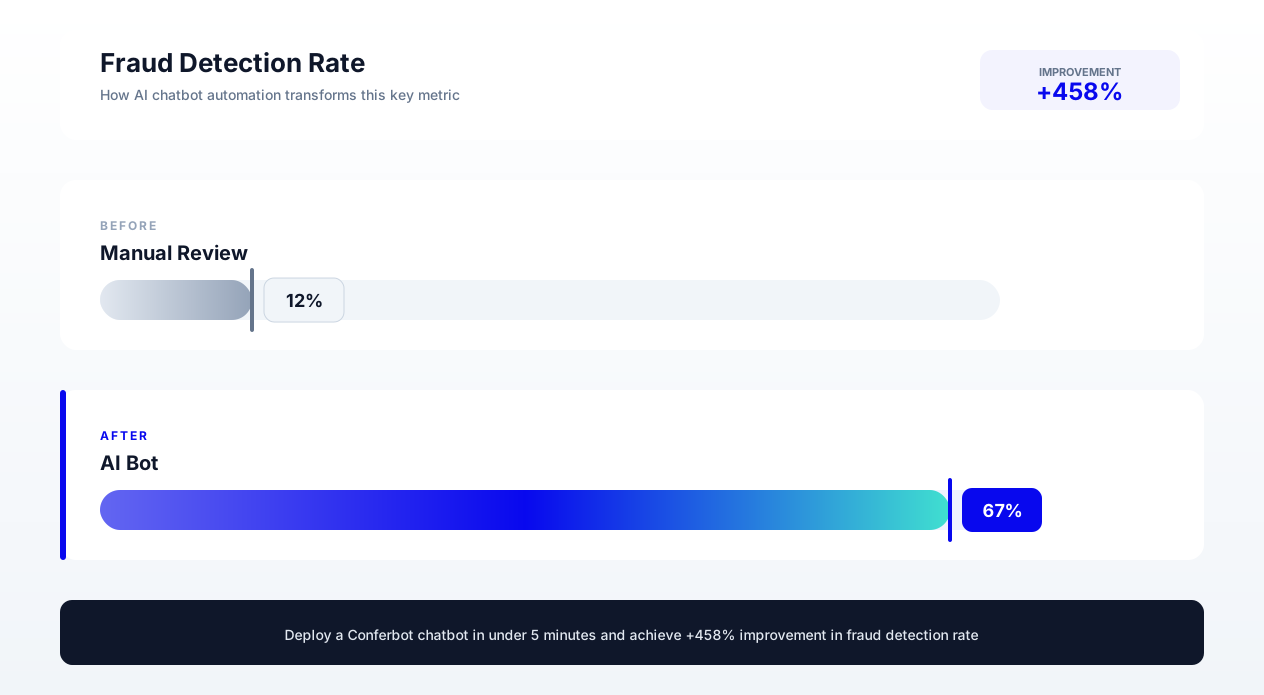
Warranty fraud is a persistent, material cost for manufacturers, tracked and discussed regularly by trade publications like Warranty Week. Common fraud types include claiming warranty on products purchased used, submitting doctored receipts, filing duplicate claims, misrepresenting defect causes (accidental damage claimed as manufacturing defect), and organized fraud rings that exploit warranty policies at scale. A chatbot with well-designed conversation flows and rule-based checks can add a meaningful layer of friction against suspicious claims, though it is worth being realistic about what a conversational AI platform can and cannot detect on its own - the most sophisticated fraud signals described below (computer vision, image forensics) generally require dedicated fraud-detection tooling rather than a general-purpose chatbot builder.
Behavioral and Data Pattern Analysis
A well-configured claims flow can flag conversation patterns that correlate with potential fraud:
Claim history correlation: Cross-referencing against previous claims by the same customer, same address, same email domain, or same device - something you can build using your CRM or warranty system integration - is one of the more reliably automatable fraud signals, since it is a straightforward database lookup rather than a judgment call.
Language patterns: Legitimate customers describe problems in natural, specific language ("The screen started flickering last Tuesday when I was watching a video"). Fraudulent claims often use generic language that matches warranty documentation verbatim ("The product has a defect in materials and workmanship") or overly technical descriptions inconsistent with a typical consumer.
Claim history correlation: The chatbot cross-references against previous claims by the same customer, same address, same email domain, or same device. Multiple claims from the same household within a short period, claims for recently purchased products, or claims for products known to have high fraud rates trigger elevated scrutiny.
Document Verification: What Is Realistic
Specialized document-forensics and computer-vision tools exist that can analyze receipt formatting, detect photo manipulation, and cross-check EXIF metadata - but this is a distinct category of technology from a conversational AI platform, and you should not assume a general-purpose chatbot builder includes it out of the box. What a chatbot flow can realistically do well is structural validation: confirming a receipt has the expected fields, checking that a serial number matches the expected format, and using integration data to confirm whether that serial number has already been used in a previous claim. For image-level forensic analysis, plan to pair your chatbot with dedicated fraud-detection or document-verification software rather than expecting the chatbot itself to perform it.
Risk Scoring and Routing
Rather than binary approve/deny decisions, a well-designed claims flow can assign a simple risk tier to each claim based on the rule-based signals available to it - matching serial numbers, claim history, and any fraud flags your other systems provide. Low-risk claims proceed through automated processing. Higher-risk claims are routed to a human reviewer with a summary of what triggered the flag.
This graduated approach ensures that legitimate customers are not burdened with excessive verification while suspicious claims get a closer look before payout. Because fraud costs are ultimately distributed across all claims as a cost of doing business, even a modest reduction in fraudulent payouts through better upfront verification can be worth pursuing.
Balancing Security and Customer Experience
The critical challenge in warranty fraud detection is avoiding false positives that frustrate legitimate customers. The chatbot must be configured with appropriate sensitivity thresholds - too aggressive and good customers feel accused; too lenient and fraud passes through. Best practice is to use fraud signals to adjust the verification process rather than to deny claims outright. A high-risk score might trigger additional verification questions or document requests rather than an immediate denial, allowing legitimate customers to prove their claim while making fraud significantly harder to execute.
For a broader look at keeping AI-driven claim decisions accurate, see our guide on preventing chatbot hallucinations.
Cost Savings Model: Quantifying the ROI of Warranty Chatbot Automation
Understanding the financial impact of warranty chatbot automation requires modeling both direct cost savings and indirect benefits. Below is a comprehensive, illustrative ROI framework - built around a hypothetical mid-size manufacturer - that you can adapt to your own claim volumes and cost structure.
Direct Cost Savings (Illustrative Example)
| Cost Category | Before Automation | After Chatbot Implementation | Savings |
|---|---|---|---|
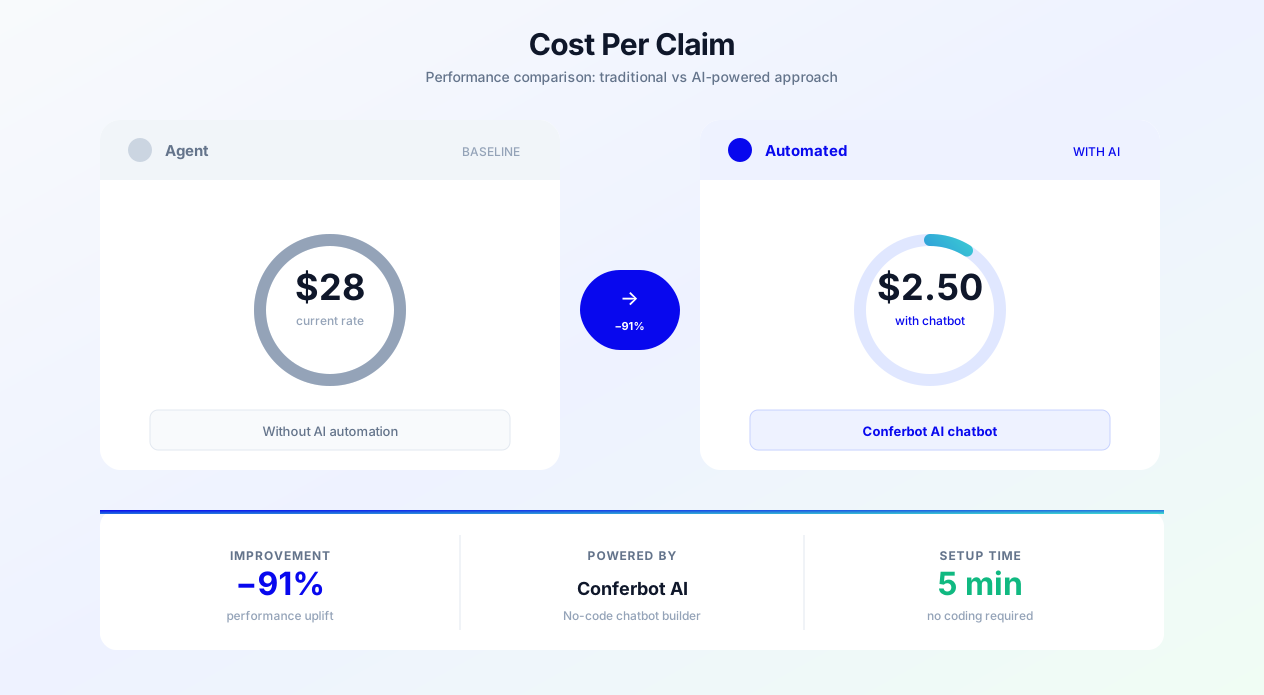
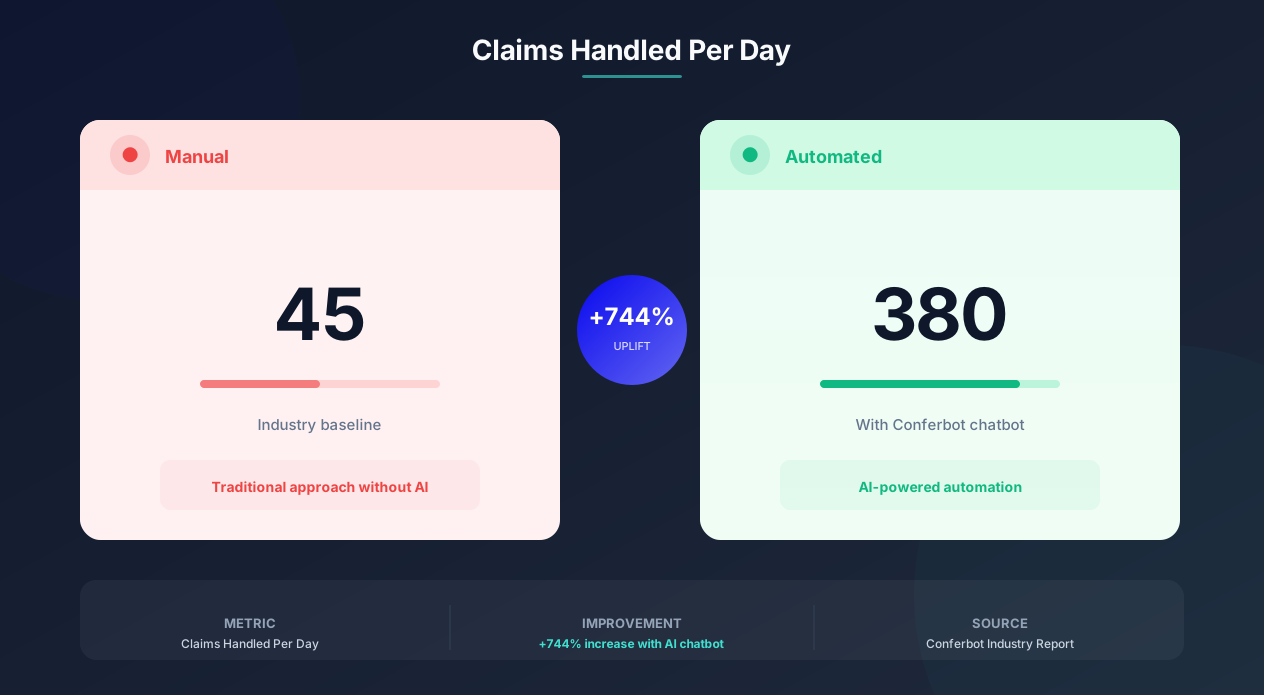
| Agent labor (claims processing) | $35 per claim x 5,000 claims/month = $175,000 | $35 x 1,100 escalated claims = $38,500 | $136,500/month (78%) |
| Agent labor (status inquiries) | $10 per inquiry x 11,500 inquiries/month = $115,000 | $10 x 575 complex inquiries = $5,750 | $109,250/month (95%) |
| Document re-collection (incomplete submissions) | $15 per follow-up x 3,100 cases/month = $46,500 | $15 x 310 cases = $4,650 | $41,850/month (90%) |
| Fraud losses | $8 per claim x 5,000 claims = $40,000 | $4.50 per claim x 5,000 = $22,500 | $17,500/month (44%) |
| After-hours staffing | $25,000/month (overnight and weekend coverage) | $0 (chatbot handles 24/7) | $25,000/month (100%) |
Total direct monthly savings: $330,100
Annual direct savings: $3,961,200
Implementation Costs
| Investment | One-Time Cost | Monthly Ongoing |
|---|---|---|
| Chatbot platform (Conferbot Business plan plus extra chat volume) | $0 | $2,500 |
| Integration development | $25,000 | $0 |
| Conversation design and testing | $15,000 | $0 |
| Training and change management | $10,000 | $0 |
| Ongoing optimization and maintenance | $0 | $3,000 |
Total first-year investment: $116,000
Ongoing annual cost: $66,000
ROI Calculation
First-year ROI: ($3,961,200 - $116,000) / $116,000 = 3,315% ROI
Ongoing annual ROI: ($3,961,200 - $66,000) / $66,000 = 5,902% ROI
Payback period: $116,000 / ($330,100/month) = 10.6 days
Indirect Benefits (Conservative Estimates)
Beyond direct cost savings, warranty chatbot automation drives additional value:
Customer retention improvement: Faster warranty resolution tends to increase repurchase rates, since a smooth claims experience is itself a reason to trust the brand again. Model this using your own repeat-purchase rate and revenue base rather than an industry-wide multiplier, since the effect size varies a great deal by category.
Agent redeployment: Agents freed from repetitive warranty tasks can be redeployed to revenue-generating activities (proactive outreach, complex sales support, VIP customer management). The revenue impact depends entirely on your redeployment strategy and what those agents do with the freed-up time.
Data insights: Automated claim data collection provides structured analytics on product failure patterns, enabling proactive quality improvements that reduce future warranty costs - a compounding benefit that pure cost-savings math tends to understate, since it improves the product itself rather than just the claims process.
For detailed case studies showing these savings in action, see our analysis of real chatbot cost savings implementations across multiple industries.
Customer Experience Improvements: From Frustration to Loyalty
Cost savings alone justify warranty chatbot implementation, but the customer experience improvements create long-term competitive advantages that compound over time. Here is how chatbot automation transforms the warranty experience from a brand liability into a loyalty driver.
Speed: From Days to Minutes
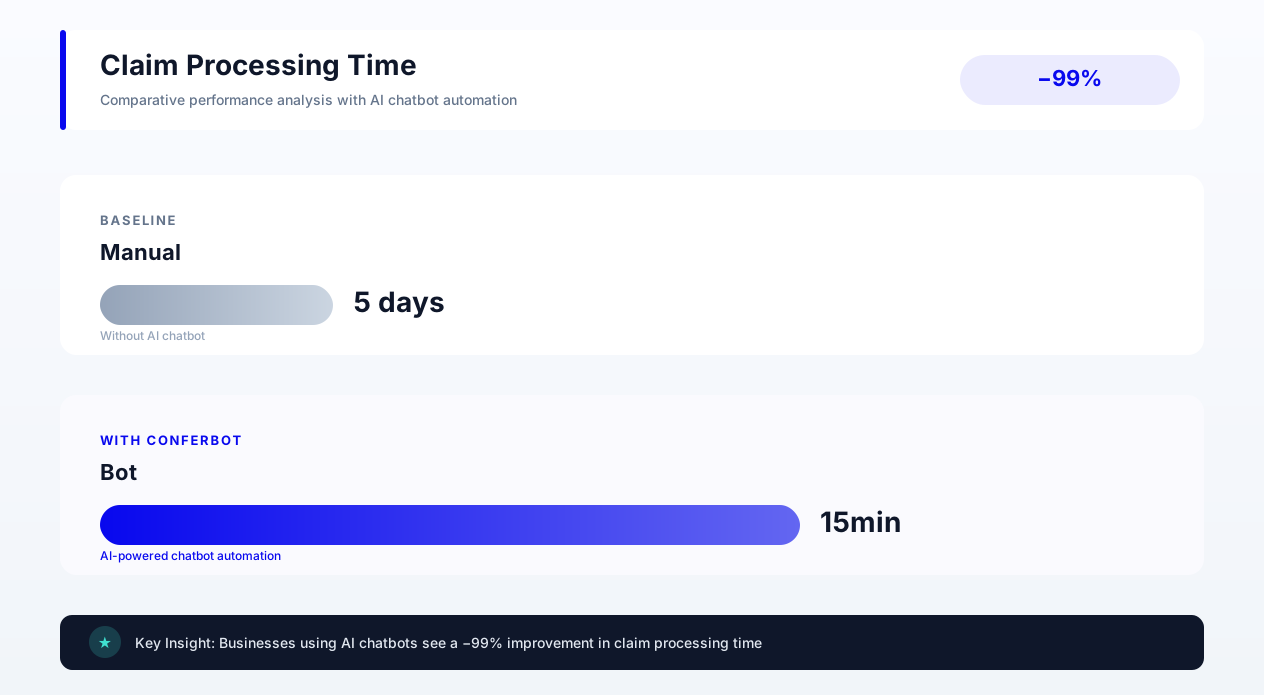
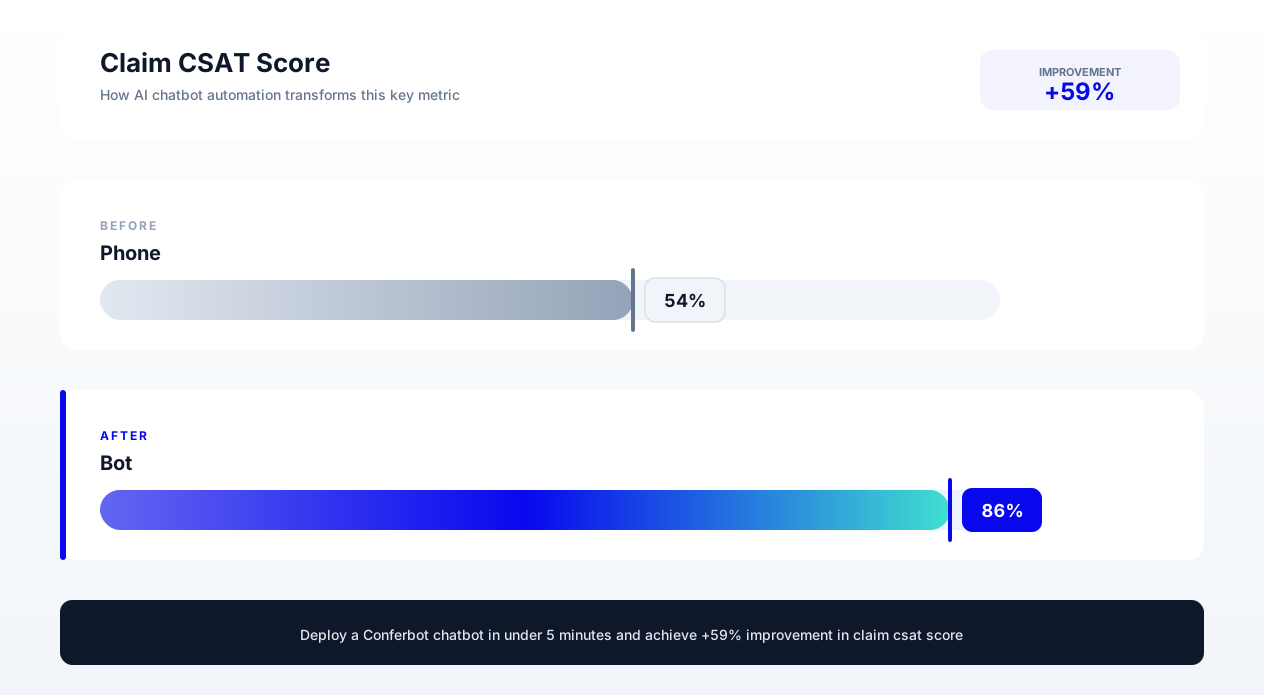
The most dramatic improvement is resolution speed. Traditional warranty claims take 7 to 14 days from submission to resolution. AI chatbots reduce this to minutes for simple claims and 1 to 2 days for complex ones. This speed improvement directly impacts customer satisfaction:
Zendesk's customer service research has repeatedly found that customers rank speed and immediacy among their top expectations, and that long wait times are consistently one of the most cited frustrations in customer service. A warranty chatbot that resolves eligible claims in under 5 minutes delivers an experience that exceeds customer expectations rather than merely meeting them.
Accessibility: Any Time, Any Channel
Warranty issues do not occur during business hours. A dishwasher leaks at 10 PM. A phone screen cracks on a Saturday morning. A laptop fails during a critical Sunday deadline. Traditional warranty processes force customers to wait until Monday - stewing in frustration and forming negative brand associations. AI chatbots are available 24/7 across every channel your plan supports: website chat on every plan, and WhatsApp and Facebook Messenger on Business-tier plans. Customers can initiate and complete claims whenever the need arises.
Transparency: No More Black Box Processing
Traditional warranty processes feel opaque to customers. They submit a claim and hear nothing for days or weeks, wondering if their claim was received, if it is being processed, or if it was denied without notification. Chatbots provide complete transparency: real-time status visibility, clear explanations of each processing stage, specific timelines with proactive updates, and immediate notification of decisions with detailed reasoning.
This transparency eliminates the anxiety that generates repeated support contacts and negative reviews. Customers who understand where their claim stands and what happens next are far less likely to leave negative feedback compared to customers left in the dark.
Consistency: Same Quality Every Time
Human agents have bad days, knowledge gaps, and varying levels of empathy. The 50th warranty call of a shift gets less patience than the first. Chatbots deliver consistent quality regardless of volume, time of day, or customer demeanor. Every customer receives the same thorough, patient, accurate service whether they are the first claim of the day or the ten-thousandth.
Personalization: Remembering Every Interaction
The chatbot remembers every previous interaction, purchase, preference, and communication. A returning customer does not need to re-explain their product history - the chatbot already knows what they own, previous issues they have reported, and their preferred communication style. This creates a personalized experience that feels attentive and respectful of the customer's time.
The combined effect of these experience improvements is measurable in your own CSAT, NPS, and review sentiment once you track them before and after launch - companies implementing warranty chatbots consistently report meaningful gains across all three, which in turn tends to translate into higher customer lifetime value and positive word-of-mouth that reduces acquisition costs.
Implementation Guide: Deploying Your Warranty Claims Chatbot
Implementing a warranty claims chatbot requires careful planning across conversation design, system integration, policy configuration, and change management, following best practices outlined by the IBM chatbot implementation guide. Here is a phased approach that minimizes risk while delivering value quickly.
Phase 1: Foundation (Weeks 1-2)
Define scope and policies: Document your current warranty policies in chatbot-readable format. For each product category, specify: warranty duration, coverage inclusions and exclusions, resolution options (replace, repair, refund), required documentation, and escalation criteria. This policy documentation becomes the chatbot's decision-making rulebook.
Map current workflows: Document existing claim flows end-to-end, identifying every decision point, information requirement, and system interaction. This reveals which steps are automatable immediately and which require human judgment.
Select integration priorities: Based on your technology stack, identify which systems need integration first. Priority order is typically: product/warranty database (for eligibility verification), claims management system (for claim creation and tracking), fulfillment system (for resolution execution).
Phase 2: Build and Configure (Weeks 3-4)
Design conversation flows: Create chatbot conversation scripts for each major warranty scenario: new claim submission, eligibility check, status inquiry, document upload, escalation request. Use branching logic to handle variations within each flow. Test flows with real historical claims to ensure they handle edge cases.
Configure integrations: Connect the chatbot to backend systems using APIs, webhooks, or middleware. Implement data mapping between chatbot conversation fields and system record fields. Test data flow in both directions (chatbot reading system data, chatbot writing to systems).
Set up fraud detection rules: Configure fraud scoring thresholds, define which signals contribute to the score, and establish routing rules for different risk levels. Start with conservative thresholds (low false positive rate) and tune over time.
Phase 3: Test and Validate (Weeks 5-6)
Internal testing: Run the chatbot through your complete catalog of warranty scenarios using test data. Verify eligibility determinations are accurate, documents are properly collected and stored, claims are correctly created in backend systems, and status tracking reflects real-time system state.
Pilot with real customers: Deploy to a limited segment (10-20% of traffic) and monitor performance. Track automation rate, escalation rate, customer satisfaction, and resolution accuracy. Compare outcomes to manual processing benchmarks.
Iterate and optimize: Based on pilot data, refine conversation flows, adjust escalation thresholds, and fix integration issues. Common pilot findings include: conversation dead-ends for unusual product types, integration timeouts during peak hours, and customer confusion about document requirements.
Phase 4: Full Deployment (Weeks 7-8)
Gradual rollout: Increase chatbot coverage from pilot segment to full traffic over 1-2 weeks. Monitor key metrics at each expansion step: automation rate (target: 70%+), escalation rate (target: less than 30%), CSAT (target: equal to or better than manual), resolution accuracy (target: 99%+).
Agent retraining: As the chatbot handles routine claims, retrain agents for complex scenarios that require human judgment. Agents should understand how to interpret chatbot-collected data, how to handle escalations with full context, and how to override chatbot decisions when appropriate.
Communication to customers: Announce the new warranty claims capability through email, website banners, and product documentation. Emphasize speed and convenience benefits. Provide clear instructions for customers who still prefer human assistance.
Phase 5: Optimization (Ongoing)
Continuous improvement: Monitor chatbot performance weekly. Identify conversations that result in customer frustration (repeated questions, abandoned flows, immediate escalation requests) and redesign those flows. Add new product categories, update policies as they change, and expand to additional channels based on customer demand.
With proper human handoff configuration, the chatbot seamlessly escalates to specialized warranty agents when needed - ensuring that automation enhances rather than replaces the human touch for complex situations. The goal is not to eliminate human involvement entirely but to reserve it for cases where human judgment, empathy, and creativity add genuine value.
For the handoff moments where a claim needs a human, follow the same principles in our chatbot human handoff guide.
How Conferbot Powers Warranty Claims Automation
Conferbot's AI chatbot platform provides solid general-purpose infrastructure for a workflow like warranty claims processing. Here is honestly how Conferbot's capabilities map to warranty claim requirements, including where you will need to bring your own tooling.
Multi-step conversation flows: Conferbot's visual flow builder supports the complex branching logic required for warranty claims - product identification, eligibility verification, document collection, and resolution determination all connected in a single coherent conversation that adapts to each customer's situation.
File upload: Customers can submit receipt photos, product defect images, and serial number photos directly in the chat interface. Treat this as collection and routing rather than automated verification - if you need automated image-quality or fraud analysis on submitted photos, plan to pair Conferbot with dedicated document-verification software rather than expecting that analysis natively.
API integration framework: Conferbot connects to backend systems through its integrations hub - Webhook, Zapier, HubSpot, SalesForce, and several other named integrations - plus Zendesk, Freshdesk, and Help Scout for helpdesk-side ticket actions. For warranty-specific systems like ServiceBench or Tavant that are not natively supported, route data through Zapier or a generic Webhook rather than expecting a purpose-built connector.
Multi-channel deployment: Deploy your warranty chatbot across your website (every plan) and, on Business-tier plans, WhatsApp, Facebook Messenger, Instagram, and Slack, from a single conversation design. SMS is not a supported channel.
Analytics and reporting: The analytics dashboard shows claim-related conversation volumes, escalation rates, resolution times, and customer satisfaction signals. Use it to identify trends in common customer pain points and opportunities for process optimization.
Security: Conferbot supports role-based access controls and standard data handling practices. If your compliance program requires a specific certification such as SOC 2, confirm current certification status directly with Conferbot rather than assuming it from this guide, since certifications change over time.
Companies using Conferbot for warranty claims automation can achieve strong automation rates for straightforward, well-documented claim types once flows and integrations are properly configured - the platform's combination of conversational AI and integration capabilities makes it a reasonable foundation for the complex, multi-step workflows that warranty claims require, with the caveats above about what is native versus what you will need to connect yourself.
Ready to transform your warranty claims process? Learn how Conferbot also automates returns and refunds using the same platform and integration infrastructure.
Was this article helpful?
Build and deploy in 10 minutes. No coding needed.
AI Chatbot for Warranty Claims FAQ
Everything you need to know about chatbots for ai chatbot for warranty claims.
About the Author
The Conferbot team writes about building, deploying, and improving AI chatbots.
View all articles