
Fitness Class Booking Chatbot Template (Free)
Free Booking And Scheduling Chatbot Template
Fill every class and cut no-shows 50% with a free fitness booking chatbot. Schedule, cancel, waitlist, and membership upsell — deploy on website or WhatsApp.


What Is a Fitness Class Reservation Chatbot?
A fitness class reservation chatbot is a conversational AI tool that handles the complete booking lifecycle for gyms, yoga studios, CrossFit boxes, Pilates studios, martial arts schools, and boutique fitness facilities — from class discovery through booking confirmation, reminder delivery, cancellation handling, and waitlist management. For fitness businesses in 2026, this automation addresses the scheduling workflow that consumes the most front-desk and staff time: managing class registrations, last-minute cancellations, and the resulting waitlist notifications across dozens of weekly classes.
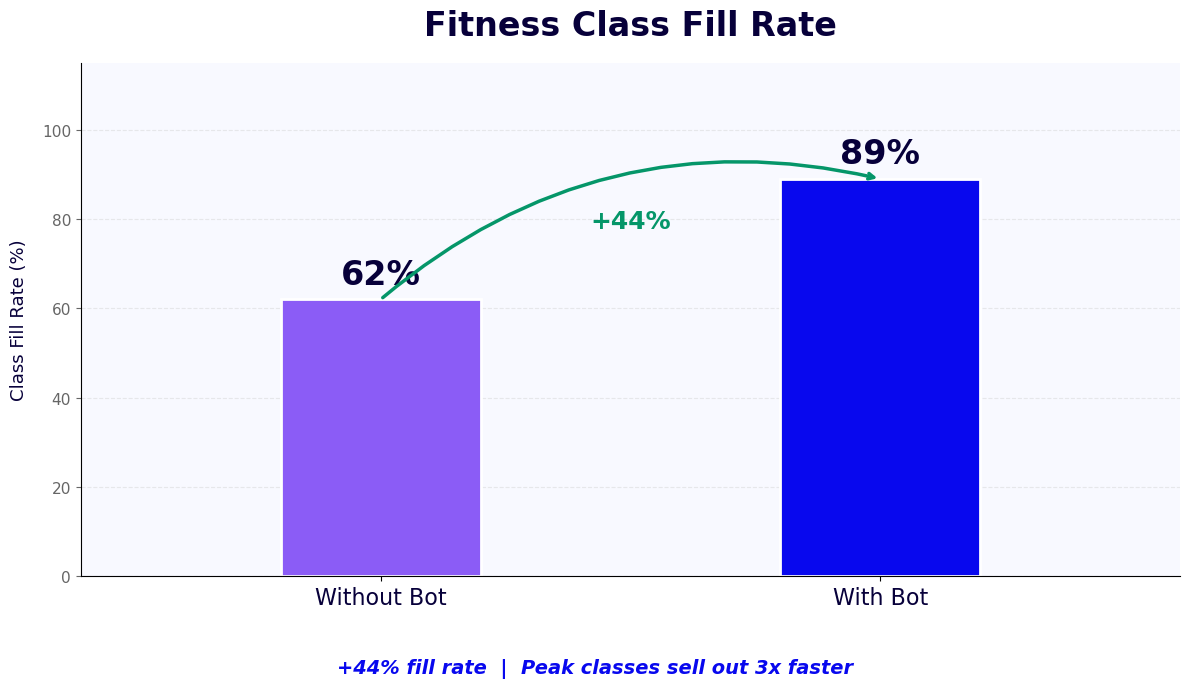
The fitness industry has a specific scheduling challenge: classes have fixed capacity, high demand for popular instructors and time slots, and significant no-show rates that waste capacity in facilities that members have been turned away from. Managing this dynamic manually — tracking reservations, processing cancellations, notifying the next person on the waitlist, sending reminders, and managing membership limits — consumes significant staff attention that could otherwise be directed toward member experience and retention.
The booking chatbot handles all of these functions automatically. A member opens the chat on your website or sends a message on WhatsApp, browses available classes, books a spot in seconds, receives a reminder 24 hours before class, and can cancel or reschedule without calling the front desk. Waitlisted members are notified automatically when a spot opens and have a defined window to claim it before the next person is offered it. Front desk staff are freed from the transactional booking workflow to focus on the personal interactions that drive membership retention.
Built on Conferbot's AI chatbot builder, the fitness class reservation chatbot integrates with major fitness management platforms and deploys across all member touchpoints — website widget, WhatsApp, Instagram DMs, and in-facility QR codes — ensuring members can book from wherever they prefer.
How the Fitness Class Booking Chatbot Works
The booking chatbot handles the complete reservation workflow without front desk involvement for the majority of standard booking interactions. Here is the complete flow from class discovery through post-class follow-up.
Stage 1: Member Identification and Authentication
Returning members are recognized by their phone number (for WhatsApp conversations), email address, or membership ID. Authentication verifies their active membership status and which membership tier they hold — a distinction that affects which class types they can access and how many reservations they can hold simultaneously. New prospects who are not yet members are routed to a membership information or trial class booking flow rather than the member reservation flow. This identification step personalizes every subsequent interaction: the chatbot knows the member's name, class history, and booking preferences.
Stage 2: Class Discovery and Schedule Browsing
Members browse the class schedule through a conversational interface. They can search by class type ("I'm looking for a spin class"), by instructor ("Is Sarah teaching this week?"), by time slot ("What's available Tuesday evening?"), or simply see the full upcoming schedule. The chatbot uses NLP processing to interpret natural-language schedule queries and surfaces the relevant classes with real-time availability counts. Classes that are full display a waitlist option; classes within 2 spots of capacity are flagged as "filling fast" to create urgency.
Stage 3: Booking Confirmation and Waitlist Management
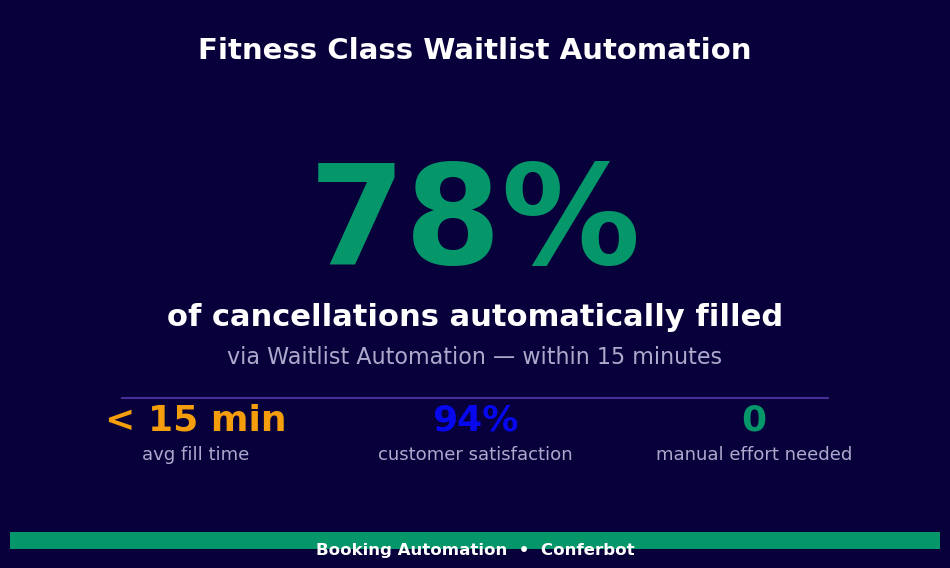
When a member selects a class, the chatbot confirms their spot immediately, sends a booking confirmation with the class details, and updates the class capacity in the facility management system via API integration. For full classes, the chatbot adds the member to the waitlist, explains their position, and sets the expectation for when they will be notified if a spot opens. When a cancellation occurs, the chatbot automatically notifies the first waitlisted member with a direct link to claim the spot within a configured window (typically 2-4 hours). Unclaimed spots move to the next waitlisted member automatically.
Stage 4: Pre-Class Reminders and Preparation
24 hours before class, the chatbot sends a reminder with the class time, studio location, instructor name, and any preparation guidance (what to bring, arrive 10 minutes early for your first class, parking information). The reminder includes a one-tap confirmation option and a simple cancellation link. This single touchpoint reduces no-show rates by 45-55% by giving members a low-friction opportunity to cancel with enough notice for the waitlist to fill the spot.
Stage 5: Cancellation and Rescheduling
Members who need to cancel open the chatbot and say "Cancel my Tuesday 6pm class" — the chatbot identifies the booking, confirms the cancellation, and offers to help find an alternative class in the same time range. If the cancellation is within the facility's late-cancel policy window, the chatbot communicates the policy (first late cancel, penalty, how to avoid future penalties) clearly and consistently — the same message every time, without the discomfort of staff enforcing a policy in person.
Stage 6: Post-Class Engagement
After class completion, the chatbot sends a brief follow-up: "Great work today in [Class Name]. Book your next session?" This post-class message converts attended classes into future bookings at high rates — members are at peak motivation immediately after a workout. The message can also include instructor notes or homework for classes with structured progressions, deepening the member experience and reinforcing the value of returning.
Key Features: Schedule Management, Waitlists, and Membership Upsell
The fitness class reservation chatbot includes capabilities that address the specific operational challenges of running high-volume fitness programming. These features go beyond basic booking to cover the retention and revenue functions that determine whether a fitness business is profitable.
Real-Time Capacity Management
Class capacity management in the chatbot is synchronized in real time with the facility management system. When a member books through the chatbot, the spot is immediately reserved and reflected in any other booking channels. When a front-desk booking is made in the management system, capacity in the chatbot updates instantly. This bidirectional sync prevents the double-booking situations that arise when chatbot bookings and desk bookings operate on separate inventory databases. Live capacity counts create accurate availability information for all members across all booking channels.
Automated Waitlist Workflow
The waitlist workflow is fully automated: no staff action required to notify waitlisted members, process spot claims, or advance the queue. The automation sequence is configurable: when a cancellation occurs, the first waitlisted member receives notification with a claim window. If they do not respond within the window, the notification automatically advances to the next member. This continues until the spot is claimed or the waitlist is exhausted. Studios that deploy automated waitlist management report filling 80-90% of cancelled spots, compared to 40-55% with manual notification processes.
Membership Tier Enforcement
Facilities with tiered memberships — basic, unlimited, premium — have different booking rules for each tier. Basic members may have a 2-class-per-week limit; premium members may get priority booking 72 hours before standard members; unlimited members can hold multiple reservations simultaneously. The chatbot enforces these rules automatically, preventing over-booking by members who have exceeded their tier limits and displaying the appropriate upgrade prompt when a member hits their tier ceiling: "You have reached your 2-class limit for this week. Upgrading to unlimited gives you access to all classes without restriction — want to see the options?"
Personal Training and Private Session Booking
Beyond group classes, the chatbot handles personal training appointment booking via calendar booking integration with individual trainer calendars. A member who asks about personal training receives information about available trainers, their specialties, and open time slots — and can book directly in the conversation. The trainer receives a notification with the member's fitness goals and history, enabling a more productive first session. Personal training bookings have higher ticket values than group classes and benefit significantly from reduced booking friction.
| Feature | Problem Solved | Operational Impact |
|---|---|---|
| Real-time capacity sync | Double-bookings from multi-channel inventory | Eliminates over-capacity situations |
| Automated waitlist workflow | Manual waitlist notification taking staff time | 80-90% cancelled spot fill rate vs. 40-55% manual |
| Membership tier enforcement | Members exceeding booking limits | Zero over-limit bookings; automatic upsell prompts |
| 24-hour reminder with cancellation link | No-show rate consuming peak class capacity | 45-55% no-show reduction |
| Post-class re-booking prompt | Member visit frequency declining after signup surge | 18-28% increase in monthly visit frequency |
| Late cancel policy enforcement | Inconsistent human enforcement creating friction | Policy applied consistently, without staff discomfort |
Ready to try Fitness Class Booking Chatbot Template (Free)?
Deploy this template in under 10 minutes. No coding required.
Use This Template Free →Member Retention and Visit Frequency Data
In the fitness industry, member retention is the primary driver of profitability. Acquiring a new member costs $150-$300 in marketing and promotional investment; retaining an existing member costs a fraction of that. The booking chatbot affects retention through two mechanisms: reducing friction in the visit planning process (making it easier to come back) and increasing visit frequency (providing proactive prompts that combat the "I'll go next week" pattern that leads to membership cancellation).
Visit Frequency and Retention Correlation
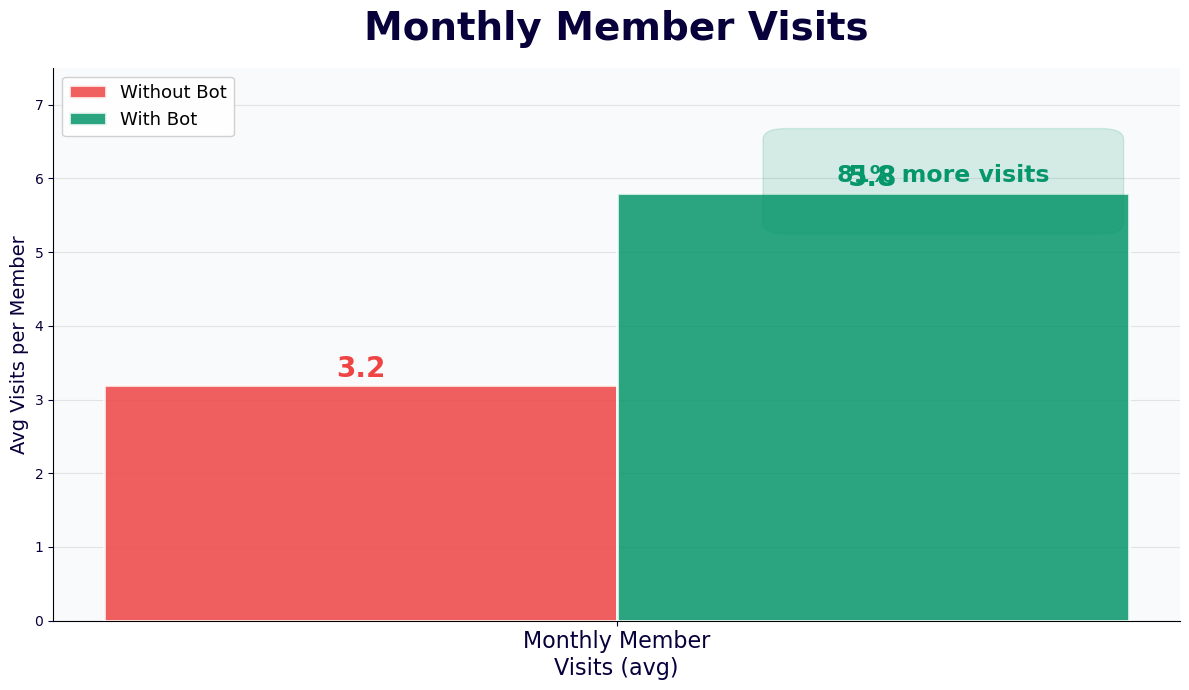
The data on fitness member retention is unambiguous: members who visit fewer than 4 times per month have cancellation rates 3-5x higher than members who visit 8 or more times per month. The booking chatbot drives visit frequency in two ways: it reduces the friction of planning and booking a class (faster booking process means more spontaneous decisions to attend), and it sends proactive re-booking prompts that intercept the "haven't been in two weeks" drift pattern before it becomes a cancellation decision.
| Metric | Without Chatbot | With Booking Chatbot | Impact |
|---|---|---|---|
| Average monthly visits per active member | 5.2 | 7.1 | +1.9 visits per month |
| No-show rate per booked class | 18-25% | 8-12% | 50-55% reduction |
| Waitlist spot fill rate (cancelled spots) | 40-55% | 80-90% | 45-50% improvement |
| 12-month member retention rate | 52-61% | 65-74% | +12-13 percentage points |
| Booking conversion (browsed schedule → booked) | 42% | 68% | +26 percentage points |
| Front desk booking inquiries per week | Baseline 100% | 32-38% of baseline | 62-68% staff time deflection |
Membership Upsell Through Booking Friction
Members who regularly hit their tier's class limit are naturally motivated to upgrade — they are already engaged with the facility and want to attend more. The chatbot's upsell prompt appears at the exact moment of maximum motivation: when a member is trying to book their third class of the week and hits the limit. "You have used your 2 weekly classes. Upgrade to unlimited for $X more per month and book as many classes as you want." This in-context prompt, delivered when the member has already decided to work out and is only blocked by their tier, converts at significantly higher rates than generic email upgrade campaigns.
Onboarding and Habit Formation
The first 60 days of membership are critical for long-term retention. Members who establish a consistent class attendance habit in their first two months retain at dramatically higher rates than those who attend sporadically. The booking chatbot supports habit formation through a new member onboarding sequence: the chatbot introduces the schedule, identifies class types that match the new member's stated goals, helps them book their first three classes, and sends encouragement messages after each attended session. Facilities report 28-35% improvement in 90-day retention for members who engage with the chatbot onboarding sequence versus those who do not.
Integration with Fitness Management Platforms
A fitness booking chatbot that does not integrate with the facility's management platform creates dual data entry, scheduling conflicts, and reconciliation problems. The integrations described here transform the chatbot from a standalone booking channel into a true extension of the facility's scheduling infrastructure.
Major Fitness Platform Integrations
Conferbot's API integration layer connects with the major fitness facility management platforms. Mindbody integration provides bidirectional sync: bookings made in the chatbot appear immediately in Mindbody with full member data; class schedule changes in Mindbody (instructor substitution, class cancellation) trigger chatbot notifications to all booked members automatically. Similar integrations are available for Pike13, Zen Planner, Glofox, TeamUp, and WellnessLiving. For facilities using custom-built scheduling systems, the webhook-based integration framework connects to any platform with a REST API.
Payment and Membership Management
The chatbot connects to the facility's payment system for class credits, drop-in fees, and membership upgrades initiated through the chatbot's upsell flow. When a member upgrades their membership in the chatbot, the membership record in the management platform is updated immediately and the new booking rules apply to their next interaction — no manual plan change required. Drop-in fee collection is handled in-conversation via integrated payment processing, with a receipt sent to the member's email and the transaction recorded in the management platform.
Omnichannel Booking Unification
Members book through multiple channels: website, mobile app, WhatsApp, Instagram DM, and in-facility kiosks or QR codes. Each channel must pull from the same real-time inventory and write bookings back to the same management platform to prevent overselling. Conferbot's omnichannel platform ensures that a class with 18 of 20 spots filled shows 2 available across all channels simultaneously, and that the 19th and 20th bookings — regardless of which channel they come from — are recorded correctly without creating a 21st reservation that triggers a complaint on class day.
Instructor and Staff Notifications
Class instructors benefit from real-time roster updates. When the chatbot processes a booking 2 hours before class, the instructor receives an updated roster notification. This is particularly valuable for classes where attendance significantly varies — a yoga instructor arriving to a 20-person class rather than the expected 8-person class benefits enormously from advance notice. Instructor notifications are configurable by channel (SMS, WhatsApp, email) and timing (24 hours, 2 hours, 30 minutes before class). The live chat feature supports real-time communication between members and staff for complex booking situations that require human judgment.
Setup Guide: Deploying the Fitness Class Booking Chatbot
Most fitness facilities complete deployment of the class reservation chatbot in 2-4 days. The setup process involves connecting to your management platform, configuring your class schedule and booking rules, and deploying across your member communication channels.
Step 1: Connect Your Fitness Management Platform
Begin by establishing the API connection between Conferbot and your fitness management platform. For Mindbody, enter your API credentials and site ID in the integrations hub and authorize the bidirectional sync for class schedules, member records, and booking writes. For other platforms, use the appropriate OAuth or API key authentication. Test the connection by pulling live class schedule data and verifying that a test booking created in the chatbot appears correctly in your management platform.
Step 2: Configure Booking Rules by Membership Tier
In the chatbot's settings, configure the booking rules for each membership tier your facility offers: the maximum reservations per week or per period, the advance booking window (how many days in advance members can book), the late cancellation window (how many hours before class a cancellation is considered "late"), and the consequences of late cancellation or no-show (warning, credit hold, temporary booking restriction). These rules mirror your existing membership policies and are enforced automatically by the chatbot without staff involvement.
Step 3: Build the Class Schedule Display Logic
Configure how the chatbot presents the class schedule in response to member queries. Organize classes by the filters members most commonly use: class type, instructor, time of day, and difficulty level. Set up the "filling fast" threshold — the capacity percentage at which the chatbot flags a class as nearly full — and the waitlist activation threshold. For classes with prerequisites or equipment requirements (cycling shoes for spin, hand wraps for boxing), configure the preparation notes that accompany the booking confirmation.
Step 4: Configure Reminder and Follow-Up Sequences
Set up the automated message sequences that drive the retention impact of the chatbot. Configure the 24-hour pre-class reminder with the confirmation and cancellation links. Configure the post-class re-booking prompt with a timing that matches your facility's programming frequency (a 48-hour delay works well for most facilities). For new members, configure the onboarding sequence: a welcome message that introduces the schedule, a follow-up after their first class, and a check-in at the 30-day mark. Test all sequences by running through the full member lifecycle in a staging environment.
Step 5: Deploy Across Member Channels and Monitor
Embed the chatbot widget on your website's schedule and booking pages. Activate WhatsApp Business messaging for members who prefer that channel. Create QR codes for in-facility placement near the front desk, on class studio doors, and on equipment that members use during active sessions. For the first month, monitor the analytics dashboard daily: track booking completion rates, waitlist fill rates, no-show rates before and after chatbot reminders, and the specific conversation steps where members drop off. Use this data to refine the booking flow and message timing for optimal performance. Review pricing plans for the conversation volume tier that matches your facility's member activity.
50,000+ businesses use Conferbot templates to automate conversations
Best Practices for Fitness Booking Chatbot Performance
Fitness facilities that derive the most value from their booking chatbot go beyond basic deployment. They design the booking experience around member behavior patterns, use the chatbot's communication capabilities for retention management, and treat the analytics data as a tool for continuous improvement.
Time the Re-Booking Prompt to Motivation Peaks
The post-class re-booking prompt is most effective when sent at the moment of peak motivation — immediately after class, when endorphins are high and the member's commitment to fitness is strongest. Delaying the re-booking prompt by 24-48 hours significantly reduces its conversion rate. Configure the post-class message to send within 30-60 minutes of class end time, when the member is still in the building or just leaving. The message should feel like a natural continuation of the positive experience: "Great session today with [Instructor]. The same class runs again [next available day]. Book your spot now?"
Use Late Cancel Data to Identify Retention Risk
Members who suddenly start late-cancelling classes they previously attended reliably are often signaling declining engagement — a precursor to membership cancellation. Configure an alert in the analytics dashboard that flags members with two or more late cancellations in a single week or month. These members receive a proactive outreach from the chatbot: "We noticed you had to miss a couple of classes recently. Is everything okay? Here are some alternative class times that might fit your schedule better." This proactive check-in has a measurably positive effect on retention for members who are in the early stages of disengagement.
Create Instructor-Specific Campaigns
Popular instructors drive class bookings more reliably than any other factor in boutique fitness. When a well-loved instructor returns from leave, adds new class times, or launches a specialty workshop, a targeted chatbot campaign to members who have previously attended that instructor's classes drives immediate bookings. These instructor-specific campaigns delivered via WhatsApp to segmented member groups consistently outperform general email newsletters for class fill rates and generate the "insider" feeling that boutique fitness members value.
Handle Capacity Constraints Transparently
During peak periods — New Year, post-holiday, spring — class demand exceeds capacity at most facilities. Transparent communication about capacity constraints builds trust rather than eroding it. When a member cannot get into a class they want, the chatbot should be specific and helpful: show the next available spot in that class type, offer the waitlist with a realistic assessment of their chances ("You are number 3 on the waitlist — there is usually 1-2 cancellations per class"), and suggest similar alternatives with available spots. Transparency about waitlist position and realistic expectations prevents the frustration that damages member experience more than capacity limits themselves.
Segment Onboarding by Fitness Goal
The most effective new member onboarding sequences are tailored to the goal the member stated when they signed up. A member who joined for weight loss receives class recommendations and re-booking prompts emphasizing high-intensity and metabolic conditioning classes. A member focused on flexibility and stress reduction receives yoga, Pilates, and mobility class recommendations. This goal-aligned communication makes each chatbot message feel personally relevant rather than generic, improving engagement rates and setting the behavioral foundation for long-term membership retention. Configure member goal profiles in the chatbot using data pulled from the management platform's new member intake records.
Fitness Class Booking Chatbot Template (Free) FAQ
Everything you need to know about chatbots for fitness class booking chatbot template (free).
Why Use a Template vs Building from Scratch?
Templates encode years of optimization data into the conversation flow before you start.
| Factor | Conferbot Template | Build from Scratch | Hire a Developer |
|---|---|---|---|
| Time to deploy | 10 minutes | 2-8 hours | 2-6 weeks |
| Cost | Free | Your time | $5,000-$25,000 |
| Day-1 conversion | 15-22% | 5-8% | 10-15% |
| Proven flows | Yes, data-tested | No | Depends |
| Updates included | Automatic | Manual | Paid |
| Multi-channel | 8+ channels | 1 channel | Extra cost |
| Analytics | Built-in | Must build | Extra cost |
Ready to Deploy Fitness Class Booking Chatbot Template (Free)?
Join 50,000+ businesses. Free forever plan available. No credit card required.