
Product Comparison Tool Chatbot
Free E-commerce And Retail Chatbot Template
An interactive product comparison chatbot that helps shoppers compare features, prices, and specifications of products side by side. It guides users through category selection, product picks, and delivers a clear comparison with a winner recommendation to drive confident purchase decisions.


What Is a Product Comparison Chatbot?
A product comparison chatbot is an AI-powered conversational tool that helps shoppers evaluate and compare multiple products side by side within a natural chat interface. Instead of forcing customers to open a dozen browser tabs, toggle between spec sheets, and manually build spreadsheets, a product comparison tool bot distills the decision-making process into a guided conversation that surfaces exactly the information that matters to each buyer.
Think of it as a knowledgeable sales consultant who has memorized your entire product catalog -- every specification, price point, availability status, and customer review -- and can recall any detail instantly. The shopper simply tells the bot what they are looking for ("I need a laptop for video editing under $1,500") and the chatbot narrows the catalog, presents the strongest contenders, and walks through the differences feature by feature.
Traditional comparison pages are static. They show fixed grids that overwhelm users with data and assume every shopper cares about the same attributes. A product comparison chatbot is dynamic: it learns which criteria matter most to the individual -- whether that is battery life for a commuter, thread count for a textile buyer, or API rate limits for a developer choosing a SaaS plan -- and restructures the comparison around those priorities.
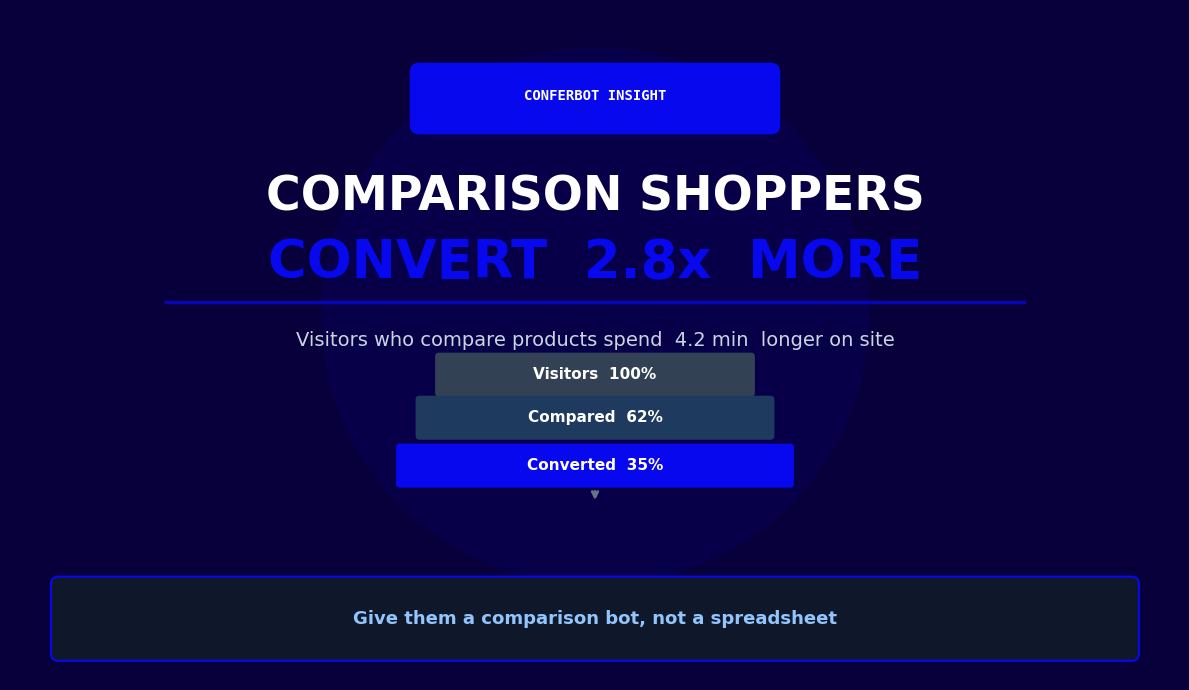
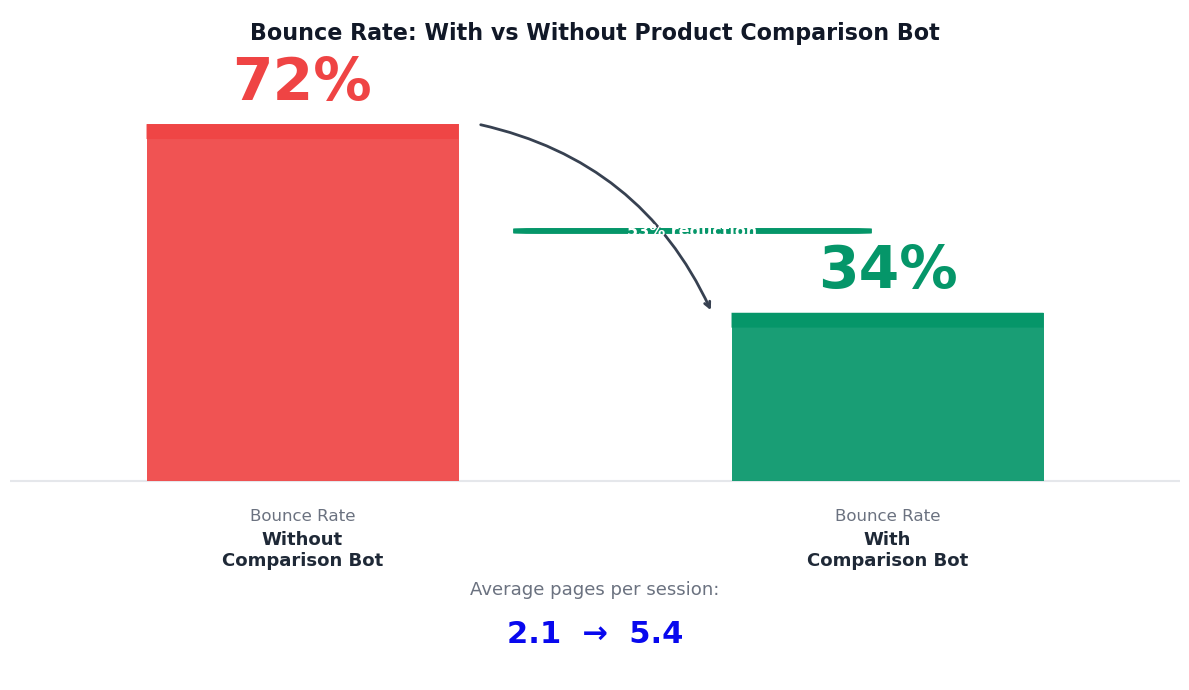
In 2026, buyers complete an average of 70% of their research online before ever contacting a sales team. If your site cannot help them compare options quickly and confidently, they will find a competitor that can. A website chatbot that offers instant, personalized comparisons keeps visitors engaged longer, reduces bounce rates, and dramatically increases the likelihood of a purchase.
Conferbot's no-code builder makes it straightforward to deploy a product comparison chatbot that connects to your catalog, understands natural language queries via AI integration, and delivers rich comparison cards across your website, WhatsApp, and Messenger. You do not need developers, and the bot can be live in under a day.
This page covers everything you need to know about building and deploying a product comparison chatbot: how the conversation flow works, the features that set it apart from static pages, industry-specific use cases, integration requirements, ROI data, and a step-by-step setup guide.
How a Product Comparison Chatbot Works
The conversation flow of a product comparison chatbot follows a structured yet flexible path that mirrors how an expert human advisor guides a buyer through a decision. Here is the step-by-step flow from initial query to purchase-ready recommendation.
Step 1: Intent Recognition
The chatbot detects that the visitor wants to compare products. This can happen through an explicit request ("Compare the iPhone 16 and Galaxy S25") or an implicit signal ("I am not sure which project management tool is right for my team"). Conferbot's NLP engine classifies the intent and routes the conversation into the comparison workflow.
Step 2: Requirement Gathering
Before presenting any products, the bot asks clarifying questions to understand the shopper's priorities. What is the primary use case? What is the budget range? Are there any must-have features or deal-breakers? This step is critical because it transforms a generic comparison into a personalized evaluation. The bot adapts its questions based on the product category -- asking about screen size and refresh rate for monitors, or asking about team size and integrations for SaaS tools.
Step 3: Catalog Search and Filtering
Using the gathered requirements, the chatbot queries your product catalog through API integrations or a synced product feed. It filters out products that do not meet the stated criteria and selects the top candidates. The bot balances relevance with variety, ensuring the shortlist includes options at different price points and with different strength profiles.
Step 4: Side-by-Side Presentation
The chatbot presents the shortlisted products in a structured comparison format. Each product is displayed with key specifications, pricing, ratings, and images. Attributes are aligned so the shopper can scan vertically through each criterion. The bot highlights where one product excels and where another falls short, using the priorities the shopper stated earlier.
Step 5: Deep-Dive Questions
After the initial comparison, shoppers inevitably have follow-up questions: "Does the cheaper one have the same warranty?" or "How does battery life compare in real-world tests?" The chatbot answers these using detailed product data and, where available, aggregated review insights. This conversational deep-dive replaces the tedious process of hunting through separate product pages.
Step 6: Decision Support and Conversion
Once the shopper has enough information, the bot offers a clear recommendation based on the stated requirements and provides a direct path to purchase: an add-to-cart button, a booking link, or a lead capture form depending on your business model. If the shopper is not ready, the bot can save the comparison and send a follow-up via WhatsApp or email.
This guided flow consistently outperforms self-service comparison pages because it reduces cognitive load, eliminates information overload, and gives each shopper a comparison tailored to their specific needs rather than a one-size-fits-all grid.
Key Features of a Product Comparison Chatbot
A high-performing product comparison chatbot needs a specific set of capabilities that go beyond basic question-and-answer functionality. These features transform it from a simple FAQ bot into a genuine decision-support tool that drives conversions.
| Feature | What It Does | Business Impact |
|---|---|---|
| Side-by-side comparison cards | Displays products in aligned columns with specs, prices, and images | Reduces decision time by 40-60% |
| Dynamic filter by specs | Lets users narrow options by budget, features, brand, or ratings in conversation | Surfaces relevant products faster |
| Real-time price alerts | Notifies users when a compared product drops in price or goes on sale | Recovers 12-18% of undecided shoppers |
| Weighted scoring | Ranks products based on the user's stated priorities (e.g., performance vs. price) | Increases purchase confidence |
| Review sentiment summary | Aggregates customer reviews into pros/cons summaries for each product | Builds trust and reduces returns |
| Save and share comparisons | Generates a shareable link or PDF of the comparison for team decisions | Supports B2B buying committees |
| Multi-language support | Conducts comparisons in the shopper's preferred language | Expands addressable market |
Side-by-Side Comparison Cards
The core experience is the visual comparison. The chatbot renders rich cards that place products next to each other, aligning specifications row by row. This is not a static table -- the bot dynamically highlights the winning product for each attribute based on the user's priorities. If a shopper said battery life matters most, the bot visually emphasizes that row and marks the leader.
Dynamic Filtering in Conversation
Rather than presenting every product in your catalog, the bot lets users refine their shortlist conversationally. "Remove anything over $800" or "Only show me options with at least 16 GB RAM" instantly updates the comparison. This natural-language filtering is far more intuitive than checkbox-based faceted search, especially on mobile devices where screen space is limited.
Real-Time Price and Availability
The chatbot connects to your inventory and pricing systems through API integrations to ensure every comparison reflects current prices, active promotions, and stock levels. Out-of-stock items are flagged or automatically replaced with available alternatives, so shoppers never hit a dead end.
AI-Powered Recommendations
After the comparison, Conferbot's AI engine synthesizes the user's requirements, the product data, and behavioral patterns to offer a clear recommendation. This "If I were you, I would choose X because..." moment replicates the advisory role that drives conversions in physical retail. Businesses report that AI-recommended products convert at 2-3x the rate of self-selected products.
Combined, these features create a comparison experience that is faster, more personalized, and significantly more effective at driving purchase decisions than any static page or manual research process.
Ready to try Product Comparison Tool Chatbot?
Deploy this template in under 10 minutes. No coding required.
Use This Template Free →Use Cases by Industry
Product comparison chatbots deliver value across any industry where buyers evaluate multiple options before purchasing. Here are the highest-impact verticals and how a comparison bot transforms the buying experience in each.
E-Commerce and Online Retail
Online retailers with large catalogs benefit enormously from comparison bots. A shopper looking for running shoes does not want to scroll through 200 results -- they want to tell a bot "I need stability running shoes for flat feet, size 10, under $150" and see the top three options compared by cushioning, weight, durability rating, and price. E-commerce chatbots that offer guided comparisons see 25-40% higher conversion rates than stores relying on static filter pages alone. Fashion, home goods, sports equipment, and beauty products are all categories where conversational comparison excels.
Consumer Electronics
Electronics purchases involve dense technical specifications that most consumers struggle to interpret. A comparison chatbot translates specs into practical terms: instead of listing "Snapdragon 8 Gen 3 vs. A17 Pro," the bot explains "Both phones handle gaming and multitasking smoothly, but Phone A has better battery life for heavy use." This consultative approach is particularly effective for smartphones, laptops, TVs, cameras, and smart home devices where spec sheets alone rarely help non-technical buyers make confident decisions.
SaaS and B2B Software
SaaS buyers often compare three to five tools before committing. A comparison chatbot on your website lets prospects compare your product against competitors or compare your own plan tiers. The bot asks about team size, required integrations, budget, and must-have features, then presents a tailored comparison that naturally highlights your product's strengths. This is a powerful lead generation tool -- prospects who engage with a comparison bot are significantly more qualified and convert at higher rates because they have already evaluated alternatives and chosen your solution.
Automotive
Car buyers spend weeks researching online before visiting a dealership. A comparison chatbot on a dealer's or manufacturer's website lets shoppers compare models by fuel economy, safety ratings, cargo space, technology features, and monthly payment estimates. The bot can schedule a test drive for the top pick, turning research into a dealership visit. Dealers using comparison bots report 30% more test drive bookings from their websites.
Financial Products
Credit cards, insurance policies, loans, and investment accounts all require careful comparison. A chatbot guides users through eligibility criteria, fee structures, interest rates, and benefits, presenting a clear side-by-side view. For regulated industries, the bot ensures all required disclosures are included in the comparison, combining compliance with a superior user experience. Banks and fintech companies using comparison bots see higher application completion rates because the bot prequalifies users during the comparison itself.
Regardless of industry, the core value is the same: a product comparison chatbot collapses the research phase, accelerates decisions, and keeps buyers on your platform instead of losing them to competitor sites.
Integration with Product Catalogs
The accuracy and usefulness of a product comparison chatbot depends entirely on its connection to your product data. A bot that serves stale prices, missing specs, or out-of-stock recommendations will damage trust and hurt conversions. Here is how to build a robust catalog integration that keeps your comparison chatbot reliable and current.
Direct Platform Integrations
Conferbot supports direct integrations with major e-commerce platforms including Shopify, WooCommerce, Magento, and BigCommerce. These connectors sync your product catalog automatically -- names, descriptions, images, variants, pricing, and stock levels flow into the chatbot's knowledge base without manual intervention. When you update a price or mark a product as discontinued in your store, the chatbot reflects the change within minutes.
API and Webhook Integration
For custom catalogs, headless commerce setups, or proprietary product databases, Conferbot's API integration framework lets you connect any data source. You define the endpoints, the chatbot queries them in real time during conversations. This approach works for SaaS pricing pages, automotive inventory systems, financial product databases, and any other structured product data. Webhooks can push updates to the chatbot when products change, ensuring zero lag between your system of record and the bot's knowledge.
Product Data Enrichment
Raw catalog data is often insufficient for meaningful comparisons. A product listing might include basic specs but lack the contextual information that helps buyers decide -- things like "best for beginners," "editor's choice for battery life," or aggregated review sentiment. Conferbot's AI layer enriches your product data by generating natural-language summaries, extracting key differentiators, and synthesizing customer review themes. This enrichment transforms dry specification lists into conversational comparison content.
Handling Large Catalogs
Retailers with thousands or millions of SKUs need a comparison bot that scales. Conferbot indexes your catalog for fast semantic search, so even a query like "something similar to the Sony WH-1000XM5 but cheaper" returns relevant results in under a second. The bot uses vector similarity and attribute matching to find comparable products across your catalog, even when the shopper does not know exact model names.
Multi-Source Comparisons
Some businesses need to compare their products against competitor offerings. A comparison chatbot can integrate data from multiple sources -- your internal catalog plus publicly available competitor data -- to deliver honest, transparent comparisons. This builds trust with buyers and positions your brand as a helpful advisor rather than a one-sided sales pitch. Financial services, SaaS, and telecom companies frequently use this approach to win buyers who are actively evaluating alternatives.
A well-integrated product comparison chatbot is only as good as its data. Invest in reliable, real-time catalog connections, and the bot will consistently deliver comparisons that help shoppers make confident purchase decisions on your platform.
Comparison Chatbot vs. Static Comparison Pages
Most websites that offer product comparisons rely on static comparison tables -- fixed grids that display the same attributes for every visitor regardless of what they care about. While these pages have their place, a product comparison chatbot represents a fundamentally different and more effective approach to helping buyers decide. Here is how the two methods stack up.
| Capability | Static Comparison Page | Product Comparison Chatbot |
|---|---|---|
| Personalization | Same view for all visitors | Adapts to each user's priorities and budget |
| Number of products | Limited to 3-5 side by side | Can evaluate entire catalog and shortlist dynamically |
| Follow-up questions | Not possible -- user must search elsewhere | Instant deep-dive on any attribute or concern |
| Mobile experience | Wide tables are hard to read on small screens | Conversational format works naturally on any device |
| Data freshness | Manual updates, often outdated | Real-time sync with catalog and pricing systems |
| Conversion path | User must navigate away to purchase | Direct add-to-cart or booking within the conversation |
| Lead capture | Requires separate forms | Natural lead qualification during the comparison |
| Analytics | Pageviews and time on page | Full conversation analytics: criteria used, products considered, drop-off points |
The Personalization Advantage
A static comparison page shows the same 15 rows of specs to a power user and a first-time buyer alike. The power user might want those details, but the first-time buyer is overwhelmed and leaves. A chatbot shows each visitor only the information relevant to their stated needs, progressively disclosing detail as the conversation deepens. This personalization is the single biggest reason comparison chatbots outperform static pages in conversion rate tests.
Mobile-First Comparison
Over 60% of online shopping now happens on mobile devices, and wide comparison tables are notoriously difficult to use on small screens. They require horizontal scrolling, squinting at tiny text, and endless pinch-to-zoom gestures. A chatbot's conversational format is inherently mobile-friendly -- it presents information in digestible messages that fit naturally on any screen size, making product comparison effortless on phones and tablets.
Conversion Path Integration
Static comparison pages are informational dead ends. The user reads the comparison, decides which product they prefer, and then has to navigate to that product's page to make a purchase. Every extra click is a potential drop-off. A comparison chatbot keeps the buyer in a single conversation thread from research to purchase, offering an add-to-cart button or checkout link the moment the decision is made.
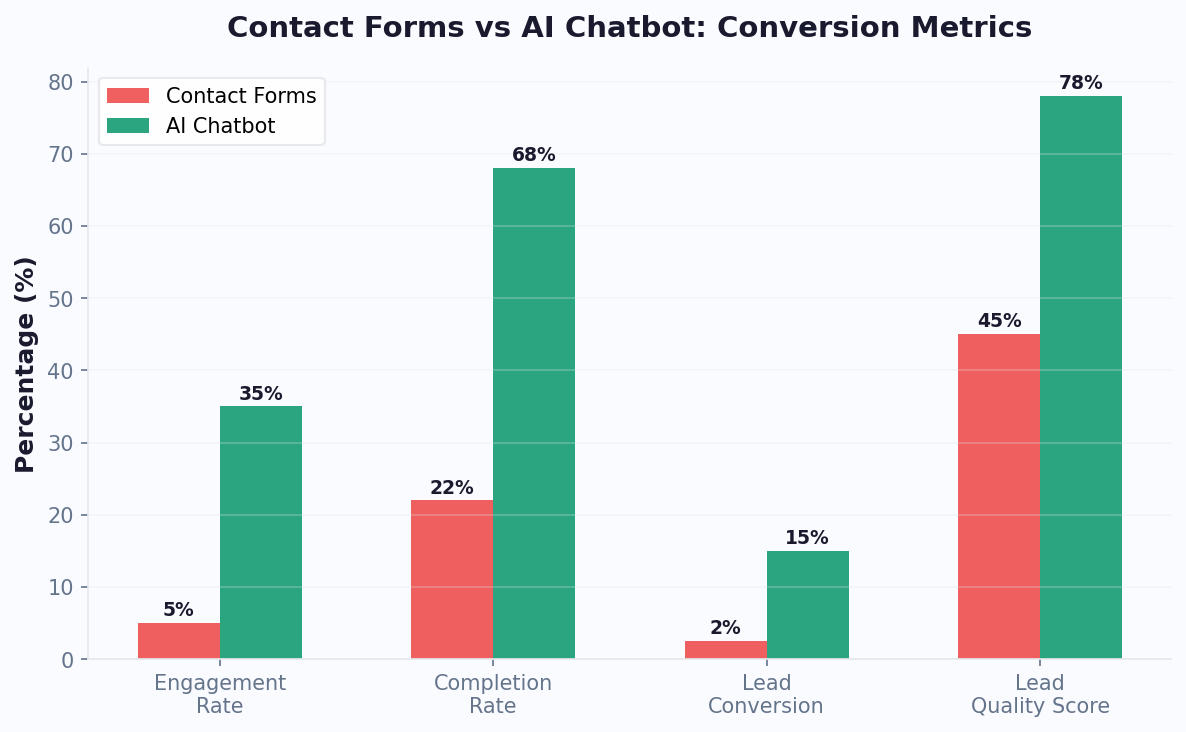
The data consistently shows that interactive, conversational comparison experiences convert at higher rates than static alternatives. Businesses that replace or supplement their comparison pages with a chatbot see measurable lifts in engagement time, product page visits, and ultimately, revenue.
50,000+ businesses use Conferbot templates to automate conversations
ROI and Conversion Impact
Deploying a product comparison chatbot is not just a UX improvement -- it is a revenue investment with measurable returns. Here is what the data shows across industries that have implemented comparison bots on their websites and messaging channels.
Conversion Rate Lift
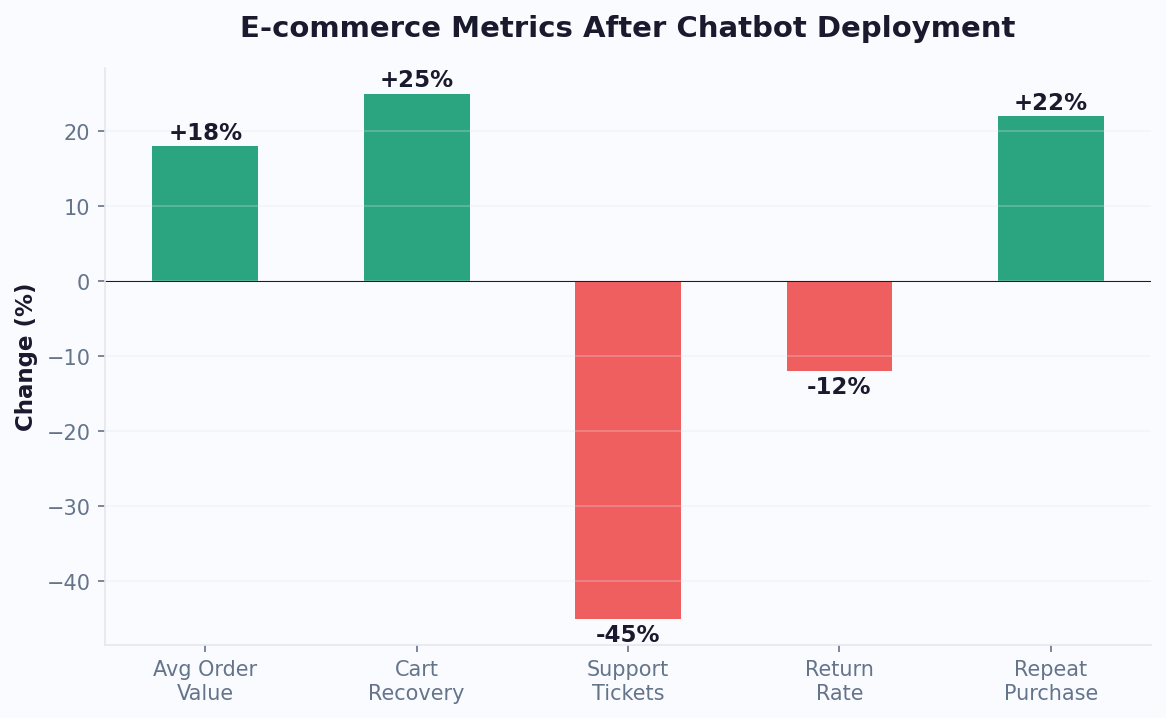
Visitors who engage with a product comparison chatbot convert at significantly higher rates than those who browse independently. Across e-commerce, SaaS, and electronics, businesses report 25-45% higher conversion rates among visitors who use the comparison bot versus those who navigate the site without it. The lift is driven by two factors: the bot surfaces the right products faster, and it addresses objections and questions in real time, eliminating the hesitation that causes abandonment.
Average Order Value
Comparison chatbots consistently increase average order value because they introduce shoppers to products they might not have found on their own. When a bot recommends a slightly higher-priced product with significantly better specs for the user's needs, many shoppers trade up. Across retail categories, comparison bot users show 15-20% higher AOV compared to non-bot shoppers.
Time to Decision
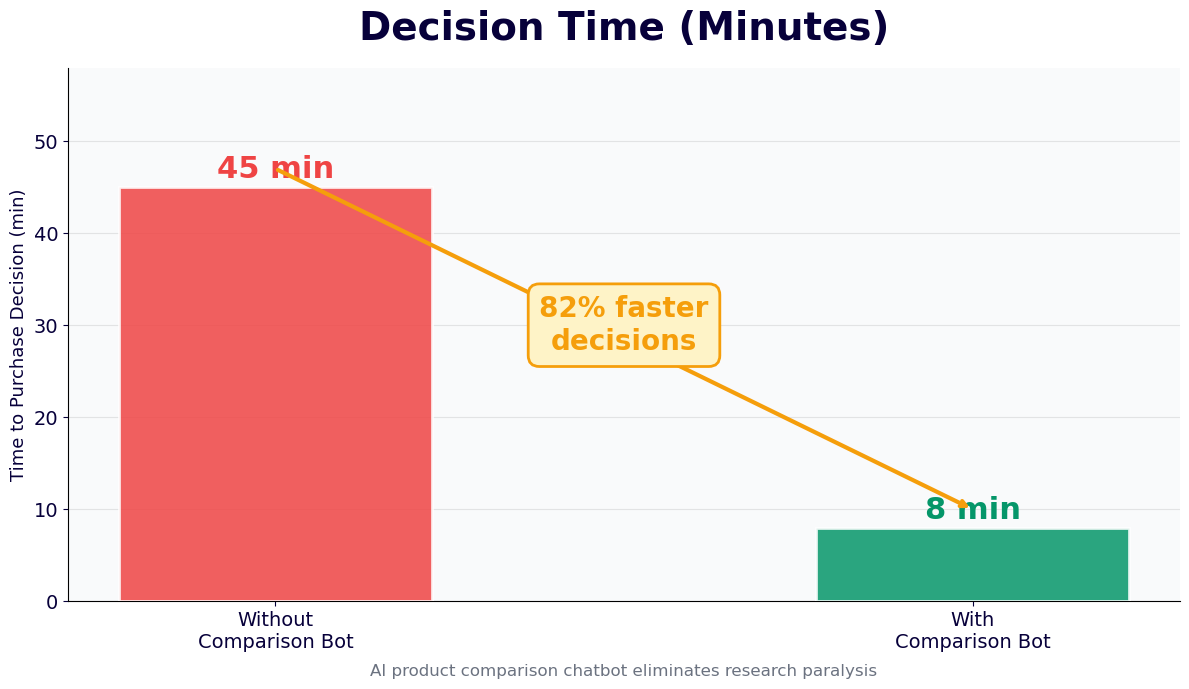
Research shows that the average online shopper spends 79 days researching a major purchase. A comparison chatbot compresses this timeline by consolidating research into a single, guided interaction. Buyers who use comparison bots reach a purchase decision 3-5x faster than those relying on self-service research, which means faster revenue for your business and less risk of losing the customer to a competitor during a prolonged decision cycle.
Support Cost Reduction
Pre-sale product questions are a major driver of support ticket volume. "What is the difference between Model A and Model B?" generates calls, emails, and live chat sessions that cost $5-15 each to handle. A comparison chatbot answers these questions instantly and at scale, reducing pre-sale support volume by 30-50%. With Conferbot's analytics dashboard, you can track exactly how many support queries the bot deflects each month.
Lead Quality for B2B
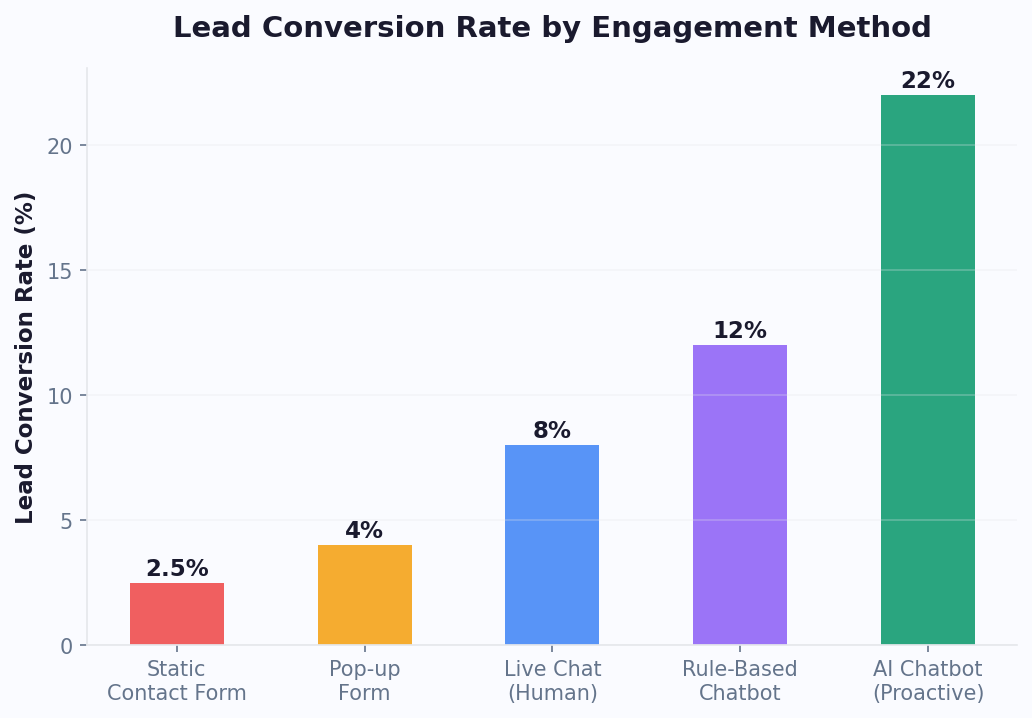
In B2B contexts, the comparison conversation itself qualifies leads. By the time a prospect finishes comparing your software plans or service tiers, the bot knows their team size, budget, feature priorities, and timeline. This data flows directly into your CRM, giving your sales team warm, pre-qualified leads with context. Companies report that comparison-bot-generated leads close at 2x the rate of form-fill leads because the buyer has already evaluated alternatives and self-selected your solution.
The ROI math is straightforward: higher conversion rates, larger order values, faster decisions, lower support costs, and better-qualified leads. For most businesses, a product comparison chatbot pays for itself within the first month of deployment.
How to Deploy a Product Comparison Chatbot
Getting a product comparison chatbot live on your website and messaging channels is faster than most teams expect. With Conferbot's no-code platform, you can go from zero to a fully functional comparison bot in a matter of hours. Here is the step-by-step process.
Step 1: Choose or Customize the Template
Start with Conferbot's product comparison chatbot template, which includes the core comparison conversation flow, side-by-side display logic, and recommendation engine out of the box. Customize the template to match your brand voice, colors, and the specific product attributes your customers care about. The no-code editor lets you modify conversation flows, add or remove comparison criteria, and adjust the visual presentation without touching any code.
Step 2: Connect Your Product Catalog
Integrate your product data using one of Conferbot's native connectors (Shopify, WooCommerce, BigCommerce) or via the API integration framework. Map your product attributes -- name, price, specifications, images, stock status, and ratings -- to the chatbot's comparison fields. Test the connection to verify that the bot can search, filter, and display your products accurately.
Step 3: Configure Comparison Logic
Define which product attributes are comparable, set up weighted scoring rules (so the bot knows that battery life matters more than weight when a user says they prioritize portability), and configure the recommendation algorithm. You can also set up rules for handling out-of-stock products, discontinued items, and new arrivals that should be featured prominently.
Step 4: Deploy Across Channels
Embed the chatbot on your website with a single line of code. Enable it on WhatsApp, Messenger, and other channels through Conferbot's omnichannel settings. Each channel adapts the comparison display to its format -- rich cards on the web, structured messages on WhatsApp, and carousel cards on Messenger.
Step 5: Test and Optimize
Run through several comparison scenarios as a test user. Try different product categories, price ranges, and levels of specificity. Verify that the bot handles edge cases: what happens when only one product matches the criteria? When the user changes their mind? When they want to add a third product to a two-product comparison? Refine the flows based on testing.
Step 6: Launch and Monitor
Go live and monitor performance through Conferbot's analytics. Track comparison completion rates, most-compared products, conversion rates from comparison to purchase, and common drop-off points. Use these insights to continuously improve the comparison experience -- adding new attributes that users frequently ask about, adjusting recommendation logic, and expanding to new product categories.
Most Conferbot customers have their product comparison chatbot live within one business day. The platform handles the heavy lifting -- AI, catalog sync, multi-channel deployment -- so your team can focus on refining the comparison experience rather than building infrastructure from scratch.
Product Comparison Tool Chatbot FAQ
Everything you need to know about chatbots for product comparison tool chatbot.
Why Use a Template vs Building from Scratch?
Templates encode years of optimization data into the conversation flow before you start.
| Factor | Conferbot Template | Build from Scratch | Hire a Developer |
|---|---|---|---|
| Time to deploy | 10 minutes | 2-8 hours | 2-6 weeks |
| Cost | Free | Your time | $5,000-$25,000 |
| Day-1 conversion | 15-22% | 5-8% | 10-15% |
| Proven flows | Yes, data-tested | No | Depends |
| Updates included | Automatic | Manual | Paid |
| Multi-channel | 8+ channels | 1 channel | Extra cost |
| Analytics | Built-in | Must build | Extra cost |
Ready to Deploy Product Comparison Tool Chatbot?
Join 50,000+ businesses. Free forever plan available. No credit card required.