
Event Registration Chatbot
Free Events And Conferences Chatbot Template
A comprehensive event registration chatbot that handles ticket selection, attendee information collection, dietary requirements, and payment processing. Perfect for conferences, seminars, workshops, galas, and any ticketed events that need a seamless registration experience.


What Is an Event Registration & RSVP Chatbot?
An event registration chatbot is an AI-powered conversational assistant that handles the entire registration lifecycle for your events — from initial interest and ticket selection to RSVP confirmation, attendee data collection, and post-event follow-up. It replaces static registration forms with a guided, interactive experience that runs 24/7 on your website, social channels, and messaging platforms.
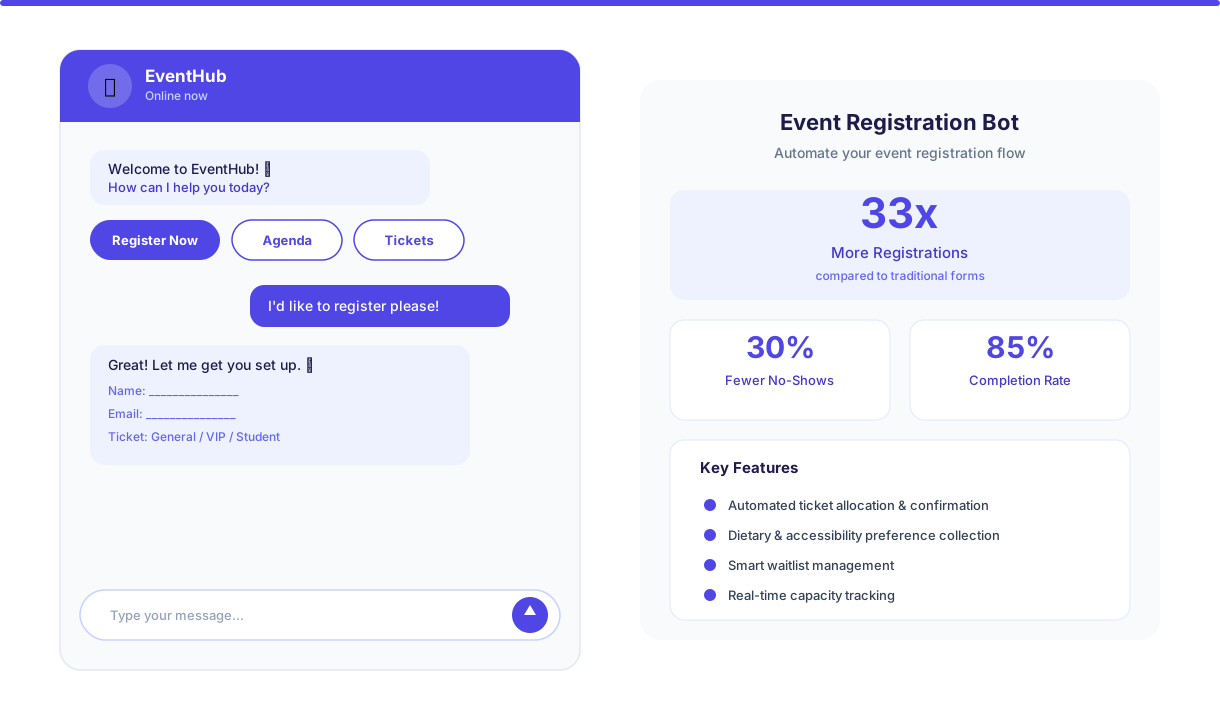
Traditional event registration relies on long web forms, email chains, and manual spreadsheet tracking. These approaches create friction at every step: potential attendees abandon multi-field forms, organizers lose track of RSVPs across channels, and no-show rates climb because there is no automated follow-up between registration and event day. Industry data shows that 68% of event registrations are abandoned when the process requires more than three steps or takes longer than two minutes.
An event registration chatbot solves this by turning registration into a conversation. Instead of filling out a form, attendees answer a few quick questions — name, email, ticket type, dietary preferences — in a natural chat flow that takes under 90 seconds. The chatbot confirms registration instantly, sends confirmation details, and handles all follow-up communications automatically. For organizers, every registration flows into a centralized dashboard with real-time attendee counts, ticket breakdowns, and exportable guest lists.
Conferbot's event registration chatbot template is built on a no-code visual builder that lets you launch registration for any event — corporate conferences, community meetups, galas, product launches, or webinars — in under an hour. It deploys on your website, integrates with your existing event tools, and scales from a 50-person workshop to a 10,000-person conference. This guide covers everything you need to know about deploying and optimizing an event registration chatbot in 2026.
Why Events Need a Registration Chatbot in ${year}
The events industry has undergone a permanent shift. Attendees expect instant, mobile-first registration experiences. Organizers need tools that reduce manual work while increasing conversion rates. A chatbot for event registration addresses both demands simultaneously, and the data makes a compelling case for adoption.
Here is how chatbot-powered registration compares to traditional methods across every critical metric:
| Metric | Traditional Registration | With Registration Chatbot |
|---|---|---|
| Registration completion rate | 32% (form abandonment) | 85%+ conversational completion |
| Registration volume | Baseline | Up to 33x more registrations |
| No-show rate | 30-50% for free events | Reduced by 30-50% via reminders |
| Data collection accuracy | Typos, missing fields common | Validated inputs, 95%+ accuracy |
| Organizer time on admin | 8-12 hours per event | Reduced by 70-80% |
| After-hours registrations | Lost or delayed | 100% captured instantly |
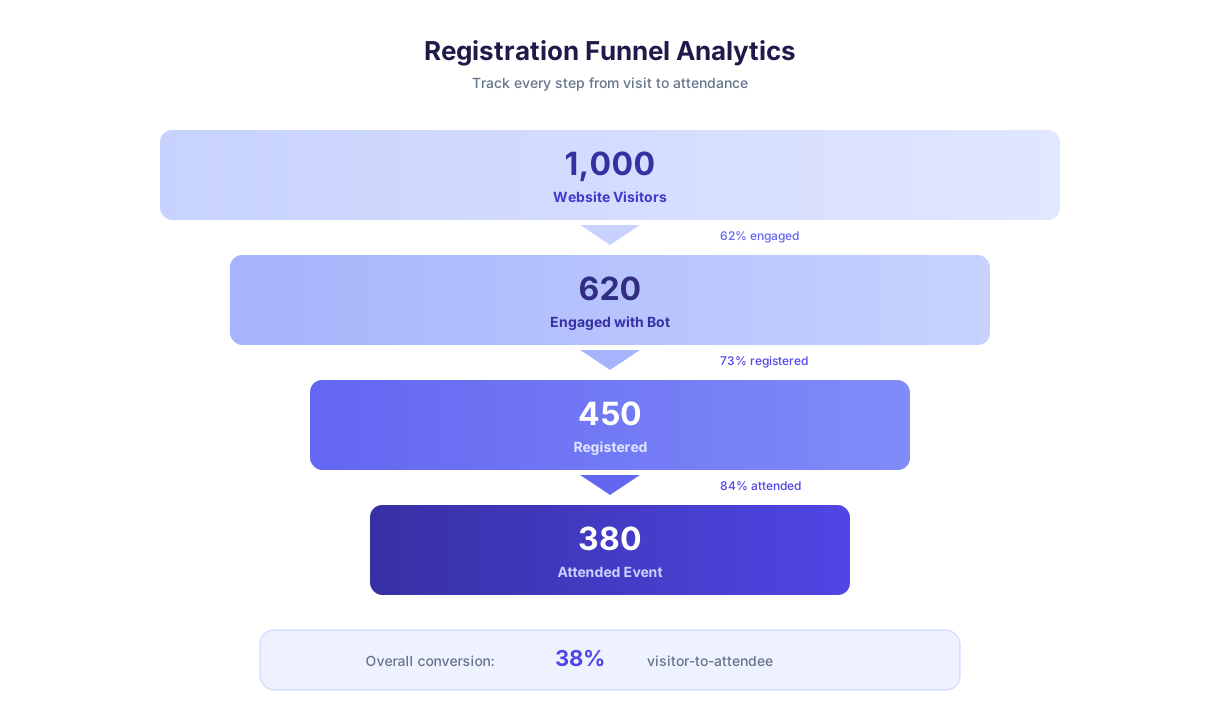
The 33x registration increase is not hypothetical — it reflects the difference between a passive registration page that waits for visitors to fill out a form and a proactive chatbot that engages every visitor, answers questions in real time, and guides them through a frictionless registration flow. When registration takes 90 seconds instead of 5 minutes, conversion rates increase dramatically.
No-show reduction is equally significant. For free events, no-show rates regularly reach 40-50%, making capacity planning nearly impossible. The chatbot combats this with automated reminder sequences — confirmation at registration, a reminder one week before, another 24 hours before, and a final reminder two hours before the event. Each touchpoint includes event details, venue directions, and a one-tap option to update or cancel the RSVP. Organizers using automated reminders consistently report no-show reductions of 30-50%, which translates directly into better venue utilization, more accurate catering orders, and a fuller room for speakers and sponsors.
Beyond conversion metrics, there is an operational efficiency argument. Every manual registration task — data entry, confirmation emails, dietary preference tracking, waitlist management, name badge preparation — is handled automatically by the chatbot. For a mid-size event with 500 attendees, this eliminates 8-12 hours of administrative work that organizers can redirect toward content, partnerships, and attendee experience.
How the Registration Flow Works
Conferbot's event registration chatbot template is a structured conversational flow with 20+ nodes covering every step from first engagement to confirmed RSVP. Here is how each pathway works from the attendee's perspective.
Welcome and Event Overview
When a visitor opens the chatbot, they receive a branded welcome message with the event name, date, location, and a brief description. The chatbot immediately offers three primary actions: Register now, View agenda, and Ask a question. This upfront clarity eliminates the common problem of visitors landing on a registration page without enough context to commit — the chatbot provides just enough information to drive action without overwhelming.
Attendee Information Collection
The registration path collects attendee details through a conversational flow: full name, email address, phone number (optional), company or organization, and job title. Each field is collected one at a time with validation — email format is checked, required fields are enforced with a friendly prompt, and the chatbot confirms the information before proceeding. This sequential approach feels natural and reduces the cognitive load that causes form abandonment.
Ticket Selection and Add-Ons
After collecting attendee details, the chatbot presents available ticket options with pricing, descriptions, and availability status. For multi-tier events, this might include General Admission, VIP, Workshop Pass, or Full Conference + Workshop bundles. Each option displays what is included (sessions, meals, networking events, swag) so attendees can make an informed choice without navigating away from the conversation. Add-ons like workshop seats, parking passes, or evening gala tickets are offered after the primary ticket selection.
Payment Integration
For paid events, the chatbot integrates with payment processors to collect payment within the conversation flow. The attendee selects their ticket, confirms the total, and is directed to a secure payment link. Upon successful payment, the chatbot immediately confirms the registration and sends a receipt. For free events, the flow skips payment entirely and moves directly to confirmation.
Confirmation and Next Steps
Every completed registration ends with a confirmation message that includes a registration ID, event details summary, calendar invite link, and venue directions. The chatbot asks if the attendee wants to receive SMS reminders and offers to share the event with colleagues — turning every registrant into a potential referral source. Connect this flow to your CRM or event management platform via Conferbot's API integration for automatic syncing.
Ready to try Event Registration Chatbot?
Deploy this template in under 10 minutes. No coding required.
Use This Template Free →Ticket Types and Pricing Management
Event ticketing is rarely simple. Most events offer multiple ticket tiers, early-bird pricing, group discounts, promo codes, and capacity limits — all of which need to be communicated clearly to potential attendees. The event registration chatbot handles this complexity conversationally, presenting options in a way that guides attendees toward the right ticket without confusion.
Multi-Tier Ticket Presentation
The chatbot displays ticket tiers as clear, comparable options with pricing and included benefits. Here is how a typical conference ticket structure is presented:
| Ticket Tier | Price | Includes | Availability |
|---|---|---|---|
| Early Bird | $199 | All sessions, lunch, networking | Limited - 50 remaining |
| General Admission | $299 | All sessions, lunch, networking | Available |
| VIP Pass | $499 | All sessions, meals, VIP lounge, speaker meet-and-greet | Available |
| Workshop Bundle | $599 | Full conference + 2 workshop sessions | Available |
| Virtual Pass | $99 | Livestream access, recordings, digital materials | Unlimited |
Early-Bird and Promotional Pricing
The chatbot is time-aware. When early-bird pricing is active, it highlights the savings and displays the countdown to the early-bird deadline, creating urgency that drives faster registration decisions. When early-bird pricing expires, the chatbot automatically switches to regular pricing without any manual intervention. Promo codes can be entered during the registration flow, with the chatbot validating the code and applying the discount in real time.
Group Registration
For corporate events and conferences, group registration is a significant revenue driver. The chatbot handles group bookings by asking how many attendees are being registered, collecting details for each person, and applying group discount tiers automatically. A typical structure might offer 10% off for groups of 3-5, 15% off for 6-10, and custom pricing for groups over 10. This removes the friction of group organizers having to email your team for quotes and wait for manual responses.
Waitlist Management
When a ticket tier sells out, the chatbot automatically switches to waitlist mode for that tier. Attendees can join the waitlist with one tap, and if a spot opens up (due to a cancellation or capacity increase), the chatbot notifies the next person on the list and gives them a 24-hour window to claim the spot. This automated waitlist eliminates the manual tracking that organizers typically handle through spreadsheets and individual emails.
Attendee Management and Communication
Registration is only the beginning of attendee management. Between the moment someone registers and the moment they walk through the door, there are dozens of communication touchpoints that determine whether they actually show up, have a positive experience, and become a repeat attendee. The event RSVP chatbot automates this entire lifecycle.
Automated Reminder Sequences
The chatbot delivers a structured reminder sequence designed to minimize no-shows:
| Timing | Message Content | Purpose |
|---|---|---|
| Immediately | Registration confirmation, calendar invite, receipt | Confirm commitment |
| 1 week before | Agenda highlights, speaker announcements, preparation tips | Build anticipation |
| 24 hours before | Venue directions, parking info, what to bring | Remove logistics barriers |
| 2 hours before | Final reminder with QR code for check-in | Last-mile conversion |
| During event | Session reminders, room changes, live updates | Enhance experience |
RSVP Modification and Cancellation
Attendees can return to the chatbot at any time to modify their registration — update contact details, change ticket tier, add dietary preferences, or cancel their RSVP. The chatbot handles modifications instantly and updates the organizer's dashboard in real time. For paid events, cancellation triggers the refund policy flow, which explains the terms and initiates the refund process if applicable. This self-service capability eliminates the most common support emails organizers receive between registration and event day.
Dietary and Accessibility Preferences
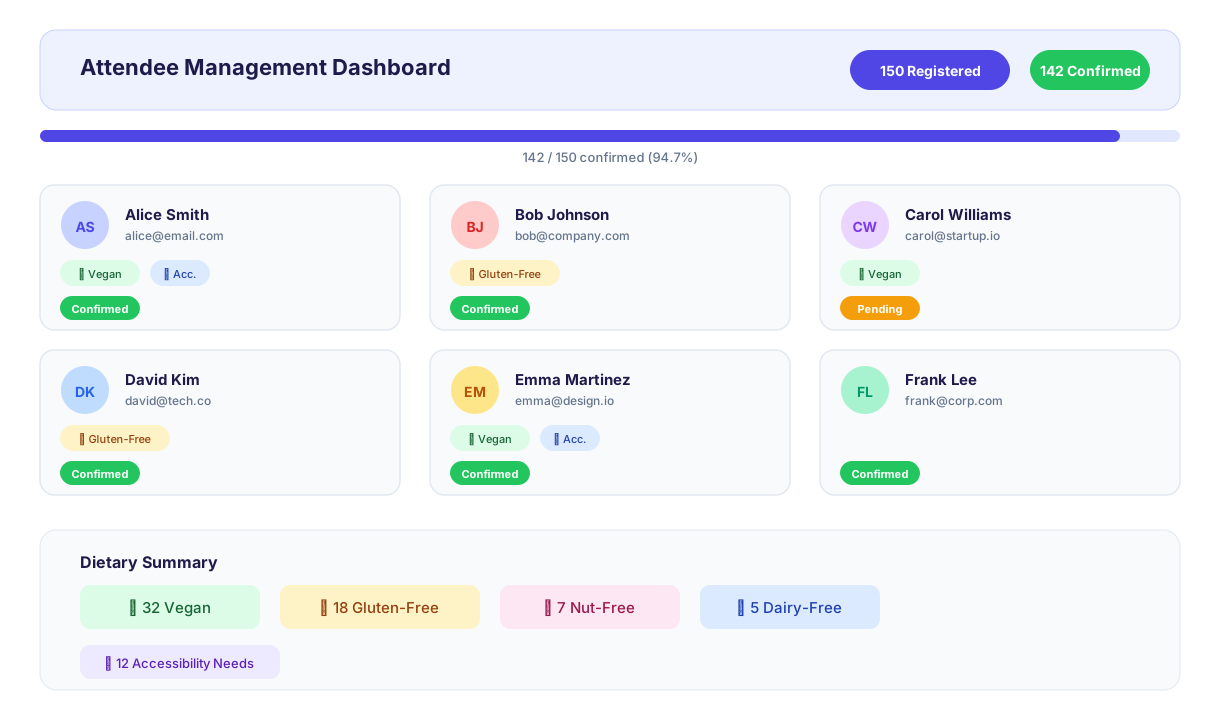
The chatbot collects dietary requirements (vegetarian, vegan, gluten-free, halal, kosher, allergies) and accessibility needs (wheelchair access, hearing assistance, visual accommodations) as part of the registration or as a follow-up message. This data flows directly into the organizer's catering and logistics planning, eliminating the separate survey that most organizers send (and that most attendees ignore). Collection rates for dietary preferences increase from 25-30% via email surveys to 80%+ when collected in the chatbot flow, giving caterers accurate numbers and reducing food waste.
Real-Time Attendee Dashboard
Every registration, modification, and cancellation updates the real-time dashboard accessible through Conferbot's analytics. Organizers see total registrations, ticket tier breakdown, dietary preference summary, revenue collected, and check-in status on event day. The dashboard supports CSV export for integration with badge printing systems, catering orders, and post-event reporting.
Multichannel Registration: Capturing Attendees Everywhere
In 2026, potential attendees discover events across multiple channels — social media posts, email invitations, partner websites, search results, and word-of-mouth referrals. An effective registration strategy must meet them where they are rather than funneling everyone to a single landing page and hoping they complete a form. The event registration chatbot deploys across every channel where potential attendees engage, capturing registrations at the moment of interest.
WhatsApp and Messenger Registration
For events promoted through social media and messaging, the chatbot deploys directly on WhatsApp and Messenger, allowing attendees to register without ever leaving the messaging app. When an attendee sees an event promotion in a WhatsApp group or a Facebook post, they tap a link that opens the registration conversation in their preferred messaging app. The entire flow — information collection, ticket selection, confirmation — happens within the familiar messaging interface. This approach captures registrations from audiences who would never navigate to a separate website and fill out a form, particularly for community events, social gatherings, and events promoted through informal channels.
Omnichannel Consistency
Whether an attendee registers through the website chatbot, WhatsApp, or Messenger, their data flows into the same centralized dashboard and they receive the same confirmation and reminder sequence. Conferbot's omnichannel framework ensures consistent conversation logic and data capture across all channels, preventing the fragmentation that occurs when organizers manage registrations across multiple disconnected tools. An attendee who started registration on their desktop can complete it on mobile via WhatsApp — the chatbot picks up where they left off.
Calendar Integration and Scheduling
For events that require time-slot selection — workshops, one-on-one consultations, or multi-session conferences where attendees choose their track — the chatbot integrates with calendar booking to display available slots and confirm selections in real time. Attendees see only available time slots, select their preferred sessions, and receive calendar invites automatically. This eliminates the overbooking problems that arise when multiple attendees register for the same limited-capacity session through static forms without real-time availability checking.
Live Chat Handoff for Complex Registrations
While the chatbot handles standard registrations autonomously, some scenarios require human assistance — corporate group bookings with custom pricing, accessibility accommodations that need coordination, or VIP attendees with special requests. The chatbot detects these complex cases and seamlessly transfers the conversation to a human agent via live chat, preserving all collected information so the attendee does not need to repeat themselves. This hybrid approach ensures every potential attendee receives the level of support they need without overwhelming the organizing team with routine registrations.
50,000+ businesses use Conferbot templates to automate conversations
Post-Event Follow-Up and Engagement
The most underutilized phase of event management is post-event follow-up. Organizers invest enormous effort in pre-event marketing and day-of logistics, then drop communication entirely after the event ends. A registration chatbot closes this loop by automating post-event engagement that turns one-time attendees into a loyal community.
Thank-You and Feedback Collection
Within 24 hours of the event, the chatbot sends a personalized thank-you message to every attendee and asks for feedback through a quick conversational survey. Instead of a long form, the chatbot asks three targeted questions: overall satisfaction (1-5 scale), favorite session or speaker, and one suggestion for improvement. This conversational format achieves 3-4x higher response rates than traditional email surveys because it takes under 60 seconds and feels like a personal follow-up rather than a mass email.
Content and Resource Sharing
The chatbot delivers post-event resources — presentation slides, session recordings, speaker contact information, and photo galleries — through the same channel attendees are already familiar with. Instead of sending an email with 15 attachments that gets lost in the inbox, the chatbot lets attendees request specific resources on demand: "Send me the keynote slides" or "I want the networking contacts list." This on-demand delivery increases resource engagement by 40-60% compared to bulk email distribution.
Next Event Registration
The post-event chatbot flow includes an early registration offer for the next event, complete with an exclusive returning-attendee discount. Attendees who had a positive experience and are still engaged in the post-event conversation are the highest-converting audience for future events. Capturing their registration at this moment — while satisfaction is peak — is significantly more effective than re-marketing to them months later. Organizations that use post-event chatbot registration capture 15-25% of attendees for the next event within the first week.
NPS and Long-Term Relationship Building
The chatbot calculates Net Promoter Score from the satisfaction ratings and identifies promoters (score 9-10) who can be invited to become event ambassadors, speakers, or sponsors. Detractors (score 1-6) receive a follow-up message acknowledging their feedback and outlining specific improvements being made. This closed-loop feedback system transforms event evaluation from a one-time survey into an ongoing conversation that drives continuous improvement.
Ready to automate your event registration? Explore all chatbot templates for more event automation options, or learn how the NLP chatbot engine can handle complex attendee questions with natural language understanding.
Event Registration Chatbot FAQ
Everything you need to know about chatbots for event registration chatbot.
Why Use a Template vs Building from Scratch?
Templates encode years of optimization data into the conversation flow before you start.
| Factor | Conferbot Template | Build from Scratch | Hire a Developer |
|---|---|---|---|
| Time to deploy | 10 minutes | 2-8 hours | 2-6 weeks |
| Cost | Free | Your time | $5,000-$25,000 |
| Day-1 conversion | 15-22% | 5-8% | 10-15% |
| Proven flows | Yes, data-tested | No | Depends |
| Updates included | Automatic | Manual | Paid |
| Multi-channel | 8+ channels | 1 channel | Extra cost |
| Analytics | Built-in | Must build | Extra cost |
Ready to Deploy Event Registration Chatbot?
Join 50,000+ businesses. Free forever plan available. No credit card required.