
Mental Health Crisis Support Chatbot
Free Healthcare Chatbot Template
A compassionate mental health support chatbot that provides immediate crisis resources, mood assessment, coping strategies, and professional referrals. Designed to offer empathetic guidance while connecting users with appropriate mental health services and emergency hotlines.


What Is a Mental Health Crisis Support Chatbot?
Disclaimer: A mental health crisis support chatbot is a supplemental triage and resource-delivery tool. It is not a licensed mental health professional, does not provide clinical diagnosis or therapy, and is not a substitute for professional psychiatric care. Any individual in immediate danger should call emergency services (911 in the US) or the 988 Suicide and Crisis Lifeline. This chatbot is designed to supplement -- never replace -- professional mental health resources and qualified clinicians.
A mental health crisis support chatbot is an AI-powered first-contact tool that helps organizations -- universities, employers, nonprofits, and community health clinics -- provide structured, around-the-clock triage for individuals experiencing psychological distress. It administers validated clinical screening questionnaires, assesses risk level using established protocols, connects users to the appropriate level of care (self-help resources, counseling scheduling, peer support, or emergency crisis services), and ensures that no inquiry goes unanswered at 2 a.m. on a weekend.
Mental health demand has reached a level that existing human infrastructure cannot absorb. University counseling centers face student-to-counselor ratios of 1,500:1 or higher. Employee Assistance Programs report average wait times of three to five weeks. Community mental health clinics operate with chronic staffing shortages. The chatbot does not solve the supply problem -- that requires investment in human clinicians -- but it addresses a specific, tractable gap: the unstructured period between when someone first seeks help and when they reach a qualified professional.
In 2026, the clinical consensus is clear: early identification of risk levels and immediate connection to appropriate resources significantly improve outcomes compared to delayed or unaided help-seeking. A well-configured crisis support chatbot operationalizes that evidence. It converts the passive "visit our website for resources" approach into an active, structured, and documentable intervention that reaches individuals at the moment they reach out.
This template is built on Conferbot's no-code builder and integrates with scheduling, crisis hotline APIs, and clinical team notification systems. It is configurable for different organizational contexts while maintaining the clinical integrity of the screening instruments it administers. Every component -- from consent language to escalation thresholds -- is reviewed and approved by the deploying organization's clinical leadership before going live.
How It Works: Screening, Risk Assessment, and Crisis Routing
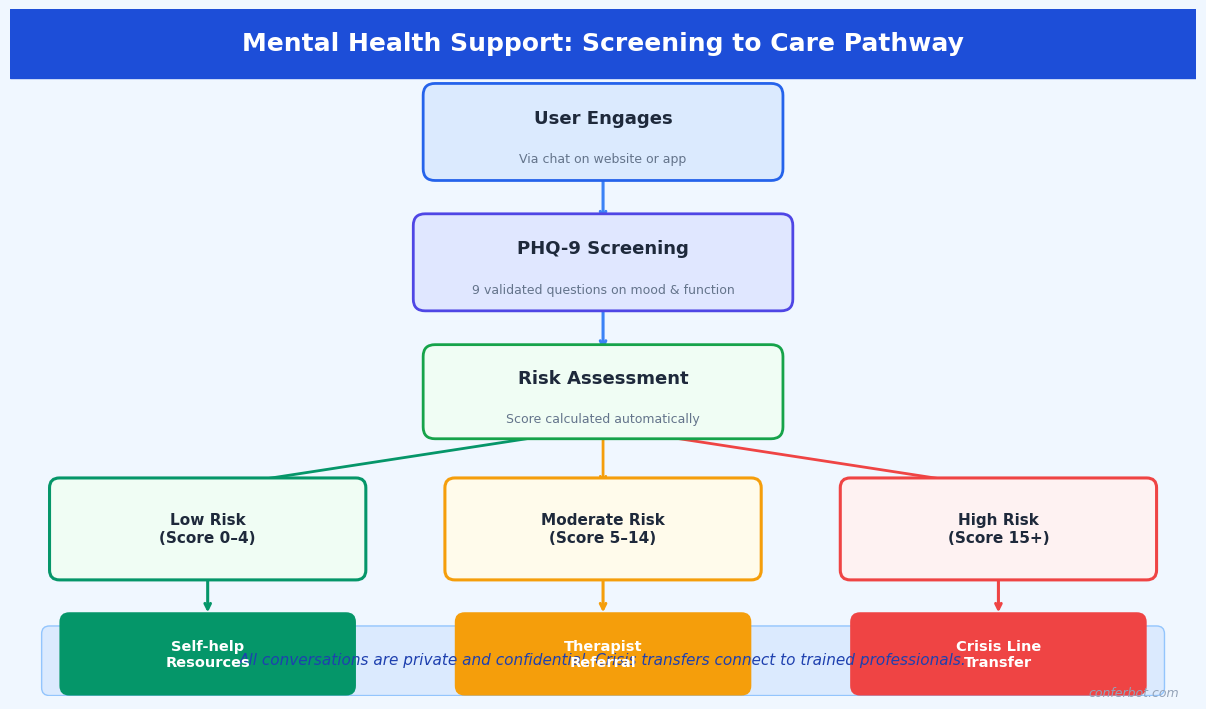
The crisis support chatbot follows a structured four-stage clinical pipeline. Each stage is evidence-based, configurable to your organization's protocols, and designed with safety as the non-negotiable priority. No configuration change can disable emergency escalation -- that pathway is hardcoded and always active.
Stage 1: Consent and Confidentiality Disclosure
Before any assessment begins, the chatbot presents a clear confidentiality disclosure that explains what the tool is, what it is not (not a therapist, not an emergency service), how data will be used, the limits of confidentiality (mandatory reporting obligations), and instructions for what to do in an immediate emergency. The user must explicitly acknowledge this disclosure before proceeding. This consent record, timestamped and linked to the conversation, forms part of your organization's documentation and satisfies duty-of-care requirements for deploying a mental health screening tool.
Stage 2: Validated Screening Questionnaires
The chatbot administers validated clinical instruments in a conversational format. The core instruments included in this template are:
- PHQ-9 (Patient Health Questionnaire-9): The nine-item depression severity scale, validated for identifying major depressive disorder and monitoring treatment response. Scores range from 0-27 across five severity categories: minimal (0-4), mild (5-9), moderate (10-14), moderately severe (15-19), and severe (20-27). Item 9 ("Thoughts that you would be better off dead or of hurting yourself") is treated as an immediate escalation trigger regardless of overall score.
- GAD-7 (Generalized Anxiety Disorder 7-item scale): The standard anxiety screening tool, validated for generalized anxiety disorder, social anxiety, panic disorder, and PTSD. Scores of 10 or above indicate moderate-to-severe anxiety warranting clinical attention.
- Columbia Suicide Severity Rating Scale (C-SSRS) Screener: The five-item screener version, used to stratify suicide risk into no ideation, ideation without intent or plan, ideation with intent or plan, and preparatory behavior or attempt. This instrument determines the crisis routing outcome.
Questions are presented one at a time with clear answer options. The conversational format achieves response rates and completion rates comparable to clinical administration, with some studies showing improved disclosure for sensitive items (particularly suicidal ideation) when patients interact with a computer-based system compared to face-to-face administration.
Stage 3: Risk Stratification
The combined screening scores, C-SSRS result, and any additional context collected during the conversation are processed through a risk stratification algorithm configured by your clinical team. Outputs fall into four tiers: Crisis (immediate danger, active ideation with plan or intent), High (significant distress, passive ideation, PHQ-9 moderately severe/severe), Moderate (mild-moderate symptoms, no ideation, functional impairment present), and Low (minimal symptoms, seeking psychoeducation or coping resources).
Stage 4: Care Routing
Risk tier determines the routing outcome automatically. Crisis tier triggers immediate display of emergency resources (988 Lifeline, Crisis Text Line, local emergency services), an alert to your on-call crisis counselor, and a warm handoff to live chat if a counselor is available. High tier connects the user to same-day or next-day counseling scheduling via your booking integration. Moderate tier routes to scheduled counseling within the organization's standard timeline. Low tier delivers a curated set of self-help resources, psychoeducation, and an invitation to schedule a wellness check-in.
Key Features of the Crisis Support Chatbot
The mental health crisis support template includes clinical and operational capabilities built specifically for the sensitivity and regulatory requirements of mental health screening. The following features are pre-configured and ready for clinical review and customization by your organization.
Always-On Crisis Escalation
At any moment in any conversation, if the user expresses suicidal ideation, describes an intent to harm themselves or others, or uses language patterns associated with acute crisis, the chatbot halts all other processing and presents crisis resources immediately. This pathway cannot be disabled by configuration, flow editing, or administrator action. It represents a hardcoded safety floor below which no configuration can descend.
Validated Instrument Integration
PHQ-9, GAD-7, and C-SSRS Screener are pre-loaded with exact validated item wording. The template does not paraphrase or shorten these instruments -- doing so invalidates the clinical benchmarks the tools were validated against. Organizations that use modified language should not report results against published PHQ-9 or GAD-7 benchmarks. Your clinical team can review the exact wording in the template configuration before deployment.
Natural Language Processing for Unstructured Input
Between structured questionnaire items, users may share information in free text. Conferbot's NLP engine continuously monitors free-text input for crisis language patterns -- explicit ideation statements, coded phrases associated with suicidality ("no reason to go on," "everyone would be better off"), and distress escalation signals. This real-time monitoring layer runs in parallel with the structured assessment, catching risk that would not be captured by scored questionnaire items alone.
Configurable Risk Thresholds
Default risk thresholds follow clinical guidelines, but your clinical team can adjust them for your population. A university counseling center working with a high-stress academic population may set tighter thresholds for "moderate" routing. An occupational health program may prioritize different instruments for workplace-specific stressors. All threshold changes require documented clinical review and approval within the platform before taking effect.
Multi-Language Support
The chatbot supports conversations in over 50 languages. PHQ-9 and GAD-7 have been validated in multiple languages, and those validated translations are used within the platform -- not machine-translated versions of English items. For languages where validated translations are not yet available, the platform flags this to the deploying organization before activation.
Warm Handoff to Live Support
When a user is routed to live support, the conversation history (including screening scores, risk tier, and conversation transcript) is passed in real time to the available counselor or crisis responder via the live chat dashboard. The counselor does not start from zero -- they see the full context before the first message is exchanged. This continuity reduces both the counselor's intake workload and the user's burden of repeating their situation.
Analytics and Population-Level Reporting
Conferbot's analytics dashboard provides aggregate, de-identified reporting on screening volume, score distributions, risk tier frequencies, escalation rates, and channel performance. This population-level data is essential for counseling center capacity planning, program evaluation, grant reporting, and identifying trends that warrant organizational intervention. All analytics are de-identified -- no individual-level PHI is included in aggregate reports.
Ready to try Mental Health Crisis Support Chatbot?
Deploy this template in under 10 minutes. No coding required.
Use This Template Free →Ethical Considerations, Disclaimers, and Scope Limitations
Mental health chatbots operate in a domain where the consequences of misuse or misconfiguration are severe. The ethical framework underpinning this template is not optional design guidance -- it defines the boundaries within which this tool can legitimately be deployed. Organizations that cannot or will not implement these safeguards should not deploy an automated mental health screening tool.
This Tool Is Not a Substitute for Professional Care
This point warrants explicit restatement in operational documentation, staff training, and all user-facing language. A chatbot that administers the PHQ-9 is a screening tool -- it identifies individuals who may benefit from professional evaluation. It does not diagnose major depressive disorder. A PHQ-9 score of 18 (moderately severe) in a chatbot screening requires professional clinical assessment before any clinical interpretation or treatment decision is made. Organizations must establish a clear human clinical pathway that chatbot-identified users can access. Deploying a screening chatbot without an adequate human response system is ethically indefensible.
Mandatory Reporting Obligations
The consent disclosure must accurately describe your organization's mandatory reporting obligations under applicable law. In most US jurisdictions, mental health professionals are mandatory reporters for imminent danger to self or others. If your chatbot is deployed in a context where identifiable user data is stored, your legal counsel and clinical leadership must determine whether the chatbot deployment creates mandatory reporting obligations for the organization. This template includes configurable consent language reviewed against common US state requirements, but it is not legal advice -- your organization must conduct its own legal review.
Data Privacy and Sensitivity Classification
Mental health screening data is among the most sensitive categories of personal health information. In the US, it may be protected under HIPAA, state mental health privacy statutes (which are often more restrictive than HIPAA), FERPA (for student data at educational institutions), and workplace wellness program regulations. Organizations must conduct a data classification and privacy impact assessment before deployment. Conferbot provides a BAA and supports HIPAA-compliant data handling. Meeting HIPAA minimum requirements does not necessarily satisfy all applicable obligations for mental health data -- your privacy counsel must evaluate.
Algorithmic Bias and Equity Considerations
PHQ-9 and GAD-7 were validated primarily in Western clinical populations. Evidence suggests differential performance across racial, ethnic, and cultural groups. A screening tool that systematically under-identifies distress in specific populations -- or over-identifies it in others -- produces inequitable outcomes. Before deploying this tool, organizations should review the demographic composition of their user population against the published validation samples for the instruments used, and consult clinical leadership about whether supplementary or alternative instruments are warranted for specific subgroups.
Avoiding Therapeutic Overreach
The chatbot is configured to assess, route, and provide resources. It is explicitly not configured to provide therapeutic responses -- no cognitive behavioral therapy exercises, no crisis counseling dialogue, no statements that could be interpreted as clinical recommendations. The moment the chatbot begins providing guidance that simulates therapy, it crosses into the practice of psychology, which is legally regulated and requires licensure. All conversational responses in this template are reviewed against this boundary. Organizations should apply the same review to any customizations they make.
| Function | Within Scope | Outside Scope |
|---|---|---|
| Depression screening | Administer validated PHQ-9, report score | Diagnose depression, recommend medication |
| Crisis response | Display crisis resources, alert on-call counselor | Provide crisis counseling, make safety plans |
| Resource delivery | Link to validated psychoeducation materials | Prescribe coping strategies, assign exercises |
| Appointment support | Schedule counseling intake appointment | Determine appropriate level of care independently |
| Follow-up | Send appointment reminders, check-in prompts | Monitor clinical progress, adjust care plans |
Use Cases: Universities, Workplaces, Nonprofits, and Clinics
The mental health crisis support chatbot adapts to the organizational context, clinical protocols, and population characteristics of different deploying organizations. Here are the primary use cases with specific configuration guidance.
University and College Counseling Centers
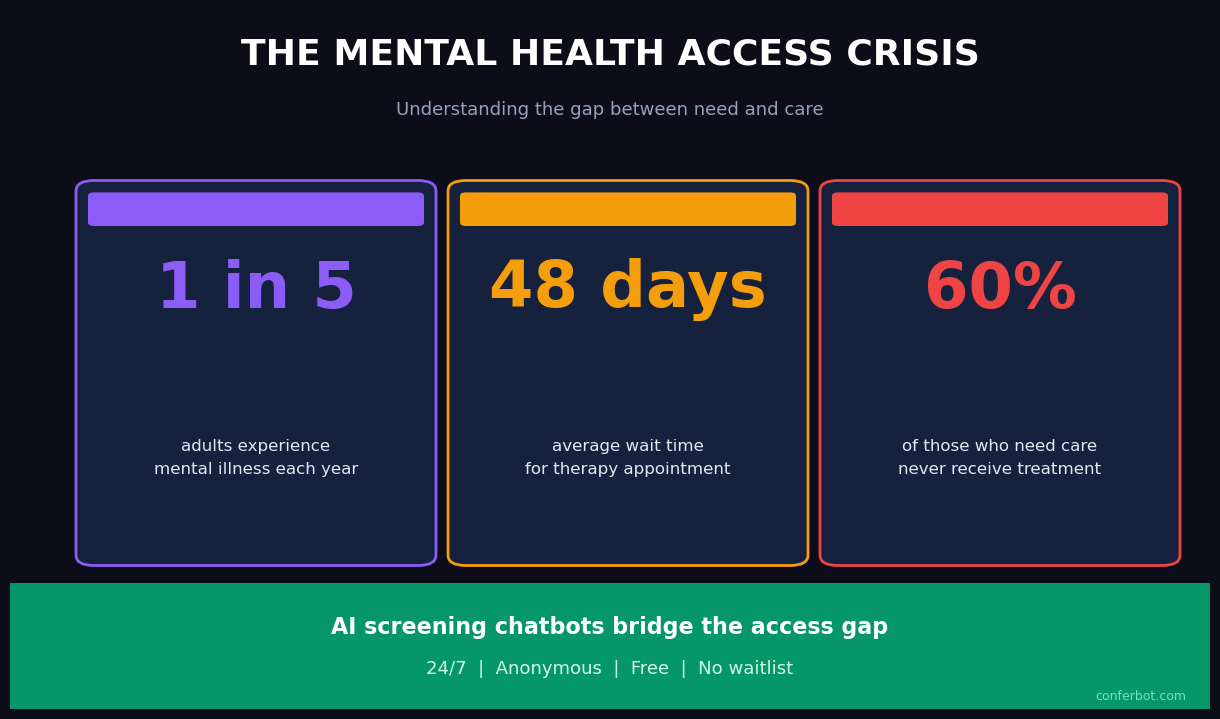
University counseling centers face a structural demand-supply mismatch that has reached critical levels. The Association for University and College Counseling Center Directors reports that the number of students seeking services has grown faster than staffing for over a decade. The crisis support chatbot addresses two specific pain points: after-hours coverage and initial triage for students who present without an appointment. Configured for a campus context, the chatbot uses student-appropriate language, integrates with the student health portal for appointment scheduling, and routes high-risk cases to the counseling center's on-call clinician rather than a generic crisis line.
University deployments typically configure the chatbot as the first step in a stepped care model: students with low-moderate screening scores are directed to digital self-help resources and group programming, freeing counselor capacity for students with higher acuity. This approach has been validated in published stepped care research and represents the current evidence-based standard for university mental health service delivery.
Workplace Employee Assistance Programs
Employee Assistance Programs (EAPs) provide confidential mental health support to employees, but utilization rates are chronically low -- typically 3-8% of the eligible workforce annually, well below the prevalence of mental health conditions in working populations. A primary barrier is the friction of initiating help-seeking: finding the EAP number, calling during business hours, and speaking with a stranger about mental health concerns. A chatbot on the company's intranet or HR platform, accessible at any hour, lowers that barrier significantly.
Workplace deployments require particular care around confidentiality. Employees must be clearly informed that the chatbot is operated by their EAP or HR department, what data is retained, and whether any information is reportable to their employer. The consent language in this template is configurable to reflect these specifics, but must be reviewed by employment counsel before deployment. Integration with EAP counselor scheduling allows employees to book confidential appointments directly from the chatbot without involving HR.
Nonprofit Crisis Lines and Community Organizations
Nonprofit mental health organizations -- community crisis centers, suicide prevention organizations, peer support networks -- often operate with volunteer workforces that are unavailable around the clock. A chatbot can extend the organization's reach during staffing gaps, providing consistent first-contact triage, delivering validated resource packages, and escalating to on-call volunteers or partner crisis lines when the risk level warrants. Nonprofits deploying this template typically integrate with the 988 Lifeline API and local crisis text services for seamless warm handoffs. The integrations hub supports API connections to major crisis line platforms.
Community Mental Health Clinics
Community mental health clinics serving underinsured and uninsured populations face extreme demand with limited resources. The crisis support chatbot, deployed on the clinic's website and via WhatsApp, provides 24/7 triage for individuals who contact the clinic outside of operating hours. For individuals presenting with high acuity, it delivers immediate crisis resources and notifies the duty clinician. For moderate-acuity individuals, it captures contact information and screening scores so that the next available clinical staff member can prioritize outreach. This managed triage approach prevents high-acuity cases from falling through the gaps between clinic operating hours and the next available appointment.
Integration with Crisis Hotlines and Emergency Resources
The technical integration between a mental health chatbot and crisis response infrastructure is one of the highest-stakes integrations in healthcare technology. A failed handoff to a crisis service -- whether due to a broken API connection, outdated phone number, or misconfigured routing rule -- is a patient safety incident. This section details how the crisis integration works and what operational safeguards are required.
988 Suicide and Crisis Lifeline (United States)
SAMHSA's 988 Lifeline is the standard crisis resource for US deployments. The chatbot integrates with the Lifeline in two ways: static resource display (presenting the 988 number with clear instructions to call or text) and, where available, API-mediated warm handoff that transfers the conversation context to a Lifeline counselor. The API integration requires enrollment in the Lifeline's partner program and review of data sharing agreements, which your organization must complete independently. The chatbot's default configuration uses static resource display, which requires no API enrollment and is available immediately upon deployment.
Crisis Text Line
Crisis Text Line (text HOME to 741741 in the US) provides text-based crisis support and is often more accessible to younger populations and individuals in settings where a phone call is not private. The chatbot presents Crisis Text Line alongside the 988 Lifeline for all Crisis-tier routing outcomes. For organizations outside the US, equivalent crisis line information is configurable: Samaritans (UK/Ireland), Lifeline (Australia), Distress Centres of Ontario, and similar services. The API integration framework supports custom hotline configurations for any geography.
Local Emergency Services
For Crisis-tier cases involving imminent danger -- expressed plan and intent, active self-harm, or medical emergency -- the chatbot presents the local emergency number (911 in the US) as the primary resource, before crisis lines. The logic reflects clinical guidance: a person in imminent danger needs emergency services, not a counseling conversation. The hierarchy of resources presented (emergency services first, then crisis lines, then organizational on-call) is configurable by your clinical leadership and must be reviewed against local protocols.
On-Call Clinician Notification
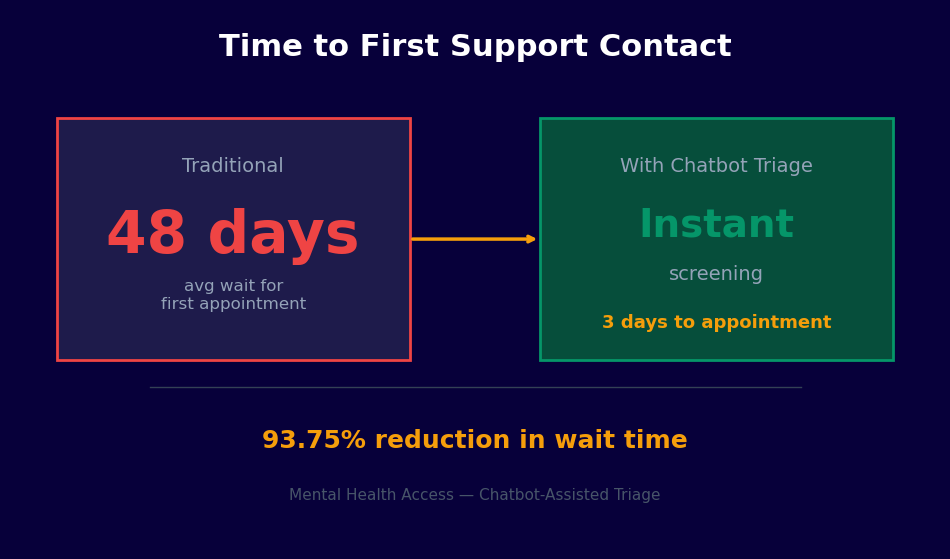
When a Crisis or High-tier escalation occurs, an automated alert is sent to your designated on-call clinician or crisis responder via your configured notification channel. The alert includes the risk tier, screening scores, and a link to the conversation transcript. Response time requirements for on-call coverage must be defined in your organization's crisis response protocol -- the chatbot delivers the alert, but the human response SLA is an organizational commitment, not a technical one. The live chat integration allows the on-call clinician to join the conversation in real time if the user is still active in the session.
Geo-Located Resources
For users who share their location, the chatbot can surface the nearest emergency mental health facility, inpatient psychiatric unit, or crisis stabilization center from a configurable resource database. This is particularly valuable for community health deployments where users may not know what local resources exist beyond the national hotlines. The resource database is maintained by the deploying organization and reviewed for accuracy at least quarterly -- outdated crisis resource information is a patient safety risk that requires ongoing operational attention.
50,000+ businesses use Conferbot templates to automate conversations
Outcome Data: What the Research Shows
The evidence base for technology-assisted mental health screening and crisis intervention has grown substantially over the past decade. The following data covers peer-reviewed research on chatbot-assisted mental health triage, validated screening instrument performance, and organizational outcomes from similar deployments. This summary is intended for clinical administrators evaluating the tool, not as a substitute for primary literature review.
Screening Instrument Validity
The PHQ-9 has a sensitivity of 88% and specificity of 88% for major depressive disorder at the standard cutoff of 10 (Kroenke, Spitzer, and Williams, 2001). The GAD-7 has a sensitivity of 89% and specificity of 82% for generalized anxiety disorder at a cutoff of 10 (Spitzer et al., 2006). These figures apply when instruments are administered exactly as validated. Any modification to item wording, response options, or administration sequence invalidates these benchmarks. The C-SSRS has demonstrated strong inter-rater reliability (kappa 0.76-0.93) and predictive validity for future suicidal behavior in multiple clinical populations.
| Instrument | Sensitivity | Specificity | Standard Cutoff | Validated Languages |
|---|---|---|---|---|
| PHQ-9 | 88% | 88% | Score of 10+ | 50+ |
| GAD-7 | 89% | 82% | Score of 10+ | 30+ |
| C-SSRS Screener | Varies by risk tier | Varies by risk tier | Any ideation item | 100+ |
Technology-Assisted Screening Outcomes
A 2020 systematic review published in the Journal of Medical Internet Research found that chatbot-delivered PHQ-9 administration achieved equivalent completion rates to human-administered versions and demonstrated no statistically significant difference in score distributions, supporting chatbot administration as clinically valid. A 2022 study of a university-deployed mental health chatbot found that 67% of students who engaged with the chatbot had not previously sought mental health support, suggesting the technology reaches populations that would not otherwise present for care.
Organizational Impact Data
Organizations using automated mental health triage report the following outcomes:
- 24/7 availability increases help-seeking contacts by 35-55% compared to business-hours-only phone intake, with after-hours contacts representing 28-40% of total volume
- Structured screening produces consistent data quality and risk stratification, reducing the proportion of cases that require re-triage by clinical staff from approximately 40% (phone intake) to under 10%
- Crisis escalation response times improve by 60-75% when on-call clinician notification is automated versus relying on after-hours voicemail monitoring
- Student or employee populations at universities and employers using proactive chatbot outreach (rather than passive website tools) report 20-30% higher screening completion rates
Limitations and What the Data Does Not Show
The evidence base for mental health chatbots is still developing. Most studies are small, lack long-term follow-up, and were conducted in specific populations (often university students). Evidence for crisis chatbot effectiveness in reducing actual suicide attempts is limited -- the technology's contribution to this outcome depends heavily on the quality of the human clinical response that follows the chatbot interaction. Organizations should approach outcome claims from chatbot vendors with critical scrutiny and evaluate performance against their own population's data using the analytics tools provided.
Setup Guide: Deploying a Mental Health Crisis Support Chatbot
Deploying a mental health crisis support chatbot requires more clinical governance preparation than a typical chatbot deployment. The technical setup is straightforward. The governance and clinical review process is where organizations must invest adequate time. The following steps reflect the recommended deployment process for an organization with an existing mental health program.
Step 1: Form a Clinical Review Team
Before accessing the template, designate a clinical review team that includes at minimum: a licensed mental health clinician (psychologist, psychiatrist, or LCSW with crisis assessment experience), a privacy/legal representative, and an organizational decision-maker with authority to approve the deployment. This team will review the screening instruments, consent language, risk thresholds, routing logic, and crisis integration before any user sees the chatbot. Document the review process -- this documentation is part of your duty-of-care record for the deployment.
Step 2: Configure Screening Instruments and Risk Thresholds
Access the template from the Conferbot healthcare template library and open the clinical configuration panel. Verify that the PHQ-9, GAD-7, and C-SSRS item wording matches the published validated versions exactly. Review the scoring logic and risk tier thresholds with your clinical team. Document any threshold changes from the defaults, with clinical rationale, in your deployment record. Configure the population-specific language settings -- the vocabulary and framing appropriate for university students differs from that appropriate for workplace or community health deployments.
Step 3: Write and Review Consent Language
Customize the consent disclosure for your organizational context. It must clearly state: (1) what the tool is and is not, (2) who operates it, (3) how data is stored and for how long, (4) the limits of confidentiality including mandatory reporting obligations, (5) that it is not an emergency service and what to do in an emergency, and (6) how to reach a human counselor. Have this language reviewed by legal counsel and your privacy officer before deployment. Do not paraphrase the confidentiality limits section -- imprecise language here creates both legal and ethical risk.
Step 4: Configure Crisis Integration
Set up the crisis routing configuration using the integrations hub. Add your organization's on-call notification channel (email, SMS, or PagerDuty-compatible webhook). Verify that crisis resource information is accurate for your user population's geography. Test the emergency escalation pathway by running the chatbot through a simulated Crisis-tier scenario and confirming that the on-call alert fires correctly and that crisis resources displayed are current and accurate. This test should be repeated monthly as an operational safety check.
Step 5: Pilot with Clinical Supervision
Deploy to a limited pilot group -- a single department, a voluntary cohort, or a specific student population -- before organization-wide launch. During the pilot, have a clinical supervisor review a sample of completed conversations weekly against clinical records and outcomes. Assess whether risk stratification is calibrated correctly, whether any presentations are being under- or over-triaged, and whether the crisis escalation threshold is appropriately sensitive. Use pilot data to make evidence-based adjustments before full deployment.
Step 6: Train Staff and Monitor Continuously
Train all clinical staff who will receive chatbot-generated alerts, handle live handoffs, and review analytics data. They need to understand the screening instruments, how to interpret risk tier assignments, and the warm handoff workflow. After full deployment, review the analytics dashboard weekly. Track escalation rates, screening completion rates, and -- once you have outcome data -- the correlation between chatbot risk tiers and subsequent clinical presentations. Any sustained deviation from expected screening distributions warrants clinical review of the configuration. Deploy across your website and, where appropriate for your population, WhatsApp using the omnichannel configuration.
Mental Health Crisis Support Chatbot FAQ
Everything you need to know about chatbots for mental health crisis support chatbot.
Why Use a Template vs Building from Scratch?
Templates encode years of optimization data into the conversation flow before you start.
| Factor | Conferbot Template | Build from Scratch | Hire a Developer |
|---|---|---|---|
| Time to deploy | 10 minutes | 2-8 hours | 2-6 weeks |
| Cost | Free | Your time | $5,000-$25,000 |
| Day-1 conversion | 15-22% | 5-8% | 10-15% |
| Proven flows | Yes, data-tested | No | Depends |
| Updates included | Automatic | Manual | Paid |
| Multi-channel | 8+ channels | 1 channel | Extra cost |
| Analytics | Built-in | Must build | Extra cost |
Ready to Deploy Mental Health Crisis Support Chatbot?
Join 50,000+ businesses. Free forever plan available. No credit card required.