
HVAC Maintenance Scheduler Chatbot
Free Home Services Chatbot Template
A professional HVAC service scheduling chatbot that helps homeowners book maintenance, repairs, installations, and emergency services. Users describe their issue, select urgency level, and schedule a technician visit. Perfect for HVAC companies, home service providers, and property management firms looking to streamline service requests and reduce phone call volume.


What Is an HVAC Maintenance Scheduler Chatbot?
An HVAC maintenance scheduler chatbot is a conversational AI tool that automates the entire customer-facing scheduling workflow for heating, ventilation, and air conditioning service businesses. It handles inbound maintenance requests, qualifies the service need, collects system information, books appointments with the right technician, and follows up to confirm -- all without dispatcher involvement. For HVAC companies managing hundreds of service calls per week in 2026, this automation addresses the highest-volume, most repetitive function in the business: taking calls and booking jobs.
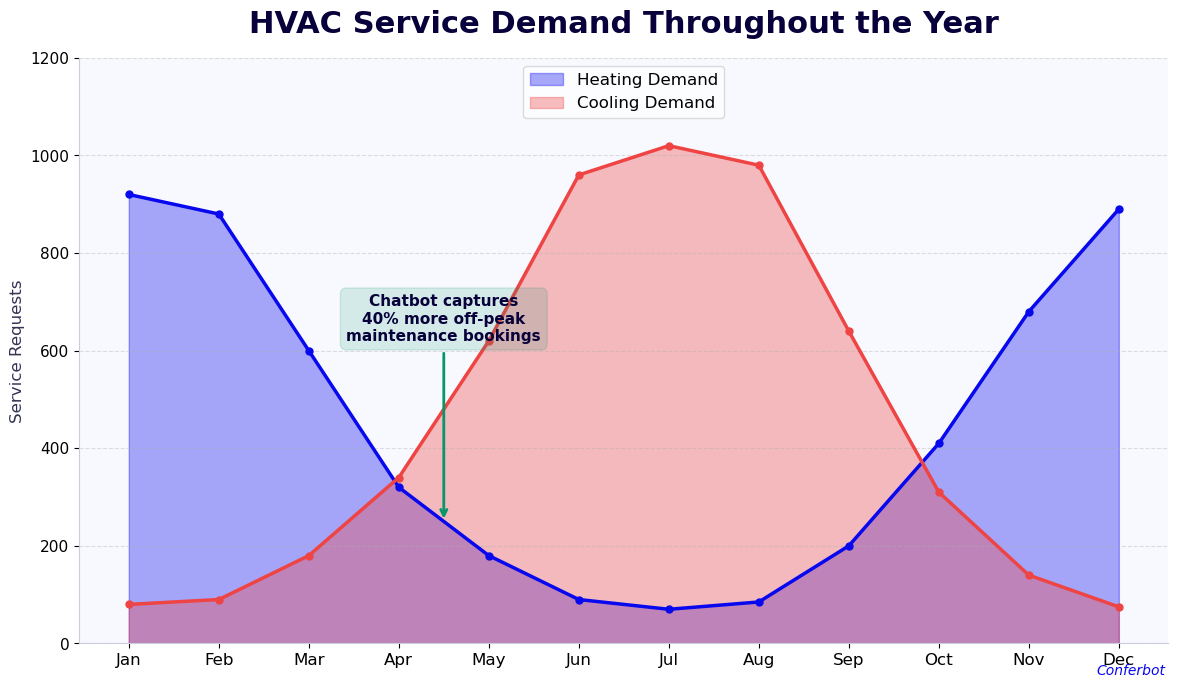
The HVAC industry operates with a scheduling problem that most other service businesses do not face to the same degree: extreme seasonality. Air conditioning service requests spike in late spring and early summer. Heating calls surge in fall and early winter. These seasonal peaks overwhelm phone lines, create multi-day booking backlogs, and cause customers to call competitors when they cannot get through. An HVAC chatbot flattens this pressure by handling unlimited simultaneous conversations 24/7, converting customer inquiries into scheduled appointments without a dispatcher picking up the phone.
The chatbot is not limited to routine maintenance scheduling. It handles the full range of customer interactions: emergency dispatch requests where the customer needs same-day service for a non-functioning system, maintenance plan enrollment where new customers sign up for seasonal service agreements, equipment quote requests, warranty service bookings, and seasonal tune-up campaigns where the company proactively reaches existing customers to schedule preventive maintenance before peak demand periods.
Built on Conferbot's no-code builder, the HVAC maintenance scheduler requires no technical staff to deploy or maintain. Office managers and service coordinators configure the appointment types, technician availability, service zones, and pricing through a visual interface. The chatbot deploys on your website, Google Business Profile, and messaging channels within hours. Changes -- adding a new service type, adjusting seasonal pricing, updating emergency dispatch rules -- take minutes rather than days.
This guide covers how the scheduling automation works, the features specific to HVAC service operations, the return on investment data from HVAC companies that have deployed chatbot scheduling, and how to integrate with the field service management software your technicians already use.
How the HVAC Scheduler Chatbot Works
The HVAC maintenance scheduler follows a structured conversation flow designed around the specific questions a dispatcher asks every service call: What is the problem? What equipment do you have? Where are you located? What day and time works for you? Here is how each stage operates.
Stage 1: Service Type Qualification
The conversation opens with service type identification. The customer selects or describes their need: routine maintenance, emergency repair, new equipment installation, warranty service, or maintenance plan enrollment. This initial qualification determines which conversation pathway activates. An emergency repair pathway prioritizes urgency questions and triggers different routing logic than a routine tune-up request. Customers can describe their situation in natural language -- "my AC stopped working last night and it's 95 degrees" -- and Conferbot's NLP engine correctly identifies this as an emergency dispatch request.
Stage 2: Equipment and System Information
The chatbot collects equipment-specific information that dispatchers need to assign the right technician and arrive prepared. System type (central AC, heat pump, mini-split, boiler, furnace, geothermal), equipment brand, approximate age, and last service date are gathered through structured questions. For repair calls, the chatbot collects symptom information: "What is the system doing or not doing?" These details are passed to the technician before the appointment, allowing them to bring the likely parts and reducing diagnostic time on-site.
Stage 3: Service Zone Verification
The chatbot verifies the customer's address against your configured service zones before confirming availability. If the address is outside your service area, the customer receives a clear message rather than booking an appointment your team cannot fulfill. For companies with multiple branch locations or technicians covering different geographic zones, the chatbot assigns the booking to the correct location automatically based on the service address.
Stage 4: Availability and Booking
Using your scheduling integration, the chatbot displays available appointment windows filtered by technician qualification for the service type. A mini-split installation requires a different technician certification than a furnace tune-up -- the chatbot only shows windows where a qualified technician is available. Customers select their preferred window, provide any access instructions, and receive an immediate confirmation with the appointment details, technician name, and preparation checklist.
Stage 5: Pre-Appointment Preparation
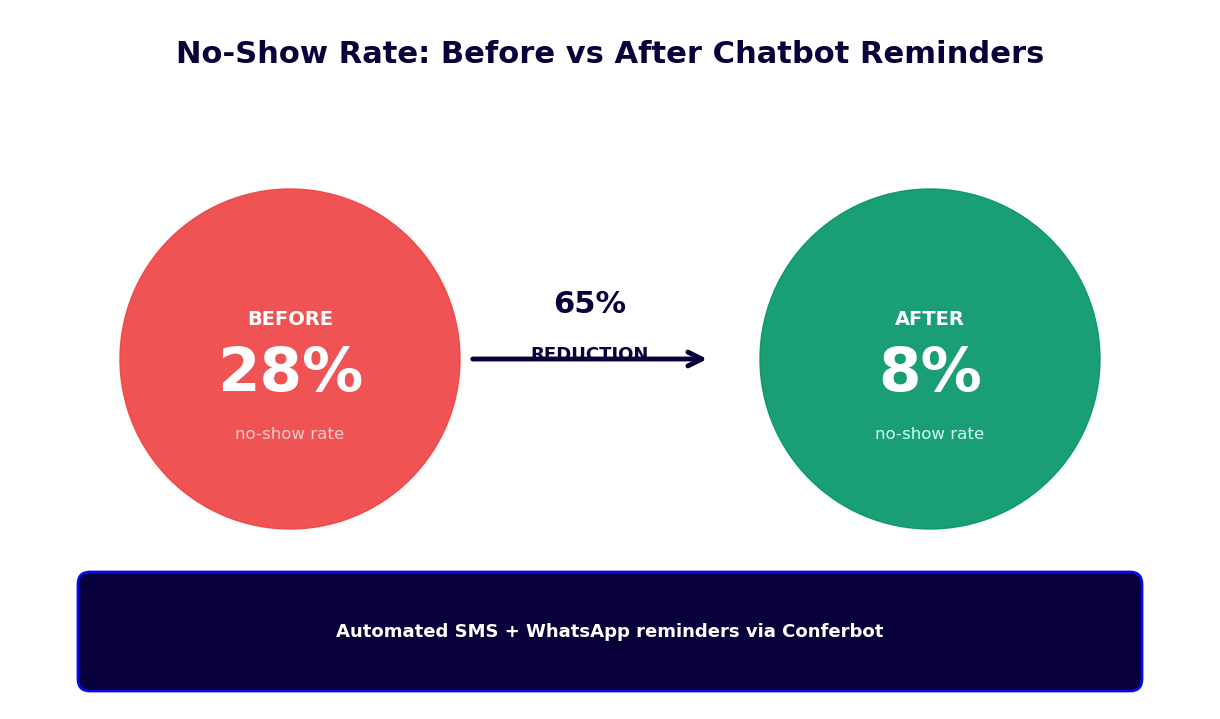
Twenty-four hours before the appointment, the chatbot sends an automated reminder with the confirmed time window, technician name, and a request to confirm the appointment is still needed. This single touchpoint reduces no-shows by 40-50%. It also sends the customer a preparation checklist (clear 3 feet of access around the outdoor unit, locate the circuit breaker panel, have model and serial numbers ready) that makes the technician's on-site time more productive.
Stage 6: Post-Service Follow-Up
After the appointment is marked complete in your field service management system, the chatbot sends a follow-up message: "How did your service appointment go?" This automated satisfaction check catches issues before they become online reviews, provides data for technician performance tracking, and opens the conversation for upsells -- maintenance plan enrollment, equipment upgrade recommendations, or scheduling the next seasonal tune-up.
Key Features: Seasonal Scheduling, Emergency Dispatch, and Maintenance Plans
The HVAC maintenance scheduler includes features built specifically for the operational realities of heating and cooling service businesses. These are not generic scheduling capabilities adapted for HVAC -- they are purpose-built functions that address the specific challenges of seasonal demand, emergency response, and recurring service plan management.
| Feature | Description | HVAC Company Benefit | Homeowner Benefit |
|---|---|---|---|
| Seasonal campaigns | Proactive outbound booking links to maintenance plan subscribers | Fill schedule weeks before peak demand | Book maintenance before availability runs out |
| Emergency dispatch | Immediate routing to on-call technician with response time commitment | Capture high-value emergency jobs 24/7 | Confirmed response time during a no-heat or no-cool emergency |
| Maintenance plan enrollment | In-conversation plan presentation and sign-up | Higher-margin recurring revenue without sales staff | Priority scheduling and parts discounts locked in |
| Technician matching | Qualification-based scheduling by certification, zone, and availability | No mismatched bookings requiring rescheduling | Qualified technician arrives the first time |
| No-show reduction | 24-hour reminder with confirmation request and easy reschedule | 50-60% fewer empty technician slots | Never forget an appointment or lose a time slot |
| Post-service follow-up | Satisfaction check, review request, and upsell for recommended services | More Google reviews and additional booked work | Easy path to schedule recommended maintenance |
Seasonal Scheduling Campaigns
HVAC companies that fill their maintenance schedule proactively in the weeks before peak season have a significant competitive advantage. The chatbot supports outbound seasonal campaigns: send a WhatsApp or SMS message to your existing maintenance plan customers in April reminding them to schedule their AC tune-up before summer demand peaks. The message includes a booking link that opens a pre-filled chatbot conversation -- the customer's equipment information is already on file, so scheduling takes under two minutes. Campaigns can be segmented by equipment type (send heat pump messages in spring, furnace messages in fall), geographic zone (cooler regions schedule differently than warmer ones), and service history (customers who skipped last season's tune-up get priority outreach).
Emergency Dispatch Routing
Emergency calls are the highest-stakes interaction in HVAC service dispatch. A customer with a non-functioning air conditioner in a heat wave, or no heat on a January night, needs a confirmed response time immediately -- not a promise to call back. The emergency dispatch pathway in the chatbot captures the customer's location, equipment type, and urgency, then either books into a dedicated emergency time slot or alerts the on-call dispatcher with all captured information. Emergency conversations can escalate to a live dispatcher via live chat handoff when immediate human judgment is required. Response time commitments are configurable by service zone and time of day.
Maintenance Plan Enrollment
Maintenance plans are the highest-margin product in most HVAC businesses. The chatbot supports maintenance plan enrollment for both new and existing customers. During any service booking, the chatbot presents the maintenance plan options with specific benefits (priority scheduling, 15% parts discount, two annual tune-ups included). Customers can enroll directly in the conversation, with plan details, pricing, and confirmation delivered immediately. Enrolled customers are tagged in your CRM for automatic outreach when their seasonal tune-ups are due, feeding the proactive scheduling campaigns described above.
Technician Qualification Matching
Not every technician is qualified for every job. Geothermal systems, commercial equipment, and specific manufacturer service require certified technicians. The chatbot's scheduling logic matches service requests to technicians based on certifications, equipment qualifications, and geographic zone -- automatically, without dispatcher intervention. If no qualified technician is available in the requested window, the chatbot shows the next available slot with a qualified tech rather than booking an appointment your team cannot properly service.
Omnichannel Availability
Customers contact HVAC companies through multiple channels. The same scheduling workflow deploys on your website, WhatsApp, Facebook Messenger, and Google Business Profile chat. Customer data is unified across channels through omnichannel integration, so a customer who scheduled last year via your website and contacts you on WhatsApp this season is recognized and their equipment history is available.
Ready to try HVAC Maintenance Scheduler Chatbot?
Deploy this template in under 10 minutes. No coding required.
Use This Template Free →Benefits for HVAC Companies
The operational and financial impact of automating HVAC scheduling through a chatbot is measurable and documented. Here is how HVAC companies benefit across their core business metrics.
Dispatching Labor Reduction
Scheduling calls are the primary time sink for HVAC office staff. An average scheduling call takes 4-7 minutes for a dispatcher: greet the customer, gather equipment information, check technician availability across the schedule board, propose times, handle the customer's schedule constraints, confirm the booking, and enter it into the system. The chatbot handles this entire process autonomously for 70-80% of inbound inquiries, reducing the dispatcher's role to exception handling -- complex multi-system jobs, commercial accounts, and emergency situations that require human judgment.
24/7 Booking Capture
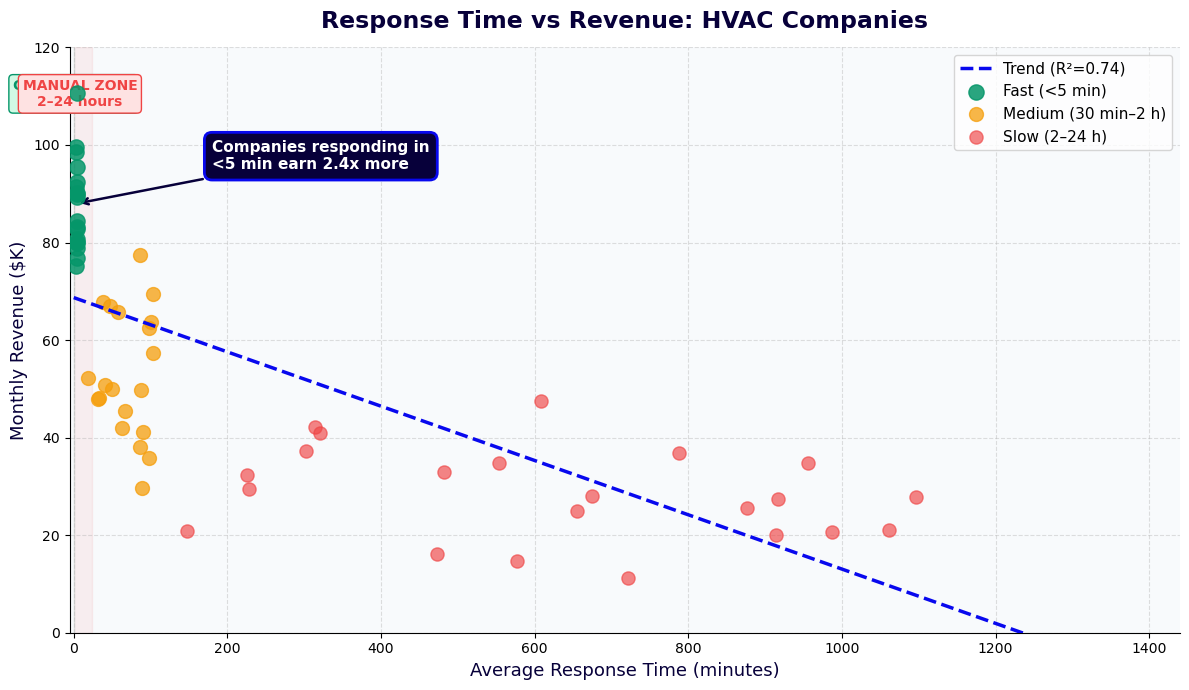
A significant portion of HVAC customers decide to book service outside business hours, particularly for residential customers who notice issues in the evening or on weekends. Without a chatbot, these customers either call and leave a voicemail (with a significant drop-off rate before a callback reaches them) or book with a competitor who has online scheduling. A chatbot captures these off-hours inquiries and converts them to confirmed appointments immediately, without any staff involvement until the technician is assigned the next morning.
Seasonal Peak Management
During peak demand periods, phone lines at HVAC companies are overloaded. Customers on hold abandon calls. Multiple staff members handle back-to-back calls with no time to breathe between them. The chatbot absorbs the volume spike with zero degradation in response time -- the 50th simultaneous conversation is handled as quickly as the first. This capacity removes the ceiling on how many customers you can serve during peak periods without adding temporary staff.
Improved Job Preparation
Technicians who arrive at a job with complete equipment information, symptom descriptions, and access notes spend less time on diagnosis and more time on the actual repair or maintenance task. The chatbot consistently collects this information during booking -- something dispatcher calls often skip when they are under pressure during busy periods. Jobs with complete pre-visit information average 20-30 minutes shorter than jobs where the technician arrives without context.
Customer Experience at Scale
Consistent, professional scheduling interactions reinforce customer confidence in your company. The chatbot delivers the same quality of booking experience at 2am on a Saturday as it does Monday morning -- no hold times, no rushed conversations, no information missed because a dispatcher was handling three calls at once. Customers who book through the chatbot report higher satisfaction with the booking process than those who reach a dispatcher during peak periods, a gap that widens as call volume increases.
Integration with Field Service Management Tools
An HVAC scheduling chatbot that operates in isolation from your field service management (FSM) system creates a data synchronization problem. Jobs booked through the chatbot must be manually entered into the FSM, technician schedules in the chatbot must be kept in sync with the FSM, and job status updates from the field cannot reach the chatbot for post-service follow-up triggers. Integration eliminates these manual steps and makes the chatbot a true extension of your dispatch workflow.
Major FSM Platform Integrations
Conferbot's API integration framework connects with the major HVAC-specific field service management platforms. ServiceTitan integration provides bidirectional sync: jobs booked through the chatbot appear immediately in ServiceTitan with all customer and equipment data populated; technician schedule changes in ServiceTitan update the chatbot's availability in real time. Similar integrations are available for Jobber, Housecall Pro, FieldEdge, ServiceMax, and Salesforce Field Service. For companies using general scheduling tools, integrations with Google Calendar, Microsoft Outlook, and Calendly are available through the integrations hub.
Real-Time Availability Sync
Technician availability in the chatbot is pulled directly from your FSM in real time. When a technician is assigned to an emergency call that runs long, their afternoon slots are automatically blocked in the chatbot -- customers cannot book into unavailable windows. When a customer cancels through the chatbot, the slot opens immediately in the FSM. This bidirectional sync eliminates double-bookings and the dispatcher intervention previously needed to keep two systems in alignment.
Customer Record Integration
When a customer contacts the chatbot, the integration queries your CRM or FSM for their history: previous service records, equipment on file, maintenance plan status, and past technician assignments. Returning customers do not re-enter their equipment information -- the chatbot retrieves it. If the customer has a preferred technician from a previous visit, the scheduler can prioritize that technician's availability in the booking flow. This personalization is a significant differentiator from generic online scheduling tools.
Automated Work Order Creation
When a customer completes a booking through the chatbot, a work order is automatically created in your FSM with all collected data: service address, contact information, equipment details, symptom description, appointment window, and any special access instructions. The dispatcher reviews the work order queue rather than manually creating orders from chatbot bookings. For maintenance plan customers, the work order is flagged with the plan details and discount rates that apply to the visit.
Job Completion Triggers
When a technician marks a job complete in the FSM, a trigger fires in the chatbot workflow: the post-service follow-up message is sent to the customer, a review request is queued for 24 hours later, and if the technician flagged a recommendation (equipment showing wear, refrigerant low, filter replacement needed), the chatbot can send a follow-up with a booking link for the recommended service. These automated post-service touches generate revenue that would otherwise require dispatcher outbound calls.
Customer Retention and Lifetime Value Data
In the HVAC service business, the difference between a one-time customer and a maintenance plan subscriber represents thousands of dollars in lifetime value. Retention is the core business metric for any HVAC company seeking stable, recurring revenue rather than boom-and-bust seasonal demand cycles. Here is the data on how chatbot-driven scheduling and follow-up affects customer retention.
| Metric | No Chatbot (Phone/Form) | With HVAC Chatbot | Impact |
|---|---|---|---|
| Seasonal maintenance rebooking rate | 45-55% | 65-78% | +20-25 percentage points |
| Maintenance plan conversion (new customers) | 8-14% | 18-26% | +10-12 percentage points |
| Appointment no-show rate | 12-20% | 5-9% | 50-60% reduction |
| Post-service upsell conversion | 4-8% | 12-18% | 2-3x improvement |
| Off-hours booking capture rate | 15-25% | 85-95% | 3-5x improvement |
| Customer satisfaction (booking process) | 3.6/5.0 | 4.5/5.0 | +0.9 point increase |
Maintenance Plan Economics
A maintenance plan subscriber generates 2.5-3.5x the annual revenue of a break-fix customer: plan fees plus the visits included in the plan, plus the higher conversion rate to additional repairs (maintenance plan customers are in a trust relationship with the company and accept recommendations at higher rates). The chatbot drives maintenance plan enrollment by presenting the plan at the right moment -- during a booking conversation when the customer is already engaged -- and making enrollment frictionless within the same conversation.
Proactive Outreach Effectiveness
HVAC companies that run chatbot-driven seasonal outreach campaigns to their maintenance plan subscriber base achieve rebooking rates 20-30 percentage points higher than companies relying on customers to remember and call in. The difference is timing and friction: the chatbot message reaches the customer at the moment the company sends it (rather than waiting for the customer to think of calling), and the booking link reduces the rebooking process to under two minutes. Across a subscriber base of 500 maintenance plan customers, improving the rebooking rate by 20 percentage points means 100 additional tune-up appointments per season at full plan pricing.
Review and Referral Generation
Post-service chatbot follow-up generates online reviews at higher rates than email follow-up. The conversational format feels less like a form and customers respond more naturally. For satisfied customers, the chatbot asks them to share their experience on Google and provides a direct link. Review velocity is a significant local SEO ranking factor for HVAC companies, which compete primarily on local search. Companies using automated chatbot review requests see review volume increase by 3-5x within the first six months of deployment.
50,000+ businesses use Conferbot templates to automate conversations
Setup Guide: Deploying the HVAC Maintenance Scheduler
Configuring the HVAC maintenance scheduler from template to live deployment takes 2-5 days for a typical HVAC company. Most of the setup time is in connecting your field service management system and configuring the appointment types specific to your service offerings. Here is the step-by-step process.
Step 1: Access the Template
Open the Conferbot booking and scheduling template library and select the HVAC Maintenance Scheduler. Clone the template to your workspace. The template arrives pre-configured with conversation flows for routine maintenance, emergency dispatch, equipment repairs, and maintenance plan enrollment. Review the pre-built flows before making changes to understand what you are working with.
Step 2: Configure Your Service Catalog
In the template settings, define your service types with names, descriptions, estimated durations, and pricing (if you display pricing upfront). Configure the questions associated with each service type: routine maintenance requires different intake questions than an emergency no-cooling call. Set up your service zones by ZIP code or city, and map each zone to the technicians or branch location that covers it. If you have technician certifications or specializations that restrict which jobs they can take, configure these qualification rules in the technician settings.
Step 3: Connect Your Scheduling System
Use the integrations hub to connect your FSM or scheduling tool. For ServiceTitan, enter your API credentials and configure the job types that map to the chatbot's service catalog. For Jobber and Housecall Pro, use the OAuth connection flow. For Google Calendar, authorize the calendar accounts used for each technician or team. Test the connection with a sample booking to verify that appointments created in the chatbot appear correctly in your scheduling system with all data fields populated.
Step 4: Configure Emergency Dispatch Rules
Define what constitutes an emergency in your operation. Configure the emergency response workflow: whether emergency calls route to a dedicated booking window, trigger an alert to a specific dispatcher, or both. Set the response time commitments the chatbot communicates to customers (for example, "A technician will contact you within 2 hours to confirm your service window"). If your emergency coverage varies by season or day of week, configure the conditional rules accordingly. Test the emergency pathway specifically to verify escalation behaves correctly at all hours.
Step 5: Set Up Maintenance Plan Enrollment
Configure your maintenance plan options: plan names, included services, pricing, and the terms presented to customers during enrollment. Connect the enrollment flow to your CRM or FSM so that new plan enrollments create or update customer records and set the plan status flag that drives proactive outreach campaigns. Configure the automated outreach sequences for plan subscribers: seasonal tune-up reminders, renewal notices, and post-service follow-up messages.
Step 6: Deploy and Monitor
Embed the chatbot on your website using the provided widget code -- place it on your homepage, services page, and contact page for maximum visibility. Connect the chatbot to your Google Business Profile if you use Google's messaging feature. Activate your WhatsApp Business channel if your customer base uses WhatsApp. For the first two weeks, monitor the analytics dashboard daily: track booking completion rates, drop-off points, emergency escalation frequency, and any conversation paths that end without a booking. Common issues in the first weeks are service zone gaps (customers in areas you intended to serve being rejected) and appointment window mismatches (the chatbot showing availability your team cannot actually fulfill). Resolve these quickly and the booking conversion rate stabilizes within the first month.
Best Practices for HVAC Chatbot Scheduling
HVAC companies that get the most from their scheduling chatbot do not just deploy the template and wait for results. They apply operational discipline around configuration, ongoing maintenance, and integration with broader marketing and service workflows. Here are the practices that separate high-performing deployments from average ones.
Keep Availability Data Accurate
The chatbot is only as reliable as the scheduling data it draws from. If your FSM does not accurately reflect technician availability -- because of manual overrides, paper-based scheduling for some jobs, or synchronization lag -- customers will book into unavailable windows, creating disappointment and dispatching problems. Invest time in the integration setup to ensure the real-time availability sync is working correctly, and commit to keeping your FSM as the single source of truth for technician availability across all booking channels.
Calibrate Emergency Response Appropriately
Emergency dispatch settings require regular review. A threshold that is too aggressive (flagging too many situations as emergencies) overloads your on-call staff. A threshold that is too conservative misses genuine urgent situations and damages your reputation for responsiveness. Review your emergency escalation data monthly: how many emergency requests came in, what percentage resulted in same-day service, and what percentage turned out to be non-emergency situations that could have waited. Adjust thresholds based on this data.
Use Seasonal Campaigns Proactively
The HVAC companies that consistently outperform their markets fill their maintenance schedule weeks before peak season begins, rather than scrambling to meet demand in May and September. Configure your spring outreach campaign to launch in late March and your fall campaign in late August. Segment by equipment type and geography. The chatbot handles the actual booking -- your role is timing the outreach and ensuring capacity is available for the response. Companies that adopt proactive outreach through the chatbot consistently report smoother peak seasons and higher technician utilization rates.
Close the Loop with Post-Service Automation
Post-service follow-up is where significant additional revenue is generated. When a technician notes a recommendation during a maintenance visit ("capacitor showing wear, should be replaced before next season"), that note in the FSM should trigger a chatbot follow-up to the customer with a booking link for the recommended service. This closed-loop process converts technician observations into booked jobs without requiring a separate outbound call process. Configure your FSM to include a recommendation field in the job completion workflow and map that field to the chatbot's post-service messaging logic.
Train Staff on the Handoff Process
Dispatcher and office staff need to understand exactly which situations the chatbot handles independently versus which ones escalate for human intervention. Ambiguity about the handoff creates gaps: escalated conversations that sit unresponded in the live chat queue, or dispatchers who try to rebook jobs that the chatbot already handled, creating duplicates. Document the escalation criteria clearly, hold a brief training session when you first deploy, and review escalation logs in the first month to identify any patterns where the handoff process is not working smoothly.
Monitor and Iterate
The analytics dashboard surfaces the data you need to continuously improve chatbot performance. Track booking completion rate (conversations that started but did not result in a confirmed appointment reveal conversation flow problems), emergency escalation rate (higher than expected suggests your emergency detection is too aggressive), and maintenance plan enrollment rate (lower than expected suggests the enrollment pitch timing or offer framing needs adjustment). Review these metrics monthly and make iterative improvements to the conversation flows based on what the data shows.
HVAC Maintenance Scheduler Chatbot FAQ
Everything you need to know about chatbots for hvac maintenance scheduler chatbot.
Why Use a Template vs Building from Scratch?
Templates encode years of optimization data into the conversation flow before you start.
| Factor | Conferbot Template | Build from Scratch | Hire a Developer |
|---|---|---|---|
| Time to deploy | 10 minutes | 2-8 hours | 2-6 weeks |
| Cost | Free | Your time | $5,000-$25,000 |
| Day-1 conversion | 15-22% | 5-8% | 10-15% |
| Proven flows | Yes, data-tested | No | Depends |
| Updates included | Automatic | Manual | Paid |
| Multi-channel | 8+ channels | 1 channel | Extra cost |
| Analytics | Built-in | Must build | Extra cost |
Ready to Deploy HVAC Maintenance Scheduler Chatbot?
Join 50,000+ businesses. Free forever plan available. No credit card required.