
Event Registration Chatbot Template (Free)
Free Lead Generation Chatbot Template
Fill events faster and capture qualified leads with a free event registration chatbot. Automates signups, ticketing, reminders, and follow-up. No code.


What Is an Event Registration Chatbot?
An event registration chatbot is an AI-powered conversational tool that handles the complete registration workflow for events -- conferences, webinars, workshops, networking events, product launches, and trade shows -- through a natural conversation that captures attendee information, processes ticket selection, delivers confirmation details, and follows up to maximize attendance and post-event engagement.
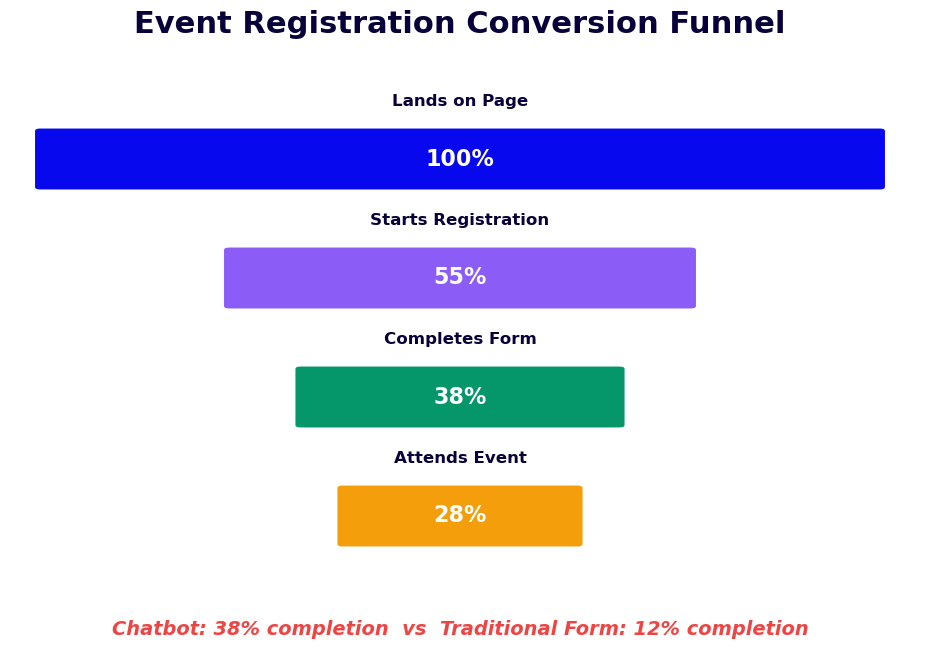
In 2026, events remain one of the highest-ROI lead generation channels for B2B organizations, with in-person and virtual events producing qualified pipeline at a cost-per-lead 3-5x lower than paid advertising for many businesses. Yet the registration process itself -- a static form, a generic email confirmation, and a reminder a day before -- is the weakest link in the event funnel. Registration forms are abandoned at rates of 40-60%. Confirmed registrants no-show at rates of 30-50% for free events and 10-20% for paid events. Post-event follow-up is generic and slow.
An event registration chatbot addresses each of these failure points. It converts more landing page visitors into registrants through a conversational interface that qualifies interest and reduces form friction. It drives higher attendance through a structured pre-event communication sequence personalized to each registrant's stated interests. And it captures post-event contact and interest data that enables precise, high-conversion follow-up. Built on Conferbot's AI chatbot builder with NLP processing, it deploys on your event landing page, website, and WhatsApp without engineering resources.
This page covers how the registration and lead capture flow works, ticketing and attendee management features, pre-event and post-event communication sequences, CRM and marketing automation integration, event type use cases, conversion and attendance benchmarks, and a setup guide for event and marketing teams.
How It Works: Registration Flow, Lead Qualification, and Attendee Journey
The event registration chatbot manages the attendee experience through four distinct phases: initial registration, pre-event engagement, day-of attendance support, and post-event follow-up. Each phase is configurable to match the event type, audience, and the organization's lead generation objectives.
Phase 1: Registration and Lead Qualification
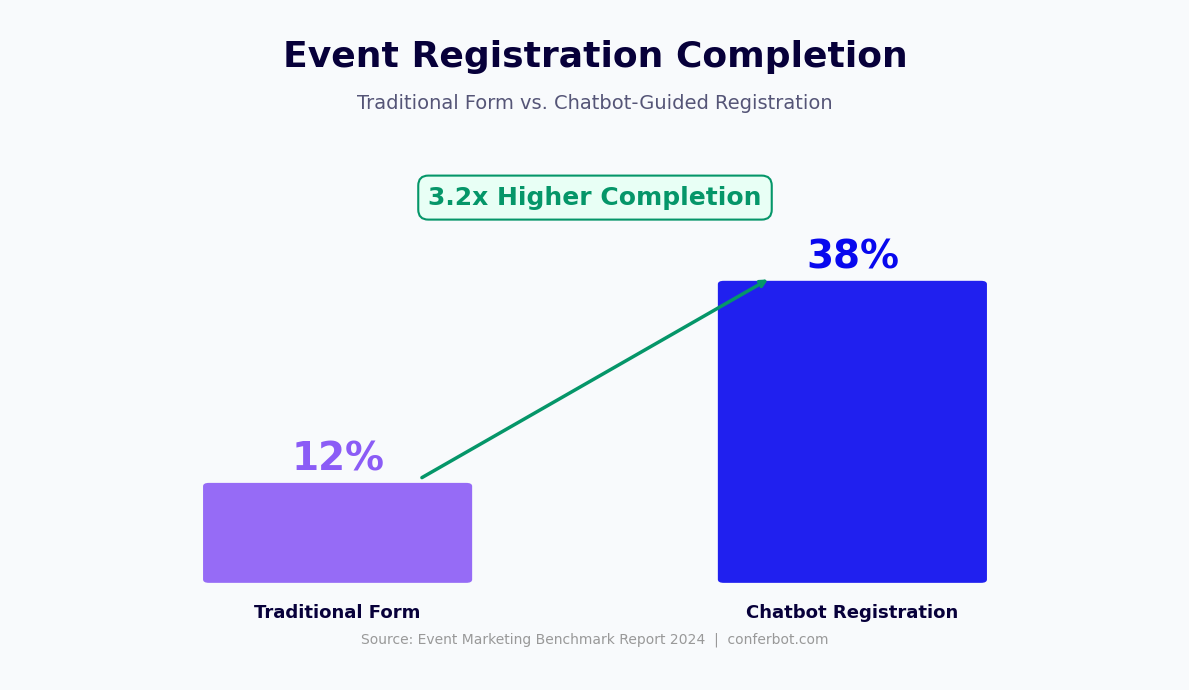
The chatbot opens with an engaging event introduction rather than an immediate form. It describes what the attendee will gain from attending -- the key topics, speakers, or outcomes -- and confirms their interest before collecting information. This approach increases completion rates by 25-35% compared to a form that asks for name and email without context. After confirming interest, the chatbot collects the registration fields required for the event: name, business email, job title, company name and size, and any event-specific qualification questions. For lead generation events, these qualification questions serve a dual purpose: they collect the information needed for registration and they qualify the lead's sales readiness and fit. A registrant who answers "What is your budget for this type of solution?" provides a sales qualification data point that a standard registration form never captures.
Phase 2: Ticket Selection and Confirmation
For events with multiple ticket tiers -- general admission, VIP, early bird, sponsor passes, virtual access -- the chatbot presents the options conversationally, explains the differences between tiers, and guides the registrant to the most appropriate selection based on their role and stated interests. For paid events, the chatbot integrates with Stripe, PayPal, or the organization's payment processor to complete the transaction within the conversation. On registration completion, the chatbot delivers an immediate confirmation with event details, calendar invite attachment, and a personalized agenda recommendation based on the sessions most relevant to the registrant's role and interests. This personalized confirmation email performs significantly better than generic confirmations on opens, clicks, and the likelihood the registrant saves the event in their calendar.
Phase 3: Pre-Event Engagement Sequence
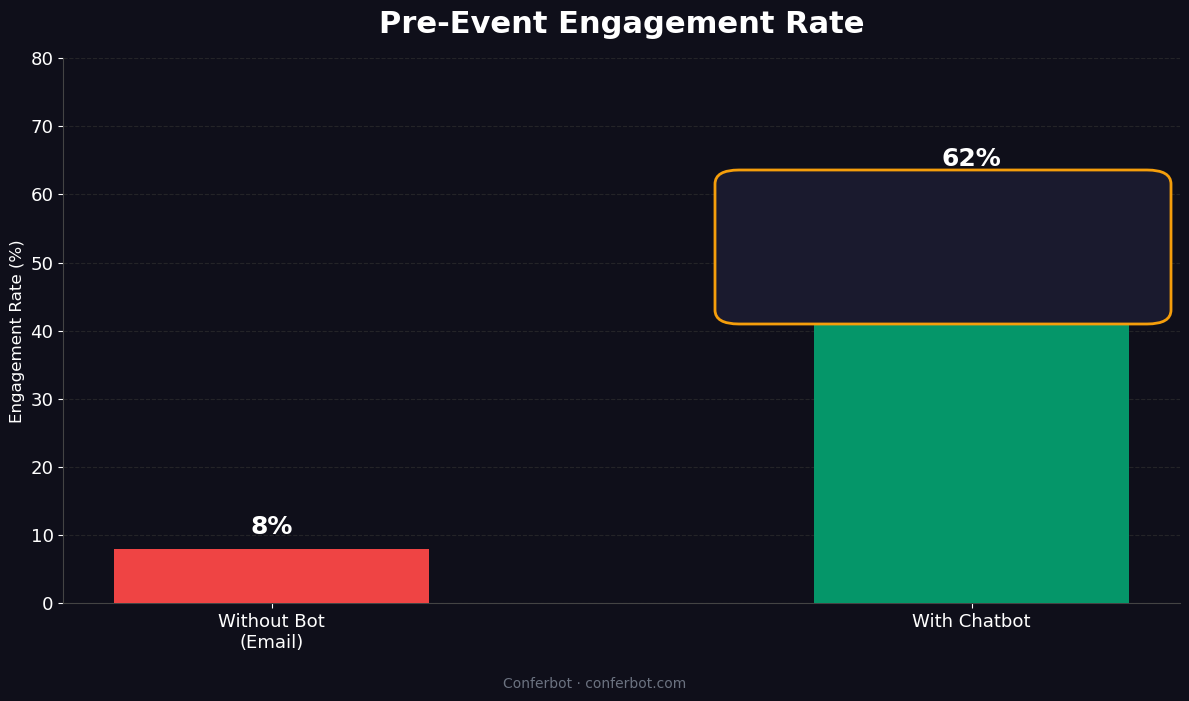
Confirmed registrants receive a structured pre-event sequence through their preferred channel (email, WhatsApp, or SMS). The sequence is timed to maximize attendance: a session agenda preview one week before the event, a speaker spotlight three days before, practical logistics information (parking, virtual access link, what to prepare) the day before, and a morning-of reminder with a single click to access the event or confirm attendance. Each message in the sequence is personalized to the registrant's profile: a senior executive receives different content emphasis than a practitioner; a virtual attendee receives different logistics than an in-person attendee. This personalized sequence reduces no-show rates by 20-35% compared to generic reminder emails.
Phase 4: Post-Event Follow-Up
Immediately after the event, the chatbot initiates post-event engagement: a satisfaction survey, links to session recordings or materials, and a prompt to connect with specific follow-up resources based on the sessions the registrant attended or expressed interest in. For B2B events, this is the highest-value lead generation moment -- registrants who have just attended a compelling session are at their point of maximum interest. The chatbot captures post-event intent signals: "Would you like to speak with someone about implementing what you heard today?" A positive response creates a high-qualification lead record in the CRM with the registrant's profile, session interests, and explicit next-step intent. Track registration rates, attendance conversion, and post-event lead quality through Conferbot's analytics dashboard.
Key Features of the Event Registration Chatbot
The event registration chatbot's feature set covers the full event attendee lifecycle, from first registration contact to post-event follow-up, with specific capabilities that address the conversion and engagement challenges at each stage.
| Feature | What It Does | Event Team Benefit | Attendee Benefit |
|---|---|---|---|
| Conversational registration | Replaces static forms with a guided conversation that reduces abandonment | 25-35% higher registration completion rate | Faster, more engaging signup experience |
| Lead qualification questions | Captures sales qualification data alongside registration fields | Every registrant arrives in CRM with qualification data | Personalized content and follow-up matching their role |
| Multi-tier ticket management | Presents ticket options with contextual recommendations | Higher VIP and paid tier uptake | Selects the right ticket without reading a tier comparison table |
| Payment processing | Processes ticket payments via Stripe or PayPal within the conversation | Frictionless paid registration in a single flow | Completes purchase without leaving to a separate checkout |
| Personalized confirmation | Delivers confirmation with calendar invite and agenda recommendation | Higher calendar save and attendance intention rates | Relevant session recommendations from the moment of registration |
| Pre-event reminder sequence | Automated, personalized reminders at 7-day, 1-day, and day-of intervals | 20-35% lower no-show rates | Never forgets about an event they registered for |
| Post-event lead capture | Captures intent signals and next-step requests immediately post-event | High-qualification leads at peak interest moment | Easy path to follow-up resources or conversations |
| CRM and marketing automation sync | Pushes structured attendee data to CRM and MA platforms in real time | Zero manual data entry for event leads | Personalized follow-up that reflects their event experience |
WhatsApp Event Registration
For events targeting audiences in markets where WhatsApp is the dominant communication platform -- which includes most of Latin America, Europe, the Middle East, Africa, and South and Southeast Asia -- the registration chatbot on WhatsApp achieves dramatically higher completion rates than email or web form alternatives. Registrants receive a WhatsApp message from the event organizer, complete the registration conversation within WhatsApp in 2-3 minutes, and continue to receive all pre-event communications and reminders through the same channel. The message open rates for WhatsApp reminders (85-95%) compared to email reminders (15-25%) produce attendance rate improvements that are particularly significant for free events with traditionally high no-show rates.
Waitlist and Capacity Management
For events with capacity constraints, the chatbot manages waitlist registration automatically. When an event reaches capacity, incoming registrations are captured as waitlist entries with the registrant's full qualification data. If a registered attendee cancels, the chatbot automatically contacts the next waitlist entry with an offer of the freed spot and a defined acceptance window. This automated waitlist management fills capacity gaps without any manual event team intervention and ensures that event capacity is fully utilized even when pre-event cancellations occur.
Ready to try Event Registration Chatbot Template (Free)?
Deploy this template in under 10 minutes. No coding required.
Use This Template Free →Event Chatbots as a Lead Generation Engine
For marketing and sales teams, the event registration chatbot is not merely an operational efficiency tool -- it is a structured lead generation system that captures more qualified leads at lower cost than alternative channel strategies. This section covers how to maximize the lead generation value of event registration chatbots.
Lead Qualification at the Registration Gate
Standard event registration forms collect contact information. A chatbot registration flow collects contact information and qualification data simultaneously. The difference in downstream sales value is substantial. A registrant who has answered "What is your organization's primary challenge with customer retention?", "Are you currently evaluating solutions in this area?", and "What is your timeline for making a decision?" has given the sales team a qualified lead brief that would otherwise require a full discovery call to compile. The registration flow becomes a qualification interview that the prospect completes because the framing is event registration, not a sales conversation. This distinction makes prospects significantly more forthcoming than they are in direct lead generation contexts.
Lead Scoring Integration
The qualification data collected during registration maps to lead scoring models in the CRM. Conferbot's integration with Salesforce, HubSpot, and Marketo assigns lead score points based on registration responses: company size above a threshold, role seniority, explicit purchase intent statement, and active evaluation status each contribute to a lead score that surfaces high-priority leads for immediate sales follow-up. This scoring happens in real time as registrations complete, allowing sales teams to prioritize their event follow-up before the event begins rather than scoring leads from a raw registrant list after the event closes.
Multi-Touch Event Lead Attribution
Events are often one touchpoint in a longer buying journey. The registration chatbot's integration with marketing automation platforms captures the full attribution chain: which campaign or channel drove the prospect to the event landing page, whether they were a known contact from previous marketing touchpoints, and how the event influenced their progression through the buying journey. This attribution data enables marketing teams to accurately measure event ROI and compare event lead quality against other demand generation channels.
Post-Event Lead Nurture Sequences
The post-event lead capture data -- which sessions attended, what follow-up resources were requested, whether the attendee explicitly expressed intent to speak with sales -- enables marketing automation to deliver hyper-relevant nurture sequences that reference the specific event experience. An attendee who indicated interest in a particular product demonstration receives a follow-up sequence that leads directly to that demonstration, skipping the generic welcome sequence that would be irrelevant to their stated interest. These personalized post-event nurture sequences consistently outperform generic event follow-up by 2-4x on conversion to pipeline opportunity. Connect event lead data to your CRM and marketing automation platform through Conferbot's API integration and monitor lead-to-pipeline conversion through the analytics dashboard.
Use Cases Across Event Types
The event registration chatbot template adapts to the specific operational and lead generation requirements of different event formats. Here are the primary use cases and how the configuration differs across event types.
Webinars and Virtual Events
Webinars are the highest-volume use case for event registration chatbots in B2B environments. The chatbot handles registration, delivers the virtual access link in the confirmation, sends the pre-event reminder sequence with the join link prominent in each message, and captures post-webinar interest in replay access or follow-up conversations. For multi-session virtual conferences, the chatbot guides attendees through session selection based on their role and interests and builds a personalized agenda. The post-event chatbot engagement happens at the moment when webinar registration data most commonly goes cold -- the chatbot converts that moment into an active lead capture interaction.
In-Person Conferences and Trade Shows
For in-person events, the chatbot manages logistics alongside registration: meal preference collection, workshop session selection, accommodation recommendations, parking or transit guidance, and badge pickup information. At the event itself, the chatbot can be deployed for on-site registration and check-in, reducing queues at the registration desk. Post-event, it drives session evaluation, connects attendees with speaker resources, and captures interest in the next event in the series.
Product Launches and Demos
Product launch events combine event registration with direct sales qualification. The chatbot qualifies registrants specifically for product fit: current solution, organization size, decision timeline, and specific use case. This qualification data is available to sales representatives before the event, enabling them to prioritize their engagement with the highest-fit attendees during the event and to personalize their post-event follow-up with specific product capability messaging. For demo events, the chatbot can schedule personalized one-on-one demo slots within the event registration flow, filling the demo calendar while registration is still in progress.
Networking Events and Meetups
Community and networking events benefit from chatbot registration primarily through the attendee profile collection and matching capabilities. The registration chatbot asks about each attendee's professional interests, what they are hoping to discuss at the event, and who they would most like to connect with. This data enables the event organizer to provide each attendee with a suggested connection list and conversation starters, transforming a random networking event into a structured connection experience that attendees find significantly more valuable. The post-event chatbot captures connection follow-ups and community membership requests.
Training Workshops and Courses
For paid training events, the chatbot serves as the primary enrollment interface. It explains course content, assesses whether the registrant's background is appropriate for the course level, processes payment, delivers pre-course preparation materials, and manages the waitlist. For certification programs, the chatbot manages the multi-session enrollment sequence and tracks completion requirements. Connect workshop enrollment to your calendar booking integration to manage instructor availability and session capacity automatically.
CRM and Marketing Automation Integration
The event registration chatbot's value as a lead generation tool depends entirely on how effectively the captured data flows into the organization's sales and marketing systems. Without integration, event leads sit in a registration spreadsheet that the sales team manually processes days or weeks after the event. With integration, every registration creates a real-time, fully-qualified lead record in the CRM that is immediately actionable.
Salesforce Integration
Conferbot integrates with Salesforce through the Salesforce REST API. When an event registration is completed, the integration creates or updates a Lead or Contact record in Salesforce with all registration fields populated: name, business email, company, title, and qualification question responses. A Campaign Member record is created linking the registrant to the specific event Campaign in Salesforce, enabling event-level attribution reporting. The lead score calculated from registration responses is written to the Salesforce lead score field, surfacing high-priority leads in sales representative views immediately. Post-event activity -- survey response, intent signals, follow-up requests -- is logged as a Salesforce activity against the lead record.
HubSpot Integration
HubSpot integration uses the HubSpot Contacts API to create or update contact records on registration completion. Registration data maps to HubSpot contact properties and timeline events, enabling accurate attribution in HubSpot's contact timeline and lifecycle stage progression. For HubSpot Marketing Hub users, registration completion triggers marketing automation workflows -- post-event nurture sequences, sales notification emails, and lead handoff tasks -- without any manual workflow triggers. The chatbot's lead score data maps to HubSpot's contact score or lead scoring properties, feeding the existing sales prioritization workflows the team already uses.
| CRM/MA Platform | Integration Method | Records Created | Automation Triggered |
|---|---|---|---|
| Salesforce | REST API | Lead/Contact, Campaign Member, Activity | Lead assignment rules, workflow rules |
| HubSpot | HubSpot API | Contact, Timeline Event | Workflows, sequences, sales tasks |
| Marketo | REST API | Lead record, Program Member, Activity | Smart campaigns, nurture streams |
| ActiveCampaign | REST API | Contact, Deal (optional) | Automations, pipeline stage changes |
| Generic CRM | Webhook or REST API | Configurable field mapping | Webhook triggers to connected systems |
Marketing Automation Trigger Sequences
The registration event in the chatbot can trigger different automation sequences based on the registration profile. A first-time registrant with no prior CRM history enters a prospect introduction sequence. A known contact who has engaged with prior marketing enters an accelerated nurture track that references their history. A contact flagged as sales-qualified by their registration responses triggers a sales notification and task assignment rather than a nurture sequence. This trigger logic is configured in the marketing automation platform using the standard tools the team already knows, with the chatbot delivering the registration data that drives the branching logic.
50,000+ businesses use Conferbot templates to automate conversations
Setup Guide: Launching Your Event Registration Chatbot
Marketing and event teams can configure and deploy a fully functional event registration chatbot using Conferbot's no-code platform in two to four hours per event. Once the master template and CRM integration are configured, individual event instances can be cloned and customized in under an hour. Here is the complete setup process.
Step 1: Define Registration Data Requirements (30 Minutes)
List every piece of information you need to collect from registrants: mandatory contact fields, event logistics fields (meal preference, session selection, attendance format), and lead qualification questions specific to this event's audience and your sales qualification criteria. For the qualification questions, consult with the sales team to ensure the questions capture the information they need for post-event prioritization. Limit total questions to eight to twelve for maximum completion rates -- every additional question reduces completion rates by 5-10%.
Step 2: Configure the Registration Flow (1 Hour)
Start from the Event Registration template in Conferbot and configure the event introduction, registration questions in the designed sequence, ticket tier presentation (for multi-tier events), and confirmation message content. Write the personalized confirmation message that references the registrant's specific session interests and includes a calendar invite. Set up any ticket tier logic or capacity limits. Configure the escalation path for complex registration situations (group bookings, corporate rate requests, accessibility accommodations) to route to the appropriate team member via Conferbot's live chat.
Step 3: Build the Communication Sequence (1 Hour)
Configure the pre-event reminder sequence with specific content for each send: the session agenda preview at seven days, the speaker spotlight at three days, the logistics reminder at one day, and the morning-of access reminder. Configure personalization variables -- the registrant's name, their selected sessions, their attendance format -- to appear in each message. For WhatsApp sequences, configure the WhatsApp channel through Conferbot's omnichannel settings and set opt-in language at registration. Build the post-event sequence: the immediate satisfaction survey, recording/materials delivery, and the intent capture prompt.
Step 4: Connect CRM Integration and Launch (30-60 Minutes)
Configure the CRM integration through Conferbot's API integration settings, mapping each registration field to the appropriate CRM property. Set up the lead scoring mapping. Configure the marketing automation triggers that should fire on registration completion. Test the end-to-end flow: complete a test registration, verify the CRM record is created correctly with all fields populated, and confirm the automation sequences are triggered as expected. Deploy the chatbot to your event landing page using the embed code, configure the WhatsApp registration channel, and run a final end-to-end test before activating the live event registration. Monitor registration volume and completion rates through the analytics dashboard and increase the knowledge base of Q&A responses for any questions that arise during the registration window.
Event Registration Chatbot Template (Free) FAQ
Everything you need to know about chatbots for event registration chatbot template (free).
Why Use a Template vs Building from Scratch?
Templates encode years of optimization data into the conversation flow before you start.
| Factor | Conferbot Template | Build from Scratch | Hire a Developer |
|---|---|---|---|
| Time to deploy | 10 minutes | 2-8 hours | 2-6 weeks |
| Cost | Free | Your time | $5,000-$25,000 |
| Day-1 conversion | 15-22% | 5-8% | 10-15% |
| Proven flows | Yes, data-tested | No | Depends |
| Updates included | Automatic | Manual | Paid |
| Multi-channel | 8+ channels | 1 channel | Extra cost |
| Analytics | Built-in | Must build | Extra cost |
Ready to Deploy Event Registration Chatbot Template (Free)?
Join 50,000+ businesses. Free forever plan available. No credit card required.