
Sales Appointment Chatbot Template (Free)
Free Sales Chatbot Template
Book discovery calls in 3 minutes, not 3 days, with a free sales appointment chatbot. Live calendar sync, AE routing, CRM auto-update, and 66% fewer no-shows. Deploy today.


What Is a Sales Appointment Scheduler Bot?
A sales appointment scheduler bot is a conversational AI tool that automates the full meeting booking sequence for B2B sales teams — from initial prospect qualification through calendar availability check, confirmation, and CRM record creation. Rather than relying on back-and-forth email threads to find a mutually available time, the bot handles every step of the scheduling workflow in a single conversation, delivering a booked discovery call to your AE within minutes of a prospect expressing interest.
For B2B sales teams in 2026, speed-to-meeting is one of the most reliable predictors of pipeline conversion. Research consistently shows that the first vendor to secure a discovery call wins a disproportionate share of deals — not because they have the best product, but because they control the buyer's early evaluation frame. Every hour a qualified prospect spends waiting for a meeting invite is an hour your competitors can use to schedule their own call. A sales appointment scheduler bot eliminates that window entirely.
The Problem With Manual Meeting Scheduling
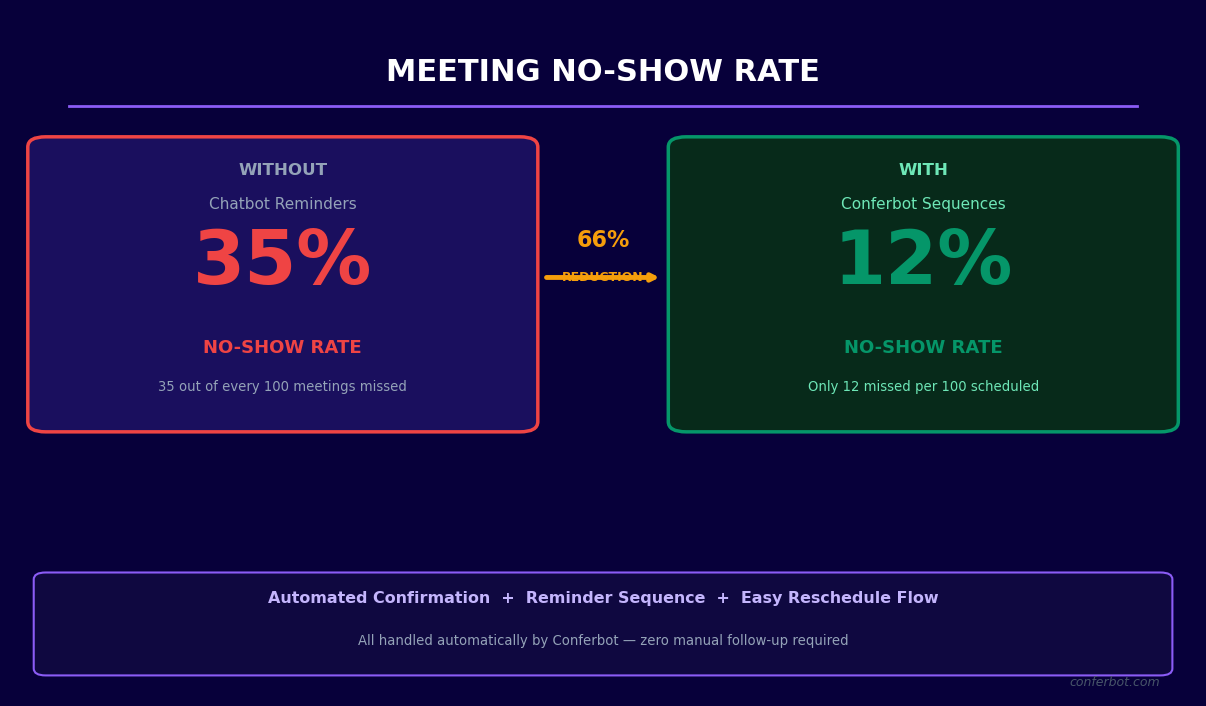
Manual meeting scheduling is not just slow — it is leaky. Consider the typical B2B meeting booking sequence: a prospect submits a contact form, an SDR receives the notification (often hours later), the SDR sends an email with available times, the prospect responds with a different time, the SDR checks the AE's calendar, the SDR replies with a confirmation, the prospect confirms — and somewhere in this six-step, multi-day exchange, a third of the prospects lose interest, get poached by a competitor, or simply forget why they reached out. According to Drift's B2B Buyer Behavior data, 55% of companies take 5 or more days to respond to inbound leads. That response latency is a direct revenue leak.
What the Bot Does Differently
The sales appointment scheduler bot compresses a multi-day email exchange into a 3-minute conversation. When a prospect lands on your pricing page, clicks a paid ad, or submits a contact form, the bot engages immediately. It confirms meeting intent, runs a brief qualification check to ensure the prospect meets your ICP criteria, presents live calendar availability for the appropriate AE, books the meeting, sends confirmation details, and updates your CRM — all before the prospect closes the browser tab.
- Zero scheduling friction: Prospects see available times instantly and book in one click. No email chains, no coordination overhead, no lost leads to scheduling fatigue.
- Intelligent rep assignment: The bot routes to the correct AE based on territory, company size, product line, or round-robin rules — not just whoever happens to check their email first.
- Pre-meeting qualification: The bot gathers key qualification data during the booking conversation, so the AE arrives at the call already briefed rather than spending the first 10 minutes on discovery basics.
- CRM-first automation: Every booked meeting creates a timestamped CRM record with the prospect's qualification data, contact information, and meeting details — no manual logging required.
Who Needs This Template
This template is purpose-built for B2B sales teams running inbound, outbound, or account-based motions with more than 50 qualified prospects per month. It is particularly high-value for companies where AE time is a scarce resource — when your AEs spend 20% of their week coordinating scheduling logistics rather than selling, you are paying senior sales salaries for administrative work. Explore the full range of automation capabilities in Conferbot's AI chatbot builder and see how scheduling bots fit into a complete sales automation stack.
How It Works: Qualification, Calendar Check, Booking, and CRM Update
The sales appointment scheduler bot operates as a four-stage pipeline within a single conversation. Each stage has a clear purpose, and each stage feeds data into the next — creating a seamless experience for the prospect while building a complete record for your sales team. Here is how the full flow works from first message to confirmed meeting in your CRM.
Stage 1: Intent Confirmation and Qualification
The bot opens by confirming meeting intent and running a brief qualification check. This stage prevents two critical failure modes: booking meetings with prospects who are not ready to buy (which wastes AE time), and creating friction by asking too many questions before showing calendar availability (which causes prospect drop-off). The qualification check is kept deliberately brief — typically 3-5 questions covering company size, current pain point, and decision timeline. Prospects who fail qualification criteria are redirected to appropriate nurture content rather than blocked outright.
| Qualification Stage | Bot Action | Pass Outcome | Fail Outcome |
|---|---|---|---|
| Intent check | "What brings you here today — are you looking to book a demo or just exploring?" | Proceeds to qualification questions | Routes to self-serve resources |
| ICP screening | Company size, industry, current solution questions | Proceeds to calendar booking | Routes to nurture sequence with relevant content |
| Urgency check | "When are you hoping to have a solution in place?" | Matched rep urgency flag set | Timeline noted in CRM, no urgency flag |
| Meeting type selection | "Would a 30-minute discovery call or a 45-minute product demo be more useful for you?" | Determines meeting slot length | Defaults to discovery call if unclear |
Stage 2: Real-Time Calendar Availability Check
Once the prospect qualifies, the bot queries the assigned AE's calendar in real time via Conferbot's calendar booking integration. Available slots for the next 5 business days display directly in the chat — the prospect clicks a time, selects their timezone, and the meeting is reserved. The calendar check respects buffer times between meetings, blocks prep time before important calls, and handles multi-timezone scheduling automatically. If the assigned AE is fully booked within the prospect's preferred window, the bot can present secondary AE availability or offer the next available slot with the primary AE.
Stage 3: Booking Confirmation and Pre-Meeting Prep
On booking confirmation, three things happen simultaneously: a calendar invite with conference link is sent to both parties, a confirmation message with meeting details is delivered to the prospect within the chat, and a pre-meeting prep notification is sent to the AE with the prospect's qualification data and conversation summary. The prospect optionally receives a pre-meeting resource — a relevant case study, product walkthrough video, or industry report — to arrive at the call better informed. This pre-meeting education step reduces the time AEs spend on background context during calls and increases the quality of discovery conversations.
Stage 4: CRM Record Creation and Pipeline Entry
Within 10 seconds of booking confirmation, the bot writes a complete CRM record: contact and company fields, qualification answers mapped to CRM properties, meeting details linked to the contact, and pipeline stage set to "Meeting Scheduled." Notification rules fire to alert the assigned AE via Slack or email. For teams using API integrations with outbound sequencing tools, a meeting-booked webhook can pause active outbound sequences to prevent awkward automated follow-ups after a meeting is already booked. The entire four-stage process completes in under 4 minutes for a motivated prospect — compared to an average of 2.3 business days for manual scheduling sequences.
Key Features: Intelligent Routing, Multi-Calendar Sync, and Pre-Meeting Qualification
The sales appointment scheduler bot combines scheduling logic, qualification intelligence, and CRM automation into a unified system. Individual features work together rather than in isolation — every design decision serves the goal of putting the right prospect in front of the right AE at the right time with maximum context and minimum friction.
Feature Overview
| Feature | Description | Sales Team Impact |
|---|---|---|
| Real-time calendar sync | Live integration with Google Calendar and Outlook 365, respecting buffer times, prep blocks, and existing meetings | Zero double-bookings, AE calendar always accurate |
| Intelligent rep routing | Routes prospects to AEs based on territory, company size, product line, language, or round-robin | Correct AE assigned without manager involvement |
| Pre-booking qualification | 3-5 question ICP screen before showing calendar availability | AEs only receive meetings with qualified prospects |
| Multi-timezone handling | Detects prospect timezone from browser; displays availability in their local time | Eliminates timezone confusion for global prospects |
| Meeting type selection | Offers discovery call, demo, technical deep-dive, or executive briefing based on prospect profile | Right meeting format for each stage and persona |
| CRM auto-population | Creates contact, deal, and meeting records in HubSpot, Salesforce, or Pipedrive with all qualification data | 100% CRM coverage, no manual data entry |
| Pre-meeting resources | Delivers case studies, videos, or one-pagers to prospects at time of booking | Higher-quality discovery conversations |
| Reminder sequence | Automated 24-hour and 1-hour reminders to both prospect and AE with meeting prep checklist | Measurably higher meeting show rates |
| Rescheduling self-service | Allows prospects to reschedule within the chat without contacting an SDR | Reduces cancellations, retains meetings that would otherwise be lost |
| No-show re-engagement | Automatically sends rescheduling link to prospects who miss meetings | Recovers 25-40% of no-shows without manual follow-up |
Intelligent Rep Routing Logic
Rep routing is where many scheduling tools fall short. Round-robin assignment ignores the fact that a 500-person enterprise prospect in Germany should not route to the SMB rep covering the western US. Conferbot's routing engine supports multi-condition routing rules: prospects are evaluated against all active rules in priority order, and the first matching rule determines assignment. Common configurations include territory-first routing (region takes priority), then size-based routing (enterprise above 500 employees routes to enterprise AEs), then product-line routing (security-focused prospects route to technical AEs). Round-robin serves as the fallback for prospects who do not match any specific rule.
NLP-Powered Intent Detection
Not every prospect arrives at the scheduler with a clear "I want to book a demo" message. Some arrive via a blog post CTA saying "talk to an expert," others click a pricing page button that says "get started," and others simply start typing a question. Conferbot's NLP engine interprets intent from the prospect's first message and routes accordingly — someone asking "how much does this cost?" routes to a pricing-focused discovery call, while someone asking "can you integrate with Salesforce?" routes to a technical AE. This intent-aware routing means the AE arrives at the meeting already knowing the prospect's primary concern.
Omnichannel Scheduling
The same scheduling bot deploys across your website, WhatsApp, and Messenger via Conferbot's omnichannel platform. Prospects can book a meeting from wherever they first engage — a LinkedIn ad landing page, a WhatsApp message from an SDR, or a cold email with a chatbot link — and the same qualification logic, routing rules, and CRM integration apply across all channels. Analytics track booking source so you can measure which channels produce the highest show rates and most qualified pipeline.
Ready to try Sales Appointment Chatbot Template (Free)?
Deploy this template in under 10 minutes. No coding required.
Use This Template Free →CRM Integration: HubSpot, Salesforce, and Pipedrive Configuration
A sales appointment scheduler bot without deep CRM integration is a calendar tool, not a sales system. The value of automated scheduling compounds when every booked meeting creates a fully populated CRM record, triggers the correct pipeline workflows, and puts deal data in front of the AE before the call begins. Conferbot's native integrations with HubSpot, Salesforce, and Pipedrive cover the three most widely used CRMs in B2B sales, each with object-model-specific logic that fits naturally into your existing process.
HubSpot Integration Configuration
The HubSpot integration uses Conferbot's bidirectional sync to both read from and write to HubSpot in real time. When a prospect books a meeting, the following HubSpot objects are created or updated automatically:
- Contact: Created with first name, last name, email, phone, company name, job title, and all qualification fields mapped to HubSpot contact properties. If the contact already exists (email match), properties are updated rather than a duplicate created.
- Company: Company record linked to the contact if company name and domain are provided. Existing company records are matched by domain to prevent duplicates.
- Deal: Created at the "Meeting Scheduled" stage in the appropriate pipeline. Deal name defaults to "[Company] - [Meeting Type] - [Date]" and is fully customizable. Deal owner is set to the assigned AE.
- Meeting: HubSpot meeting activity logged with meeting title, time, duration, conference link, and chatbot conversation transcript attached as a note.
- Workflow enrollment: The booked-meeting trigger can enroll contacts in HubSpot workflows — pausing active prospecting sequences, triggering pre-meeting email resources, or notifying managers of high-value bookings.
Salesforce Integration Configuration
Salesforce's more complex object model (Leads vs. Contacts, Opportunities vs. Cases) requires configuration-level decisions about how chatbot data maps to your Salesforce instance. Conferbot's Salesforce connector handles both standard and custom objects:
- Lead vs. Contact routing: New prospects without existing Salesforce records are created as Leads. Prospects matched to existing Contact records (email or domain match) bypass Lead creation and go directly to Contact + Opportunity creation.
- Opportunity creation: Booked meetings create Opportunities with Stage = "Discovery Scheduled," Close Date set to 90 days out (configurable), and Amount field left blank for the AE to populate after the call.
- Activity logging: Meeting details are logged as a Salesforce Event linked to both the Contact and Opportunity, with chatbot transcript as the event description.
- Campaign membership: Leads are added to the relevant Salesforce Campaign for accurate source attribution in marketing ROI reports.
Pipedrive Integration Configuration
Pipedrive's activity-centric model is a natural fit for appointment scheduling. Each booked meeting creates a Pipedrive Activity of type "Call" or "Meeting," linked to a new or existing Deal and Person record. The Activity is assigned to the correct AE, scheduled for the booked time, and populated with the prospect's qualification notes. Pipedrive's pipeline view then shows all upcoming discovery calls, demos, and technical sessions in a single board that sales managers can review in the morning standup.
CRM Integration Comparison
| CRM Action | HubSpot | Salesforce | Pipedrive |
|---|---|---|---|
| Contact creation | Contact object, email deduplication | Lead or Contact, configurable | Person object, email deduplication |
| Deal/opportunity creation | Deal at "Meeting Scheduled" stage | Opportunity at "Discovery Scheduled" stage | Deal at first pipeline stage |
| Meeting logging | Meeting activity + note with transcript | Event object linked to Contact + Opportunity | Activity of type Meeting with notes |
| Rep assignment | Deal owner = assigned AE (HubSpot user) | Opportunity owner = Salesforce User | Activity assigned user = Pipedrive user |
| Sequence management | Enrolls in workflows, pauses sequences | Adds to campaign, triggers process builder | Adds to filter views for AE action |
| Deduplication logic | Email match, then domain match | Email match, then SFDC deduplication rules | Email match |
For teams using CRMs not listed above, Conferbot's API integration supports webhook-based data delivery to any CRM with a REST API. See the full list of available native and API connections in the integrations hub.
Meeting Show Rates: Data on What Actually Moves the Needle
Booking a meeting is only half the battle. In B2B sales, meeting show rates — the percentage of booked meetings where the prospect actually attends — average between 50% and 65% for manually scheduled calls. Every no-show represents not just a lost meeting, but a gap in the AE's calendar that could have been filled with a qualified call, plus the time cost of last-minute preparation wasted. Sales appointment scheduler bots influence show rates through three mechanisms: booking speed, confirmation quality, and reminder sequencing.
Why Bot-Booked Meetings Show at Higher Rates
The core insight is that meeting show rates are primarily driven by intent at the moment of booking, not by reminder volume. When a prospect books a meeting through a bot within minutes of expressing interest, their intent is at its peak. Compare this to a meeting booked via email three days after the initial inquiry — by then, the prospect may have explored two competitor demos, cooled on the urgency, or simply moved on. Bot-immediate booking captures intent at its highest point, which is the strongest predictor of attendance.
| Booking Method | Average Show Rate | No-Show Recovery Rate | Reschedule Rate |
|---|---|---|---|
| Manual SDR email scheduling (2-3 day lag) | 52% | 18% | 14% |
| Calendly link in email (same day) | 61% | 22% | 17% |
| Chatbot immediate booking (under 5 minutes) | 74% | 31% | 12% |
| Chatbot booking + pre-meeting resources | 79% | 35% | 10% |
| Chatbot booking + reminder sequence + resource | 82% | 38% | 9% |
The Reminder Sequence Architecture
Conferbot's appointment scheduler ships with a three-touch reminder sequence configured out of the box. The sequence is designed to add value rather than nag:
- T-24 hours: Confirmation reminder with the case study or product overview sent at booking. Subject line includes the meeting topic the prospect selected. This touchpoint has a 68% open rate because it delivers relevant content rather than a pure administrative reminder.
- T-1 hour: A concise reminder with the direct conference join link and the AE's name and title. Short enough to skim in 10 seconds, with one-click access to the meeting link. This is the highest-impact reminder touchpoint — prospects who open the T-1 hour reminder show at 91%.
- T-0 (no-show trigger): If the prospect does not join within 5 minutes of the start time, a rescheduling message fires automatically. The message acknowledges the conflict without blame and offers the next 3 available slots. This automated recovery converts 31-38% of no-shows into rescheduled meetings that ultimately occur.
Pre-Meeting Resource Impact
Delivering a targeted resource at the time of booking — a relevant case study, a 3-minute product overview video, or an industry benchmark report — serves two purposes simultaneously: it keeps the prospect engaged in the period between booking and meeting, and it ensures the prospect arrives with foundational product knowledge so the AE can use discovery time for genuine needs assessment rather than basic explanations. Teams deploying pre-meeting resources report an average 8% increase in show rates and a 22% increase in discovery-to-proposal conversion, because prospects who consume pre-meeting content arrive with higher intent and clearer evaluation criteria.
Track your show rates, no-show patterns, and reminder engagement through Conferbot's analytics dashboard, which provides per-AE, per-channel, and per-campaign show rate breakdowns in real time.
Pipeline Impact: Revenue Data From B2B Sales Teams in ${year}
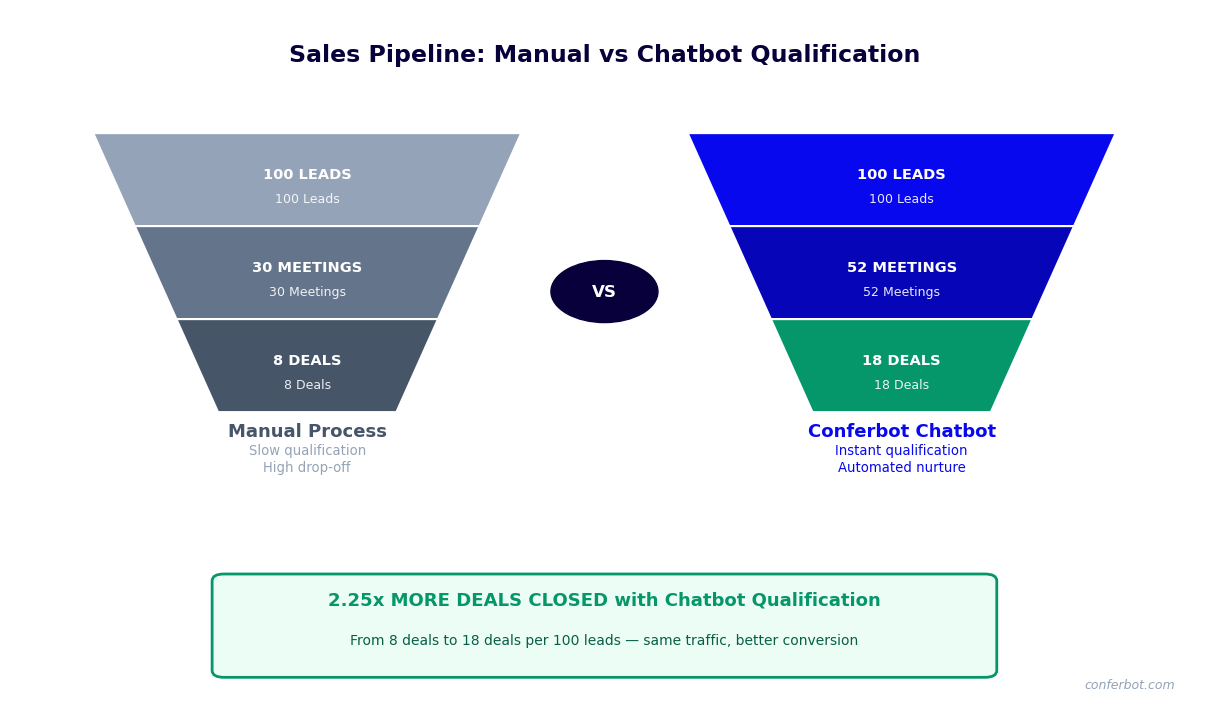
The business case for a sales appointment scheduler bot is built on measurable pipeline outcomes, not on scheduling convenience. The scheduling efficiency gains are real, but they are secondary to the revenue impact that comes from faster response times, higher show rates, better pre-meeting qualification, and reduced AE time on administrative work. Here is the data on what B2B sales teams actually see when they deploy automated appointment scheduling at scale.
Pipeline Impact Benchmarks
| Metric | Manual Scheduling Baseline | Bot-Automated Scheduling | Change |
|---|---|---|---|
| Time from lead to booked meeting | 1.5-3 business days | Under 10 minutes | -95% |
| Inbound lead-to-meeting conversion rate | 18-24% | 35-42% | +17-18 percentage points |
| Meeting show rate | 52-58% | 74-82% | +22-24 percentage points |
| Discovery-to-proposal conversion | 38% | 49% | +11 percentage points |
| AE time on scheduling logistics (per week) | 4-6 hours | Under 30 minutes | 85% reduction |
| SDR capacity (meetings booked per day) | 8-12 (manual) | 40-60 (bot-assisted) | 4-5x increase |
| CRM data completeness at meeting stage | 55-65% of fields populated | 95%+ of fields populated | Eliminates blind-spot calls |
ROI Model: Mid-Market B2B Team
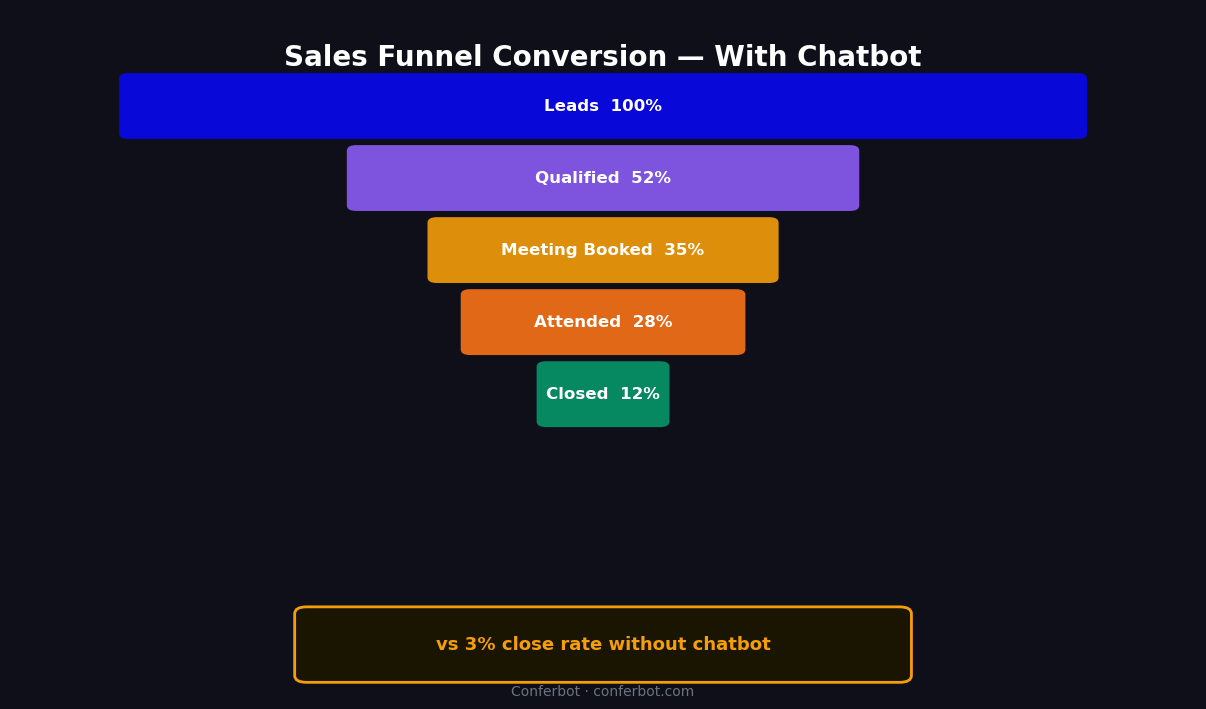
Consider a B2B SaaS company with 300 inbound MQLs per month, an average deal size of $24,000 ACV, and a sales team of 4 AEs at $120,000 OTE. The current manual process converts 20% of MQLs to booked meetings (60 meetings/month), with a 55% show rate (33 attended meetings), a 35% discovery-to-proposal rate (11-12 proposals), and a 30% close rate (3-4 new deals/month). Monthly new ARR from inbound: approximately $84,000.
After deploying the scheduling bot, MQL-to-meeting conversion rises to 38% (114 meetings booked). Show rate improves to 78% (89 attended meetings). Discovery-to-proposal holds at 35% but applies to more meetings (31 proposals). Close rate improves marginally to 32% due to better pre-meeting qualification (10 new deals/month). Monthly new ARR from inbound: approximately $240,000. That is a $156,000/month increase from the same lead volume and same sales team — no new AE hires, no increased ad spend.
AE Productivity Recapture
Beyond direct pipeline conversion, scheduling automation recaptures significant AE selling time. A 4-AE team spending an average of 5 hours per week on scheduling logistics loses 20 AE-hours per week — the equivalent of half an AE's selling capacity. Returning those 20 hours to actual selling activities (follow-up calls, proposal work, executive briefings) is additive to the pipeline gains from faster lead response. Teams that track AE activity before and after scheduling automation consistently report 15-25% increases in total selling time per AE per week.
Run the full ROI calculation for your team size and deal economics with the chatbot ROI calculator. Explore Conferbot pricing to see which plan scales to your monthly meeting volume.
50,000+ businesses use Conferbot templates to automate conversations
Setup Guide: Launching Your Sales Appointment Scheduler Bot
Deploying a sales appointment scheduler bot requires decisions across four domains: qualification criteria, routing rules, CRM mapping, and reminder configuration. Conferbot's template-based setup guide walks through each domain in a structured sequence designed to get your first booked meeting in under an hour. Here is the complete process.
Step 1: Define Your Qualification Threshold (10 Minutes)
Decide what minimum criteria a prospect must meet to receive calendar access. Common thresholds include minimum company size (e.g., 50+ employees), specific industries (exclude consumer, non-profit, or student if they are not ICP), and meeting type eligibility (e.g., technical deep-dives only for prospects who have already had a discovery call). Write these criteria down explicitly before opening the bot builder — vague qualification logic produces inconsistent meeting quality. Use Conferbot's no-code chatbot builder to configure conditional branches for each pass/fail scenario.
Step 2: Configure Rep Routing Rules (15 Minutes)
Map your team structure to routing logic. Enter each AE's name, calendar connection, territory or segment ownership, and capacity limits (e.g., maximum 4 discovery calls per day to protect deep-work time). Set priority order for routing rules: territory rules fire first, then segment rules, then round-robin. Test each routing path with a simulated prospect to confirm the correct AE receives the meeting before going live.
Step 3: Connect Calendar and CRM (10 Minutes)
Connect each AE's Google Calendar or Outlook 365 account via OAuth in the Conferbot integrations panel. Set default meeting durations, buffer times between calls, and advance booking window (e.g., prospects can book no sooner than 4 hours from now, no later than 10 business days out). Then connect your CRM — HubSpot, Salesforce, or Pipedrive — and complete field mapping. Conferbot's field mapper displays a side-by-side view of chatbot-collected data and available CRM fields for each object type.
Step 4: Set Up Pre-Meeting Resources and Reminders (10 Minutes)
Select or upload the pre-meeting resource you want prospects to receive at booking: a case study PDF, a product overview video URL, or an industry benchmark report. Configure your reminder sequence: 24-hour email, 1-hour email, and no-show re-engagement message. Review the default copy and adjust the tone to match your brand voice. All three reminder templates are fully editable in Conferbot's message editor.
Step 5: Deploy and Test (10 Minutes)
Deploy the bot via the Conferbot embed snippet on your website — place it on the highest-intent pages first: pricing, contact, and demo request pages. For outbound teams, generate a standalone scheduling link to include in cold emails and LinkedIn messages. Run three test bookings: one qualifying prospect, one borderline prospect, and one disqualified prospect. Confirm that each scenario produces the correct outcome: booked meeting + CRM record for the qualifier, nurture content for the borderline, polite redirect for the disqualified. Once all three scenarios pass, the bot is ready for live traffic.
Step 6: Launch Across Channels (5 Minutes)
Extend the same scheduling bot to WhatsApp and Messenger via Conferbot's omnichannel settings. For SDR-led outbound teams, generate channel-specific links that pre-load the prospect's name and company from your outbound tool's personalization variables — the bot opens with "Hi [Name], [SDR Name] suggested we connect" rather than a generic greeting. This context-aware opening increases scheduling link click-through rates by 28-35% compared to cold scheduling links.
Optimization for Different Sales Motions: Inbound, Outbound, and ABM
A single scheduling bot configuration does not fit all sales motions equally. An inbound prospect who clicked "Book a Demo" on your pricing page has different expectations, different levels of familiarity with your product, and different scheduling preferences than a cold outbound target who received a personalized LinkedIn message. And both are fundamentally different from an ABM target account that your team has been warming up for three months. Optimizing the scheduler for each motion separately produces meaningfully better conversion rates than using a single generic flow.
Inbound Motion Optimization
Inbound prospects arrive with existing intent. They have already decided they want to speak with someone — the scheduling bot's job is to capture and convert that intent before it cools. Key optimizations for inbound:
- Minimize qualification friction: Inbound prospects have already self-qualified by landing on your pricing or demo page. Keep the qualification check to 2-3 questions maximum. Every additional question reduces completion rate by approximately 7-12%.
- Show availability immediately: Do not make high-intent prospects wait through five questions before seeing a calendar. Present calendar access after the first qualifying answer to keep momentum high.
- Match meeting type to page context: Prospects arriving from the pricing page want a commercial conversation. Those arriving from a feature documentation page want a technical demo. Use page-level bot variants to pre-select the appropriate meeting type and AE pool.
- Prioritize same-day and next-day slots: Display same-day and next-day availability at the top of the calendar selection. Inbound intent decays fastest — a same-day meeting closes at dramatically higher rates than one booked 4+ days out.
Outbound Motion Optimization
Outbound scheduling bots function as the conversion layer at the end of a multi-touch sequence. When an SDR sends a scheduling link in a cold email or LinkedIn message, the prospect has zero prior relationship with the product. Key optimizations:
- Personalization variables: Pre-load the prospect's name, company, and the specific SDR's name into the bot opening. Cold scheduling links that open with "Hi Sarah, Michael suggested we connect about [Company]'s Q3 pipeline challenges" convert at 2.3x the rate of generic links.
- Deeper value articulation before calendar: Unlike inbound, outbound prospects need brief value context before committing to a meeting. A 2-sentence value statement in the first bot message — specific to their industry and the pain the SDR referenced — meaningfully increases conversion.
- Flexible meeting format: Offer "15-minute intro call" as an option alongside the standard 30-minute discovery. Cold outbound targets are more willing to commit to 15 minutes than 30, and conversion rates for short-format meetings are significantly higher. The meeting itself then converts naturally to a longer demo.
ABM Motion Optimization
Account-Based Marketing targets require the highest level of scheduling personalization. These are known high-value accounts that your team has been engaging through advertising, content, and direct outreach for weeks or months. When an ABM target finally clicks a scheduling link, the experience must reflect that existing relationship:
- Named AE assignment: ABM targets should always route to the specific AE or executive who has been leading the account — not to round-robin. Configure account-level routing rules in Conferbot that match company domain to named owners.
- Executive meeting option: For Tier 1 ABM accounts above a defined revenue threshold, surface an "Executive Briefing" meeting option alongside standard discovery. This signals investment in the relationship and often unlocks C-level access that standard scheduling flows miss.
- Account context briefing: Connect your ABM intent data platform (6sense, Demandbase, or similar) via API integration to surface current account intent signals to the AE in the meeting notification. The AE arrives knowing which of your product pages the account has been visiting, which competitor content they have consumed, and where they are in their buying journey.
Sales Motion Performance Comparison
| Sales Motion | Avg. Meeting Conversion Rate | Avg. Show Rate | Optimal Qualification Depth |
|---|---|---|---|
| Inbound (demo/pricing page) | 38-44% | 78-82% | 2-3 questions |
| Outbound (cold email/LinkedIn) | 12-18% | 65-72% | 0-1 questions (value-first) |
| ABM (warm account) | 52-61% | 84-89% | 1-2 questions (persona confirmation only) |
| Re-engagement (past leads) | 22-28% | 71-76% | 2-3 questions (update qualification) |
Explore related templates in the lead generation templates library and ecommerce and retail templates for scheduling flows adapted to different buyer journeys. See how Conferbot's OpenAI integration enables dynamic, LLM-powered scheduling conversations for the most complex sales environments.
Sales Appointment Chatbot Template (Free) FAQ
Everything you need to know about chatbots for sales appointment chatbot template (free).
Why Use a Template vs Building from Scratch?
Templates encode years of optimization data into the conversation flow before you start.
| Factor | Conferbot Template | Build from Scratch | Hire a Developer |
|---|---|---|---|
| Time to deploy | 10 minutes | 2-8 hours | 2-6 weeks |
| Cost | Free | Your time | $5,000-$25,000 |
| Day-1 conversion | 15-22% | 5-8% | 10-15% |
| Proven flows | Yes, data-tested | No | Depends |
| Updates included | Automatic | Manual | Paid |
| Multi-channel | 8+ channels | 1 channel | Extra cost |
| Analytics | Built-in | Must build | Extra cost |
Ready to Deploy Sales Appointment Chatbot Template (Free)?
Join 50,000+ businesses. Free forever plan available. No credit card required.