
Social Media Customer Service Chatbot
Free Support And FAQ Chatbot Template
An AI social media support chatbot that handles customer inquiries via DMs on Instagram, Facebook, Twitter, and WhatsApp. Detects sentiment, responds with your brand voice, and escalates negative experiences to human agents. Perfect for brands managing high-volume social media customer interactions.


What Is a Social Media Customer Service Chatbot?
A social media customer service chatbot is an AI-powered tool that automatically responds to customer inquiries, complaints, and support requests arriving through social media messaging channels -- Instagram Direct Messages, Facebook Messenger, and Twitter (X) DMs -- using the same intelligent conversation engine that powers your website support. Instead of requiring a dedicated social media support team to monitor and respond to each channel separately, the chatbot handles the full first-contact resolution workflow across all three channels from a single unified platform.
In 2026, over 60% of consumers under 40 prefer to contact brands through social media rather than phone or email, and 78% expect a response within an hour. Most businesses cannot staff their social channels to meet that expectation, resulting in response times that stretch to hours or days. The consequences are public: unanswered DMs and slow responses are visible signals of poor service quality that erode brand trust across your entire following, not just with the individual customer who messaged.
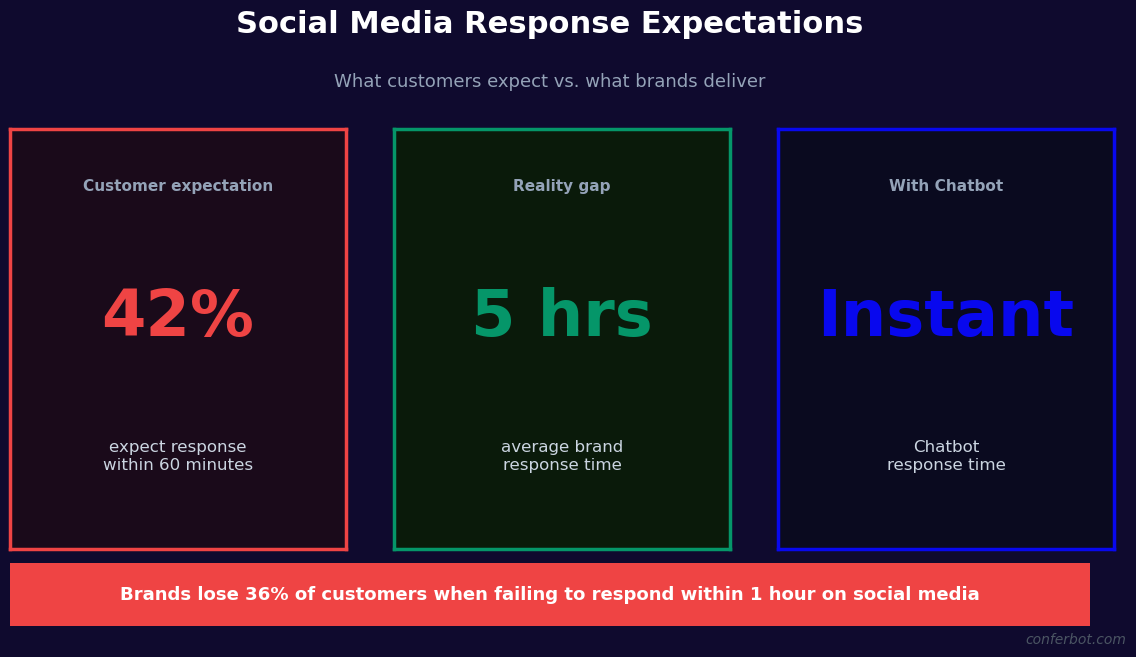
A social media customer service chatbot eliminates the response time gap by handling the first response instantly and resolving the majority of inquiries automatically. Order status questions, product information requests, return policy queries, shipping updates, and common troubleshooting steps are answered within seconds of the customer's message arriving -- at any hour, on any day, with no staffing required. Complex issues that require human judgment are routed to a live agent with full conversation context, ensuring the agent does not ask the customer to repeat information they have already provided.
Conferbot's omnichannel framework manages the unified inbox across Instagram, Facebook Messenger, and Twitter DMs, with the same AI resolution logic applied consistently across all channels. Live agent escalation connects to Conferbot's live chat module, enabling seamless handoffs when automation reaches its limits. This page covers the channel-specific setup requirements, conversation flow architecture, escalation design, compliance considerations, and performance benchmarks for social media support automation.
Channel Coverage: Instagram, Messenger, and Twitter DMs
Each social media platform has distinct technical requirements, messaging capabilities, and audience behaviors that the chatbot must accommodate. Here is a channel-by-channel overview of how the social media customer service chatbot operates and what makes each deployment distinct.
Instagram Direct Messages
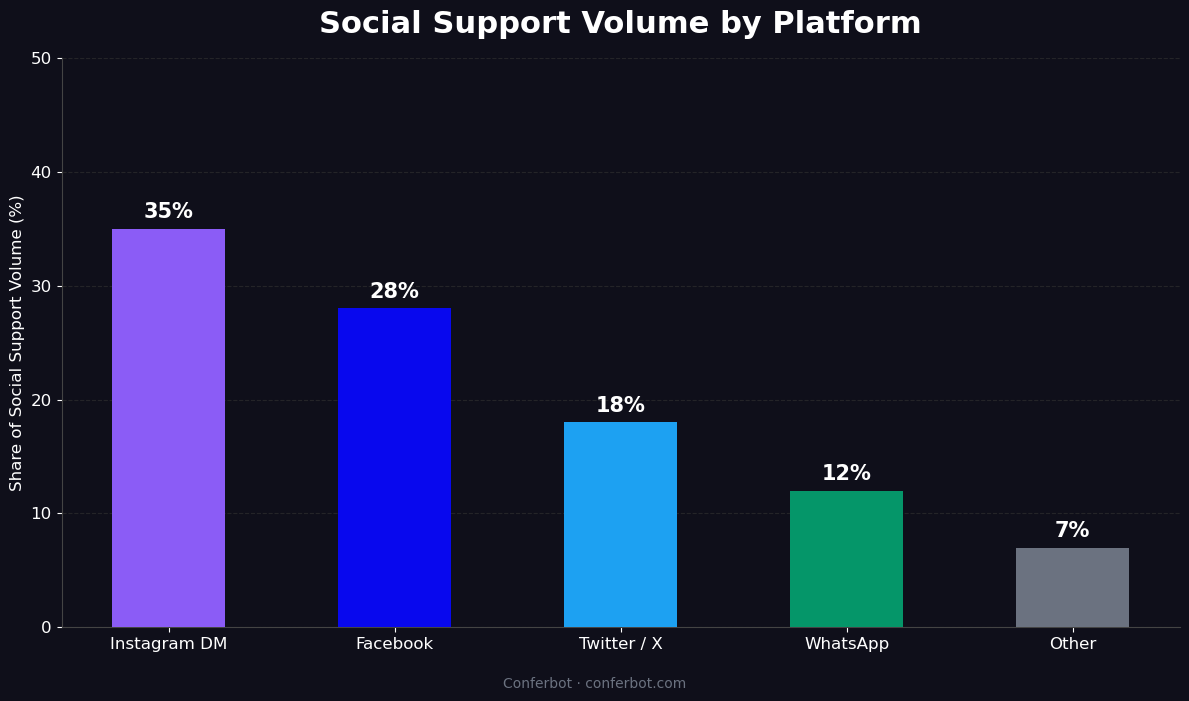
Instagram DM automation is available through Meta's Messenger API for Instagram, which connects Conferbot directly to your Instagram Business account's messaging inbox. The chatbot responds to DMs sent by followers and non-followers alike, handles Story mentions and replies (a common customer service trigger), and processes Quick Reply taps when customers respond to Stories with specific keywords. Instagram DMs are particularly high-volume for consumer brands in fashion, beauty, food, and lifestyle -- categories where product questions, order issues, and influencer-related inquiries flow heavily through Instagram rather than email or the website contact form.
Key Instagram-specific behaviors include: automatic ice-breaker responses that activate when a user opens the chat for the first time, story-mention reply flows that convert a public story tag into a private support conversation, and keyword triggers that detect order number formats in DMs and automatically initiate an order status lookup. Instagram's 24-hour messaging window policy applies -- the chatbot can respond to customer-initiated messages within 24 hours; proactive outreach requires approved message templates.
Facebook Messenger
Facebook Messenger is the highest-volume social customer service channel for most established brands, particularly those with older demographic audiences. Messenger supports richer message formats than Instagram DMs: persistent menus, quick reply buttons, image carousels, list templates, and receipt templates. The chatbot leverages these capabilities to build structured support flows -- a persistent menu with "Track my order," "Return an item," and "Talk to an agent" options reduces free-text volume and routes customers faster. Messenger's bot platform has more permissive outreach rules than Instagram, allowing follow-up messages through notification subscriptions for status updates on open cases.
Twitter (X) DMs
Twitter DM support is distinct from Instagram and Messenger in that customers often DM after a public complaint tweet, making the stakes of the response higher -- a good DM resolution can turn a public critic into a public advocate. The chatbot monitors Twitter DMs and can be configured to trigger when a customer who has tweeted at your handle also sends a DM, enabling a coordinated response that acknowledges both channels. Twitter's Direct Message API supports welcome messages, quick replies, and media attachments. Response time expectations on Twitter are the highest of any channel: customers who DM a brand on Twitter expect a response within 30-60 minutes based on platform norms established by large support-active brands.
Unified Inbox and Consistent Resolution
Conferbot's omnichannel platform aggregates all three channels into a single inbox. The same resolution logic applies regardless of the source channel, ensuring customers receive consistent answers whether they message on Instagram, Messenger, or Twitter. When a customer contacts the same brand on two channels about the same issue, the system detects the duplicate and merges the conversations to prevent duplicate responses and conflicting resolutions.
| Channel | Rich Message Support | Messaging Window | Best For |
|---|---|---|---|
| Instagram DMs | Quick replies, images, links | 24-hour window after customer message | Visual brands, younger demographics, Story-driven commerce |
| Facebook Messenger | Persistent menus, carousels, receipts, buttons | 24-hour window + Message Tags for follow-ups | Established brands, structured support flows, older demographics |
| Twitter (X) DMs | Welcome messages, quick replies, media | No window restriction for DMs | Public-to-private complaint resolution, real-time brand monitoring |
| WhatsApp Business | Buttons, lists, media, documents | 24-hour window + approved templates | International audiences, transactional updates, high-trust conversations |
Support Conversation Flow Architecture
The social media customer service chatbot uses a modular conversation architecture that covers the highest-volume support use cases out of the box while remaining fully customizable for business-specific scenarios.
Order Status and Tracking
Order status is consistently the single highest-volume inquiry type across all social media support channels. The chatbot detects order status intent through keyword recognition ("where is my order," "tracking number," "my package") and entity extraction (order numbers mentioned in the message body). When an order number is detected, the bot queries your order management system through API integration and returns current fulfillment status, the most recent tracking event, and the estimated delivery date. For orders in transit, it provides the carrier tracking link. This flow resolves 35-45% of all social media support DMs without any human involvement.
Product Questions and Recommendations
Product inquiries -- availability, specifications, sizing, compatibility -- are the second most common social media support category. The NLP engine classifies product questions and routes them to the appropriate knowledge base response. For sizing questions, the bot serves the relevant size guide. For compatibility questions, it checks the product specifications database. For availability questions, it queries real-time inventory. When a product question cannot be answered from the knowledge base, the bot collects the specific question and the customer's contact details before escalating to a human agent who can provide an accurate answer.
Complaint Handling and Sentiment Detection
Customer complaints arriving through social DMs require careful handling. The chatbot's sentiment detection classifies incoming messages as positive, neutral, or negative before selecting a response approach. Negative-sentiment messages trigger an empathetic acknowledgment before any informational response: "I'm sorry to hear you are experiencing this -- let me help you get it resolved." This empathy-first design significantly reduces customer frustration escalation compared to bots that respond to complaints with generic FAQ answers. High-intensity negative messages (containing multiple negative sentiment markers or explicit threats to post publicly) are immediately flagged for priority human review.
Returns and Refunds
Return and refund requests arriving through social media are processed through the same policy-based eligibility engine as the website's return flow. The bot verifies order details, checks return window eligibility, explains the return process, and provides the relevant return instructions or portal link. For eligible returns, it can generate return authorization numbers through integration with your order management system, completing the RMA process entirely within the DM conversation.
Escalation to Live Agent
When a conversation requires human judgment -- complex complaints, unresolved issues after two resolution attempts, or explicit customer requests to speak with a person -- the bot executes a graceful escalation. It informs the customer of the estimated wait time for a human agent, summarizes the conversation context for the agent handoff, and transfers the conversation to Conferbot's live chat queue. The agent receives the full conversation history, extracted order details, and the bot's resolution attempts, enabling them to continue the conversation without asking the customer to repeat themselves.
Ready to try Social Media Customer Service Chatbot?
Deploy this template in under 10 minutes. No coding required.
Use This Template Free →Platform Compliance and Messaging Policy Requirements
Operating a customer service chatbot on social media platforms requires compliance with each platform's developer policies, messaging rules, and terms of service. Violating these policies can result in loss of messaging access, which would disable the customer service chatbot entirely. Here is what you need to know about each platform's requirements.
Meta Messaging Policies (Instagram and Messenger)
Meta's Messenger Platform policies govern both Instagram DMs and Facebook Messenger automation. The key policy areas for customer service bots include: the 24-hour standard messaging window (the bot can respond to any customer-initiated message within 24 hours; messages sent after this window require an approved Message Tag or Sponsored Message); the human agent fallback requirement (any automation that cannot resolve a customer inquiry must offer a clear path to a human agent); and the prohibition on sending promotional content through the standard messaging window (support responses must be non-promotional). Conferbot's Instagram and Messenger integrations are built to comply with these policies out of the box, including automatic detection of 24-hour window expiry and proper use of approved Message Tags for case follow-ups.
Twitter (X) Developer Policies
Twitter's Developer Agreement and Automation Rules govern bot behavior in DMs. Key requirements include: users must explicitly opt in to receive automated DM messages (the customer initiating the DM constitutes opt-in); bots must respond only to direct messages, not automatically DM users based on public tweet activity without user initiation; and automated responses must not impersonate human agents without disclosure. Conferbot's Twitter integration includes a welcome message that identifies the responder as an automated assistant while inviting the customer to engage with their question.
Data Handling and Privacy
Customer messages received through social media channels contain personal data subject to GDPR, CCPA, and other applicable privacy regulations. Conferbot processes social media conversation data in compliance with these regulations, applying configurable data retention policies that automatically delete conversation records after a defined period. Customers who request data deletion through a GDPR subject access request can have their social media conversation history removed through Conferbot's compliance administration tools. Consult your legal team on the specific retention period requirements for your jurisdiction and industry.
Instagram Verification and Business Account Requirements
Instagram DM automation through the Messenger API requires a Facebook Business Manager account, an Instagram Business or Creator account connected to a Facebook Page, and an approved Meta app with the instagram_manage_messages permission. Conferbot manages the app approval process as part of the Instagram integration setup. Businesses with high message volumes may need to apply for elevated Instagram API access, which Conferbot's support team can assist with based on your account's message volume history.
CRM and Help Desk Integration for Social Support
Social media customer service conversations generate valuable customer interaction data that should flow into your broader support and CRM infrastructure. Here is how the chatbot integrates with the tools that power your customer experience operations.
Help Desk Integration
Social media conversations that require human agent involvement or that involve complex multi-message resolutions should be tracked as support tickets in your help desk platform. Conferbot integrates with Zendesk, Freshdesk, HubSpot Service Hub, and Intercom to create tickets from social media conversations automatically. The ticket includes the customer's social media handle, the full conversation transcript, extracted entities (order numbers, product names, issue type), and the resolution status at the time of escalation. Tickets created from social media conversations are tagged by source channel, enabling channel-specific performance reporting in your help desk dashboards.
CRM Integration
When a social media conversation includes customer identification (order number, email address, or account login), the chatbot matches the conversation to the corresponding customer record in your CRM and appends the interaction to the contact's activity history. This customer-level view of social media support interactions helps sales and marketing teams understand the support context of customers they are engaging with, and helps support teams identify customers with repeat issues who may be at churn risk. Conferbot integrates with Salesforce, HubSpot CRM, and other major CRM platforms through the API integration framework.
Analytics and Reporting
Conferbot's analytics dashboard provides channel-level and aggregate performance reporting for social media customer service. Key metrics include first response time by channel, automation resolution rate (percentage of conversations resolved without human escalation), escalation rate by issue type, average conversation length, customer satisfaction scores (collected through a post-resolution rating request), and volume trends by channel, issue type, and time of day. These metrics enable continuous improvement of automation coverage and identification of knowledge gaps that should be addressed with additional response content.
Social Listening Integration
Beyond direct DMs, some customer service issues begin as public posts -- a tweet tagging your brand, an Instagram comment on a post, or a Facebook post on your page. Conferbot's social listening integration monitors public mentions and comments, identifies customer service issues in public posts, and automatically sends a proactive DM to the customer offering support. This converts public complaints into private support conversations before they attract wider attention, protecting brand reputation while delivering a genuinely responsive service experience.
Performance Benchmarks and ROI for Social Support Automation
Social media customer service automation delivers measurable improvements in response time, resolution rate, agent efficiency, and customer satisfaction. Here are the benchmarks that businesses should use to evaluate and track their social support chatbot performance.
Response Time
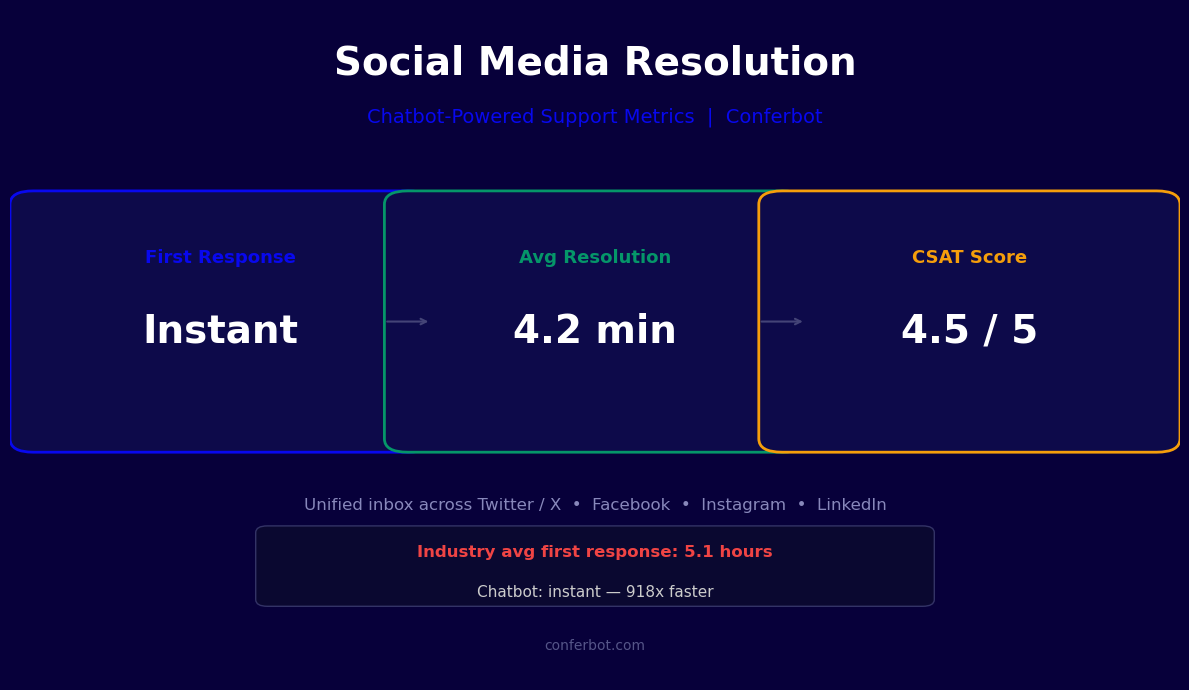
First response time is the most publicly visible social media support metric. Before automation, the median first response time for brand DMs across industries is 2-8 hours for small-to-mid-size businesses and 1-3 hours for large brands with dedicated social teams. With a social media customer service chatbot, first response time drops to under 10 seconds -- 24 hours a day, 7 days a week, with no staffing dependency. This improvement alone increases customer satisfaction scores by 25-35% for businesses that had response time gaps prior to automation.
| Metric | Before Automation | After Automation | Improvement |
|---|---|---|---|
| First response time | 2-8 hours | Under 10 seconds | 99%+ reduction |
| Automation resolution rate | 0% (all manual) | 65-75% | Deflects majority of volume |
| Average handle time (escalations) | 12-18 minutes | 6-9 minutes | 50% reduction (context handoff) |
| After-hours resolution rate | 0% | 65-75% | Full coverage without staffing |
| Agent capacity | 30-50 conversations/day | 100-150 complex cases/day | 2-3x capacity increase |
Automation Resolution Rate
A well-configured social media support chatbot resolves 65-75% of incoming DMs without human escalation. The remaining 25-35% involve complex issues, emotional customers, or non-standard scenarios that benefit from human judgment. The automation resolution rate improves over the first 90 days of operation as the knowledge base is expanded to cover common questions that the bot initially escalates. Track resolution rate by issue category to identify the gaps most worth addressing.
Agent Efficiency
For conversations that do require human agents, the chatbot's context handoff significantly reduces average handle time. Agents receive a pre-filled conversation summary with customer identification, order details, issue category, and the bot's resolution attempts. This eliminates the information-gathering phase that typically consumes 30-40% of agent time on social media support conversations. Agents who previously handled 30-50 social conversations per day can typically handle 100-150 after automation handles first contact and provides context for escalations.
Customer Satisfaction
Social media customers who receive instant, accurate responses from a chatbot report satisfaction scores comparable to human agent interactions, provided the bot escalates gracefully when needed. The critical satisfaction driver is resolution completeness, not response humanness: customers care more about having their issue resolved than about whether the response came from a bot or a person. Measure CSAT through a simple post-resolution rating request ("Was your issue resolved? Rate your experience") that the bot sends at conversation close.
50,000+ businesses use Conferbot templates to automate conversations
How to Deploy a Social Media Customer Service Chatbot
Deploying a social media customer service chatbot across Instagram, Facebook Messenger, and Twitter DMs requires channel-specific setup steps followed by a shared configuration of conversation flows and integrations. Here is the full setup process.
Step 1: Connect Your Social Channels
In Conferbot's channel settings, connect each social account. For Instagram: link your Instagram Business account through Facebook Business Manager, authorize the instagram_manage_messages permission, and verify the webhook subscription. For Messenger: connect your Facebook Page and authorize the pages_messaging permission. For Twitter: create a Twitter Developer App, configure the Account Activity API webhook, and authorize DM read and write access. Conferbot's setup wizard guides through each authorization flow with platform-specific instructions.
Step 2: Build Your Response Knowledge Base
Populate the knowledge base with answers to your most common social media support questions. Analyze your existing DM history to identify the top 20-30 inquiry types by volume. Build response templates for each, including any dynamic data fields (order status, tracking links, return deadlines) that the bot will populate from API calls. Ensure each response template is calibrated to the tone appropriate for social media -- more conversational and concise than traditional support documentation.
Step 3: Configure Order and Account Integrations
Connect your order management system, return portal, and other support data sources through Conferbot's API integrations. Test each integration with real order numbers and customer accounts to verify that the data retrieval and display is accurate. Configure authentication handling for conversations where customer account verification is required before sensitive information can be shared.
Step 4: Set Up Escalation Routing
Configure the escalation rules that determine when the bot hands off to a human agent: after how many failed resolution attempts, on detection of specific sentiment signals, on explicit customer request, and for specific issue categories that always require human handling (legal complaints, media inquiries, health and safety reports). Connect the escalation routing to Conferbot's live chat module or your external help desk platform. Test the full escalation flow to verify that conversation context transfers correctly to the receiving agent.
Step 5: Test, Launch, and Iterate
Test each channel with representative inquiry types before going live. Verify response accuracy, escalation triggers, and API data retrieval across a sample of real customer scenarios. After launch, review automation resolution rates and escalation patterns weekly for the first month. Identify the most common escalation reasons and address them by expanding the knowledge base or improving intent detection. Monitor analytics for response time, resolution rate, and CSAT trends to track ongoing performance improvement.
Social Media Customer Service Chatbot FAQ
Everything you need to know about chatbots for social media customer service chatbot.
Why Use a Template vs Building from Scratch?
Templates encode years of optimization data into the conversation flow before you start.
| Factor | Conferbot Template | Build from Scratch | Hire a Developer |
|---|---|---|---|
| Time to deploy | 10 minutes | 2-8 hours | 2-6 weeks |
| Cost | Free | Your time | $5,000-$25,000 |
| Day-1 conversion | 15-22% | 5-8% | 10-15% |
| Proven flows | Yes, data-tested | No | Depends |
| Updates included | Automatic | Manual | Paid |
| Multi-channel | 8+ channels | 1 channel | Extra cost |
| Analytics | Built-in | Must build | Extra cost |
Ready to Deploy Social Media Customer Service Chatbot?
Join 50,000+ businesses. Free forever plan available. No credit card required.