
Daycare & Childcare Chatbot
Free Education And Training Chatbot Template
A friendly childcare center chatbot that helps parents explore programs, check availability by age group, understand pricing, learn about curriculum, and schedule tours. Built for daycare centers, preschools, and childcare facilities to streamline enrollment inquiries and reduce administrative workload.


What Is a Daycare & Childcare Chatbot?
A daycare and childcare chatbot is a conversational assistant embedded on a childcare center's website, social media profiles, or messaging platforms that answers parent questions, qualifies enrollment inquiries, checks program availability by age group, and schedules facility tours — all without requiring staff to pick up the phone or respond to emails manually. It serves as a 24/7 front desk for your childcare business, capturing leads at the moment parents are actively searching for care options.
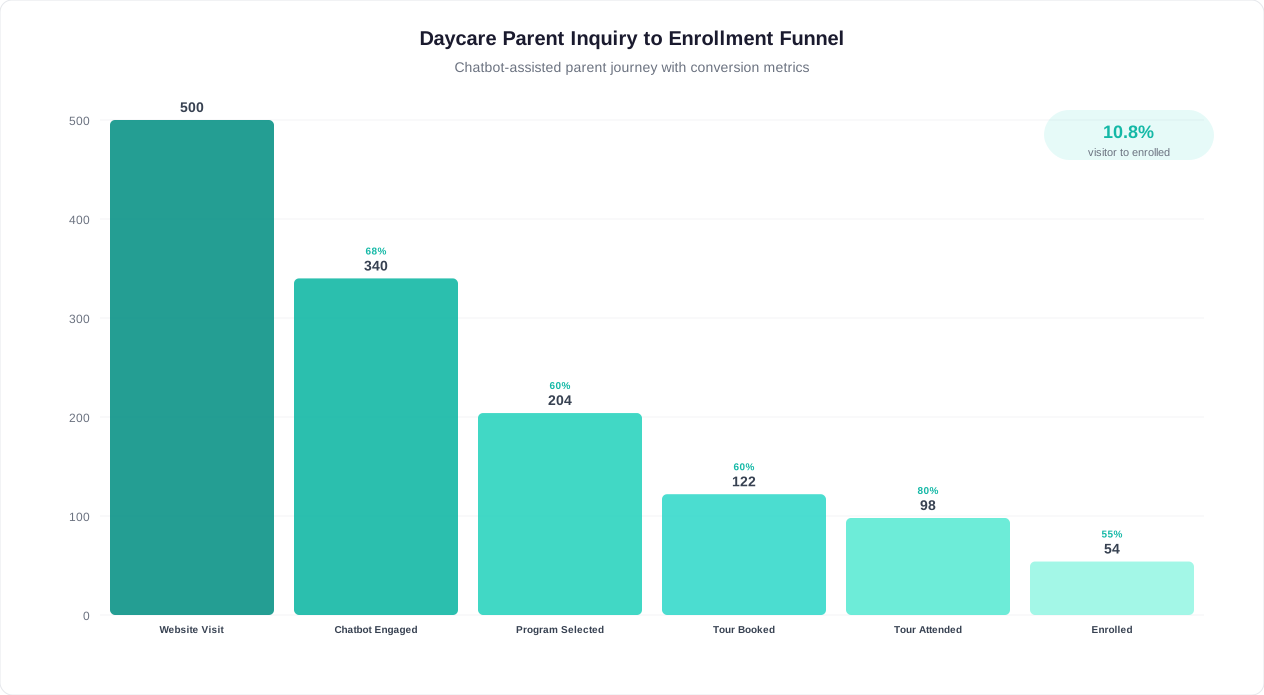
Finding quality childcare is one of the most stressful decisions parents make. They research multiple centers, compare programs, check reviews, and reach out to facilities — often during nap time, late at night, or during lunch breaks at work. If your center cannot respond immediately, that inquiry goes to a competitor who can. A chatbot ensures every parent receives an instant, helpful response regardless of when they reach out.
The Childcare Enrollment Challenge
Daycare centers and preschools face a unique enrollment challenge: demand is highly localized, parents comparison-shop aggressively, and the decision timeline is compressed. A parent who calls three centers and only gets one callback will enroll at the center that responded. Yet most childcare facilities are staffed for caregiving, not sales — the director who handles inquiries is also managing classrooms, communicating with existing parents, and ensuring licensing compliance.
- Missed calls and delayed responses: Industry data indicates that 60-70% of phone calls to childcare centers go unanswered during peak hours. Each missed call represents a family that may never call back — they simply move to the next center on their list.
- Repetitive questions consuming staff time: The same 8-10 questions (pricing, hours, age requirements, waitlist status, curriculum approach, meals policy, outdoor play, teacher ratios) account for over 80% of parent inquiries. Staff answer these identical questions dozens of times per week.
- Enrollment pipeline invisibility: Without a system to capture and track inquiries, centers have no visibility into how many families are considering them, where prospects drop off, or which marketing channels produce enrolled families. Enrollment feels unpredictable because it is unmeasured.
- Tour no-shows: Parents who schedule tours days or weeks in advance frequently forget or deprioritize the visit. Centers that lack automated reminders experience 30-40% tour no-show rates, wasting director time reserved for those meetings.
How Conferbot Solves This for Childcare Centers
Conferbot's AI chatbot builder enables any childcare center — from a single-location home daycare to a multi-site corporate chain — to deploy an always-on enrollment assistant without technical expertise. The chatbot answers the common questions that consume staff time, qualifies families by age group and schedule needs, checks availability against your current openings, and books tours directly into your calendar. Every interaction is captured as a lead in your dashboard, giving you full pipeline visibility for the first time.
Unlike generic contact forms that collect an email and hope for the best, the chatbot engages parents in a natural conversation that gathers the specific information your admissions team needs: child's age, desired start date, schedule preference, special requirements, and referral source. By the time your director reviews the inquiry, they have everything needed to provide a personalized follow-up — dramatically increasing the likelihood of enrollment.
How the Childcare Enrollment Chatbot Works
The daycare enrollment chatbot guides parents through a structured yet conversational flow that feels natural while collecting every data point your admissions process requires. Unlike a static FAQ page that dumps information and hopes parents self-select, the chatbot asks targeted questions to understand each family's specific needs, then provides relevant answers and next steps tailored to their situation.
The Parent Journey: Step by Step
| Step | Parent Experience | Chatbot Action | Center Benefit |
|---|---|---|---|
| 1. Greeting | Lands on website, chatbot opens with warm welcome | Introduces the center and asks what brought them here | Engages visitor before they bounce |
| 2. Intent Qualification | Selects their primary need (enroll, tour, pricing, programs) | Routes conversation to appropriate information path | Understands inquiry type for prioritization |
| 3. Age Group | Shares child's age or selects age bracket | Checks availability for that age group and presents relevant program info | Automatically filters by classroom capacity |
| 4. Schedule Needs | Indicates full-time, part-time, or specific days needed | Confirms schedule options and any waitlist status | Matches demand to available slots |
| 5. Start Timeline | Shares when they need care to begin | Sets urgency level and adjusts follow-up timing | Prioritizes immediate-need families |
| 6. Special Considerations | Mentions allergies, accessibility, or learning needs | Acknowledges and notes for admissions team | Staff prepared for specific accommodations |
| 7. Contact Collection | Provides name, email, phone number | Captures parent and child details for follow-up | Complete lead record created automatically |
| 8. Tour Scheduling | Selects preferred tour time | Books tour and sends calendar confirmation | Director's calendar managed without back-and-forth |
| 9. Confirmation | Receives summary and next steps | Sends email with program guide, fee schedule, tour details | Professional follow-up delivered instantly |
Intelligent Routing by Intent
Not every parent is at the same stage. A parent searching for "daycare near me" at 11 PM is in early research mode — they need program information, photos, and philosophy. A parent whose current provider just announced closure needs immediate placement — they need availability and a tour slot tomorrow. The chatbot recognizes these different urgency levels through its qualifying questions and adjusts both the information provided and the follow-up priority accordingly.
Real-Time Availability Checking
When connected to your enrollment management system through Conferbot's integrations hub, the chatbot can provide real-time availability by age group and schedule type. Parents receive an immediate answer: "We have 2 full-time spots available in our Toddler room starting next month" or "Our Preschool program is currently at capacity, but I can add you to our waitlist — most families hear back within 3-4 weeks." This transparency builds trust and prevents the frustration of touring a center only to learn there is no availability.
For centers using Conferbot's no-code chatbot builder, availability can be managed through a simple dashboard that staff update weekly as enrollments and withdrawals occur — no complex system integration required.
Key Features: Age-Based Programs, Tour Scheduling, and Waitlist Management
A childcare enrollment chatbot must handle the specific operational realities of daycare centers — licensing ratios, age-based classroom assignments, seasonal enrollment patterns, and the high-trust nature of the parent-provider relationship. The features below represent the complete capability set designed specifically for childcare businesses, built on Conferbot's platform.
Feature Overview
| Feature | How It Works | Parent Benefit | Center Benefit |
|---|---|---|---|
| Age-Based Program Matching | Classifies child into correct program based on age and presents relevant curriculum, ratios, and schedule | Sees exactly what their child's day looks like | No mismatched expectations at tour |
| Real-Time Availability | Checks current enrollment against licensed capacity for each classroom | Instant answer on whether space exists | Eliminates inquiries for full classrooms |
| Automated Tour Scheduling | Presents available tour slots and books directly into director's calendar | Confirms tour without phone tag | Zero back-and-forth scheduling emails |
| Waitlist Management | Adds family to prioritized waitlist when preferred program is full | Knows their position and expected timeline | Fills spots instantly when openings occur |
| Tour Reminders | Sends automated SMS/email reminders 24 hours and 1 hour before scheduled tour | Never forgets their tour appointment | Reduces no-show rate by 50-60% |
| Multi-Child Enrollment | Handles sibling inquiries within same conversation | One conversation for all children | Captures sibling discount opportunities |
| Pricing Transparency | Shares fee schedules by program, schedule type, and any available discounts | No surprises about cost | Pre-qualifies families on budget fit |
| Referral Tracking | Asks how family heard about center and attributes to marketing channel | Quick, non-intrusive question | Measures ROI of marketing spend |
| Special Needs Documentation | Collects allergy, accessibility, and learning accommodation details upfront | Feels heard and accommodated from first interaction | Staff prepared before tour or enrollment |
Tour Scheduling That Actually Works
Tour scheduling is the single highest-value action a childcare chatbot performs. Parents who tour are 5-8x more likely to enroll than parents who only receive information digitally. The chatbot maximizes tour bookings by offering scheduling at the exact moment of peak interest — immediately after the parent has learned about the program and confirmed availability. No delay, no "someone will call you back," no friction.
The scheduling system integrates with Google Calendar, Outlook, and Calendly through Conferbot's integrations hub, ensuring tour slots reflect the director's actual availability. Parents receive an instant confirmation email with the center's address, parking instructions, what to bring, and what to expect during the tour. This professional touch builds confidence before the family ever walks through the door.
Waitlist Intelligence
For popular programs that maintain waitlists, the chatbot transforms waitlist management from a manual spreadsheet exercise into an automated system. When a spot opens, the next family on the waitlist receives an immediate notification with a time-limited offer to claim the spot. If they do not respond within 48 hours, the offer moves to the next family. This ensures spots are filled within days of becoming available rather than sitting empty while staff play phone tag with waitlisted families.
Centers using the live chat feature can seamlessly escalate complex enrollment situations — such as families requesting specific accommodations or those with questions about curriculum philosophy — to a human staff member without losing any conversation context.
Ready to try Daycare & Childcare Chatbot?
Deploy this template in under 10 minutes. No coding required.
Use This Template Free →Benefits for Daycare Centers and Preschools
Deploying a childcare enrollment chatbot delivers measurable benefits across three dimensions that matter most to daycare operators: enrollment pipeline growth (more qualified families), operational efficiency (less administrative time per enrollment), and parent experience (faster, more professional interactions that build trust before families even visit). Below is a detailed examination of each benefit category with quantified outcomes from childcare businesses using conversational automation.
Enrollment Pipeline Growth
The most immediate impact of a chatbot deployment is the expansion of your enrollment pipeline. Centers that rely solely on phone calls and contact forms capture only a fraction of interested families. Parents who visit your website at 9 PM, browse your programs, and find no way to get immediate answers leave — and the majority never return. A chatbot converts these silent visitors into captured leads by engaging them in conversation at the moment of interest.
Childcare centers report 2.5-4x increases in monthly inquiry volume after deploying an enrollment chatbot. This is not because more parents are searching — it is because the chatbot captures demand that already existed but was being lost to unanswered calls, abandoned contact forms, and after-hours browsing. For a center that previously received 15-20 inquiries per month, chatbot deployment typically increases this to 40-60 qualified inquiries per month from the same traffic.
Administrative Time Recovery
A typical daycare director spends 8-12 hours per week on enrollment-related communication: answering phone inquiries, responding to emails, scheduling tours, sending follow-ups, and managing waitlists. The chatbot automates the repetitive portions of this workflow — the 80% of inquiries that ask the same questions and need the same information. This recovers 6-10 hours per week of director time that can be redirected to program quality, staff development, or family engagement.
The math is straightforward: if your director earns $60,000 annually and spends 25% of their time on enrollment administration, that represents $15,000 in annual labor cost allocated to tasks a chatbot handles more effectively. The chatbot does not eliminate the director's role in enrollment — it eliminates the repetitive, low-value portions so the director focuses exclusively on high-value interactions like tours, parent meetings, and enrollment decisions.
Improved Parent Experience
Parents evaluating childcare options form impressions fast. A center that responds within minutes signals professionalism, organization, and attentiveness — qualities parents want in the people caring for their children. A center that takes 2-3 days to return a call signals the opposite. The chatbot ensures every family receives an immediate, helpful, personalized response that positions your center as the organized, responsive choice.
Beyond speed, the chatbot provides consistency. Every parent receives complete, accurate information about programs, pricing, and availability. No details forgotten, no outdated fee schedules quoted, no miscommunication about classroom openings. This consistency reduces the "surprise" factor that causes enrollment dropout — parents who arrive for a tour and discover the price is different from what they were told, or the schedule they wanted is unavailable.
Marketing Attribution and ROI Measurement
Most childcare centers spend money on Google Ads, Facebook advertising, directory listings, and community sponsorships without clear data on which channels produce enrolled families. The chatbot's referral tracking question ("How did you hear about us?") provides this attribution data automatically. After three months of chatbot data, you know exactly which marketing channels produce tour-booking families and which produce browsers who never convert — enabling you to reallocate budget from underperforming channels to high-converting ones.
Track all enrollment pipeline metrics through Conferbot's chatbot analytics dashboard, which surfaces conversation completion rates, tour booking rates, and conversion by referral source in real time.
Enrollment and Lead Conversion Data for Childcare Centers in 2026
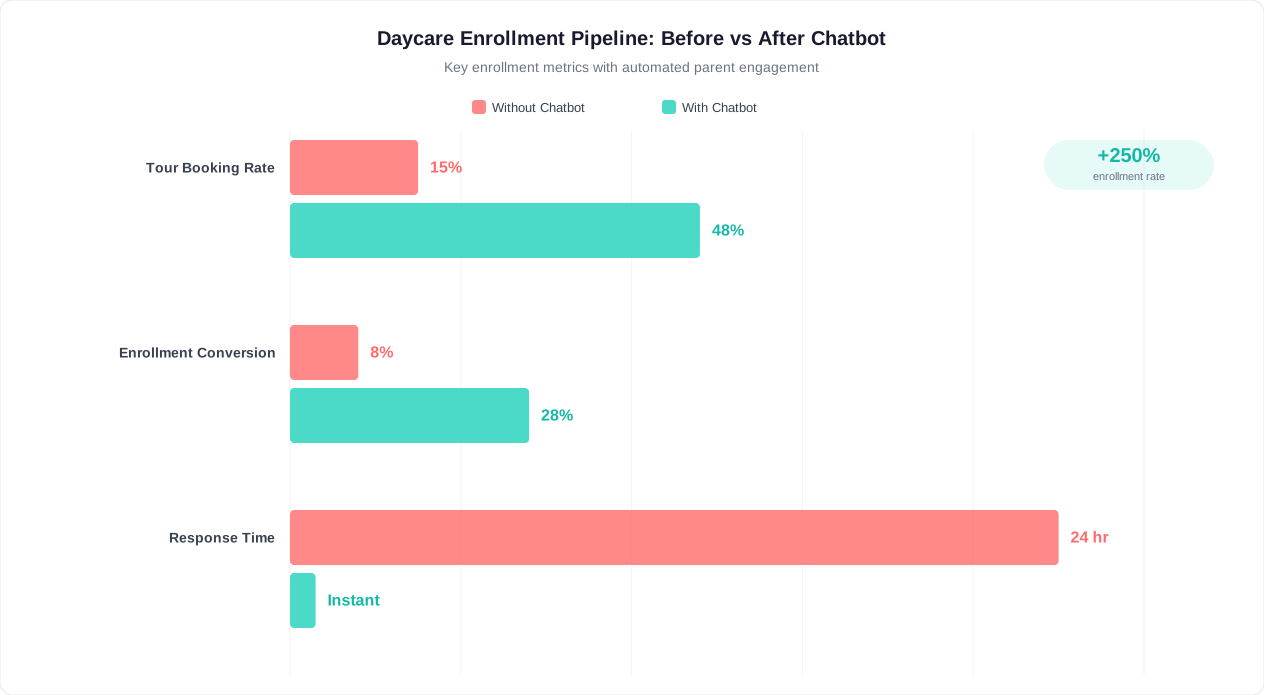
Childcare enrollment economics are straightforward: each enrolled child represents $800-$2,000+ in monthly recurring revenue depending on age group, schedule, and geography. A single additional enrollment per month more than pays for any chatbot investment. The data below quantifies the enrollment pipeline improvements childcare centers achieve after deploying conversational automation for parent inquiries.
Before and After: Chatbot Impact on Key Metrics
| Metric | Without Chatbot | With Chatbot | Improvement |
|---|---|---|---|
| Monthly qualified inquiries | 15-25 | 45-70 | 2.5-4x increase |
| Inquiry-to-tour conversion | 30-40% | 55-70% | 65-80% improvement |
| Tour no-show rate | 30-40% | 12-18% | 55-60% reduction |
| Tour-to-enrollment conversion | 50-60% | 60-70% | 15-20% improvement |
| Average response time to inquiry | 4-24 hours | Under 30 seconds | 99% faster |
| After-hours inquiries captured | Near zero (voicemail) | 35-45% of total volume | New lead channel |
| Director hours on enrollment admin/week | 8-12 hours | 2-4 hours | 65-75% reduction |
| Waitlist-to-enrollment conversion | 45-55% | 75-85% | 45-55% improvement |
Revenue Impact Modeling
Consider a 60-child capacity center with an average monthly tuition of $1,400. At full enrollment, the center generates $84,000 in monthly revenue. A single empty spot represents $1,400/month in lost revenue — $16,800 annually. Centers with 2-3 chronic vacancies are losing $33,600-$50,400 per year in revenue that a more effective enrollment pipeline could capture.
The chatbot addresses vacancies at two points: it increases the flow of qualified inquiries (more families entering the pipeline) and it improves conversion at each stage (more families progressing from inquiry to tour to enrollment). Even a modest improvement — filling one additional spot per quarter that would otherwise have remained vacant for 2-3 months — generates $4,200-$5,600 in additional annual revenue. Most centers report filling 3-6 additional spots in the first year after chatbot deployment.
Cost Per Enrolled Family by Channel
When you combine marketing spend data with the chatbot's referral attribution, you can calculate true cost-per-enrollment by channel. Childcare centers typically discover that Google Ads produce the highest volume of inquiries but referrals produce the highest enrollment rate. This intelligence — impossible to gather without systematic tracking — enables marketing budget optimization that reduces cost per enrolled family by 30-50% over six months.
Use Conferbot's ROI calculator to model the specific revenue impact for your center based on your capacity, tuition rates, current vacancy rate, and monthly inquiry volume.
Improving Parent Communication and Trust
In childcare, trust is the product. Parents are not buying a service — they are entrusting their child's safety, development, and daily happiness to people they have just met. Every interaction between a parent and your center, from the very first website visit to daily drop-off conversations, either builds or erodes that trust. A chatbot represents your center's first extended interaction with most prospective families, and its quality directly influences whether parents feel confident enough to schedule a tour.
First Impressions in Childcare Decision-Making
Research on childcare selection consistently shows that parents make initial judgments about a center within the first 2-3 interactions. These interactions increasingly happen digitally before any in-person visit. A professional, responsive, informative chatbot experience signals that your center is organized, modern, and parent-focused. It communicates: "We take communication seriously, we have systems in place, and we respect your time." These are precisely the qualities parents extrapolate to the care environment itself.
Conversely, a website with no interactive elements, a contact form that disappears into a void, or a phone line that rings to voicemail signals disorganization. Parents unconsciously wonder: "If they cannot manage inquiries effectively, how are they managing 30 toddlers?" Whether this inference is fair or not, it drives enrollment decisions. The chatbot ensures your digital first impression matches the quality of care you actually provide.
Transparency as a Trust-Building Tool
Parents value transparency above almost everything else when choosing childcare. They want to know exactly what their child's day looks like, what the teacher-to-child ratios are, what happens during meals and naps, and what the center's policies are on illness, discipline, and outdoor play. A chatbot that proactively shares this information — rather than making parents dig for it — demonstrates confidence in your program and respect for parent concerns.
The chatbot can share daily schedule breakdowns by age group, introduce lead teachers, explain curriculum philosophy, detail safety protocols, and present licensing and accreditation information. Each piece of information shared proactively is one fewer concern a parent carries into the tour. Parents who arrive informed and reassured convert at dramatically higher rates than parents who arrive with unanswered questions and unaddressed concerns.
Communication Style Matters
A childcare chatbot must communicate differently from a corporate customer service bot. The tone should be warm, reassuring, and slightly informal — mirroring how excellent childcare providers speak with families. Phrases like "your little one," "we are here for your family," and "we understand this is a big decision" resonate with parents evaluating care options. Cold, transactional language ("Please provide your contact information for processing") creates distance at precisely the moment you need connection.
Conferbot's template uses carefully crafted language that balances professionalism with warmth. Every prompt, response, and confirmation message is written from the perspective of a welcoming childcare provider, not a lead generation system. Parents feel cared for from the first message, which is exactly the experience you want them to associate with your center.
Ongoing Communication After Enrollment
The chatbot's value extends beyond enrollment. Centers using Conferbot's omnichannel platform deploy the same conversational interface for ongoing parent communication: policy updates, closure notifications, event reminders, and re-enrollment confirmations. This creates a single, familiar communication channel that parents learn to rely on — reducing the "lost in email" problem that plagues parent communication at busy centers.
50,000+ businesses use Conferbot templates to automate conversations
Child Safety and Data Privacy Considerations
Any technology deployed in a childcare setting must meet elevated standards for data privacy and security. Parents entrust you not only with their children but also with sensitive personal information — names, addresses, phone numbers, medical details, and family circumstances. A chatbot that collects this data carries responsibility for protecting it. Below are the compliance considerations childcare centers should address when deploying conversational automation.
Data You Collect and Why It Matters
The daycare enrollment chatbot collects several categories of personal data through natural conversation: parent identifying information (name, email, phone), child identifying information (name, age, sometimes medical details like allergies), scheduling preferences that imply work patterns, and referral sources. While none of this individually constitutes highly sensitive data, the combination creates a detailed profile of a family with young children — a population that deserves particular privacy protection.
Conferbot implements data minimization principles by default: the chatbot only asks for information that serves a clear enrollment purpose. It does not collect social security numbers, financial details, or detailed medical histories through the chat interface. Sensitive information that enrollment requires (immunization records, custody documentation, detailed health histories) is collected through secure, separate channels after the family has decided to enroll — not during the initial inquiry conversation.
COPPA Compliance Considerations
The Children's Online Privacy Protection Act (COPPA) in the United States regulates the collection of personal information from children under 13. While your chatbot primarily interacts with parents (not children), centers should be aware of COPPA implications if any part of their digital presence could involve direct child interaction. Conferbot's childcare template is designed exclusively for parent-facing enrollment conversations and does not collect information directly from children.
For centers operating in the European Union, GDPR applies to all personal data collected through the chatbot. Conferbot's platform provides the technical infrastructure for GDPR compliance: data access requests, deletion capabilities, consent tracking, and data processing documentation. Centers are responsible for creating their own privacy policies and obtaining appropriate consent, but the platform ensures the technical mechanisms are in place.
State Licensing and Record Retention
Childcare licensing requirements vary by state and jurisdiction but frequently include requirements around record-keeping for enrolled and inquiring families. Some states require that waitlist records be maintained for specific periods. Conferbot's data retention policies can be configured to align with your state's licensing requirements, ensuring inquiry records are preserved for the required duration and properly disposed of afterward.
Security Infrastructure
All data collected through the Conferbot platform is encrypted in transit (TLS 1.3) and at rest (AES-256). Access to conversation data is restricted by role-based permissions — only staff members you designate can view parent inquiry details. The platform maintains audit logs of all data access, providing accountability for who viewed what information and when. For centers that are part of larger corporate childcare chains, enterprise-grade security certifications (SOC 2 Type II) are available.

For questions about compliance specific to your state or jurisdiction, Conferbot's support team provides guidance on configuration options. Review the platform's privacy policy and terms of service for detailed information about data handling practices.
Getting Started with Your Daycare Chatbot
Launching a childcare enrollment chatbot does not require technical expertise, a large budget, or weeks of setup time. With Conferbot's no-code chatbot builder and this pre-built Daycare and Childcare template, most centers complete deployment in a single afternoon. Below is the step-by-step process from account creation to live deployment.
Step 1: Use the Template (15 Minutes)
Start by selecting the Daycare and Childcare Chatbot template from Conferbot's education and training template library. The template provides a complete, tested conversation flow covering program inquiry, age-group matching, schedule selection, contact collection, and tour scheduling. You customize the content to match your center rather than building from scratch. Update the center name, program names, age group boundaries, schedule options, and pricing to reflect your specific offerings.
Step 2: Customize Your Programs and Availability (30 Minutes)
Edit the chatbot's response content to accurately represent your programs. For each age group you serve, update the program description, teacher-to-child ratios, daily schedule overview, and current availability status. If you maintain a waitlist for certain programs, configure the waitlist response. If you offer specialized programs (Montessori, language immersion, STEM-focused), add those as options in the program discovery flow. The visual builder makes all of these edits drag-and-drop simple.
Step 3: Connect Your Calendar (10 Minutes)
Integrate the tour scheduling feature with your director's calendar. Conferbot connects to Google Calendar and Outlook, pulling available time slots and writing confirmed tours directly into the calendar. Define your tour availability windows (for example, Tuesday and Thursday mornings, Saturday by appointment) and the chatbot only offers those times to parents. This eliminates double-booking and ensures tours are scheduled when staff are prepared to host them.
Step 4: Set Up Notifications (10 Minutes)
Configure how your team receives new inquiry notifications. Options include email alerts to the director, SMS notifications for urgent inquiries (families needing immediate placement), and daily digest summaries of all chatbot conversations. Set up automated tour reminder messages that go to parents 24 hours and 1 hour before their scheduled visit to reduce no-shows.
Step 5: Deploy on Your Website and Social Media (15 Minutes)
Add the chatbot widget to your website by pasting a single line of code into your site template. If you use a website builder (Wix, Squarespace, WordPress), Conferbot provides platform-specific installation guides. Optionally deploy the chatbot on your Facebook Messenger and Instagram profiles to capture parents who find you through social media — a growing acquisition channel for family-oriented businesses.
Step 6: Test and Go Live (15 Minutes)
Run through the complete chatbot conversation as if you were a parent inquiring about each age group and schedule type. Verify that program information is accurate, tour scheduling works correctly, and notification emails arrive as expected. Once confirmed, flip the chatbot to live mode. Most centers see their first parent inquiry within 24-48 hours of deployment, with volume ramping as search engine traffic reaches the chatbot-enabled pages.
Ongoing Optimization
After two weeks of live operation, review your analytics dashboard to identify any conversation drop-off points. If parents consistently abandon the conversation at a particular question, simplify or remove that step. If a specific program gets significantly more inquiries than others, consider highlighting it earlier in the flow. The chatbot is a living tool — small refinements based on real conversation data compound into significant enrollment improvements over time.
Explore pricing plans to find the tier that matches your center's inquiry volume and feature requirements. Most single-location childcare centers operate comfortably on Conferbot's starter or professional plans.
Daycare & Childcare Chatbot FAQ
Everything you need to know about chatbots for daycare & childcare chatbot.
Why Use a Template vs Building from Scratch?
Templates encode years of optimization data into the conversation flow before you start.
| Factor | Conferbot Template | Build from Scratch | Hire a Developer |
|---|---|---|---|
| Time to deploy | 10 minutes | 2-8 hours | 2-6 weeks |
| Cost | Free | Your time | $5,000-$25,000 |
| Day-1 conversion | 15-22% | 5-8% | 10-15% |
| Proven flows | Yes, data-tested | No | Depends |
| Updates included | Automatic | Manual | Paid |
| Multi-channel | 8+ channels | 1 channel | Extra cost |
| Analytics | Built-in | Must build | Extra cost |
Ready to Deploy Daycare & Childcare Chatbot?
Join 50,000+ businesses. Free forever plan available. No credit card required.