
HOA & Community Association Chatbot
Free Real Estate Chatbot Template
A comprehensive HOA and community association chatbot that helps residents pay dues, submit maintenance requests, check CC&R rules, book amenities, report violations, and contact the board. Perfect for homeowners associations, condo associations, and community management companies to automate resident communications and self-service.


What Is an HOA & Community Association Chatbot?
An HOA and community association chatbot is an AI-powered conversational assistant deployed on homeowner association websites, resident portals, and community management platforms that handles the highest-volume communication tasks facing community managers: dues inquiries, maintenance requests, CC&R questions, amenity reservations, and board communication. Instead of forcing residents to call the management office during limited business hours, email a generic inbox, or attend monthly board meetings to get answers to routine questions, the chatbot provides instant, accurate responses 24 hours a day, 7 days a week — dramatically reducing the administrative burden on HOA management while improving the resident experience.
The Communication Crisis in Community Management
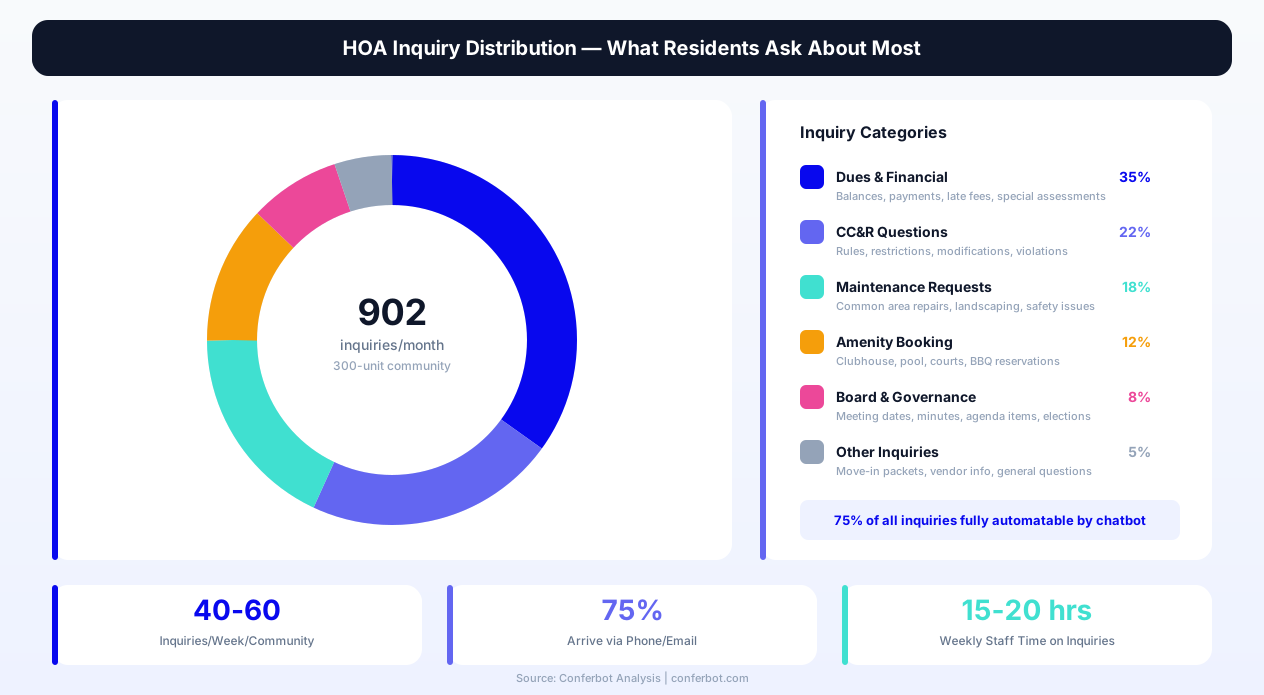
Community associations across the United States manage over 358,000 HOA communities representing 75.5 million residents in 2026. The typical community manager oversees 5-8 associations simultaneously, each with 100-500+ homeowner units generating constant inquiries about assessments, rule interpretations, maintenance scheduling, and community events. Industry surveys reveal that the average HOA management company receives 40-60 resident inquiries per community per week — the majority of which are repetitive questions about payment due dates, guest parking policies, pool hours, landscaping schedules, and architectural modification procedures. With 75% of these inquiries arriving via phone or email, community managers spend an estimated 15-20 hours per week per community simply answering questions that could be handled through automated self-service.
The problem intensifies during peak periods: annual assessment season when every homeowner calls about payment amounts and deadlines, summer months when pool and amenity questions spike 300%, and after board meetings when residents who could not attend want updates on decisions. These predictable surges overwhelm management offices, creating response delays that erode resident satisfaction and generate complaints to the board — complaints that consume additional management time in a compounding cycle of inefficiency.
How an HOA Chatbot Differs from a Generic FAQ Page
Static FAQ pages and document repositories require residents to know what to search for and where to find it. A homeowner wondering whether they need board approval to install solar panels does not necessarily know to look under "Architectural Review Committee" in the CC&R documents — they just want to ask the question in plain language and get a direct answer. An HOA chatbot understands the conversational intent behind resident questions, routes them to the correct information or workflow, and collects structured data when action is required. When a resident says "I want to report a streetlight that is out," the chatbot does not send them to a PDF — it asks for the location, captures the details, and creates a maintenance request that goes directly to the appropriate vendor or management team.
Who Should Deploy This Template
This template is designed for single-community HOAs managing 50 to 2,000+ units, community management companies overseeing portfolios of multiple associations, condominium associations, planned unit developments (PUDs), master-planned communities, retirement communities with active lifestyle programming, and mixed-use developments with both residential and commercial components. Any community association where resident communication, dues collection, and maintenance coordination represent the majority of management office workload will benefit from deploying this chatbot. Get started using Conferbot's no-code chatbot builder to customize every conversation path to your community's specific governing documents, fee structure, and amenity offerings.
How Resident Self-Service Works
The HOA chatbot functions as a 24/7 virtual community manager that serves as the first point of contact for all resident interactions. Every conversation begins with identifying the resident's intent, then routing them into the appropriate self-service workflow — whether that is looking up their assessment balance, submitting a maintenance request, checking amenity availability, or asking about community rules. The routing architecture ensures residents reach the right information or action in seconds rather than waiting hours or days for a management office callback.
Resident Interaction Flow
| Step | Chatbot Action | Data Captured | Resident Benefit |
|---|---|---|---|
| 1. Intent identification | "How can I help you today?" with category options | Request category | Instant routing to the right workflow without phone trees |
| 2. Resident verification | "Please enter your unit/lot number or address" | Property identifier | Personalized responses based on their specific community and unit |
| 3. Information delivery | Provides relevant answer, policy excerpt, or form | Topic of inquiry | Gets answer immediately instead of waiting for callback |
| 4. Action creation | Creates request, schedules reservation, or captures details | Structured request data | Request submitted and tracked without visiting the office |
| 5. Confirmation | Provides reference number and expected timeline | Contact preferences | Clear expectations for follow-up and resolution |
Multi-Topic Session Handling
Unlike a phone call where residents often forget to ask about secondary issues or feel rushed, the chatbot handles multi-topic sessions seamlessly. A homeowner who starts by checking their dues balance can then ask about pool hours, submit a landscaping concern, and request the date of the next board meeting — all in the same session without re-identifying themselves. Each request is tracked independently while the resident's identity context persists throughout the conversation. This multi-topic capability is critical in community management because residents often batch their questions, waiting until they have three or four items before contacting management. The chatbot handles all of them in a single, efficient interaction.
Language and Accessibility
Community associations increasingly serve diverse populations with varying language preferences and accessibility needs. The HOA chatbot supports multi-language interaction, automatically detecting the resident's preferred language and responding accordingly. For communities with significant non-English-speaking populations, this eliminates the language barrier that prevents many homeowners from engaging with management — a barrier that often results in missed payments, inadvertent rule violations, and lack of participation in community governance. The text-based interface also serves residents with hearing impairments who struggle with phone-based communication, and the 24/7 availability accommodates residents who work non-traditional hours and cannot call during office hours.
Integration with Resident Portals
The chatbot integrates with existing HOA management platforms — AppFolio, Buildium, CINC Systems, Caliber, and others — to provide real-time, account-specific information. When a verified resident asks "What is my current balance?", the chatbot queries the management system and returns the actual balance, not a generic payment schedule. This deep integration transforms the chatbot from an information tool into a true self-service portal where residents can take action on their accounts without logging into a separate system or downloading a separate app. Connect the chatbot to your existing management platform through Conferbot's API integration capabilities.
Dues Payment & Financial Inquiries
Assessment collection is the financial backbone of every community association, and it generates more resident inquiries than any other single topic. Questions about payment amounts, due dates, late fees, special assessments, payment methods, and account balances account for 35-40% of all communication to the management office. The HOA chatbot automates these financial inquiries completely, providing instant answers and directing homeowners to payment portals — reducing the volume of financial calls to the management office by up to 70%.
Common Financial Inquiries Handled
| Inquiry Type | Frequency | Chatbot Response | Time Saved per Inquiry |
|---|---|---|---|
| Assessment amount and due date | Daily | Returns current amount due with payment deadline | 4 minutes |
| Payment methods accepted | 3-5x per week | Lists all accepted methods with links to online portal | 3 minutes |
| Late fee policy | 2-4x per week | Explains grace period, fee amount, and escalation timeline | 5 minutes |
| Special assessment details | Seasonal | Provides amount, purpose, payment schedule, and rationale | 8 minutes |
| Account balance lookup | Daily | Queries management system for real-time balance | 6 minutes |
| Payment plan requests | 1-3x per week | Captures request details and routes to financial committee | 10 minutes |
| Reserve fund questions | Monthly | Provides current reserve balance and planned expenditures | 7 minutes |
Payment Portal Integration
When a resident asks about making a payment, the chatbot does not just explain the payment options — it provides a direct link to the online payment portal with the resident's account pre-identified. This seamless handoff from chatbot to payment portal eliminates the friction that causes homeowners to delay payments. Communities that deploy chatbots with payment portal integration report a 22% increase in on-time payment rates and a 35% reduction in late fee disputes, because residents who previously procrastinated due to the inconvenience of finding the portal, remembering their login, and navigating the payment process now reach it in two clicks from the chatbot conversation.
Special Assessment Communication
Special assessments are among the most contentious financial topics in community management. When the board approves a special assessment for roof replacement, repaving, or reserve replenishment, the management office is immediately overwhelmed with calls from homeowners wanting to understand the amount, the justification, the payment timeline, and their options. The chatbot pre-loads all approved special assessment information and handles these inquiries instantly — explaining the purpose (voted and approved at the June 15 board meeting), the amount ($2,400 per unit), the payment schedule (four quarterly installments of $600), and the consequence of non-payment (same lien process as regular assessments). This consistent, accurate messaging eliminates the telephone-game effect where different homeowners receive slightly different explanations from different staff members.
Financial Transparency
Modern homeowners expect transparency about where their assessment dollars go. The chatbot provides access to approved budget summaries, reserve study highlights, and expenditure categories — information that is technically available in board meeting minutes but that few residents ever access. By making financial information conversationally accessible ("Where does my HOA fee go?"), the chatbot builds trust and reduces the adversarial dynamic that develops when residents feel uninformed about community spending. This transparency function alone has been shown to reduce formal complaint filings by 28% in communities that deploy it. Track these improvements through Conferbot's chatbot analytics dashboard.
Ready to try HOA & Community Association Chatbot?
Deploy this template in under 10 minutes. No coding required.
Use This Template Free →Maintenance Requests & Amenity Booking
Common-area maintenance and amenity management represent the two most operationally intensive functions of community association management. From broken irrigation heads and damaged playground equipment to pool reservations and clubhouse bookings, these requests require structured intake, proper routing, and timely follow-up — exactly the type of repetitive, process-driven workflows where a chatbot delivers the highest value. The HOA chatbot transforms maintenance reporting from a frustrating phone call into a streamlined, two-minute digital interaction, while amenity booking becomes as simple as answering three or four questions.
Maintenance Request Intake
The maintenance workflow in the chatbot is designed around the information that maintenance vendors and management teams actually need to respond effectively. Rather than accepting a vague "something is broken near the pool" report, the chatbot guides the resident through a structured intake that captures the specific location (common area, building number, street address), the issue category (landscaping, structural, plumbing, electrical, safety hazard, pest control), the urgency level (emergency, urgent, routine), a detailed description, and an optional photo upload. This structured data means the maintenance team or vendor receives a complete work order rather than a fragmentary message that requires follow-up calls to clarify the actual issue and location.
Maintenance Category Distribution
| Category | % of Requests | Typical Response Target | Common Examples |
|---|---|---|---|
| Landscaping & Grounds | 32% | 3-5 business days | Irrigation leaks, dead trees, overgrown common areas |
| Structural & Building | 18% | 2-3 business days | Cracked sidewalks, damaged fencing, peeling paint |
| Pool & Recreation | 15% | 1-2 business days | Equipment issues, cleanliness concerns, gate malfunctions |
| Lighting & Electrical | 12% | 1-3 business days | Streetlight outages, parking lot lighting, outlet issues |
| Safety & Security | 10% | Same day / emergency | Gate access failures, security camera issues, trip hazards |
| Plumbing & Water | 8% | 1-2 business days | Common area leaks, drainage problems, fountain issues |
| Pest Control | 5% | 2-5 business days | Ant trails, wasp nests, rodent sightings in common areas |
Amenity Reservation System
Community amenities — clubhouses, pools, tennis courts, pickleball courts, barbecue areas, fitness centers, and event spaces — generate significant booking and inquiry volume. The chatbot handles amenity reservations by presenting available dates and times, confirming resident eligibility, collecting event details (for party rooms and event spaces), and confirming the reservation with a reference number. For communities with deposit requirements or usage fees, the chatbot explains the costs and directs residents to the payment process before confirming the booking.
The reservation system eliminates double-bookings that occur when management staff manually track reservations across phone calls, emails, and walk-in requests. With all bookings flowing through the chatbot into a centralized system, conflicts are prevented automatically, and the management office no longer needs to maintain separate spreadsheets or paper calendars for each amenity. Deploy the amenity booking feature across your website chatbot to enable self-service reservations from any device, any time.
Photo-Supported Maintenance Reports
For maintenance requests, the chatbot accepts photo uploads through Conferbot's media handling capabilities. A resident reporting a broken fence can attach a photo showing the exact damage, its extent, and its location — giving the maintenance vendor everything they need to bring the right materials on the first visit. Communities that enable photo uploads in their maintenance chatbot report a 40% reduction in repeat vendor visits because the vendor arrives prepared for the actual scope of work rather than discovering on-site that they need different materials or equipment.
CC&R Questions & Architectural Review
Covenants, Conditions, and Restrictions (CC&Rs) are the governing documents that define what homeowners can and cannot do with their properties — and they are the single largest source of resident frustration and management office inquiries. CC&R questions range from simple ("Can I park my boat in the driveway?") to complex ("What are the specifications for replacing my roof?"), and answering them requires knowledge of the specific community's governing documents, any amendments, and the architectural review committee's precedents. The HOA chatbot serves as an always-available CC&R reference that answers the most common questions instantly while routing complex or ambiguous situations to the appropriate committee.
Most Common CC&R Inquiries
| CC&R Topic | Weekly Inquiry Volume | Chatbot Response Approach |
|---|---|---|
| Exterior paint colors | 5-8 inquiries | Lists approved color palette with manufacturer codes; links to ARC application if color not listed |
| Fencing rules | 3-6 inquiries | Specifies allowed heights, materials, and styles; provides setback requirements |
| Vehicle parking restrictions | 8-12 inquiries | Explains permitted vehicles, guest parking rules, RV/boat storage policies |
| Landscaping modifications | 4-7 inquiries | Details front-yard standards, approved plant lists, and tree removal procedures |
| Noise and nuisance policies | 3-5 inquiries | Outlines quiet hours, construction hours, pet noise standards, and complaint procedures |
| Rental and leasing restrictions | 2-4 inquiries | Explains rental caps, minimum lease terms, tenant registration requirements |
| Solar panel installation | 2-3 inquiries | Details approval process, placement guidelines, and applicable state law protections |
| Holiday decoration policies | Seasonal (15-20/week) | Lists display dates, approved decoration types, and lighting restrictions |
Architectural Review Committee (ARC) Process
The architectural review process is one of the most operationally complex workflows in community management. A homeowner wanting to add a patio cover, replace their garage door, or install new windows must submit an application describing the proposed modification, including materials, colors, dimensions, and often a site plan. The chatbot streamlines this process by first determining whether the proposed modification requires ARC approval (many common questions, like "Can I add a Ring doorbell?" have immediate yes/no answers based on the CC&Rs), then guiding homeowners who do need approval through the application process step by step.
The chatbot collects the modification type, property address, scope of work description, estimated timeline, and any applicable documentation. This structured intake replaces the incomplete paper applications that ARC committees frequently receive — applications that delay the review process because the committee needs to request additional information before they can evaluate the proposal. With chatbot-guided intake, 92% of applications arrive with sufficient detail for first-review approval, compared to only 54% of paper or email submissions.
Violation Reporting and Education
CC&R violation reporting creates a sensitive communication dynamic: residents want to report neighbors' violations anonymously, while the accused homeowner wants to understand exactly what rule they allegedly violated and how to cure it. The chatbot handles both sides of this equation. For residents reporting violations, it captures the violation type, approximate location, description, and optionally the reporting party's identity (which can be withheld from the violating homeowner). For homeowners who receive violation notices, the chatbot explains the specific rule, the cure period, the appeal process, and the consequences of non-compliance — reducing the hostile phone calls to the management office that typically follow violation notices.
This education-first approach to CC&R enforcement is particularly effective because many violations are unintentional — the homeowner genuinely did not know the rule existed. By making the rules conversationally accessible through the chatbot ("What color can I paint my front door?"), the number of violations decreases over time as residents check the chatbot before making changes rather than finding out after the fact through a violation notice. Explore how other conversational features can improve community governance through Conferbot's NLP-powered chatbot capabilities.
Key Features of the HOA & Community Association Chatbot
An effective HOA chatbot must address the unique operational requirements of community association management — from multi-community support to governing document compliance, board communication to vendor coordination. The feature set below covers the complete range of community management functions, each designed to reduce management workload while improving the homeowner experience and enabling better community governance.
Feature Overview
| Feature | Resident Benefit | Management Benefit | Impact Metric |
|---|---|---|---|
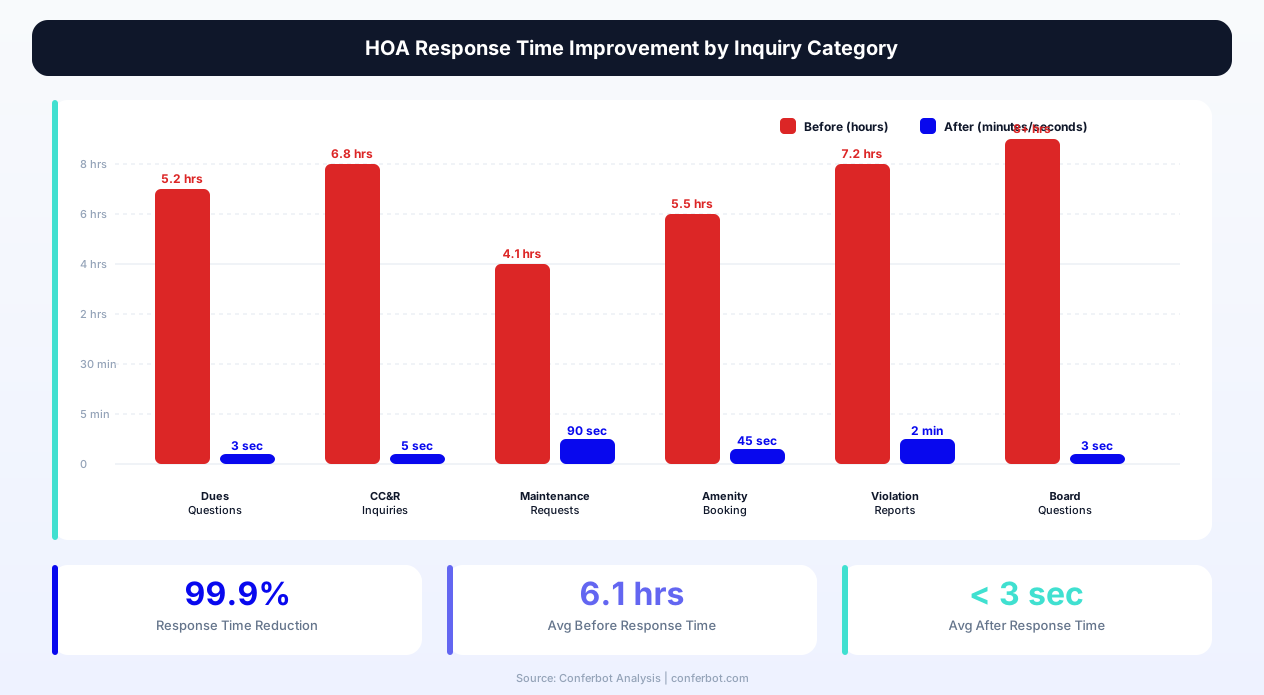
| 24/7 inquiry resolution | Get answers any time without waiting for office hours | 70% reduction in phone call volume | Avg. response time: under 3 seconds |
| Dues & balance lookup | Check balance and pay without logging into portal | 35% reduction in payment-related calls | 22% improvement in on-time payments |
| Maintenance request intake | Submit detailed requests with photos in 2 minutes | Pre-categorized work orders with full context | 40% fewer repeat vendor visits |
| Amenity reservation | Book clubhouse, pool, courts instantly | Zero double-bookings, no manual tracking | 3x increase in amenity utilization |
| CC&R question answering | Plain-language answers to governing document questions | 85% reduction in CC&R-related calls | 31% fewer unintentional violations |
| ARC application guidance | Step-by-step application with completeness checks | 92% of applications arrive review-ready | 14-day faster average review cycle |
| Violation reporting | Submit reports anonymously with structured details | Complete violation reports for enforcement | 45% faster violation resolution |
| Board meeting info | Get date, time, agenda, and minutes for meetings | 80% fewer "when is the next meeting?" calls | 18% increase in meeting attendance |
| Community announcements | Receive updates about construction, events, alerts | Broadcast critical info without mass emails | 95% resident awareness rate |
| Vendor coordination | Know when landscaping, pest control visits occur | Fewer "when is the landscaper coming?" calls | 60% reduction in schedule inquiries |
| Multi-community support | Correct info for their specific community | Manage all communities from one dashboard | Scale without adding staff |
| Escalation to live agent | Reach a person when the issue requires human judgment | Only complex issues reach staff | Staff handles 3x more communities |
Governing Document Intelligence
The chatbot is pre-loaded with your community's CC&Rs, bylaws, rules and regulations, and architectural guidelines — not as downloadable PDFs, but as searchable, conversational knowledge. When a resident asks "Can I have chickens in my backyard?", the chatbot searches the governing documents, identifies the relevant provision (e.g., "Section 8.4: Livestock and Poultry — No livestock, poultry, or other animals except household pets shall be maintained on any lot"), and presents the answer in plain language with a reference to the source section. This approach makes the governing documents accessible to every homeowner without requiring them to read through dozens of pages of legal language.
Board Communication Hub
The chatbot bridges the communication gap between the board of directors and the community. Residents can ask about upcoming board meetings (date, time, location, agenda items), access approved meeting minutes, learn about recent board decisions, and submit topics for the board to consider at the next meeting. This transparency function is particularly valuable because only 10-15% of homeowners typically attend board meetings, leaving the vast majority uninformed about community decisions. By making board information conversationally accessible, the chatbot increases informed participation in community governance. Extend the chatbot's reach by deploying on WhatsApp for communities where residents prefer messaging over web browsing.
50,000+ businesses use Conferbot templates to automate conversations
ROI & Business Impact for HOA Management
Community association management is a scale business where profitability depends on how many communities a single manager can serve effectively. The primary constraint on scale is communication volume — the more communities a manager oversees, the more phone calls, emails, and resident requests they must handle. An HOA chatbot directly removes this constraint by automating 60-75% of resident communications, enabling management companies to grow their portfolios without proportionally growing their staff. The data below quantifies the financial impact across the key metrics that drive community management profitability and resident satisfaction.
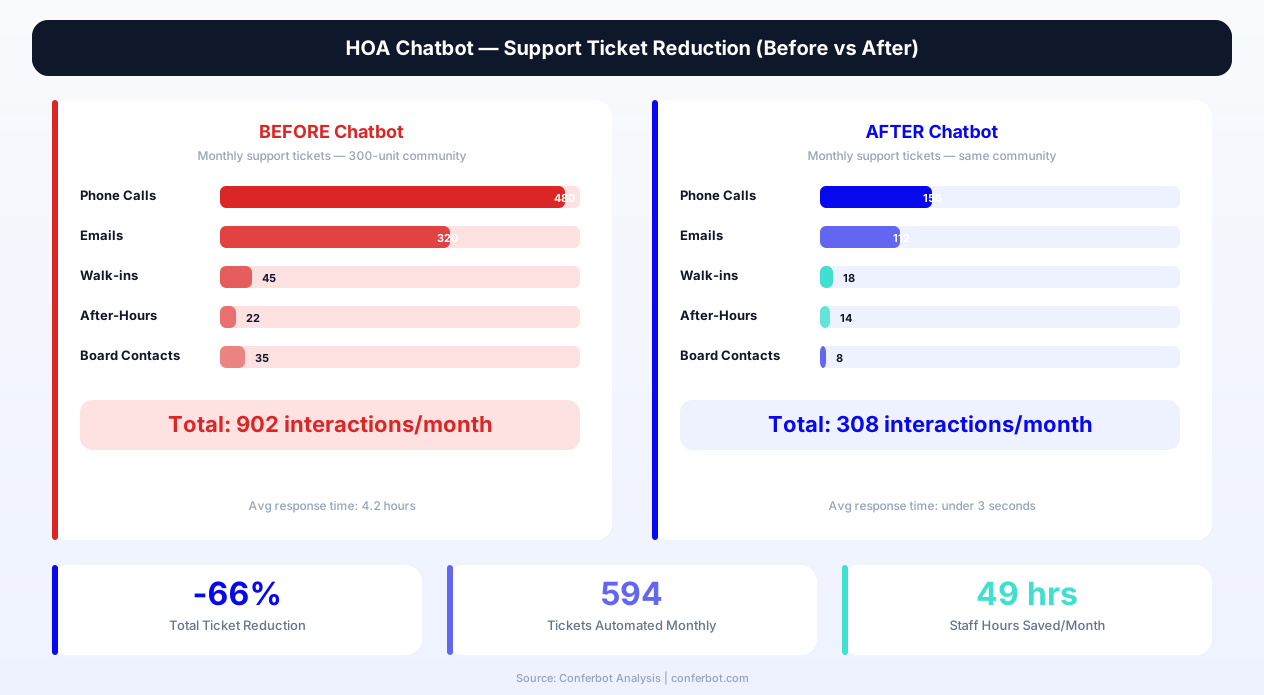
Communication Volume Reduction
| Communication Channel | Before Chatbot (Monthly) | After Chatbot (Monthly) | Reduction |
|---|---|---|---|
| Phone calls to office | 480 calls | 156 calls | -67% |
| Emails to management | 320 emails | 112 emails | -65% |
| Walk-in office visits | 45 visits | 18 visits | -60% |
| After-hours emergency calls | 22 calls | 14 calls (true emergencies only) | -36% |
| Board member direct contacts | 35 contacts | 8 contacts | -77% |
| Total management interactions | 902 interactions | 308 interactions | -66% |
Financial Impact Model: 300-Unit Community
Consider a 300-unit community with monthly assessments of $350 per unit ($105,000 monthly revenue) managed by a community management company charging $18 per unit per month ($5,400 monthly management fee). The management company assigns one community manager to handle this community along with 5 other similar associations. Here is how the chatbot impacts the economics:
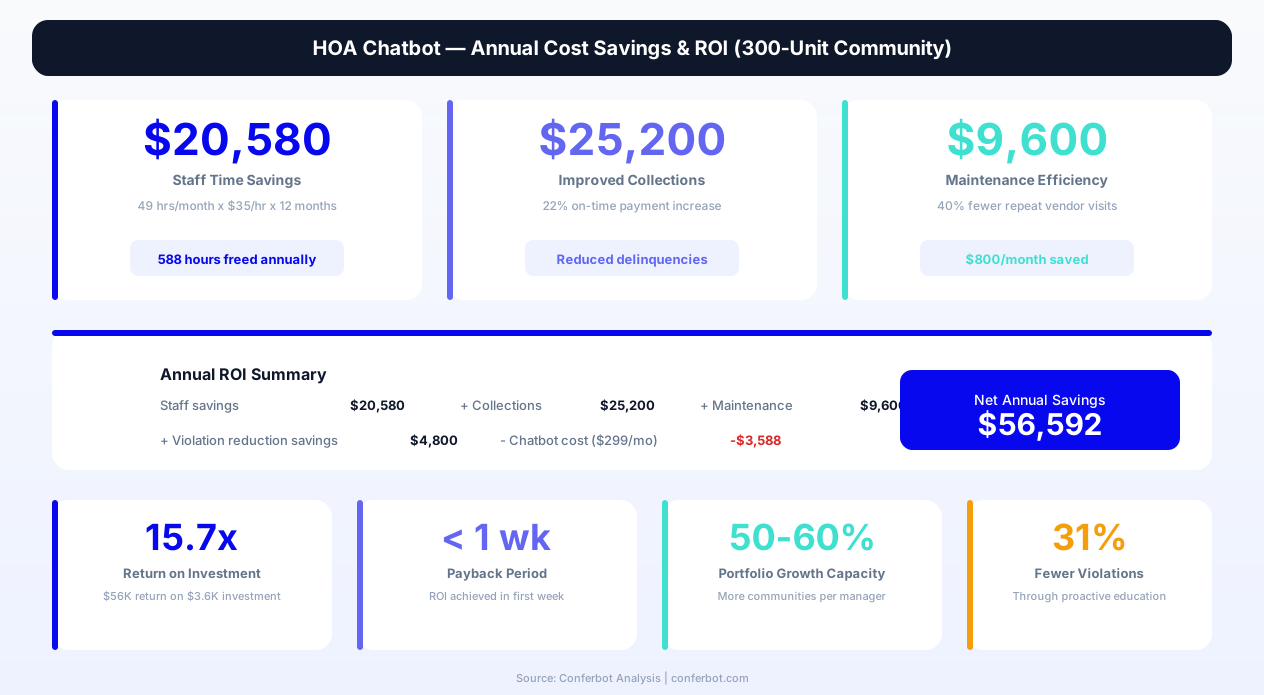
- Staff time savings: Reducing 902 monthly interactions to 308 saves approximately 49 hours per month of community manager time (at an average of 5 minutes per interaction). At a fully loaded labor cost of $35/hour, that represents $1,715 in monthly savings per community — or $10,290 across the six communities a single manager handles.
- On-time payment improvement: The 22% improvement in on-time payment rates reduces late fee disputes and collection costs. For a 300-unit community, moving from 82% to 100% on-time payment would recover approximately $2,100 per month in reduced delinquency processing and improved cash flow timing.
- Violation reduction: The 31% decrease in unintentional CC&R violations eliminates an estimated 8-12 violation processing cycles per month, each of which requires a notice letter, follow-up inspection, and potential hearing — saving approximately 6 hours of management and legal coordinator time per month.
- Maintenance efficiency: Structured maintenance intake with photo documentation reduces average resolution time from 8.2 days to 5.1 days and cuts repeat vendor visits by 40%, saving approximately $800 per month in vendor charges across the community.
Resident Satisfaction Metrics
| Satisfaction Metric | Without Chatbot | With HOA Chatbot | Change |
|---|---|---|---|
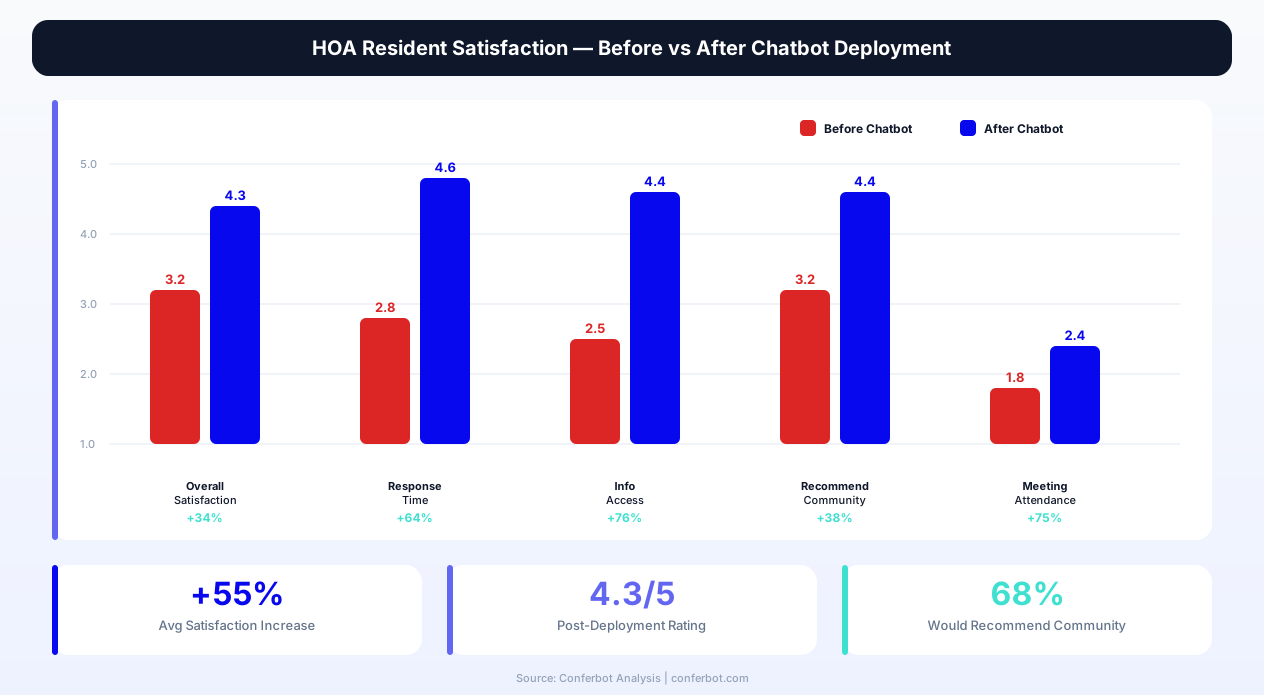
| Overall management satisfaction | 3.2 / 5.0 | 4.3 / 5.0 | +34% |
| Response time satisfaction | 2.8 / 5.0 | 4.6 / 5.0 | +64% |
| Information accessibility rating | 2.5 / 5.0 | 4.4 / 5.0 | +76% |
| Likelihood to recommend community | 42% | 68% | +62% |
| Board meeting attendance (virtual+in-person) | 8% of homeowners | 14% of homeowners | +75% |
| Annual survey participation rate | 18% | 31% | +72% |
Management Company Portfolio Growth
The most significant ROI for community management companies comes from portfolio growth capacity. Without a chatbot, industry benchmarks suggest one community manager can effectively handle 5-8 associations of 200-400 units each. With chatbot automation reducing routine communication volume by 66%, the same manager can handle 8-12 associations — a 50-60% increase in portfolio capacity without additional hiring. For a management company charging an average of $16 per unit per month, adding 3 communities of 250 units each represents $12,000 in additional monthly revenue with negligible incremental cost. The chatbot investment of $199-$399 per month per community pays for itself many times over through this scale leverage alone. Calculate your specific savings using Conferbot's chatbot ROI calculator.
Setup Guide: Deploying Your HOA Chatbot
Deploying an HOA chatbot requires thoughtful configuration because community associations have unique governing structures, specific rules, and established communication patterns that must be accurately reflected in the chatbot's responses. The setup process below ensures your chatbot launches with complete, accurate community information from day one — eliminating the "garbage in, garbage out" problem that plagues poorly configured chatbots and erodes resident trust.
Step 1: Community Profile Configuration
Start by loading the HOA & Community Association Chatbot template from the Conferbot template library. Update the community name, management company branding, and color scheme to match your association's identity. Enter the fundamental community details: number of units, property type (single-family, townhome, condominium, mixed), assessment frequency (monthly, quarterly, annually), and management office contact information. This profile data populates the chatbot's responses with accurate, community-specific information from the first interaction.
Step 2: Governing Document Setup
Upload or enter the key provisions from your CC&Rs, bylaws, and rules and regulations. Focus on the 20-30 most frequently asked topics: parking rules, pet policies, noise restrictions, exterior modification guidelines, rental restrictions, landscaping standards, and holiday decoration policies. For each topic, provide the plain-language answer that residents should receive, along with the governing document section reference. This content forms the chatbot's knowledge base for CC&R questions — the category that generates the second-highest inquiry volume after financial questions.
Step 3: Financial Information Loading
Configure the financial information module with current assessment amounts, due dates, grace periods, late fee schedules, accepted payment methods, and online payment portal links. If your community has active special assessments, enter the details including purpose, total amount, payment schedule, and board meeting date when the special assessment was approved. For communities using HOA management software with API access, configure the direct integration so the chatbot can return real-time account balances rather than generic payment information.
Step 4: Amenity and Maintenance Setup
Enter your community's amenity inventory — pool, clubhouse, fitness center, tennis courts, common room, barbecue area, etc. — with operating hours, reservation policies, deposit requirements, and usage rules. Configure the maintenance request categories to match your community's vendor assignments and escalation procedures. Set up notification routing so that emergency maintenance requests (gate failures, water main breaks, safety hazards) trigger immediate alerts to the appropriate party, while routine requests are batched into daily management reports.
Step 5: Integration and Deployment
Connect the chatbot to your HOA management platform, email notification system, and any calendar tools used for amenity scheduling and board meetings. Deploy the chatbot on your community website using the single-line embed code, and add the chatbot link to all resident communication — assessment notices, newsletter emails, violation letters, and board meeting announcements. Communities that include the chatbot link in every resident touchpoint see 5x higher adoption rates in the first 90 days compared to communities that only add it to their website without promoting it.
Step 6: Board Review and Launch
Before launching to the full community, have the board of directors and the community manager review the chatbot's responses to the 15 most common resident questions. This review catches any inaccuracies or nuances that need adjustment — such as a parking rule that has an exception for temporary guests during holidays, or an amenity booking policy that differs during summer months. After board approval, announce the chatbot launch through the community newsletter, a dedicated email, and physical signage at the management office and amenity areas. Monitor performance through Conferbot's analytics dashboard and review weekly reports for the first month to identify any questions the chatbot cannot answer that should be added to its knowledge base.
Frequently Asked Questions
How does the chatbot handle emergency maintenance requests for HOA common areas?
The chatbot classifies maintenance requests into three urgency levels: emergency, urgent, and routine. When a resident selects "Emergency" for situations like a broken community gate, flooding in common areas, downed trees blocking roads, or non-functioning security systems, the chatbot immediately captures the issue details, location, and resident contact information, then triggers instant SMS and email notifications to the on-call maintenance coordinator, community manager, and relevant vendor. The resident receives confirmation that emergency staff have been alerted, along with any immediate safety instructions. Non-emergency situations like a burned-out streetlight or irrigation system issue are queued for standard response timelines with a reference number for tracking.
Can the chatbot answer questions specific to our community's CC&Rs?
Yes. During setup, you configure the chatbot with your community's specific governing document provisions, approved architectural standards, parking rules, pet policies, and all other CC&R topics that generate resident inquiries. The chatbot responds with your community's actual rules — not generic HOA information — and references the specific governing document section for residents who want to read the source language. When a question falls outside the pre-configured knowledge base or requires interpretation rather than a straightforward answer, the chatbot captures the question and routes it to the community manager or the appropriate committee for a human response.
How does the amenity reservation system prevent double-bookings?
All amenity reservations flow through a centralized booking system that checks availability in real time before confirming any reservation. When a resident requests to book the clubhouse for Saturday evening, the chatbot checks existing bookings, confirms the time slot is available, collects event details and any required deposits, and confirms the reservation with a reference number. If the slot is already booked, the chatbot offers alternative dates and times. This eliminates the double-booking problem that occurs when multiple staff members accept reservations through different channels — phone, email, and walk-in — without checking a single source of truth.
Can the chatbot process actual dues payments?
The chatbot does not process payments directly within the conversation, but it provides a seamless handoff to your community's online payment portal. When a resident asks about making a payment, the chatbot provides their current balance (when integrated with the management system), lists accepted payment methods, and generates a direct link to the online payment portal. This approach maintains PCI compliance while eliminating the friction of finding the payment portal independently. Communities using this approach report a 22% increase in on-time payments because the chatbot removes the inconvenience barrier that causes many homeowners to delay paying their assessments.
How does the chatbot handle the architectural review application process?
The chatbot guides homeowners through the ARC application process step by step. It first determines whether the proposed modification requires ARC approval by checking against the community's pre-configured modification rules. For modifications that do require approval, the chatbot collects the modification type, detailed scope of work, materials and colors, dimensions, timeline, and any supporting documentation. This structured intake produces applications that are 92% review-ready on first submission, compared to 54% for unguided paper submissions. The chatbot also provides the expected review timeline and explains the approval process, including the homeowner's right to appear before the ARC if they choose.
Can the chatbot support multiple communities managed by the same company?
Yes. Community management companies can deploy separate chatbot instances for each managed association — each with its own CC&Rs, assessment amounts, amenity offerings, and community-specific rules — while managing all instances from a single Conferbot dashboard. This multi-community deployment ensures that residents at Maple Ridge get Maple Ridge's parking rules (not Oak Valley's), while the management company maintains centralized visibility into inquiry volume, resolution rates, and satisfaction metrics across their entire portfolio. The dashboard enables portfolio-level reporting that helps management companies identify which communities need additional attention and which are running smoothly.
How does the chatbot handle anonymous violation reports?
The chatbot offers residents the option to submit violation reports anonymously or with their identity attached. For anonymous reports, the chatbot captures the violation type, location, description, and optionally a photo — but does not require the reporting party to identify themselves. The management team receives a complete violation report for investigation and enforcement without the reporter's identity. For residents who choose to identify themselves, their contact information is included in the internal report but can be withheld from the homeowner receiving the violation notice, depending on community policy. This approach encourages violation reporting while protecting neighborly relationships.
What is the typical timeline from setup to launch for an HOA chatbot?
Most communities complete the full setup and launch process within 5-7 business days. The first 2-3 days are spent configuring the community profile, entering CC&R provisions, and setting up financial and amenity information. Days 3-5 involve integration with the management platform, notification routing setup, and internal testing by the community manager and board liaison. Days 5-7 cover the board review, any final adjustments, and the community-wide launch announcement. Communities with straightforward governing documents and no integration requirements can launch in as little as 2-3 days, while large master-planned communities with multiple sub-associations may take 10-14 days to configure all community-specific content.
HOA & Community Association Chatbot FAQ
Everything you need to know about chatbots for hoa & community association chatbot.
Why Use a Template vs Building from Scratch?
Templates encode years of optimization data into the conversation flow before you start.
| Factor | Conferbot Template | Build from Scratch | Hire a Developer |
|---|---|---|---|
| Time to deploy | 10 minutes | 2-8 hours | 2-6 weeks |
| Cost | Free | Your time | $5,000-$25,000 |
| Day-1 conversion | 15-22% | 5-8% | 10-15% |
| Proven flows | Yes, data-tested | No | Depends |
| Updates included | Automatic | Manual | Paid |
| Multi-channel | 8+ channels | 1 channel | Extra cost |
| Analytics | Built-in | Must build | Extra cost |
Ready to Deploy HOA & Community Association Chatbot?
Join 50,000+ businesses. Free forever plan available. No credit card required.