
IT Helpdesk Chatbot
Free Technology Chatbot Template
A comprehensive IT helpdesk chatbot that triages support requests, guides users through common fixes like password resets, and automatically creates tickets for complex issues. Employees can report problems across categories — password, software, hardware, access, and network — get instant self-service resolutions, and track their ticket status. Perfect for IT departments, MSPs, and internal support teams looking to reduce ticket volume and improve first-contact resolution rates.


What Is an IT Helpdesk Chatbot?
An IT helpdesk chatbot is an AI-powered conversational assistant that sits on your internal support portal, intranet, or messaging platform and handles the repetitive IT requests that consume your support team's day — password resets, VPN troubleshooting, software access requests, printer issues, and account lockouts. It is the first line of defense between your employees and your L1 support queue, resolving common issues instantly and routing complex ones to the right specialist with full context attached.
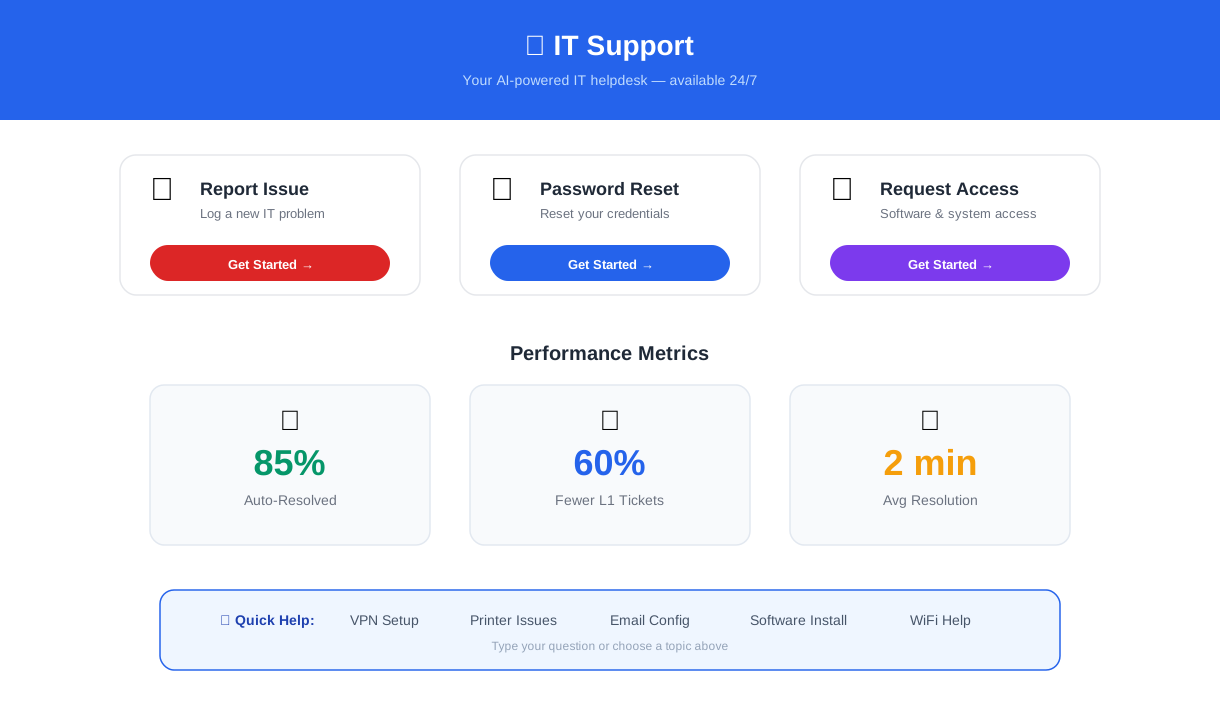
IT support teams are drowning in volume. The average enterprise IT department handles 500+ tickets per month per 1,000 employees, and the majority of those tickets are repetitive, predictable issues that follow the same resolution path every time. Password resets alone account for 20-30% of all helpdesk tickets at most organizations, and each one takes 5-15 minutes of analyst time when handled manually — time that could be spent on infrastructure projects, security initiatives, or complex troubleshooting that actually requires human expertise.
An IT helpdesk chatbot addresses this by automating the resolution of common issues through guided troubleshooting flows, self-service password management, and structured ticket submission. When the chatbot cannot resolve an issue, it collects diagnostic information — device type, operating system, error messages, steps already attempted — and creates a pre-triaged ticket that reaches the right team with everything they need to resolve it on first contact.
Conferbot's IT helpdesk chatbot template is built on a no-code visual builder that lets IT teams deploy in under an hour. It integrates with your existing ticketing system, deploys on your intranet or support portal, and scales from a 50-person startup to a 10,000-employee enterprise. This guide covers everything you need to know about deploying, configuring, and measuring an IT support chatbot in 2026.
Why IT Teams Need a Helpdesk Chatbot in ${year}
The math behind IT helpdesk automation is unambiguous. Every L1 ticket that a chatbot resolves is a ticket that does not consume analyst time, does not sit in a queue, and does not generate employee frustration while waiting for a response. The cumulative impact on IT operations is transformative — teams that deploy helpdesk chatbots report a 60% reduction in L1 ticket volume within the first 90 days.
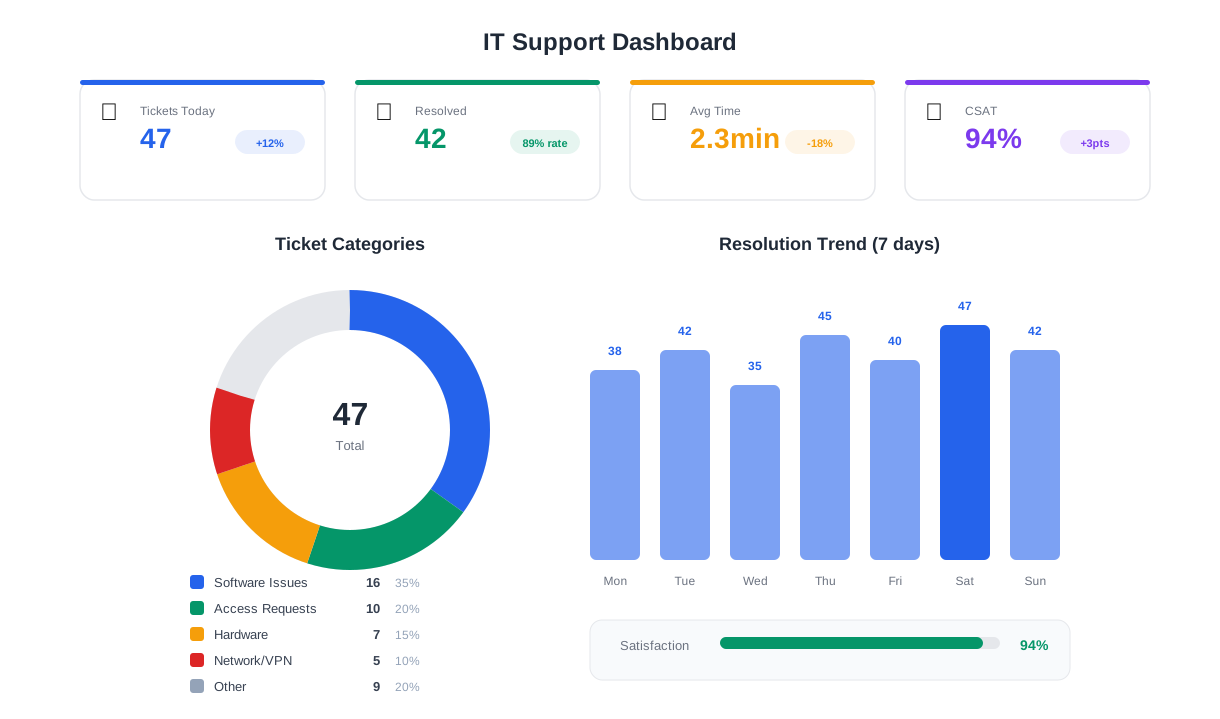
Here is how an IT helpdesk chatbot changes the support equation:
| Metric | Without a Chatbot | With an IT Helpdesk Chatbot |
|---|---|---|
| Password reset time | 5-15 min (call + verify + reset) | Under 2 min (self-service) |
| L1 ticket volume | Baseline (100%) | Reduced by 60% |
| Average resolution time | 4-8 hours | Under 5 min for automated issues |
| After-hours support | None or on-call pager | 24/7 automated resolution |
| Ticket routing accuracy | 60-70% (manual triage) | 95%+ (structured classification) |
| Employee satisfaction (CSAT) | 55-65% | 80-90% |
Beyond the operational metrics, there is a strategic dimension. IT talent is expensive and scarce. Every hour your senior engineers spend resetting passwords or walking someone through VPN configuration is an hour not spent on cloud migration, security hardening, or automation projects that move the business forward. A helpdesk chatbot does not just reduce ticket volume — it frees your most valuable people to do the work that only they can do.
Employee experience matters too. When an employee cannot log in at 7am before a client presentation, waiting four hours for a ticket response is not acceptable. The chatbot resolves that issue in two minutes, the employee is productive, and IT never has to touch the ticket. That is the kind of invisible, seamless support that builds trust in IT as a department.
Organizations with distributed or remote workforces face an even more compelling case. Without a physical IT desk to visit, remote employees rely entirely on digital channels for support. A chatbot provides instant, consistent support regardless of time zone, location, or whether the helpdesk team is in a sprint planning meeting.
Password Reset Automation: Eliminating Your Highest-Volume Ticket
Password resets are the single largest category of IT helpdesk tickets at most organizations, accounting for 20-30% of all support requests. Each manual reset requires identity verification, system access, the reset itself, and confirmation — a process that takes 5-15 minutes of analyst time and often involves multiple back-and-forth messages. Multiply that by 50-100 resets per week in a mid-size company, and you are looking at 10-25 hours of analyst time per week consumed by a task that follows the exact same steps every time.
How Automated Password Reset Works
The chatbot's password reset flow begins with identity verification. The employee provides their employee ID or registered email address, and the chatbot validates it against your directory. It then sends a one-time verification code to the employee's registered phone number or backup email. Once verified, the chatbot either triggers a password reset link via your identity provider's API or walks the employee through the self-service portal step by step.
The entire process takes under two minutes. No ticket is created. No analyst is interrupted. The employee is back to work immediately.
Multi-System Password Management
Enterprise environments typically have multiple systems requiring separate credentials — Active Directory, VPN, SaaS applications, legacy systems. The chatbot's password path begins by asking which system the employee needs help with, then routes to the appropriate reset flow for that system. This system-specific routing eliminates the confusion employees face when they do not know which password is failing or which system to target for a reset.
| System | Reset Method | Average Time |
|---|---|---|
| Active Directory / SSO | Self-service portal link + guided steps | 90 seconds |
| VPN | Certificate refresh instructions | 2 minutes |
| Email (Exchange/Google) | Admin-triggered reset via API | 60 seconds |
| SaaS applications | Redirect to app-specific reset flow | 2 minutes |
| Legacy systems | Escalation to L2 with pre-filled ticket | Auto-routed |
Security Considerations
Password reset automation must be secure. The chatbot never displays existing passwords, never bypasses multi-factor authentication, and always verifies identity before triggering any credential change. Failed verification attempts are logged and flagged for security review. For high-privilege accounts (admin, root, service accounts), the chatbot routes directly to the security team rather than attempting self-service — because the risk profile of those accounts warrants human oversight regardless of automation capability.
Ready to try IT Helpdesk Chatbot?
Deploy this template in under 10 minutes. No coding required.
Use This Template Free →Intelligent Ticket Routing: Right Team, First Time
When an IT issue cannot be resolved by self-service automation, the next most valuable thing a chatbot can do is ensure the ticket reaches the right team with the right information on the first attempt. Misrouted tickets are one of the most expensive inefficiencies in IT support — every misroute adds an average of 4-8 hours to resolution time as the ticket bounces between teams, each one reading, re-triaging, and reassigning.
Structured Issue Classification
The chatbot replaces the free-text "describe your issue" field with a structured classification flow. The employee selects from top-level categories — Hardware, Software, Network/Connectivity, Access/Permissions, Email, and Other — then drills into subcategories. A hardware issue branches into laptop, desktop, monitor, printer, or peripheral. A network issue branches into Wi-Fi, VPN, internet, or internal network. Each path collects the specific diagnostic information that the resolving team needs.

Contextual Data Collection
Different issue types require different diagnostic data. A software crash needs the application name, version, operating system, and error message. A hardware failure needs the device model, asset tag, and physical symptoms. A connectivity issue needs the location, network type, and whether the issue affects one device or multiple. The chatbot collects exactly the right data for each issue type, eliminating the back-and-forth messages that add days to resolution.
Every submitted ticket includes a structured summary: category, subcategory, affected system, diagnostic details, steps already attempted, urgency level, and employee contact information. The receiving team can begin troubleshooting immediately rather than spending the first 15 minutes asking clarifying questions.
Priority-Based Routing Rules
Not all tickets are equal. A CEO who cannot access email before a board meeting has a different urgency than a new hire requesting access to a training portal. The chatbot assesses urgency through two factors: the issue category (some categories are inherently higher priority) and the employee's self-reported impact level (blocking work completely, degrading productivity, or minor inconvenience). High-priority tickets are flagged, routed to on-call staff, and trigger immediate notifications. Standard tickets enter the normal queue with full context attached.
Connect the chatbot to your ticketing system — ServiceNow, Jira Service Management, Zendesk, or Freshdesk — via Conferbot's API integration to automatically create tickets with all collected data, assign them to the correct team, and set the appropriate priority level. This eliminates manual ticket creation entirely and ensures consistent classification across all incoming requests.
Self-Service Knowledge Base: Empowering Employees to Fix It Themselves
The fastest ticket resolution is the one that never becomes a ticket. A significant portion of IT issues — connecting to Wi-Fi, configuring email on a mobile device, installing approved software, setting up a VPN — have well-documented solutions that employees could follow themselves if they knew where to find them. The problem is not that documentation does not exist; it is that employees do not search for it, cannot find it, or do not trust it. A chatbot solves all three problems by delivering the right knowledge article at the right moment in a conversational format that feels like getting help rather than reading a manual.
Conversational Knowledge Delivery
Instead of linking employees to a 20-page IT wiki and hoping they find the right section, the chatbot delivers step-by-step instructions inline in the conversation. When an employee says they cannot connect to Wi-Fi, the chatbot asks which operating system they are using, then delivers the exact steps for that OS — not a generic article that covers Windows, Mac, Linux, iOS, and Android in a single document. This targeted delivery increases self-service success rates from the typical 15-20% for traditional knowledge bases to 60-70% for chatbot-delivered guidance.
Common Self-Service Flows
| Issue | Self-Service Resolution | Success Rate |
|---|---|---|
| Wi-Fi connectivity | OS-specific reconnection steps, forget/rejoin network | 72% |
| VPN setup | Download link, configuration steps, certificate install | 65% |
| Email on mobile | Platform-specific IMAP/Exchange configuration | 78% |
| Software installation | Link to self-service portal, approval workflow | 85% |
| Printer setup | Driver download, network printer discovery steps | 58% |
| Multi-factor authentication | Authenticator app setup, backup code retrieval | 70% |
Feedback Loop and Knowledge Gaps
After delivering a self-service solution, the chatbot asks a simple question: "Did this resolve your issue?" If the employee answers yes, the interaction is complete — no ticket, no analyst time, no queue wait. If the answer is no, the chatbot immediately transitions to the ticket creation flow with all context preserved, including the steps already attempted. This "try self-service first, escalate seamlessly" pattern is the most effective model for IT support automation because it reduces ticket volume without creating frustration when self-service does not work.
The "no" responses also serve as a feedback mechanism. When a particular knowledge article consistently fails to resolve issues, IT teams know that article needs updating, the underlying system has a new failure mode, or the self-service flow needs a different approach. This continuous improvement loop makes the chatbot more effective over time — an advantage that static knowledge bases do not have.
50,000+ businesses use Conferbot templates to automate conversations
Escalation Logic: Seamless Handoff When Automation Reaches Its Limit
No chatbot can resolve every IT issue. Hardware failures require physical intervention. Complex network outages require senior engineering. Security incidents require the security operations team. The measure of a great IT helpdesk chatbot is not just how many tickets it resolves autonomously — it is how gracefully it handles the ones it cannot. A poorly designed escalation creates more frustration than no chatbot at all. A well-designed one makes the human resolution faster and smoother.
Escalation Triggers
The chatbot escalates to a human agent under four conditions: the employee explicitly requests human help, the self-service flow did not resolve the issue, the issue category is flagged for mandatory human review (security incidents, data loss, executive requests), or the chatbot detects frustration signals in the conversation (repeated attempts, negative sentiment, urgent language). Each trigger routes to the appropriate team with a different priority level.
Context Preservation
The most critical element of a good escalation is context preservation. When a ticket is created from a chatbot conversation, it includes the complete interaction transcript, all diagnostic data collected, the self-service steps attempted and their outcomes, the employee's stated urgency, and device and system information. The receiving analyst sees the full picture without asking the employee to repeat anything. This context-rich handoff reduces average escalated ticket resolution time by 35-45% compared to tickets submitted through traditional forms.
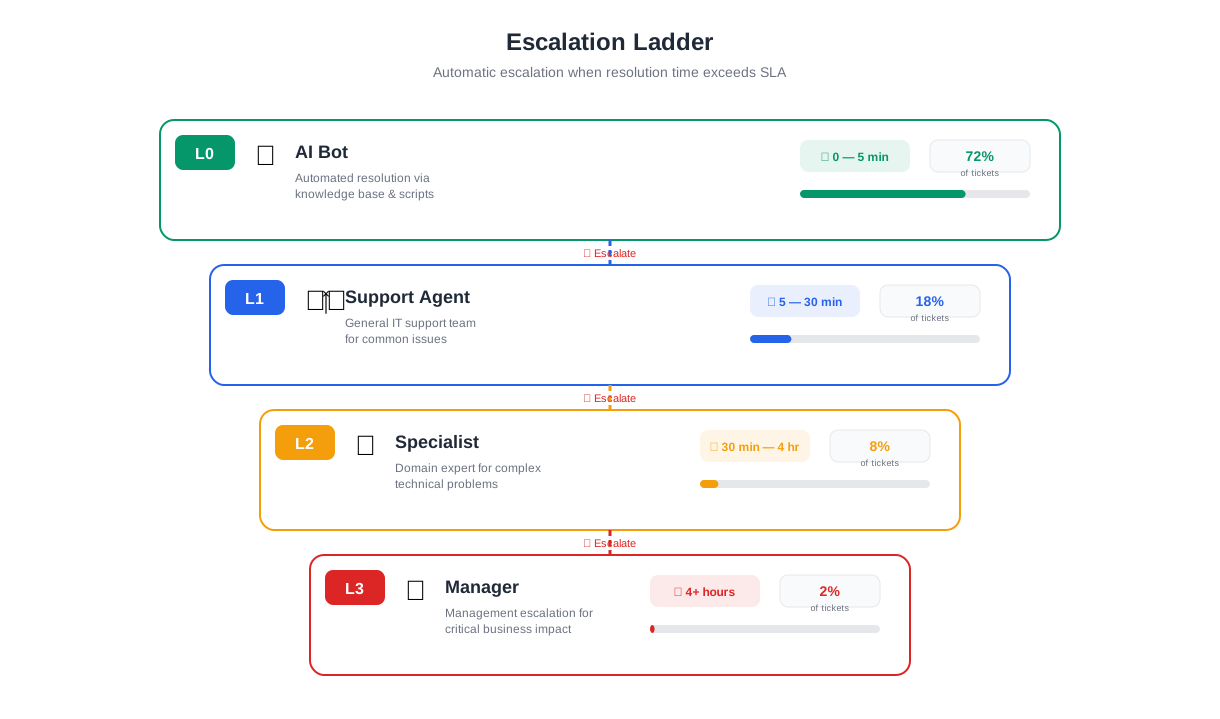
Tiered Escalation Paths
| Escalation Level | Trigger | Routing Target | SLA |
|---|---|---|---|
| L1 — Standard | Self-service unsuccessful | General IT support queue | 4 hours |
| L2 — Specialist | Category-specific (network, security, etc.) | Specialist team | 2 hours |
| L3 — Urgent | Work-blocking issue, executive request | On-call engineer + manager alert | 30 minutes |
| Security | Suspected breach, phishing, data loss | Security operations team | Immediate |
Live Agent Handoff
For urgent issues that require real-time assistance, the chatbot connects to Conferbot's live chat module, enabling a seamless handoff from automated conversation to a human IT analyst. The analyst receives the full conversation context, sees what troubleshooting steps have already been attempted, and can continue the conversation in the same chat window the employee has been using. This eliminates the disjointed experience of submitting a ticket and waiting for a separate email response — the employee stays in one conversation from start to finish, whether the resolution comes from the chatbot or a human.
Implementation and ROI
Deploying Conferbot's IT helpdesk chatbot template takes under an hour with the no-code builder. Customize the knowledge base articles for your environment, configure your escalation routing rules, connect to your ticketing system via API, and embed on your intranet or IT portal. Most organizations see a 85% automation rate for common issues within the first month, with continuous improvement as the knowledge base is refined based on conversation data.
The ROI calculation is straightforward. If your L1 analysts handle 400 tickets per month at an average cost of $15-25 per ticket (including salary, tools, and overhead), and the chatbot deflects 60% of those tickets, you save $3,600-6,000 per month in direct support costs. Add the productivity gains from faster employee resolution times, reduced downtime, and the ability to reallocate L1 analysts to higher-value projects, and the total value often exceeds $100,000 annually for a mid-size organization. Explore all chatbot templates or see how the NLP engine handles more complex IT troubleshooting with natural language understanding.
IT Helpdesk Chatbot FAQ
Everything you need to know about chatbots for it helpdesk chatbot.
Why Use a Template vs Building from Scratch?
Templates encode years of optimization data into the conversation flow before you start.
| Factor | Conferbot Template | Build from Scratch | Hire a Developer |
|---|---|---|---|
| Time to deploy | 10 minutes | 2-8 hours | 2-6 weeks |
| Cost | Free | Your time | $5,000-$25,000 |
| Day-1 conversion | 15-22% | 5-8% | 10-15% |
| Proven flows | Yes, data-tested | No | Depends |
| Updates included | Automatic | Manual | Paid |
| Multi-channel | 8+ channels | 1 channel | Extra cost |
| Analytics | Built-in | Must build | Extra cost |
Ready to Deploy IT Helpdesk Chatbot?
Join 50,000+ businesses. Free forever plan available. No credit card required.