Why Discord Bots Are Essential for Community Management
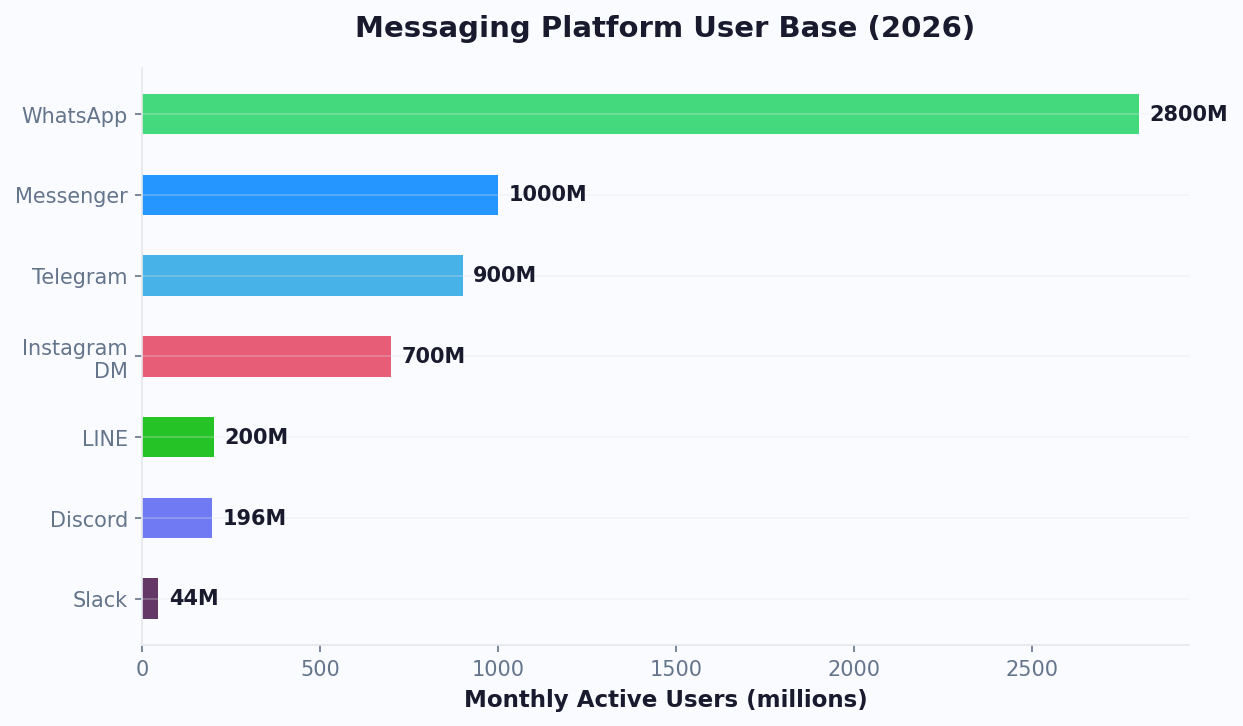
Discord has evolved from a gaming voice chat platform into the world's leading community hub. According to Statista's platform data, Discord now has over 200 million monthly active users and 19 million active servers, it's where brands, creators, DAOs, SaaS companies, and educators build and nurture their communities. But managing a growing Discord community manually is unsustainable.
Consider the challenges of manual community management:
- 24/7 moderation: Spam, toxic behavior, and off-topic content can appear at any hour
- Repetitive questions: New members ask the same onboarding questions dozens of times daily
- Engagement decline: Without ongoing activity and value, communities stagnate and members leave
- Scaling pain: What works for a 100-member server breaks down at 1,000 or 10,000 members
- Data blind spots: Without analytics, you can't measure community health or identify at-risk members
A Discord bot solves these challenges by automating the operational side of community management. Bots handle moderation, answer questions, welcome new members, track engagement, and run events — all without human intervention.
The numbers make the case clear:
| Community Metric | Without Bot | With Bot |
|---|---|---|
| Avg moderation response time | 15-60 minutes | Under 1 second |
| New member retention (30-day) | 25-35% | 50-65% |
| Daily active user ratio | 5-10% | 15-25% |
| Support query resolution | 2-8 hours | Instant |
| Moderator burnout rate | High | Significantly reduced |
As Gartner's community management research notes, automated community tools reduce operational costs by 40-60% while improving member satisfaction. In 2026, the most successful Discord communities aren't the ones with the most members — they're the ones with the best bot infrastructure that enables consistent, scalable, and engaging member experiences.
Automated Moderation: Keeping Your Community Safe
Moderation is the foundation of a healthy Discord community. Without it, spam, harassment, and toxic behavior drive away valuable members. Automated moderation handles the bulk of this work so your human moderators can focus on nuanced situations.
Content Filtering
Configure automated content filtering with multiple layers:
- Keyword Filters: Block or flag messages containing prohibited words, slurs, or spam patterns
- Link Filtering: Auto-delete messages with suspicious URLs, phishing links, or unauthorized promotional links
- Spam Detection: Detect and act on repeated messages, message floods, and @everyone/@here abuse
- Image Moderation: Use AI-powered image analysis to detect and remove inappropriate visual content via API integration
- Invite Link Blocking: Prevent unauthorized Discord invite links from being posted
Automated Actions
| Violation | First Offense | Second Offense | Third Offense |
|---|---|---|---|
| Mild spam | Delete + warning DM | 1-hour mute | 24-hour mute |
| Offensive language | Delete + warning | 24-hour mute | 7-day ban |
| Phishing links | Delete + immediate ban | N/A | N/A |
| Raid/mass spam | Auto-lockdown mode | N/A | N/A |
| Unsolicited DM spam | Ban + report to Discord | N/A | N/A |
Anti-Raid Protection
Raids (coordinated attacks where many accounts join and spam simultaneously) can destroy a community in minutes. Automated protection includes:
- Join Rate Detection: Trigger lockdown when join rate exceeds a threshold (e.g., 10+ joins per minute)
- Account Age Filtering: Require accounts to be at least 7 days old to send messages
- Verification Gates: Require new members to complete a captcha or reaction-based verification before accessing channels
- Auto-Ban Patterns: Detect and ban accounts with known raid bot naming patterns
Moderation Logging
Every automated action should be logged in a private moderator channel:
- What action was taken (delete, mute, ban)
- Who was affected (user ID, username)
- What triggered the action (the message content, rule violated)
- Timestamp and channel where the violation occurred
This audit trail is essential for reviewing automated decisions, handling appeals, and fine-tuning your moderation rules. Use Conferbot's analytics to track moderation trends over time and identify patterns that need new rules.
Driving Member Engagement With Discord Bots
A community that isn't engaged is a community that's dying. Discord bots can create the structure, incentives, and interactive experiences that keep members coming back daily.
Welcome and Onboarding
First impressions determine whether a new member stays or leaves:
- Welcome Message: Send a personalized DM when a new member joins, explaining the server's purpose, key channels, and rules
- Role Assignment: Using team management tools, let new members self-assign interest-based roles via reaction roles (e.g., tap the game controller emoji for the #gaming channel)
- Introduction Prompt: Invite new members to introduce themselves in #introductions with a structured template
- Guided Tour: Bot walks the member through key channels and features via an interactive DM flow
XP and Leveling Systems
Gamification drives consistent engagement. Implement an XP system that rewards participation:
| Activity | XP Reward | Purpose |
|---|---|---|
| Sending a message | 10-25 XP | Encourage daily activity |
| Reacting to messages | 5 XP | Encourage engagement with others |
| Voice chat (per minute) | 5 XP | Drive voice channel usage |
| Helping another member | 50 XP (mod-awarded) | Foster a helpful culture |
| Winning a contest | 500 XP | Incentivize event participation |
| Streak bonus (7 days) | 100 XP | Encourage daily return |
Link XP levels to exclusive roles and perks: access to VIP channels, custom colors, early access to announcements, or real-world rewards like discount codes.
Interactive Events
Schedule automated events to create regular engagement touchpoints:
- Trivia Nights: Bot runs timed quiz sessions with leaderboards
- AMA (Ask Me Anything): Bot collects and queues questions, manages the Q&A flow
- Polls and Surveys: Regular community polls to gather feedback and spark discussion
- Challenges: Weekly challenges with submissions and community voting
Content Curation
Keep the community fresh with automated content:
- Daily Digest: Bot posts a summary of the day's highlights in #daily-recap
- RSS/News Feed: Automatically share industry news from curated sources
- Milestone Celebrations: Announce member milestones (100 messages, 1-year anniversary, level-ups)
- Scheduled Reminders: Weekly event reminders, discussion topic prompts
The key to engagement is consistency. A bot that creates reliable, daily touchpoints establishes habits that turn casual visitors into committed community members. With a no-code chatbot builder, you can set up these engagement systems without writing any code. Use NLP-powered responses to make bot interactions feel natural and conversational rather than robotic.
Community Support and FAQ Automation
In product and brand communities, members frequently need support. A Discord support bot provides instant answers while keeping your support costs near zero.
FAQ Knowledge Base
Build a searchable FAQ system that members can query naturally:
- Members type questions in a dedicated #support channel
- The bot's NLP engine, backed by a comprehensive knowledge base, matches the question to the most relevant FAQ
- If the match confidence is high, the bot responds with the answer
- If confidence is low, the bot presents the 3 closest matches for the user to choose from
- If nothing matches, the bot creates a support thread and notifies a moderator
Ticket System
For issues that require human follow-up, implement an in-Discord ticket system:
- Member reacts to a message or types a command to create a ticket
- Bot creates a private thread or channel visible only to the member and support staff
- Bot collects structured information: issue category, description, account details
- Support staff respond in the thread at their convenience
- When resolved, the bot archives the ticket and sends a satisfaction survey
Common Support Scenarios
| Scenario | Bot Handling | Human Needed? |
|---|---|---|
| Product feature questions | FAQ response with documentation link | Rarely |
| Bug reports | Collect details + screenshots, create ticket | Yes |
| Account issues | Verify identity, basic troubleshooting | Sometimes |
| Billing questions | Policy FAQ, then escalate if needed | Sometimes |
| Feature requests | Log request, show existing roadmap | No |
| Onboarding help | Step-by-step guided flow | Rarely |
Self-Service Resources
Empower members to find answers independently:
- Pinned Resource Messages: Bot maintains auto-updated pinned messages with links to docs, guides, and tutorials in each channel
- Search Command:
!search [topic]returns relevant documentation and past answers - Tutorial Flows: Interactive walkthroughs for common setup procedures
- Status Page: Real-time service status pulled from your status page API
A well-designed support bot resolves 70-85% of support queries without any human involvement. For the remaining queries, it creates structured tickets with all necessary context, reducing the average resolution time for human agents by 40%. When complex issues arise, seamless handoff to live chat ensures members always get the help they need. This combination of automation and smart escalation makes Discord a viable primary support channel for product communities.
Building Your Discord Community Bot With Conferbot
Setting up a Discord community bot with Conferbot combines Discord's powerful bot infrastructure with Conferbot's AI chatbot builder. Here's the step-by-step process.
Step 1: Create a Discord Application
- Go to the Discord Developer Portal
- Click "New Application" and name it (e.g., "Community Bot")
- Navigate to the Bot section and click "Add Bot"
- Copy the bot Token (keep this secure)
- Enable Privileged Gateway Intents: Message Content, Server Members, Presence
Step 2: Invite the Bot to Your Server
- In the Developer Portal, go to OAuth2 > URL Generator
- Select scopes:
bot,applications.commands - Select permissions: Send Messages, Manage Messages, Manage Roles, Read Message History, Use Slash Commands
- Copy the generated URL and open it in your browser to add the bot to your server
Step 3: Connect to Conferbot
- Log into your Conferbot dashboard
- Navigate to Channels > Discord
- Paste your bot token
- Select the server and configure which channels the bot should operate in
Step 4: Configure Bot Features
Set up the core functionality modules:
- Moderation Module: Word filters, spam detection, anti-raid, auto-moderation rules
- Welcome Module: Join messages, role assignment, onboarding DM flow
- Support Module: FAQ bot, ticket system, knowledge base search
- Engagement Module: XP system, leveling, leaderboards, event scheduling
- Analytics Module: Member activity tracking, growth metrics, engagement scores
Step 5: Set Up Slash Commands
Register custom slash commands for quick access to bot features:
/help— Display available commands and bot capabilities/faq [topic]— Search the FAQ knowledge base/ticket— Create a support ticket/rank— Check your XP level and leaderboard position/suggest [idea]— Submit a feature suggestion
Step 6: Test and Launch
Test all bot features in a private testing channel. Verify that moderation rules trigger correctly (test with a secondary account), welcome flows deliver the right messages, and slash commands respond as expected. Once testing is complete, configure the bot for production channels and announce it to your community with a guide on available features. You can also start from one of our pre-built chatbot templates to speed up your launch.
Community Analytics: Measuring Health and Growth
You can't improve what you don't measure. Community analytics give you visibility into what's working, what's declining, and where to invest your attention.
Key Community Health Metrics
| Metric | What It Tells You | Healthy Range |
|---|---|---|
| DAU/MAU Ratio | Stickiness — how often members return | 15-25% |
| Messages per Active User | Depth of engagement | 5-15 per day |
| New Member Retention (7-day) | Onboarding effectiveness | 40-60% |
| New Member Retention (30-day) | Sustained value delivery | 25-45% |
| Churn Rate (monthly) | Members leaving the server | Under 5% |
| Voice Channel Usage | Real-time community engagement | 5-10% of DAU |
| Support Resolution Rate | Bot and team effectiveness | 80%+ (bot + human) |
Growth Analytics
Track where your community growth comes from:
- Join Source: Track which invite links bring the most (and most engaged) members
- Growth Rate: Net new members per week/month (joins minus leaves)
- Conversion Funnel: Invite link click → join → verify → first message → regular active member
- Referral Tracking: Which existing members bring in the most new members
Engagement Heatmaps
Understand when and where your community is most active:
- Time-of-Day Activity: Which hours see peak message volume? Schedule events and announcements accordingly.
- Channel Activity: Which channels are thriving? Which are dead? Consider retiring inactive channels and promoting active ones.
- Content Performance: Which types of posts generate the most reactions, replies, and thread activity?
Member Segmentation
Segment your community to understand different member personas:
- Power Users (top 5%): Your most active contributors. Recognize and reward them.
- Regular Members (next 20%): Consistent participants. Keep them engaged with events and recognition.
- Lurkers (50-60%): They read but don't post. Lower the barrier to first participation.
- At-Risk (15-20%): Declining activity. Re-engage with targeted outreach or win-back campaigns.
Automated Reporting
Set up automated reports that deliver insights on a schedule:
- Daily: New members, message volume, moderation actions
- Weekly: Growth rate, engagement trends, top contributors, unresolved support tickets
- Monthly: Retention cohort analysis, channel health scores, ROI metrics
Use Conferbot's analytics dashboard to visualize these metrics in real time. Data-driven community management consistently outperforms intuition-based approaches, helping you allocate resources where they have the greatest impact on community health and growth. HubSpot's State of Marketing report confirms that community-driven brands see 2-3x higher customer lifetime value compared to transactional-only relationships. For brands managing communities across multiple platforms, omnichannel deployment lets you unify analytics from Discord, your website, and messaging apps in one dashboard.
Discord Server Growth: Chatbot Automation for Community Scaling
Growing a Discord community from 100 to 10,000 members is not just about marketing — it is about building infrastructure that scales without proportionally increasing your moderation and support staff. Chatbot automation is the backbone of scalable community growth, handling the operational load that would otherwise require 5-10 additional moderators.
The Growth Bottleneck Problem
Most Discord communities hit a growth ceiling between 500 and 2,000 members. The pattern is predictable: more members generate more noise, noise drives away quality members, moderators burn out trying to keep order, and growth stalls or reverses. The communities that break through this ceiling share one trait: automation handles operations so humans can focus on culture.
Automated Growth Levers
| Growth Lever | Manual Approach | Bot-Automated Approach | Scaling Impact |
|---|---|---|---|
| New member onboarding | Moderator manually greets, assigns roles | Bot sends welcome DM, guided role selection, rules quiz | Handles 100+ joins/day without mod intervention |
| Content moderation | Mods scan channels, delete violations | Auto-filter spam, phishing, toxicity in real time | Response time drops from 15 min to under 1 second |
| FAQ and support | Mods answer same questions daily | NLP bot resolves 70-85% of queries instantly | Frees 10+ hours/week of moderator time |
| Event scheduling | Manual announcements, no reminders | Bot posts events, sends reminders, tracks RSVPs | Event attendance increases 40-60% |
| Member retention | No systematic re-engagement | Bot detects inactive members, sends re-engagement DMs | Reduces monthly churn by 20-30% |
| Referral tracking | No tracking | Bot generates unique invite links, tracks conversions | Identifies and rewards your best growth channels |
Invite Link Analytics and Attribution
Every growth strategy starts with knowing what works. Configure your bot to generate unique invite links for each acquisition channel: Twitter posts, YouTube descriptions, blog embeds, partner cross-promotions, and paid ads. The bot tracks: clicks per link, joins per link, 7-day retention per source, and messages per new member per source. This data reveals which channels bring engaged members (not just warm bodies) so you can double down on quality sources.
Automated Re-Engagement Campaigns
Members who go silent for 14+ days are at high risk of permanently leaving. A bot-driven re-engagement flow can recover 15-25% of these at-risk members:
- Day 14 silent: Bot sends a DM: "Hey [Name], we've missed you in [Server]! Here's what you missed this week: [top 3 highlights]."
- Day 21 silent: "We'd love your input — there's a poll running in #community about [topic]. Your voice matters."
- Day 30 silent: Final touchpoint with an exclusive offer or early access incentive.
Track re-engagement success rates to refine the messaging cadence and content that resonates with your community's specific culture.
Scaling Server Architecture
As your community grows, your bot should help restructure the server dynamically:
- Auto-archive inactive channels: Channels with zero messages in 30 days get auto-archived to reduce clutter.
- Dynamic channel creation: When a topic generates heavy discussion in a general channel, the bot can suggest and create a dedicated channel, moving the conversation organically.
- Role-gated access: Use the bot's leveling system to unlock channels progressively. New members see a clean, simple server. Veterans access advanced discussions, beta features, and insider channels.
Communities using this automated growth infrastructure consistently report 3-5x faster member growth with lower moderator burnout compared to manually managed servers. Combine Discord automation with cross-platform presence on Telegram, Slack, WhatsApp, or a website chatbot to reach audiences where they already spend time. For a full comparison of chatbot capabilities, see our no-code chatbot builders guide.
Best Practices for Discord Community Bots
Building an effective Discord community bot requires balancing automation with authenticity. Here are the best practices drawn from successful communities with thousands of active members.
1. Don't Over-Automate
The biggest mistake is automating too much and killing the human feel of your community:
- Automate operations (moderation, FAQ, onboarding) but not social interactions
- Don't have the bot post generic "engagement" messages that feel hollow
- Let organic conversations flow — the bot should support, not dominate
- Keep automated messages concise; long bot messages get ignored
2. Customize for Your Community Culture
Every Discord community has its own culture. Your bot should reflect it:
- Match the bot's tone to your community (casual gaming server vs. professional SaaS community)
- Use inside jokes and community-specific terminology where appropriate
- Let community members suggest and vote on bot features
- Name your bot something memorable that fits your brand
3. Progressive Moderation
Heavy-handed moderation drives members away. Use a progressive approach:
- Start with the lightest action possible (warning before mute, mute before ban)
- Give members a chance to correct behavior before escalating
- Keep detailed logs so moderators can make informed decisions on edge cases
- Create a clear appeals process for members who believe they were moderated unfairly
4. Optimize Onboarding Continuously
Your onboarding flow is the most impactful part of your bot. Optimize it relentlessly:
- Track 7-day and 30-day retention for new members and correlate with onboarding completion
- A/B test different welcome messages, role menus, and introduction prompts
- Survey members who leave within the first week to understand why
- Simplify — reduce the steps between joining and participating in the community
5. Respect Discord's Guidelines
Follow Discord's developer and community guidelines:
- Don't collect or store data unnecessarily
- Be transparent about what data the bot collects and why
- Don't use the bot for unauthorized mass messaging or scraping
- Keep the bot's functionality within the scopes requested during OAuth
6. Build for Scale
Design your bot infrastructure to handle growth:
- Test performance at 2-5x your current member count
- Use efficient database queries for XP, leaderboards, and analytics
- Implement rate limiting to prevent bot abuse
- Plan channel structure and permissions that scale (categories, role hierarchies)
7. Gather and Act on Feedback
Your community members are your best source of improvement ideas:
- Add a
/feedbackcommand that sends suggestions to a private moderator channel - Run monthly feedback polls on bot features and community experience
- Acknowledge and implement popular suggestions to build trust and ownership
- Publish a changelog when you add new bot features so members see their feedback in action
The best Discord bots feel like a natural part of the community — helpful when needed, invisible when not. By following these practices and using Conferbot's Discord integration, you can build a community management system that scales smoothly from 100 members to 100,000. For more on the channel integration side, see our Telegram bot guide and Slack chatbot for IT support. And for building the conversation flows your bot uses, check our copy-paste chatbot flow templates.
Monetizing Your Discord Community With Bot Automation
A thriving Discord community is not just a support tool or brand-building exercise — it can become a revenue center. Bot automation enables monetization strategies that scale without proportional increases in staff time. Here are the proven approaches communities use to generate revenue through their Discord bots.
Premium Membership Tiers
The most common Discord monetization model uses bot-managed membership tiers:
| Tier | Price | Bot-Managed Perks | Revenue Potential (1,000 members) |
|---|---|---|---|
| Free | $0 | Access to public channels, basic FAQ bot | $0 (community building) |
| Supporter | $5/month | Custom role, priority support queue, exclusive channel access | $500-1,500/month (10-30% conversion) |
| Pro | $20/month | 1-on-1 bot consultations, advanced tools, early access, direct DM support | $400-1,000/month (2-5% conversion) |
| VIP | $50-100/month | Private channel with founder, exclusive events, white-label tools | $250-500/month (0.5-1% conversion) |
The bot manages the entire subscription lifecycle: payment verification (via Stripe webhook), role assignment on successful payment, role removal on cancellation or failed payment, and renewal reminders before expiration. This eliminates manual subscription management entirely.
Course and Content Sales
Education-focused communities monetize through gated content delivered via bot:
- Drip content delivery: Bot releases course modules on a schedule (Module 1 on Day 1, Module 2 on Day 7, etc.) to paid members only
- Quiz and certification: Bot administers course quizzes, tracks completion, and awards certification roles upon passing
- Workshop registration: Bot handles sign-ups for paid workshops, collects payment, and manages waitlists
- Resource library access: Premium members get bot-managed access to a downloads channel with templates, tools, and guides
Affiliate and Referral Revenue
Bot-tracked referral systems turn engaged community members into revenue generators:
- Each member gets a unique referral link generated by the bot
- Bot tracks conversions from each link and credits the referrer
- Referrers earn rewards: XP, premium access days, or cash payouts
- Leaderboard of top referrers drives competitive motivation
Sponsored Events and Partnerships
Communities with engaged audiences attract sponsors. The bot facilitates this:
- Sponsored AMAs: Bot manages Q&A sessions where a sponsor's representative answers community questions. Sponsor pays for access to your engaged audience.
- Product giveaways: Bot runs randomized giveaways sponsored by partner brands. Members engage, sponsor gets visibility.
- Sponsored channels: Partner brands get a dedicated channel where the bot facilitates discussions about their products. Revenue: $500-5,000/month depending on community size and engagement.
Revenue Per Member Benchmarks
Based on successful Discord communities, here are revenue benchmarks by community type:
- SaaS/Tech communities: $0.50-2.00 per member per month (premium support, beta access, education)
- Creator communities: $1.00-5.00 per member per month (courses, exclusive content, 1-on-1 access)
- Gaming communities: $0.20-1.00 per member per month (cosmetic roles, event access, marketplace cuts)
- Trading/Finance communities: $5.00-50.00 per member per month (signals, analysis, tools access)
The key insight: monetization works when the community delivers genuine value first. Members pay for premium access because the free tier already proved the community's worth. The bot automates both the value delivery and the payment infrastructure, making monetization scalable without adding staff.
Measuring Monetization Success
Track these metrics to evaluate your Discord monetization strategy:
- Free-to-paid conversion rate: Target 5-15% of active free members converting to any paid tier. Below 3% signals your premium offering lacks perceived value.
- Monthly recurring revenue (MRR) per member: Calculate total subscription revenue divided by total active members. Healthy communities achieve $0.50-5.00 per member per month depending on niche.
- Churn rate for paid members: Monthly churn above 10% means your premium content is not retaining subscribers. Add exclusive value or improve engagement tactics.
- Lifetime value (LTV): Average subscription length multiplied by monthly price. For community subscriptions, healthy LTV is 6-12 months of membership fees.
- Revenue per event: For sponsored events, track attendees and sponsor satisfaction to justify pricing for future partnerships.
For communities also looking to expand their reach, combining Discord with a website chatbot and omnichannel presence creates multiple touchpoints for member acquisition and conversion.
Was this article helpful?
Discord Bots for Community Management FAQ
Everything you need to know about chatbots for discord bots for community management.
About the Author

Conferbot Team specializes in conversational AI, chatbot strategy, and customer engagement automation. With deep expertise in building AI-powered chatbots, they help businesses deliver exceptional customer experiences across every channel.
View all articles